This is the multi-page printable view of this section. .
ToplingDB
Historical integration. The 2025 articles below describe an earlier interface and are retained for reference. For the proposed replacement, see the ToplingDB development guide. That guide describes unreleased changes; do not mix its settings with these historical examples.
1 - ToplingDB Quick Start
Historical integration. This 2025 article describes an earlier interface and is retained for reference. For the proposed replacement, see the ToplingDB development guide. That guide describes unreleased changes; do not mix its settings with these historical examples.
ToplingDB is a configurable and observable extension of RocksDB. It supports dynamic tuning via YAML files and enables real-time monitoring through a built-in Web Server.
Update hugegraph.properties
Initialize the database (required on the first startup, or a new configuration was manually added under ‘conf/graphs/’)
Start server
Verify ToplingDB Is Working Properly
Prerequisite: Ensure Core Parameters Are Correctly Configured
Check that hugegraph.properties includes:
Method 1: Access the Web Monitoring Interface
Visualize the Web monitoring page. Example screenshot:
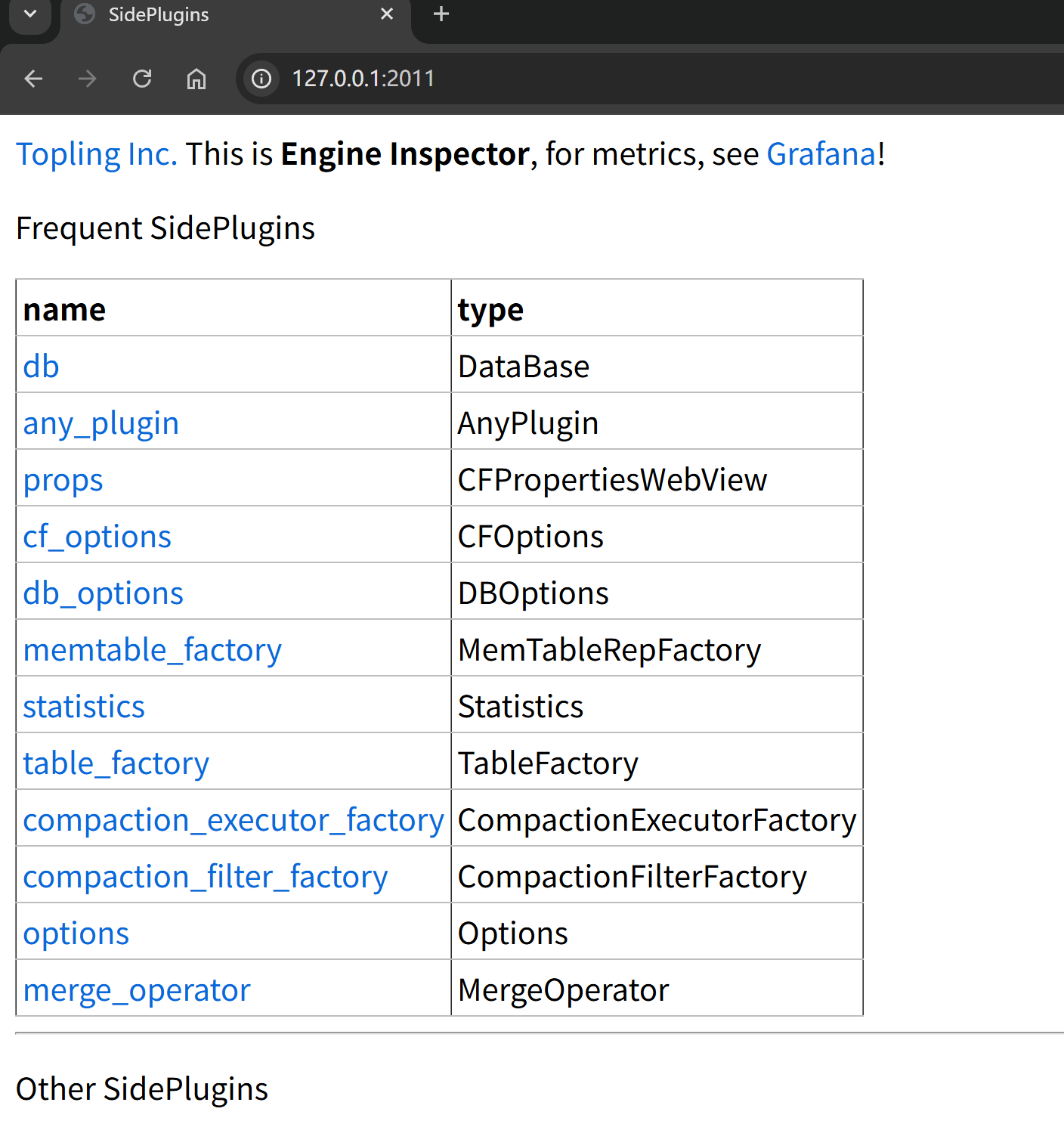
Verify via terminal:
The following output indicates the page is working:
Method 2: Check ToplingDB Initialization Info in Logs
Similar output indicates ToplingDB is the storage engine:
Common Troubleshooting
Issue 1: Startup Failure Due to YAML Format Error
Sample log during startup:
Solutions:
- Check YAML indentation (must use spaces, not tabs)
- Validate YAML syntax:
python -c "import yaml; yaml.safe_load(open('conf/graphs/rocksdb_plus.yaml'))" - Review specific error messages in logs
Issue 2: Web Server Port Conflict
Sample log during startup:
Solutions:
- Check if the port is occupied:
lsof -i :2011 - Modify
listening_portsin the YAML file - Restart HugeGraph Server
Issue 3: Database Initialization Failure
Sample output indicating lock acquisition failure, possibly due to write permission issues or another process locking the DB:
Solutions:
- Confirm correct config path:
rocksdb.option_path=./conf/graphs/rocksdb_plus.yaml - Check data directory permissions: ensure read/write access for the running user
- Review detailed logs:
bin/init-store.sh 2>&1 | tee init.log
Related Documentation
- ToplingDB YAML Configuration Explained – Understand each parameter in the config file
- HugeGraph Configuration Guide – Reference for core HugeGraph settings
- ToplingDB GitHub Repository – Official docs and latest updates
2 - ToplingDB YAML configuration file
Historical integration. This 2025 article describes an earlier interface and is retained for reference. For the proposed replacement, see the ToplingDB development guide. That guide describes unreleased changes; do not mix its settings with these historical examples.
RocksDB provides a rich set of configuration parameters, but most of them typically require hardcoded setup.
ToplingDB introduces a SidePlugin + YAML mechanism, making configuration more modular and composable.
This document focuses on the extended parameters of ToplingDB, helping readers understand their purpose and usage.
0. rocksdb_plus.yaml used in HugeGraph
The following includes only the configuration parameters used in HugeGraph. For the full configuration supported by ToplingDB, refer to the SidePlugin Wiki:
Key points:
listening_ports: '127.0.0.1:2011'sets the Web Server listening port to 2011 and restricts access to localhost.memtable_as_log_index: truecombined withconvert_to_sst: kFileMmapenables omit L0 Flush.memtable_factory: "${cspp}"specifies the memory structure asCSPP Memtable.table_factory: dispatchsets the TableFactory to the customDispatcherTabledefined in YAML.
1. Plugin-based configuration and reference mechanism
- YAML modularization: The configuration file is organized as objects; each object can be defined independently and referenced elsewhere.
- Reference syntax: Objects can be reused across sections via
${lru_cache},${cspp}, etc. - DispatcherTable: Allows selecting different TableFactories at different levels or scenarios. RocksDB natively supports only a single TableFactory.
ToplingDB YAML Reference and Reuse Diagram:
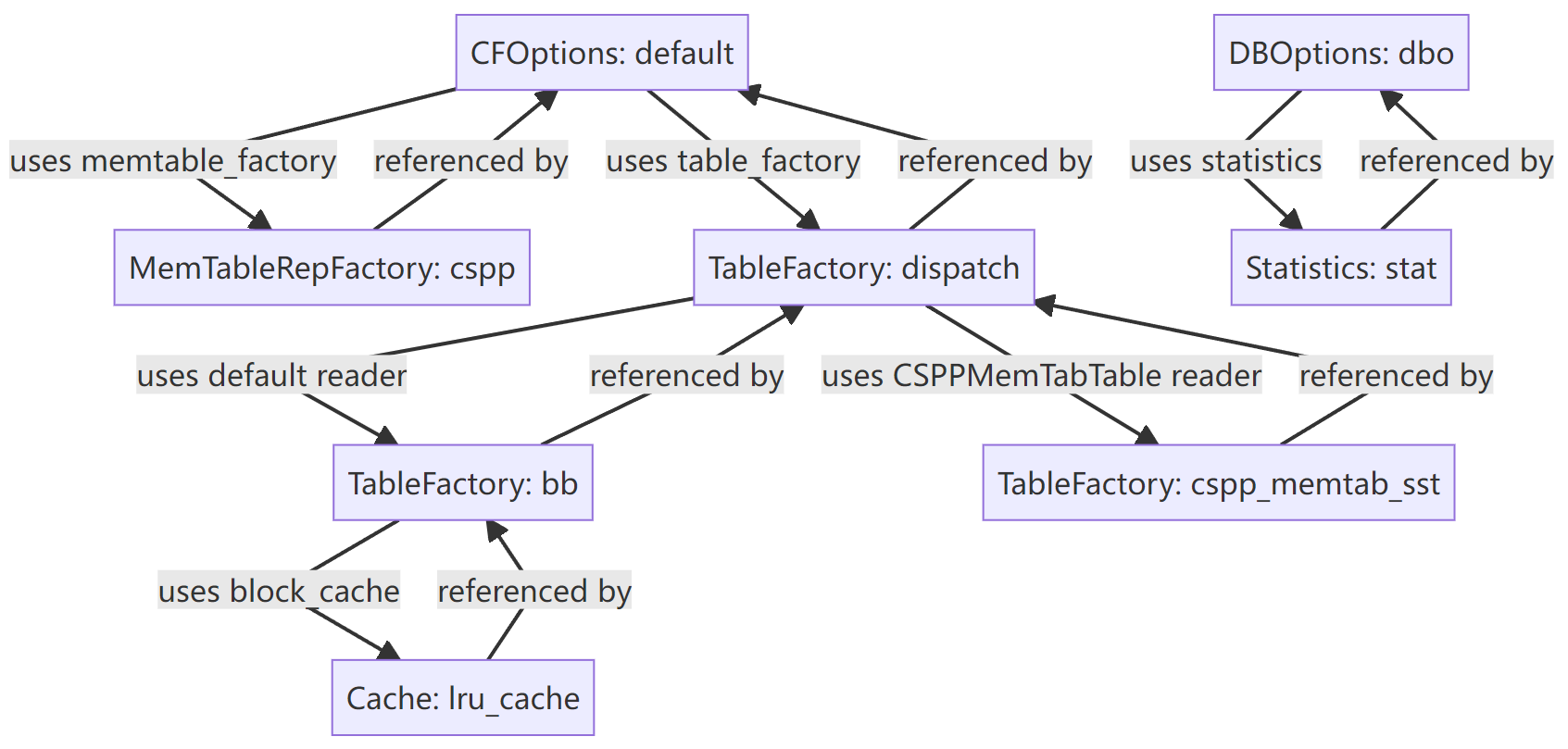
This mechanism makes configuration more flexible and easier to compose in complex scenarios.
2. New MemTable implementation: CSPP
ToplingDB provides a MemTable type that RocksDB does not natively have, configured with the following parameters:
mem_cap
mem_cap is the size of the virtual address space reserved for CSPP. This may be just reserved address space without actual physical allocation.
The actual memory usage of mem_cap is approximately equal to write_buffer_size.
Background of mem_cap Design
The underlying algorithm of CSPP adopts a pre-allocation strategy to support high-concurrency writes. Once the pre-allocated memory is filled, no further writes can proceed. However, RocksDB itself lacks a mechanism that allows a memtable to actively report “the pre-allocated memory is full, a new memtable is required”. Due to the complexity of its call chain, it is impractical to refactor RocksDB to add this capability. Therefore, CSPP adapts to RocksDB’s behavior through parameter design.
Core Idea of mem_cap
ToplingDB sets mem_cap to be much larger than write_buffer_size,
so that RocksDB will not prematurely trigger an “out of memory” error when writing to a memtable.
During CSPP initialization (New), the system rechecks the setting.
If mem_cap is found to be too small, it will be automatically adjusted to 2 * write_buffer_size to ensure stability during the write process.
The default value is 2G, and the effective maximum is 16G.
- Small deployments (<16GB RAM): set to 20–30% of system memory
- Medium deployments (16–64GB RAM): set to 8–16G
- Large deployments (>64GB RAM): set to 16G
use_vm
When allocating memory via malloc/posix_memalign, the address space may already be physically allocated (heap space with mapped pages), while CSPP only needs reserved virtual address space.
When use_vm is true, allocation is forced to use mmap, ensuring reserved address space without occupying physical pages.
The default is true. If physical memory is sufficient, it is recommended to disable this option—establishing mappings from mmap’s virtual memory to physical pages can trigger many minor page faults and may affect performance.
convert_to_sst
convert_to_sst supports three enum values:
kDontConvert: Disables the feature (default). Uses the traditional Flush process, offering the best compatibility for stability-focused scenarios.kDumpMem: During conversion, dumps the entire MemTable memory to an SST file, reducing CPU consumption but not memory usage.kFileMmap:mmaps MemTable content into a file—the key feature—reduces both CPU and memory usage. You can also setDBOptions.memtable_as_log_index = trueto essentially eliminate MemTable Flush.
These parameters offer more tunable options for the write path, allowing users to choose as needed.
For more design details, see: cspp-memtable, ToplingDB CSPP MemTable Design Essentials, CSPP Trie Design Analysis.
3. TableFactory extensions
- CSPPMemTabTable: The TableFactory paired with the
csppMemTable. - DispatcherTable: Supports specifying different TableFactories per level, for example:
- Use BlockBasedTable by default.
- Use CSPPMemTabTable for specific levels.
This level of flexibility is not available in native RocksDB configuration.
4. Statistics and observability controls
- discard_tickers / discard_histograms: Precisely specify which statistics to discard.
- stats_level: kDisableAll: Combined with the above, flexibly control the overhead of statistics.
Compared to RocksDB’s coarse-grained controls, ToplingDB offers finer tuning.
5. New DBOptions parameter
- memtable_as_log_index: true: Allows using the MemTable as a log index to speed up recovery.
6. Security considerations
Web Server security:
- The Web Server pages are provided by ToplingDB and do not include authentication.
- By default,
listening_ports: '127.0.0.1:2011'restricts access to local requests. - In production, configure firewall rules to allow only intranet access.
- To disable the Web Server, set
rocksdb.open_http=falseinhugegraph.properties.
Shared memory safety:
document_root: /dev/shm/rocksdb_resourceuses a shared memory directory.- In multi-user environments, ensure proper file permissions to avoid unauthorized access.
7. Summary
ToplingDB adds the following capabilities on top of RocksDB:
- Plugin-based configuration and object reuse
- A new MemTable type (cspp) with a paired TableFactory
- DispatcherTable for multi-factory scheduling
- Built-in Web Server
- More flexible statistics and observability controls
- Special DBOptions (such as
memtable_as_log_index)
These extensions give users more tuning space, particularly suited for scenarios requiring high write performance and flexible operations.
Related Documentation
- ToplingDB Quick Start – How to enable ToplingDB in HugeGraph
- RocksDB Official Configuration Guide – Learn the basic configuration options
- SidePlugin Wiki – Complete configuration reference for ToplingDB