This is the multi-page printable view of this section. .
Clients and APIs
- 1: HugeGraph RESTful API
- 1.1: Graphspace API
- 1.2: Schema API
- 1.3: PropertyKey API
- 1.4: VertexLabel API
- 1.5: EdgeLabel API
- 1.6: IndexLabel API
- 1.7: Rebuild API
- 1.8: Vertex API
- 1.9: Edge API
- 1.10: Traverser API
- 1.11: Rank API
- 1.12: Variable API
- 1.13: Graphs API
- 1.14: Task API
- 1.15: Gremlin API
- 1.16: Cypher API
- 1.17: Authentication API
- 1.18: Metrics API
- 1.19: Other API
- 2: HugeGraph Java Client
- 3: Gremlin-Console
This section covers the REST API, Gremlin Console, and client libraries. The current Server REST API identifies graph resources with both a graph space and a graph name. Refer to each API page and the Server OpenAPI page for the exact paths.
1 - HugeGraph RESTful API
This section documents the REST API on current master. For historical APIs, switch to the versioned HugeGraph 1.7 RESTful API documentation or HugeGraph 1.5 RESTful API documentation.
The default graph space is
DEFAULT.
After starting Server, open http://localhost:8080/swagger-ui/index.html to view the OpenAPI page for the current version. See the usage example.
1.1 - Graphspace API
2.0 Graphspace
HugeGraph implements multi-tenancy through graph spaces, which isolate compute/storage resources per tenant.
Prerequisites
- Graphspace currently only works in HStore mode.
- In non-HStore mode you can only use the default graphspace
DEFAULT; creating/deleting/updating other graphspaces is not supported. - Set
usePD=trueinrest-server.propertiesandbackend=hstoreinhugegraph.properties. - Production requires Server authentication and authorization, and
auth=truefor new graph spaces. Replace the public default administrator passwordpaconfigured byauth.admin_pa. - Every endpoint on this page requires PD mode. In standalone mode they answer
400with the messageGraphSpace management is not supported in standalone mode.
Restrict graph-space listing and detail endpoints
GET /graphspaces and GET /graphspaces/{graphspace} have no @RolesAllowed annotation. They are anonymous when Server authentication is disabled and lack method-level administrator checks when it is enabled. Detail responses contain dp_username and dp_password. In production, set white_ip.status=enable and maintain the IP allowlist. A gateway must restrict both paths by caller identity or role to administrators and trusted operators; restricting only source IPs still lets ordinary authenticated accounts on that network read DP credentials. Server network policy must allow only trusted gateway egress addresses to the API port, blocking direct client bypass. Record caller identity, source, and outcome at the gateway. Server audit-*.log files record authentication and authorization but do not replace gateway access auditing for these paths. Grant business accounts minimum permissions.
2.0.1 Create a graphspace
Method & Url
Request Body
Note: CPU/memory and Kubernetes-related capabilities are not publicly available yet.
| Name | Required | Type | Default | Range/Note | Description |
|---|---|---|---|---|---|
| name | Yes | String | Lowercase letters, digits, underscore; must start with a letter; max length 48 | Graphspace name | |
| nickname | No | String | name | Must be unique among graphspaces | Display name of the graphspace |
| description | No | String | Description | ||
| cpu_limit | Yes | Int | > 0 | CPU cores for the graphspace | |
| memory_limit | Yes | Int | > 0 (GB) | Memory quota in GB | |
| storage_limit | Yes | Int | > 0 | Maximum disk usage, in GB | |
| compute_cpu_limit | No | Int | 0 | >= 0 | Extra HugeGraph-Computer CPU cores; falls back to cpu_limit if unset or 0 |
| compute_memory_limit | No | Int | 0 | >= 0 | Extra HugeGraph-Computer memory in GB; falls back to memory_limit if unset or 0 |
| oltp_namespace | No | String | "" | Kubernetes namespace for OLTP HugeGraph-Server | |
| olap_namespace | No | String | "" | Resources are merged when identical to oltp_namespace | Kubernetes namespace for OLAP / HugeGraph-Computer |
| storage_namespace | No | String | "" | Kubernetes namespace for HugeGraph-Store | |
| operator_image_path | No | String | "" | HugeGraph-Computer operator image registry | |
| internal_algorithm_image_url | No | String | "" | HugeGraph-Computer algorithm image registry | |
| max_graph_number | Yes | Int | > 0 | Maximum number of graphs that can be created inside the graphspace | |
| max_role_number | No | Int | 0 | Maximum number of roles that can be created inside the graphspace | |
| auth | No | Boolean | false | true / false | Whether to enable authentication for the graphspace |
| configs | No | Map | Additional configuration |
Response Status
Response Body
2.0.2 List all graphspaces
Method & Url
Response Status
Response Body
2.0.3 Get graphspace details
Params
Path parameters
- graphspace: Graphspace name
Method & Url
Response Status
Response Body
The
dp_usernameanddp_passwordvalues above are documentation examples. Real detail responses contain the graph space’s DP credentials and must be protected as sensitive credentials.
2.0.4 Update a graphspace
authcannot be changed once a graphspace is created.
Params
Path parameter
- graphspace: Graphspace name
Request parameters
- action: Must be
"update" - update: Container for the actual fields to update (see table below)
| Name | Required | Type | Range/Note | Description |
|---|---|---|---|---|
| name | Yes | String | Must match the graphspace name in the path | Graphspace name |
| nickname | No | String | Must be unique among graphspaces | Display name of the graphspace |
| description | No | String | Description | |
| cpu_limit | Yes | Int | > 0 | CPU cores for OLTP HugeGraph-Server |
| memory_limit | Yes | Int | > 0 (GB) | Memory quota (GB) for OLTP HugeGraph-Server |
| storage_limit | Yes | Int | > 0 | Maximum disk usage, in GB |
| compute_cpu_limit | No | Int | >= 0 | Extra HugeGraph-Computer CPU cores; falls back to cpu_limit if unset or 0 |
| compute_memory_limit | No | Int | >= 0 | Extra HugeGraph-Computer memory in GB; falls back to memory_limit if unset or 0 |
| oltp_namespace | Yes | String | Kubernetes namespace for OLTP HugeGraph-Server | |
| olap_namespace | Yes | String | Resources are merged when identical to oltp_namespace | Kubernetes namespace for OLAP |
| storage_namespace | Yes | String | Kubernetes namespace for HugeGraph-Store | |
| operator_image_path | No | String | HugeGraph-Computer operator image registry | |
| internal_algorithm_image_url | No | String | HugeGraph-Computer algorithm image registry | |
| max_graph_number | Yes | Int | > 0 | Maximum number of graphs |
| max_role_number | Yes | Int | > 0 | Maximum number of roles |
Method & Url
Request Body
Response Status
Response Body
2.0.5 Delete a graphspace
Params
Path parameter
- graphspace: Graphspace name
Method & Url
Response Status
Warning: deleting a graphspace releases all resources that belong to it.
2.0.6 List all graphspaces with their details
Params
Query parameters
- prefix: Return only the graphspaces whose name or nickname starts with this prefix
Method & Url
Response Status
Response Body
Each entry carries the same fields as GET /graphspaces/{graphspace} plus authed, default, create_time and update_time. authed says whether the current user may enter the graphspace: it is false when the graphspace has authentication on and the user is neither an administrator, nor a manager, nor a member of it. default is always false for now, the default-graphspace feature is not implemented yet.
Default roles
Every graphspace carries four built-in roles, so that a user or a group can be given a whole set of permissions at once:
space: manager of the graphspace, only an administrator may grant itspace_member: member of the graphspaceanalyst: analyst of the graphspaceobserver: read-only role, it can be narrowed to a single graph by passinggraph
user accepts either a user name or a group name. Whether the current user holds a default role can also be checked with GET /graphspaces/{graphspace}/auth/managers/default, see Authentication API.
2.0.7 Grant a default role
Params
Path parameter
- graphspace: Graphspace name
Request parameters
- user: User or group name, required
- role: One of
space,space_member,analyst,observer, required - graph: Graph name, optional, only taken into account with
role=observer
Method & Url
Request Body
Response Status
Response Body
graph is echoed back only when the role was granted on a single graph.
2.0.8 Check a default role
Params
Path parameter
- graphspace: Graphspace name
Query parameters
- user: User or group name, required
- role: Default role name, required
- graph: Graph name, optional, only taken into account with
role=observer
Method & Url
Response Status
Response Body
2.0.9 Revoke a default role
Params
Path parameter
- graphspace: Graphspace name
Query parameters
- user: User or group name, required
- role: Default role name, required
- graph: Graph name, optional, only taken into account with
role=observer
Method & Url
Response Status
Schema templates
A schema template stores a Gremlin schema script under a name, so that a new graph can be initialized with it by passing schema when the graph is created, see Graphs API. A template can be updated or deleted by its creator, by a manager of the graphspace, or by an administrator.
2.0.10 Create a schema template
Params
Path parameter
- graphspace: Graphspace name
Request parameters
- name: Template name, required
- schema: Gremlin schema script, required
Method & Url
Request Body
Response Status
Response Body
2.0.11 List the schema templates of a graphspace
Method & Url
Response Status
Response Body
2.0.12 Get a schema template
Method & Url
Response Status
2.0.13 Update a schema template
Only schema can be updated, the name of a template is fixed.
Method & Url
Request Body
Response Status
2.0.14 Delete a schema template
Method & Url
Response Status
1.2 - Schema API
1.1 Schema
HugeGraph provides a single interface to get all Schema information of a graph, including: PropertyKey, VertexLabel, EdgeLabel and IndexLabel.
Method & Url
Response Status
Response Body
1.3 - PropertyKey API
1.2 PropertyKey
Params Description:
- name: The name of the property type, required.
- data_type: The data type of the property type, including: bool, byte, int, long, float, double, text, blob, date, uuid. The default data type is
text(Represent astringtype) - cardinality: The cardinality of the property type, including: single, list, set. The default cardinality is
single.
Request Body Field Description:
- id: The ID value of the property type.
- properties: The properties of the property type. For properties, this field is empty.
- user_data: Setting the common information of the property type, such as setting the value range of the age property from 0 to 100. Currently, no validation is performed on this field, and it is only a reserved entry for future expansion.
1.2.1 Create a PropertyKey
Method & Url
Request Body
Response Status
Response Body
1.2.2 Add or Remove userdata for an existing PropertyKey
Params
- action: Indicates whether the current action is to add or remove userdata. Possible values are
append(add) andeliminate(remove).
Method & Url
Request Body
Response Status
Response Body
1.2.3 Get all PropertyKeys
Method & Url
Response Status
Response Body
1.2.4 Get PropertyKey according to name
Method & Url
Where age is the name of the PropertyKey to be retrieved.
Response Status
Response Body
1.2.5 Delete PropertyKey according to name
Method & Url
Where age is the name of the PropertyKey to be deleted.
Response Status
Response Body
1.4 - VertexLabel API
1.3 VertexLabel
Assuming that the PropertyKeys listed in 1.1.3 have already been created.
Params Description:
- id: The ID value of the vertex type.
- name: The name of the vertex type, required.
- id_strategy: The ID strategy for the vertex type, including primary key ID, auto-generated, custom string, custom number, custom UUID. The default strategy is primary key ID.
- properties: The property types associated with the vertex type.
- primary_keys: The primary key properties. This field must have a value when the ID strategy is PRIMARY_KEY, and must be empty for other ID strategies.
- enable_label_index: Whether to enable label indexing. It is disabled by default.
- index_names: The indexes created for the vertex type. See details in section 3.4.
- nullable_keys: Nullable properties.
- user_data: Setting the common information of the vertex type, similar to the property type.
1.3.1 Create a VertexLabel
Method & Url
Request Body
Response Status
Response Body
Starting from version v0.11.2, hugegraph-server supports Time-to-Live (TTL) functionality for vertices. The TTL for vertices is set through VertexLabel. For example, if you want the vertices of type “person” to have a lifespan of one day, you need to set the TTL field to 86400000 (in milliseconds) when creating the “person” VertexLabel.
Additionally, if the vertex has a property called “createdTime” and you want to use it as the starting point for calculating the vertex’s lifespan, you can set the ttl_start_time field in the VertexLabel. For example, if the “person” VertexLabel has a property called “createdTime” of type Date, and you want the vertices of type “person” to live for one day starting from the creation time, the Request Body for creating the “person” VertexLabel would be as follows:
1.3.2 Add properties or userdata to an existing VertexLabel, or remove userdata (removing properties is currently not supported)
Params
- action: Indicates whether the current action is to add or remove. Possible values are
append(add) andeliminate(remove).
Method & Url
Request Body
Response Status
Response Body
1.3.3 Get all VertexLabels
Method & Url
Response Status
Response Body
1.3.4 Get VertexLabel by name
Method & Url
Response Status
Response Body
1.3.5 Delete VertexLabel by name
Deleting a VertexLabel will result in the removal of corresponding vertices and related index data. This operation will generate an asynchronous task.
Method & Url
Response Status
Response Body
Note:
You can use
GET http://localhost:8080/graphspaces/DEFAULT/graphs/hugegraph/tasks/1(where “1” is the task_id) to query the execution status of the asynchronous task. For more information, refer to the Asynchronous Task RESTful API.
1.5 - EdgeLabel API
1.4 EdgeLabel
Assuming PropertyKeys from version 1.2.3 and VertexLabels from version 1.3.3 have already been created.
Params Explanation
- name: Name of the vertex type, required.
- source_label: Name of the source vertex type, required.
- target_label: Name of the target vertex type, required.
- frequency: Whether there can be multiple edges between two points, can have values SINGLE or MULTIPLE, optional (default value: SINGLE).
- properties: Property types associated with the edge type, optional.
- sort_keys: Specifies a list of differentiating key properties when multiple associations are allowed.
- nullable_keys: Nullable properties, optional (default: nullable).
- enable_label_index: Whether to enable type indexing, disabled by default.
1.4.1 Create an EdgeLabel
Method & Url
Request Body
Response Status
Response Body
Starting from version 0.11.2 of hugegraph-server, the TTL (Time to Live) feature for edges is supported. The TTL for edges is set through EdgeLabel. For example, if you want the “knows” type of edge to have a lifespan of one day, you need to set the TTL field to 86400000 when creating the “knows” EdgeLabel, where the unit is milliseconds.
Additionally, when the edge has a property called “createdTime” and you want to use the “createdTime” property as the starting point for calculating the edge’s lifespan, you can set the ttl_start_time field in the EdgeLabel. For example, if the knows EdgeLabel has a property called “createdTime” which is of type Date, and you want the “knows” type of edge to live for one day from the time of creation, the Request Body for creating the knows EdgeLabel would be as follows:
1.4.2 Add properties or userdata to an existing EdgeLabel, or remove userdata (removing properties is currently not supported)
Params
- action: Indicates whether the current action is to add or remove, with values
append(add) andeliminate(remove).
Method & Url
Request Body
Response Status
Response Body
1.4.3 Get all EdgeLabels
Method & Url
Response Status
Response Body
1.4.4 Get EdgeLabel by name
Method & Url
Response Status
Response Body
1.4.5 Delete EdgeLabel by name
Deleting an EdgeLabel will result in the deletion of corresponding edges and related index data. This operation will generate an asynchronous task.
Method & Url
Response Status
Response Body
Note:
You can query the execution status of an asynchronous task by using
GET http://localhost:8080/graphspaces/DEFAULT/graphs/hugegraph/tasks/1(where “1” is the task_id). For more information, refer to the Asynchronous Task RESTful API.
1.6 - IndexLabel API
1.5 IndexLabel
Assuming PropertyKeys from version 1.1.3, VertexLabels from version 1.2.3, and EdgeLabels from version 1.3.3 have already been created.
1.5.1 Create an IndexLabel
Method & Url
Request Body
Response Status
Response Body
1.5.2 Get all IndexLabels
Method & Url
Response Status
Response Body
1.5.3 Get IndexLabel by name
Method & Url
Response Status
Response Body
1.5.4 Delete IndexLabel by name
Deleting an IndexLabel will result in the deletion of related index data. This operation will generate an asynchronous task.
Method & Url
Response Status
Response Body
Note:
You can query the execution status of an asynchronous task by using
GET http://localhost:8080/graphspaces/DEFAULT/graphs/hugegraph/tasks/1(where “1” is the task_id). For more information, refer to the Asynchronous Task RESTful API.
1.5.5 Add or remove userdata for an existing IndexLabel
Only user_data can be changed this way, base_type, base_value and index_type must be left out of the request body.
Params
- action: Indicates whether the current action is to add or remove userdata. Possible values are
append(add) andeliminate(remove).
Method & Url
Request Body
Response Status
Response Body
1.7 - Rebuild API
1.6 Rebuild
1.6.1 Rebuild IndexLabel
Method & Url
Response Status
Response Body
Note:
You can get the asynchronous job status by
GET http://localhost:8080/graphspaces/DEFAULT/graphs/hugegraph/tasks/${task_id}(the task_id here should be 1). See More AsyncJob RESTfull API
1.6.2 Rebulid all Indexs of VertexLabel
Method & Url
Response Status
Response Body
Note:
You can get the asynchronous job status by
GET http://localhost:8080/graphspaces/DEFAULT/graphs/hugegraph/tasks/${task_id}(the task_id here should be 2). See More AsyncJob RESTfull API
1.6.3 Rebulid all Indexs of EdgeLabel
Method & Url
Response Status
Response Body
Note:
You can get the asynchronous job status by
GET http://localhost:8080/graphspaces/DEFAULT/graphs/hugegraph/tasks/${task_id}(the task_id here should be 3). See More AsyncJob RESTfull API
1.8 - Vertex API
2.1 Vertex
In vertex types, the Id strategy determines the type of the vertex Id, with the corresponding relationships as follows:
| Id_Strategy | id type |
|---|---|
| AUTOMATIC | number |
| PRIMARY_KEY | string |
| CUSTOMIZE_STRING | string |
| CUSTOMIZE_NUMBER | number |
| CUSTOMIZE_UUID | uuid |
For the GET/PUT/DELETE API of a vertex, the id part in the URL should be passed as the id value with type information. This type information is indicated by whether the JSON string is enclosed in quotes, meaning:
- When the id type is
number, the id in the URL is without quotes, for example:xxx/vertices/123456. - When the id type is
string, the id in the URL is enclosed in quotes, for example:xxx/vertices/"123456".
The next example requires first creating the graph schema from the following groovy script
2.1.1 Create a vertex
Method & Url
Request Body
Response Status
Response Body
2.1.2 Create multiple vertices
Method & Url
Request Body
Response Status
Response Body
2.1.3 Update vertex properties
Method & Url
Request Body
Note: There are three categories for property values: single, set, and list. If it is single, it means adding or updating the property value. If it is set or list, it means appending the property value.
Response Status
Response Body
2.1.4 Batch Update Vertex Properties
Function Description
Batch update properties of vertices and support various update strategies, including:
- SUM: Numeric accumulation
- BIGGER: Take the larger value between two numbers/dates
- SMALLER: Take the smaller value between two numbers/dates
- UNION: Take the union of set properties
- INTERSECTION: Take the intersection of set properties
- APPEND: Append elements to list properties
- ELIMINATE: Remove elements from list/set properties
- OVERRIDE: Override existing properties, if the new property is null, the old property is still used
Assuming the original vertex and properties are:
Add vertices with the following command:
Method & Url
Request Body
Response Status
Response Body
Result Analysis:
- The lang property does not specify an update strategy and is directly overwritten by the new value, regardless of whether the new value is null.
- The price property specifies the BIGGER update strategy. The old property value is 328, and the new property value is 299, so the old property value of 328 is retained.
- The age property specifies the OVERRIDE update strategy, but the new property value does not include age, which is equivalent to age being null. Therefore, the original property value of 32 is still retained.
- The city property also specifies the OVERRIDE update strategy, and the new property value is not null, so it overrides the old value.
- The weight property specifies the SUM update strategy. The old property value is 0.1, and the new property value is 0.2. The final value is 0.3.
- The hobby property (cardinality is Set) specifies the UNION update strategy, so the new value is taken as the union with the old value.
The usage of other update strategies can be inferred in a similar manner and will not be further elaborated.
2.1.5 Delete Vertex Properties
Method & Url
Request Body
Note: Here, the properties (keys and all values) will be directly deleted, regardless of whether the property values are single, set, or list.
Response Status
Response Body
2.1.6 Get Vertices that Meet the Criteria
Params
- label: Vertex type
- properties: Property key-value pairs (precondition: indexes are created for property queries)
- keep_start_p: Default is false. When set to true, the range matching input expression will not be automatically escaped. For example,
properties={"age":"P.gt(18)"}will be interpreted as an exact match, i.e., the age property is equal to the string “P.gt(18)” - offset: Offset, default is 0
- limit: Maximum number of results, default is 100
- page: Page number
All of the above parameters are optional. page can not be combined with a non-zero offset, everything else can be combined in any way.
Property key-value pairs consist of the property name and value in JSON format. Multiple property key-value pairs are allowed as query conditions. The property value supports exact matching, range matching, and fuzzy matching. For exact matching, use the format properties={"age":29}, for range matching, use the format properties={"age":"P.gt(29)"}, and for fuzzy matching, use the format properties={"city": "P.textcontains("ChengDu China")}. The following expressions are supported for range matching:
| Expression | Explanation |
|---|---|
| P.eq(number) | Vertices with property value equal to number |
| P.neq(number) | Vertices with property value not equal to number |
| P.lt(number) | Vertices with property value less than number |
| P.lte(number) | Vertices with property value less than or equal to number |
| P.gt(number) | Vertices with property value greater than number |
| P.gte(number) | Vertices with property value greater than or equal to number |
| P.between(number1,number2) | Vertices with property value greater than or equal to number1 and less than number2 |
| P.inside(number1,number2) | Vertices with property value greater than number1 and less than number2 |
| P.outside(number1,number2) | Vertices with property value less than number1 and greater than number2 |
| P.within(value1,value2,value3,…) | Vertices with property value equal to any of the given values |
Query all vertices with age 29 and label person
Method & Url
Response Status
Response Body
Paginate through all vertices, retrieve the first page (page without parameter value), limited to 3 records
Add vertices with the following command:
Method & Url
Response Status
Response Body
The returned body contains information about the page number of the next page, "page": "CIYxOnBldGVyAAAAAAAAAAM". When querying the next page, assign this value to the page parameter.
Paginate and retrieve all vertices, including the next page (passing the page value returned from the previous page), limited to 3 items.
Method & Url
Response Status
Response Body
At this point, "page": null indicates that there are no more pages available. (Note: When using Cassandra as the backend for performance reasons, if the returned page happens to be the last page, the page value may not be empty. When requesting the next page using that page value, it will return empty data and page = null. The same applies to other similar situations.)
2.1.7 Retrieve Vertex by ID
Method & Url
Response Status
Response Body
2.1.8 Delete Vertex by ID
Params
- label: Vertex type, optional parameter
Delete the vertex based on ID only.
Method & Url
Response Status
Delete Vertex by Label+ID
When deleting a vertex by specifying both the Label parameter and the ID, it generally offers better performance compared to deleting by ID alone.
Method & Url
Response Status
1.9 - Edge API
2.2 Edge
The modification of the vertex ID format also affects the ID of the edge, as well as the formats of the source vertex and target vertex IDs.
The EdgeId is formed by concatenating src-vertex-id + direction + label + sort-values + tgt-vertex-id, but the vertex ID types are not distinguished by quotation marks here. Instead, they are distinguished by prefixes:
- When the ID type is number, the vertex ID in the EdgeId has a prefix
L, like “L123456>1»L987654”. - When the ID type is string, the vertex ID in the EdgeId has a prefix
S, like “S1:peter>1»S2:lop”.
The following example requires creating a graph schema based on the following groovy script:
2.2.1 Creating an Edge
Params
Path Parameter Description:
- graph: The graph to operate on
Request Body Description:
- label: The edge type name (required)
- outV: The source vertex id (required)
- inV: The target vertex id (required)
- outVLabel: The source vertex type (required)
- inVLabel: The target vertex type (required)
- properties: The properties associated with the edge. The internal structure of the object is as follows:
- name: The property name
- value: The property value
Method & Url
Request Body
Response Status
Response Body
2.2.2 Creating Multiple Edges
Params
Path Parameter Description:
- graph: The graph to operate on
Request Parameter Description:
- check_vertex: Whether to check the existence of vertices (true | false). When set to true, an error will be thrown if the source or target vertices of the edge to be inserted do not exist. Default is true.
Request Body Description:
- List of edge information
Method & Url
Request Body
Response Status
Response Body
2.2.3 Updating Edge Properties
Params
Path Parameter Description:
- graph: The graph to operate on
- id: The ID of the edge to be operated on
Request Parameter Description:
- action: The append action
Request Body Description:
- Edge information
Method & Url
Request Body
NOTE: There are three categories of property values: single, set, and list. If it is single, it means adding or updating the property value. If it is set or list, it means appending the property value.
Response Status
Response Body
2.2.4 Batch Updating Edge Properties
Params
Path Parameter Description:
- graph: The graph to operate on
Request Body Description:
- edges: List of edge information
- update_strategies: For each property, you can set its update strategy individually, including:
- SUM: Only supports number type
- BIGGER/SMALLER: Only supports date/number type
- UNION/INTERSECTION: Only supports set type
- APPEND/ELIMINATE: Only supports collection type
- OVERRIDE
- check_vertex: Whether to check the existence of vertices (true | false). When set to true, an error will be thrown if the source or target vertices of the edge to be inserted do not exist. Default is true.
- create_if_not_exist: Currently only supports setting to true
Method & Url
Request Body
Response Status
Response Body
2.2.5 Deleting Edge Properties
Params
Path Parameter Description:
- graph: The graph to operate on
- id: The ID of the edge to be operated on
Request Parameter Description:
- action: The eliminate action
Request Body Description:
- Edge information
Method & Url
Request Body
NOTE: This will directly delete the properties (removing the key and all values), regardless of whether the property values are single, set, or list.
Response Status
Response Body
It is not possible to delete an attribute that is not set as nullable.
2.2.6 Fetching Edges that Match the Criteria
Params
Path Parameter:
- graph: The graph to operate on
Request Parameters:
- vertex_id: Vertex ID
- direction: Edge direction (OUT | IN | BOTH), default is BOTH
- label: Edge label
- properties: Key-value pairs of properties (requires pre-built indexes for property queries)
- keep_start_p: Default is false. When set to true, the range matching input expression will not be automatically escaped. For example,
properties={"age":"P.gt(0.8)"}will be interpreted as an exact match, i.e., the age property is equal to “P.gt(0.8)” - offset: Offset, default is 0
- limit: Number of queries, default is 100
- page: Page number
Key-value pairs of properties consist of the property name and value in JSON format. Multiple key-value pairs are allowed as query conditions. Property values support exact matching and range matching. For exact matching, it is in the form properties={"weight":0.8}. For range matching, it is in the form properties={"age":"P.gt(0.8)"}. The expressions supported by range matching are as follows:
| Expression | Description |
|---|---|
| P.eq(number) | Edges with property value equal to number |
| P.neq(number) | Edges with property value not equal to number |
| P.lt(number) | Edges with property value less than number |
| P.lte(number) | Edges with property value less than or equal to number |
| P.gt(number) | Edges with property value greater than number |
| P.gte(number) | Edges with property value greater than or equal to number |
| P.between(number1,number2) | Edges with property value greater than or equal to number1 and less than number2 |
| P.inside(number1,number2) | Edges with property value greater than number1 and less than number2 |
| P.outside(number1,number2) | Edges with property value less than number1 and greater than number2 |
| P.within(value1,value2,value3,…) | Edges with property value equal to any of the given values |
| P.textcontains(value) | Edges with property value containing the given value (string type) |
| P.contains(value) | Edges with property value containing the given value (collection type) |
Edges connected to the vertex person:marko(vertex_id=“1:marko”) with label knows and date property equal to “20160111”
Method & Url
Response Status
Response Body
Paginate and retrieve all edges, get the first page (page without parameter value), limit to 2 entries
Method & Url
Response Status
Response Body
The returned body contains the page number information for the next page, "page": "EoYxOm1hcmtvgggCAIQyOmxvcAAAAAAAAAAC". When querying the next page, assign this value to the page parameter.
Paginate and retrieve all edges, get the next page (include the page value returned from the previous page), limit to 2 entries
Method & Url
Response Status
Response Body
When "page": null is returned, it indicates that there are no more pages available.
NOTE: When the backend is Cassandra, for performance considerations, if the returned page happens to be the last page, the
pagevalue may not be empty. When requesting the next page data using thatpagevalue, it will returnempty dataandpage = null. Similar situations apply for other cases.
2.2.7 Fetching Edge by ID
Params
Path parameter description:
- graph: The graph to be operated on.
- id: The ID of the edge to be operated on.
Method & Url
Response Status
Response Body
2.2.8 Deleting Edge by ID
Params
Path parameter description:
- graph: The graph to be operated on.
- id: The ID of the edge to be operated on.
Request parameter description:
- label: The label of the edge.
Deleting Edge by ID only
Method & Url
Response Status
Deleting Edge by Label + ID
In general, specifying the Label parameter along with the ID to delete an edge will provide better performance compared to deleting by ID only.
Method & Url
Response Status
1.10 - Traverser API
3.1 Overview of Traverser API
HugeGraphServer provides a RESTful API interface for the HugeGraph graph database. In addition to the basic CRUD operations for vertices and edges, it also offers several traversal methods, which we refer to as the traverser API. These traversal methods implement various complex graph algorithms, making it convenient for users to analyze and explore the graph.
The Traverser API supported by HugeGraph includes:
- K-out API: It finds neighbors that are exactly N steps away from a given starting vertex. There are two versions:
- The basic version uses the GET method to find neighbors that are exactly N steps away from a given starting vertex.
- The advanced version uses the POST method to find neighbors that are exactly N steps away from a given starting vertex. The advanced version differs from the basic version in the following ways:
- Supports counting the number of neighbors only
- Supports filtering by edge and vertex properties
- Supports returning the shortest path to reach the neighbor
- K-neighbor API: It finds all neighbors that are within N steps of a given starting vertex. There are two versions:
- The basic version uses the GET method to find all neighbors that are within N steps of a given starting vertex.
- The advanced version uses the POST method to find all neighbors that are within N steps of a given starting vertex. The advanced version differs from the basic version in the following ways:
- Supports counting the number of neighbors only
- Supports filtering by edge and vertex properties
- Supports returning the shortest path to reach the neighbor
- Same Neighbors: It queries the common neighbors of two vertices.
- Jaccard Similarity API: It calculates the Jaccard similarity, which includes two types:
- One type uses the GET method to calculate the similarity (intersection over union) of neighbors between two vertices.
- The other type uses the POST method to find the top N vertices with the highest Jaccard similarity to a given starting vertex in the entire graph.
- Shortest Path API: It finds the shortest path between two vertices.
- All Shortest Paths: It finds all shortest paths between two vertices.
- Weighted Shortest Path: It finds the shortest weighted path from a starting vertex to a target vertex.
- Single Source Shortest Path: It finds the weighted shortest path from a single source vertex to all other vertices.
- Multi Node Shortest Path: It finds the shortest path between every pair of specified vertices.
- Paths API: It finds all paths between two vertices. There are two versions:
- The basic version uses the GET method to find all paths between a given starting vertex and an ending vertex.
- The advanced version uses the POST method to find all paths that meet certain conditions between a set of starting vertices and a set of ending vertices.
- Customized Paths API: It traverses all paths that pass through a batch of vertices according to a specific pattern.
- Template Path API: It specifies a starting point, an ending point, and the path information between them to find matching paths.
- Crosspoints API: It finds the intersection (common ancestors or common descendants) between two vertices.
- Customized Crosspoints API: It traverses multiple patterns starting from a batch of vertices and finds the intersections with the vertices reached in the final step.
- Rings API: It finds the cyclic paths that can be reached from a starting vertex.
- Rays API: It finds the paths from a starting vertex that reach the boundaries (i.e., paths without cycles).
- Fusiform Similarity API: It finds the fusiform similar vertices to a given vertex.
- Adamic-Adar API: It computes the Adamic-Adar index of two vertices.
- Resource Allocation API: It computes the resource allocation index of two vertices.
- Edge Existence API: It returns the edges that exist between two given vertices.
- Count API: It counts the vertices reached after a series of traversal steps, without returning them.
- Vertices API:
- Batch querying vertices by ID.
- Getting the partitions of vertices.
- Querying vertices by partition.
- Edges API:
- Batch querying edges by ID.
- Getting the partitions of edges.
- Querying edges by partition.
3.2 Detailed Explanation of Traverser API
The usage examples provided in this section are based on the graph presented on the TinkerPop official website:
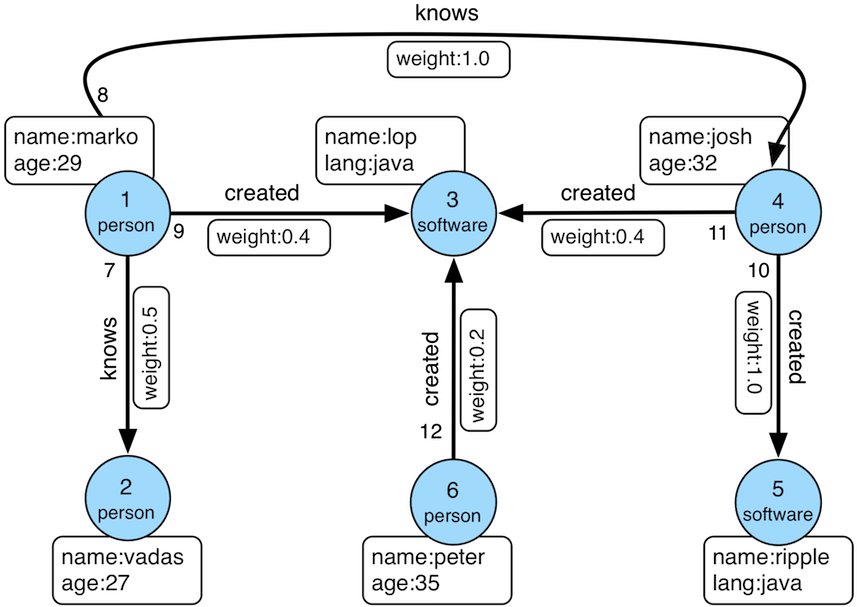
The data import program is as follows:
The vertex IDs are:
The edge IDs are:
3.2.1 K-out API (GET, Basic Version)
3.2.1.1 Functionality Overview
The K-out API allows you to find vertices that are exactly “depth” steps away from a given starting vertex, considering the specified direction, edge type (optional), and depth.
Params
- source: ID of the starting vertex (required)
- direction: Direction of traversal from the starting vertex (OUT, IN, BOTH). Optional, default is BOTH.
- max_depth: Number of steps (required)
- label: Edge type (optional), represents all edge labels by default
- nearest: When nearest is set to true, it means the shortest path length from the starting vertex to the result vertices is equal to the depth, and there is no shorter path. When nearest is set to false, it means there is at least one path of length depth from the starting vertex to the result vertices (not necessarily the shortest and may contain cycles). Optional, default is true.
- max_degree: Maximum number of adjacent edges to traverse per vertex during the query. Optional, default is 10000.
- capacity: Maximum number of vertices to be visited during the traversal. Optional, default is 10000000.
- limit: Maximum number of vertices to be returned. Optional, default is 10000000.
3.2.1.2 Usage Example
Method & Url
Response Status
Response Body
3.2.1.3 Use Cases
Finding vertices that are exactly N steps away in a relationship. Two examples:
- In a family relationship, finding all grandchildren of a person. The set of vertices that can be reached by person A through two consecutive “son” edges.
- Discovering potential friends in a social network. For example, finding users who are two degrees of friendship away from the target user, reachable through two consecutive “friend” edges.
3.2.2 K-out API (POST, Advanced Version)
3.2.2.1 Functionality Overview
The K-out API allows you to find vertices that are exactly “depth” steps away from a given starting vertex, considering the specified steps (including direction, edge type, and attribute filtering).
The advanced version differs from the basic version of K-out API in the following aspects:
- Supports counting the number of neighbors only
- Supports edge attribute filtering
- Supports returning the shortest path to the neighbor
Params
- source: The ID of the starting vertex, required.
- steps: Steps from the starting point, required, with the following structure:
- direction: Represents the direction of the edges (OUT, IN, BOTH), default is BOTH.
- edge_steps: The step set of edges, supporting label and properties filtering for the edge. If edge_steps is empty, the edge is not filtered.
- label: Edge types.
- properties: Filter edges based on property values.
- vertex_steps: The step set of vertices, supporting label and properties filtering for the vertex. If vertex_steps is empty, the vertex is not filtered.
- label: Vertex types.
- properties: Filter vertices based on property values.
- max_degree: Maximum adjacent edges traversed per vertex, defaulting to 10000; the parameter name
degreeis also accepted. - skip_degree: Sets the minimum number of edges to skip super vertices during the query process. If the number of adjacent edges for a vertex is greater than skip_degree, the vertex is completely skipped. Optional. If enabled, it should satisfy the constraint
skip_degree >= max_degree. Default is 0 (not enabled), indicating no skipping of any vertices (Note: Enabling this configuration means that during traversal, an attempt will be made to access skip_degree edges of a vertex, not just max_degree edges. This incurs additional traversal overhead and may have a significant impact on query performance. Please enable it only after understanding the implications).
- max_depth: Number of steps, required.
- nearest: When nearest is true, it means the shortest path length from the starting vertex to the result vertex is equal to depth, and there is no shorter path. When nearest is false, it means there is a path of length depth from the starting vertex to the result vertex (not necessarily the shortest and can contain cycles). Optional, default is true.
- count_only: Boolean value, true indicates only counting the number of results without returning specific results, false indicates returning specific results. Default is false.
- with_path: When true, it returns the shortest path from the starting vertex to each neighbor. When false, it does not return the shortest path. Optional, default is false.
- with_edge: Optional parameter, default is false:
- When true, the result will include complete edge information (all edges in the path):
- When with_path is true, it returns complete information of all edges in all paths.
- When with_path is false, no information is returned.
- When false, it only returns edge IDs.
- When true, the result will include complete edge information (all edges in the path):
- with_vertex: Optional parameter, default is false:
- When true, the result will include complete vertex information (all vertices in the path):
- When with_path is true, it returns complete information of all vertices in all paths.
- When with_path is false, it returns complete information of all neighbors.
- When false, it only returns vertex IDs.
- When true, the result will include complete vertex information (all vertices in the path):
- capacity: Maximum number of vertices to visit during traversal. Optional, default is 10000000.
- limit: Maximum number of vertices to return. Optional, default is 10000000.
- traverse_mode: Traversal mode. There are two options: “breadth_first_search” and “depth_first_search”, default is “breadth_first_search”.
3.2.2.2 Usage
Method & Url
Request Body
Response Status
Response Body
3.2.2.3 Use Cases
Refer to 3.2.1.3.
3.2.3 K-neighbor (GET, Basic Version)
3.2.3.1 Function Introduction
Find all vertices that are reachable within depth steps, including the starting vertex, based on the starting vertex, direction, edge type (optional), and depth.
Equivalent to the union of: starting vertex, K-out(1), K-out(2), …, K-out(max_depth).
Params
- source: ID of the starting vertex, required.
- direction: Direction in which the starting vertex’s edges extend (OUT, IN, BOTH). Optional, default is BOTH.
- max_depth: Number of steps, required.
- label: Edge type, optional, default represents all edge labels.
- max_degree: Maximum number of adjacent edges to traverse for a single vertex during the query process. Optional, default is 10000.
- limit: Maximum number of vertices to return, also represents the maximum number of vertices to visit during traversal. Optional, default is 10000000.
3.2.3.2 Usage
Method & Url
Response Status
Response Body
3.2.3.3 Use Cases
Find all vertices reachable within N steps, for example:
- In a family relationship, find all descendants within five generations of a person. This can be achieved by traversing five consecutive “parent-child” edges from person A.
- In a social network, discover friend circles. For example, users who can be reached by 1, 2, or 3 “friend” edges from the target user can form the target user’s friend circle.
3.2.4 K-neighbor API (POST, Advanced Version)
3.2.4.1 Function Introduction
Find all vertices that are reachable within depth steps from the starting vertex, based on the starting vertex, steps (including direction, edge type, and filter properties), and depth.
The difference from the Basic Version of K-neighbor API is that:
- It supports counting the number of neighbors only.
- It supports filtering edges based on their properties.
- It supports returning the shortest path to reach the neighbors.
Params
- source: Starting vertex ID, required.
- steps: Steps from the starting point, required, with the following structure:
- direction: Represents the direction of the edges (OUT, IN, BOTH), default is BOTH.
- edge_steps: The step set of edges, supporting label and properties filtering for the edge. If edge_steps is empty, the edge is not filtered.
- label: Edge types.
- properties: Filter edges based on property values.
- vertex_steps: The step set of vertices, supporting label and properties filtering for the vertex. If vertex_steps is empty, the vertex is not filtered.
- label: Vertex types.
- properties: Filter vertices based on property values.
- max_degree: Maximum adjacent edges traversed per vertex, defaulting to 10000; the parameter name
degreeis also accepted. - skip_degree: Used to set the minimum number of edges to discard super vertices during the query process. When the number of adjacent edges for a vertex exceeds skip_degree, the vertex is completely discarded. This is an optional parameter. If enabled, it should satisfy the constraint
skip_degree >= max_degree. Default is 0 (not enabled), which means no vertices are skipped. (Note: When this configuration is enabled, the traversal will attempt to access skip_degree edges for each vertex, not just max_degree edges. This incurs additional traversal overhead and may significantly impact query performance. Please make sure to understand this before enabling.)
- max_depth: Number of steps, required.
- count_only: Boolean value. If true, only the count of results is returned without the actual results. If false, the specific results are returned. Default is false.
- with_path: If true, the shortest path from the starting point to each neighbor is returned. If false, the shortest path from the starting point to each neighbor is not returned. This is an optional parameter. Default is false.
- with_edge: Optional parameter, default is false:
- When true, the result will include complete edge information (all edges in the path):
- When with_path is true, it returns complete information of all edges in all paths.
- When with_path is false, no information is returned.
- When false, it only returns edge IDs.
- When true, the result will include complete edge information (all edges in the path):
- with_vertex: Optional parameter, default is false:
- When true, the result will include complete vertex information (all vertices in the path):
- When with_path is true, it returns complete information of all vertices in all paths.
- When with_path is false, it returns complete information of all neighbors.
- When false, it only returns vertex IDs.
- When true, the result will include complete vertex information (all vertices in the path):
- limit: Maximum number of vertices to be returned. Also, the maximum number of vertices visited during the traversal process. This is an optional parameter. Default is 10000000.
3.2.4.2 Usage Method
Method & Url
Request Body
Response Status
Response Body
3.2.4.3 Use Cases
See 3.2.3.3
3.2.5 Same Neighbors
3.2.5.1 Function Introduction
Retrieve the common neighbors of two vertices.
Params
- vertex: ID of one vertex, required.
- other: ID of another vertex, required.
- direction: Direction in which the vertex expands outward (OUT, IN, BOTH). Optional, default is BOTH.
- label: Edge type. Optional, default represents all edge labels.
- max_degree: Maximum number of adjacent edges to traverse for each vertex during the query process. Optional, default is 10000.
- limit: Maximum number of common neighbors to be returned. Optional, default is 10000000.
3.2.5.2 Usage Method
Method & Url
Response Status
Response Body
3.2.5.3 Use Cases
Find the common neighbors of two vertices:
- In a social network, find the common followers or users both users are following.
3.2.6 Jaccard Similarity (GET)
3.2.6.1 Function Introduction
Compute the Jaccard similarity between two vertices (the intersection of the neighbors of the two vertices divided by the union of the neighbors of the two vertices).
For neighbor sets N(u) and N(v) with a nonempty union, the definition above is:
Params
- vertex: ID of one vertex, required.
- other: ID of another vertex, required.
- direction: Direction in which the vertex expands outward (OUT, IN, BOTH). Optional, default is BOTH.
- label: Edge type. Optional, default represents all edge labels.
- max_degree: Maximum number of adjacent edges to traverse for each vertex during the query process. Optional, default is 10000.
3.2.6.2 Usage Method
Method & Url
Response Status
Response Body
3.2.6.3 Use Cases
Used to evaluate the similarity or closeness between two vertices.
3.2.7 Jaccard Similarity (POST)
3.2.7.1 Function Introduction
Compute the N vertices with the highest Jaccard similarity to a specified vertex.
The Jaccard similarity is calculated as the intersection of the neighbors of the two vertices divided by the union of the neighbors of the two vertices.
Params
- vertex: ID of a vertex, required.
- Steps from the starting point, required. The structure is as follows:
- direction: Direction of the edges (OUT, IN, BOTH). Optional, default is BOTH.
- labels: List of edge types.
- properties: Filter edges based on property values.
- max_degree: Maximum adjacent edges traversed per vertex, defaulting to 10000; the parameter name
degreeis also accepted. - skip_degree: Used to set the minimum number of edges to skip super vertices during the query process. If the number of adjacent edges for a vertex is greater than skip_degree, the vertex is completely skipped. Optional, default is 0 (not enabled), which means no skipping. (Note: When this configuration is enabled, the traversal will attempt to access skip_degree edges of a vertex, not just max_degree edges. This incurs additional traversal overhead and may have a significant impact on query performance. Please enable it after understanding and confirming.)
- top: Return the top N vertices with the highest Jaccard similarity for a starting vertex. Optional, default is 100.
- capacity: Maximum number of vertices to be visited during the traversal process. Optional, default is 10000000.
3.2.7.2 Usage Method
Method & Url
Request Body
Response Status
Response Body
3.2.7.3 Use Cases
Used to find the vertices in the graph that have the highest similarity to a specified vertex.
3.2.8 Shortest Path
3.2.8.1 Function Introduction
Find the shortest path between a starting vertex and a target vertex based on the direction, edge type (optional), and maximum depth.
Params
- source: ID of the starting vertex, required.
- target: ID of the target vertex, required.
- direction: Direction in which the starting vertex expands (OUT, IN, BOTH). Optional, default is BOTH.
- max_depth: Maximum number of steps, required.
- label: Edge type, optional. Default represents all edge labels.
- max_degree: Maximum number of adjacent edges to traverse for each vertex during the query process. Optional, default is 10000.
- skip_degree: Used to set the minimum number of edges to skip super vertices during the query process. If the number of adjacent edges for a vertex is greater than skip_degree, the vertex is completely skipped. Optional, default is 0 (not enabled), which means no skipping. (Note: When this configuration is enabled, the traversal will attempt to access skip_degree edges of a vertex, not just max_degree edges. This incurs additional traversal overhead and may have a significant impact on query performance. Please enable it after understanding and confirming.)
- capacity: Maximum number of vertices to be visited during the traversal process. Optional, default is 10000000.
3.2.8.2 Usage Method
Method & Url
Response Status
Response Body
3.2.8.3 Use Cases
Used to find the shortest path between two vertices, for example:
- In a social network, finding the shortest path between two users, representing the closest friend relationship chain.
- In a device association network, finding the shortest association relationship between two devices.
3.2.9 All Shortest Paths
3.2.9.1 Function Introduction
Find all shortest paths between a starting vertex and a target vertex based on the direction, edge type (optional), and maximum depth.
Params
- source: ID of the starting vertex, required.
- target: ID of the target vertex, required.
- direction: Direction in which the starting vertex expands (OUT, IN, BOTH). Optional, default is BOTH.
- max_depth: Maximum number of steps, required.
- label: Edge type, optional. Default represents all edge labels.
- max_degree: Maximum number of adjacent edges to traverse for each vertex during the query process. Optional, default is 10000.
- skip_degree: Used to set the minimum number of edges to skip super vertices during the query process. If the number of adjacent edges for a vertex is greater than skip_degree, the vertex is completely skipped. Optional, default is 0 (not enabled), which means no skipping. (Note: When this configuration is enabled, the traversal will attempt to access skip_degree edges of a vertex, not just max_degree edges. This incurs additional traversal overhead and may have a significant impact on query performance. Please enable it after understanding and confirming.)
- capacity: Maximum number of vertices to be visited during the traversal process. Optional, default is 10000000.
3.2.9.2 Usage Method
Method & Url
Response Status
Response Body
3.2.9.3 Use Cases
Used to find all shortest paths between two vertices, for example:
- In a social network, finding all shortest paths between two users, representing all the closest friend relationship chains.
- In a device association network, finding all shortest association relationships between two devices.
3.2.10 Weighted Shortest Path
3.2.10.1 Function Introduction
Find a weighted shortest path between a starting vertex and a target vertex based on the direction, edge type (optional), maximum depth, and edge weight property.
Params
- source: ID of the starting vertex, required.
- target: ID of the target vertex, required.
- direction: Direction in which the starting vertex expands (OUT, IN, BOTH). Optional, default is BOTH.
- label: Edge type, optional. Default represents all edge labels.
- weight: Edge weight property, required. It must be a numeric property.
- max_degree: Maximum number of adjacent edges to traverse for each vertex during the query process. Optional, default is 10000.
- skip_degree: Used to set the minimum number of edges to skip super vertices during the query process. If the number of adjacent edges for a vertex is greater than skip_degree, the vertex is completely skipped. Optional, default is 0 (not enabled), which means no skipping. (Note: When this configuration is enabled, the traversal will attempt to access skip_degree edges of a vertex, not just max_degree edges. This incurs additional traversal overhead and may have a significant impact on query performance. Please enable it after understanding and confirming.)
- capacity: Maximum number of vertices to be visited during the traversal process. Optional, default is 10000000.
- with_vertex: true to include complete vertex information (all vertices in the path) in the result, false to only return vertex IDs. Optional, default is false.
3.2.10.2 Usage Method
Method & Url
Response Status
Response Body
3.2.10.3 Use Cases
Used to find the weighted shortest path between two vertices, for example:
- In a transportation network, finding the transportation method that requires the least cost from city A to city B.
3.2.11 Single Source Shortest Path
3.2.11.1 Function Introduction
Starting from a vertex, find the shortest paths from that vertex to other vertices in the graph (optional with weight).
Params
- source: ID of the starting vertex, required.
- direction: Direction in which the starting vertex expands (OUT, IN, BOTH). Optional, default is BOTH.
- label: Edge type, optional. Default represents all edge labels.
- weight: Edge weight property, optional. It must be a numeric property. If not provided or the edges don’t have this property, the weight is considered as 1.0.
- max_degree: Maximum number of adjacent edges to traverse for each vertex during the query process. Optional, default is 10000.
- skip_degree: Used to set the minimum number of edges to skip super vertices during the query process. If the number of adjacent edges for a vertex is greater than skip_degree, the vertex is completely skipped. Optional, default is 0 (not enabled), which means no skipping. (Note: When this configuration is enabled, the traversal will attempt to access skip_degree edges of a vertex, not just max_degree edges. This incurs additional traversal overhead and may have a significant impact on query performance. Please enable it after understanding and confirming.)
- capacity: Maximum number of vertices to be visited during the traversal process. Optional, default is 10000000.
- limit: Number of target vertices to be queried and the number of shortest paths to be returned. Optional, default is 10.
- with_vertex: true to include complete vertex information (all vertices in the path) in the result, false to only return vertex IDs. Optional, default is false.
3.2.11.2 Usage Method
Method & Url
Response Status
Response Body
3.2.11.3 Use Cases
Used to find the weighted shortest path from one vertex to other vertices, for example:
- Finding the shortest travel time by bus from Beijing to all other cities in the country.
3.2.12 Multi Node Shortest Path
3.2.12.1 Function Introduction
Finds the shortest paths between pairs of specified vertices.
Params
- vertices: Defines the starting vertices, required. It can be specified in the following ways:
- ids: Provide a list of vertex IDs as starting vertices.
- label and properties: If no IDs are specified, use the combined conditions of label and properties to query the starting vertices.
- label: Vertex type.
- properties: Query the starting vertices based on property values.
Note: Property values in properties can be a list, indicating that the value of the key can be any value in the list.
- step: Represents the path from the starting vertices to the destination vertices, required. The structure of the step is as follows:
- direction: Represents the direction of the edges (OUT, IN, BOTH). Default is BOTH.
- labels: List of edge types.
- properties: Filters the edges based on property values.
- max_degree: Maximum adjacent edges traversed per vertex, defaulting to 10000; the parameter name
degreeis also accepted. - skip_degree: Used to set the minimum number of edges to skip super vertices during the query process. If the number of adjacent edges for a vertex is greater than skip_degree, the vertex is completely skipped. Optional, default is 0 (not enabled), which means no skipping. (Note: When this configuration is enabled, the traversal will attempt to access skip_degree edges of a vertex, not just max_degree edges. This incurs additional traversal overhead and may have a significant impact on query performance. Please enable it after understanding and confirming.)
- max_depth: Number of steps, required.
- capacity: Maximum number of vertices to be visited during the traversal process. Optional, default is 10000000.
- with_vertex: true to include complete vertex information (all vertices in the path) in the result, false to only return vertex IDs. Optional, default is false.
3.2.12.2 Usage Method
Method & Url
Request Body
Response Status
Response Body
3.2.12.3 Use Cases
Used to find the shortest paths between multiple vertices, for example:
- Finding the shortest paths between multiple companies and their legal representatives.
3.2.13 Paths (GET, Basic Version)
3.2.13.1 Function Introduction
Finds all paths based on conditions such as the starting vertex, destination vertex, direction, edge types (optional), and maximum depth.
Params
- source: ID of the starting vertex, required.
- target: ID of the destination vertex, required.
- direction: Direction in which the starting vertex expands (OUT, IN, BOTH). Optional, default is BOTH.
- label: Edge type. Optional, default represents all edge labels.
- max_depth: Number of steps, required.
- max_degree: Maximum number of adjacent edges to traverse for each vertex during the query process. Optional, default is 10000.
- capacity: Maximum number of vertices to be visited during the traversal process. Optional, default is 10000000.
- limit: Maximum number of paths to be returned. Optional, default is 10.
3.2.13.2 Usage Method
Method & Url
Response Status
Response Body
3.2.13.3 Use Cases
Used to find all paths between two vertices, for example:
- In a social network, finding all possible relationship paths between two users.
- In a device association network, finding all associated paths between two devices.
3.2.14 Paths (POST, Advanced Version)
3.2.14.1 Function Introduction
Finds all paths based on conditions such as the starting vertex, destination vertex, steps (step), and maximum depth.
Params
- sources: Defines the starting vertices, required. The specification methods include:
- ids: Provide the starting vertices through a list of vertex IDs.
- label and properties: If no IDs are specified, use the label and properties as combined conditions to query the starting vertices.
- label: Vertex type.
- properties: Query the starting vertices based on the values of their properties.
Note: The property values in properties can be a list, indicating that any value corresponding to the key is acceptable.
- targets: Defines the destination vertices, required. The specification methods include:
- ids: Provide the destination vertices through a list of vertex IDs.
- label and properties: If no IDs are specified, use the label and properties as combined conditions to query the destination vertices.
- label: Vertex type.
- properties: Query the destination vertices based on the values of their properties.
Note: The property values in properties can be a list, indicating that any value corresponding to the key is acceptable.
- step: Represents the path from the starting vertex to the destination vertex, required. The structure of Step is as follows:
- direction: Represents the direction of edges (OUT, IN, BOTH). The default is BOTH.
- labels: List of edge types.
- properties: Filters edges based on property values.
- max_degree: Maximum adjacent edges traversed per vertex, defaulting to 10000; the parameter name
degreeis also accepted. - skip_degree: Used to set the minimum number of edges to be discarded for super vertices during the query process. When the number of adjacent edges for a vertex is greater than skip_degree, the vertex is completely discarded. Optional, if enabled, it must satisfy the constraint
skip_degree >= max_degree. Default is 0 (not enabled), which means no points are skipped. (Note: When this configuration is enabled, the traversal will attempt to visit skip_degree edges of a vertex, not just max_degree edges. This incurs additional traversal overhead and may have a significant impact on query performance. Please make sure to understand before enabling it.)
- max_depth: Number of steps, required.
- nearest: When nearest is true, it means the shortest path length from the starting vertex to the result vertex is depth, and there is no shorter path. When nearest is false, it means there is a path of length depth from the starting vertex to the result vertex (not necessarily the shortest path and can have cycles). Optional, default is true.
- capacity: Maximum number of vertices to be visited during the traversal process. Optional, default is 10000000.
- limit: Maximum number of paths to be returned. Optional, default is 10.
- with_vertex: When true, the results include complete vertex information (all vertices in the path). When false, only the vertex IDs are returned. Optional, default is false.
3.2.14.2 Usage Method
Method & Url
Request Body
Response Status
Response Body
3.2.14.3 Use Cases
Used to find all paths between two vertices, for example:
- In a social network, finding all possible relationship paths between two users.
- In a device association network, finding all associated paths between two devices.
3.2.15 Customized Paths
3.2.15.1 Function Introduction
Finds all paths that meet the specified conditions based on a batch of starting vertices, edge rules (including direction, edge types, and property filters), and maximum depth.
Params
- sources: Defines the starting vertices, required. The specification methods include:
- ids: Provide the starting vertices through a list of vertex IDs.
- label and properties: If no IDs are specified, use the label and properties as combined conditions to query the starting vertices.
- label: Vertex type.
- properties: Query the starting vertices based on the values of their properties.
Note: The property values in properties can be a list, indicating that any value corresponding to the key is acceptable.
- steps: Represents the path rules traversed from the starting vertices and is a list of Steps. Required. The structure of each Step is as follows:
- direction: Represents the direction of edges (OUT, IN, BOTH). The default is BOTH.
- labels: List of edge types.
- properties: Filters edges based on property values.
- weight_by: Calculates the weight of edges based on the specified property. It is effective when sort_by is not NONE and is mutually exclusive with default_weight.
- default_weight: The default weight to be used when there is no property to calculate the weight of edges. It is effective when sort_by is not NONE and is mutually exclusive with weight_by.
- max_degree: Maximum adjacent edges traversed per vertex, defaulting to 10000; the parameter name
degreeis also accepted. - sample: Used when sampling is needed for the edges that meet the conditions of a specific step. -1 means no sampling, and the default is to sample 100 edges.
- sort_by: Sorts the paths based on their weights. Optional, default is NONE:
- NONE: No sorting, default value.
- INCR: Sorts in ascending order based on path weights.
- DECR: Sorts in descending order based on path weights.
- capacity: Maximum number of vertices to be visited during the traversal process. Optional, default is 10000000.
- limit: Maximum number of paths to be returned. Optional, default is 10.
- with_vertex: When true, the results include complete vertex information (all vertices in the path). When false, only the vertex IDs are returned. Optional, default is false.
3.2.15.2 Usage Method
Method & Url
Request Body
Response Status
Response Body
3.2.15.3 Use Cases
Suitable for finding various complex sets of paths, for example:
- In a social network, finding the paths from users who have watched movies directed by Zhang Yimou to the influencers they follow (Zhang Yimou —> Movie —> User —> Influencer).
- In a risk control network, finding the paths from multiple high-risk users to the friends of their direct relatives (High-risk user —> Direct relative —> Friend).
3.2.16 Template Paths
3.2.16.1 Function Introduction
Finds all paths that meet the specified conditions based on a batch of starting vertices, edge rules (including direction, edge types, and property filters), and maximum depth.
Params
- sources: Defines the starting vertices, required. The specification methods include:
- ids: Provide the starting vertices through a list of vertex IDs.
- label and properties: If no IDs are specified, use the label and properties as combined conditions to query the starting vertices.
- label: Vertex type.
- properties: Query the starting vertices based on the values of their properties.
Note: The property values in properties can be a list, indicating that any value corresponding to the key is acceptable.
- targets: Defines the ending vertices, required. The specification methods include:
- ids: Provide the ending vertices through a list of vertex IDs.
- label and properties: If no IDs are specified, use the label and properties as combined conditions to query the ending vertices.
- label: Vertex type.
- properties: Query the ending vertices based on the values of their properties.
Note: The property values in properties can be a list, indicating that any value corresponding to the key is acceptable.
- steps: Represents the path rules traversed from the starting vertices and is a list of Steps. Required. The structure of each Step is as follows:
- direction: Represents the direction of edges (OUT, IN, BOTH). The default is BOTH.
- labels: List of edge types.
- properties: Filters edges based on property values.
- max_times: The number of times the current step can be repeated. When set to N, it means the starting vertices can pass through the current step 1-N times.
- max_degree: Maximum adjacent edges traversed per vertex, defaulting to 10000; the parameter name
degreeis also accepted. - skip_degree: Used to set the minimum number of edges to discard super vertices during the query process. When the number of adjacent edges of a vertex is greater than skip_degree, the vertex is completely discarded. Optional. If enabled, it must satisfy the
skip_degree >= max_degreeconstraint. Default is 0 (not enabled), which means no points are skipped. (Note: After enabling this configuration, traversing will attempt to access a vertex’s skip_degree edges, not just max_degree edges. This incurs additional traversal overhead and may have a significant impact on query performance. Please ensure understanding before enabling.)
- with_ring: Boolean value, true to include cycles; false to exclude cycles. Default is false.
- capacity: Maximum number of vertices to be visited during the traversal process. Optional, default is 10000000.
- limit: Maximum number of paths to be returned. Optional, default is 10.
- with_vertex: When true, the results include complete vertex information (all vertices in the path). When false, only the vertex IDs are returned. Optional, default is
false.
3.2.16.2 Usage Method
Method & Url
Request Body
Response Status
Response Body
3.2.16.3 Use Cases
Suitable for finding various complex template paths, such as personA -(Friend)-> personB -(Classmate)-> personC, where the “Friend” and “Classmate” edges can have a maximum depth of 3 and 4 layers, respectively.
3.2.17 Crosspoints
3.2.17.1 Function Introduction
Finds the intersection points based on the specified conditions, including starting vertices, destination vertices, direction, edge types (optional), and maximum depth.
Params
- source: ID of the starting vertex, required.
- target: ID of the destination vertex, required.
- direction: The direction from the starting vertex to the destination vertex. The reverse direction is used from the destination vertex to the starting vertex. When set to BOTH, the direction is not considered (OUT, IN, BOTH). Optional, default is BOTH.
- label: Edge type, optional. Default represents all edge labels.
- max_depth: Number of steps, required.
- max_degree: Maximum number of adjacent edges to traverse for each vertex during the query process. Optional, default is 10000.
- capacity: Maximum number of vertices to be visited during the traversal process. Optional, default is 10000000.
- limit: Maximum number of intersection points to be returned. Optional, default is 10.
3.2.17.2 Usage Method
Method & Url
Response Status
Response Body
3.2.17.3 Use Cases
Used to find the intersection points and their paths between two vertices, such as:
- In a social network, finding the topics or influencers that two users have in common.
- In a family relationship, finding common ancestors.
3.2.18 Customized Crosspoints
3.2.18.1 Function Introduction
Finds the intersection of destination vertices that satisfy the specified conditions, including starting vertices, multiple edge rules (including direction, edge type, and property filters), and maximum depth.
Params
sources: Defines the starting vertices, required. The specified options include:
- ids: Provides a list of vertex IDs as starting vertices.
- label and properties: If no IDs are specified, uses the combined conditions of label and properties to query the starting vertices.
- label: Type of the vertex.
- properties: Queries the starting vertices based on property values.
Note: Property values in properties can be a list, indicating that the value of the key can be any item in the list.
path_patterns: Represents the path rules to be followed from the starting vertices. It is a list of rules. Required. Each rule is a PathPattern.
- Each PathPattern consists of a list of steps, where each step has the following structure:
- direction: Indicates the direction of the edge (OUT, IN, BOTH). Default is BOTH.
- labels: List of edge types.
- properties: Filters the edges based on property values.
- max_degree: Maximum number of adjacent edges to traverse for each vertex during the query process. Default is 10000.
- skip_degree: Sets the minimum number of edges to discard super vertices during the query process. If the number of adjacent edges for a vertex is greater than skip_degree, the vertex is completely discarded. Optional. If enabled, it must satisfy the constraint
skip_degree >= max_degree. Default is 0 (not enabled), which means no vertices are skipped. Note: When this configuration is enabled, the traversal process will attempt to visit skip_degree edges of a vertex, not just max_degree edges. This incurs additional traversal overhead and may significantly impact query performance. Please make sure you understand it before enabling.
- Each PathPattern consists of a list of steps, where each step has the following structure:
capacity: Maximum number of vertices to be visited during the traversal process. Optional. Default is 10000000.
limit: Maximum number of paths to be returned. Optional. Default is 10.
with_path: When set to true, returns the paths where the intersection points are located. When set to false, does not return the paths. Optional. Default is false.
with_vertex: Optional. Default is false.
- When set to true, the result includes complete vertex information (all vertices in the paths):
- When with_path is true, it returns complete information of all vertices in the paths.
- When with_path is false, it returns complete information of all intersection points.
- When set to false, only the vertex IDs are returned.
- When set to true, the result includes complete vertex information (all vertices in the paths):
3.2.18.2 Usage Method
Method & Url
Request Body
Response Status
Response Body
3.2.18.3 Use Cases
Used to query a group of vertices that have intersections at the destination through multiple paths. For example:
- In a product knowledge graph, multiple models of smartphones, learning devices, and gaming devices belong to the top-level category of electronic devices through different lower-level category paths.
3.2.19 Rings
3.2.19.1 Function Introduction
Finds reachable cycles based on the specified conditions, including starting vertices, direction, edge types (optional), and maximum depth.
For example: 1 -> 25 -> 775 -> 14690 -> 25, where the cycle is 25 -> 775 -> 14690 -> 25.
Params
- source: Starting vertex ID, required.
- direction: Direction of edges emitted from the starting vertex (OUT, IN, BOTH). Optional. Default is BOTH.
- label: Edge type. Optional. Default represents all edge labels.
- max_depth: Number of steps. Required.
- source_in_ring: Whether the starting point is included in the cycle. Optional. Default is true.
- max_degree: Maximum number of adjacent edges to traverse for each vertex during the query process. Optional. Default is 10000.
- capacity: Maximum number of vertices to be visited during the traversal process. Optional. Default is 10000000.
- limit: Maximum number of reachable cycles to be returned. Optional. Default is 10.
3.2.19.2 Usage Method
Method & Url
Response Status
Response Body
3.2.19.3 Use Cases
Used to query cycles reachable from the starting vertex, for example:
- In a risk control project, querying individuals or devices involved in a circular guarantee that a user is connected to.
- In a device network, discovering devices that have circular references around a specific device.
3.2.20 Rays
3.2.20.1 Function Introduction
Finds paths that diverge from the starting vertex and reach boundary vertices based on the specified conditions, including starting vertices, direction, edge types (optional), and maximum depth.
For example: 1 -> 25 -> 775 -> 14690 -> 2289 -> 18379, where 18379 is the boundary vertex, meaning there are no edges emitted from 18379.
Params
- source: Starting vertex ID, required.
- direction: Direction of edges emitted from the starting vertex (OUT, IN, BOTH). Optional. Default is BOTH.
- label: Edge type. Optional. Default represents all edge labels.
- max_depth: Number of steps. Required.
- max_degree: Maximum number of adjacent edges to traverse for each vertex during the query process. Optional. Default is 10000.
- capacity: Maximum number of vertices to be visited during the traversal process. Optional. Default is 10000000.
- limit: Maximum number of non-cycle paths to be returned. Optional. Default is 10.
3.2.20.2 Usage Method
Method & Url
Response Status
Response Body
3.2.20.3 Use Cases
Used to find paths from the starting vertex to boundary vertices based on a specific relationship, for example:
- In a family relationship, finding paths from a person to all descendants who do not have children.
- In a device network, discovering paths from a specific device to terminal devices.
3.2.21 Fusiform Similarity
3.2.21.1 Function Introduction
Queries a batch of “fusiform similar vertices” based on specified conditions. When two vertices share a certain relationship with many common vertices, they are considered “fusiform similar vertices.” For example, if “Reader A” has read 100 books, readers who have read 80 or more of these 100 books can be defined as “fusiform similar vertices” of “Reader A.”
Params
sources: Starting vertices, required. Specify using:
- ids: Provide a list of vertex IDs as starting vertices.
- label and properties: If ids are not specified, use the combined conditions of label and properties to query the starting vertices.
- label: Vertex type.
- properties: Query the starting vertices based on the values of their properties.
Note: Property values in properties can be a list, indicating that the value of the key can be any value in the list.
label: Edge type. Optional. Default represents all edge labels.
direction: Direction in which the starting vertex diverges (OUT, IN, BOTH). Optional. Default is BOTH.
min_neighbors: Minimum number of neighbors. If the number of neighbors is less than this threshold, the starting vertex is not considered a “fusiform similar vertex.” For example, if you want to find “fusiform similar vertices” of books read by “Reader A,” and min_neighbors is set to 100, it means that “Reader A” must have read at least 100 books to have “fusiform similar vertices.” Required.
alpha: Similarity, representing the proportion of common neighbors between the starting vertex and “fusiform similar vertices” to all neighbors of the starting vertex. Required.
min_similars: Minimum number of “fusiform similar vertices.” Only when the number of “fusiform similar vertices” of the starting vertex is greater than or equal to this value, the starting vertex and its “fusiform similar vertices” will be returned. Optional. Default is 1.
top: Returns the top highest similarity “fusiform similar vertices” of a starting vertex. Required. 0 means all.
group_property: Used together with min_groups. Returns the starting vertex and its “fusiform similar vertices” only if there are at least min_groups different values for a certain attribute of the starting vertex and its “fusiform similar vertices.” For example, when recommending “out-of-town” book buddies for “Reader A,” set group_property to the “city” attribute of readers and min_group to at least 2. Optional. If not specified, no filtering based on attributes is needed.
min_groups: Used together with group_property. Only meaningful when group_property is set.
max_degree: Maximum number of adjacent edges to traverse for each vertex during the query process. Optional. Default is 10000.
capacity: Maximum number of vertices to be visited during the traversal process. Optional. Default is 10000000.
limit: Maximum number of results to be returned (one starting vertex and its “fusiform similar vertices” count as one result). Optional. Default is 10.
with_intermediary: Whether to return the starting vertex and the intermediate vertices that are commonly related to the “fusiform
similar vertices.” Default is false.
- with_vertex: Optional. Default is false.
- true: Returns complete vertex information in the results.
- false: Only returns vertex IDs.
3.2.21.2 Usage Method
Method & Url
Request Body
Response Status
Response Body
3.2.21.3 Use Cases
Used to query vertices that have high similarity with a group of vertices. For example:
- Readers with similar book lists to a specific reader.
- Players who play similar games to a specific player.
3.2.22 Vertices
3.2.22.1 Batch Query Vertices by Vertex IDs
Params
- ids: List of vertex IDs to be queried.
Method & Url
Response Status
Response Body
3.2.22.2 Get Vertex Shard Information
Obtain vertex shard information by specifying the shard size split_size (can be used in conjunction with Scan in 3.2.21.3 to retrieve vertices).
Params
- split_size: Shard size, required.
Method & Url
Response Status
Response Body
3.2.22.3 Batch Retrieve Vertices Based on Shard Information
Retrieve vertices in batches based on the specified shard information (refer to 3.2.21.2 Shard for obtaining shard information).
Params
- start: Shard start position, required.
- end: Shard end position, required.
- page: Page position for pagination, optional. Default is null, no pagination. When page is “”, it represents the first page of pagination starting from the position indicated by start.
- page_limit: The upper limit of the number of vertices per page when retrieving vertices with pagination, optional. Default is 100000.
Method & Url
Response Status
Response Body
3.2.22.4 Use Cases
- Querying vertices by ID list, which can be used for batch vertex queries. For example, after querying multiple paths in a path search, you can further query all vertex properties of a specific path.
- Retrieving shards and querying vertices by shard, which can be used to traverse all vertices.
3.2.23 Edges
3.2.23.1 Batch Retrieve Edges Based on Edge IDs
Params
- ids: List of edge IDs to be queried.
Method & Url
Response Status
Response Body
3.2.23.2 Retrieve Edge Shard Information
Retrieve shard information for edges by specifying the shard size (split_size). This can be used in conjunction with the Scan operation described in section 3.2.22.3 to retrieve edges.
Params
- split_size: Shard size, required field.
Method & Url
Response Status
Response Body
3.2.23.3 Batch Retrieve Edges Based on Shard Information
Batch retrieve edges by specifying shard information (refer to section 3.2.22.2 for shard retrieval).
Params
- start: Shard starting position, required field.
- end: Shard ending position, required field.
- page: Page position for pagination, optional field. Default is null, which means no pagination. When
pageis empty, it indicates the first page of pagination starting from the position indicated bystart. - page_limit: Upper limit of the number of edges per page for paginated retrieval, optional field. Default is 100000.
Method & Url
Response Status
Response Body
3.2.23.4 Use Cases
- Querying edges based on ID list, suitable for batch retrieval of edges.
- Retrieving shard information and querying edges based on shards, useful for traversing all edges.
3.2.24 Adamic-Adar
3.2.24.1 Function Introduction
Compute the Adamic-Adar index of two vertices: the sum of the reciprocal of the logarithm of the degree of each common neighbor.
Params
- vertex: ID of one vertex, required.
- other: ID of another vertex, required. It must differ from
vertex. - direction: Direction in which the vertex expands outward (OUT, IN, BOTH). Optional, default is BOTH.
- label: Edge type. Optional, default represents all edge labels.
- max_degree: Maximum number of adjacent edges to traverse for each vertex during the query process. Optional, default is 10000.
- limit: Maximum number of common neighbors taken into account. Optional, default is 10000000.
3.2.24.2 Usage Method
Method & Url
Response Status
Response Body
Common neighbors with a degree of 0 are skipped, so the result is 0.0 when the two vertices share no neighbor.
3.2.24.3 Use Cases
Predict whether a link is likely to appear between two vertices, where rare common neighbors weigh more than popular ones.
3.2.25 Resource Allocation
3.2.25.1 Function Introduction
Compute the resource allocation index of two vertices: the sum of the reciprocal of the degree of each common neighbor.
Params
- vertex: ID of one vertex, required.
- other: ID of another vertex, required. It must differ from
vertex. - direction: Direction in which the vertex expands outward (OUT, IN, BOTH). Optional, default is BOTH.
- label: Edge type. Optional, default represents all edge labels.
- max_degree: Maximum number of adjacent edges to traverse for each vertex during the query process. Optional, default is 10000.
- limit: Maximum number of common neighbors taken into account. Optional, default is 10000000.
3.2.25.2 Usage Method
Method & Url
Response Status
Response Body
3.2.25.3 Use Cases
Link prediction, as an alternative to Adamic-Adar with a stronger penalty on high-degree common neighbors.
3.2.26 Edge Existence
3.2.26.1 Function Introduction
Return the edges that exist between a source vertex and a target vertex.
Params
- source: ID of the source vertex, required.
- target: ID of the target vertex, required.
- label: Edge type. Optional, default represents all edge labels.
- sort_values: Value of the sort keys, required for edge labels of the
MULTIPLEfrequency to pick one of several parallel edges. Optional, default is an empty string. - limit: Maximum number of edges to be returned. Optional, default is 100.
3.2.26.2 Usage Method
Method & Url
Response Status
Response Body
3.2.26.3 Use Cases
Check whether two vertices are directly connected, and get the properties of the connecting edges in one request.
3.2.27 Count
3.2.27.1 Function Introduction
Count the vertices reached from a starting vertex after a series of traversal steps, without returning the vertices themselves.
Params
- source: ID of the starting vertex, required.
- steps: Steps of the traversal, required. Each step accepts the following fields:
- direction: Direction in which the vertex expands outward (OUT, IN, BOTH). Optional, default is BOTH.
- labels: List of edge labels of the step. Optional, default represents all edge labels.
- properties: Property filter of the edges of the step. Optional.
- max_degree: Maximum number of adjacent edges to traverse for each vertex in this step. Optional, default is 10000.
- skip_degree: Threshold above which a super vertex is skipped in this step. Optional, default is 100000.
- contains_traversed: Whether to also count the vertices reached by the intermediate steps. Optional, default is false.
- dedup_size: Maximum number of vertices kept for deduplication,
-1means no limit. Optional, default is 1000000.
3.2.27.2 Usage Method
Method & Url
Request Body
Response Status
Response Body
3.2.27.3 Use Cases
Get the size of a multi-step neighborhood when only the number matters, so the vertices do not have to be serialized and transferred.
1.11 - Rank API
4.1 Rank API overview
Not only the Graph iteration (traverser) method, HugeGraph-Server also provide Rank API for recommendation purpose.
You can use it to recommend some vertexes much closer to a vertex.
4.2 Details of Rank API
4.2.1 Personal Rank API
A typical scenario for Personal Rank algorithm is in recommendation application. According to the out edges of a vertex,
recommend some other vertices that having the same or similar edges.
Here is a use case: According to someone’s reading habit or reading history, we can recommend some books he may be interested or some book pal.
For Example:
- Suppose we have a vertex, Person type, and named tom.He like 5 books
a,b,c,d,e. If we want to recommend some book pal and books for tom, an easier idea is let’s check whoever also liked these books (common hobby based). - Now, we need someone else, like neo, he like three books
b,d,f. And Jay, he like 4 booksc,d,e,g, and Lee, he also like 4 booksa,d,e,f. - For we don’t need to recommend books tom already read, the recommend-list should only contain the books Tom’s book pal already read but tom haven’t read yet. Such as book “f” and “g”, and with priority f > g.
- Now, we recompute Tom’s personal rank value, we will get a sorted TopN book pal or book recommend-list. (Choose OTHER_LABEL,for Only Book purpose)
4.2.1.0 Data Preparation
The case above is simple. Here we also provide a public test dataset MovieLens for use case. You should download the dataset. The load it into HugeGraph with HugeGraph-Loader. To make it simple, we ignore all properties data of user and move. only field id is enough. we also ignore the value of edge rating.
The metadata for input file and mapping file as follows:
Note: modify the
input.pathto your local path.
4.2.1.1 Function Introduction
suitable for bipartite graph, will return all vertex or a list of its correlation which related to all source vertex.
Bipartite Graph is a special model in Graph Theory, as well as a special flow in network. The strongest feature is, it split all vertex in graph into two sets. The vertex in the set is not connected. However,the vertex in two sets may connect with each other.
Suppose we have one bipartite graph based on user and things. A random walk based PersonalRank algorithm should be likes this:
- Choose a user u as start vertex, let’s set the initial weight to be 1.0 . Go from Vu with probability alpha to a neighbor vertex, and (1-alpha) to stay.
- If we decide to go outside, we would like to choose an edge, such as
rating, to find a common judge.- Then choose the neighbors of current vertex randomly with uniform distribution, and reset the weights with uniform distribution.
- Compensate the source vertex’s weight with (1 - alpha)
- Repeat step 2;
- Convergence after reaching a certain number of steps or precision, then we got a recommend-list.
Params
Required:
- source: the id of source vertex
- label: edge label go from the source vertex, should connect two different type of vertex
Optional:
- alpha: the probability of going out for one vertex in each iteration,similar to the alpha of PageRank,required, value range is (0, 1], default 0.85.
- max_degree: in query process, the max iteration number of adjacency edge for a vertex, default
10000 - max_depth: iteration number,range [2, 5000], default
5 - with_label:result filter,default
BOTH_LABEL,optional list as follows:- SAME_LABEL:Only keep vertex which has the same type as source vertex
- OTHER_LABEL:Only keep vertex which has different type as source vertex (the another part in bipartite graph)
- BOTH_LABEL:Keep both type vertex
- limit: max return vertex number,default
100 - max_diff: accuracy for convergence, default
0.0001(will implement soon) - sorted: whether sort the result by rank or not, true for descending sort, false for none, default
true
4.2.1.2 Usage
Method & Url
Request Body
Response Status
Response Body
4.2.1.3 Suitable Scenario
In a bipartite graph build by two different type of vertex, recommend other most related vertex to one vertex. for example:
- Reading recommendation: find out the books should be recommended to someone first, It is also possible to recommend book pal with the highest common preferences at the same time (just like: WeChat “your friend also read xx " function)
- Social recommendation: find out other Poster who interested in same topics, or other News/Messages you may be interested with (Such as : “Hot News” function in Weibo)
- Commodity recommendation: according to someone’s shopping habit,find out a commodity list should recommend first, some online salesman may also be good (Such as : “You May Like” function in TaoBao)
4.2.2 Neighbor Rank API
4.2.2.0 Data Preparation
4.2.2.1 Function Introduction
In a general graph structure,find the first N vertices of each layer with the highest correlation with a given starting point and their relevance.
In graph words: to go out from the starting point, get the probability of going to each vertex of each layer.
Params
- source: id of source vertex,required
- alpha:the probability of going out for one vertex in each iteration,similar to the alpha of PageRank,required, value range is (0, 1]
- steps: a path rule for source vertex visited,it’s a list of Step,each Step map to a layout in result,required.The structure of each Step as follows:
- direction:the direction of edge(OUT, IN, BOTH), BOTH for default.
- labels:a list of edge types, will union all edge types
- max_degree:in query process, the max iteration number of adjacency edge for a vertex, default
10000- max_degree: Maximum adjacent edges traversed per vertex, defaulting to 10000; the parameter name
degreeis also accepted.
- max_degree: Maximum adjacent edges traversed per vertex, defaulting to 10000; the parameter name
- skip_degree: the threshold above which a super vertex is skipped in this layer, default
0(no skipping) - top: retains only the top N results with the highest weight in each layer of the results, default 10, max 1000
- capacity: the maximum number of vertexes visited during the traversal, optional, default 10000000
4.2.2.2 Usage
Method & Url
Request Body
Response Status
Response Body
4.2.2.3 Suitable Scenario
Find the vertices in different layers for a given start point that should be most recommended
- For example, in the four-layered structure of the audience, friends, movies, and directors, according to the movies that a certain audience’s friends like, recommend movies for that audience, or recommend directors for those movies based on who made them.
1.12 - Variable API
5.1 Variables
Variables can be used to store data about the entire graph. The data is accessed and stored in the form of key-value pairs.
5.1.1 Creating or Updating a Key-Value Pair
Method & Url
Request Body
Response Status
Response Body
5.1.2 Listing all key-value pairs
Method & Url
Response Status
Response Body
5.1.3 Listing a specific key-value pair
Method & Url
Response Status
Response Body
5.1.4 Deleting a specific key-value pair
Method & Url
Response Status
1.13 - Graphs API
6.1 Graphs
In production, enable Server authentication and authorization, restrict graph management with an IP allowlist and minimum permissions, and retain audit-*.log audit records. Unauthenticated settings below are only for isolated local tests.
This page documents the Graphs API on current master. For historical paths and request bodies, use the 1.7 Graphs API or 1.5 Graphs API.
With authentication enabled, creation, cloning, deletion, clearing, display-name changes, graph-configuration reads, read-mode changes, and manual compaction require graph-space management permission (space); administrators can satisfy it through permission inheritance. Snapshot creation/restoration and data-mode changes allow graph-space managers or the graph owner. Listing, details, and data/read-mode queries use graph read permissions. Raft APIs additionally require graph-space membership.
6.1.1 List all graphs in the graphspace
Params
Path parameters
- graphspace: Graphspace name
Method & Url
Response Status
Response Body
6.1.2 Get details of the graph
Params
Path parameters
- graphspace: Graphspace name
- graph: Graph name
Method & Url
Response Status
Response Body
6.1.3 Clear all data of a graph, include: schema, vertex, edge and index
Params
Path parameters
- graphspace: Graphspace name
- graph: Graph name
Query parameters
Since emptying the graph is a dangerous operation, we have added parameters for confirmation to the API to avoid false calls by users:
- confirm_message: default by
I'm sure to delete all data
Method & Url
Response Status
6.1.4 Clone graph
Params
Path parameters
- graphspace: Graphspace name
- graph: Name of the new graph to create
Query parameters
- clone_graph_name: name of an existed graph. To clone from an existing graph, the user can choose to transfer the configuration file, which will replace the configuration in the existing graph
Method & Url
Request Body [Optional]
Clone a non-auth mode graph (set Content-Type: application/json)
Note:
- The data/wal_path can’t be the same as the existing graph (use separate directories)
- Replace “gremlin.graph=org.apache.hugegraph.auth.HugeFactoryAuthProxy” to enable auth mode
Response Status
Response Body
6.1.5 Create graph
Params
Path parameters
- graphspace: Graphspace name
- graph: Graph name
Method & Url
Request Body
Create a graph (set Content-Type: application/json)
gremlin.graph Configuration:
- Auth mode:
"gremlin.graph": "org.apache.hugegraph.auth.HugeFactoryAuthProxy"(required in production) - Non-auth mode:
"gremlin.graph": "org.apache.hugegraph.HugeFactory"
Note: For HStore, configure PD correctly in HugeGraph Server; see HStore configuration. The backend selects the scheduler: HStore uses the distributed scheduler; other backends use the local scheduler.
Response Status
Response Body
6.1.6 Delete graph and its data
Graph-space management permission (space) is required when authentication is enabled.
Stop writes and tasks on every Server that uses the graph before deletion, and keep them stopped during failures and retries. Do not recreate the same graph name until deletion has completed and been confirmed on every Server. Notifications are not a cluster-wide barrier.
On the deleting Server, scheduler shutdown fences new task admission and waits for actual executions, cancellation callbacks and transaction cleanup.
If the configured task-drain wait times out (task.wait_timeout, seconds), deletion is refused before data, configuration or metadata removal; retry after
the owners exit. Task admission stays closed after this refusal.
To resume ordinary graph use before destructive cleanup, keep writes and task producers stopped;
wait for all admitted tasks and cancellation cleanup to finish, then restart Server. A restart does not restore data or metadata already removed.
Closing the scheduler alone retains persistent work that has not started.
Deletion is not transactional. A failure after destructive cleanup does not restore removed data or metadata. An uncertain owner or native-resource cleanup
needs manual inspection; do not force-remove the scheduler or resume writes just because a task Future is done.
In PD deployments with graph.load_from_local_config=true, if deletion is refused because the graph uses local configuration,
removing its configuration file and restarting Server stops Server from loading the graph, but leaves its backend data in place.
Params
Path parameters
- graphspace: Graphspace name
- graph: Graph name
Query parameters
Since deleting a graph is a dangerous operation, we have added parameters for confirmation to the API to avoid false calls by users:
- confirm_message: default by
I'm sure to drop the graph
Method & Url
Response Status
6.1.7 List the graphs of the graphspace with their configuration
Returns one entry per graph the current user can read, each carrying the graph configuration (keys that look like passwords, secrets, tokens, credentials or private keys are left out) plus the fields below. Graphs marked as default for the current user come first.
Params
Path parameters
- graphspace: Graphspace name
Query parameters
- prefix: Return only the graphs whose name or nickname starts with this prefix
Method & Url
Response Status
Response Body
default_update_time is only present when the graph is a default graph of the current user, and create_time only when the graph records one.
6.1.8 Update the nickname of a graph
Params
Path parameters
- graphspace: Graphspace name
- graph: Graph name
Request parameters
- action: Must be
update - update: Container for the fields to update.
nameis required and must match the graph name in the path,nicknameis the new display name and must be unique inside the graphspace.
Method & Url
Request Body
Response Status
Response Body
6.1.9 Manage the default graphs of the current user
A default graph is recorded per user, so the endpoints below act on behalf of the calling user. They need the authentication system, a server started in standalone mode without it answers 400 with GraphSpace management is not supported in standalone mode.
Set a graph as default
Method & Url
Response Status
Response Body
Unset a default graph
Method & Url
Response Status
Response Body
Get the default graphs
Method & Url
Response Status
Response Body
6.1.10 Reload the graphs of the graphspace
Apply graph configuration changes by restarting Server. Hot-reload recovery is deferred; do not use this endpoint for configuration maintenance. In the current non-PD path, reload invokes graph deletion and can clear backend data. Keep writes and tasks stopped until Server has restarted and the intended graphs have been verified. The request and response below document the API shape, not a maintenance or recovery guarantee.
Params
Path parameters
- graphspace: Graphspace name
Request parameters
- action: Must be
reload
Method & Url
Request Body
Response Status
Response Body
6.2 Conf
6.2.1 Get configuration for a graph
Params
Path parameters
- graphspace: Graphspace name
- graph: Graph name
Method & Url
Response Status
Response Body
6.3 Mode
Allowed graph mode values are: NONE, RESTORING, MERGING, LOADING
- None mode is regular mode
- Not allowed to create schema with specified id
- Not support creating vertex with id for AUTOMATIC id strategy
- LOADING mode used to load data via hugegraph-loader.
- When adding vertices / edges, it is not checked whether the required attributes are passed in
Restore has two different modes: Restoring and Merging
- Restoring mode is used to restore schema and graph data to a new graph.
- Support create schema with specified id
- Support create vertex with id for AUTOMATIC id strategy
- Merging mode is used to merge schema and graph data to an existing graph.
- Not allowed to create schema with specified id
- Support create vertex with id for AUTOMATIC id strategy
Under normal circumstances, the graph mode is None. When you need to restore the graph, you need to temporarily modify the graph mode to Restoring or Merging as needed. When you complete the restore, change the graph mode to None.
6.3.1 Get graph mode
Graph read permission (space_member or the graph owner) is required when authentication is enabled.
Params
Path parameters
- graphspace: Graphspace name
- graph: Graph name
Method & Url
Response Status
Response Body
Allowed graph mode values are: NONE, RESTORING, MERGING, LOADING
6.3.2 Modify graph mode.
Graph-space management permission (space) or graph ownership is required when authentication is enabled; administrators can satisfy it through permission inheritance.
Params
Path parameters
- graphspace: Graphspace name
- graph: Graph name
Method & Url
Request Body
Allowed graph mode values are: NONE, RESTORING, MERGING, LOADING
While loading owners are active, this enum PUT rejects all mode changes, including "LOADING". Release the owners after their import workers stop.
Response Status
Response Body
6.3.3 Get graph’s read mode
Graph read permission (space_member or the graph owner) is required when authentication is enabled.
Params
Path parameters
- graphspace: Graphspace name
- graph: Graph name
Method & Url
Response Status
Response Body
6.3.4 Modify graph’s read mode.
Graph-space management permission (space) is required when authentication is enabled; administrators can satisfy it through permission inheritance.
Params
Path parameters
- graphspace: Graphspace name
- graph: Graph name
Method & Url
Request Body
Allowed read mode values are: ALL, OLTP_ONLY. The API rejects OLAP_ONLY with
Graph-read-mode could be ALL or OLTP_ONLY.
Response Status
Response Body
6.3.5 LOADING ownership
Starting with HugeGraph 1.8.0, the Server provides the protocol 1 endpoints for LOADING ownership
(requires a Server whose GET .../mode/owners returns protocol: 1 and a matching Loader; current master does not include it yet);
Loader integration requires a matching 1.8.0 or newer client.
Released packages, earlier 1.8 builds, and current master builds lack this protocol. Support for the LOADING enum alone does not imply support for it.
With authentication enabled, both endpoints use the mode setter’s permissions: graph-space management (space) or graph ownership, with STATUS write
authorization. Server binds the handle to the authenticated principal; a token grants no permission. Keep the same identity for acquire, release and retries.
The 200 capability response contains the graph-instance UUID, current nonnegative epoch, and state revision:
Generate a new lowercase hyphenated UUID token for each import, retain the returned instance and epoch,
and acquire with Content-Type: application/json:
An acquire succeeded only when the response returns 200 with state: "active", echoing protocol, instance, epoch, token, and mode: "LOADING".
A 200 response with state: "released" means the handle is finished or was preemptively released; it does not grant ownership. In that case, stop and drain
that import attempt, then start a new attempt with a fresh GET for instance and epoch and generate a new token.
Release with action: "release" and the same handle; its response has state: "released" and the effective graph mode. Calling release before acquire is
recorded and causes a subsequent acquire with that handle to return released.
Keep one handle for retries; Server checks its principal, instance and epoch. A released handle cannot acquire again.
To clear orphaned handles after an abnormal exit (e.g. kill -9), an administrator can execute an explicit recovery request:
Administrator recovery requires the global administrator role (admin). Callers must supply the current revision, instance, and epoch
obtained from GET /mode/owners, plus the confirmation string confirm: "I'm sure all imports have stopped".
If the provided revision does not match the Server’s current state, the request is rejected with HTTP 409 Conflict.
On success, the Server clears all active owners, resets graph mode to NONE, and increments the epoch, returning HTTP 200 with
state: "recovered" and mode: "NONE".
The first owner requires NONE. Other owners share owner-managed LOADING; the last release restores NONE.
Manually set LOADING, RESTORING and MERGING are not adopted. While owners are active, the legacy enum PUT rejects mode changes.
This protects ordinary imports on one live Server graph instance, with the handle bound to its authenticated principal, instance and epoch.
It provides no cross-Server coordination, data-write isolation or automatic expiry. Use a fixed direct Server endpoint and release after the import stops.
The upgraded Loader falls back to old behavior only for an unsupported-route 404 from its ownership probe; other errors remain failures.
Graph-source and restore imports retain their original enum-mode behavior. See
Loader compatibility and recovery.
6.4 Snapshot
6.4.1 Create a snapshot
Graph-space management permission (space) or graph ownership is required when authentication is enabled; administrators can satisfy it through permission inheritance.
Params
Path parameters
- graphspace: Graphspace name
- graph: Graph name
Method & Url
Response Status
Response Body
6.4.2 Resume a snapshot
Graph-space management permission (space) or graph ownership is required when authentication is enabled; administrators can satisfy it through permission inheritance.
Params
Path parameters
- graphspace: Graphspace name
- graph: Graph name
Method & Url
Response Status
Response Body
6.5 Compact
6.5.1 Manually compact graph
Graph-space management permission (space) is required when authentication is enabled; administrators can satisfy it through permission inheritance.
Params
Path parameters
- graphspace: Graphspace name
- graph: Graph name
Method & Url
Response Status
Response Body
6.6 Raft
These endpoints only work when the graph runs in raft mode, see the raft.mode option in Config Options. On a graph that does not, they answer 400 with Allowed <operation> operation only when working on raft mode.
Params
Path parameters
- graphspace: Graphspace name
- graph: Graph name
Query parameters
- group: Raft group name, default is
default - endpoint: Address of the peer, in the
host:portform. Required bytransfer_leader,set_leader,add_peerandremove_peer.
6.6.1 List the peers of a raft group
Graph-space membership (space_member) is required when authentication is enabled; administrators can satisfy it through permission inheritance.
Method & Url
Response Status
Response Body
The key of the returned object is the raft group name.
6.6.2 Get the leader of a raft group
Method & Url
Response Status
Response Body
6.6.3 Transfer the leadership of a raft group
Method & Url
Response Status
Response Body
6.6.4 Set the leader of a raft group
Method & Url
Response Status
Response Body
6.6.5 Add a peer to a raft group
This schedules an asynchronous task, see Task API.
Method & Url
Response Status
Response Body
6.6.6 Remove a peer from a raft group
This schedules an asynchronous task, see Task API.
Method & Url
Response Status
Response Body
1.14 - Task API
7.1 Task
7.1.1 List all async tasks in graph
Params
- status: the status of asyncTasks, one of NEW, SCHEDULING, SCHEDULED, QUEUED, RESTORING, RUNNING, SUCCESS, CANCELLING, CANCELLED, FAILED, HANGING, DELETING, case-insensitive
- ids: task ids to query, can be repeated. It can not be combined with
statusorpage, and it ignoreslimit. - limit: the max number of tasks to return, default is 100
- page: page token for pagination. When it is passed, the response carries a
pagefield with the token of the next page.
Method & Url
Response Status
Response Body
7.1.2 View the details of an async task
Params
- with_result: whether to load the result of the task, default is true
Method & Url
Response Status
Response Body
7.1.3 Delete task information of an async task,won’t delete the task itself
Params
- force: whether to delete the task even when it is still running, default is false
Task-record deletion is separate from graph deletion. For graph maintenance, follow the stop-write and task-drain requirements in the graph API.
Method & Url
Response Status
7.1.4 Cancel an async task, the task should be able to be canceled
If you already created an async task via Gremlin API as follows:
Method & Url
cancel it in 10s. if more than 10s, the task may already be finished, then can’t be cancelled.
Response Status
Cancelling a task that is already completed or already cancelling returns 400.
Response Body
The whole task object is returned, with task_status set to cancelling or cancelled:
At this point, the number of vertices whose label is man must be less than 10.
7.2 Algorithm Job
Schedules an OLAP algorithm as an asynchronous task inside the server. The task id in the response can be followed with the Task API above.
Params
Path parameters
- graphspace: Graphspace name
- graph: Graph name
- name: Algorithm name. The registered algorithms are
count_vertex,count_edge,degree_centrality,stress_centrality,betweenness_centrality,closeness_centrality,eigenvector_centrality,triangle_count,cluster_coefficient,lpa,louvain,weak_connected_component,fusiform_similarity,rings,k_core,page_rankandsubgraph_stat. An unknown name returns404.
Method & Url
Request Body
The body is the parameter map of the algorithm, and each algorithm validates its own parameters. Pass {} to run with the defaults.
Response Status
Response Body
7.3 Computer Job
Schedules a HugeGraph-Computer job as an asynchronous task. The computer job runs outside the server, see HugeGraph-Computer.
Params
Path parameters
- graphspace: Graphspace name
- graph: Graph name
- name: Computer name. The registered computers are
page_rank,weak_connected_component,lpa,triangle_countandlouvain. An unknown name returns404.
Method & Url
Request Body
The body is the parameter map of the computer job. Pass {} to run with the defaults.
Response Status
Response Body
1.15 - Gremlin API
8.1 Gremlin
Use native query APIs safely in production
The flexibility of graph query languages such as Gremlin and Cypher can introduce security risks. Do not expose native query endpoints directly to the public network.
In production, enable authentication and authorization, maintain an IP allowlist, and grant minimum permissions. Standard Server configuration writes authentication-proxy authorization records to audit-*.log; retain these files and restrict read access. auth.audit_log_rate limits per-user output rather than serving as a dedicated audit-log on/off switch.
8.1.1 Send a Gremlin statement to HugeGraphServer (GET), synchronously
Params
- gremlin: The Gremlin statement to execute on HugeGraphServer.
- bindings: Parameter bindings with string keys and string or numeric values, similar to MySQL prepared statements, to speed up execution.
- language: Statement language, defaulting to
gremlin-groovy. - aliases: Adds aliases for existing variables in a graph space.
This REST proxy cannot reliably carry a JSON-braced aliases parameter in GET queries. Current graph binding names contain hyphens and cannot be used directly as Groovy variables. This GET example uses a simple expression; use the POST example with aliases below to select a graph for traversal.
Method & Url
Response Status
Response Body
8.1.2 Send a Gremlin statement to HugeGraphServer (POST), synchronously
Count vertices
Runnable request
/gremlin is a top-level endpoint. The traversal source for graph hugegraph in graph space DEFAULT is __g_DEFAULT-hugegraph; aliases maps it to script variable g. Adjust the alias to the Server binding name for another graph or graph space. Batch responses can use gzip; curl --compressed decompresses them automatically.
Response Status
Response Body
Vertex count depends on current graph data; 6 above is an example result.
The response structure differs from the Vertex and Edge REST APIs; clients may need to parse it explicitly.
Query edges
Request Body
Response Status
Response Body
Edge IDs, endpoints, and properties depend on current graph data.
8.1.3 Send a Gremlin statement to HugeGraphServer (POST), asynchronously
Method & Url
Query vertices
Request Body
Note:
Asynchronous requests cannot supply
aliases. Server automatically bindsgraphto the current graph andgto its traversal source, and adds the URL graph name as an alias forgraph. Scripts can usegraph,g, or that graph name.
Response Status
Response Body
Note:
Query task status with
GET http://localhost:8080/graphspaces/DEFAULT/graphs/hugegraph/tasks/1, where1is the task ID. See the asynchronous task REST API.
Query edges
Request Body
Response Status
Response Body
Note:
Query task status with
GET http://localhost:8080/graphspaces/DEFAULT/graphs/hugegraph/tasks/2, where2is the task ID. See the asynchronous task REST API.
1.16 - Cypher API
9.1 Cypher
The Cypher API always needs an
Authorizationheader, eitherBasicorBearer. A request without one is rejected with401, even when the server runs without authentication. The credentials are forwarded to the Gremlin Server throughconf/remote-objects.yaml.
9.1.1 Sending a cypher statement (GET) to HugeGraphServer for synchronous execution
Method & Url
Params
Path parameters
- graphspace: Graphspace name
- graph: Graph name
Query parameters
- cypher: Cypher statement
Example
Response Status
Response Body
9.1.2 Sending a cypher statement (POST) to HugeGraphServer for synchronous execution
Method & Url
Params
Path parameters
- graphspace: Graphspace name
- graph: Graph name
Body
{cypher}
- cypher: Cypher statement
Note:
It is not in JSON format, but a plain text Cypher statement.
Example
Request Body
Response Status
Response Body
1.17 - Authentication API
Version notes: This page documents current
master. For historical behavior, use the 1.7 Authentication API or 1.5 Authentication API.Users, graph-space groups, resources, memberships, and permission grants use
/graphspaces/{graphspace}/auth/.... Login, logout, and token verification remain at/auth/login,/auth/logout, and/auth/verify; default graph-space roles are under/graphspaces/{graphspace}/role. Source retains top-level/auth/groups; this page’s group examples use the graph-space API.
{group_id}, {target_id}, {another_target_id}, {belong_id}, and {access_id} are placeholders. Replace them with the corresponding response id, then encode IDs as URL path components before placing them in a path.
10.1 User Authentication and Access Control
To enable authentication and related configurations, please refer to the Authentication Configuration documentation.
Overview of User Authentication and Access Control:
HugeGraph supports multi-user authentication and fine-grained access control. It adopts a 4-tier design based on “User-User Group-Operation-Resource” to flexibly control user roles and permissions. Resources describe data in the graph database, such as vertices that meet certain conditions. Each resource consists of three elements: type, label, and properties. There are a total of 18 types and combinations of any label and properties to form resources. The internal condition of a resource is an “AND” relationship, while the condition between multiple resources is an “OR” relationship. Users can belong to one or more user groups, and each user group can have permissions for any number of resources. The types of operations include read, write, delete, execute, etc. HugeGraph supports dynamically creating users, user groups, and resources, and supports dynamically assigning or revoking permissions. During the initialization of the database, a super administrator user is created, and subsequently, various role users can be created by the super administrator. If a newly created user is assigned sufficient permissions, they can create or manage more users.
Example:
user(name=boss) -belong-> group(name=all) -access(read)-> target(graph=graph1, resource={label: person, city: Beijing})
Description: User ‘boss’ has read permission for people in the ‘graph1’ graph from Beijing.
Interface Description:
The core of user authentication and access control is 5 categories: UserAPI, GroupAPI, TargetAPI, BelongAPI, AccessAPI. Alongside them, ManagerAPI grants graphspace-level manager roles, LoginAPI issues and verifies tokens, and ProjectAPI groups several graphs so that permissions can be granted for the whole set at once.
10.2 User (User) API
The user interface includes APIs for creating users, deleting users, modifying users, and querying user-related information.
10.2.1 Create User
Params
- user_name: User name
- user_password: User password
- user_nickname: User nickname
- user_phone: User phone number
- user_email: User email
- user_avatar: URL of the user avatar
- user_description: User description
Both user_name and user_password are required, the rest are optional.
Request Body
Method & Url
Response Status
Response Body
In the response message, the password is encrypted as ciphertext.
10.2.2 Delete User
Params
- id: User ID to be deleted
Method & Url
Response Status
10.2.3 Modify User
Params
- id: User ID to be modified
Method & Url
Request Body
Modify user_password and user_phone. user_name can not be changed, and when it is passed it must match the existing name.
Response Status
Response Body
The returned result is the entire user object including the modified content.
10.2.4 Query User List
Params
- name: Return only the user with this name. When it is given, the response is a single user object instead of a list, and
404is returned if no such user exists. - limit: Upper limit of the number of results returned, default is 100
Method & Url
Response Status
Response Body
10.2.5 Query a User
Params
- id: User ID to be queried
Method & Url
Response Status
Response Body
10.2.6 Query Roles of a User
Method & Url
Response Status
Response Body
10.3 Group (Group) API
Groups grant corresponding resource permissions, and users are assigned to different groups, thereby having different resource permissions. The group interface includes APIs for creating groups, deleting groups, modifying groups, and querying group-related information.
GroupAPIremains at/auth/groupson 1.7.0; currentmasteralso serves/graphspaces/DEFAULT/auth/groups.The GraphSpace API generates each persisted group name as
~hubble_role:v1:+ base64url(graphspace) +:+ 32 hex digits. ForDEFAULT, the name and ID look like~hubble_role:v1:REVGQVVMVA:<32 hex>; requestgroup_nameis only a client label. Use the ID returned by the create response below.
10.3.1 Create Group
Params
- group_name: Required client label; the Server generates the persisted name
- group_description: Group description
Request Body
group_name is required, but cannot customize the persisted graph-space group name generated by Server. Copy the response id for later membership, authorization, lookup, update, or deletion operations.
Method & Url
Response Status
Response Body
10.3.2 Delete Group
Params
- id: Group ID to be deleted
Method & Url
Response Status
10.3.3 Modify Group
Params
- id: Group ID to be modified
Method & Url
Request Body
Modify group_description. On the GraphSpace form group_name is omitted here, or equal
to the generated name: any other value is rejected with “The name of group can’t be
updated”.
Response Status
Response Body
The returned result is the entire group object including the modified content.
10.3.4 Query Group List
Params
- limit: Upper limit of the number of results returned
Method & Url
Response Status
Response Body
10.3.5 Query a Specific Group
Params
- id: Group ID to be queried
Method & Url
Response Status
Response Body
10.4 Resource (Target) API
Resources describe data in the graph database, such as vertices that meet certain criteria. Each resource includes three elements: type, label, and properties. There are 18 types in total, and the combination of any label and any properties forms a resource. The internal conditions of a resource are based on the AND relationship, while the conditions between multiple resources are based on the OR relationship.
The resource API includes creating, deleting, modifying, and querying resources.
10.4.1 Create Resource
Params
- target_name: Name of the resource
- target_graph: Graph of the resource
- target_url: URL of the resource
- target_resources: Resource definitions (list)
target_resources can include multiple target_resource, stored in the form of a list.
Each target_resource contains:
- type: Optional value: VERTEX, EDGE, etc. Can be filled with ALL, indicating it can be a vertex or edge.
- label: Optional value: name of a vertex or edge type. Can be filled with *, indicating any type.
- properties: Map type, can contain multiple key-value pairs of properties. Must match all property values. Property values can support conditional ranges (e.g., age: P.gte(18)). If properties are null, it means any property is allowed. If both the property name and value are ‘*’, it also means any property is allowed.
For example, a specific resource: “target_resources”: [{“type”:“VERTEX”,“label”:“person”,“properties”:{“city”:“Beijing”,“age”:“P.gte(20)”}}]
The resource definition means: a vertex of type ‘person’ with the city property set to ‘Beijing’ and the age property greater than or equal to 20.
Request Body
Method & Url
Response Status
Response Body
10.4.2 Delete Resource
Params
- id: Resource Id to be deleted
Method & Url
Response Status
10.4.3 Modify Resource
Params
- id: Resource Id to be modified
Method & Url
Request Body
Modify the ’type’ in the resource definition.
Response Status
Response Body
The response contains the entire target group object, including the modified content.
10.4.4 Query Resource List
Params
- limit: Upper limit of the number of returned results.
Method & Url
Response Status
Response Body
10.4.5 Query a Specific Resource
Params
- id: Id of the resource to query
Method & Url
Response Status
Response Body
10.5 Association of Roles (Belong) API
The association between users and user groups allows a user to be associated with one or more user groups. User groups have permissions for related resources, and the permissions for different user groups can be understood as different roles. In other words, users are associated with roles.
The API for associating roles includes creating, deleting, modifying, and querying the association of roles for users.
Use your actual group ID from 10.3. For later requests, use the Belong response
idand URL-encode>as%3Ein URLs.
10.5.1 Create an Association of Roles for a User
Params
- user: User ID
- group: User group ID
- belong_description: Description
Request Body
Method & Url
Response Status
Response Body
10.5.2 Delete an Association of Roles
Params
- id: ID of the association of roles to delete
Method & Url
Response Status
10.5.3 Modify an Association of Roles
An association of roles can only be modified for its description. The user and group properties cannot be modified. If you need to modify an association of roles, you need to delete the existing association and create a new one.
Params
- id: ID of the association of roles to modify
Method & Url
Request Body
Modify the belong_description field
Response Status
Response Body
The response includes the modified content as well as the entire association of roles object
10.5.4 Query List of Associations of Roles
Params
- user: Return only the associations of this user
- group: Return only the associations of this group
- limit: Upper limit on the number of results to return, default is 100
user and group can not be used together.
Method & Url
Response Status
Response Body
10.5.5 View a Specific Association of Roles
Params
- id: The id of the association of roles to be queried
Method & Url
Response Status
Response Body
10.6 Authorization (Access) API
Grant permissions to user groups for resources, including operations such as READ, WRITE, DELETE, EXECUTE, etc. The authorization API includes: creating, deleting, modifying, and querying permissions.
Use your actual group ID from 10.3 and target ID from 10.4. For later requests, use the Access response
idand URL-encode>as%3Ein URLs.
10.6.1 Create Authorization (Granting permissions to user groups for resources)
Params
- group: Group ID
- target: Resource ID
- access_permission: Permission grant
- access_description: Authorization description
Access permissions:
- READ: Read operations, including all queries such as querying the schema, retrieving vertices/edges, aggregating vertex and edge counts (VERTEX_AGGR/EDGE_AGGR), and reading the graph’s status (STATUS), variables (VAR), tasks (TASK), etc.
- WRITE: Write operations, including creating and updating operations, such as adding property keys to the schema or adding/updating properties of vertices.
- DELETE: Delete operations, including deleting metadata, vertices, or edges.
- EXECUTE: Execute operations, including executing Gremlin queries, executing tasks, and executing metadata functions.
Request Body
Method & Url
Response Status
Response Body
10.6.2 Delete Authorization
Params
- id: The ID of the authorization to be deleted
Method & Url
Response Status
10.6.3 Modify Authorization
Authorization can only be modified for its description. User group, resource, and permission cannot be modified. If you need to modify the authorization relationship, delete the original authorization and create a new one.
Params
- id: The ID of the authorization to be modified
Method & Url
Request Body
Modify access_description
Response Status
Response Body
The response includes the modified content as well as the entire authorization object.
10.6.4 Query Authorization List
Params
- group: Return only the authorizations of this group
- target: Return only the authorizations on this resource
- limit: The maximum number of results to return, default is 100
group and target can not be used together.
Method & Url
Response Status
Response Body
10.6.5 Query a Specific Authorization
Params
- id: The ID of the authorization to be queried
Method & Url
Response Status
Response Body
10.7 Graphspace Manager (Manager) API
Note: Before using the following APIs, you need to create a graphspace first. For example, create a graphspace named
gs1via the Graphspace API. The examples below assume thatgs1already exists.
Note: The manager APIs only work when the server runs in PD mode. In standalone mode they return
400with the messageGraphSpace management is not supported in standalone mode.
- The graphspace manager API is used to grant/revoke manager roles for users at the graphspace level, and to query the roles of the current user or other users in a graphspace. Supported role types include
SPACE,SPACE_MEMBER, andADMIN.
10.7.1 Check whether the current login user has a specific role
Params
- type: Role type to check, required, one of
SPACE,SPACE_MEMBER,ADMIN
Method & Url
Response Status
Response Body
10.7.2 List graphspace managers
Params
- type: Role type, required, one of
SPACE,SPACE_MEMBER,ADMIN.SPACElists the managers of the graphspace,SPACE_MEMBERlists its members, andADMINlists the administrators of the whole cluster.
Method & Url
Response Status
Response Body
10.7.3 Grant/create a graphspace manager
- The following example grants user
bosstheSPACE_MEMBERrole in graphspacegs1.
Params
- user: User or group name, required
- type: Role type, required, one of
SPACE,SPACE_MEMBER,ADMIN
Granting
SPACEto a user that is already a space member revokes the member role first, and the other way round. Only an administrator can grantADMIN.
Request Body
Method & Url
Response Status
Response Body
10.7.4 Revoke graphspace manager privileges
- The following example revokes the
SPACE_MEMBERrole of userbossin graphspacegs1.
Params
- user: User name to revoke. The built-in
adminuser can not be removed fromADMIN. - type: Role type to revoke, one of
SPACE,SPACE_MEMBER,ADMIN
Method & Url
Response Status
10.7.5 Query roles of a specific user in a graphspace
Params
- user: User name
Method & Url
Response Status
Response Body
The returned roles are a subset of ADMIN, SPACE and SPACE_MEMBER; NONE is returned when the user holds none of them in this graphspace.
10.7.6 Check whether the current login user holds a default role
Default roles are the built-in roles of a graphspace, see Graphspace API. Valid role values are space, space_member, analyst and observer; graph is only taken into account for the observer role.
Params
- role: Default role name, required
- graph: Graph name, optional, only used with
role=observer
Method & Url
Response Status
Response Body
10.8 Login (Login) API
Besides HTTP Basic authentication, the server can hand out a JWT token that is then passed as Authorization: Bearer <token>. The login endpoints are not scoped to a graphspace.
The token is signed with the auth.token_secret option and expires after auth.token_expire seconds (default 86400). The default secret is generated randomly at startup, so set it explicitly when tokens must stay valid across a restart or must be accepted by more than one server.
10.8.1 Log in and get a token
Params
- user_name: User name, required
- user_password: User password, required
- token_expire: Token lifetime in seconds, optional
Request Body
Method & Url
Response Status
Wrong credentials return 401.
Response Body
10.8.2 Log out and invalidate the token
The token to invalidate is taken from the request header, no request body is needed.
Params
Request header
- Authorization:
Bearer <token>, required. Only the Bearer scheme is accepted, other schemes return400.
Method & Url
Response Status
An invalid or expired token returns 401.
10.8.3 Verify a token
Params
Request header
- Authorization:
Bearer <token>, required
Method & Url
Response Status
An invalid or expired token returns 401.
Response Body
10.9 Project (Project) API
A project groups a set of graphs together with an admin group and an op group, so that permissions can be granted for the whole set at once. Creating a project also creates its project_target, project_admin_group and project_op_group, which are returned in the response but can not be set by the client.
10.9.1 Create Project
Params
- project_name: Project name, required
- project_description: Project description, optional
project_graphs can not be passed on creation, use the add_graph action below.
Request Body
Method & Url
Response Status
Response Body
10.9.2 Add graphs to or remove graphs from a project
Params
- id: Project ID
- action:
add_graphto add graphs,remove_graphto remove them
Request Body
Method & Url
Response Status
Response Body
The whole project object is returned, including the updated graph list.
10.9.3 Modify the description of a project
Params
- id: Project ID
Leave action out to update the description. project_graphs must not be present in this case.
Request Body
Method & Url
Response Status
10.9.4 Query Project List
Params
- limit: The maximum number of results to return, default is 100
Method & Url
Response Status
Response Body
10.9.5 Query a Specific Project
Params
- id: Project ID
Method & Url
Response Status
10.9.6 Delete Project
Params
- id: Project ID
Remove all graphs from the project before deleting it.
Method & Url
Response Status
1.18 - Metrics API
HugeGraph provides a metrics interface for obtaining monitoring information, such as statistics on each Gremlin execution time, cache size, etc. The metrics interface includes the following categories: basic metrics, statistical metrics, system metrics, and backend storage metrics.
1. Basic Metrics
1.1 Get All Basic Metrics
Params
- type: If the passed value is
json, it is returned in json format, otherwise it is returned in Promethaus format.
1.1.1 Method & Url
Response Status
Response Body
1.1.2 Method & Url
Response Status
Response Body
1.2 Get Gauges Metrics
Method & Url
Response Status
Response Body
1.3 Get Counters Metrics
Method & Url
Response Status
Response Body
1.4 Get Histograms Metrics
Method & Url
Response Status
Response Body
1.5 Get Meters Metrics
Method & Url
Response Status
Response Body
1.6 Get Timers Metrics
Method & Url
Response Status
Response Body
2.Statistical Metrics
Params
- type: If the passed value is JSON, it is returned in JSON format, otherwise it is returned in Promethaus format.
2.1 Method & Url
Response Status
Response Body
2.2 Method & Url
Response Status
Response Body
3.System Metrics
System metrics mainly return the machine metrics, such as memory, threads, and other information.
Method & Url
Response Status
Response Body
4.Backend Metrics
HugeGraph supports multiple backend storage, with backend metrics including memory, disk, and other information.
Method & Url
Response Status
Response Body
1.19 - Other API
11.1 Other
11.1.1 View Version Information of HugeGraph
Method & Url
Response Status
Response Body
11.1.2 View the profile of the server
Returns the service name, the core version, the documentation links and the API groups served by this node.
Method & Url
Response Status
Response Body
The swagger_ui value is derived from restserver.url, and apis lists the API groups registered on this node, sorted by name.
11.1.3 List all APIs of the server
Lists every registered resource method, grouped by API group and resource class. Each entry carries the url, the HTTP method and the query parameters with their types and default values.
Method & Url
Response Status
Response Body
The response is long, the following fragment shows the shape:
11.1.4 View and switch the exception trace stack
Whether the error responses of the server carry the exception stack in the exception and cause fields is decided by the exception.allow_trace option (default true). The switch below is a node-wide runtime override: while it is on, the stack is always included, no matter what the option says. GET reports the state of that override, which starts as false.
Method & Url
Response Status
Response Body
Method & Url
Request Body
Response Status
Response Body
11.1.5 Manage the IP allowlist, this operation requires administrator privileges
The allowlist is only enforced when it is switched on, see the white_ip.status option (default disable).
List the allowlist
Method & Url
Response Status
Response Body
Add IPs to or remove IPs from the allowlist
Params
- ips: list of IPv4 addresses
- action:
loadto add,removeto delete
Method & Url
Request Body
Response Status
Response Body
existed_ips are the addresses already in the list, added_ips are the newly added ones, and illegal_ips is only returned when some addresses are not valid IPv4 addresses. For action=remove the response carries removed_ips and non_existed_ips instead.
Enable or disable the allowlist
Params
- status:
trueto enable,falseto disable
Method & Url
Response Status
Response Body
11.1.6 Start the Arthas agent
Starting with HugeGraph 1.8.0, Server and Store bundle Arthas 4.1.5 (PD does not embed an Arthas agent). You can attach it to a running JVM for live troubleshooting via the local script or the administrator HTTP endpoint.
Security & Access Control
- Local by Default: Arthas binds to
127.0.0.1by default. If binding a wildcard address (such as0.0.0.0), ensure firewall protection and enable authentication. - Administrator Privilege: HTTP API activation (
PUT /arthas) requires Server authentication enabled with administrator privileges; requests without authentication enabled return403. - Store Endpoint Disabled: Store’s
GET /v1/arthasstartis disabled and returns403. Usebin/arthas.shinstead. - No Restart & Auto Cleanup: We recommend running
bin/arthas.shon the host as the service OS user without restarting the JVM; exiting the interactive session automatically unloads the agent.
| Deployment | Recommended Activation | Access & Permissions |
|---|---|---|
| Server (auth) | Admin PUT /arthas or bin/arthas.sh | Admin HTTP credentials; script requires service OS user |
| Server (auth disabled) | Local script bin/arthas.sh | HTTP activation returns 403 (including loopback and proxy requests) |
| Store | Local script bin/arthas.sh | GET /v1/arthasstart is disabled and returns 403 |
Activation & Diagnostics
Operational Notes & Security Configuration
- Session Exit & Cleanup: The local script automatically stops Arthas and releases ports when exiting (via
quit,stop, or--commandcompletion), leaving the service JVM running. If activated via HTTP API only, executestopin the console to unload the agent. - Authentication & Security: Enable native authentication before exposing diagnostic ports beyond loopback. Supply credentials via
--username/--passwordin the script or set JVM properties-Darthas.usernameand-Darthas.password. For full authentication behavior and options, see Arthas Authentication Documentation. - Disabling Dangerous Commands: In
rest-server.properties, configurearthas.disabled_commandswith a comma-separated list (e.g.,jad,mc). Keepsessionandstopenabled so tooling can manage the agent lifecycle. See Arthas Commands for command usage.
HTTP Response Body
A successful activation returns HTTP 200 and the applied configuration:
Configuration options use canonical snake_case names: arthas.telnet_port, arthas.http_port, arthas.ip,
and arthas.disabled_commands. Legacy camelCase aliases remain supported for backward compatibility; explicit snake_case settings take precedence (see
upgrade note). The response preserves Arthas agent key names for client compatibility.
2 - HugeGraph Java Client
The code in this document is written in java, but its style is very similar to gremlin(groovy). The user only needs to replace the variable declaration in the code with def or remove it directly,
You can convert java code into groovy; in addition, each line of statement can be without a semicolon at the end, groovy considers a line to be a statement.
The gremlin(groovy) written by the user in HugeGraph-Studio can refer to the java code in this document, and some examples will be given below.
This reference follows Toolchain master (Client 1.8.0). Prepare the matching dependency using the
quickstart; newly added APIs such as capability detection are unavailable in older clients.
1 HugeGraph-Client
HugeGraph-Client is the general entry for operating graph. Users must first create a HugeGraph-Client object and establish a connection (pseudo connection) with HugeGraph-Server before they can obtain the operation entry objects of schema, graph and gremlin.
HugeGraph-Client connects to an existing graph on the server. Its builder accepts a GraphSpace; the two-argument builder, or an empty GraphSpace value, uses DEFAULT.
If the above process of creating HugeClient fails, an exception will be thrown, and the user needs to use try-catch. If successful, continue to get schema, graph and gremlin manager.
When operating through gremlin in HugeGraph-Hubble(or HugeGraph-Studio), HugeClient is not required and can be ignored.
1.1 Builder options
The builder accepts the following options. Every timeout is expressed in seconds and converted to milliseconds internally.
| interface | description | default |
|---|---|---|
configUrl(String url) | Server address, normally passed to builder(...) already | required |
configGraph(String graph) | Graph name, normally passed to builder(...) already | required |
configGraphSpace(String graphSpace) | GraphSpace name, a null or empty value falls back to DEFAULT | DEFAULT |
configUser(String username, String password) | Credentials for the server, a null value is stored as an empty string | empty, no auth |
configToken(String token) | Token used instead of username and password | empty |
configTimeout(int seconds) | Request timeout; use a positive number of seconds | 20 |
configConnectTimeout(Integer seconds) | Connect timeout, left unset so that configTimeout applies | unset |
configReadTimeout(Integer seconds) | Read timeout, left unset so that configTimeout applies | unset |
configPool(int maxConns, int maxConnsPerRoute) | Connection pool sizes, passing 0 for either one restores its default | 4 x CPUs, 2 x CPUs |
configIdleTime(int seconds) | Idle connection keep-alive, must be greater than 0 | 30 |
configSSL(String trustStoreFile, String trustStorePassword) | Truststore used for HTTPS connections | empty |
configHttpBuilder(Consumer<OkHttpClient.Builder> consumer) | Callback that receives the underlying OkHttp builder for further customization | none |
graphRequired(boolean graphRequired) | Whether build() rejects an empty url or graph name | true |
Current master has a unit-conversion defect in configTimeout(0): it sets 20,000 seconds instead of the default 20 seconds.
Omit the call to keep the default, or use configTimeout(20) explicitly; do not use 0 to reset it.
On build(), the client reads the server API version and rejects anything outside the range [0.38, 0.81).
1.2 Operation entries
Besides schema, graph and gremlin, HugeClient exposes the following entries. The graph-scoped ones are only available when a graph name was supplied; when the client is built with an empty graph name they return null until assignGraph(graphSpace, graph) is called.
| interface | returns | scope | description |
|---|---|---|---|
schema() | SchemaManager | graph | Manage PropertyKey, VertexLabel, EdgeLabel and IndexLabel |
graph() | GraphManager | graph | Add, query, update and delete vertices and edges, single or batch |
gremlin() | GremlinManager | graph | Run Gremlin statements, synchronously or as an async task |
cypher() | CypherManager | graph | Run Cypher statements, synchronously or as an async task |
traverser() | TraverserManager | graph | RESTful traversals such as shortest path, k-out, k-neighbor and crosspoints |
variables() | VariablesManager | graph | Get, set, list and remove graph variables |
job() | JobManager | graph | Rebuild the index of a VertexLabel, EdgeLabel or IndexLabel |
task() | TaskManager | graph | List, get, cancel, delete and wait on async tasks |
computer() | ComputerManager | graph | Create, cancel, list and get computer jobs |
graphs() | GraphsManager | graphspace | Create, clone, list, reload, clear and drop graphs, read and set the graph mode |
graphSpace() | GraphSpaceManager | server | Manage GraphSpaces, see section 4 |
auth() | AuthManager | server | Manage users, groups, targets, belongs and accesses |
metrics() | MetricsManager | server | Read backend, system and statistics metrics |
versionManager() | VersionManager | server | Read the core, gremlin and API versions of the server |
The client also reports what the connected server supports, so callers can branch on a capability instead of on a version string: supportsGraphSpace(), supportsCypher(), supportsGraphCreate(), supportsDefaultRole() and isServerAuthEnabled().
2 Schema
2.1 SchemaManager
SchemaManager is used to manage four kinds of schema in HugeGraph, namely PropertyKey (property type), VertexLabel (vertex type), EdgeLabel (edge type) and IndexLabel (index label). A SchemaManager object can be created for schema information definition.
The user can obtain the SchemaManager object using the following methods:
Create a schema object via gremlin in HugeGraph-Hubble:
The definition process of the 4 kinds of schema is described below.
2.2 PropertyKey
2.2.1 Interface and parameter introduction
PropertyKey is used to standardize the property constraints of vertices and edges, and properties of properties are not currently supported.
The constraint information that PropertyKey allows to define includes: name, datatype, cardinality, aggregateType, writeType and userdata, which are introduced one by one below.
- name: The name of the property, used to distinguish different PropertyKeys, PropertyKeys with the same name are not allowed.
| interface | param | must set |
|---|---|---|
| propertyKey(String name) | name | y |
- datatype: property value type, you must select an explicit setting from the following table that conforms to the specific business scenario:
| interface | Java Class |
|---|---|
| asText() | String |
| asInt() | Integer |
| asDate() | Date |
| asUUID() | UUID |
| asBoolean() | Boolean |
| asByte() | Byte |
| asBlob() | Byte[] |
| asDouble() | Double |
| asFloat() | Float |
| asLong() | Long |
- cardinality: Whether the property value is single-valued or multivalued, in the case of multivalued, it is divided into allowing-duplicate values and not-allowing-duplicate values. This item is single by default. If necessary, you can select a setting from the following table:
| interface | cardinality | description |
|---|---|---|
| valueSingle() | single | single value |
| valueList() | list | multi-values that allow duplicate value |
| valueSet() | set | multi-values that not allow duplicate value |
- aggregateType: How repeated writes of the same property are combined. The default is none, which keeps the last written value. The numeric options require a number datatype:
| interface | aggregateType | description |
|---|---|---|
| calcSum() | sum | accumulate the written values |
| calcMax() | max | keep the greatest value |
| calcMin() | min | keep the smallest value |
| calcOld() | old | keep the first written value and ignore updates |
aggregateType(AggregateType type) sets the same thing directly, and AggregateType.NONE restores the default.
- writeType: Whether the property belongs to the OLTP graph or to an OLAP computing result, and for OLAP whether it carries an index. The default is oltp:
| writeType | description |
|---|---|
| OLTP | ordinary graph property |
| OLAP_COMMON | OLAP property without index |
| OLAP_SECONDARY | OLAP property with a secondary index |
| OLAP_RANGE | OLAP property with a range index |
| interface | description |
|---|---|
| writeType(WriteType writeType) | set the write type with the enum value |
| writeType(String name) | set the write type by enum name |
- userdata: Users can add some constraints or additional information by themselves, and then check whether the incoming properties satisfy the constraints, or extract additional information when necessary:
| interface | description |
|---|---|
| userdata(String key, Object value) | The same key, the latter will cover the former |
2.2.2 Create PropertyKey
The syntax of creating the above PropertyKey object through gremlin in HugeGraph-Hubble is exactly the same. If the user does not define the schema variable, it should be written like this:
In the following examples, the syntax of gremlin and java is exactly the same, so we won’t repeat them.
- ifNotExist(): Add a judgment mechanism for create, if the current PropertyKey already exists, it will not be created, otherwise the property will be created. If no ifNotExist() is added, an exception will be thrown if a property-key with the same name already exists. The same as below, and will not be repeated there.
2.2.3 Delete PropertyKey
2.2.4 Query PropertyKey
2.3 VertexLabel
2.3.1 Interface and parameter introduction
VertexLabel is used to define the vertex type and describe the constraint information of the vertex.
The constraint information that VertexLabel allows to define include: name, idStrategy, properties, primaryKeys, nullableKeys and ttl, which are introduced one by one below.
- name: The name of the VertexLabel, used to distinguish different VertexLabels, VertexLabels with the same name are not allowed.
| interface | param | must set |
|---|---|---|
| vertexLabel(String name) | name | y |
- idStrategy: Each VertexLabel can choose its own ID strategy. There are currently three strategies to choose from, namely Automatic (automatically generated), Customize (user input) and PrimaryKey (primary attribute key). Among them, Automatic uses the Snowflake algorithm to generate ID, Customize requires the user to pass in the ID of string or number type, and PrimaryKey allows the user to select several properties of VertexLabel as the basis for differentiation. HugeGraph will be spliced and generated ID according to the value of the primary properties. idStrategy uses Automatic by default, but if the user does not explicitly set idStrategy and calls the primaryKeys(…) method to set the primary property, then idStrategy will automatically use PrimaryKey.
| interface | idStrategy | description |
|---|---|---|
| useAutomaticId | AUTOMATIC | generate id automatically by Snowflake algorithm |
| useCustomizeStringId | CUSTOMIZE_STRING | passed id by user, must be string type |
| useCustomizeNumberId | CUSTOMIZE_NUMBER | passed id by user, must be number type |
| useCustomizeUuidId | CUSTOMIZE_UUID | passed id by user, must be UUID type |
| usePrimaryKeyId | PRIMARY_KEY | choose some important prop as primary key to splice id |
- properties: define the properties of the vertex, the incoming parameter is the name of the PropertyKey.
| interface | description |
|---|---|
| properties(String… properties) | allow to pass multi properties |
- primaryKeys: When the user selects the ID strategy of PrimaryKey, several primary properties need to be selected from the properties of VertexLabel as the basis for differentiation;
| interface | description |
|---|---|
| primaryKeys(String… keys) | allow to choose multi prop as primaryKeys |
Note that the selection of the ID strategy and the setting of primaryKeys have some mutual constraints, which cannot be called at will. The constraints are shown in the following table:
| useAutomaticId | useCustomizeStringId | useCustomizeNumberId | usePrimaryKeyId | |
|---|---|---|---|---|
| unset primaryKeys | AUTOMATIC | CUSTOMIZE_STRING | CUSTOMIZE_NUMBER | ERROR |
| set primaryKeys | ERROR | ERROR | ERROR | PRIMARY_KEY |
The client itself only checks that the ID strategy is set once, so calling two of these methods on the same builder fails locally. The combinations above are validated by the server.
- nullableKeys: For properties set by the properties(…) method, all of them are non-nullable by default, that is, the property must be assigned a value when creating a vertex, which may impose too strict integrity requirements on user data. In order to avoid such strong constraints, the user can set some properties to be nullable through this method, so that the properties can be unassigned when adding vertices.
| interface | description |
|---|---|
| nullableKeys(String… properties) | allow to pass multi props |
Note: primaryKeys and nullableKeys cannot intersect, because a property cannot be both primary and nullable.
- ttl: Time to live of the vertices of this label. The default is 0, which means they never expire. The client rejects a negative value. By default the countdown is relative to the moment the vertex is written; ttlStartTime instead names a date property of the label that the countdown is measured from.
| interface | description |
|---|---|
| ttl(long ttl) | set the time to live, 0 disables expiry |
| ttlStartTime(String property) | name the date property the countdown starts from |
- enableLabelIndex: The user can specify whether to create an index for the label. If you don’t create it, you can’t globally search for the vertices and edges of the specified label. If you create it, you can search globally, like
g.V().hasLabel('person'), g.E().has('label', 'person')query, but the performance will be slower when inserting data, and it will take up more storage space. This defaults to true.
| interface | description |
|---|---|
| enableLabelIndex(boolean enable) | Whether to create a label index |
- userdata: Users can add some constraints or additional information by themselves, and then check whether the incoming properties meet the constraints, or extract additional information when necessary.
| interface | description |
|---|---|
| userdata(String key, Object value) | The same key, the latter will cover the former |
2.3.2 Create VertexLabel
2.3.3 Update VertexLabel
VertexLabel can append constraints, but only properties and nullableKeys, and the appended properties must also be added to the nullableKeys collection.
2.3.4 Delete VertexLabel
2.3.5 Query VertexLabel
2.4 EdgeLabel
2.4.1 Interface and parameter introduction
EdgeLabel is used to define the edge type and describe the constraint information of the edge.
The constraint information that EdgeLabel allows to define include: name, sourceLabel, targetLabel, frequency, properties, sortKeys, nullableKeys and ttl, which are introduced one by one below.
- name: The name of the EdgeLabel, used to distinguish different EdgeLabels, EdgeLabels with the same name are not allowed.
| interface | param | must set |
|---|---|---|
| edgeLabel(String name) | name | y |
sourceLabel and targetLabel: The names of the source and the target vertex type of the edge link. Setting both is the same as declaring one link pair.
link: An EdgeLabel holds a set of source and target pairs, so
link(...)can be called more than once to let the same edge type connect several pairs of vertex types. Once a pair has been added this way,sourceLabel(...)andtargetLabel(...)are rejected, and thesourceLabel()andtargetLabel()getters only work on a label that has exactly one pair. Uselinks()to read them all.
| interface | param | must set |
|---|---|---|
| link(String sourceLabel, String targetLabel) | sourceLabel, targetLabel | y, or set the two below |
| sourceLabel(String label) | label | y, unless link() was used |
| targetLabel(String label) | label | y, unless link() was used |
- frequency: Indicating the number of times a relationship occurs between two specific vertices, which can be single (single) or multiple (frequency), the default is single.
| interface | frequency | description |
|---|---|---|
| singleTime() | single | a relationship can only occur once |
| multiTimes() | multiple | a relationship can occur many times |
- properties: Define the properties of the edge.
| interface | description |
|---|---|
| properties(String… properties) | allow to pass multi props |
- sortKeys: When the frequency of EdgeLabel is multiple, some properties are needed to distinguish the multiple relationships, so sortKeys (sorted keys) is introduced;
| interface | description |
|---|---|
| sortKeys(String… keys) | allow to choose multi prop as sortKeys |
- nullableKeys: Consistent with the concept of nullableKeys in vertices.
Note: sortKeys and nullableKeys also cannot intersect.
ttl: Consistent with the concept of ttl in vertices, with the same
ttl(long ttl)andttlStartTime(String property)methods and the same default of 0.edge label type: An EdgeLabel is normal by default. It can instead be declared as the parent of a family of edge labels, as a child of such a parent, or as a general label:
| interface | edgeLabelType | description |
|---|---|---|
| asBase() | PARENT | declare the label as a parent label |
| withBase(String parentLabel) | SUB | declare the label as a child of ‘parentLabel’ |
| asGeneral() | GENERAL | declare the label as a general label |
enableLabelIndex: It is consistent with the concept of enableLabelIndex in the vertex.
userdata: Users can add some constraints or additional information by themselves, and then check whether the incoming properties meet the constraints, or extract additional information when necessary.
| interface | description |
|---|---|
| userdata(String key, Object value) | The same key, the latter will cover the former |
2.4.2 Create EdgeLabel
2.4.3 Update EdgeLabel
2.4.4 Delete EdgeLabel
2.4.5 Query EdgeLabel
2.5 IndexLabel
2.5.1 Interface and parameter introduction
IndexLabel is used to define the index type and describe the constraint information of the index, mainly for the convenience of query.
The constraint information that IndexLabel allows to define include: name, baseType, baseValue, indexFields, indexType, which are introduced one by one below.
- name: The name of the IndexLabel, used to distinguish different IndexLabels, IndexLabels with the same name are not allowed.
| interface | param | must set |
|---|---|---|
| indexLabel(String name) | name | y |
baseType: Indicates whether to index VertexLabel or EdgeLabel, used in conjunction with the baseValue below.
baseValue: Specifies the name of the VertexLabel or EdgeLabel to be indexed.
| interface | param | description |
|---|---|---|
| onV(String baseValue) | baseValue | build index for VertexLabel: ‘baseValue’ |
| onE(String baseValue) | baseValue | build index for EdgeLabel: ‘baseValue’ |
- indexFields: on which fields to index, it can be a joint index for multiple columns.
| interface | param | description |
|---|---|---|
| by(String… fields) | files | allow to build index for multi fields for secondary index |
- indexType: There are currently five types of indexes established, namely Secondary, Range, Search, Shard and Unique.
- Secondary Index supports exact matching secondary index, allow to build joint index, joint index supports index prefix search
- Single Property Secondary Index, support equality query, for example: the secondary index of the city property of the person vertex, you can use
g.V().has("city", "Beijing")to query all the vertices with “city attribute value is Beijing” - Joint Secondary Index, supports prefix query and equality query, such as: joint index of city and street properties of person vertex, you can use
g.V().has("city", "Beijing").has('street', 'Zhongguancun street ')to query all vertices of “city property value is Beijing and street property value is ZhongGuanCun”, org.V().has("city", "Beijing")to query all vertices of “city property value is Beijing”.
The query of Secondary Index is based on the query condition of “yes” or “equal”, and does not support “partial matching”.
- Single Property Secondary Index, support equality query, for example: the secondary index of the city property of the person vertex, you can use
- Range Index supports for range queries of numeric types
- Must be a single number or date attribute, for example: the range index of the age property of the person vertex, you can use
g.V().has("age", P.gt(18))to query the vertices with “age property value greater than 18” . In addition toP.gt(), also supportsP.gte(),P.lte(),P.lt(),P.eq(),P.between(),P.inside()andP.outside()etc.
- Must be a single number or date attribute, for example: the range index of the age property of the person vertex, you can use
- Search Index supports full-text search
- It must be a single text property, such as: full-text index of the address property of the person vertex, you can use
g.V().has("address", Text.contains('building')to query all vertices whose “address property contains a ‘building’”
The query of the Search Index is based on the query condition of “is” or “contains”.
- It must be a single text property, such as: full-text index of the address property of the person vertex, you can use
- Shard Index supports prefix matching + numeric range query
- The shard index of N properties supports range queries with equal prefixes. For example, the shard index of the city and age properties of the person vertex can use
g.V().has("city", "Beijing").has ("age", P.between(18, 30))Query “city property is Beijing and all vertices whose age is greater than or equal to 18 and less than 30”. - When all N properties are text properties in a Shard Index, it is equivalent to Secondary Index.
- When there is only one single number or date property in a Shard Index, it is equivalent to the Range Index.
Shard Index can have any number or date property, but at most one range search condition can be provided when querying, and the prefix properties of the Shard Search conditions must be “equals”.
- The shard index of N properties supports range queries with equal prefixes. For example, the shard index of the city and age properties of the person vertex can use
- Unique Index supports properties uniqueness constraints, that is, the value of properties can be limited to not repeat, and joint indexing is allowed, but querying is not supported now
- The unique index of single or multiple properties cannot be used for query, only the value of the property can be limited, and an error will be reported when there is a duplicate value.
- Secondary Index supports exact matching secondary index, allow to build joint index, joint index supports index prefix search
| interface | indexType | description |
|---|---|---|
| secondary() | Secondary | support prefix search |
| range() | Range | support range(numeric or date type) search |
| search() | Search | support full text search |
| shard() | Shard | support prefix + range(numeric or date type) search |
| unique() | Unique | support unique props value, not support search |
2.5.2 Create IndexLabel
These examples assume a person vertex label with name and age, and a created edge label with date.
First add the indexed properties below; id is a business property, separate from the internal vertex ID.
2.5.3 Delete IndexLabel
2.5.4 Query IndexLabel
3 Graph
3.1 Vertex
Vertices are the most basic elements of a graph, and there can be many vertices in a graph. Here is an example of adding vertices:
- The key to adding vertices is the vertex properties. The number of parameters of the vertex adding function must be an even number and satisfy the order of
key1 -> val1, key2 -> val2 ..., and the order between key-value pairs is free . - The parameter must contain a special key-value pair, namely
T.LABEL -> "val", which is used to define the category of the vertex, so that the program can obtain the schema definition of the VertexLabel from the cache or backend, and then do subsequent constraint checks. The label in the example is defined as person.T.LABELis the constant"label", so the plain string works just as well. - If the vertex type’s ID policy is
AUTOMATIC, users are not allowed to pass in id key-value pairs. - If the ID policy of the vertex type is
CUSTOMIZE_STRING, the user needs to pass in the value of the id of the String type. The key-value pair is like:T.ID, "123456". - If the ID policy of the vertex type is
CUSTOMIZE_NUMBER, the user needs to pass in the value of the id of the Number type. The key-value pair is like:T.ID, 123456. - If the ID policy of the vertex type is
PRIMARY_KEY, the parameters must also contain the name and value of the properties corresponding to theprimaryKeys, if not set an exception will be thrown. For example, theprimaryKeysofpersonisname, in the example, the value ofnameis set tomarko. - For properties that are not nullableKeys, a value must be assigned.
- The remaining parameters are the settings of other properties of the vertex, but they are not required.
- After calling the
addVertexmethod, the vertices are inserted into the backend storage system immediately.
3.2 Edge
After added vertices, edges are also needed to form a complete graph. Here is an example of adding edges:
- The function
addEdge()of the (source) vertex is to add an edge(relationship) between itself and another vertex. The first parameter of the function is the label of the edge, and the second parameter is the target vertex. The position and order of these two parameters are fixed. The subsequent parameters are the order ofkey1 -> val1, key2 -> val2 ..., set the properties of the edge, and the key-value pair order is free. - The source and target vertices must conform to the definitions of source-label and target label in EdgeLabel, and cannot be added arbitrarily.
- For properties that are not nullableKeys, a value must be assigned.
Note: When frequency is multiple, the value of the property type corresponding to sortKeys must be set.
4 GraphSpace
The client can manage multiple GraphSpaces in one physical deployment, and each GraphSpace can contain multiple graphs. When no GraphSpace is specified, it uses DEFAULT.
GraphSpaces need a server of core version 1.7.0 or later. Against an older server the client falls back to a legacy profile, and hugeClient.supportsGraphSpace() returns false.
4.1 Create GraphSpace
4.2 GraphSpace Interface Summary
| Category | Interface | Description |
|---|---|---|
| Manager - Query | listGraphSpace() | Get all GraphSpace names |
| listProfile() / listProfile(String prefix) | Get GraphSpace profiles | |
| getGraphSpace(String name) | Get the specified GraphSpace | |
| getDefault() | Get the default GraphSpace | |
| Manager - Create/Update | createGraphSpace(GraphSpace) | Create a GraphSpace |
| updateGraphSpace(GraphSpace) | Update configuration | |
| setDefault(String name) | Set the default GraphSpace | |
| Manager - Delete | deleteGraphSpace(String name) | Delete the specified GraphSpace |
| Manager - Default role | setDefaultRole(String name, String user, String role) | Grant a default role, optionally scoped to a graph with a fourth argument |
| checkDefaultRole(String name, String user, String role) | Check a default role, optionally scoped to a graph with a fourth argument | |
| deleteDefaultRole(String name, String user, String role) | Revoke a default role, optionally scoped to a graph with a fourth argument | |
| GraphSpace - Properties | getName() / getNickname() / getDescription() | Get name / nickname / description |
| getGraphNumberUsed() / getRoleNumberUsed() | Get the number of graphs / roles in use | |
| getCpuUsed() / getMemoryUsed() / getStorageUsed() | Get the resources in use | |
| getCreateTime() / getUpdateTime() | Get the creation / update time | |
| GraphSpace - Configuration | setDescription(String) / setNickname(String) | Set description / nickname |
| setMaxGraphNumber(int) / setMaxRoleNumber(int) | Set the maximum number of graphs / roles | |
| setCpuLimit(int) / setMemoryLimit(int) / setStorageLimit(int) | Set the resource quotas | |
| setConfigs(Map<String, Object>) | Set extra configuration entries |
5 Simple Example
Simple examples can reference HugeGraph-Client
3 - Gremlin-Console
Gremlin-Console is an interactive client developed by TinkerPop. Users can use this client to perform various operations on Graph. There are two main usage modes:
- Stand-alone offline mode
- Client/Server mode
Note: Gremlin-Console is only for users to quickly get started and experience, it is not recommended for use in production environments.
1 Stand-alone offline mode
Since the lib directory already contains the HugeCore jar package, and HugeGraph-Server has been registered in the Console as a plug-in, the users can write a groovy script directly to call the code of HugeGraph-Core, and then hand it over to the parsing engine in Gremlin-Console for execution. As a result, the users can operate the graph without starting the Server.
Here is an example, first modify the hugegraph.properties configuration to use the Memory backend (using other backends may encounter some initialization issues):
Then enter the following command:
The
--here will be parsed by getopts as the last option, allowing the subsequent options to be passed to Gremlin-Console for processing.-irepresentsExecute the specified script and leave the console open on completion. For more options, you can refer to the source code of Gremlin-Console.
example.groovy is an example script under the scripts directory. This script inserts some data and queries the number of vertices and edges in the graph at the end.
You can continue to enter Gremlin statements to operate on the graph:
For more Gremlin statements, please refer to Tinkerpop Official Website
2 Client/Server mode
Gremlin Console connects to HugeGraph Server through WebSocket. Use the Console and conf/remote.yaml bundled with the same Server version.
Keep the serializer settings from that file; change only the address and, if authentication is enabled, credentials.
Older configuration files may reference serializer classes that no longer exist.
Prepare the connection configuration and start Server.
Check the
hostandportinconf/gremlin-server.yaml. The defaultWsAndHttpChannelizerhandles both WebSocket and HTTP requests; it does not need to be changed. Inconf/remote.yaml,hostsmust contain the Server address reachable from the Console, andportmust match the Gremlin port (default8182, not the REST port8080). Start Server following the quick start.The current master configuration uses GraphBinary V1 with HugeGraph’s type registry:
If Server requires authentication, add your actual credentials to the same file:
The bundled
remote-objects.yamlandgremlin-driver-settings.yamluse the same serializer settings. Keep them aligned if you use them.Start Console from the Server distribution directory and create a client with a traversal alias.
Server binds the graph
hugegraphin graphspaceDEFAULTasDEFAULT-hugegraph, and its traversal source as__g_DEFAULT-hugegraph. Because hyphens are invalid in Groovy variable names, use.alias(['g': '__g_DEFAULT-hugegraph'])to map it togwhen creating the driver client:Submit queries through the client.
Both return
6if the sample graph was preloaded at Server startup (other graphs return their actual vertex count). When submitting scripts viaclient.submit(), no:>prefix is needed.Close the client and cluster when finished.
Alternatively, you can connect using Gremlin Console’s built-in :remote command:
When connected with :remote, expressions prefixed with :> are sent to the remote Server, while normal expressions execute locally in Console.
For more information, see the TinkerPop Gremlin Console reference.