This is the multi-page printable view of this section. .
GUIDES
- 1: HugeGraph Architecture Overview
- 2: Development & Testing
- 3: Backup and Restore
- 4: HugeGraph Docker Cluster Guide
- 5: FAQ
- 6: Security Report
- 7: 1.8.0 shared-foundation migration
- 8: HugeGraph 1.8.0 Gremlin Migration & Compatibility Guide
This section covers HugeGraph architecture, design, backup and restore, plugin development, security settings, and frequently asked questions.
1 - HugeGraph Architecture Overview
Full-Stack Components
The HugeGraph ecosystem combines a graph database, graph computing engines, graph AI, and a toolchain with distinct responsibilities. HugeGraph Server provides OLTP graph database services; HugeGraph-Computer and Vermeer are independent OLAP engines; HugeGraph-AI provides graph AI capabilities. Toolchain clients, import tools, visualization, and operations tools provide entry points for applications and operators.
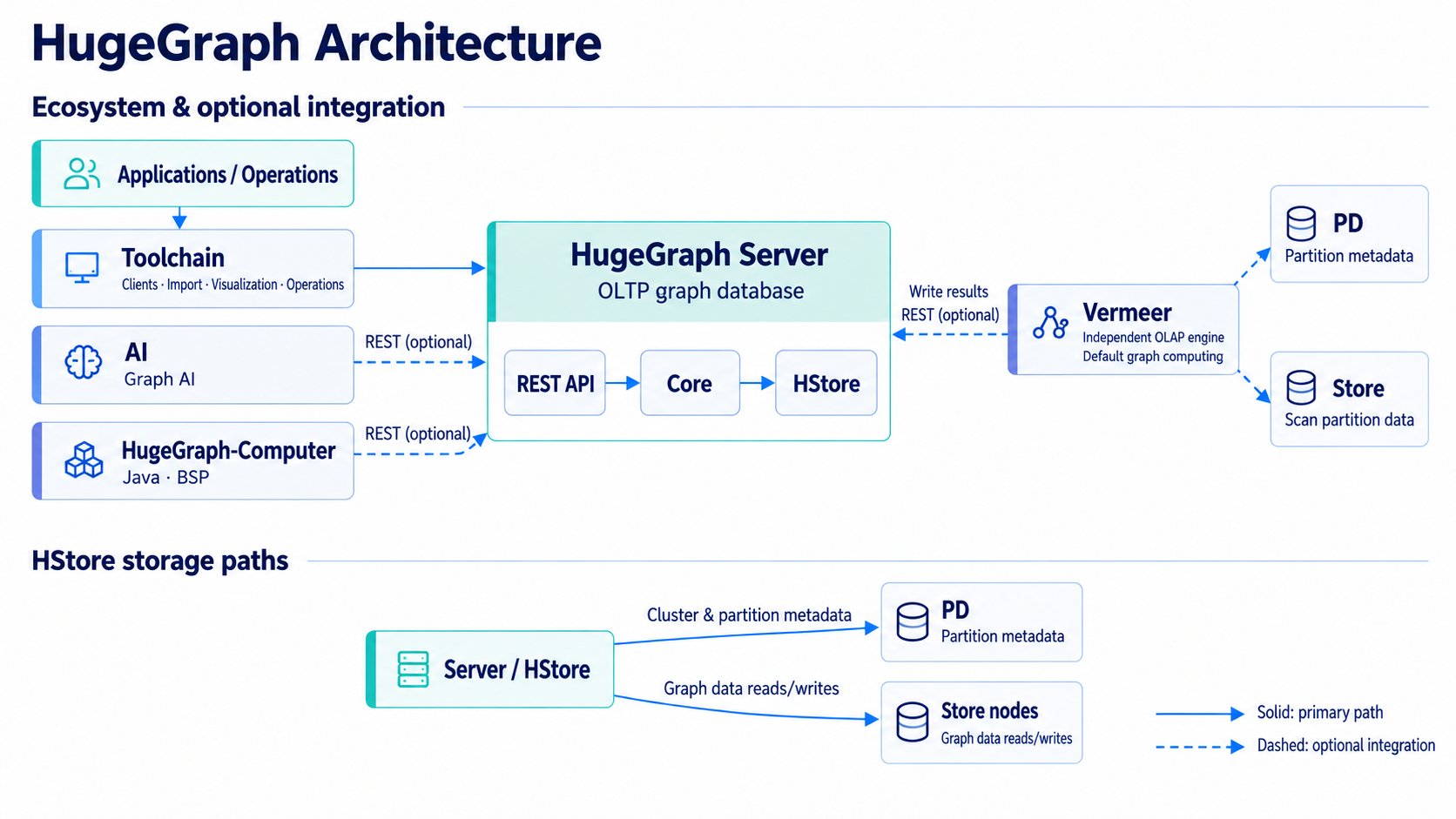
Figure: Server uses HStore as an example backend; see the Mermaid diagram below for independent backends such as RocksDB and HBase. Vermeer and HugeGraph-Computer are independent OLAP engines. Dashed arrows indicate optional integration.
Ecosystem Integration
flowchart TB
  Apps["Applications / Operations"] --> Toolchain["Toolchain"] --> Server["Server REST API"]
  AI["AI"] -. REST .-> Server
  Computer["Computer"] -. REST .-> Server
  Vermeer["Vermeer"] -. PD .-> PD["PD"]
  Vermeer -. Scan .-> Store["Store"]
  Vermeer -. Write .-> Server
Optional connections do not mean every AI, Computer, or Vermeer task must connect to Server, PD, or Store. Computer and AI read and write through the Server REST API. Vermeer’s HugeGraph input queries PD for partition metadata and scans HStore partitions directly through Store. With HugeGraph result output, it writes results back through the Server REST API.
Server Internals
flowchart TB
  API["REST API / Gremlin"] --> Core["Core"] --> Adapter["Backend adapter"]
  Adapter --> RocksDB["RocksDB"]
  Adapter --> HBase["HBase"]
  Adapter --> HStore["HStore"]
  HStore --> PD["PD"]
  HStore --> Store["Store"]
Server REST APIs and Gremlin send requests to Core, which reads and writes through a backend adapter. RocksDB and HBase are independent backends. The HStore adapter obtains cluster metadata and partition information from PD and sends graph operations to Store nodes. PD manages metadata and partitions; it does not carry graph data reads and writes.
Current Server implementations include RocksDB, HBase, HStore, and memory backends. Memory is for testing or temporary use, not a persistent production deployment. See the Server quick start for production deployment options.
Main Toolchain components:
- Hubble — Web visualization and management workspace for schema, imports, and queries.
- Loader — Multi-source batch data import utility for fast bulk loading.
- Tools — CLI operations tool for cluster maintenance, backup, and restore.
- Client — Official programmatic client SDKs available in Java, Python, and Go.
Independent Graph Computing Engines
- Vermeer — High-performance Go in-memory graph computing engine with 15+ OLAP algorithms.
- HugeGraph-Computer — Java distributed graph computing framework based on BSP/Pregel.
Historical Architecture
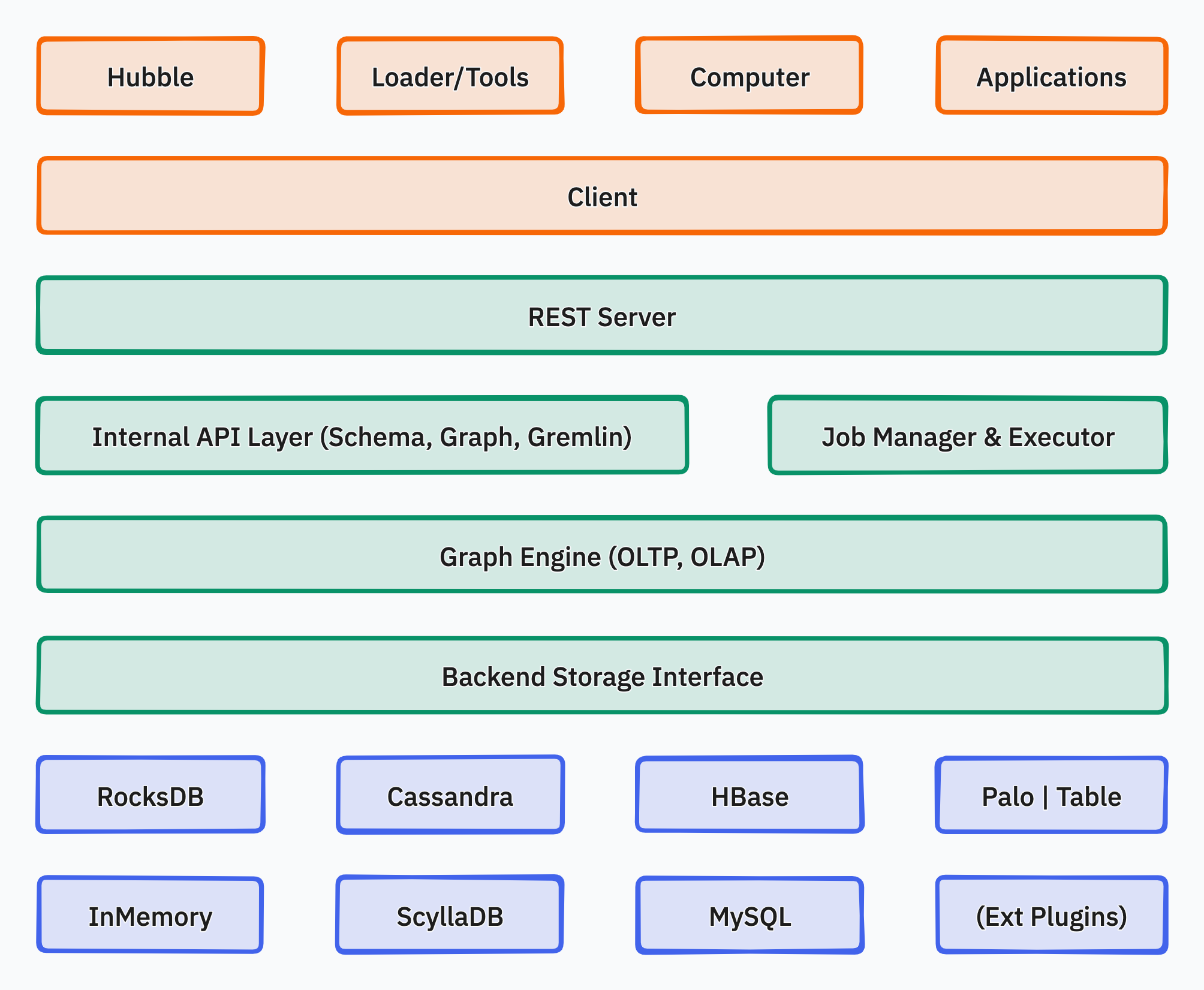
The following diagram is retained for historical reference. Its depiction of Server providing both OLTP and OLAP, and of various old backends, does not describe current master.
Related Topics
Extension mechanism, SPI registration, and plugin lifecycle in HugeGraph.
Historical background on the property graph model, graph partitioning, and early architecture tradeoffs.
1.1 - HugeGraph Plugin mechanism and plug-in extension process
For plugins targeting the planned 1.8.0 shared-foundation API, follow the Java/SPI migration guide and recompile against matching artifacts. The examples below describe the 1.7.0 API.
Background
- HugeGraph is not only open source and open, but also simple and easy to use. General users can easily add plug-in extension functions without changing the source code.
- HugeGraph supports a variety of built-in storage backends, and also allows users to extend custom backends without changing the existing source code.
- HugeGraph supports full-text search. The full-text search function involves word segmentation in various languages. Currently, there are 7 built-in word breakers (ansj, hanlp, smartcn, jieba, jcseg, mmseg4j, ikanalyzer), and it also allows users to expand custom word breakers without changing the existing source code.
Scalable dimension
Currently, the plug-in method provides extensions in the following dimensions:
- backend storage
- serializer
- Custom configuration items
- tokenizer
Plug-in implementation mechanism
- Provide SPI interface: HugeGraph provides the
HugeGraphPlugininterface, supporting pluggability via Java SPI. - Registration functions:
HugeGraphPluginexposes static registration methods:registerOptions(),registerBackend(),registerSerializer(), andregisterAnalyzer(). - Implement components: The developer implements the corresponding
OptionHolder,BackendStoreProvider,AbstractSerializer, orAnalyzerinterfaces. - Register in plugin: The developer implements the
register()method ofHugeGraphPluginto register implementation classes, declared inMETA-INF/services/. - Deploy and activate: Place the packaged JAR in the HugeGraph Server
plugins/directory, configure the custom options, and restart the service.
Plug-in implementation process example
1 Create a new maven project
1.1 Name the project name: hugegraph-plugin-demo
1.2 Add hugegraph-core Jar package dependencies
The Maven pom.xml is shown below. Match hugegraph.version to the target Server version; this example uses the current master version 1.7.0:
2 Realize extended functions
2.1 Extending a custom backend
2.1.1 Implement the interface BackendStoreProvider
- Realizable interfaces:
org.apache.hugegraph.backend.store.BackendStoreProvider - Or inherit an abstract class:
org.apache.hugegraph.backend.store.AbstractBackendStoreProvider
Take the RocksDB backend RocksDBStoreProvider as an example:
2.1.2 Implement interface BackendStore
The main abstract methods of BackendStore are shown below; default helper methods are omitted:
2.1.3 Extending custom serializers
The serializer must inherit the abstract class: org.apache.hugegraph.backend.serializer.AbstractSerializer
( implements GraphSerializer, SchemaSerializer) The main interface is defined as follows:
2.1.4 Extend custom configuration items
When adding a custom backend, it may be necessary to add new configuration items. The implementation process mainly includes:
- Add a configuration item container class and implement the interface
org.apache.hugegraph.config.OptionHolder - Provide a singleton method
public static OptionHolder instance(), and call the method when the object is initializedOptionHolder.registerOptions() - Add configuration item declaration, single-value configuration item type is
ConfigOption, multi-value configuration item type isConfigListOption
Take the RocksDB configuration item definition as an example:
2.2 Extend custom tokenizer
The tokenizer needs to implement the interface org.apache.hugegraph.analyzer.Analyzer, take implementing a SpaceAnalyzer space tokenizer as an example.
3. Implement the plug-in interface and register it
The plug-in registration entry is HugeGraphPlugin.register(), the custom plug-in must implement this interface method, and register the extension
items defined above inside it. The interface org.apache.hugegraph.plugin.HugeGraphPlugin is defined as follows:
And HugeGraphPlugin provides 4 static methods for registering extensions:
- registerOptions(String name, String classPath): register configuration items
- registerBackend(String name, String classPath): register backend (BackendStoreProvider)
- registerSerializer(String name, String classPath): register serializer
- registerAnalyzer(String name, String classPath): register tokenizer
The following is an example of registering the SpaceAnalyzer tokenizer:
4. Configure SPI entry
- Make sure the services directory exists: hugegraph-plugin-demo/resources/META-INF/services
- Create a text file in the services directory: org.apache.hugegraph.plugin.HugeGraphPlugin
- The content of the file is as follows: org.apache.hugegraph.plugin.DemoPlugin
5. Make Jar package
Through maven packaging, execute the command in the project directory mvn package, and a Jar package file will be generated in the
target directory. Copy the Jar package to the plugins directory when using it, and restart the service to take effect.
1.2 - HugeGraph Design Concepts
1. Property Graph
Version note: This page retains early design material. The property graph model and vertex ID strategies remain consistent with current master, but figures, partitioning conclusions, and transaction descriptions have the scope stated in each section. They are not current deployment or storage implementation guarantees.
There are two common graph data representation models, namely the RDF (Resource Description Framework) model and the Property Graph (Property Graph) model. Both RDF and Property Graph are the most basic and well-known graph representation modes, and both can represent entity-relationship modeling of various graphs. RDF is a W3C standard, while Property Graph is an industry standard and is widely supported by graph database vendors. HugeGraph currently uses Property Graph.
HugeGraph uses the property graph model. This person-and-book example shows labels and properties on vertices and directed edges. It is a logical model, not an illustration of the current internal data layout.
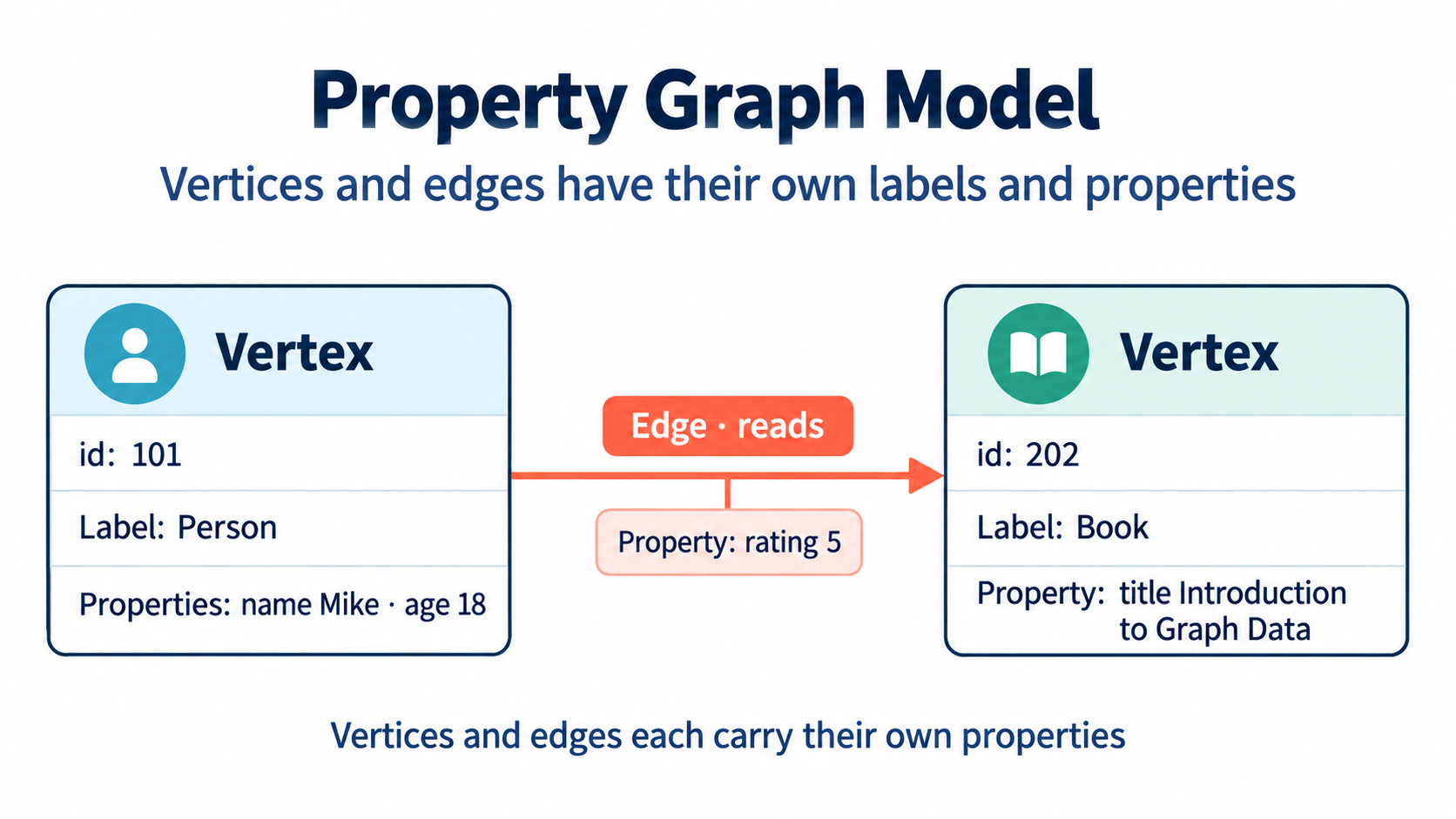
Figure: Vertices and edges each carry their own labels and properties.
Inside HugeGraph, each vertex/edge is identified by a unique VertexId/EdgeId, and the attributes are stored inside the corresponding vertex/edge. The relationship/mapping between vertices is stored through edges.
When the vertex attribute value is stored by edge pointer, if you want to update a vertex-specific attribute value, you can directly write it by overwriting. The disadvantage is that the VertexId is redundantly stored; if you want to update the attribute of the relationship, you need to use the read-and-modify method , read all attributes first, modify some attributes, and then write to the storage system, the update efficiency is low. According to experience, there are more requirements for modifying vertex attributes, but less for edge attributes. For example, calculations such as PageRank and Graph Cluster require frequent modification of vertex attribute values.
2. Graph Partition Scheme
Version note: The Edge Cut and Vertex Cut comparison is historical design background. Current PD and Store code does not define “HugeGraph uses Edge Cut” as an implementation contract. Do not use that conclusion to describe current partitioning or replication; see the HStore quick start for current distributed deployments.
For distributed graph databases, there are two partition storage methods for graphs: Edge Cut and Vertex Cut, as shown in the following figure. When using the Edge Cut method to store graphs, any vertex will only appear on one machine, while edges may be distributed on different machines. This storage method may lead to multiple storage of edges. When using the Vertex Cut method to store graphs, any edge will only appear on one machine, and each same point may be distributed to different machines. This storage method may result in multiple storage of vertices.
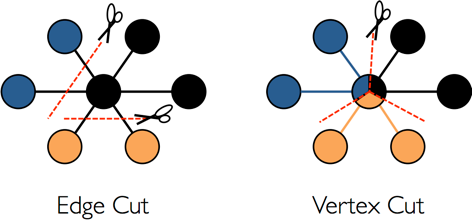
The EdgeCut partition scheme can support high-performance insert and update operations, while the VertexCut partition scheme is more suitable for static graph query analysis, so EdgeCut is suitable for OLTP graph query, and VertexCut is more suitable for OLAP graph query. Early design material described HugeGraph as using Edge Cut. That historical conclusion is retained here and does not describe the current partitioning implementation.
3. VertexId Strategy
Vertex of HugeGraph supports four ID strategies. Different VertexLabels in the same graph database can use different Id strategies. Currently, the Id strategies supported by HugeGraph are:
- Automatic generation (AUTOMATIC): Use the Snowflake algorithm to automatically generate a globally unique Id, Long type;
- Primary Key (PRIMARY_KEY): Generate Id through VertexLabel+PrimaryKeyValues, String type;
- Custom (CUSTOMIZE_STRING|CUSTOMIZE_NUMBER): User-defined Id, which is divided into two types: String and Long, and you need to ensure the uniqueness of the Id yourself;
- Custom UUID (CUSTOMIZE_UUID): User-defined Id in UUID form, you need to ensure the uniqueness of the Id yourself;
The default Id policy is AUTOMATIC, if the user calls the primaryKeys() method and sets the correct PrimaryKeys, the PRIMARY_KEY policy is automatically enabled. After enabling the PRIMARY_KEY strategy, HugeGraph can implement data deduplication based on PrimaryKeys.
- AUTOMATIC ID Policy
- PRIMARY_KEY ID policy
- CUSTOMIZE_STRING ID Policy
- CUSTOMIZE_NUMBER ID Policy
- CUSTOMIZE_UUID ID Policy
If users need Vertex deduplication, there are three options:
- Adopt PRIMARY_KEY strategy, automatic overwriting, suitable for batch insertion of large amount of data, users cannot know whether overwriting has occurred
- Adopt AUTOMATIC strategy, read-and-modify, suitable for small data insertion, users can clearly know whether overwriting occurs
- Using the CUSTOMIZE_STRING or CUSTOMIZE_NUMBER strategy, the user guarantees the uniqueness
4. EdgeId policy
Current implementation: The four-part composition below is a historical simplification. Current
EdgeIdalso distinguishes edge direction and parent/child edge labels. SeeEdgeIdin the Server source; use the source for your version when relying on ID formats or persistent keys.
The EdgeId of HugeGraph is composed of srcVertexId + edgeLabel + sortKey + tgtVertexId. Among them sortKey is an important concept of HugeGraph.
There are two reasons for adding sortKey to Edge as the unique ID of Edge:
- If there are multiple edges of the same Label between two vertices, they can be distinguished by
sortKey - For SuperNode nodes, edges can be sorted and truncated by
sortKey.
Since EdgeId is composed of srcVertexId + edgeLabel + sortKey + tgtVertexId, HugeGraph will automatically overwrite when the same Edge is inserted
multiple times to achieve deduplication. It should be noted that the properties of Edge will also be overwritten in the batch insert mode.
In addition, because HugeGraph’s EdgeId adopts an automatic deduplication strategy, HugeGraph considers that there is only one edge in the case of self-loop (a vertex has an edge pointing to itself), while a graph database that uses the AUTOMATIC strategy (TitanDB for example) considers that the graph has two edges.
The edges of HugeGraph only support directed edges, and undirected edges can be realized by creating two edges, Out and In.
5. HugeGraph transaction overview
Version scope: The isolation-level, thread-binding, and backend atomicity descriptions below are historical implementation notes. Transaction isolation and rollback boundaries depend on the backend implementation; do not treat these historical descriptions as cross-backend guarantees.
TinkerPop transaction overview
A TinkerPop transaction refers to a unit of work that performs operations on the database. A set of operations within a transaction either succeeds or all fail. For a detailed introduction, please refer to the official documentation of TinkerPop: http://tinkerpop.apache.org/docs/current/reference/#transactions
TinkerPop transaction interfaces
- open open transaction
- commit commit transaction
- rollback rollback transaction
- close closes the transaction
TinkerPop transaction specification
- The transaction must be explicitly committed before it can take effect (the modification operation can only be seen by the query in this transaction if it is not committed)
- A transaction must be opened before it can be committed or rolled back
- If the transaction setting is automatically turned on, there is no need to explicitly turn it on (the default method), if it is set to be turned on manually, it must be turned on explicitly
- When the transaction is closed, you can set three modes: automatic commit, automatic rollback (default mode), manual (explicit shutdown is prohibited), etc.
- The transaction must be closed after committing or rolling back
- The transaction must be open after the query
- Transactions (non-threaded tx) must be thread-isolated, and multi-threaded operations on the same transaction do not affect each other
For more transaction specification use cases, see: Transaction Test
HugeGraph transaction implementation
- All operations in a transaction either succeed or fail
- A transaction can only read what has been committed by another transaction (Read committed)
- All uncommitted operations can be queried in this transaction, including:
- Adding a vertex can query the vertex
- Delete a vertex to filter out the vertex
- Deleting a vertex can filter out the related edges of the vertex
- Adding an edge can query the edge
- Delete edge can filter out the edge
- Adding/modifying (vertex, edge) attributes can take effect when querying
- Delete (vertex, edge) attributes can take effect at query time
- All uncommitted operations become invalid after the transaction is rolled back, including:
- Adding and deleting vertices and edges
- Addition/modification, deletion of attributes
Example: One transaction cannot read another transaction’s uncommitted content
Principle of transaction realization
- The server internally realizes isolation by binding transactions to threads (ThreadLocal)
- The uncommitted content of this transaction overwrites the old data in chronological order for this transaction to query the latest version of data
- The bottom layer relies on the back-end database to ensure transaction atomicity (for example, the batch interface of RocksDB guarantees atomicity)
Notice
REST APIs do not expose a separate transaction lifecycle interface; write APIs invoke the relevant Server-side transaction commit logic.
TinkerPop API allows open transactions, which are automatically closed when the request is completed (Gremlin Server forces close)
2 - Development & Testing
This section collects guides for setting up local development environments, running test suites, and integrating experimental storage engines.
Section Guide
Guide for running local unit and integration tests across HugeGraph Toolchain components against Server.
Instructions for building and testing the optional ToplingDB runtime from source.
2.1 - HugeGraph Toolchain Local Testing Guide
This guide helps developers run HugeGraph toolchain tests locally.
1. Core Concepts
1.1 Core Dependency: HugeGraph Server
Integration and functional tests of the toolchain depend on HugeGraph Server, including Client, Loader, Hubble, Spark Connector, Tools, and other components.
1.2 Test Types
- Unit Tests: Test individual functions/methods, no external dependencies required
- API Tests (ApiTestSuite): Test API interfaces, requires running HugeGraph Server
- Functional Tests (FuncTestSuite): End-to-end tests, require complete system environment
2. Environment Setup
2.1 System Requirements
- Operating System: Linux / macOS (Windows use WSL2)
- JDK: >= 11, configure
JAVA_HOME - Maven: >= 3.6
- Python: >= 3.11 (only required for Hubble tests)
2.2 Clone Code
3. Deploy Test Environment
Deployment Options
- Script Deployment: Specify a Server commit to reproduce the server version used by CI
- Docker Deployment: Suitable for quick checks; if tests fail, first verify compatibility between the image and Toolchain
For detailed installation instructions, refer to Community Documentation
3.1 Script Deployment
Parameter Description
$COMMIT_ID: Specify Server source code Git Commit ID$DB_DATABASE/$DB_PASS: MySQL database name and password for Loader JDBC tests
Deployment Steps
1. Install HugeGraph Server
- The script starts HTTP and HTTPS instances on ports 8080 and 8443 and configures
admin/paauthentication. - Ensure both ports are available before running it.
2. Install Optional Dependencies
3. Health Check
3.2 Docker Deployment
Note: Docker images may have version lag, use script deployment if encountering compatibility issues
Quick Start
docker-compose Configuration (Optional)
Complete configuration example including Server, MySQL, Hadoop services (requires Docker Compose V2):
Hadoop Configuration Mounts
Create a ./config folder in the same directory as docker-compose.yml to mount Hadoop configuration files. You can skip this step if HDFS testing is not required.
📁 ./config/core-site.xml content:
📁 ./config/hdfs-site.xml content:
Docker Operations
4. Run Tests
Test process for each tool:
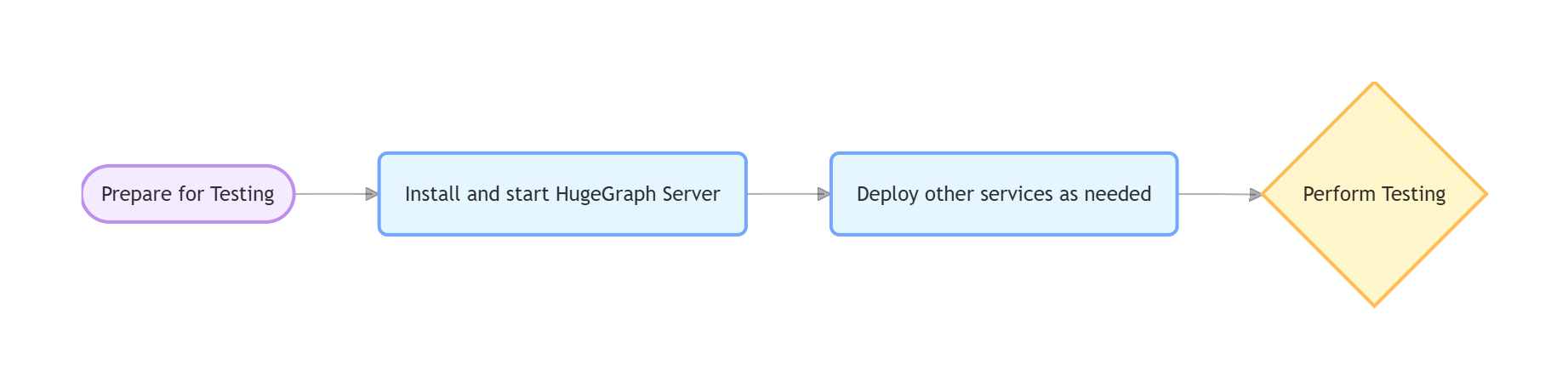
4.1 hugegraph-client
Compile
Dependent Services
Start HugeGraph Server (refer to Section 3)
Server Authentication Configuration
ApiTest requires authentication. No additional configuration is needed when using the script in Section 3.1. For a manually deployed Server, the authentication settings and test credentials must match the test code.
Run Tests
Check Server log if tests fail:
logs/hugegraph-server.log
4.2 hugegraph-loader
Compile
Dependent Services
- Required: HugeGraph Server
- Optional: Hadoop (HDFS tests), MySQL (JDBC tests); Kafka tests use Testcontainers to start Kafka and also require an available Docker daemon.
Run Tests
4.3 hugegraph-hubble
Compile
Dependent Services
1. Start Server (refer to Section 3)
2. Python Environment
3. Build and Verify
Run Tests
4.4 hugegraph-spark-connector
Compile
Run Tests
4.5 hugegraph-tools
Compile
Run Tests
5. Common Issues
Service Connection Issues
If Server, MySQL, or Hadoop cannot be reached:
- Confirm services are running (Server must be on port 8080)
- Check port usage:
lsof -i:8080 - Docker check:
docker compose psanddocker compose logs
Configuration Issues
If files cannot be found or parameters are invalid:
- Check environment variables:
echo $COMMIT_ID - Script permissions:
chmod +x hugegraph-*/assembly/travis/*.sh
HDFS Test Failures
- Confirm NameNode/DataNode running normally
- Check Hadoop logs
- Verify HDFS connection:
hdfs dfsadmin -report
JDBC Test Failures
- Confirm MySQL running normally
- Verify database connection:
mysql -u root -p$DB_PASS - Check MySQL logs
6. References
- HugeGraph GitHub Repository: https://github.com/apache/hugegraph
- HugeGraph Toolchain GitHub Repository: https://github.com/apache/hugegraph-toolchain
- HugeGraph Server Documentation: https://hugegraph.apache.org/docs/quickstart/hugegraph/hugegraph-server/
- CI Configuration:
.github/workflows/*-ci.yml - Dependency Installation Scripts:
hugegraph-*/assembly/travis/
2.2 - ToplingDB development integration
Development interface: This guide applies to development builds with the optional ToplingDB runtime enabled. Existing releases and image tags do not establish support, and runtime acceptance remains a deployment prerequisite.
Choose the database owner
HugeGraph defaults to standard RocksDB. Enable Topling separately for each process that owns local storage:
| Component | Business provider setting | Start command |
|---|---|---|
| Standalone RocksDB Server | rocksdb.provider=topling in each selected graph properties file | bin/start-hugegraph.sh |
| PD | provider: topling under rocksdb in conf/application.yml | bin/start-hugegraph-pd.sh |
| Store | provider: topling under rocksdb in conf/application-pd.yml | bin/start-hugegraph-store.sh |
A standalone Server keeps backend=rocksdb; an HStore-backed Server uses backend=hstore and needs no local Topling runtime.
All local RocksDB graphs in one Server process must use the same provider. The business setting must match the runtime selected by its launcher.
Build and prepare a standard distribution
Build the normal distributions from the source repository root using Java 17 and Maven 3.6.3 or later:
Obtain a trusted Topling Easy Migrate JNI JAR and its SHA-256 through your artifact channel. Preparation requires a Java 17 JDK, Linux x86_64,
sha256sum, unzip, od, ldd, and GNU mv. The selected JAR’s native dependencies, including its glibc and libaio requirements, must be installed.
Stop the component, unpack a fresh standard distribution, and run from that component directory:
The script verifies the copied JAR’s hash, Topling Java marker, one Linux x86_64 JNI entry, ELF architecture and native dependencies.
Before installation, a disposable database verifies that the selected JNI actually applies EasyMigrate configuration to its persisted write-buffer size.
Unsupported builds are rejected even when their marker and hash match. The probe does not certify existing-data compatibility or every production setting.
A checksum receipt binds this verification to the installed JAR and native library; launchers reject missing or changed receipts. Use a fresh distribution
when upgrading from an older preparation script. Launch rejects inherited RocksDB JNI preloads in default/standard mode
and competing JNI in Topling mode, while preserving unrelated preloads.
It installs topling/rocksdbjni.jar, its native library and optional web resources outside lib. Preparation refuses an existing topling directory;
replace a runtime by preparing another stopped, fresh distribution. Repeat preparation separately for Server, PD and Store as applicable.
Keep data outside the distribution
Changing providers does not convert an existing database. Use separate, initially empty Topling directories and retain the standard-provider data. Create persistent directories writable by the service account, outside source checkouts, build outputs and unpacked distribution directories. Note that each graph requires distinct, dedicated data and WAL directories to prevent path conflicts:
| Component | Configuration file and key | Example persistent path |
|---|---|---|
| Server data | Graph properties: rocksdb.data_path | /srv/hugegraph/topling/server/<graph>/data |
| Server WAL | Graph properties: rocksdb.wal_path | /srv/hugegraph/topling/server/<graph>/wal |
| PD | conf/application.yml: pd.data-path | /srv/hugegraph/topling/pd |
| Store data | conf/application.yml: app.data-path | /srv/hugegraph/topling/store/data |
| Store Raft | conf/application.yml: app.raft-path | /srv/hugegraph/topling/store/raft |
For a standalone Server, edit every selected graph configuration, for example conf/graphs/hugegraph.properties
(replace hugegraph with the corresponding graph name for each graph):
Set both Server data and WAL paths, ensuring each graph uses distinct directories. Leaving WAL at its package-local default risks losing it when a build or package replacement removes that directory. Keep the external data, WAL and Raft roots across runtime/package changes.
For PD and Store, edit the existing rocksdb mapping in the provider configuration file listed above, retaining its other options:
Set their persistent paths separately in conf/application.yml; keep the normal network addresses and cluster configuration.
The published runtime directories use 0755 and regular files use 0644, so a service account different from the preparer can read the JNI. The service account also needs traversal permission on the component’s parent directories; preparation does not change those parents.
Select, start and verify
In the startup shell of each component that owns a Topling database, explicitly select the runtime:
The launcher uses that component’s conf/toplingdb.yaml. Set TOPLINGDB_EASY_MIGRATE_CONF=/absolute/path/config.yaml for an explicit override.
The shipped native profile disables its HTTP server and keeps memtable_as_log_index=false, which the Java write path requires.
Tune that profile for the host; it is separate from the business provider and data-path configuration.
For a fresh standalone Server graph, initialize its store once before the first startup:
bin/init-store.sh and bin/dump-store.sh use the same explicit runtime selection as bin/start-hugegraph.sh.
For HStore, start PD, then Store. Before starting the HStore-backed Server from the same shell, run unset TOPLINGDB_ROCKSDB_PROVIDER
(or export TOPLINGDB_ROCKSDB_PROVIDER=rocksdb); do not enable local Topling on that Server.
A configured provider/runtime mismatch fails before the component opens its database.
Before adoption, verify the actual RocksDB Java classes and mapped JNI library belong to the prepared runtime. Use dedicated data directories to test real writes, reads, normal stop and restart; for HStore, include a Server graph operation through PD and Store. A successful build, startup or standard-JNI unit test alone does not establish Topling runtime acceptance.
Stop or switch back
Stop incoming work, then use the normal stop scripts. For HStore, stop Server with bin/stop-hugegraph.sh, Store with bin/stop-hugegraph-store.sh,
and PD with bin/stop-hugegraph-pd.sh, waiting for each process to exit before stopping its dependency. A forced kill is not proof of normal native cleanup.
To use standard RocksDB again, stop the component, unset TOPLINGDB_ROCKSDB_PROVIDER, and restore its business provider to rocksdb.
Select the corresponding standard-provider data and WAL paths; do not point it at a database modified by Topling.
Dedicated Topling distributions, Docker/Compose packaging, general lifecycle changes and retryable snapshot recovery are separate follow-ups. This guide covers the normal distribution launch scripts; custom IDE and embedded launchers require their own runtime setup and validation.
3 - Backup and Restore
Description
Backup exports a graph’s schema, vertices, and edges as JSON data. Restore imports that data into a target graph. These HugeGraph-Tools commands support migration, recovery after an upgrade, and graph merging.
Backup
Backup runs in any graph mode. Pausing source writes before exporting is recommended to keep schema, vertices, and edges consistent
(paginated read APIs do not provide a global transactional snapshot).
Note: backup -t all only exports schema and graph data, excluding deployment configurations and user permissions.
Restore
Before restoring data, switch the target graph to the appropriate mode.
Normal read/write operations use NONE mode; note that LOADING mode cannot be used for restore.
| Target | Mode | Schema IDs | Vertex and edge IDs |
|---|---|---|---|
| New graph without schema or data | RESTORING | Use IDs from the backup | Use IDs from the backup |
| Existing graph to merge into | MERGING | Use target schema IDs, creating schema if needed | Some IDs change with target schema; see below |
In MERGING, Tools recomputes PRIMARY_KEY vertex IDs using the target label IDs and updates connected edge endpoints and IDs.
It retains AUTOMATIC and custom vertex IDs. The merge reuses schema with matching names.
Check that their definitions are compatible and that retained vertex IDs do not conflict.
It does not resolve arbitrary schema or data conflicts. Test on a separate target before merging production data.
Instructions
Prepare HugeGraph-Tools compatible with your Server version, then run the commands from the Tools root directory.
This example restores a source graph on port 8080 to an empty target on port 8081.
Both Servers and the target graph must already exist and be running. Adjust the addresses and graph names for your deployment.
With authentication enabled, add --user <user> --password <password> before the subcommand in each Tools command.
The account needs the relevant graph access and graph-mode management permissions.
See the Tools reference for connection and credential options.
Backup
Pause source writes, then export all schema, vertices, and edges.
An explicit -d is the backup directory itself; the graph name is not appended. Use a separate directory for each backup to avoid mixing old files.
Retain the complete directory, including compressed files. Restore reads the JSON backup formats supported by Tools.
Restore
This sequence uses RESTORING. To merge, use MERGING after the compatibility checks above.
Pause application writes to the target during maintenance.
Record the original mode, then switch it.
A graph in normal use should be in
NONEmode. SetORIGINAL_MODEto the value returned by the query, such asNONEbelow. If another task is usingRESTORING,MERGING, orLOADING, coordinate with that task before changing its mode.Restore the data.
Check command output and the restore results for each type. On failure, retain the backup directory and logs to inspect target state. Restore does not automatically roll back committed writes; do not re-run on a partially restored graph without inspection.
Restore the original mode.
Reset the mode using
ORIGINAL_MODE, recorded in the first step.Regardless of whether restore succeeds or fails, always restore the graph mode back to its original state (usually
NONE). On failure, preserve the logs and state, and re-prepare the target graph before resuming business writes.
After resetting the mode, compare vertex and edge counts on both graphs.
Each pair of counts should match exactly. We also recommend using the Schema API to verify metadata definitions, and sampling vertex and edge properties and endpoints to ensure complete data integrity.
Help
For additional options on compression, concurrency, and selective type backup, see the Tools reference. Before performing cross-major-version restores, verify backup file compatibility in a test environment first.
API description for Backup/Restore usage and implementation
Backup
Backup exports data through the schema, vertex, and edge list GET APIs.
Restore
Restore imports data through the schema, vertex, and edge creation APIs. See the mode table for ID behavior.
RESTORING accepts schema IDs; MERGING does not. Both accept retained AUTOMATIC vertex IDs.
Normal NONE mode does not accept these ID settings required for restore.
View the mode of a graph
When authentication is enabled, graph read permission is required (space_member or the graph owner).
Method & Url
Response Status
Response Body
Valid graph modes are NONE, RESTORING, MERGING, and LOADING.
Set the mode of a graph
When authentication is enabled, graph-space management permission (space) is required; administrators can satisfy it through permission inheritance.
Method & Url
Request Body
Valid graph modes are NONE, RESTORING, MERGING, and LOADING.
Response Status
Response Body
4 - HugeGraph Docker Cluster Guide
Overview
Docker Compose provides a quick way to run a complete HugeGraph distributed cluster (PD + Store + Server) on Linux or macOS.
Prerequisites
- Docker Engine 20.10+ or Docker Desktop 4.x+
- Docker Compose v2
- For a three-node cluster on macOS, allocate at least 12 GB of memory (Settings → Resources → Memory). Adjust resources to suit other platforms.
Tested environments: Linux (native Docker) and macOS (Docker Desktop on ARM M4).
Compose Files
The HugeGraph repository provides four Compose files in docker/:
| File | Services | Use case |
|---|---|---|
docker-compose.yml | 1 RocksDB Server + 1 Hubble | Default standalone Quick Start; recommended starting point |
docker-compose-hstore.yml | 1 PD + 1 Store + 1 Server + 1 Hubble | Local distributed development |
docker-compose-3pd-3store-3server.yml | 3 PD + 3 Store + 3 Server + 1 Hubble | HA reference and evaluation |
docker-compose.dev.yml | Override only | Source-build override for the minimal HStore topology; always combine with docker-compose-hstore.yml |
Standalone uses hugegraph/hugegraph:${HUGEGRAPH_VERSION:-latest}; HStore uses matching hugegraph/pd, hugegraph/store, and hugegraph/server tags. Hubble is selected separately by ${HUBBLE_IMAGE:-hugegraph/hubble:latest}.
The following steps assume you have cloned the
hugegraphrepository, or at least itsdocker/directory.
HStore and HA instructions use current master Compose files and require PD, Store, and Server images built from the same master source. Do not combine these files with HStore component images tagged 1.7.0. The standalone example separately pins hugegraph/hugegraph:1.7.0.
Authentication Environment
This .env template applies to current master Compose. Angle-bracket values and replace-with-your-password are placeholders: replace them before loading the file or starting services. Follow the master authentication environment instructions to generate .env, then replace the administrator password placeholder:
For master HStore and HA topologies, HG_PD_AUTH_SECRET_KEY is the PD REST Basic password, shared by all PD nodes, Server, and Hubble. Current master PD Docker images require it. Hubble does not read .env directly: generate the local configuration for its topology using this value before startup, as described below. Do not commit .env or generated .local.properties files.
A nonempty HUGEGRAPH_ADMIN_PASSWORD enables Server authentication through PASSWORD; Hubble detects this mode through the Server API. It initializes the built-in admin password only on first initialization. An unset or empty value disables authentication and is suitable only for trusted local environments.
Current master Compose passes HUGEGRAPH_AUTH_TOKEN_SECRET as HG_SERVER_AUTH_TOKEN_SECRET. A shared secret lets master Server replicas verify the same tokens and retain token validity after container recreation; HA Compose requires an explicit secret. The standalone hugegraph/hugegraph:1.7.0 entrypoint enables authentication through PASSWORD but ignores HG_SERVER_AUTH_TOKEN_SECRET, so this .env variable does not fix its JWT secret. For a stable JWT secret in 1.7.0, explicitly set auth.token_secret in its authentication graph configuration, conf/graphs/hugegraph.properties, and persist that file across container replacement. See the authentication guide for graph paths and secret generation.
Changing HUGEGRAPH_ADMIN_PASSWORD later does not rotate an existing password; use the user API.
Production component access controls
In production, enable Server authentication and authorization for graph APIs, maintain the Server IP allowlist, grant minimum permissions, and retain Server audit-*.log with restricted read access. Configure PD REST credentials and PD/Store gRPC, Raft, and REST network boundaries separately; Server Auth does not protect those ports. Expose PD/Store only to cluster nodes and trusted operations networks.
Standalone Quick Start
This section pins the standalone image hugegraph/hugegraph:1.7.0. HStore/HA examples use master-built images; do not reuse this version for them.
Verify:
Hubble binds only to host loopback (127.0.0.1:8088) by default. Set HUBBLE_PUBLISH_HOST only behind an HTTPS reverse proxy and trusted network controls.
Minimal HStore Quick Start (Current Master Images)
Build PD, Store, and HStore Server images from the HugeGraph Server master repository root:
From the repository root, enter docker/, load .env, and generate Hubble configuration for the minimal topology. A read-only bind mount cannot create a valid missing hstore.local.properties; generate it before startup:
Verify:
To build this topology from local source instead of pulling images, add the development override and keep both files in all subsequent lifecycle commands:
The override builds images tagged dev. If you already built local images above, start with the base Compose file and HUGEGRAPH_VERSION=local; keep the tag choices consistent.
Three-Node Cluster Quick Start (Current Master Images)
HA Compose has no source-build override. First build hugegraph/pd:local, hugegraph/store:local, and hugegraph/server:local from the same master source as in the minimal HStore section, then load .env in docker/, generate HA Hubble configuration, and start:
HA Hubble bind-mounts conf/hubble/hstore-ha.local.properties; generate this before startup. It is separate from the minimal topology’s hstore.local.properties, but both use the same HG_PD_AUTH_SECRET_KEY from .env.
The default startup order is:
- PD nodes start first and must pass
/v1/healthchecks. - Store nodes start after all PD nodes are healthy.
- Server nodes start after all Store and PD nodes are healthy.
Verify the cluster: PD /v1/health and /v1/ready probes require no authentication. Store registration and partition queries are protected PD REST management APIs: use Basic username hg and HG_PD_AUTH_SECRET_KEY from .env.
With authentication enabled, graph listing should reject anonymous access and accept the administrator:
The other Server nodes listen on 8081 and 8082; the remaining PD and Store nodes use 8621/8622 and 8521/8522.
Environment Variable Reference
The following tables describe current master entrypoints and Compose files, not the standalone hugegraph/hugegraph:1.7.0 environment-variable contract. PD and Store build SPRING_APPLICATION_JSON from their variables and log selected nonsensitive settings at startup. PD secrets are excluded from that summary. Use docker logs to check listed settings; an absent secret in the logs does not establish whether it was applied. Server instead rewrites keys in conf/graphs/hugegraph.properties and conf/rest-server.properties.
PD Variables
| Variable | Required | Default | Configuration mapping |
|---|---|---|---|
HG_PD_GRPC_HOST | Yes | None | grpc.host |
HG_PD_RAFT_ADDRESS | Yes | None | raft.address |
HG_PD_RAFT_PEERS_LIST | Yes | None | raft.peers-list |
HG_PD_INITIAL_STORE_LIST | Yes | None | pd.initial-store-list |
HG_PD_GRPC_PORT | No | 8686 | grpc.port |
HG_PD_REST_PORT | No | 8620 | server.port |
HG_PD_DATA_PATH | No | /hugegraph-pd/pd_data | pd.data-path |
HG_PD_INITIAL_STORE_COUNT | No | 1 | pd.initial-store-count |
HG_PD_AUTH_SECRET_KEY | Yes (current master Docker) | None | auth.secret-key; PD REST Basic password, also used by Server and Hubble |
Deprecated aliases:
GRPC_HOST→HG_PD_GRPC_HOST,RAFT_ADDRESS→HG_PD_RAFT_ADDRESS,RAFT_PEERS→HG_PD_RAFT_PEERS_LIST,PD_INITIAL_STORE_LIST→HG_PD_INITIAL_STORE_LIST. Old names are mapped only when new names are unset, with a warning. Missing required variables cause the entrypoint to exit with code 2.
Store Variables
| Variable | Required | Default | Configuration mapping |
|---|---|---|---|
HG_STORE_PD_ADDRESS | Yes | None | pdserver.address |
HG_STORE_GRPC_HOST | Yes | None | grpc.host |
HG_STORE_RAFT_ADDRESS | Yes | None | raft.address |
HG_STORE_GRPC_PORT | No | 8500 | grpc.port |
HG_STORE_REST_PORT | No | 8520 | server.port |
HG_STORE_DATA_PATH | No | /hugegraph-store/storage | app.data-path |
HG_STORE_ROCKSDB_TOTAL_MEMORY_SIZE | No | None | rocksdb.total_memory_size, auto or bytes |
Deprecated aliases:
PD_ADDRESS→HG_STORE_PD_ADDRESS,GRPC_HOST→HG_STORE_GRPC_HOST,RAFT_ADDRESS→HG_STORE_RAFT_ADDRESS.
RocksDB caches use off-heap memory. When HG_STORE_ROCKSDB_TOTAL_MEMORY_SIZE is unset, the system sizes the cache automatically from the container memory limit (cgroup), or falls back to the host memory if no container limit is configured.
Because the default Docker Compose file does not set a memory limit, each Store sizes its budget using the host’s full capacity. When deploying multiple Stores on a single host, specify a container memory limit or set this variable directly to an explicit byte value.
Additionally, the Store startup script sizes the JVM heap and direct memory based on host free memory by default (up to 2 GiB each). Constrain JVM memory explicitly via JAVA_OPTS to match your container budget (for example, JAVA_OPTS="-Xmx1g -XX:MaxDirectMemorySize=512m" for a 4 GiB container). See the HStore configuration reference for the detailed calculation rules.
Server Variables
Unlike PD and Store, Server has no mandatory entrypoint variables: only set values are written to configuration. Distributed deployment nevertheless requires at least HG_SERVER_BACKEND and HG_SERVER_PD_PEERS.
| Variable | Default | Configuration mapping |
|---|---|---|
HG_SERVER_BACKEND | Template value (rocksdb, or hstore in hugegraph/server) | backend in conf/graphs/hugegraph.properties |
HG_SERVER_PD_PEERS | None | pd.peers in hugegraph.properties and rest-server.properties |
HG_SERVER_USE_PD | false | usePD in rest-server.properties |
HG_SERVER_CLUSTER | hg-test | cluster in rest-server.properties |
HG_SERVER_REST_URL | http://0.0.0.0:8080 (set in the image) | restserver.url |
HG_SERVER_URLS_TO_PD | http://0.0.0.0:8080 | server.urls_to_pd: comma-separated URLs this Server registers in PD instead of restserver.url; read only when server.deploy_in_k8s is true; give each URL its own http:// prefix, since only the first entry gets one added; whitespace is removed |
HG_SERVER_DEPLOY_IN_K8S | false | server.deploy_in_k8s in rest-server.properties |
HG_SERVER_MIN_FREE_MEMORY | 64(MB) | restserver.min_free_memory |
HG_SERVER_INIT_STORE_ENABLED | true | init_store.enabled; set false for PD/HStore deployments whose metadata is managed by storage |
HG_SERVER_AUTH_TOKEN_SECRET | Generated when PASSWORD is set | auth.token_secret in both configuration files; at least 32 bytes |
HG_SERVER_REQUIRE_AUTH_TOKEN_SECRET | false | When true, refuse startup if PASSWORD is set without HG_SERVER_AUTH_TOKEN_SECRET |
PASSWORD | None | auth.admin_pa; runs bin/enable-auth.sh to enable authentication |
PRELOAD | None | When true, preload the example graph from scripts/example.groovy |
JAVA_OPTS | Set in the image | Passed to bin/start-hugegraph.sh -j |
HG_SERVER_STARTUP_TIMEOUT_S | 120 seconds | Passed to bin/start-hugegraph.sh -t, range 1–86400; see Server startup timeout below |
STORE_REST | store:8520 | Store REST address polled by wait-partition.sh, for HStore only |
HG_SERVER_PD_REST_ENDPOINT | Derived from pd.peers by replacing :8686 with :8620 | PD REST address polled by wait-storage.sh |
PD_AUTH_USER | store | Basic username for PD REST calls from wait-storage.sh |
PD_AUTH_PASSWORD | Empty | PD REST Basic password; must match HG_PD_AUTH_SECRET_KEY when PD REST authentication is enabled |
WAIT_PARTITION_TIMEOUT_S | 120 | Partition polling timeout; also bounds the final diagnostic in builds with the fix described below |
Master builds that include authentication property fixes preserve spaces, backslashes and Unicode in explicit
signing keys. Use the same key on every Server replica. When upgrading from an image that misread such a key, explicitly supply the intended
HG_SERVER_AUTH_TOKEN_SECRET again; retaining the old configuration also retains its misread key. If the active key changes, sign in again to
obtain new tokens. The 1.7.0 image limitation above still applies.
Older images could initialize a Unicode administrator password incorrectly when the initializer inherited the C locale. Upgrading or setting
PASSWORD again does not repair an existing account’s stored password. A working administrator must change it through the
user API. This fix provides no automatic recovery when no administrator identity is usable; preserve the
existing data and arrange account recovery before upgrading.
Deprecated aliases:
BACKEND→HG_SERVER_BACKEND,PD_PEERS→HG_SERVER_PD_PEERS.
wait-storage.sh waits up to 300 seconds for an Up Store. This duration is hardcoded and cannot be changed through environment variables.
In master builds, HStore startup gives partition polling
and the final /v1/partitions diagnostic separate WAIT_PARTITION_TIMEOUT_S budgets. Earlier builds bound polling only; the final diagnostic
request has no timeout. With the default value, a stalled final response times out after 120 seconds; setting the value to 0 disables
GNU timeout’s limit.
The entrypoint waits for wait-partition.sh before waiting for the Java launcher. If Java exits while partition polling is still waiting,
that poll can consume its full timeout before the entrypoint observes the exit. If polling succeeds, the diagnostic step can then consume
a second full timeout before observation finishes; signal-triggered shutdown remains interruptible.
HG_SERVER_INIT_STORE_ENABLED and HG_SERVER_DEPLOY_IN_K8S accept only the case-insensitive boolean values recognized by HugeConfig: y, t, yes, on, true, n, f, no, off, false. Other values, including 0 and 1, terminate the entrypoint.
After successful initialization, the entrypoint writes docker/init_complete; later starts skip reinitialization but still invoke bin/init-store.sh to revalidate configuration each time initialization is disabled.
Compose Variables
Compose files, rather than entrypoints, read these variables:
| Variable | Default | Purpose |
|---|---|---|
HUGEGRAPH_VERSION | latest | Server, PD, and Store image tag |
HUGEGRAPH_PULL_POLICY | missing | Image pull_policy; use never to retain locally built images |
HUBBLE_IMAGE | hugegraph/hubble:latest | Hubble image, selected independently of HUGEGRAPH_VERSION |
HUBBLE_PULL_POLICY | missing | Hubble image pull_policy |
HUBBLE_PUBLISH_HOST | 127.0.0.1 | Host interface for publishing Hubble port 8088 |
HUGEGRAPH_ADMIN_PASSWORD | None | Passed to Server as PASSWORD |
HUGEGRAPH_AUTH_TOKEN_SECRET | None | Master Compose passes this to Server as HG_SERVER_AUTH_TOKEN_SECRET; the 1.7.0 image ignores it |
HG_PD_AUTH_SECRET_KEY | None | HStore PD REST Basic password; Compose supplies it to PD and Server and uses it to generate local Hubble configuration |
Port Reference
Published ports in the three-node cluster:
| Service | Host port | Container port | Purpose |
|---|---|---|---|
| pd0 | 8620 | 8620 | REST API |
| pd0 | 8686 | 8686 | gRPC |
| pd1 | 8621 | 8620 | REST API |
| pd1 | 8687 | 8686 | gRPC |
| pd2 | 8622 | 8620 | REST API |
| pd2 | 8688 | 8686 | gRPC |
| store0 | 8500 | 8500 | gRPC |
| store0 | 8510 | 8510 | Raft |
| store0 | 8520 | 8520 | REST API |
| store1 | 8501 | 8500 | gRPC |
| store1 | 8511 | 8510 | Raft |
| store1 | 8521 | 8520 | REST API |
| store2 | 8502 | 8500 | gRPC |
| store2 | 8512 | 8510 | Raft |
| store2 | 8522 | 8520 | REST API |
| server0 | 8080 | 8080 | Graph API |
| server1 | 8081 | 8080 | Graph API |
| server2 | 8082 | 8080 | Graph API |
| hubble | 8088 | 8088 | Hubble UI, bound to 127.0.0.1 by default |
Standalone publishes only 8080 and 8088; minimal HStore publishes 8620 (PD REST), 8520 (Store REST), 8080, and 8088. PD Raft uses internal port 8610, unpublished in all topologies.
Troubleshooting
Container OOM exit (code 137): Increase Docker Desktop memory beyond 12 GB or adjust JVM memory for the killed process.
Raft election timeout: Verify every PD node has the same
HG_PD_RAFT_PEERS_LIST. Check connectivity withdocker exec hg-pd0 ping pd1.Partition allocation incomplete: Load
.envindocker/, then check Store registration with PD REST Basic authentication:PD can complete partition allocation once all three Stores report
"state":"Up".Connection refused: Use container hostnames (
pd0,store0) inHG_*variables rather than127.0.0.1.Unexpected retained data:
docker compose downkeeps named volumes. To delete topology data too, usedocker compose down -v.Permission deniedafter upgrading to master-built images: PD, Store and Server images built from current master run as the non-root userhugegraph, UID/GID10001. Volumes written by older images, which ran as root, stay owned by root. Stop withdocker compose down(notdown -v), change the owner of each data volume once, then start again:Do not upgrade running containers with a plain
up -d: Compose reattaches the anonymous volume holding the previous image’s root-owned application directory. Rundownfirst, or useup -d --renew-anon-volumes. A host directory used as a bind mount must be writable by UID10001; one an older image wrote to needssudo chown -R 10001:10001 <dir>, since files inside it stay owned by root. On Kubernetes, the pod security context needsfsGroup: 10001, which the Helm chart sets for PD and Store; see Helm upgrade and verification.
Runtime logs: docker logs <container-name> (for example, docker logs hg-pd0) shows logs without entering containers. In images built from current
master, the PD, Store and both Server images (hugegraph/hugegraph and the HStore hugegraph/server) set STDOUT_MODE=true and send service logs to stdout.
For the Server, WARN and above from Hadoop, ZooKeeper, SOFA, Netty and Commons also reaches stdout; INFO from Hadoop, Netty and Commons and the audit and
slow-query logs stay in files, and ZooKeeper and SOFA log nothing below WARN. /hugegraph-server/logs holds hugegraph-server.log, JVM crash logs
(hs_err_pid*.log) and out-of-memory heap dumps (heapdump_*/java_pid*.hprof, one directory per start, so the Server and the JVMs it starts get separate files
unless a JVM reuses an earlier PID from that start; if the directory cannot be created, dumps go to /hugegraph-server/logs itself). Both images declare
VOLUME /hugegraph-server, so docker restart and a Compose recreate keep them; docker compose down leaves that anonymous volume behind unattached, and a
later down -v does not remove it (note the volume name from docker inspect before down and delete it with docker volume rm <name>; docker volume prune
would also delete every other unused anonymous volume on the Docker host), so use a named volume or bind mount to keep them reachable. Kubernetes starts a new
container on every restart, so mount an emptyDir or a PersistentVolumeClaim at /hugegraph-server/logs. Give each pod its own volume, or a per-pod directory
on a shared PVC (subPathExpr: $(POD_NAME), with POD_NAME passed in from metadata.name through the Downward API; the Helm chart sets neither): crash files
get distinct names, but the log files themselves have fixed names. Pods on different nodes can share one PVC only if its storage supports read-write mounts from
several nodes (typically ReadWriteMany); a ReadWriteOnce claim is writable from one node only, so otherwise give each pod its own PVC. The Helm chart does
not mount a logs volume yet. A heap dump can be as large as the JVM heap, and every start uses a new directory, so a Server that keeps running out of memory
fills the volume; size it for the dumps you want to keep, keep it within any ephemeral-storage limit or emptyDir sizeLimit (eviction deletes the
emptyDir with the dump), and do not use medium: Memory. A failing liveness probe can restart the container as soon as about
(failureThreshold - 1) × periodSeconds + timeoutSeconds after a dump starts, and the kubelet kills it at most terminationGracePeriodSeconds after that; make
that time longer than writing a heap dump takes, or a restart in the middle of a dump leaves a truncated file. The launcher never deletes dumps or heapdump_*
directories, because a computer-job JVM can go on using one after its Server exits; each start that reaches Java leaves one, empty unless something ran out of
memory. Delete old ones once no HugeGraph JVM from that launch is running, never the newest one of a running Server. To turn dumps off for every JVM, set
JAVA_TOOL_OPTIONS=-XX:-HeapDumpOnOutOfMemoryError in the container’s environment (docker run -e, an environment: entry on the Server service in Compose,
which the shipped Compose files do not set, or env in Kubernetes; exporting it in the host shell has no effect), which keeps the image’s default JAVA_OPTS;
putting the flag in JAVA_OPTS affects the Server JVM only and replaces that default (-XX:+UseContainerSupport -XX:MaxRAMPercentage=50 ...), so repeat those
flags.
Version scope: the paragraph above describes current master images. No 1.7.0 or older image sets
STDOUT_MODE, including the standalonehugegraph/hugegraph:1.7.0used above:docker logsshows only entrypoint output, and service logs stay inlogs/inside the container (logs/hugegraph-server.logfor the Server).
Container Monitoring and Health Checks
Version scope: This section describes current master Docker images; these behaviors are not included in 1.7.0 images. Use the master-built
localimages above or alatestimage containing these changes.
Process Monitoring
Previously, all three entrypoints ended with tail -f /dev/null, keeping containers alive even after Java crashed. Because containers never exited, Docker’s restart: unless-stopped policy did not trigger.
Entrypoints now monitor Java directly:
- PD and Store: The entrypoint passes
-d falseto the startup script, which replaces itself with Java usingexec. When Java exits, the container exits immediately and Docker’s restart policy applies. - Server: The entrypoint owns the foreground launcher and waits for Java. After readiness, it preserves Java’s exit status,
including
0,42, and137forSIGKILL.SIGTERMandSIGINTrequest cooperative shutdown, reap owned readiness/partition checks, and return143and130respectively after shutdown. - PID 1 in every image is
dumb-init, which forwards Docker signals to the entrypoint.
Server Startup Timeout
HG_SERVER_STARTUP_TIMEOUT_S sets the Docker entrypoint’s REST readiness deadline; the default is 120 seconds.
Values must be decimal integers without leading zeros, from 1 to 86400 seconds.
Empty strings, 0, negative numbers, fractions, and out-of-range values log an error and exit with code 1.
The entrypoint also passes this value to bin/start-hugegraph.sh -t; the foreground launcher itself waits for Java, without polling REST.
A startup deadline failure or Java exiting with 0 before readiness returns 1;
an early nonzero Java exit keeps its status. The deadline excludes earlier storage initialization and backend readiness waits.
Readiness and partition checks remain interruptible during shutdown. A deadline failure requests termination and returns without an indefinite wait;
an unresponsive Java process relies on container termination for final cleanup.
For example, from the HugeGraph repository’s docker/ directory, extend the standalone Server wait to 300 seconds (Compose passes this variable to the container):
This setting is independent of Docker health-check start_period, interval, timeout, and retries. Those determine when a container becomes unhealthy; extending health-check grace periods does not extend the startup script deadline. Adjusting this variable does not update health-check settings, so check both for slow startup.
Health-Check Endpoints
All four master Docker images include HEALTHCHECK. docker ps displays health status. Failures during the 90-second startup grace period do not count; three consecutive failures afterward mark a container unhealthy.
| Image | Health-check endpoint | Port | Parameters |
|---|---|---|---|
hugegraph/hugegraph (standalone RocksDB Server) | GET /versions | 8080 | --interval=15s --timeout=10s --start-period=90s --retries=3 |
hugegraph/server (HStore Server) | GET /versions | 8080 | Same as above |
hugegraph/pd | GET /v1/health | 8620 | Same as above |
hugegraph/store | GET /v1/health | 8520 | Same as above |
Compose defines additional health checks, so --wait and depends_on: condition: service_healthy do not depend on image-level checks. Compose uses shorter startup periods (30–120 seconds depending on service and topology) and more retries.
Note: The cron-based
-m truemonitoring option instart-hugegraph.shis for VM/bare-metal deployments. Docker images neither install nor use it; use built-inHEALTHCHECKand Docker restart policies.
5 - FAQ
Deployment and startup
Choose RocksDB or HStore
For development, testing, or small-to-medium standalone deployments, Server + RocksDB is recommended for its simplicity and high performance. When data volume is large (TB to PB scale) or requires horizontal scalability and multi-replica high availability, deploy an HStore distributed cluster (PD + Store + Server).
Version 1.7.0 supports RocksDB, HStore, HBase, and Memory. Legacy backends such as Cassandra, ScyllaDB, MySQL, and PostgreSQL require a version earlier than 1.7.0. See the Server quick start for deployment steps.
Investigate a core dump at startup
First, run java -version to confirm your JDK version: HugeGraph master (1.8 baseline) requires Java 17, and 1.7.0 requires Java 11 (Java 8 is no longer supported). If the JDK version is correct, inspect the Server logs and the JVM crash log (hs_err_pid*.log) to check for
architecture mismatches, missing native libraries (such as RocksDB JNI), or insufficient system memory.
Which backends need init-store
When using local persistent backends like RocksDB or HBase, you must run bin/init-store.sh before the first startup. Memory (in-memory
backend) and HStore (distributed backend) do not use this script; HStore storage is managed directly by PD and Store.
Note: The backend and serializer settings must match (for example, RocksDB requires binary). If the service starts but reports that
the backend is disconnected, verify initialization and backend connection settings first.
Resolve a missing GLIBCXX version during init-store
The following error indicates that the host system’s libstdc++ version is too old and lacks symbols required by the RocksDB JNI native library:
To resolve: Upgrade the system’s libstdc++ (or install a newer GCC runtime), or run HugeGraph using the official Docker image.
Which Server startup script should I use
Current releases uniformly use bin/start-hugegraph.sh. Both GremlinServer and the REST Server start in the same process. The
start-restserver.sh and start-gremlinserver.sh scripts from older documentation are deprecated.
Which graphs does the startup script load
The script name has no relation to the graph name. Server scans and loads all graph configurations in conf/graphs by default (this
directory can be customized via graphs in conf/rest-server.properties). Each local graph uses an independent configuration file; restart
Server after editing configurations.
Note: graph.load_from_local_config defaults to false (controlling constructor preloading) and cannot prevent local graph loading at
startup. See the Server configuration guide.
Connections and queries
Read compressed responses with curl
Batch vertex and edge endpoints return gzip-compressed data by default. Add the --compressed flag to curl to decompress automatically:
If authentication is enabled, supply credentials. If output remains unexpected, check HTTP status codes, Content-Type, and
Content-Encoding. Do not pipe JSON error responses directly into gunzip.
A vertex exists, but lookup by ID cannot find it
Check the exact format and type of id in existing query results: string IDs require JSON double quotes, while numeric IDs do not. For
example, the string ID 1:marko is written in JSON as "1:marko".
When embedding this JSON ID into a URL path, URL-encode the entire string including double quotes. If the ID contains special characters, encoding the whole quoted string is required:
| Character | URL encoding |
|---|---|
+ | %2B |
| Space | %20 |
/ | %2F |
? | %3F |
% | %25 |
# | %23 |
& | %26 |
= | %3D |
" | %22 |
Queries by label time out
When a label contains a large volume of data, scanning all records will exhaust resources and time out. Recommended solutions:
- Append
.limit(n)to restrict the number of returned records; - Use pagination to fetch results incrementally;
- Filter by specific properties and ensure the relevant properties are indexed to prevent full scans.
REST works, but Gremlin returns HTTP 500
A working REST endpoint only confirms HTTP reachability. HTTP 500 from Gremlin typically stems from:
- Gremlin Server connection failure: Verify that
gremlinserver.urlinconf/rest-server.propertiespoints to a reachable Gremlin port (default8182, configured inconf/gremlin-server.yaml); - Query syntax or logic error: Such as unindexed property filtering triggering scan limits;
- Missing or expired credentials.
Check logs/hugegraph-server.log for the detailed exception stack trace.
REST returns HTTP 415
When sending POST/PUT requests with a JSON body, set the header Content-Type: application/json and ensure the payload is valid JSON.
Import and data maintenance
Loader reports Socket Timeout
Import timeouts usually occur when batch sizes are too large or write concurrency is too high for the Server. Recommended actions:
- Decrease
--batch-size(e.g., from 500 down to 200); - Reduce the number of concurrent insert threads;
- Increase
--timeoutand configure retry settings. See the Loader guide for parameter details.
Clear all data from a graph
Administrators can call the following endpoint to wipe schema, vertices, edges, and indexes from a graph (verify target graph and backups beforehand):
The request requires the confirm_message query parameter, strictly matching I'm sure to delete all data (URL-encoded). See the Graph
API for complete reference.
Schema still exists after clearing the backend
Server caches metadata in memory. Bypassing Server to clear underlying storage directly (such as wiping RocksDB directories or HBase tables) causes cache inconsistency. If storage was manually deleted, restart Server to clear the cache. For normal cleanup, use the official Clear Graph API.
Modeling and IDs
A vertex or edge ID exceeds the length limit
To maintain storage and indexing performance, HugeGraph enforces maximum ID length limits (calculated by encoded byte count):
- Vertex ID: Maximum 16384 bytes (16 KB);
- Edge ID: Maximum 65536 bytes (64 KB).
Use concise business identifiers as primary keys rather than concatenating large text blocks. Note: Property index values exceeding 32 bytes are automatically hashed for storage and will not trigger length errors.
Are nested properties supported
Nested properties (complex nested maps or objects) are not currently supported. To represent multi-level relations, model the nested object as an independent vertex and link it to the parent vertex with an edge.
Can one edge label connect several vertex-label pairs
Yes. When creating an EdgeLabel, invoke link(sourceLabel, targetLabel) once for each source-target pair.
For example, an investment edge label can link both individual → enterprise and enterprise → enterprise. The deprecated
sourceLabel() and targetLabel() methods only supported a single pair and should no longer be used.
For other questions, search the Server issues or Toolchain issues.
6 - Security Report
Reporting New Security Problems with Apache HugeGraph
Production security requirements
HugeGraph disables user authentication by default. In production, enable authentication and authorization, set white_ip.status=enable, maintain the IP allowlist, and grant minimum permissions. Do not expose Gremlin, Cypher, or other query endpoints directly to the public network. See the IP allowlist API. Isolate the Server process, for example with Docker or Kubernetes.
Standard Server configuration writes authentication-proxy audit records to audit-*.log. Retain these files and restrict read access. auth.audit_log_rate controls the maximum per-user log output rate rather than serving as a dedicated audit-log on/off switch.
Vulnerability reporting scope
The community has received many reports about the flexibility of graph query languages. Until the security architecture is refactored, known risks from DSL queries executed with Auth disabled or deliberately skipped, outside an authorized session, will not be treated individually as new vulnerabilities.
Exploitation through anonymous or unauthorized access despite Auth being enabled, or bypassing an IP allowlist or escaping a container to cause serious privilege violations or system compromise, remains a high-risk security vulnerability. Please report these cases to the community.
Following ASF procedures, the HugeGraph community actively works to resolve security issues.
Report security issues privately to the dedicated security list first. See the ASF security procedures for details.
The security list handles undisclosed vulnerabilities and their resolution. Report ordinary software bugs through GitHub Issues/Discussions or the developer mailing list. Messages unrelated to security sent to the security list will be ignored.
Security mailing list: security@hugegraph.apache.org
The general vulnerability-handling process is:
- The reporter privately sends the HugeGraph security list the affected versions, description, reproduction steps, and impact.
- The project security team works privately with the reporter on a fix. A
CVEidentifier can be requested after initial confirmation. - The project releases an updated version of the affected software containing the fix.
- At an appropriate time, the project discloses the general issue and how to apply the fix, following ASF rules and omitting sensitive reproduction details.
- CVE publication and related steps follow the ASF security procedures.
Known Security Vulnerabilities (CVEs)
HugeGraph main repository (Server/PD/Store)
- CVE-2024-27348: HugeGraph-Server - Command execution in gremlin
- CVE-2024-27349: HugeGraph-Server - Bypass whitelist in Auth mode
- CVE-2024-43441: HugeGraph-Server - Fixed JWT Token (Secret)
- CVE-2025-26866: HugeGraph-Server - RAFT and deserialization vulnerability
HugeGraph-Toolchain repository (Hubble/Loader/Client/Tools/..)
- CVE-2024-27347: HugeGraph-Hubble - SSRF in Hubble connection page
7 - 1.8.0 shared-foundation migration
The 1.8.0 shared-foundation migration changes Java imports and extension signatures, and requires Server, PD and Store to upgrade together. Use this guide to identify affected code, rebuild your integrations and check existing data before deployment.
Find the work that applies to you
| Your integration | What to prepare |
|---|---|
| Java code using Server IDs, schema metadata, queries or indexes | Update imports and affected signatures, then recompile against matching 1.8.0 artifacts. |
Custom serializers, HugeGraph implementations or element subclasses | Adapt the SPI contracts and shared element state below. |
| Custom Gremlin imports or scripts | Replace the old IdGenerator class name and test packaged Gremlin startup. |
| Hubble, Java client or Computer integration | Apply the downstream exception changes when matching artifacts are available. |
| HStore deployment | Align the PD namespace, inspect legacy rebuilt indexes and upgrade all writers together. |
| Loader or another REST-only caller | Keep the independent client DTOs; migrate any actual affected Java calls. |
This shared-foundation consolidation targets HugeGraph 1.8.0. Use matching Server, PD, Store and downstream artifacts when upgrading. See the source migration guide for Java mappings and compatibility fixtures.
Where shared code now lives
Server core and struct previously carried separate implementations of several IDs, schema types, queries, elements and codecs.
The migration gives these shared types one owner so Server and Store can use the same implementation.
hugegraph-core continues to run the graph engine, hugegraph-struct supplies shared models and codecs, and hugegraph-common supplies utilities.
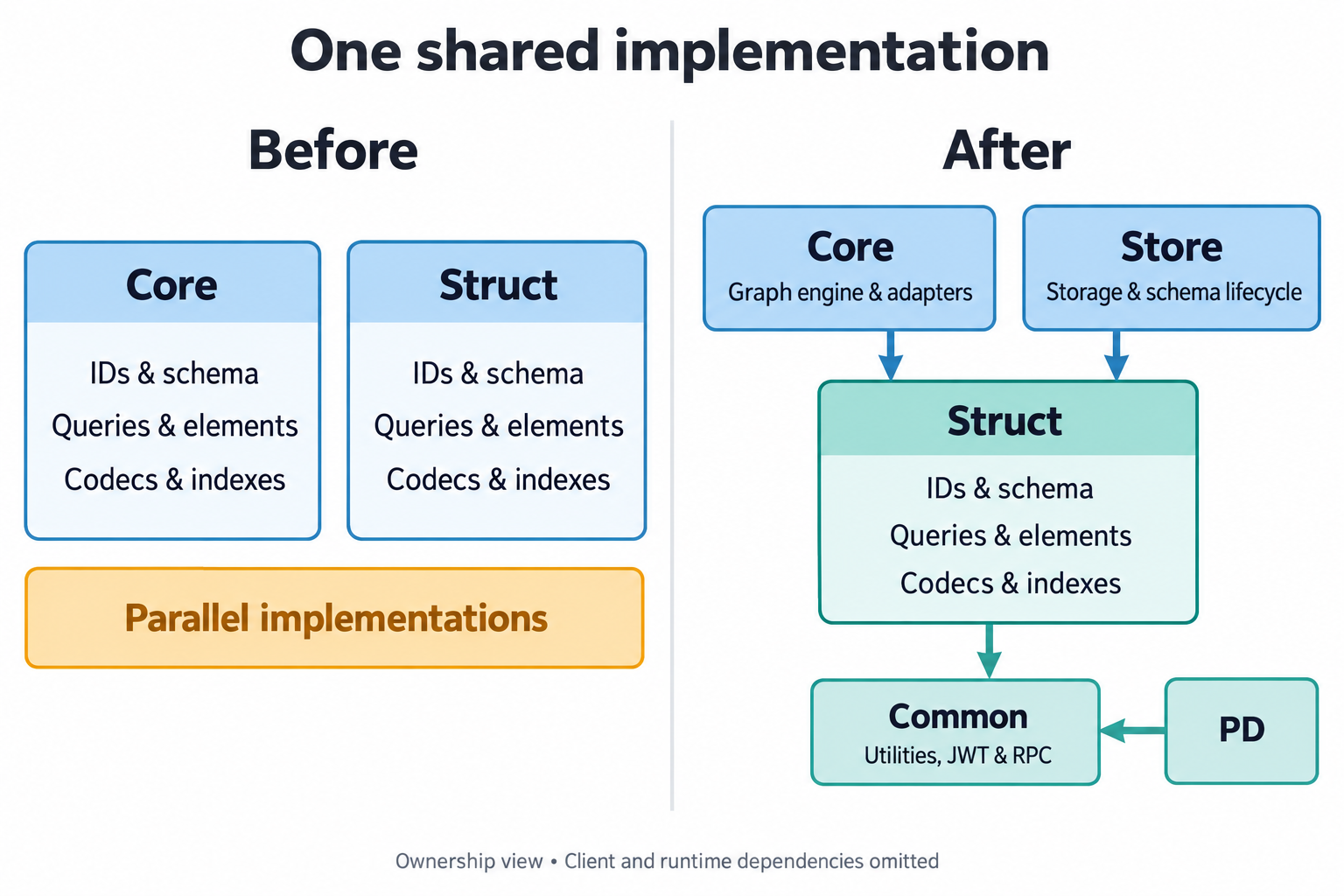
Core retains graph execution and adapters, Store retains storage and schema lifecycle, and struct/common own the shared implementations. The arrows show shared ownership, not the full dependency tree.
| Owner | Responsibilities |
|---|---|
| struct | IDs, schema metadata, type codes, queries, base elements, property/byte codecs, index construction and analyzers |
| core | Transactions, traversal, tasks, schema mutation, backend adapters and index update orchestration |
| Store | PD-backed schema access, listeners and cache lifecycle through SchemaGraph/SchemaDriver |
| common | JWT signing/verification, shared auth constants and RPC configuration interfaces |
The Server HStore adapter still needs PD and Store clients. Store retains its network, PD client and storage libraries. PD and Store must not depend on core, and struct must not depend on core or PD clients.
Core and Store implement HugeGraphSupplier to provide schema, configuration and clock access.
Shared base elements hold state and adjacency. HugeVertex and HugeEdge retain engine behavior and wrapper identity over that same state;
property mutation, cloning, removal, expiration and loading state must propagate through it.
Core serializers retain backend adapters and delegate shared encoding.
Shared index and OLAP selection receive schema candidates and result sinks from their callers; core keeps transaction writes and backend capability checks.
Update Java source and SPI implementations
Start with the types your code imports. This ID construction call keeps the same string value while its imports move.
Before, using the 1.7.0 core API
After, using the shared API
Recompile the application and its plugins after adapting source. Relocated types also change method descriptors, so editing imports cannot make an old compiled jar binary-compatible. Removed core classes have no general compatibility package. The plugin examples still describe 1.7.0; apply the following mappings when targeting the migrated API.
| Previous Java entry | Use in the migrated API |
|---|---|
Shared types listed below in org.apache.hugegraph.backend.id | org.apache.hugegraph.id.* |
org.apache.hugegraph.schema.* metadata | org.apache.hugegraph.struct.schema.* |
Shared types listed below in org.apache.hugegraph.backend.query | org.apache.hugegraph.query.* |
org.apache.hugegraph.backend.query.serializer.* | org.apache.hugegraph.query.serializer.* |
org.apache.hugegraph.backend.store.Shard | org.apache.hugegraph.backend.Shard |
org.apache.hugegraph.backend.store.BackendEntry.BackendColumn | org.apache.hugegraph.backend.BackendColumn |
org.apache.hugegraph.structure.HugeIndex | org.apache.hugegraph.structure.Index |
| Shared byte/encoding code in backend serializers | org.apache.hugegraph.serializer.* |
Core HugeException | org.apache.hugegraph.exception.HugeException |
org.apache.hugegraph.SchemaGraph/SchemaDriver | org.apache.hugegraph.store.schema.* |
Only Id, IdGenerator, EdgeId, IdUtil and SplicingIdGenerator move from the ID package.
SnowflakeIdGenerator remains in core under org.apache.hugegraph.backend.id; retain its existing import.
The moved query types are Query, ConditionQuery, Condition, IdQuery, IdPrefixQuery, IdRangeQuery, BatchConditionQuery and Aggregate.
QueryResults, ConditionQueryFlatten, EdgesQueryIterator, QueryBatch and QueryResultContext remain in core under
org.apache.hugegraph.backend.query; retain their existing imports.
SchemaManager, schema mutation builders and backend-specific serializers remain in core, so apply these mappings only to affected types.
Client REST DTOs remain independent, including Toolchain’s org.apache.hugegraph.structure.graph.Shard.
| Extension point | Change in your implementation |
|---|---|
HugeGraph.sameAs(HugeGraph) | Override sameAs(org.apache.hugegraph.HugeGraphSupplier). There is no old-signature overload. |
GraphSerializer.writeIndex/readIndex | Accept/return shared org.apache.hugegraph.structure.Index; update callers too. |
Custom HugeElement subclass | Expose shared BaseElement through element() and adapt properties through wrapProperty. |
Keep element adapters on the shared state; do not restore removed engine state fields or add a second adjacency collection.
For Gremlin classImports and scripts, replace org.apache.hugegraph.backend.id.IdGenerator with org.apache.hugegraph.id.IdGenerator.
Configuration-only class names need a packaged Gremlin startup check; Java compilation does not exercise them.
The RPC interfaces org.apache.hugegraph.rpc.RpcServiceConfig4Client and RpcServiceConfig4Server now have one owner in common.
Their names and signatures stay the same, so this move requires no RPC import or configuration change.
org.apache.hugegraph.auth.TokenGenerator also belongs to common. Callers supply the signing secret and map JWT failures to their service responses.
Common’s JWT dependencies are optional; direct JWT consumers must declare their required libraries.
Adapt downstream exceptions when matching artifacts are available
| Previous downstream entry | Replacement |
|---|---|
Hubble org.apache.hugegraph.exception.HugeException | org.apache.hugegraph.exception.HubbleException |
Java client org.apache.hugegraph.exception.NotSupportException | org.apache.hugegraph.exception.ClientNotSupportException |
Hubble’s copy of org.apache.hugegraph.license.MachineInfo | Keep the import and use the common implementation. |
Update constructors and catch clauses along with imports. HubbleException keeps its RuntimeException parent and string constructor.
ClientNotSupportException keeps its ClientException parent and message/cause and message/arguments constructors.
Computer’s HgkvDirImpl is one affected client-exception caller. Struct’s similarly named exceptions have different contracts.
Loader’s REST boundary and independent client DTOs do not need an overall conversion to struct.
The Toolchain and Computer changes are still unpublished downstream handoffs. They need matching publication, builds and packaged-classpath checks. Inspect the built jars as well as the source tree for stale or transitive copies of the same class.
Prepare a coordinated service upgrade
Upgrade Server, PD and Store together to matching release artifacts. This migration does not support mixed-version rolling upgrades. The sequence below applies once those matching artifacts are available.
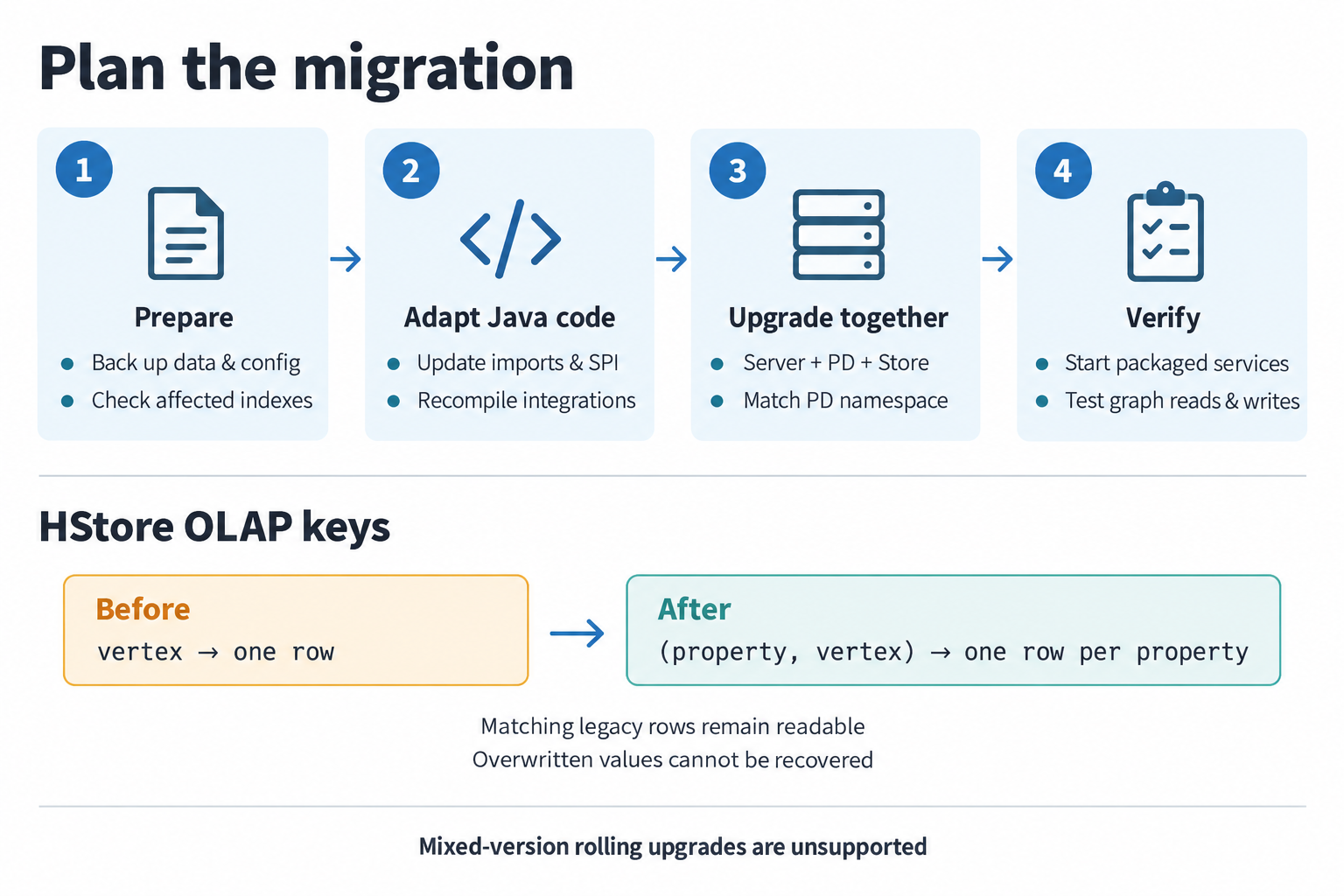
Back up data/configuration and check affected indexes, update imports/SPI and recompile, then upgrade matching services and align the PD namespace. Verify packaged services and graph reads/writes. OLAP keys change from one row per vertex to one row per property and vertex; matching legacy rows remain readable, overwritten values cannot be recovered, and mixed-version rolling upgrades are unsupported.
- Back up graph data with the existing backup and restore procedure and preserve deployment configuration.
- Prepare matching Server, PD and Store artifacts, plus rebuilt plugins and any required downstream integrations.
- Align the metadata namespace using the settings below; preserve existing backend graph names.
- Rehearse in a validation environment. Start the packaged services, read historical data and exercise affected queries and writes.
- Pause writes for the coordinated deployment upgrade. Resume only after all Server and Store writers use matching artifacts and checks pass.
The consolidation does not automatically rewrite graph data, rebuild indexes or recover historical entries. Review the compatibility cases below during the rehearsal.
Match the PD metadata namespace
Store’s pd.cluster defaults to hg. Set it in Store application.yml as follows.
The equivalent environment variable is PD_CLUSTER.
| Server mode | Value that must match Store’s pd.cluster |
|---|---|
usePD=true | Server’s cluster |
usePD=false | The graph’s pd.cluster |
This namespace covers schema, graph configuration, cache watches and TTL-cleaner metadata.
All HStore graphs in one Server process must use the same metadata namespace.
With usePD=false, the first HStore graph opened binds the process-wide MetaManager to its pd.cluster.
A later graph’s explicit conflicting pd.cluster is logged and ignored; it does not create an independent namespace.
One Store process cannot share a schema driver across conflicting namespaces.
Preserve backend graphspace/store/table names such as DEFAULT/hugegraph/g; the REST identity DEFAULT-hugegraph is not a metadata key.
Check data compatibility
| Data or behavior | What the migration preserves or changes |
|---|---|
| Stored IDs and properties | Existing type codes and ID/property bytes are preserved, along with configuration defaults. |
| String ID comparison | Java UTF-16 order is used consistently, including IDs loaded from UTF-8 bytes. Stored ID bytes stay the same. |
| Query JSON and supported Kryo values | Historical Java names still need legacy decoding after relocation. |
| Schema maps | Wire fields and ID identity stay the same. Primary-key and edge sort-key lists keep order and duplicates. |
| Schema endpoints | Matching redundant metadata and legacy endpoint-only maps remain readable; conflicting or malformed endpoints are rejected. |
| Ordinary schema indexes | Server-created keys keep their key/name-TTL layout. |
| Store SYSTEM-label indexes with positive expiry | Stable keys and the old 13-byte value envelope remain; the label reader recognizes that bounded envelope. |
The core SYSTEM-label writer keeps its existing bytes. This migration adds no TTL suffix to those keys and does not change prefix deletion. Previously unsupported index-only element reconstruction remains unsupported.
Element classification also keeps the producer context through BaseVertex.TypeContext.
| Context | Existing system-vertex classification |
|---|---|
STORAGE | ~variables is task data. |
ENGINE | ~server and ~role_data are server data; ~variables is ordinary vertex data. |
| Both | ~task and ~taskresult are task data. |
Engine wrappers select ENGINE; standalone storage elements retain STORAGE so table routing follows the existing behavior.
Rebuild affected legacy long-text indexes
The previous Store-side IndexBuilder shortened long text values to 20 characters. Server queries used the full value and its hash.
The shared builder now follows the Server contract. An old shortened row can still be decoded, but it does not automatically match a full-value query.
If your deployment used Store-side index rebuilding, identify affected indexes and rebuild them from graph data where necessary. The migration performs no automatic rebuild and cannot recover missing historical entries. Ordinary Server-created index keys retain their existing contract.
Verify HStore OLAP reads and deletes
New OLAP rows use [property ID][vertex ID] keys, allowing several OLAP properties on one vertex to coexist.
Legacy rows used only the vertex ID; their values remain readable without a rewrite.
| Operation | Behavior with compound and legacy keys |
|---|---|
| Read a property | Prefer its compound key. Fall back to a vertex-only row only when its value contains the requested property ID. |
| Delete a property | Remove its compound row and a matching legacy row; preserve other properties. |
| Read a property already overwritten by the old writer | The lost value cannot be recovered by this repair. |
Upgrade all Server and Store writers before resuming writes. An old writer can update a legacy row while a new reader prefers an existing compound row. Mixed-version OLAP writes are outside the supported upgrade contract.
Verify packaged services and integrations
Run affected Java/SPI tests, then exercise RocksDB and HStore queries, authentication, Store schema/filter behavior and shared element state propagation. Include historical ID, schema, property and index samples, pagination, TTL and OLAP cases. Inspect resolved dependencies and shipped jars for forbidden module dependencies or duplicate HugeGraph classes, and start the actual packaged services without classpath-ordering workarounds. The contribution guide describes build and dependency-inventory prerequisites.
The implementation, website documentation and downstream artifacts need coordinated publication. Use matching artifacts and their runtime results to decide when to adopt the migration; compiling source or skipping tests is insufficient.
8 - HugeGraph 1.8.0 Gremlin Migration & Compatibility Guide
HugeGraph 1.8.0 upgrades its underlying graph traversal and query framework from Apache TinkerPop 3.5.1 to TinkerPop 3.8.1, requires Java 17 for Server and builds, and updates the script engine to Groovy 4.0.25.
This upgrade introduces several language-level breaking changes. The sections below cover the most frequently affected syntax and behavioral changes first; less common edge cases and lower-level protocol details are in the Full Compatibility Reference at the end.
- This guide applies to upgrades from version 1.7.0 (or earlier) to 1.8.0.
- The Groovy script engine remains supported in 1.8.0; existing multi-line scripts, variable definitions, and Java closures continue to work in most cases.
Top 5 High-Frequency Syntax and Behavioral Changes
The following 5 changes affect the most queries. Changes 1–3 cause immediate execution errors if not rewritten; changes 4–5 do not raise errors but silently alter returned results (dropping elements with missing properties or passing unmatched branches through). Review these first.
1. has(key, traversal) Overload Removed (High Risk: Execution Error)
- Impact:
In TinkerPop 3.8.0, the
has(String, Traversal)andhas(T, Traversal)overloads were removed. In the Groovy script engine, legacy syntax falls back tohas(String, Object). On HugeGraph 1.8, because the graph engine pusheshas()predicates down into backend queries and validates values withTraversalUtil.validPropertyValue(), it fails immediately with type mismatch errors:- Property filter
g.V().has('age', __.is(gt(30)))throws:IllegalArgumentException: Invalid data type of query value '[IsStep(gt(30))]', expect INT for 'age', actual got class org.apache.tinkerpop.gremlin.process.traversal.dsl.graph.DefaultGraphTraversal - Label filter
g.V().has(T.label, __.is('person'))throws:HugeException: The label type must be number or string, but got 'class org.apache.tinkerpop.gremlin.process.traversal.dsl.graph.DefaultGraphTraversal'(Note: Pure in-memory TinkerGraph silently returns an empty array[], whereas HugeGraph 1.8 fails strictly).
- Property filter
- Legacy Query:
- Recommended Rewrite:
2. store() Removed & aggregate() Scope Overload Removed
- Impact:
- The
store('x')step, previously used for lazy side-effect collection, has been completely removed (MissingMethodException: No signature of method: ...store()). - The
aggregate(Scope, 'x')overload with an explicitScope(bothlocalandglobal) has also been removed.
- The
- Legacy Query:
- Recommended Rewrite:
3. Step none() Renamed to discard()
- Impact:
In TinkerPop 3.5.1, only the traversal step
g.V().none()existed (which returned an empty result); anonymous__.none()was not supported. In 3.8.0, parameterlessnone()was completely renamed todiscard(), whilenone(P)was repurposed as a collection predicate step. Calling parameterlessnone()in 3.8.1 (such asg.V().hasLabel('person').none()) throws:IllegalArgumentException: Input predicate to none step can't be null. - Recommended Rewrite:
4. Strict Behavior for Missing Properties in by()
- Impact:
TinkerPop 3.6+ unified missing value handling across
by()modulators (removing previous default-null behaviors). In 3.8.1, when a property referenced byby()does not exist:- Ordering
order().by('age'): Vertices missingageare immediately filtered out (previously they might sort first/last). - Projection
project('name', 'age').by('name').by('age'): Ifageis missing, the returned Map will not contain theagekey at all (previously returnedage: null). - Path
path().by('age'): If any vertex along the path missesage, the entire path is dropped.
- Ordering
- Recommended Rewrite:
If your application requires preserving elements with explicit defaults (e.g.,
null), usecoalesce()insideby():
5. choose() Semantics Alignment
- Impact:
- Missing Property Handling: When a choice child traversal evaluated an absent property on an element, TinkerPop 3.5.1 threw:
IllegalArgumentException: The provided traverser does not map to a value: v[3]->[PropertiesStep([age],value)]. In 3.8.1, elements missing the target property pass through unchanged without error. - Single Branch Execution: When multiple
option()conditions match simultaneously, 3.8.1 executes only the first matching branch (legacy versions might execute all matching branches). - Default Pass-Through: When no
option()condition matches, 3.8.1 passes the input element through unchanged by default (whereas 3.5.1 filtered it out).
- Missing Property Handling: When a choice child traversal evaluated an absent property on an element, TinkerPop 3.5.1 threw:
- Recommended Rewrite:
- To execute multiple matching branches, rewrite using
union()combined withfilter(). - To filter out elements when no option matches or property is missing, explicitly supply
Pick.noneandPick.unproductivebranches:
- To execute multiple matching branches, rewrite using
New Steps & Functions in 1.8 (TinkerPop 3.8)
TinkerPop 3.8 introduces native date manipulation functions and steps that were not present in 3.5.1 (HugeGraph 1.7.0):
Date Steps (datetime(), dateAdd(), dateDiff())
datetime(): Creates a date-time object or retrieves server time. In 3.8, it returnsjava.time.OffsetDateTime(e.g.,datetime('2026-10-19T00:00:00Z')).dateAdd(): Performs date arithmetic, adding a duration to a date.dateDiff(): Computes the difference between two date-time objects, returning the difference in milliseconds (e.g., a 1-day difference yields86400000ms).- Example:
Server Configuration and Client Compatibility
1. Serializer Configuration in conf/gremlin-server.yaml
In TinkerPop 3.8, serializer classes moved from gremlin-driver (org.apache.tinkerpop.gremlin.driver.ser.*)
to gremlin-util (org.apache.tinkerpop.gremlin.util.ser.*).
Do not simply copy an old gremlin-server.yaml from 1.7.0 and edit class names.
Always start from the conf/gremlin-server.yaml bundled with HugeGraph 1.8.0 and carry over your customizations (ports, host, authenticator).
HugeGraph requires custom serializer builders and registries: GraphBinary requires builder: org.apache.hugegraph.io.HugeGraphTypeSerializerRegistryBuilder
to serialize HugeGraph Id, schema, Blob, and enum values (otherwise failing with IOException: Serializer for type ... not found);
untyped GraphSON V1 requires org.apache.hugegraph.io.HugeGraphSONV1MessageIoRegistry.
Legacy Serializer (driver.ser.*) | 1.8.0 Serializer (util.ser.*) | Required Registries / Builder | Notes |
|---|---|---|---|
GraphBinaryMessageSerializerV1 | org.apache.tinkerpop.gremlin.util.ser.GraphBinaryMessageSerializerV1 | builder: org.apache.hugegraph.io.HugeGraphTypeSerializerRegistryBuilderioRegistries: [org.apache.hugegraph.io.HugeGraphIoRegistry] | Recommended default binary serializer |
GraphSONMessageSerializerV1d0 | org.apache.tinkerpop.gremlin.util.ser.GraphSONUntypedMessageSerializerV1 | ioRegistries: [org.apache.hugegraph.io.HugeGraphIoRegistry, org.apache.hugegraph.io.HugeGraphSONV1MessageIoRegistry] | Untyped GraphSON V1 |
GraphSONMessageSerializerV2d0 | org.apache.tinkerpop.gremlin.util.ser.GraphSONMessageSerializerV2 | ioRegistries: [org.apache.hugegraph.io.HugeGraphIoRegistry] | Standard Typed GraphSON V2 |
GraphSONMessageSerializerV3d0 | org.apache.tinkerpop.gremlin.util.ser.GraphSONMessageSerializerV3 | ioRegistries: [org.apache.hugegraph.io.HugeGraphIoRegistry] | Standard Typed GraphSON V3 |
| (New in 1.8) | org.apache.tinkerpop.gremlin.util.ser.GraphSONUntypedMessageSerializerV2 | ioRegistries: [org.apache.hugegraph.io.HugeGraphIoRegistry] | Untyped GraphSON V2 (types=false) |
| (New in 1.8) | org.apache.tinkerpop.gremlin.util.ser.GraphSONUntypedMessageSerializerV3 | ioRegistries: [org.apache.hugegraph.io.HugeGraphIoRegistry] | Untyped GraphSON V3 (types=false) |
2. Can HugeGraph Client 1.5.0 Continue to Work?
- Verdict: Basic CRUD and schema operations continue to work; Gremlin queries and auth management require upgrading or custom aliases.
- HugeGraph Server 1.8.0 provides backward-compatible adapters, allowing
hugegraph-client:1.5.0to connect for standard vertex/edge CRUD and schema management. - Limitations:
- Gremlin Aliases:
hugegraph-client:1.5.0sends legacy graph and traversal aliases (graph=<graph>andg=__g_<graph>), but Server 1.8.0 only binds GraphSpace-scoped aliases (DEFAULT-<graph>and__g_DEFAULT-<graph>). Because/gremlinpasses the body unchanged, Gremlin queries sent viagremlin().execute()in Client 1.5.0 fail on unknown aliases. To run Gremlin queries against 1.8.0, upgrade the client or submit queries via the HTTP API with explicit GraphSpace aliases. - Auth Paths: Server 1.8.0 migrates authentication to GraphSpace scopes (
graphspaces/{graphspace}/auth/users). The legacy Client 1.5.0 pathgraphs/{graph}/auth/...is not redirected to this new endpoint, so auth operations require upgrading the client. - Gremlin Query Strings: All Gremlin query strings submitted by the client are evaluated on the server’s 3.8.1 engine and must adhere to 3.8 syntax.
- Gremlin Aliases:
Full Compatibility Reference
Appendix 1: Writes & Upsert (mergeV / mergeE)
HugeGraph 1.8.0 (introduced upstream in TinkerPop 3.6.0) supports standard mergeV() and mergeE() steps for graph upserts:
- M01:
onCreateproperty maps strictly inherit the search match map. Conflicting keys cannot overwrite matched properties. - M02:
mergeEno longer implicitly binds incoming/outgoing vertices from upstream traversers; specifyDirection.OUTandDirection.INin the map or use explicit options. - M03: Construction-time validation applies when a static
onCreatemap attempts to override keys defined in the search-criteria match map. - M04: Child traversers in
onMatchreceive the matched Element object rather than the original input Map. Preserve input map references prior to merge with.as('input')and reference withselect('input').
Appendix 2: Advanced Traversal Steps & Collections
- B07 (
local()unpacks bulk): Traversers with bulk counters are expanded into individual items when enteringlocal()child traversals. UsegroupCount()for frequency analysis. - B09 (
range(local)collection unpacking): Slicing a single item from a list (e.g.,limit(local, 1)) consistently returns a Collection wrapper ([item]). Append.unfold()if a scalar is needed. - B11 (
sum()return type): Summing integer streams without overflow may returnIntegerinstead ofLong. Clients should acceptNumber. - B14 (
split()step): HugeGraph 1.8 new step. An empty string separator splits the string into individual characters. - B15 (
asString()step): HugeGraph 1.8 new step. ThrowsIllegalArgumentExceptionon null inputs.
Appendix 3: GLV Client Variations
- Python: Avoids Python keyword conflicts by appending an underscore to step names (
filter_(),id_(),range_(),max_()). - JavaScript: Set collections are returned as native ECMAScript
Setinstances (use.sizeand.has()). DeprecatedconnectOnStartupoption removed; callawait connection.open(). - .NET:
bytevalues serialize strictly as signed bytes (sbyte). - Go: BigDecimal/BigInt aligned; always inspect errors on
Next().
Appendix 4: Network Protocols & Serializer Guardrails
- C03 (OLTP element properties): Remote OLTP queries return elements with full properties by default rather than reference tokens only. Use
project()orvalueMap()to restrict payload sizes when necessary. - C06 (GraphSON payload limits): Added guardrails for max number length (10,000), max string length (20,000,000), and max nesting depth (1,000).
Appendix 5: HugeGraph Feature Capabilities
- Meta-Properties Unchanged (Unsupported): HugeGraph has never supported TinkerPop meta-properties (properties on properties).
Calling
property()with key-values on a vertex property throwsVertexProperty.Exceptions.metaPropertiesNotSupported()orNotSupportException("nested property"), which remains the unchanged behavior in 1.8.0. - GraphComputer Boundaries:
supportsComputer()remainsfalse. GraphComputer-dependent steps (e.g.,pageRank(),peerPressure()) cannot run directly on the OLTP engine. Use HugeGraph algorithms REST API or Vermeer. - Uniform List Features:
supportsUniformListValues()returnsfalse; property lists remain supported via HugeGraph schema (valueList()).