This is the multi-page printable view of this section. .
HugeGraph Architecture Overview
Full-Stack Components
The HugeGraph ecosystem combines a graph database, graph computing engines, graph AI, and a toolchain with distinct responsibilities. HugeGraph Server provides OLTP graph database services; HugeGraph-Computer and Vermeer are independent OLAP engines; HugeGraph-AI provides graph AI capabilities. Toolchain clients, import tools, visualization, and operations tools provide entry points for applications and operators.
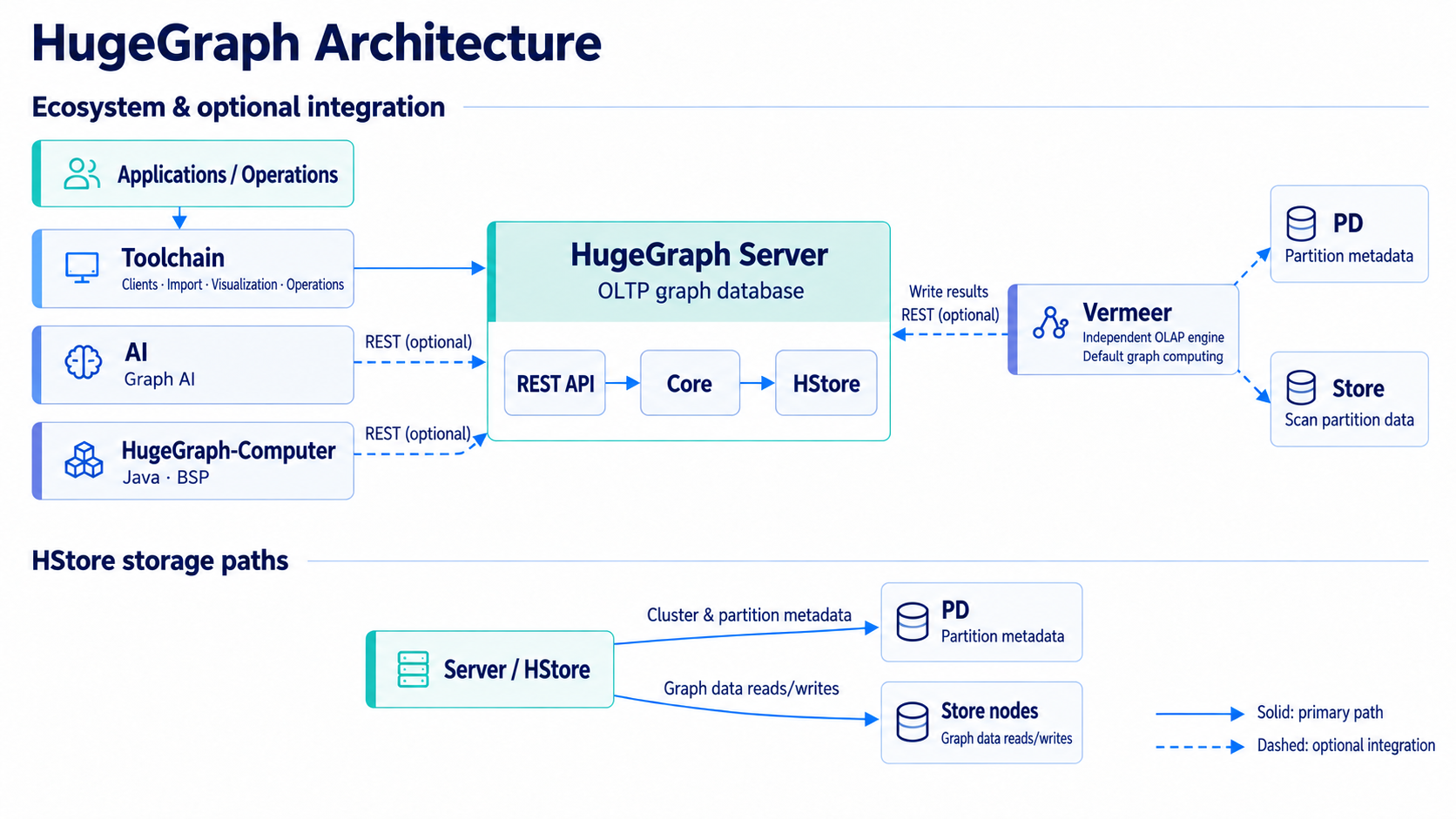
Figure: Server uses HStore as an example backend; see the Mermaid diagram below for independent backends such as RocksDB and HBase. Vermeer and HugeGraph-Computer are independent OLAP engines. Dashed arrows indicate optional integration.
Ecosystem Integration
flowchart TB
  Apps["Applications / Operations"] --> Toolchain["Toolchain"] --> Server["Server REST API"]
  AI["AI"] -. REST .-> Server
  Computer["Computer"] -. REST .-> Server
  Vermeer["Vermeer"] -. PD .-> PD["PD"]
  Vermeer -. Scan .-> Store["Store"]
  Vermeer -. Write .-> Server
Optional connections do not mean every AI, Computer, or Vermeer task must connect to Server, PD, or Store. Computer and AI read and write through the Server REST API. Vermeer’s HugeGraph input queries PD for partition metadata and scans HStore partitions directly through Store. With HugeGraph result output, it writes results back through the Server REST API.
Server Internals
flowchart TB
  API["REST API / Gremlin"] --> Core["Core"] --> Adapter["Backend adapter"]
  Adapter --> RocksDB["RocksDB"]
  Adapter --> HBase["HBase"]
  Adapter --> HStore["HStore"]
  HStore --> PD["PD"]
  HStore --> Store["Store"]
Server REST APIs and Gremlin send requests to Core, which reads and writes through a backend adapter. RocksDB and HBase are independent backends. The HStore adapter obtains cluster metadata and partition information from PD and sends graph operations to Store nodes. PD manages metadata and partitions; it does not carry graph data reads and writes.
Current Server implementations include RocksDB, HBase, HStore, and memory backends. Memory is for testing or temporary use, not a persistent production deployment. See the Server quick start for production deployment options.
Main Toolchain components:
- Hubble — Web visualization and management workspace for schema, imports, and queries.
- Loader — Multi-source batch data import utility for fast bulk loading.
- Tools — CLI operations tool for cluster maintenance, backup, and restore.
- Client — Official programmatic client SDKs available in Java, Python, and Go.
Independent Graph Computing Engines
- Vermeer — High-performance Go in-memory graph computing engine with 15+ OLAP algorithms.
- HugeGraph-Computer — Java distributed graph computing framework based on BSP/Pregel.
Historical Architecture
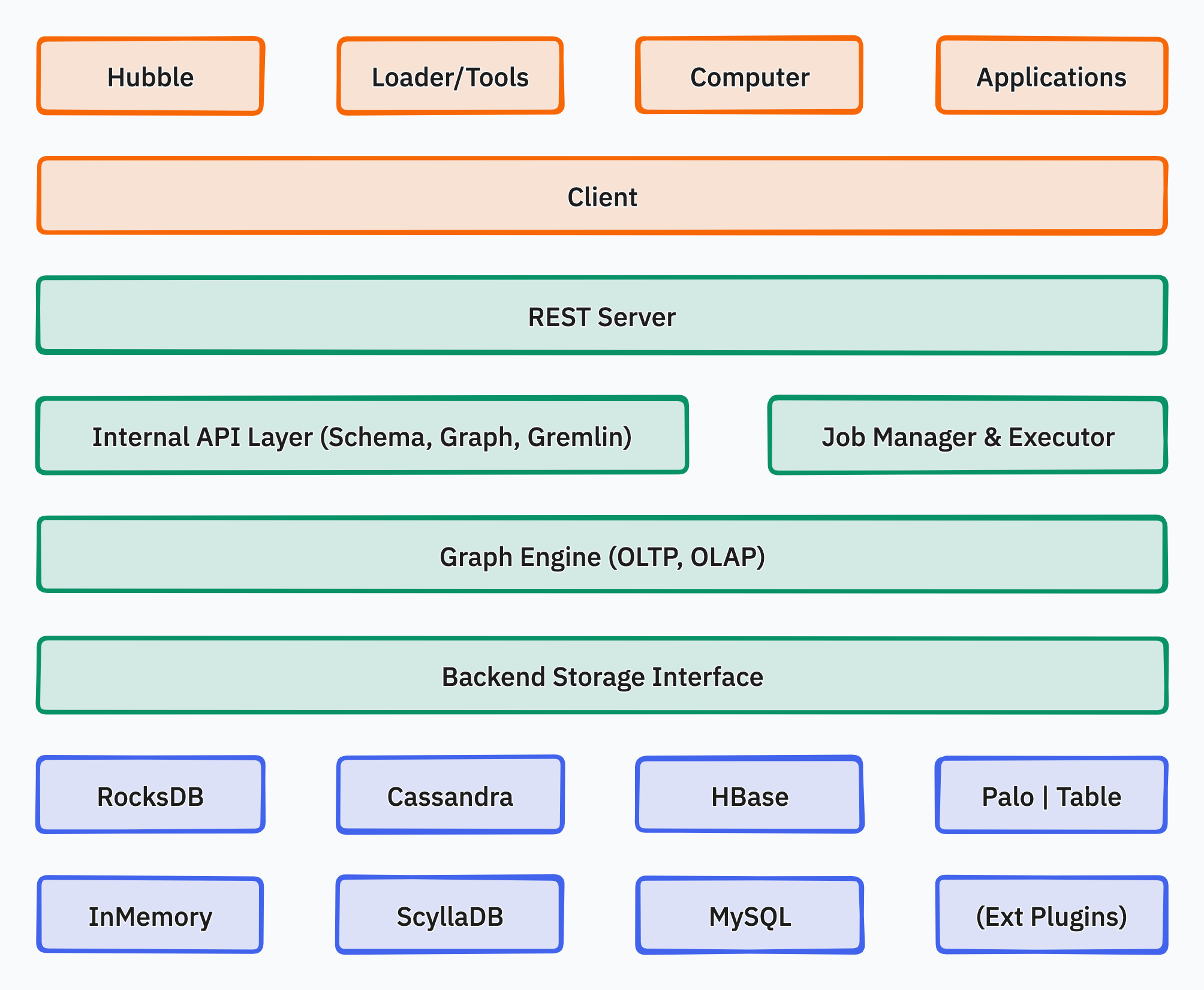
The following diagram is retained for historical reference. Its depiction of Server providing both OLTP and OLAP, and of various old backends, does not describe current master.
Related Topics
Extension mechanism, SPI registration, and plugin lifecycle in HugeGraph.
Historical background on the property graph model, graph partitioning, and early architecture tradeoffs.
1 - HugeGraph Plugin mechanism and plug-in extension process
For plugins targeting the planned 1.8.0 shared-foundation API, follow the Java/SPI migration guide and recompile against matching artifacts. The examples below describe the 1.7.0 API.
Background
- HugeGraph is not only open source and open, but also simple and easy to use. General users can easily add plug-in extension functions without changing the source code.
- HugeGraph supports a variety of built-in storage backends, and also allows users to extend custom backends without changing the existing source code.
- HugeGraph supports full-text search. The full-text search function involves word segmentation in various languages. Currently, there are 7 built-in word breakers (ansj, hanlp, smartcn, jieba, jcseg, mmseg4j, ikanalyzer), and it also allows users to expand custom word breakers without changing the existing source code.
Scalable dimension
Currently, the plug-in method provides extensions in the following dimensions:
- backend storage
- serializer
- Custom configuration items
- tokenizer
Plug-in implementation mechanism
- Provide SPI interface: HugeGraph provides the
HugeGraphPlugininterface, supporting pluggability via Java SPI. - Registration functions:
HugeGraphPluginexposes static registration methods:registerOptions(),registerBackend(),registerSerializer(), andregisterAnalyzer(). - Implement components: The developer implements the corresponding
OptionHolder,BackendStoreProvider,AbstractSerializer, orAnalyzerinterfaces. - Register in plugin: The developer implements the
register()method ofHugeGraphPluginto register implementation classes, declared inMETA-INF/services/. - Deploy and activate: Place the packaged JAR in the HugeGraph Server
plugins/directory, configure the custom options, and restart the service.
Plug-in implementation process example
1 Create a new maven project
1.1 Name the project name: hugegraph-plugin-demo
1.2 Add hugegraph-core Jar package dependencies
The Maven pom.xml is shown below. Match hugegraph.version to the target Server version; this example uses the current master version 1.7.0:
2 Realize extended functions
2.1 Extending a custom backend
2.1.1 Implement the interface BackendStoreProvider
- Realizable interfaces:
org.apache.hugegraph.backend.store.BackendStoreProvider - Or inherit an abstract class:
org.apache.hugegraph.backend.store.AbstractBackendStoreProvider
Take the RocksDB backend RocksDBStoreProvider as an example:
2.1.2 Implement interface BackendStore
The main abstract methods of BackendStore are shown below; default helper methods are omitted:
2.1.3 Extending custom serializers
The serializer must inherit the abstract class: org.apache.hugegraph.backend.serializer.AbstractSerializer
( implements GraphSerializer, SchemaSerializer) The main interface is defined as follows:
2.1.4 Extend custom configuration items
When adding a custom backend, it may be necessary to add new configuration items. The implementation process mainly includes:
- Add a configuration item container class and implement the interface
org.apache.hugegraph.config.OptionHolder - Provide a singleton method
public static OptionHolder instance(), and call the method when the object is initializedOptionHolder.registerOptions() - Add configuration item declaration, single-value configuration item type is
ConfigOption, multi-value configuration item type isConfigListOption
Take the RocksDB configuration item definition as an example:
2.2 Extend custom tokenizer
The tokenizer needs to implement the interface org.apache.hugegraph.analyzer.Analyzer, take implementing a SpaceAnalyzer space tokenizer as an example.
3. Implement the plug-in interface and register it
The plug-in registration entry is HugeGraphPlugin.register(), the custom plug-in must implement this interface method, and register the extension
items defined above inside it. The interface org.apache.hugegraph.plugin.HugeGraphPlugin is defined as follows:
And HugeGraphPlugin provides 4 static methods for registering extensions:
- registerOptions(String name, String classPath): register configuration items
- registerBackend(String name, String classPath): register backend (BackendStoreProvider)
- registerSerializer(String name, String classPath): register serializer
- registerAnalyzer(String name, String classPath): register tokenizer
The following is an example of registering the SpaceAnalyzer tokenizer:
4. Configure SPI entry
- Make sure the services directory exists: hugegraph-plugin-demo/resources/META-INF/services
- Create a text file in the services directory: org.apache.hugegraph.plugin.HugeGraphPlugin
- The content of the file is as follows: org.apache.hugegraph.plugin.DemoPlugin
5. Make Jar package
Through maven packaging, execute the command in the project directory mvn package, and a Jar package file will be generated in the
target directory. Copy the Jar package to the plugins directory when using it, and restart the service to take effect.
2 - HugeGraph Design Concepts
1. Property Graph
Version note: This page retains early design material. The property graph model and vertex ID strategies remain consistent with current master, but figures, partitioning conclusions, and transaction descriptions have the scope stated in each section. They are not current deployment or storage implementation guarantees.
There are two common graph data representation models, namely the RDF (Resource Description Framework) model and the Property Graph (Property Graph) model. Both RDF and Property Graph are the most basic and well-known graph representation modes, and both can represent entity-relationship modeling of various graphs. RDF is a W3C standard, while Property Graph is an industry standard and is widely supported by graph database vendors. HugeGraph currently uses Property Graph.
HugeGraph uses the property graph model. This person-and-book example shows labels and properties on vertices and directed edges. It is a logical model, not an illustration of the current internal data layout.
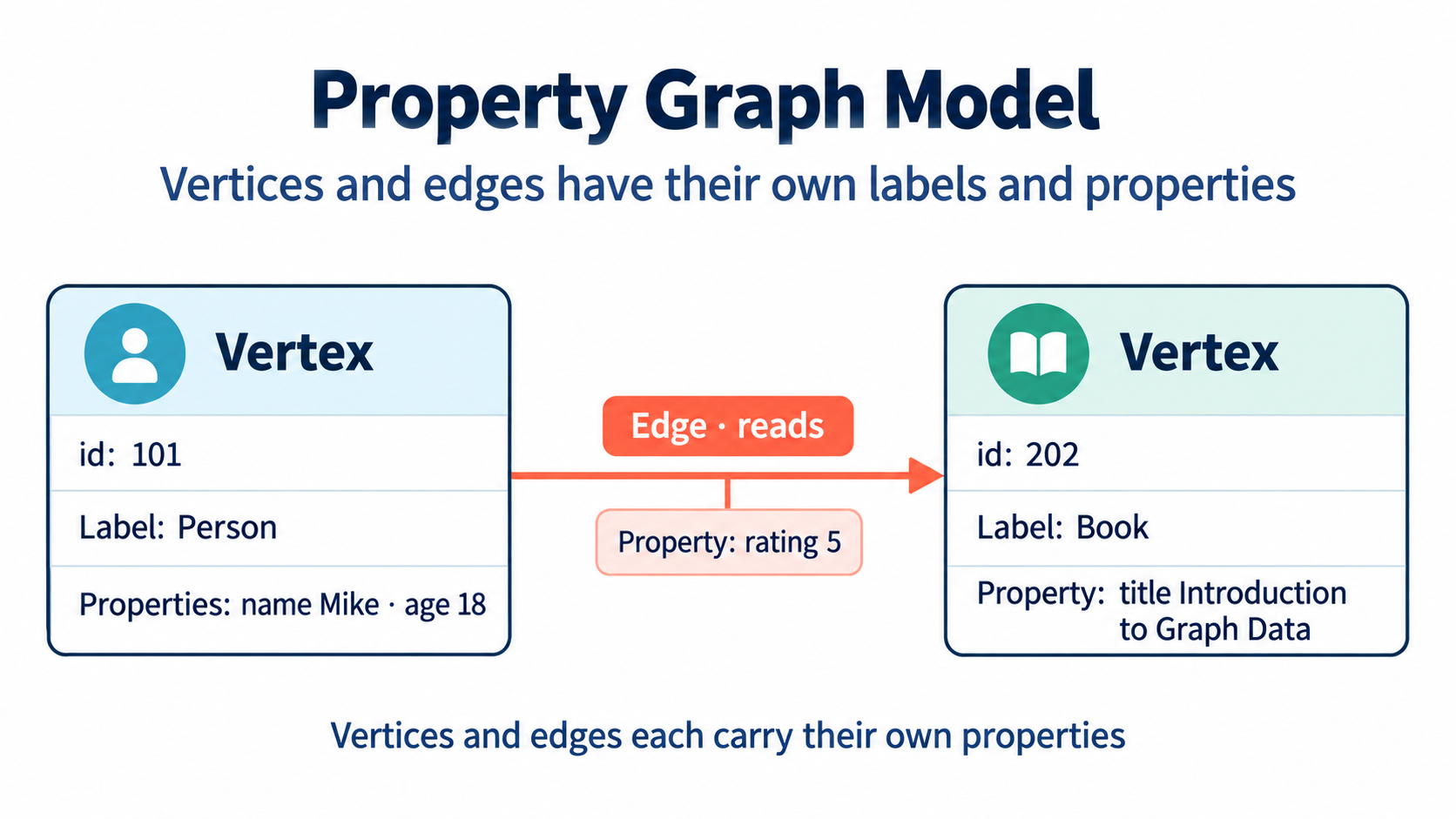
Figure: Vertices and edges each carry their own labels and properties.
Inside HugeGraph, each vertex/edge is identified by a unique VertexId/EdgeId, and the attributes are stored inside the corresponding vertex/edge. The relationship/mapping between vertices is stored through edges.
When the vertex attribute value is stored by edge pointer, if you want to update a vertex-specific attribute value, you can directly write it by overwriting. The disadvantage is that the VertexId is redundantly stored; if you want to update the attribute of the relationship, you need to use the read-and-modify method , read all attributes first, modify some attributes, and then write to the storage system, the update efficiency is low. According to experience, there are more requirements for modifying vertex attributes, but less for edge attributes. For example, calculations such as PageRank and Graph Cluster require frequent modification of vertex attribute values.
2. Graph Partition Scheme
Version note: The Edge Cut and Vertex Cut comparison is historical design background. Current PD and Store code does not define “HugeGraph uses Edge Cut” as an implementation contract. Do not use that conclusion to describe current partitioning or replication; see the HStore quick start for current distributed deployments.
For distributed graph databases, there are two partition storage methods for graphs: Edge Cut and Vertex Cut, as shown in the following figure. When using the Edge Cut method to store graphs, any vertex will only appear on one machine, while edges may be distributed on different machines. This storage method may lead to multiple storage of edges. When using the Vertex Cut method to store graphs, any edge will only appear on one machine, and each same point may be distributed to different machines. This storage method may result in multiple storage of vertices.
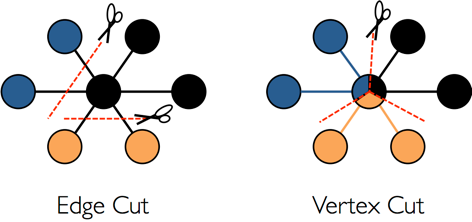
The EdgeCut partition scheme can support high-performance insert and update operations, while the VertexCut partition scheme is more suitable for static graph query analysis, so EdgeCut is suitable for OLTP graph query, and VertexCut is more suitable for OLAP graph query. Early design material described HugeGraph as using Edge Cut. That historical conclusion is retained here and does not describe the current partitioning implementation.
3. VertexId Strategy
Vertex of HugeGraph supports four ID strategies. Different VertexLabels in the same graph database can use different Id strategies. Currently, the Id strategies supported by HugeGraph are:
- Automatic generation (AUTOMATIC): Use the Snowflake algorithm to automatically generate a globally unique Id, Long type;
- Primary Key (PRIMARY_KEY): Generate Id through VertexLabel+PrimaryKeyValues, String type;
- Custom (CUSTOMIZE_STRING|CUSTOMIZE_NUMBER): User-defined Id, which is divided into two types: String and Long, and you need to ensure the uniqueness of the Id yourself;
- Custom UUID (CUSTOMIZE_UUID): User-defined Id in UUID form, you need to ensure the uniqueness of the Id yourself;
The default Id policy is AUTOMATIC, if the user calls the primaryKeys() method and sets the correct PrimaryKeys, the PRIMARY_KEY policy is automatically enabled. After enabling the PRIMARY_KEY strategy, HugeGraph can implement data deduplication based on PrimaryKeys.
- AUTOMATIC ID Policy
- PRIMARY_KEY ID policy
- CUSTOMIZE_STRING ID Policy
- CUSTOMIZE_NUMBER ID Policy
- CUSTOMIZE_UUID ID Policy
If users need Vertex deduplication, there are three options:
- Adopt PRIMARY_KEY strategy, automatic overwriting, suitable for batch insertion of large amount of data, users cannot know whether overwriting has occurred
- Adopt AUTOMATIC strategy, read-and-modify, suitable for small data insertion, users can clearly know whether overwriting occurs
- Using the CUSTOMIZE_STRING or CUSTOMIZE_NUMBER strategy, the user guarantees the uniqueness
4. EdgeId policy
Current implementation: The four-part composition below is a historical simplification. Current
EdgeIdalso distinguishes edge direction and parent/child edge labels. SeeEdgeIdin the Server source; use the source for your version when relying on ID formats or persistent keys.
The EdgeId of HugeGraph is composed of srcVertexId + edgeLabel + sortKey + tgtVertexId. Among them sortKey is an important concept of HugeGraph.
There are two reasons for adding sortKey to Edge as the unique ID of Edge:
- If there are multiple edges of the same Label between two vertices, they can be distinguished by
sortKey - For SuperNode nodes, edges can be sorted and truncated by
sortKey.
Since EdgeId is composed of srcVertexId + edgeLabel + sortKey + tgtVertexId, HugeGraph will automatically overwrite when the same Edge is inserted
multiple times to achieve deduplication. It should be noted that the properties of Edge will also be overwritten in the batch insert mode.
In addition, because HugeGraph’s EdgeId adopts an automatic deduplication strategy, HugeGraph considers that there is only one edge in the case of self-loop (a vertex has an edge pointing to itself), while a graph database that uses the AUTOMATIC strategy (TitanDB for example) considers that the graph has two edges.
The edges of HugeGraph only support directed edges, and undirected edges can be realized by creating two edges, Out and In.
5. HugeGraph transaction overview
Version scope: The isolation-level, thread-binding, and backend atomicity descriptions below are historical implementation notes. Transaction isolation and rollback boundaries depend on the backend implementation; do not treat these historical descriptions as cross-backend guarantees.
TinkerPop transaction overview
A TinkerPop transaction refers to a unit of work that performs operations on the database. A set of operations within a transaction either succeeds or all fail. For a detailed introduction, please refer to the official documentation of TinkerPop: http://tinkerpop.apache.org/docs/current/reference/#transactions
TinkerPop transaction interfaces
- open open transaction
- commit commit transaction
- rollback rollback transaction
- close closes the transaction
TinkerPop transaction specification
- The transaction must be explicitly committed before it can take effect (the modification operation can only be seen by the query in this transaction if it is not committed)
- A transaction must be opened before it can be committed or rolled back
- If the transaction setting is automatically turned on, there is no need to explicitly turn it on (the default method), if it is set to be turned on manually, it must be turned on explicitly
- When the transaction is closed, you can set three modes: automatic commit, automatic rollback (default mode), manual (explicit shutdown is prohibited), etc.
- The transaction must be closed after committing or rolling back
- The transaction must be open after the query
- Transactions (non-threaded tx) must be thread-isolated, and multi-threaded operations on the same transaction do not affect each other
For more transaction specification use cases, see: Transaction Test
HugeGraph transaction implementation
- All operations in a transaction either succeed or fail
- A transaction can only read what has been committed by another transaction (Read committed)
- All uncommitted operations can be queried in this transaction, including:
- Adding a vertex can query the vertex
- Delete a vertex to filter out the vertex
- Deleting a vertex can filter out the related edges of the vertex
- Adding an edge can query the edge
- Delete edge can filter out the edge
- Adding/modifying (vertex, edge) attributes can take effect when querying
- Delete (vertex, edge) attributes can take effect at query time
- All uncommitted operations become invalid after the transaction is rolled back, including:
- Adding and deleting vertices and edges
- Addition/modification, deletion of attributes
Example: One transaction cannot read another transaction’s uncommitted content
Principle of transaction realization
- The server internally realizes isolation by binding transactions to threads (ThreadLocal)
- The uncommitted content of this transaction overwrites the old data in chronological order for this transaction to query the latest version of data
- The bottom layer relies on the back-end database to ensure transaction atomicity (for example, the batch interface of RocksDB guarantees atomicity)
Notice
REST APIs do not expose a separate transaction lifecycle interface; write APIs invoke the relevant Server-side transaction commit logic.
TinkerPop API allows open transactions, which are automatically closed when the request is completed (Gremlin Server forces close)