This is the multi-page printable view of this section. .
Development & Testing
This section collects guides for setting up local development environments, running test suites, and integrating experimental storage engines.
Section Guide
Guide for running local unit and integration tests across HugeGraph Toolchain components against Server.
Instructions for building and testing the optional ToplingDB runtime from source.
1 - HugeGraph Toolchain Local Testing Guide
This guide helps developers run HugeGraph toolchain tests locally.
1. Core Concepts
1.1 Core Dependency: HugeGraph Server
Integration and functional tests of the toolchain depend on HugeGraph Server, including Client, Loader, Hubble, Spark Connector, Tools, and other components.
1.2 Test Types
- Unit Tests: Test individual functions/methods, no external dependencies required
- API Tests (ApiTestSuite): Test API interfaces, requires running HugeGraph Server
- Functional Tests (FuncTestSuite): End-to-end tests, require complete system environment
2. Environment Setup
2.1 System Requirements
- Operating System: Linux / macOS (Windows use WSL2)
- JDK: >= 11, configure
JAVA_HOME - Maven: >= 3.6
- Python: >= 3.11 (only required for Hubble tests)
2.2 Clone Code
3. Deploy Test Environment
Deployment Options
- Script Deployment: Specify a Server commit to reproduce the server version used by CI
- Docker Deployment: Suitable for quick checks; if tests fail, first verify compatibility between the image and Toolchain
For detailed installation instructions, refer to Community Documentation
3.1 Script Deployment
Parameter Description
$COMMIT_ID: Specify Server source code Git Commit ID$DB_DATABASE/$DB_PASS: MySQL database name and password for Loader JDBC tests
Deployment Steps
1. Install HugeGraph Server
- The script starts HTTP and HTTPS instances on ports 8080 and 8443 and configures
admin/paauthentication. - Ensure both ports are available before running it.
2. Install Optional Dependencies
3. Health Check
3.2 Docker Deployment
Note: Docker images may have version lag, use script deployment if encountering compatibility issues
Quick Start
docker-compose Configuration (Optional)
Complete configuration example including Server, MySQL, Hadoop services (requires Docker Compose V2):
Hadoop Configuration Mounts
Create a ./config folder in the same directory as docker-compose.yml to mount Hadoop configuration files. You can skip this step if HDFS testing is not required.
📁 ./config/core-site.xml content:
📁 ./config/hdfs-site.xml content:
Docker Operations
4. Run Tests
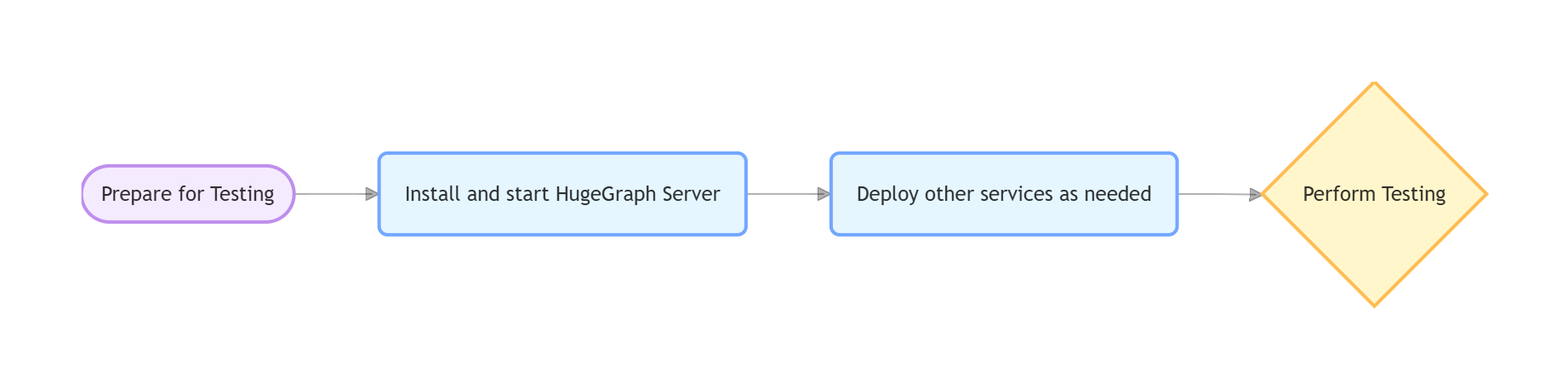
Test process for each tool:
4.1 hugegraph-client
Compile
Dependent Services
Start HugeGraph Server (refer to Section 3)
Server Authentication Configuration
ApiTest requires authentication. No additional configuration is needed when using the script in Section 3.1. For a manually deployed Server, the authentication settings and test credentials must match the test code.
Run Tests
Check Server log if tests fail:
logs/hugegraph-server.log
4.2 hugegraph-loader
Compile
Dependent Services
- Required: HugeGraph Server
- Optional: Hadoop (HDFS tests), MySQL (JDBC tests); Kafka tests use Testcontainers to start Kafka and also require an available Docker daemon.
Run Tests
4.3 hugegraph-hubble
Compile
Dependent Services
1. Start Server (refer to Section 3)
2. Python Environment
3. Build and Verify
Run Tests
4.4 hugegraph-spark-connector
Compile
Run Tests
4.5 hugegraph-tools
Compile
Run Tests
5. Common Issues
Service Connection Issues
If Server, MySQL, or Hadoop cannot be reached:
- Confirm services are running (Server must be on port 8080)
- Check port usage:
lsof -i:8080 - Docker check:
docker compose psanddocker compose logs
Configuration Issues
If files cannot be found or parameters are invalid:
- Check environment variables:
echo $COMMIT_ID - Script permissions:
chmod +x hugegraph-*/assembly/travis/*.sh
HDFS Test Failures
- Confirm NameNode/DataNode running normally
- Check Hadoop logs
- Verify HDFS connection:
hdfs dfsadmin -report
JDBC Test Failures
- Confirm MySQL running normally
- Verify database connection:
mysql -u root -p$DB_PASS - Check MySQL logs
6. References
- HugeGraph GitHub Repository: https://github.com/apache/hugegraph
- HugeGraph Toolchain GitHub Repository: https://github.com/apache/hugegraph-toolchain
- HugeGraph Server Documentation: https://hugegraph.apache.org/docs/quickstart/hugegraph/hugegraph-server/
- CI Configuration:
.github/workflows/*-ci.yml - Dependency Installation Scripts:
hugegraph-*/assembly/travis/
2 - ToplingDB development integration
Development interface: This guide applies to development builds with the optional ToplingDB runtime enabled. Existing releases and image tags do not establish support, and runtime acceptance remains a deployment prerequisite.
Choose the database owner
HugeGraph defaults to standard RocksDB. Enable Topling separately for each process that owns local storage:
| Component | Business provider setting | Start command |
|---|---|---|
| Standalone RocksDB Server | rocksdb.provider=topling in each selected graph properties file | bin/start-hugegraph.sh |
| PD | provider: topling under rocksdb in conf/application.yml | bin/start-hugegraph-pd.sh |
| Store | provider: topling under rocksdb in conf/application-pd.yml | bin/start-hugegraph-store.sh |
A standalone Server keeps backend=rocksdb; an HStore-backed Server uses backend=hstore and needs no local Topling runtime.
All local RocksDB graphs in one Server process must use the same provider. The business setting must match the runtime selected by its launcher.
Build and prepare a standard distribution
Build the normal distributions from the source repository root using Java 17 and Maven 3.6.3 or later:
Obtain a trusted Topling Easy Migrate JNI JAR and its SHA-256 through your artifact channel. Preparation requires a Java 17 JDK, Linux x86_64,
sha256sum, unzip, od, ldd, and GNU mv. The selected JAR’s native dependencies, including its glibc and libaio requirements, must be installed.
Stop the component, unpack a fresh standard distribution, and run from that component directory:
The script verifies the copied JAR’s hash, Topling Java marker, one Linux x86_64 JNI entry, ELF architecture and native dependencies.
Before installation, a disposable database verifies that the selected JNI actually applies EasyMigrate configuration to its persisted write-buffer size.
Unsupported builds are rejected even when their marker and hash match. The probe does not certify existing-data compatibility or every production setting.
A checksum receipt binds this verification to the installed JAR and native library; launchers reject missing or changed receipts. Use a fresh distribution
when upgrading from an older preparation script. Launch rejects inherited RocksDB JNI preloads in default/standard mode
and competing JNI in Topling mode, while preserving unrelated preloads.
It installs topling/rocksdbjni.jar, its native library and optional web resources outside lib. Preparation refuses an existing topling directory;
replace a runtime by preparing another stopped, fresh distribution. Repeat preparation separately for Server, PD and Store as applicable.
Keep data outside the distribution
Changing providers does not convert an existing database. Use separate, initially empty Topling directories and retain the standard-provider data. Create persistent directories writable by the service account, outside source checkouts, build outputs and unpacked distribution directories. Note that each graph requires distinct, dedicated data and WAL directories to prevent path conflicts:
| Component | Configuration file and key | Example persistent path |
|---|---|---|
| Server data | Graph properties: rocksdb.data_path | /srv/hugegraph/topling/server/<graph>/data |
| Server WAL | Graph properties: rocksdb.wal_path | /srv/hugegraph/topling/server/<graph>/wal |
| PD | conf/application.yml: pd.data-path | /srv/hugegraph/topling/pd |
| Store data | conf/application.yml: app.data-path | /srv/hugegraph/topling/store/data |
| Store Raft | conf/application.yml: app.raft-path | /srv/hugegraph/topling/store/raft |
For a standalone Server, edit every selected graph configuration, for example conf/graphs/hugegraph.properties
(replace hugegraph with the corresponding graph name for each graph):
Set both Server data and WAL paths, ensuring each graph uses distinct directories. Leaving WAL at its package-local default risks losing it when a build or package replacement removes that directory. Keep the external data, WAL and Raft roots across runtime/package changes.
For PD and Store, edit the existing rocksdb mapping in the provider configuration file listed above, retaining its other options:
Set their persistent paths separately in conf/application.yml; keep the normal network addresses and cluster configuration.
The published runtime directories use 0755 and regular files use 0644, so a service account different from the preparer can read the JNI. The service account also needs traversal permission on the component’s parent directories; preparation does not change those parents.
Select, start and verify
In the startup shell of each component that owns a Topling database, explicitly select the runtime:
The launcher uses that component’s conf/toplingdb.yaml. Set TOPLINGDB_EASY_MIGRATE_CONF=/absolute/path/config.yaml for an explicit override.
The shipped native profile disables its HTTP server and keeps memtable_as_log_index=false, which the Java write path requires.
Tune that profile for the host; it is separate from the business provider and data-path configuration.
For a fresh standalone Server graph, initialize its store once before the first startup:
bin/init-store.sh and bin/dump-store.sh use the same explicit runtime selection as bin/start-hugegraph.sh.
For HStore, start PD, then Store. Before starting the HStore-backed Server from the same shell, run unset TOPLINGDB_ROCKSDB_PROVIDER
(or export TOPLINGDB_ROCKSDB_PROVIDER=rocksdb); do not enable local Topling on that Server.
A configured provider/runtime mismatch fails before the component opens its database.
Before adoption, verify the actual RocksDB Java classes and mapped JNI library belong to the prepared runtime. Use dedicated data directories to test real writes, reads, normal stop and restart; for HStore, include a Server graph operation through PD and Store. A successful build, startup or standard-JNI unit test alone does not establish Topling runtime acceptance.
Stop or switch back
Stop incoming work, then use the normal stop scripts. For HStore, stop Server with bin/stop-hugegraph.sh, Store with bin/stop-hugegraph-store.sh,
and PD with bin/stop-hugegraph-pd.sh, waiting for each process to exit before stopping its dependency. A forced kill is not proof of normal native cleanup.
To use standard RocksDB again, stop the component, unset TOPLINGDB_ROCKSDB_PROVIDER, and restore its business provider to rocksdb.
Select the corresponding standard-provider data and WAL paths; do not point it at a database modified by Topling.
Dedicated Topling distributions, Docker/Compose packaging, general lifecycle changes and retryable snapshot recovery are separate follow-ups. This guide covers the normal distribution launch scripts; custom IDE and embedded launchers require their own runtime setup and validation.