This is the multi-page printable view of this section. .
Graph Query Languages
- 1: HugeGraph Gremlin
- 2: HugeGraph Cypher
- 3: Cypher Compatibility
- 4: Migrating from Neo4j
- 5: HugeGraph Examples
HugeGraph supports two mainstream graph query languages: Gremlin (imperative traversal language) and Cypher (declarative pattern matching language).
- Gremlin: The core graph traversal language of Apache TinkerPop, offering rich traversal primitives and fine control over complex topological paths.
- Cypher: The declarative query language standardized by openCypher, featuring intuitive SQL-like patterns (
MATCH ... WHERE ... RETURN) for Neo4j parity.
Language Guides & References
Gremlin traversal fundamentals, CRUD query examples, and TinkerPop feature support.
Declarative Cypher language support, read/write statement examples, execution mechanics, and constraints.
Coverage matrix for Cypher clauses and functions, known behavior differences, and workarounds for unsupported features.
Core differences between Neo4j and HugeGraph in graph modeling, ID strategies, multiple labels, and query translation.
The classic TitanDB “Graph of the Gods” sample graph dataset (12 vertices) used across query examples.
Related Tools & Entry Points
Ways to interact with and execute graph queries across HugeGraph components:
- CLI Shell: Use Gremlin Console to debug queries offline or connect directly to Server over WebSocket.
- Web Visualization: Use HugeGraph-Hubble to run Gremlin / Cypher queries with visual graph exploration and Text2GQL.
- HTTP REST APIs: Submit queries programmatically via HTTP using the Gremlin REST API and Cypher REST API.
- Version Migration: Upgrading from an older version? Review the Gremlin & TinkerPop Migration Guide for syntax removals and behavioral changes.
1 - HugeGraph Gremlin
Overview
HugeGraph supports Gremlin, a graph traversal query language of Apache TinkerPop3. While SQL is a query language for relational databases, Gremlin is a general-purpose query language for graph databases, enabling entity creation, property modification, deletion, and traversal queries.
For developers seeking declarative pattern matching (similar to SQL or Neo4j style), HugeGraph also supports Cypher.
HugeGraph is powered by the TinkerPop 3.8.1 engine (running on Java 17 and Groovy 4.0.25). Upgrading from an older version? Review the Gremlin & TinkerPop Migration Guide for removed legacy syntax and behavioral changes.
TinkerPop Features
HugeGraph implements the TinkerPop framework, but not all TinkerPop features are implemented.
The table below lists the support status of various TinkerPop features in HugeGraph:
Graph Features
| Name | Description | Support |
|---|---|---|
| Computer | Determines if the {@code Graph} implementation supports {@link GraphComputer} based processing | false |
| Transactions | Determines if the {@code Graph} implementations supports transactions. | true |
| Persistence | Determines if the {@code Graph} implementation supports persisting it’s contents natively to disk.This feature does not refer to every graph’s ability to write to disk via the Gremlin IO packages(.e.g. GraphML), unless the graph natively persists to disk via those options somehow. For example,TinkerGraph does not support this feature as it is a pure in-sideEffects graph. | Backend-dependent |
| ThreadedTransactions | Determines if the {@code Graph} implementation supports threaded transactions which allow a transaction be executed across multiple threads via {@link Transaction#createThreadedTx()}. | false |
| ConcurrentAccess | Determines if the {@code Graph} implementation supports more than one connection to the same instance at the same time. For example, Neo4j embedded does not support this feature because concurrent access to the same database files by multiple instances is not possible. However, Neo4j HA could support this feature as each new {@code Graph} instance coordinates with the Neo4j cluster allowing multiple instances to operate on the same database. | false |
Vertex Features
| Name | Description | Support |
|---|---|---|
| UserSuppliedIds | Determines if an {@link Element} can have a user defined identifier. Implementation that do not support this feature will be expected to auto-generate unique identifiers. In other words, if the {@link Graph} allows {@code graph.addVertex(id,x)} to work and thus set the identifier of the newly added {@link Vertex} to the value of {@code x} then this feature should return true. In this case, {@code x} is assumed to be an identifier data type that the {@link Graph} will accept. | true |
| NumericIds | Determines if an {@link Element} has numeric identifiers as their internal representation. In other words,if the value returned from {@link Element#id()} is a numeric value then this method should be return {@code true}. Note that this feature is most generally used for determining the appropriate tests to execute in the Gremlin Test Suite. | false |
| StringIds | Determines if an {@link Element} has string identifiers as their internal representation. In other words, if the value returned from {@link Element#id()} is a string value then this method should be return {@code true}. Note that this feature is most generally used for determining the appropriate tests to execute in the Gremlin Test Suite. | true |
| UuidIds | Determines if an {@link Element} has UUID identifiers as their internal representation. In other words,if the value returned from {@link Element#id()} is a {@link UUID} value then this method should be return {@code true}.Note that this feature is most generally used for determining the appropriate tests to execute in the Gremlin Test Suite. | false |
| CustomIds | Determines if an {@link Element} has a specific custom object as their internal representation.In other words, if the value returned from {@link Element#id()} is a type defined by the graph implementations, such as OrientDB’s {@code Rid}, then this method should be return {@code true}.Note that this feature is most generally used for determining the appropriate tests to execute in the Gremlin Test Suite. | true |
| AnyIds | Determines if an {@link Element} any Java object is a suitable identifier. TinkerGraph is a good example of a {@link Graph} that can support this feature, as it can use any {@link Object} as a value for the identifier. Note that this feature is most generally used for determining the appropriate tests to execute in the Gremlin Test Suite. This setting should only return {@code true} if {@link #supportsUserSuppliedIds()} is {@code true}. | false |
| AddProperty | Determines if an {@link Element} allows properties to be added. This feature is set independently from supporting “data types” and refers to support of calls to {@link Element#property(String, Object)}. | true |
| RemoveProperty | Determines if an {@link Element} allows properties to be removed. | true |
| AddVertices | Determines if a {@link Vertex} can be added to the {@code Graph}. | true |
| MultiProperties | Determines if a {@link Vertex} can support multiple properties with the same key. | true |
| DuplicateMultiProperties | Determines if a {@link Vertex} can support non-unique values on the same key. For this value to be {@code true}, then {@link #supportsMetaProperties()} must also return true. By default this method, just returns what {@link #supportsMultiProperties()} returns. | true |
| MetaProperties | Determines if a {@link Vertex} can support properties on vertex properties. It is assumed that a graph will support all the same data types for meta-properties that are supported for regular properties. | false |
| RemoveVertices | Determines if a {@link Vertex} can be removed from the {@code Graph}. | true |
Edge Features
| Name | Description | Support |
|---|---|---|
| UserSuppliedIds | Determines if an {@link Element} can have a user defined identifier. Implementation that do not support this feature will be expected to auto-generate unique identifiers. In other words, if the {@link Graph} allows {@code graph.addVertex(id,x)} to work and thus set the identifier of the newly added {@link Vertex} to the value of {@code x} then this feature should return true. In this case, {@code x} is assumed to be an identifier data type that the {@link Graph} will accept. | false |
| NumericIds | Determines if an {@link Element} has numeric identifiers as their internal representation. In other words,if the value returned from {@link Element#id()} is a numeric value then this method should be return {@code true}. Note that this feature is most generally used for determining the appropriate tests to execute in the Gremlin Test Suite. | false |
| StringIds | Determines if an {@link Element} has string identifiers as their internal representation. In other words, if the value returned from {@link Element#id()} is a string value then this method should be return {@code true}. Note that this feature is most generally used for determining the appropriate tests to execute in the Gremlin Test Suite. | true |
| UuidIds | Determines if an {@link Element} has UUID identifiers as their internal representation. In other words,if the value returned from {@link Element#id()} is a {@link UUID} value then this method should be return {@code true}.Note that this feature is most generally used for determining the appropriate tests to execute in the Gremlin Test Suite. | false |
| CustomIds | Determines if an {@link Element} has a specific custom object as their internal representation.In other words, if the value returned from {@link Element#id()} is a type defined by the graph implementations, such as OrientDB’s {@code Rid}, then this method should be return {@code true}.Note that this feature is most generally used for determining the appropriate tests to execute in the Gremlin Test Suite. | true |
| AnyIds | Determines if an {@link Element} any Java object is a suitable identifier. TinkerGraph is a good example of a {@link Graph} that can support this feature, as it can use any {@link Object} as a value for the identifier. Note that this feature is most generally used for determining the appropriate tests to execute in the Gremlin Test Suite. This setting should only return {@code true} if {@link #supportsUserSuppliedIds()} is {@code true}. | false |
| AddProperty | Determines if an {@link Element} allows properties to be added. This feature is set independently from supporting “data types” and refers to support of calls to {@link Element#property(String, Object)}. | true |
| RemoveProperty | Determines if an {@link Element} allows properties to be removed. | true |
| AddEdges | Determines if an {@link Edge} can be added to a {@code Vertex}. | true |
| RemoveEdges | Determines if an {@link Edge} can be removed from a {@code Vertex}. | true |
Data Type Features
| Name | Description | Support |
|---|---|---|
| BooleanValues | true | |
| ByteValues | true | |
| DoubleValues | true | |
| FloatValues | true | |
| IntegerValues | true | |
| LongValues | true | |
| MapValues | Supports setting of a {@code Map} value. The assumption is that the {@code Map} can contain arbitrary serializable values that may or may not be defined as a feature itself | false |
| MixedListValues | Supports setting of a {@code List} value. The assumption is that the {@code List} can contain arbitrary serializable values that may or may not be defined as a feature itself. As this{@code List} is “mixed” it does not need to contain objects of the same type. | false |
| BooleanArrayValues | false | |
| ByteArrayValues | true | |
| DoubleArrayValues | false | |
| FloatArrayValues | false | |
| IntegerArrayValues | false | |
| LongArrayValues | false | |
| SerializableValues | false | |
| StringArrayValues | false | |
| StringValues | true | |
| UniformListValues | Supports setting of a {@code List} value. The assumption is that the {@code List} can contain arbitrary serializable values that may or may not be defined as a feature itself. As this{@code List} is “uniform” it must contain objects of the same type. | false (supported via Schema valueList()) |
Gremlin Steps
HugeGraph supports all steps of Gremlin. For complete reference information about Gremlin, please refer to the Apache TinkerPop 3.8.1 official documentation.
| Step | Description | Documentation |
|---|---|---|
addE | Add an edge between two vertices. | addE step |
addV | Add vertices to graph. | addV step |
and | Make sure all traversals return values. | and step |
as | Step modulator for assigning variables to the step’s output. | as step |
by | Step modulators used in conjunction with group and order. | by step |
coalesce | Returns the first traversal that returns a result. | coalesce step |
constant | Returns a constant value. Used in conjunction with coalesce. | constant step |
count | Returns a count from the traversal. | count step |
datetime | Creates a datetime object or retrieves current server time (returns OffsetDateTime). | datetime function |
dedup | Returns values with duplicates removed. | dedup step |
discard | Discards all current traversers (replaces parameterless none()). | discard step |
drop | Discards a value (vertex/edge). | drop step |
fold | Acts as a barrier for computing aggregated values from results. | fold step |
group | Groups values based on specified labels. | group step |
has | Used to filter properties, vertices, and edges. Supports hasLabel, hasId, hasNot, and has variants. | has step |
inject | Injects values into the stream. | inject step |
is | Used to filter by a Boolean expression. | is step |
limit | Used to limit the number of items in a traversal. | limit step |
local | Locally wraps a part of a traversal, similar to a subquery. | local step |
not | Used to generate the negation result of a filter. | not step |
optional | Returns the result of a specified traversal if it generates any results, otherwise returns the calling element. | optional step |
or | Ensures that at least one traversal returns a value. | or step |
order | Returns results in the specified order. | order step |
path | Returns the full path of the traversal. | path step |
project | Projects properties as a map. | project step |
properties | Returns properties with specified labels. | properties step |
range | Filters based on a specified range of values. | range step |
repeat | Repeats a step a specified number of times. Used for looping. | repeat step |
sample | Used to sample results returned by the traversal. | sample step |
select | Used to project the results returned by the traversal. | select step |
mergeV | Matches vertices by property; updates if present, creates if absent (standard upsert). | mergeV step |
mergeE | Matches edges by property and endpoints; updates if present, creates if absent (standard upsert). | mergeE step |
tree | Aggregate the paths in vertices into a tree. | tree step |
unfold | Unfolds an iterator as a step. | unfold step |
union | Combines the results of multiple traversals. | union step |
V | Traversal steps between vertices and edges: V, E, out, in, both, outE, inE, bothE, outV, inV, bothV, and otherV | vertex steps |
where | Filters traversal results. Supports eq, neq, lt, lte, gt, gte, and between operators. | where step |
2 - HugeGraph Cypher
Overview
HugeGraph supports Cypher, the declarative graph query language originally created by Neo4j and standardized as
openCypher. While Gremlin is an imperative traversal language, Cypher lets you describe the graph pattern you want
(MATCH, WHERE, RETURN) and lets the engine decide how to execute it.
HugeGraph supports the openCypher 9 syntax subset, parsing declarative pattern queries directly and bridging them seamlessly to the underlying TinkerPop graph traversal engine. For complete coverage and boundaries, see Cypher Compatibility.
When to use Cypher vs Gremlin
| Use Cypher when | Use Gremlin when |
|---|---|
| You are migrating from Neo4j or already know Cypher | You need the full HugeGraph feature surface |
You want declarative pattern matching (MATCH (a)-[:KNOWS]->(b)) | You need fine-grained traversal control, custom steps, or lambdas |
| Your queries are read-mostly patterns and projections | You need graph algorithms, OLAP, or features Cypher does not expose |
For anything Cypher cannot express, the equivalent Gremlin query always works — examples below show both.
Calling the Cypher API
Cypher statements are submitted to the HugeGraph Server through the REST endpoint:
When authentication is enabled, Cypher requests require an Authorization header, supporting Basic (standard RFC 4648 Base64, e.g. curl -u) or Bearer <token> (requests without credentials return 401). When authentication is disabled, no Authorization header is required.
See the Cypher REST API reference for the full request and response format.
Example:
From the Java client, use CypherManager (see hugegraph-client):
Basic examples
The examples below assume a graph with person vertices (name, age, city properties) and knows edges.
Before running them, note:
- Property predicates in
WHERE(such asWHERE n.age > 30) require covering indexes (e.g. aRANGEindex onperson.age). - On schemas with non-nullable properties or
PRIMARY_KEYstrategy, create statements must provide required attributes and primary keys; create vertices with complete properties separately before creating connecting edges.
Read — MATCH / WHERE / RETURN
Create — CREATE
Update — SET / REMOVE
Delete — DELETE / DETACH DELETE
Aggregation
Gremlin equivalents
Every Cypher statement is translated to Gremlin internally. When a Cypher feature is unsupported, write the traversal directly:
| Cypher | Gremlin equivalent |
|---|---|
MATCH (n:person) WHERE n.name='marko' RETURN n | g.V().hasLabel('person').has('name','marko') |
MATCH (a)-[:knows]->(b) RETURN b | g.V().out('knows') |
CREATE (n:person {name:'x'}) | g.addV('person').property('name','x') |
MATCH (n) DETACH DELETE n | g.V().drop() |
MATCH (n:person) RETURN count(n) | g.V().hasLabel('person').count() |
Tip: You can inspect generated underlying Gremlin traversals via EXPLAIN MATCH (n:person) RETURN n (in the translation field of the response) to draft
equivalent traversals. PROFILE is not supported.
Limitations
- Parameterized query rules: Parameter bindings are supported via JSON request bodies (
{"cypher": "...", "parameters": {...}}, up to 16 top-level parameters; group additional properties into a nested Map and reference fields explicitly). Referencing an undeclared$paramresults in an execution error; explicitnullis supported. - Partial clause coverage: Certain advanced openCypher constructs (such as map projections and complex functions) are currently unsupported and fail during parsing and validation.
- No
CALLprocedures: Graph algorithms (shortest path, k-out, personalrank, etc.) are available via the traverser REST APIs or Gremlin instead of CypherCALLprocedures. - Single statement per request: Multi-statement scripts are not supported; submit one statement per call.
When a statement fails validation or execution, the server returns structured error details under status.attributes.errors with code, message, and
hint. The Gremlin equivalent is the recommended fallback.
Further reading
3 - Cypher Compatibility
Scope and Overview
HugeGraph supports declarative openCypher 9 queries on top of the TinkerPop engine. This page summarizes supported request forms, parameter binding rules, syntax coverage, and behavioral boundaries.
The endpoint is /graphspaces/{graphspace}/graphs/{graph}/cypher. For query examples and Gremlin equivalents, see the
HugeGraph Cypher Guide.
Request Forms and Parameter Bindings
| Request Form | Content-Type | Description |
|---|---|---|
POST (Recommended) | application/json | JSON body {"cypher": "...", "parameters": {...}}, supports parameter bindings |
POST | application/json | Raw Cypher text string body (for unparameterized raw statements) |
GET | — | Query parameter ?cypher=<URL-encoded statement>, suitable for simple read queries |
Example JSON parameterized request:
Parameter Binding Rules
- Parameter Format: The
cypherfield must be a non-empty string;parameters, if provided, must be a JSON object (omitted means an empty map). - Parameter Count: The top-level
parametersobject accepts at most 16 keys. For more properties, group them into a nested Map and reference fields explicitly in the statement (e.g.$props.name). - Unbound Variables: Referencing an undeclared
$paramraises an execution error and is rejected (explicitnullis supported). - Reserved Marker: The exact string
" cypher.null"(two leading spaces) is reserved by the engine as an internal sentinel and is rejected in parameter values. - Error Response: A malformed request body returns HTTP 400 with the standard error body. Translation and execution errors return HTTP 200 with
status.code400 (and nullresult), with structured details (code,message,hint) instatus.attributes.errors.
Syntax and Feature Support Matrix
| Category | Supported Features | Notes |
|---|---|---|
| Reads & Patterns | Label scans, equality and range predicates, boolean logic (AND/OR/NOT), directed 1-hop and multi-hop patterns, regex matching (=~ full match) | Range comparisons require corresponding indexes |
| Results & Projection | Node and scalar projections, aliases (AS), property access, nested structures, relationship IDs, path expressions, null handling | Results are mapped to standard JSON structures |
| Aggregation & Ordering | count, sum, min, max, avg, DISTINCT, ORDER BY, SKIP, LIMIT | Mapped to underlying graph traversal steps |
| Data Writes | Vertex and edge CREATE, property SET / REMOVE, edge and vertex DELETE / DETACH DELETE | Create vertices with required properties before creating connecting edges |
Write Constraints and Considerations
On schemas with non-nullable properties or PRIMARY_KEY strategy, the shorthand CREATE (a)-[:knows]->(b) fails
due to non-null property validation (checkNonnullProperty) or missing primary keys.
Execute vertex and edge creations separately, ensuring required vertex attributes are fully specified.
Unsupported Features
The following advanced features are currently unsupported; use Gremlin or the respective REST APIs:
- Complex Clauses:
MERGE,UNION, variable-length paths (*1..3); - Procedures:
CALL dbms.*/CALL algo.*(use the Traverser REST API); - Schema Management: Cypher Schema DDL (use the Schema REST API);
- Protocols & Drivers: Bolt protocol and drivers (use the HTTP REST API or HugeGraph Client).
4 - Migrating from Neo4j
Overview
For developers migrating from Neo4j or evaluating HugeGraph. HugeGraph supports openCypher declarative query syntax, but differences exist in the graph model, schema rules, parameter bindings, and indexing. For language usage and compatibility references, see HugeGraph Cypher and Cypher Compatibility.
What carries over directly
| Neo4j concept | HugeGraph equivalent |
|---|---|
| Property graph model (nodes / relationships / properties) | Same — vertex labels / edge labels / properties |
Core Cypher: MATCH/WHERE/RETURN/CREATE/SET/DELETE | Works as-is (REST /cypher endpoint or Java client CypherManager), subject to the schema and index rules below |
Simple aggregations (count/sum/min/max/avg) | Works as-is |
| Traversal-heavy queries | Gremlin traversals or the traverser REST APIs (k-out, shortest path, personalrank, …) |
Habits you need to change
| In Neo4j | In HugeGraph |
|---|---|
CREATE INDEX / CREATE CONSTRAINT | Create property indexes through the IndexLabel REST API; uniqueness constraints map to UNIQUE IndexLabels; node keys map to non-nullable keys plus a composite UNIQUE index; property existence constraints map to non-nullable keys on VertexLabels or EdgeLabels. Note that primary_keys defines vertex identity, not a uniqueness constraint — a duplicate CREATE overwrites the existing vertex instead of failing |
| Implicit schema (add properties freely) | Strong schema: define VertexLabel / EdgeLabel / PropertyKey before writing data |
Property predicates in WHERE need no index | The starting vertex lookup in WHERE needs a covering index unless it is an equality on every primary key of the label. Use RANGE for > / < comparisons. Without a covering index the request returns HTTP 200 with status.code 400 and a “not indexed” error |
Parameterized queries $param | Parameterized requests are supported via JSON body (up to 16 top-level parameters; group additional values into a nested Map); missing parameters result in execution errors |
CALL dbms.* / CALL algo.* procedures | Equivalent capabilities are in the traverser, task, and other REST APIs |
| Driver: Neo4j Bolt driver | hugegraph-client (CypherManager) or any HTTP client |
| Transaction boundaries inside a Cypher statement | One statement per request; graph-to-graph migration uses Apache SeaTunnel 3.0.0 (preferred, see below), file-based bulk loads use the HugeGraph Loader |
On PRIMARY_KEY labels, a UNIQUE index cannot include all primary-key fields
(the server rejects it). To keep duplicate-rejection behavior, use a
CUSTOMIZE_STRING label keyed on the Neo4j node id and add a UNIQUE index on the
business key.
Suggested migration path
Inventory your queries: Review your application’s Cypher queries against the Cypher Compatibility Notes and Limitations to classify them into “works as-is”, “rewrite as Gremlin”, or “switch to a REST API”.
Create the schema first: define VertexLabel / EdgeLabel / PropertyKey and indexes through the schema API — HugeGraph requires the schema to exist before data is written.
Import data: the preferred path is Apache SeaTunnel 3.0.0 (released 2026-09-29) running Neo4j Source → HugeGraph Sink directly — no intermediate file export. REST remains fine for small datasets; the HugeGraph Loader stays an alternative for file-based imports. HugeGraph-side setup (environment,
mappings, vertex/edge import examples) is covered in the Import Graph Data with SeaTunnel Sink guide.The SeaTunnel 3.0.0 connector docs document what to rely on:
- Neo4j Source reads Cypher
query results with explicit field schemas; 3.0.0 adds multi-table reads via
tables_configs. - HugeGraph Sink is
refactored in 3.0.0 with multi-mapping support — use the recommended
mappingsconfiguration for vertices/edges and follow its schema-creation behavior. By default, the Sink fails fast on errors (batch_failure_fallback=falseandmax_insert_errors=0). Record skipping is opt-in viabatch_failure_fallback=true; if enabled, capture and reconcile skipped records and compare row counts before cutover. - HugeGraph Source is new in 3.0.0 (schema auto-discovery, multi-label/parallel reads), enabling HugeGraph export and migration workflows.
Map Neo4j properties to HugeGraph PropertyKeys and pick the vertex ID strategy before importing. The Sink requires
idFieldsfor every vertex strategy other thanAUTOMATIC, and edge mappings need separatesourceConfig.idFieldsandtargetConfig.idFields, so the Neo4j query must return the field that carries the ID:idStrategy = "PRIMARY_KEY": put a Neo4j business key inidFieldsand express edge endpoints through those same key fields.idStrategy = "CUSTOMIZE_STRING": this alone does not keep the Neo4j node id. Make the Neo4j query return the id you want to keep as its own column (aliased, for exampleAS node_id), declare that field in the Sourceschema.fields(it must match the fields the query returns), set the vertexidFieldsto it, and map the matching edge endpoint fields insourceConfig.idFieldsandtargetConfig.idFields.
Labels you pre-created in step 2 must use that same strategy — automatic creation does not convert an existing
PRIMARY_KEYlabel intoCUSTOMIZE_STRING. The Sinkmappingsconfiguration can create the missing PropertyKey, VertexLabel and EdgeLabel definitions, so those three parts of step 2 are optional when you use it; it does not create IndexLabels, so create any index your queries rely on (see the habits table above) separately. When SeaTunnel auto-creates EdgeLabels, omittingfrequencydefaults toSINGLE, which collapses parallel Neo4j relationships between the same endpoints into a single edge. To preserve parallel relationships, explicitly specifyfrequency = "MULTIPLE"and provide stable relationship discriminator fields assortKeysin the edge mapping (HugeGraph uses sort keys to distinguish parallel edges). Load vertices before edges. We recommend thoroughly testing the import pipeline with a representative data sample before cutover.- Neo4j Source reads Cypher
query results with explicit field schemas; 3.0.0 adds multi-table reads via
Switch incrementally: keep queries Cypher supports, and rewrite unsupported constructs as Gremlin — the equivalents table shows the mapping.
Limitations at a glance
- Statements and parameters: Multi-statement scripts and
CALLprocedures are not supported; parameter binding supports up to 16 top-level parameters (pass a nested Map for additional properties). - Unverified syntax: Advanced openCypher constructs not covered in the compatibility matrix are unverified and may fail during query validation; established limitations are listed above.
- Fallback path: Unsupported query constructs can typically be rewritten as Gremlin traversals — see the equivalents table; schema DDL and procedures map to REST APIs instead.
5 - HugeGraph Examples
1 Overview
This example uses the TitanDB Getting Started guide as a template to demonstrate how to use HugeGraph. By comparing HugeGraph and TitanDB, you can understand the differences between them.
1.1 Similarities and Differences between HugeGraph and TitanDB
Both HugeGraph and TitanDB are graph databases based on the Apache TinkerPop3 framework. They both support the Gremlin graph query language and share many similarities in terms of usage and interfaces. However, HugeGraph is a completely new design and development, characterized by its clear code structure, richer features, and more user-friendly interfaces.
Compared to TitanDB, HugeGraph’s main features are as follows:
- HugeGraph currently offers a comprehensive suite of tools, including HugeGraph-API, HugeGraph-Client, HugeGraph-Loader, HugeGraph-Studio, and HugeGraph-Spark. These components facilitate system integration, data loading, visual graph querying, Spark connectivity, and other functionalities.
- HugeGraph incorporates the concepts of Server and Client, allowing third-party systems to connect via multiple methods such as JAR references, clients, and APIs. In contrast, TitanDB only supports connections via JAR references.
- HugeGraph requires explicit schema definition, and all insertions and queries must pass strict schema validation. Implicit schema creation is not supported at the moment.
- HugeGraph makes full use of the characteristics of the underlying storage system to achieve efficient data access, whereas TitanDB ignores the differences of the backend with a unified Kv structure.
- HugeGraph’s update operations can be performed on-demand (e.g., updating a specific attribute), offering better performance. TitanDB uses a read-and-update approach for updates.
- Both VertexId and EdgeId in HugeGraph support concatenation, allowing for automatic deduplication and better query performance. In TitanDB, all IDs are auto-generated and require indexing for queries.
1.2 Character Relationship Graph
This example uses the Property Graph Model to describe the relationships between characters in Greek mythology, also known as the character relationship graph. The specific relationships are shown in the diagram below.
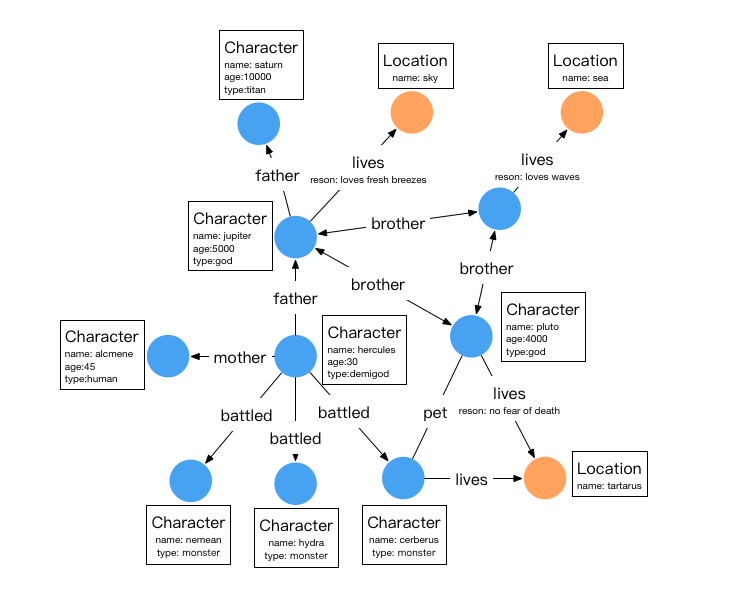
In the diagram, circular nodes represent entities (Vertices), arrows represent relationships (Edges), and the content in the boxes represents attributes.
There are two types of vertices in this graph: characters and locations, as shown in the table below:
| Name | Type | Attributes |
|---|---|---|
| character | vertex | name,age,type |
| location | vertex | name |
There are six types of relationships: father, mother, brother, battled, lives, and pet. The details of these relationships are as follows:
| Name | Type | Source Vertex Label | Target Vertex Label | Attributes |
|---|---|---|---|---|
| father | edge | character | character | - |
| mother | edge | character | character | - |
| brother | edge | character | character | - |
| battled | edge | character | character | time |
| pet | edge | character | character | - |
| lives | edge | character | location | reason |
An edge label can be linked to more than one pair of source and target vertex labels: call link(sourceLabel, targetLabel) once per pair when creating it. The deprecated sourceLabel() and targetLabel() builder methods accept only a single pair.
In this example, the original TitanDB’s monster, god, human, and demigod are all represented using the same vertex label: character in HugeGraph, with an additional type attribute to indicate the type of character. The edge labels remain consistent with the original TitanDB.
2 Graph Schema and Data Ingest Examples
HugeGraph requires explicit schema creation, which involves creating PropertyKeys, VertexLabels, and EdgeLabels in sequence. If indexing is needed, IndexLabels must also be created.
2.1 Graph Schema
The snippets assume a local Groovy script has opened HugeGraph as graph and set g = graph.traversal(). Start with the Gremlin Console local-mode example, whose scripts/example.groovy creates both variables. In a remote Console, g is a Server-side traversal-source alias and there is no local graph object; use the Schema REST API for remote schema creation.
2.2 Graph Data
2.3 Indices
HugeGraph by default automatically generates IDs. However, if a user specifies the primaryKeys field list for a VertexLabel through primaryKeys, the ID strategy for that VertexLabel will automatically switch to the primaryKeys strategy. Once the primaryKeys strategy is enabled, HugeGraph generates VertexId by concatenating vertexLabel+primaryKeys, which allows for automatic deduplication. Additionally, there is no need to create extra indexes to use the properties in primaryKeys for fast querying. For example, both “character” and “location” have the primaryKeys("name") attribute, so without creating additional indexes, vertices can be queried using g.V().hasLabel('character').has('name','hercules').
3 Graph Traversal Examples
3.1 Traversal Query
1. Find the grandfather of hercules
It can also be done using the repeat method:
2. Find the name of Hercules’s father
3. Find the characters with age > 100
4. Find who are pluto’s cohabitants
5. Find pluto can’t be his own cohabitant
6. Pluto’s Brothers
It is recommended to use HugeGraph-Hubble to execute the above code visually. Additionally, the code can be executed through various other methods such as HugeGraph-Client, HugeGraph-Api, GremlinConsole, and GremlinDriver.
3.2 Summary
HugeGraph currently supports Gremlin syntax, and users can implement various query requirements through Gremlin / REST-API.