This is the multi-page printable view of this section. .
HugeGraph-AI
- 1: HugeGraph-LLM
- 2: HugeGraph-ML
- 3: HugeGraph-LLM Workflow
- 4: Configuration Reference
- 5: HugeGraph-LLM REST API
- 6: Vermeer Python Client
hugegraph-ai provides Python clients for HugeGraph, graph machine learning tools, and LLM tools for knowledge graph construction and GraphRAG applications.
Apache License 2.0 · Ask DeepWiki
Modules
- hugegraph-llm: knowledge graph construction, GraphRAG, and natural-language graph queries.
- hugegraph-ml: reads graph data from HugeGraph and runs graph learning models.
- hugegraph-python-client: a Python SDK for managing schemas and graph data and running Gremlin queries.
- vermeer-python-client: a Python SDK for the Vermeer graph computing service.
The repository uses a uv workspace whose members are hugegraph-llm and hugegraph-python-client. hugegraph-ml and vermeer-python-client are editable path dependencies rather than workspace members. The current repository version is 1.7.0. The client source directory is named hugegraph-python-client, but its distribution name is hugegraph-python.
Requirements
- HugeGraph-AI root workspace: Python 3.10 or later; HugeGraph-LLM additionally requires a version below 3.12
- HugeGraph-ML: Python 3.10 or later
- PyPI
hugegraph-python1.5.0: Python 3.9 or later; current repository source uses Python 3.10 or later with the workspace - Vermeer Python client: current source requires Python 3.10 or later, although package metadata still says
>=3.9; see the client guide uv0.7 or later- HugeGraph Server 1.5.0 or later; the current workspace client rejects detectable older versions
Optional Dependency Groups
The root project declares one extra per module plus a few combined ones:
| Extra | Installs |
|---|---|
llm | hugegraph-llm |
ml | hugegraph-ml |
python-client | hugegraph-python (source directory hugegraph-python-client) |
vermeer | vermeer-python-client |
dev | pytest, pytest-cov, coverage, pylint, ruff, mypy, ty, pre-commit |
nk-llm | hugegraph-llm, hugegraph-python-client, and Nuitka for the compiled image |
all | all four module packages |
hugegraph-llm itself declares a vectordb extra that adds pymilvus and qdrant-client.
Deploy with Docker Compose
The repository includes a Compose file that starts both HugeGraph Server and the RAG service:
Default addresses:
- HugeGraph Server:
http://localhost:8080 - RAG service and Web UI:
http://localhost:8001
Start the RAG Service from Source
uv sync creates .venv at the repository root. Installing from the root resolves workspace members and path dependencies together. The repository does not track uv.lock; uv sync resolves the declarations and version constraints in pyproject.toml.
Install ML Dependencies
Example scripts are under hugegraph-ml/src/hugegraph_ml/examples/.
Next Steps
1 - HugeGraph-LLM
HugeGraph-LLM supports knowledge graph construction, GraphRAG, and natural-language graph queries. Its demo service hosts Gradio and FastAPI in one process. Source launches listen locally at 127.0.0.1:8001, accessible at http://localhost:8001; explicitly use --host 127.0.0.1 for local-only access. Dockerfile.llm overrides this to 0.0.0.0:8001; do not use loopback inside the container, or published ports will not reach the service.
Production requires HugeGraph-LLM login (ENABLE_LOGIN=True, replacing USER_TOKEN and ADMIN_TOKEN) and a source IP allowlist at the firewall or network entry point. Separately enable Server authentication and authorization, retain Server audit logs (normally audit-*.log), and grant GRAPH_USER only the permissions this service needs. AI service tokens authenticate the LLM UI and API, not HugeGraph Server.
Requirements
AI-generated project documentation: Ask DeepWiki
- Python 3.10 or 3.11 (
>=3.10,<3.12) uv0.7 or later- HugeGraph Server 1.5.0 or later; the current workspace client rejects detectable older versions
Deploy with Docker Compose
Prepare the environment files from the HugeGraph-AI repository root:
After startup, HugeGraph Server is available at http://localhost:8080, and the RAG service and Web UI are available at http://localhost:8001.
The Compose file mounts ${PROJECT_PATH}/hugegraph-llm/.env into the container at /home/work/hugegraph-llm/.env, so the file has to exist before the container starts. The resource directory hugegraph-llm/src/hugegraph_llm/resources can be mounted the same way; the mount is commented out by default.
The application reads GRAPH_URL; Compose-provided HUGEGRAPH_HOST and HUGEGRAPH_PORT do not override it. Set GRAPH_URL=server:8080 and matching Server credentials in the container’s .env.
Container Images
| Build recipe | Description |
|---|---|
docker/Dockerfile.llm | Source runtime image recipe; starts python -m hugegraph_llm.demo.rag_demo.app --host 0.0.0.0 --port 8001 |
docker/Dockerfile.nk | Nuitka binary image recipe using the nk-llm extra; starts ./app.dist/app.bin |
Compose references untagged hugegraph/rag, which resolves to latest. scripts/build_llm_image.sh builds docker/Dockerfile.llm locally as hugegraph/graphrag:1.7.0. These are different images: building locally does not replace Compose’s image. To run the build, change Compose’s image to hugegraph/graphrag:1.7.0. The script builds but does not push. Both Dockerfiles expose 8001, run as non-root user work, declare a resource-directory volume, and use curl -f http://localhost:8001/ as their health check.
Deploy on Kubernetes
docker/charts/hg-llm is a Helm chart for the RAG service. It deploys the hugegraph/graphrag image and, by default, publishes a NodePort service that maps node port 8039 and service port 8080 onto container port 8001. The release name is fixed to hg-llm-service. Ingress and horizontal pod autoscaling are present but disabled by default.
The chart deploys only the RAG service, not HugeGraph Server. Set GRAPH_URL in the mounted .env to a Server address reachable from the Pod, with matching credentials.
image.tag still defaults to v0.0.1. The build script produces local hugegraph/graphrag:1.7.0; before deployment, push the image to a registry reachable by the cluster or load it onto cluster nodes, then set matching tag and pull policy values.
The .env and prompt YAML mounts are commented out in values.yaml. Prompt YAML can use a ConfigMap, but .env may contain secrets and passwords: use a Secret and change the env-config volume from configMap to secret. Create them separately:
Uncomment the volumeMounts entries and enable the prompt ConfigMap volume/mount if needed. Helm renders these volume definitions directly from values.yaml.
Start from Source
Install dependencies through the workspace at the repository root:
To use a custom address and port:
Set HG_DEV_RELOAD=1 to start uvicorn with auto-reload during development.
The service stores model, HugeGraph, and login settings in hugegraph-llm/.env. Prompts are stored separately in hugegraph-llm/src/hugegraph_llm/resources/demo/config_prompt.yaml. The configuration code creates missing files with default values.
The .env location is resolved in this order: HUGEGRAPH_LLM_ENV_PATH if it is set, then hugegraph-llm/.env when the package runs from a source checkout, then .env in the current working directory.
Main Capabilities
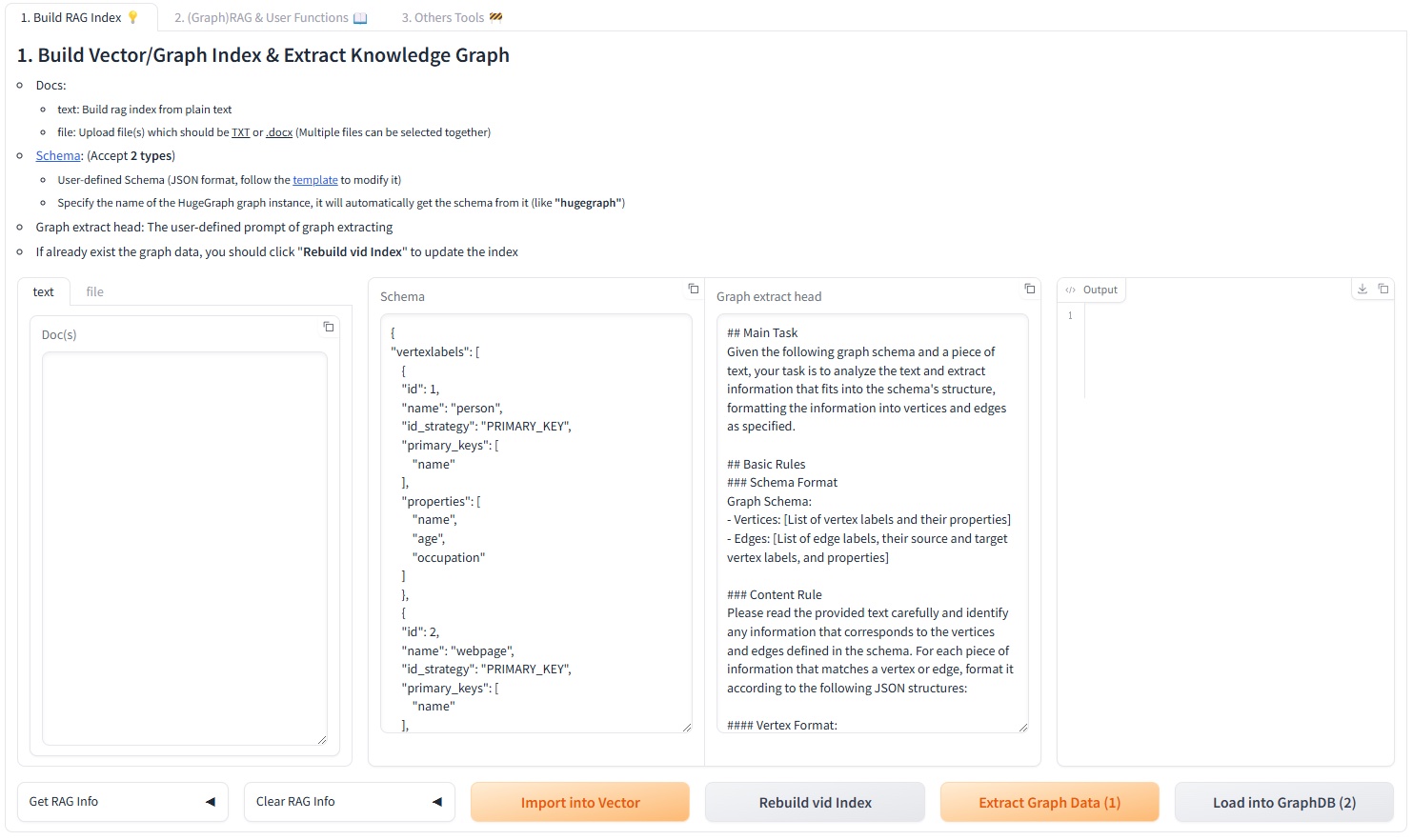
Build RAG Indexes
The first Web UI tab splits text into a chunk vector index, extracts vertices and edges according to a schema, writes the graph to HugeGraph, and updates the vertex vector index. Input can be typed into the text tab or uploaded through the file tab, which accepts .txt, .docx, and .pdf files and allows selecting several at once. Encrypted PDFs and scanned PDFs without an extractable text layer are rejected.
The schema can be inline JSON or the name of an existing graph. Through the REST API, a graph name requires a matching client_config.graph; inline JSON neither connects to HugeGraph nor accepts client_config.
The tab also carries two generators. Graph Schema Generator derives a schema from query examples plus a few-shot example. Graph Extraction Prompt Generator writes an extraction prompt from a described scenario and a selected reference example. A Graph Extraction Split Type dropdown chooses document, paragraph, or sentence granularity before extraction.
GraphRAG
The query pipeline can combine direct LLM answers, chunk-vector retrieval, and graph retrieval. Graph retrieval first extracts keywords and matches vertices, then attempts Text2Gremlin. If generation or execution fails, it can fall back to predefined graph traversals. Request parameters control result limits, vector distance thresholds, template counts, and reranking.
The same tab has a batch back-testing panel that reads questions from an .xlsx or .csv file, answers each one, and returns a downloadable file. A template file is offered for download next to the upload control.
Text2Gremlin
POST /text2gremlin generates Gremlin from natural language, the graph schema, and optional examples. A custom prompt must retain {query}, {schema}, {example}, and {vertices}.
The matching UI tab can first build the example vector index from a .json or .csv file of question and Gremlin pairs. The bundled resources/demo/text2gremlin.csv is used when no file is supplied.
Graph and Admin Tools
The Graph Tools tab runs a Gremlin query directly, triggers a manual graph backup, and can initialize demo data in HugeGraph. The Admin Tools tab shows the last lines of logs/llm-server.log behind an ADMIN_TOKEN prompt, and can refresh or clear that file.
Two background tasks run for the lifetime of the process: a cron job that backs up the graph every day at 01:00, and a task that keeps vertex-id embeddings up to date.
Models and Vector Backends
Chat, information extraction, and Text2Gremlin can independently use an OpenAI-compatible endpoint, Ollama, or LiteLLM. The embedding model is configured separately and supports the same three providers. Reranking supports Cohere and SiliconFlow.
FAISS is the default vector index. CUR_VECTOR_INDEX selects Faiss, Milvus, or Qdrant, and the same choice is available in the 5. Set up the vector engine. panel of the Web UI. Milvus and Qdrant require the optional dependencies:
See the workflow guide, the configuration reference, and the REST API for details.
Programmatic Use
The former RAGPipeline and KgBuilder classes were replaced by a pipeline scheduler. Call a flow by name through SchedulerSingleton:
The registered flow names are rag_raw, rag_vector_only, rag_graph_only, rag_graph_vector, text2gremlin, build_examples_index, build_vector_index, graph_extract, import_graph_data, update_vid_embeddings, get_graph_index_info, build_schema, and prompt_generate. schedule_stream_flow is the async streaming variant.
Development Checks
Install the module and the development tools from the repository root, then run the checks that mirror CI:
Git hooks are available through pre-commit:
2 - HugeGraph-ML
HugeGraph-ML reads graph data from HugeGraph and converts it to DGL graphs for tasks such as node embedding, node classification, graph classification, link prediction and fraud detection. Model implementations are under hugegraph-ml/src/hugegraph_ml/models/.
Requirements
- Python 3.10 or later
- HugeGraph Server 1.5.0 or later; the current workspace client rejects detectable older versions
uv0.7 or later
All server access goes through hugegraph-python-client (the pyhugegraph package) from the same repository. HugeGraph2DGL pulls vertices and edges over the Gremlin endpoint with g.V().hasLabel(...) and g.E().hasLabel(...), and the dataset importers write through the schema and batch vertex/edge APIs in batches of 500.
The repository root declares ML version constraints under [tool.uv] constraint-dependencies:
| Package | Constraint |
|---|---|
torch | ==2.2.0 |
dgl | ~=2.1.0 |
ogb | ~=1.3.6 |
torchdata | ~=0.7.0 |
catboost | ~=1.2.3 |
category-encoders | ~=2.6.3 |
numpy | ~=1.24.4 |
pandas | ~=2.2.3 |
These constraints limit versions but do not select CPU or CUDA builds. Tasks that support gpu default to -1 for CPU. GPU use requires mutually compatible CUDA builds of torch and dgl.
Installation
HugeGraph-ML is a path dependency of the root project but is not a uv workspace member. Select the ml extra at the repository root so uv installs it and its local client dependency according to workspace configuration.
Implemented Models
Every module below lives in hugegraph-ml/src/hugegraph_ml/models/. models/__init__.py re-exports nothing, so import from the module file directly.
| Model | Module | Entry class | Used for | Paper |
|---|---|---|---|---|
| AGNN | agnn.py | AGNN | Node classification | 1803.03735 |
| APPNP | appnp.py | APPNP | Node classification | 1810.05997 |
| ARMA | arma.py | ARMA4NC | Node classification | 1901.01343 |
| BGNN | bgnn.py | BGNNPredictor | Gradient boosting over node features combined with a GNN; the bundled example runs regression | 2101.08543 |
| BGRL | bgrl.py | BGRL | Self-supervised node embedding | 2102.06514 |
| CARE-GNN | care_gnn.py | CAREGNN | Fraud detection | 2008.08692 |
| Cluster-GCN | cluster_gcn.py | SAGE | Node classification with subgraph sampling | 1905.07953 |
| C&S | correct_and_smooth.py | MLP, CorrectAndSmooth, LabelPropagation | Correcting and smoothing base predictions | 2010.13993 |
| DAGNN | dagnn.py | DAGNN | Node classification | 2007.09296 |
| DeeperGCN | deepergcn.py | DeeperGCN | Node classification with edge features | 2006.07739 |
| DGI | dgi.py | DGI | Self-supervised node embedding | 1809.10341 |
| DiffPool | diffpool.py | DiffPool | Graph classification | 1806.08804 |
| GATNE | gatne.py | DGLGATNE | Heterogeneous network embedding | 1905.01669 |
| GIN | gin_global_pool.py | GIN | Graph classification | |
| GRACE | grace.py | GRACE | Self-supervised node embedding | 2006.04131 |
| GRAND | grand.py | GRAND | Node classification | 2005.11079 |
| JKNet | jknet.py | JKNet | Node classification | 1806.03536 |
| MLP | mlp.py | MLPClassifier | Downstream classifier over learned embeddings | |
| P-GNN | pgnn.py | PGNN | Link prediction | you19b |
| SEAL | seal.py | DGCNN, SEALData | Link prediction | 1802.09691 |
GIN accepts pooling values sum (default), mean, max, global_attention and set2set.
Reading Graph Data
HugeGraph2DGL in hugegraph-ml/src/hugegraph_ml/data/hugegraph2dgl.py opens a PyHugeClient and converts query results into DGL objects:
| Method | Returns | Notes |
|---|---|---|
convert_graph(vertex_label, edge_label, feat_key="feat", label_key="label", mask_keys=None) | dgl.DGLGraph | mask_keys falls back to ["train_mask", "val_mask", "test_mask"] |
convert_hetero_graph(vertex_labels, edge_labels, feat_key="feat", label_key="label", mask_keys=None) | DGL heterograph | Takes lists of labels |
convert_graph_dataset(graph_vertex_label, vertex_label, edge_label, feat_key="feat", label_key="label") | HugeGraphDataset | Fills info with n_graphs, max_n_nodes, n_feat_dim, n_classes |
convert_graph_nx(vertex_label, edge_label) | networkx.Graph | Used by P-GNN |
convert_graph_with_edge_feat(vertex_label, edge_label, node_feat_key="feat", edge_feat_key="edge_feat", label_key="label", mask_keys=None) | dgl.DGLGraph | Also fills edata["feat"] |
convert_graph_ogb(vertex_label, edge_label, split_label) | (dgl.DGLGraph, split_edge) | Used by SEAL |
convert_hetero_graph_bgnn(vertex_labels, edge_labels, feat_key="feat", label_key="class", cat_key="cat_features", mask_keys=None) | DGL heterograph | Used by BGNN |
Node features land in ndata["feat"], labels in ndata["label"] and each mask in ndata[<mask key>]. NodeEmbed requires feat only; NodeClassify, NodeClassifyWithEdge and NodeClassifyWithSample require feat, label, train_mask, val_mask and test_mask and raise ValueError when one is missing.
Importing Sample Datasets
hugegraph_ml.utils.dgl2hugegraph_utils writes DGL, OGB and NetworkX datasets into HugeGraph so the conversion layer has something to read. Every function takes the same url, graph, user, pwd and graphspace arguments as HugeGraph2DGL, and most upper-case the dataset name before matching it.
| Function | Accepted datasets | Labels created |
|---|---|---|
import_graph_from_dgl | CORA, CITESEER, PUBMED | <NAME>_vertex, <NAME>_edge |
import_graphs_from_dgl | MUTAG, COLLAB, NCI1, PROTEINS, PTC, ENZYMES, DD | <NAME>_graph_vertex, <NAME>_vertex, <NAME>_edge |
import_hetero_graph_from_dgl | ACM | <NAME>_<ntype>_v, <NAME>_<etype>_e |
import_hetero_graph_from_dgl_no_feat | AMAZONGATNE | <NAME>_<ntype>_v, <NAME>_<etype>_e |
import_hetero_graph_from_dgl_bgnn | AVAZU | <NAME>_<ntype>_v, <NAME>_<etype>_e |
import_graph_from_nx | CAVEMAN | <NAME>_vertex, <NAME>_edge |
import_graph_from_dgl_with_edge_feat | CORA, CITESEER, PUBMED | <NAME>_edge_feat_vertex, <NAME>_edge_feat_edge |
import_graph_from_ogb | ogbl-collab, matched without upper-casing | <NAME>_vertex, <NAME>_edge |
import_split_edge_from_ogb | ogbl-collab, matched without upper-casing | <NAME>_split_edge |
Any other name raises ValueError("dataset not supported"). import_split_edge_from_ogb additionally requires the idx_to_vertex_id mapping and a max_nodes cap returned by the vertex import.
clear_all_data() drops every vertex and edge in the target graph. The test fixture calls it, loads CORA, MUTAG and ACM, and calls it again on teardown.
AMAZONGATNE and AVAZU are not fetched automatically. Their archive URLs are recorded in comments above import_hetero_graph_from_dgl_no_feat and import_hetero_graph_from_dgl_bgnn.
Tasks
Task classes live in hugegraph-ml/src/hugegraph_ml/tasks/. Each one takes the converted graph and a model instance.
| Class | Module | Entry points |
|---|---|---|
NodeEmbed | node_embed.py | train_and_embed(add_self_loop=True, lr=1e-3, weight_decay=0, n_epochs=200, patience=inf, gpu=-1) returns the graph with ndata["feat"] replaced by the embedding |
NodeClassify | node_classify.py | train(lr, weight_decay, n_epochs, patience, early_stopping_monitor, gpu) then evaluate(), which returns {"accuracy": ..., "loss": ...} |
NodeClassifyWithEdge | node_classify_with_edge.py | Same shape, for models that also read edata["feat"] |
NodeClassifyWithSample | node_classify_with_sample.py | Cluster-GCN style training on ClusterGCNSampler partitions; runs on CPU and takes no gpu argument |
GraphClassify | graph_classify.py | train(batch_size=20, lr, weight_decay, n_epochs, patience, early_stopping_monitor, clip=2.0, gpu) over a HugeGraphDataset, split 70/20/10 |
DetectorCaregnn | fraud_detector_caregnn.py | CARE-GNN training; evaluate() reports recall and ROC AUC and reads ndata["feature"] rather than ndata["feat"] |
HeteroSampleEmbedGATNE | hetero_sample_embed_gatne.py | train_and_embed(lr=1e-3, n_epochs=200, gpu=-1) |
LinkPredictionPGNN | link_prediction_pgnn.py | train(lr, weight_decay, n_epochs, gpu) |
LinkPredictionSeal | link_prediction_seal.py | The constructor calls data_prepare() itself, then train(lr=1e-3, n_epochs=200, gpu=-1) |
patience defaults to float("inf"). EarlyStopping in utils/early_stopping.py monitors either loss or accuracy, keeps a copy of the best weights and restores them when training stops.
Runnable Examples
Scripts sit in hugegraph-ml/src/hugegraph_ml/examples/. From hugegraph-ml/src, run one with:
Each script also exposes a function of the same name, so it can be imported and called with a smaller epoch count.
| Script | Model | Task | Reads |
|---|---|---|---|
agnn_example.py | AGNN | NodeClassify | CORA_vertex, CORA_edge |
appnp_example.py | APPNP | NodeClassify | CORA_vertex, CORA_edge |
arma_example.py | ARMA4NC | NodeClassify | CORA_vertex, CORA_edge |
bgnn_example.py | BGNNPredictor | Its own fit() | AVAZU__N_v, AVAZU__E_e |
bgrl_example.py | BGRL | NodeEmbed, NodeClassify | CORA_vertex, CORA_edge |
care_gnn_example.py | CAREGNN | DetectorCaregnn | AMAZON_user_v plus AMAZON_net_upu_e, AMAZON_net_usu_e, AMAZON_net_uvu_e |
cluster_gcn_example.py | SAGE | NodeClassifyWithSample | CORA_vertex, CORA_edge |
correct_and_smooth_example.py | MLP from correct_and_smooth | NodeClassify | CORA_vertex, CORA_edge |
dagnn_example.py | DAGNN | NodeClassify | CORA_vertex, CORA_edge |
deepergcn_example.py | DeeperGCN | NodeClassifyWithEdge | CORA_vertex, CORA_edge through convert_graph_with_edge_feat |
dgi_example.py | DGI | NodeEmbed, NodeClassify | CORA_vertex, CORA_edge |
diffpool_example.py | DiffPool | GraphClassify | MUTAG_graph_vertex, MUTAG_vertex, MUTAG_edge |
gatne_example.py | DGLGATNE | HeteroSampleEmbedGATNE | AMAZONGATNE__N_v, AMAZONGATNE_1_e, AMAZONGATNE_2_e |
gin_example.py | GIN | GraphClassify | MUTAG_graph_vertex, MUTAG_vertex, MUTAG_edge |
grace_example.py | GRACE | NodeEmbed, NodeClassify | CORA_vertex, CORA_edge |
grand_example.py | GRAND | NodeClassify | CORA_vertex, CORA_edge |
jknet_example.py | JKNet | NodeClassify | CORA_vertex, CORA_edge |
pgnn_example.py | PGNN | LinkPredictionPGNN | CAVEMAN_vertex, CAVEMAN_edge |
seal_example.py | DGCNN | LinkPredictionSeal | ogbl-collab_vertex, ogbl-collab_edge, ogbl-collab_split_edge |
DGI Node Embedding Example
First import DGL’s Cora dataset into HugeGraph. The name is upper-cased before use, so cora and CORA both produce the CORA_vertex and CORA_edge labels:
Read the graph and train DGI:
evaluate() returns a dictionary such as {'accuracy': 0.82, 'loss': 0.5714246034622192}. The complete script is hugegraph-ml/src/hugegraph_ml/examples/dgi_example.py.
GRAND Node Classification Example
GRAND returns a list of logits per augmentation sample, and NodeClassify masks each element of that list before computing the loss. The complete script is hugegraph-ml/src/hugegraph_ml/examples/grand_example.py.
Troubleshooting
- Connection failures: check the HugeGraph Server address, port, and credentials.
- Schema mismatches: the examples use
CORA_vertexandCORA_edge; pass the actual labels for your own data. ValueError: Graph is missing required node attribute ...: the node classification tasks needfeat,label,train_mask,val_maskandtest_maskinndata. Import a dataset that carries masks, or pass your ownmask_keystoconvert_graph.ValueError: dataset not supported: the importer only accepts the names in the table above, andimport_graph_from_ogbmatchesogbl-collabwithout upper-casing.- DGL or PyTorch import failures: rerun
uv sync --extra mlfrom the repository root and confirm that Python comes from the root.venv. bgrl_example.pycurrently fails on import: it asks forMLP_Predictorfromhugegraph_ml.models.bgrl, but that module defines the class asMLPPredictor.care_gnn_example.pyreadsAMAZON_user_vand the threeAMAZON_net_*_eedge labels. No bundled importer creates them, so load that dataset yourself before running the script.
3 - HugeGraph-LLM Workflow
Follow the Web UI to build indexes, query documents, and generate Gremlin. See HugeGraph-LLM for startup instructions.
Prepare a reachable HugeGraph Server, a generation model, and an embedding model. Viewing settings or running handwritten Gremlin in
Graph Tools needs no model. Document vectors require embeddings; graph extraction and answers also require an LLM.
The reranker is optional. Start with the local bleu method.
| Task | UI tab | Prerequisites |
|---|---|---|
| Build indexes from documents | 1. Build RAG Index | Documents and embeddings; graph extraction also needs a schema and LLM |
| Answer from documents or a graph | 2. (Graph)RAG & User Functions | The corresponding indexes and an LLM |
| Convert a question to Gremlin | 3. Text2gremlin | Graph schema and LLM; examples also need embeddings and an example index |
| Check graph data directly | 4. Graph Tools | A HugeGraph connection and handwritten Gremlin |
The screenshots show the HugeGraph-LLM Web UI. The built-in prompt language can be toggled via LANGUAGE in .env, while UI controls remain in English.
If startup raises FileNotFoundError for questions_template.xlsx, create the input template from the repository root after installing dependencies,
then restart. This preserves an existing file. The template has all 6 columns, with a test question and expected answer; the 4 model-answer columns stay empty.
0. Configuration Panel
Above the tabs sits a collapsible configuration panel with five sections: 1. Set up the HugeGraph server., 2. Set up the LLM., 3. Set up the Embedding., 4. Set up the Reranker., and 5. Set up the vector engine.. Each section has its own apply button, and applying a change writes the supported fields back to .env. The header also shows the current prompt language.
Set the answer, extraction, and query-generation models in the chat, mini_tasks, and text2gql sub-tabs of the LLM settings.
The screenshots use local Ollama models qwen2.5:3b and mxbai-embed-large, with Faiss as the vector engine.
Rebuild indexes after changing embedding models, since vector dimensions or meaning can differ.
1. Build RAG Indexes
The first tab splits documents into a chunk vector index. It also extracts vertices and edges according to a schema, writes them to HugeGraph, and maintains a vertex vector index.
flowchart TD
    A[Input document] --> B[Split text]
    B --> C[Generate chunk vectors]
    C --> D[Write vector index]
    B --> E[LLM extracts vertices and edges from schema]
    E --> F[Write to HugeGraph]
    F --> G[Update vertex vector index]
Input comes from either the text sub-tab or the file sub-tab. Uploads accept .txt, .docx, and .pdf, and several files can be selected at once.
For a first run, paste this short document into Input Doc(s). Select a dedicated test graph before importing it.
Paste this JSON into Graph Schema and keep the default extraction prompt.
It allows people and roommate relationships, with optional age and occupation.
Follow these steps to build the indexes. For vector-only retrieval, stop after step 1.
- Click
Import into Vectorto split the document and build the chunk vector index. - Enter schema JSON or an existing graph name in
Graph Schema, then clickExtract Graph Data (1). Check the vertices, edges, and properties inOutput Info. - Click
Load into GraphDB (2)after checking the extraction. This writes to HugeGraph and refreshes vertex embeddings. - Open
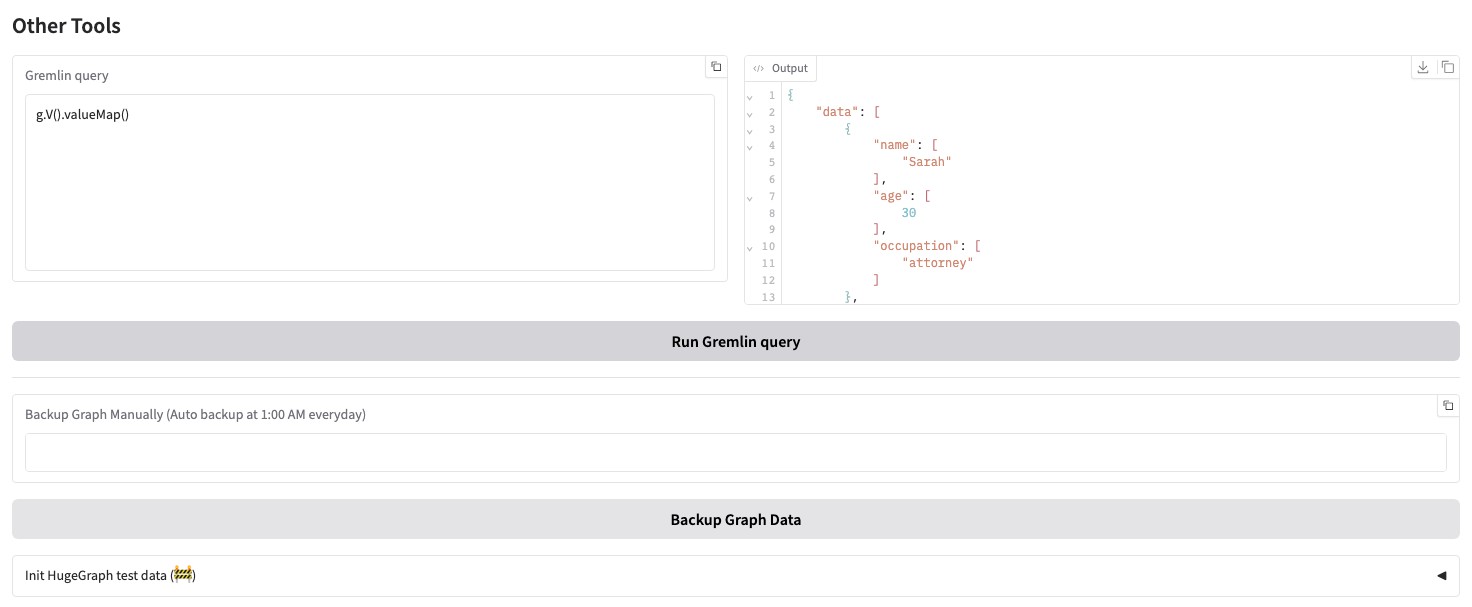
Graph Tools. Rung.V().count()andg.E().count(), then query the properties to confirm that the data was written.
This example should produce 2 vertices and 1 edge, with Sarah’s age set to 30 and occupation to attorney.
If the graph already contains data, use Update Vid Embedding to refresh its vertex index separately.
The Graph Extraction Split Type dropdown selects document, paragraph, or sentence.
document uses the whole input; the other options split it before extraction.
The page can also inspect or clear chunk indexes, vertex indexes, and graph data. Clearing removes existing data, so first confirm that the current graph and indexes are not still used by other queries.
Two collapsed helpers sit below the main controls:
Graph Schema Generatortakes query examples and a few-shot example and produces a schema for the Graph Schema field.Graph Extraction Prompt Generatortakes an expected scenario, such as social relationships or a financial knowledge graph, and a selected reference example, and produces a Graph Extract Prompt Header.
2. GraphRAG Queries
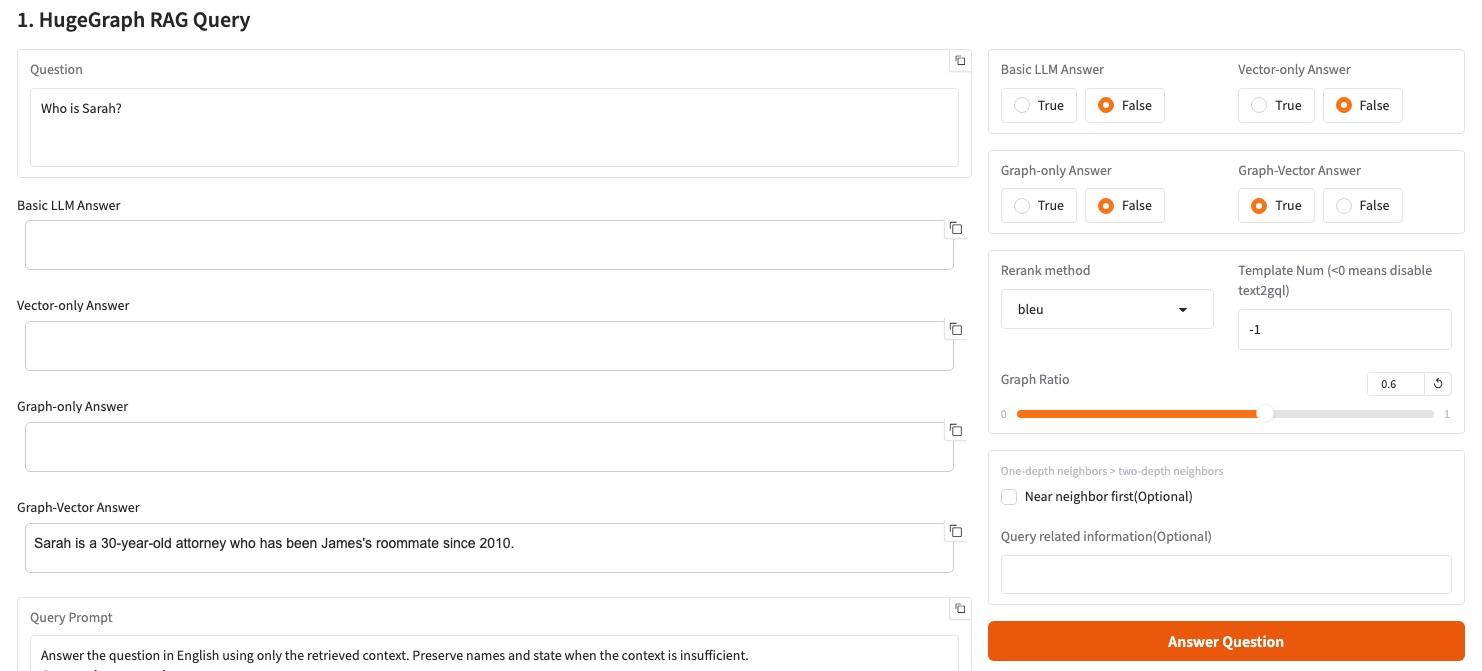
The second tab offers four answer modes. Choose the indexes needed for your question.
| Control | Answer source |
|---|---|
Basic LLM Answer | The LLM alone, without document or graph retrieval |
Vector-only Answer | Retrieved document chunks |
Graph-only Answer | Retrieved graph data |
Graph-Vector Answer | Retrieved graph data and document chunks |
Using Graph-Vector Answer is recommended, as it combines graph traversal and
vector search for more comprehensive fact retrieval. Other scopes are summarized in the table above.
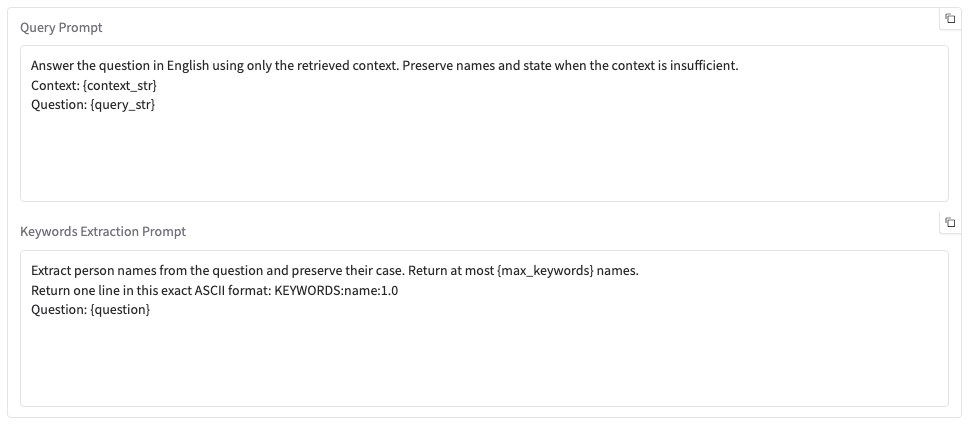
The screenshots use these short prompts. Paste them into Query Prompt and Keywords Extraction Prompt, respectively.
The service fills the placeholders. Keep the KEYWORDS: prefix and ASCII colons in keyword output, and preserve name capitalization.
- Enter
Who is Sarah?, setGraph-only AnswertoFalse, and setGraph-Vector AnswertoTrue. - Keep
Template Num=-1andRerank method=bleufor the first check, then clickAnswer Question. - Read
Graph-Vector Answerand compare facts such as age and occupation with the source document and graph.
flowchart TD
    Q[Question] --> V[Query chunk vector index]
    Q --> K[Extract keywords]
    K --> M[Match graph vertices]
    M --> D{Text2Gremlin enabled}
    D -->|Yes| T[Generate and execute Gremlin]
    D -->|No| B[BFS graph traversal]
    T -->|Failure| B
    T --> R[Prepare graph results]
    B --> R
    V --> S[Merge and rerank]
    R --> S
    S --> A[Generate answer]
Graph retrieval first matches HugeGraph vertices exactly by keyword and then uses vector similarity if no exact match exists. The matched vertices are passed to Text2Gremlin. If generation or execution fails, the pipeline can fall back to a predefined traversal.
Template Num controls how Text2Gremlin participates in graph retrieval:
- A negative value skips Text2Gremlin entirely, so graph retrieval goes straight to the predefined traversal.
0uses baseline generation without retrieving examples.- A positive value retrieves that many similar examples from the example index and uses the template-guided result. The example count is clamped to the range 0 to 10.
Other controls on this tab are Rerank method (bleu or reranker), Graph Ratio, Near neighbor first, and Query related information, plus editable Query Prompt and Keywords Extraction Prompt fields.
Below the single-question panel is a batch back-testing panel. Upload an .xlsx or .csv file of questions, set Max Lines To Show, and click Generate Answer (Batch). The answers appear in a preview table and can be downloaded as a file. A template file is offered next to the upload control.
3. Text2Gremlin
The third tab converts natural language into Gremlin and executes the generated queries.
The upper panel builds an example vector index from question and Gremlin pairs in .json or .csv files.
When no file is uploaded, it uses resources/demo/text2gremlin.csv. Match example labels and properties to the current graph.
If building the example index does not automatically retrieve similar templates, you can provide few-shot examples directly in the Prompt template below.
Use these inputs to reproduce the Sarah query.
- Save the CSV below as
sarah-gremlin.csv, upload it, and clickBuild Example Vector Index. SetNumber of refer examplesto1. - Paste the simplified schema below into
Schema. It contains only the labels and properties needed for this query. - Paste the prompt below into
Prompt, enterWho is Sarah?, then clickText2Gremlin. - Check both generated queries and their
Query ... Outputfields. This example returns Sarah withage=30andoccupation=attorney.
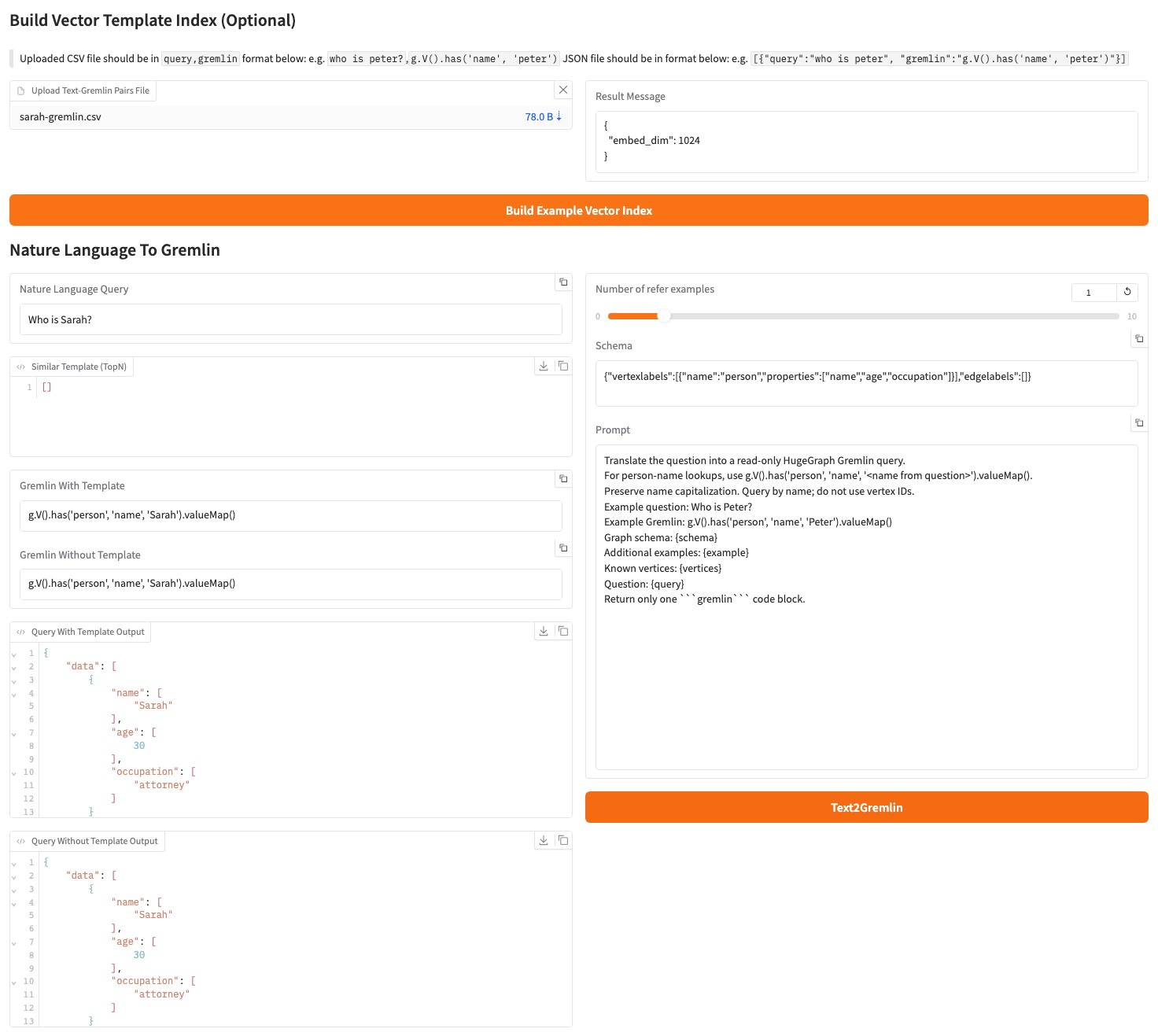
A small model can generate incorrect IDs, change name capitalization, or use filters that do not meet the graph’s index requirements. Check the returned data before treating a query as successful. The Web UI executes generated queries directly, so use a dedicated test graph. To generate a query without executing it, select the corresponding output types in the REST API.
A custom prompt must retain {query}, {schema}, {example}, and {vertices}. The REST API rejects it if any placeholder is missing.
4. Graph and Administration Tools
Graph Tools runs a Gremlin query directly against the configured graph, triggers a manual graph backup, and can initialize demo data in HugeGraph through a beta action. A background job also backs up the graph every day at 01:00, and a second background task keeps vertex-id embeddings up to date while the process runs.
Initializing demo data first clears the current graph. Use this action only on a dedicated test graph.
Admin Tools is password protected. Entering the configured ADMIN_TOKEN reveals the tail of logs/llm-server.log, which refreshes every 60 seconds, along with buttons to refresh or clear it. Access is refused while ADMIN_TOKEN is empty or still set to the placeholder xxxx.
When ENABLE_LOGIN=True, the Web UI asks for basic credentials with the fixed user name rag and USER_TOKEN as the password, and the REST API requires USER_TOKEN as a Bearer token. The log endpoint additionally requires a separately configured, secure ADMIN_TOKEN.
In production, enable HugeGraph-LLM login, replace USER_TOKEN and ADMIN_TOKEN, and enforce a source IP allowlist at the firewall or network entry point. Separately enable Server authentication and authorization, retain Server audit logs (normally audit-*.log), and grant GRAPH_USER minimum required permissions. AI service tokens do not replace Server authentication.
5. Prompt Language
Set LANGUAGE=EN or LANGUAGE=CN in hugegraph-llm/.env, then restart the service. This selects the language of built-in prompts; it does not translate input documents and is not a field in the /rag request body.
6. REST Calls
The Web UI and REST API use the same pipeline. For application integration, use /rag, /rag/graph, /graph/extract, and /text2gremlin; see the REST API for request formats.
4 - Configuration Reference
HugeGraph-LLM reads runtime configuration from .env and prompts from config_prompt.yaml. These files have different path-resolution rules; the prompt file is not part of .env.
The .env path is resolved in this order:
HUGEGRAPH_LLM_ENV_PATH, if that environment variable is set. A leading~is expanded.hugegraph-llm/.env, when the package runs from a source checkout..envin the current working directory, for an installed package.
The path is selected when the configuration module is imported. Set HUGEGRAPH_LLM_ENV_PATH before starting Python, not inside the .env file that will be loaded. Relative overrides are resolved against the process working directory.
The prompt YAML path is resolved in this order:
HUGEGRAPH_LLM_PROMPT_CONFIG_PATHfrom the process environment, expanding a leading~.hugegraph-llm/src/hugegraph_llm/resources/demo/config_prompt.yamlwhen running from source.${XDG_CONFIG_HOME:-~/.config}/hugegraph-llm/config_prompt.yamlfor an installed package.
Set path overrides before starting the process. Relative paths use its working directory. The source Docker image points PYTHONPATH at the source tree, so its default prompt path remains under hugegraph-llm/src/hugegraph_llm/resources/demo/.
Create or update files from configuration-class defaults with:
--update is enabled by default, so running without arguments has the same effect. On first configuration-module import, missing .env and prompt YAML files are created from defaults. The generator asks interactively before overwriting existing files. It handles HugeGraph, administrator, LLM, index, and prompt settings without overwriting existing files silently.
.env contains keys and passwords. Do not commit it to version control.
Basic Options
| Setting | Default | Description |
|---|---|---|
LANGUAGE | EN | Prompt language: EN or CN |
CHAT_LLM_TYPE | openai | Answer model: openai, litellm, or ollama/local |
EXTRACT_LLM_TYPE | openai | Information extraction model; same choices as above |
TEXT2GQL_LLM_TYPE | openai | Text2Gremlin model; same choices as above |
EMBEDDING_TYPE | openai | Embedding model; same choices as above, or empty |
RERANKER_TYPE | empty | cohere or siliconflow |
KEYWORD_EXTRACT_TYPE | llm | llm, textrank, or hybrid |
WINDOW_SIZE | 3 | TextRank window size, from 1 to 10 |
HYBRID_LLM_WEIGHTS | 0.5 | Weight of LLM results in hybrid mode, from 0 to 1 |
OpenAI-Compatible APIs
Chat, extraction, and Text2Gremlin can use different endpoints, keys, and models.
| Purpose | API base | Key | Model | Default maximum tokens |
|---|---|---|---|---|
| Answer | OPENAI_CHAT_API_BASE | OPENAI_CHAT_API_KEY | OPENAI_CHAT_LANGUAGE_MODEL | OPENAI_CHAT_TOKENS=8192 |
| Extraction | OPENAI_EXTRACT_API_BASE | OPENAI_EXTRACT_API_KEY | OPENAI_EXTRACT_LANGUAGE_MODEL | OPENAI_EXTRACT_TOKENS=256 |
| Text2Gremlin | OPENAI_TEXT2GQL_API_BASE | OPENAI_TEXT2GQL_API_KEY | OPENAI_TEXT2GQL_LANGUAGE_MODEL | OPENAI_TEXT2GQL_TOKENS=4096 |
| Embedding | OPENAI_EMBEDDING_API_BASE | OPENAI_EMBEDDING_API_KEY | OPENAI_EMBEDDING_MODEL | Not applicable |
The default API base is https://api.openai.com/v1. The default language model for all three tasks is gpt-4.1-mini, and the default embedding model is text-embedding-3-small.
OPENAI_BASE_URL and OPENAI_API_KEY provide general fallback values. Embeddings also support OPENAI_EMBEDDING_BASE_URL and OPENAI_EMBEDDING_API_KEY as fallback values.
LiteLLM
| Purpose | API base | Key | Model | Default maximum tokens |
|---|---|---|---|---|
| Answer | LITELLM_CHAT_API_BASE | LITELLM_CHAT_API_KEY | LITELLM_CHAT_LANGUAGE_MODEL | LITELLM_CHAT_TOKENS=8192 |
| Extraction | LITELLM_EXTRACT_API_BASE | LITELLM_EXTRACT_API_KEY | LITELLM_EXTRACT_LANGUAGE_MODEL | LITELLM_EXTRACT_TOKENS=256 |
| Text2Gremlin | LITELLM_TEXT2GQL_API_BASE | LITELLM_TEXT2GQL_API_KEY | LITELLM_TEXT2GQL_LANGUAGE_MODEL | LITELLM_TEXT2GQL_TOKENS=4096 |
| Embedding | LITELLM_EMBEDDING_API_BASE | LITELLM_EMBEDDING_API_KEY | LITELLM_EMBEDDING_MODEL | Not applicable |
The default language model is openai/gpt-4.1-mini, and the default embedding model is openai/text-embedding-3-small. Model names generally use the provider/model form; supported values depend on the LiteLLM service.
Ollama
| Purpose | Host | Port | Model |
|---|---|---|---|
| Answer | OLLAMA_CHAT_HOST | OLLAMA_CHAT_PORT | OLLAMA_CHAT_LANGUAGE_MODEL |
| Extraction | OLLAMA_EXTRACT_HOST | OLLAMA_EXTRACT_PORT | OLLAMA_EXTRACT_LANGUAGE_MODEL |
| Text2Gremlin | OLLAMA_TEXT2GQL_HOST | OLLAMA_TEXT2GQL_PORT | OLLAMA_TEXT2GQL_LANGUAGE_MODEL |
| Embedding | OLLAMA_EMBEDDING_HOST | OLLAMA_EMBEDDING_PORT | OLLAMA_EMBEDDING_MODEL |
The default host is 127.0.0.1 and the default port is 11434. Model names have no defaults; pull the required models in Ollama before use.
Reranking
| Setting | Default | Description |
|---|---|---|
COHERE_BASE_URL | https://api.cohere.com/v1/rerank | Cohere rerank endpoint; CO_API_URL is a fallback |
RERANKER_API_KEY | empty | Cohere or SiliconFlow key |
RERANKER_MODEL | empty | Model name supported by the service |
HugeGraph Connection and Retrieval Limits
| Setting | Default | Description |
|---|---|---|
GRAPH_URL | 127.0.0.1:8080 | HugeGraph address; it is not split into IP and port |
GRAPH_NAME | hugegraph | Graph name |
GRAPH_USER | admin | User name |
GRAPH_PWD | xxx | Password |
GRAPH_SPACE | empty | GraphSpace name |
LIMIT_PROPERTY | False | Whether to limit returned properties; read as a string by the configuration class |
MAX_GRAPH_PATH | 10 | Maximum graph path length |
MAX_GRAPH_ITEMS | 30 | Maximum number of graph retrieval items |
EDGE_LIMIT_PRE_LABEL | 8 | Result limit for each edge label |
VECTOR_DIS_THRESHOLD | 0.9 | Results beyond this vector-distance threshold are ignored |
TOPK_PER_KEYWORD | 1 | Candidates per keyword |
TOPK_RETURN_RESULTS | 20 | Results returned after reranking |
Vector Index Backend
| Setting | Default | Description |
|---|---|---|
CUR_VECTOR_INDEX | Faiss | Active vector store: Faiss, Milvus, or Qdrant |
QDRANT_HOST | empty | |
QDRANT_PORT | 6333 | |
QDRANT_API_KEY | empty | |
MILVUS_HOST | empty | |
MILVUS_PORT | 19530 | |
MILVUS_USER | empty | |
MILVUS_PASSWORD | empty |
FAISS is local and needs no extra dependency. Selecting Milvus or Qdrant without the optional dependencies raises an error that names the missing package, so install them first:
The same choice is available in the 5. Set up the vector engine. panel of the Web UI, which also persists the connection settings for the selected engine.
Login and Log API
| Setting | Default | Description |
|---|---|---|
ENABLE_LOGIN | False | Whether to require a Bearer token; read as a string by the configuration class |
USER_TOKEN | 4321 | Token for the Web UI and regular APIs |
ADMIN_TOKEN | xxxx | Administrator token used by /logs |
/logs returns 403 when ADMIN_TOKEN is empty or still set to xxxx.
In production, set ENABLE_LOGIN=True, replace USER_TOKEN and ADMIN_TOKEN, and enforce a source IP allowlist at the firewall or network entry point. This protects only HugeGraph-LLM. Separately enable Server authentication and authorization, retain Server audit logs (normally audit-*.log), and grant GRAPH_USER minimum required permissions. The two services use different credentials.
Minimal OpenAI Configuration
Configuration Loading
Configuration classes supply code defaults. During initialization, values from the selected .env are written into the process environment before the configuration objects are created, overriding same-named shell variables. Missing keys use defaults; empty values and unknown keys are ignored. The Web UI and configuration APIs can update settings and write supported fields back to .env. Restart after manual .env edits; prompt YAML is read at service startup or page load.
Keys are matched case-insensitively.
Configuration definitions are in:
hugegraph-llm/src/hugegraph_llm/config/llm_config.pyhugegraph-llm/src/hugegraph_llm/config/hugegraph_config.pyhugegraph-llm/src/hugegraph_llm/config/index_config.pyhugegraph-llm/src/hugegraph_llm/config/admin_config.pyhugegraph-llm/src/hugegraph_llm/config/prompt_config.pyhugegraph-llm/src/hugegraph_llm/config/models/base_config.pyfor the loading and file-sync behaviour
5 - HugeGraph-LLM REST API
The HugeGraph-LLM demo process serves both the Web UI and REST API. The default address is http://localhost:8001:
All endpoints are POST:
| Path | Success status | Purpose |
|---|---|---|
/rag | 200 | Answer a question with the selected retrieval modes |
/rag/graph | 200 | Graph retrieval only, without a final answer |
/graph/extract | 200 | Extract vertices and edges from text |
/text2gremlin | 200 | Generate Gremlin from natural language |
/config/graph | 201 | Update the HugeGraph connection |
/config/llm | 201 | Update the language model |
/config/embedding | 201 | Update the embedding model |
/config/rerank | 201 | Update the reranker |
/logs | 200 | Stream the server log |
Authentication
Enable login in .env:
Requests then require a Bearer token:
The same setting puts the Gradio UI behind basic authentication, with the fixed user name rag and USER_TOKEN as the password. A wrong token returns 401 with a WWW-Authenticate: Bearer header. When ENABLE_LOGIN is left at False, every endpoint is open.
Production requires HugeGraph-LLM login and a source IP allowlist at the firewall or network entry point. This protects only the LLM UI and REST API. Separately enable Server authentication and authorization, retain Server audit logs (normally audit-*.log), and grant GRAPH_USER minimum permissions. USER_TOKEN does not replace Server authentication.
RAG
POST /rag
Returns one or more answer types according to the switches. When none is explicitly selected, only graph_only is enabled.
The response contains only enabled answer fields:
Other optional parameters include graph_ratio (default 0.5), rerank_method (bleu or reranker, default bleu), near_neighbor_first (default false), custom_priority_info, and the three custom prompt fields answer_prompt, keywords_extract_prompt, and gremlin_prompt. Omitting a prompt field uses the value from config_prompt.yaml.
gremlin_tmpl_num selects how Text2Gremlin runs during graph retrieval. A negative value skips Text2Gremlin and goes straight to the predefined traversal, 0 generates Gremlin without examples, and a positive value retrieves that many examples from the example index.
An empty or whitespace-only query returns 400.
POST /rag/graph
Runs graph retrieval without generating a final natural-language answer:
graph_recall in the response can contain query, keywords, match_vids, graph_result_flag, gremlin, graph_result, and vertex_degree_list. Set get_vertex_only=true to return immediately after vertex matching; the endpoint then replaces match_vids with the full vertex details.
An empty query returns 400, a type error in the request returns 400, and any other failure returns 500.
Graph Extraction
POST /graph/extract
An inline schema does not connect to HugeGraph:
Request fields:
| Field | Default | Notes |
|---|---|---|
texts | required | A string or an array of strings; empty or blank entries are dropped and an empty result is rejected |
schema | required | Inline JSON object or string, or the name of an existing graph |
example_prompt | prompt YAML value | Extraction prompt header |
extract_type | property_graph | Only value currently accepted |
language | zh | zh or en, used for chunk splitting |
split_type | document | document, paragraph, or sentence |
include_meta | false | Adds vertex_count, edge_count, and text_count to meta |
client_config | none | Only allowed with a graph-name schema |
An inline schema must be an object with vertexlabels and edgelabels lists. Every vertex label needs a non-empty name and a non-empty properties list; every edge label needs a non-empty name, source_label, and target_label. propertykeys is optional and must be a list when present.
When schema is an existing graph name, also pass client_config, and make client_config.graph match that name. client_config here accepts only graph, user, pwd, and gs; unknown fields are rejected, and there is no url field:
A successful response always contains status (always succeeded), result.vertices, result.edges, warnings, and meta. meta stays empty unless include_meta is true.
Text2Gremlin
POST /text2gremlin
output_types can contain:
match_resulttemplate_gremlinraw_gremlintemplate_execution_resultraw_execution_result
If omitted, only template_gremlin is returned by default. An empty array lets the implementation return all outputs. A custom gremlin_prompt must contain {query}, {schema}, {example}, and {vertices}; a missing placeholder fails request validation and names the placeholders that are absent.
example_num defaults to 0, which means no templates, and is clamped to the range 0 to 10. client_config overrides the HugeGraph connection for the request; the schema used for generation is the active graph name. An empty query returns 400, and a generation failure returns 500.
Runtime Configuration
POST /config/graph
user and pwd default to empty strings, and gs is optional.
POST /config/llm and POST /config/embedding
Both endpoints use the same request model. /config/llm sets chat_llm_type, extract_llm_type, and text2gql_llm_type to the same value; per-task types can only be set separately through .env or the Web UI. OpenAI or LiteLLM example:
Ollama requests still require the common fields; api_key and api_base can be empty strings:
POST /config/rerank
reranker_type accepts cohere or siliconflow. Cohere also accepts cohere_base_url.
All four configuration endpoints return 201 on success. They change the process’s active configuration and may write values back to .env. /config/llm, /config/embedding, and /config/rerank restore the previous values if applying a change raises; /config/graph does not.
client_config in /rag, /rag/graph, and /text2gremlin overrides the HugeGraph connection for one request, and only the fields actually present in the request are applied. The current implementation still changes process-global settings temporarily, so do not issue long-running requests with different connections concurrently.
Logs
POST /logs
This endpoint requires ADMIN_TOKEN in .env to be changed to a secure value. Example request body:
log_file defaults to llm-server.log, must be a file name under logs/, and cannot be absolute, contain path separators, or resolve to . or ... Invalid names return 400.
An unset or placeholder ADMIN_TOKEN returns 403 before the token is even compared, and a wrong token returns a 403 body with the message Invalid admin_token.
The successful response is a text/plain stream that first replays the last 125 lines of the file and then follows it, in the manner of tail -f.
6 - Vermeer Python Client
vermeer-python-client is the Python SDK for Vermeer, the memory-first graph computing engine written in Go. The SDK wraps the REST API of the Vermeer master so you can list graphs, submit load and compute tasks, and read task state from Python. The import package is pyvermeer.
The module does not pin a Vermeer server version. It talks to the Vermeer master over HTTP using the endpoints listed in API Surface.
Requirements
- Current source requires Python 3.10 or later because its type annotations use Python 3.10 features, although packaging metadata still declares
>=3.9. - A running Vermeer master reachable over HTTP on its default port
6688. Docker deployments must publish6688:6688; see the Vermeer quick start. uv(recommended) orpip
Runtime dependencies: requests, urllib3, python-dateutil, decorator, rich, and setuptools.
Installation
The distribution name in the packaging metadata is vermeer-python-client and the version is managed independently of the repository version. The package is not published on PyPI yet, so install it from source.
From the root of the HugeGraph-AI repository, the vermeer extra installs it into the shared virtual environment:
vermeer-python-client is wired in as an editable path dependency rather than a uv workspace member, so a plain uv sync at the repository root does not install it. You have to ask for the extra (or for --all-extras).
To install the module standalone:
Connect to a Vermeer Master
Constructor parameters:
| Parameter | Type | Default | Description |
|---|---|---|---|
ip | str | required | Host name or IP address of the Vermeer master |
port | int | required | REST port of the Vermeer master |
token | str | required | Sent verbatim as the Authorization request header |
timeout | (float, float) or None | None | Connect and read timeouts in seconds |
log_level | str | "INFO" | Level applied to the shared VermeerClient logger |
For a client running on the host, use a master address reachable from that host. For a container client, use its container-network address. The client connects only to the master HTTP API; PD and Store addresses must be reachable from the Vermeer nodes that perform loading.
Behavior worth knowing before you connect:
tokenmay be an empty string when the master does not check authorization, but it cannot beNone. The session raisesValueError("Vermeer Token must be provided.")in that case.timeoutis a(connect, read)pair.VermeerConfighas its own default of(0.5, 15.0), but the client always forwards its own argument, so omittingtimeoutstoresNoneand the request waits without a deadline. Pass the pair explicitly if you want one.- The base URL is always built as
http://{ip}:{port}/, so the client speaks plain HTTP. - Every request sets
Content-Type: application/jsonand serializesparamsinto the request body, including forGETrequests. - The session configures up to 3 retries on HTTP 500, 502, and 504 with backoff factor
0.1. Status retries follow urllib3’s default allowed methods, which excludePOST; do not rely on automatic retries for task submission. log_levelsets the level of the shared logger namedVermeerClient. Its console handler is fixed atINFO, soDEBUGrecords are not printed to the console today.
End-to-End Example
The module ships vermeer-python-client/src/pyvermeer/demo/task_demo.py. This extended example polls with a deadline, waits for loading, reads the graph, and submits PageRank. It reads PD peers and the HugeGraph password from environment variables. The worker group must match the task-space allocation; a single-worker quick start can use worker_group=$. Bind a named group to the task space first, as shown in the Vermeer quick start.
Loading succeeds with loaded; computation succeeds with complete. error or canceled stops the example. Set VERMEER_PD_PEERS to a JSON array string, for example export VERMEER_PD_PEERS='["hugegraph-pd:8686"]'. The master must reach these PD addresses, and workers must reach the Store addresses returned by PD. Set VERMEER_TOKEN only if the master uses token authentication; an empty string works without it.
output.type=local writes results to the executing worker’s local filesystem with file-name prefix result/pagerank. Mount its result directory to read container output from the host. poll_timeout is the client polling deadline; requests between checks remain subject to HTTP timeouts and SDK retries, so completion can exceed that deadline. A timeout stops client waiting, not the Server task.
Never hardcode a real HugeGraph password into a script or configuration file. Use an environment variable or credential store.
Save and Run the Documentation Example
Save the complete extended example above as vermeer_client_example.py at the hugegraph-ai/ repository root. Run it with the workspace’s vermeer extra:
Enter the password and press Enter. Replace hugegraph-pd:8686 with a PD address reachable from the Vermeer master. If token authentication is enabled, supply VERMEER_TOKEN through your local credential-management method. These commands run the extended documentation example, not the bundled demo.
Original Bundled Demo
vermeer-python-client/src/pyvermeer/demo/task_demo.py is a separate minimal example. It hardcodes client port 8688, PD address 127.0.0.1:8686, and placeholder credentials xxx. It does not read the extended example’s environment variables, poll task state, or compute PageRank. Adjust its addresses and credentials separately if running it; it does not replace the documentation commands above.
API Surface
PyVermeerClient exposes its API groups as attributes. Two groups are registered today, graph and tasks.
client.graph
| Method | Vermeer endpoint | Returns |
|---|---|---|
get_graphs() | GET /graphs | GraphsResponse |
get_graph(graph_name) | GET /graphs/{graph_name} | GraphResponse |
client.tasks
| Method | Vermeer endpoint | Returns |
|---|---|---|
get_tasks() | GET /tasks | TasksResponse |
get_task(task_id) | GET /task/{task_id} | TaskResponse |
create_task(create_task) | POST /tasks/create | TaskCreateResponse |
pyvermeer/api/master.py and pyvermeer/api/worker.py contain only the license header, and neither group is registered on the client. Master and worker information is therefore not reachable from the client yet, even though MasterResponse and WorkersResponse already exist under pyvermeer/structure/.
client.send_request(method, endpoint, params) is the shared entry point behind both groups. You can call it directly to reach a Vermeer endpoint that has no wrapper yet; it returns the decoded JSON body as a plain dict.
Requests and Responses
TaskCreateRequest(task_type, graph_name, params) is serialized as {"task_type": ..., "graph": ..., "params": ...}. Note that graph_name becomes graph on the wire, which matches the payload documented for the Vermeer REST API.
Every response type extends BaseResponse and exposes errcode and message, plus a to_dict() helper. errcode is 0 on success and 1 on error; -1 means the field was missing from the response body.
GraphsResponse.graphsandGraphResponse.graphyieldVermeerGraphobjects withname,space_name,status,create_time,update_time,vertex_count,edge_count,workers,worker_group,use_out_edges,use_property,use_out_degree,use_undirected,on_disk, andbackend_option.TasksResponse.tasks,TaskResponse.task, andTaskCreateResponse.taskyieldTaskInfoobjects withid,state,create_user,create_type,create_time,start_time,update_time,graph_name,space_name,params,workers, anderror_message.- Timestamps are parsed with
python-dateutilintodatetimeobjects. An empty timestamp string becomesNone.
Server returns the task type as task_type, but SDK TaskInfo.type reads type, so that property is currently empty. The SDK also drops Server statistics_result. Use TaskInfo.state for polling. This is a field-contract mismatch in current source.
Task Parameters
The client does not validate params. Keys and values are passed straight through to Vermeer, so the accepted names come from the engine, not from the SDK. For the load parameters and the parameters of the supported algorithms, see the Vermeer quick start.
The usual sequence is the same as with the REST API directly: create a load task to read the graph into Vermeer, wait for it to finish, then create computation tasks against the loaded graph.
Errors
pyvermeer.utils.exception defines four exceptions, all raised from the underlying requests or JSON failure:
| Exception | Raised when |
|---|---|
ConnectError | requests.ConnectionError, the master is unreachable |
TimeOutError | requests.Timeout, the connect or read deadline expired |
JsonDecodeError | The response body is not valid JSON |
UnknownError | Any other failure during the request |
The client does not check the HTTP status code of the response, so inspect errcode and message on the returned object to tell success from a Vermeer-side error.
Development Checks
Run the formatting and static checks from the root of the HugeGraph-AI repository:
The source lives under vermeer-python-client/src/pyvermeer/. A few structure tests are available under src/tests/structure/test_task_data.py; they do not cover HTTP API integration.