This is the multi-page printable view of this section. .
HugeGraph (OLTP)
- 1: HugeGraph Server Quick Start
- 2: HugeGraph-PD Quick Start
- 3: HugeGraph-Store Quick Start
- 4: Deploy HugeGraph with Helm
- 5: Operate HugeGraph on Kubernetes
This section covers the HugeGraph Server standalone quick start and the PD and Store guides needed for distributed deployments.
See the DeepWiki project overview. For installation, configuration, and runtime behavior, use the documentation and code for the relevant HugeGraph version.
Start with the Server standalone quick start, which distinguishes ASF 1.7.0 release packages from builds of master. HStore deployments also require PD and Store.
GitHub Access: https://github.com/apache/hugegraph
1 - HugeGraph Server Quick Start
1 HugeGraph Server Overview
apache/hugegraph is the main repository for the HugeGraph graph database. Its top-level modules include hugegraph-server, hugegraph-pd, and hugegraph-store. This page describes the hugegraph-server module and the service it runs.
The hugegraph-server module contains hugegraph-core, hugegraph-api, hugegraph-dist, and storage adapters. Core implements the property graph model, transactions, and TinkerPop interfaces. API provides the HTTP service and delegates client requests to Core. Graph data is stored in RocksDB (the default standalone backend), HStore (distributed), or HBase.
Version scope: Download examples use the ASF HugeGraph 1.7.0 release. Source builds, configuration defaults, and startup behavior follow apache/hugegraph master. A master build is not an ASF release artifact, even if its version number matches a release. This guide covers RocksDB, HStore, and HBase; see 1.5.x documentation for other legacy backends.
Naming:
HugeGraphmeans the overall project or main repository,hugegraph-serveris its Server module, andHugeGraphServeris the Java service class. Server below means the running graph database service.
flowchart TD
    A{Choose installation source}
    A -->|Release| R["HugeGraph 1.7.0 archive"]
    R --> V[Verify SHA-512]
    V --> X[Extract and use bundled configuration]
    A -->|Development| M["master source"]
    M --> B["mvn package -DskipTests"]
    B --> C[Check RocksDB configuration in conf/graphs]
    C --> I[bin/init-store.sh]
    I --> S["bin/start-hugegraph.sh -p true"]
    S --> Q["Request /versions and graph vertices"]
The map uses short labels for the repository modules described above. server, core, api, dist, pd, and store refer to the corresponding
hugegraph- modules; dist packages the distribution.
---
markmap:
  spacingHorizontal: 40
---
# HugeGraph
## server
- core
- api
- dist
## pd
## store
2 Dependency for Building/Running
2.1 Install Java 17 (JDK 17)
Starting with HugeGraph 1.8.0, use Java 17; 1.7.0 is the last release supporting Java 11.
Build all modules with JDK 17 and Maven 3.6.3 or later, and run Server, PD and Store with JDK 17.
Server security check (-s true) requires Java 17 to 23 and a readable conf/java-security.properties;
on Java 24 or later, start Server with -s false (JDK 24+ dropped Security Manager via JEP 486).
Before continuing, run java -version to confirm your JDK version.
TinkerPop 3.8.1 Compatibility & Key Changes
HugeGraph 1.8.0 upgrades to TinkerPop 3.8.1 and Groovy 4.0.25. Use the Gremlin configuration files bundled with Server.
- Serializer Packages: Driver serializer classes moved from
org.apache.tinkerpop.gremlin.driver.sertoorg.apache.tinkerpop.gremlin.util.ser. Keep HugeGraph registries. - Graph.Features:
supportsUniformListValues()returnsfalsefor properties. SchemavalueList()/LISTproperties remain supported without rewriting existing data. - Traversal Multiplicity: Mid-traversal scans retain input multiplicity (e.g. for 3 vertices,
g.V().V().count()returns9L). - Date & Time Types:
DATEproperties acceptOffsetDateTimefor writes and indexed equality/range queries (instant normalized to milliseconds). - Filtering Behavior:
P.typeOf()runs as a local filter; count filtering applies range optimizations only when predicate branches are provably safe.
For complete client configuration and migration details, see the server runtime documentation.
3 Deploy
There are four ways to deploy the Server service:
- Docker container Quickly start a Server service for testing or development.
- ASF release archive Download a released tarball and verify it before installation.
- master source Build the development branch; its output is not an ASF release archive.
- Legacy one-click deployment (outdated) Reference for the older deployment workflow.
Production requires authentication and restricted network access
HugeGraph disables user authentication by default. Enable authentication and authorization, maintain an IP allowlist, and grant minimum permissions. Do not expose Gremlin, Cypher, or other query APIs directly to the public Internet. Retain Server audit-*.log and restrict read access. auth.audit_log_rate limits per-user output rate rather than turning audit logging on or off. See the security guide.
3.1 Use Docker container (Convenient for Test/Dev)
You can refer to the Docker deployment guide.
You can use docker run -itd --name=server -p 8080:8080 -e PASSWORD=xxx hugegraph/hugegraph:1.7.0 to quickly start a Server instance using the RocksDB backend.
Optional:
- You can use
docker exec -it server bashto enter the container for troubleshooting or other maintenance operations. - You can use
docker run -itd --name=server -p 8080:8080 -e PRELOAD="true" hugegraph/hugegraph:1.7.0to preload a built-in sample graph at startup. You can verify it through theRESTful API. See 5.1.4 for details. - You can use
-e PASSWORD=xxxto enable authentication mode and set the admin password. See Config Authentication for details.
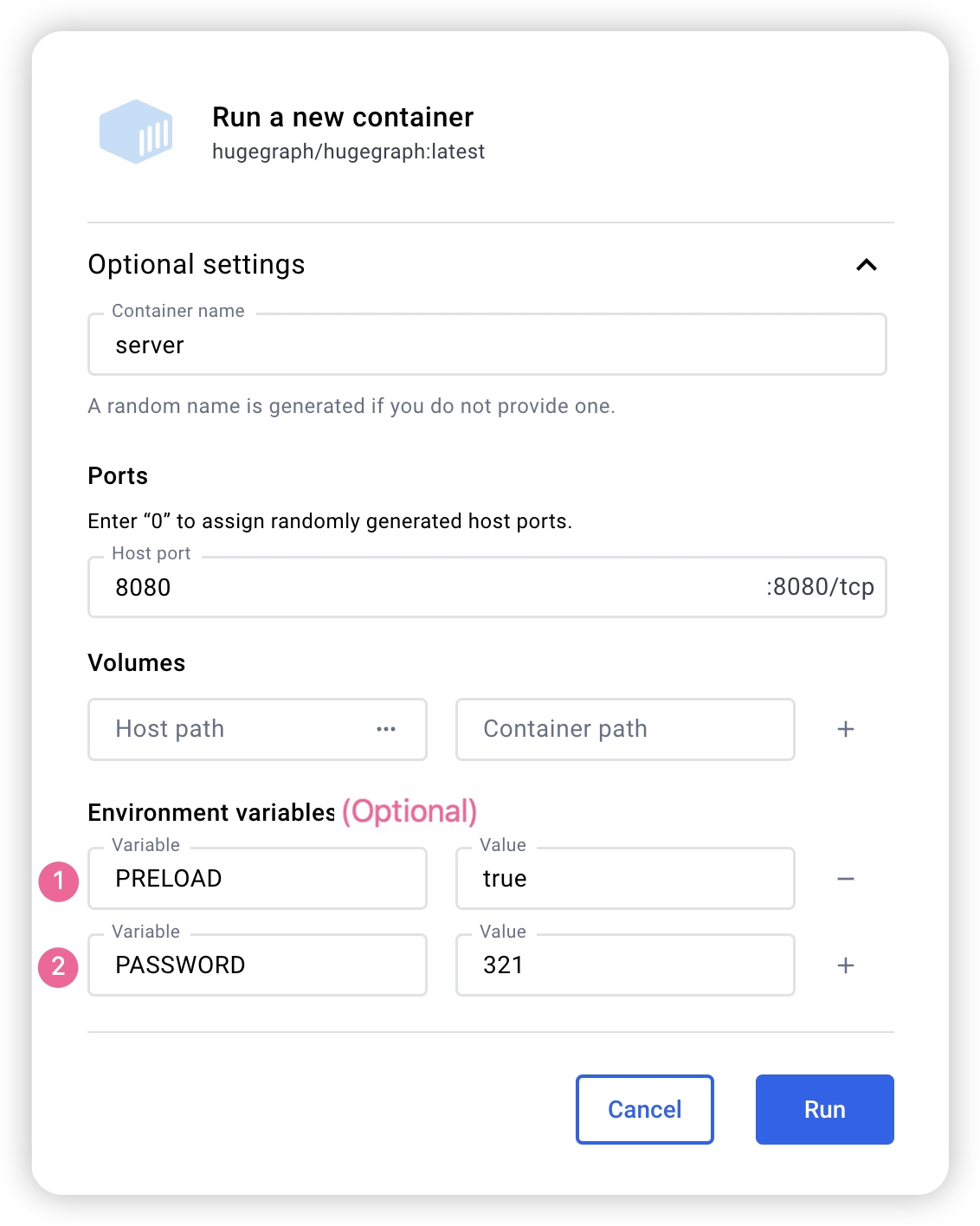
If you use Docker Desktop, you can set the options as follows:
The Docker Compose files use bridge networking (hg-net) and work on Linux and Mac (Docker Desktop). For the 3-node distributed cluster on Mac (Docker Desktop), allocate at least 12 GB of memory (Settings → Resources → Memory). On Linux, Docker uses host memory directly.
Use docker compose to manage multiple HugeGraph services from one configuration. Four Compose files are available in the docker/ directory:
| Topology | Compose file | Services |
|---|---|---|
| Standalone (start here) | docker-compose.yml | 1 RocksDB Server + 1 Hubble |
| Minimal HStore (current master) | docker-compose-hstore.yml | 1 PD + 1 Store + 1 Server + 1 Hubble; locally built master images required |
| HA reference (current master) | docker-compose-3pd-3store-3server.yml | 3 PD + 3 Store + 3 Server + 1 Hubble; locally built master images required |
| Source build override for the minimal HStore topology | docker-compose.dev.yml | (used together with docker-compose-hstore.yml) |
The standalone topology publishes the Server on port 8080 and Hubble on 127.0.0.1:8088. HUGEGRAPH_VERSION selects the Server, PD, and Store image tags; Hubble is selected separately with HUBBLE_IMAGE.
The standalone docker-compose.yml example uses hugegraph/hugegraph:1.7.0; its docker/conf/hubble/standalone.properties is bundled in source. Compose reads the administrator password from HUGEGRAPH_ADMIN_PASSWORD and JWT secret from HUGEGRAPH_AUTH_TOKEN_SECRET, normally in docker/.env. A nonempty password enables authentication, automatically detected by Hubble. With docker run, use -e PASSWORD=xxx. Master HStore Compose files cannot be combined with 1.7.0 PD/Store/Server release images.
JWT version differences: Master-built Server maps HUGEGRAPH_AUTH_TOKEN_SECRET to HG_SERVER_AUTH_TOKEN_SECRET and writes startup configuration; preserve the secret across recreation. The 1.7.0 entrypoint handles older variables such as PASSWORD, ignoring HG_SERVER_AUTH_TOKEN_SECRET. To keep a stable JWT secret in 1.7.0, persist auth.token_secret in that version’s conf/graphs/hugegraph.properties. With a randomly generated default, do not assume issued JWTs survive Server restarts.
See docker/README.md for the full setup guide.
Server service identity with PD
For a PD-backed Server, the Helm chart exposes server.serviceId and server.graphSpace.
Both default to DEFAULT, which preserves the existing server.service_id and server.graphspace
values in conf/rest-server.properties. A non-default chart value injects HG_SERVER_SERVICE_ID
or HG_SERVER_GRAPHSPACE into the Server container.
These service identity chart settings (server.serviceId, server.graphSpace, and server.testGraphAlias)
apply to development 1.8.0+ builds and charts; older versions such as 1.7.0 do not support these options.
Do not use this example with older chart or image versions lacking these features.
Non-empty service IDs supplied through HG_SERVER_SERVICE_ID, SERVICE_ID, or server.serviceId
must use printable ASCII; spaces and backslashes are supported, while deployment checks reject
non-ASCII and control characters. This entrypoint restriction does not change Core Service naming
or existing manually supplied properties. Helm preserves dollar signs in server.serviceId literally,
including $(POD_IP); this field does not expand Kubernetes environment references.
The full service ID, including / and -, is retained when service metadata is reloaded or its graph space is cleared.
Set the identity through these chart values; Server extraEnv reserves both the new and legacy identity variable names.
HG_SERVER_GRAPHSPACE, the effective GRAPH_SPACE fallback,
and server.graphSpace accept DEFAULT or an existing space name of up to 48 lowercase letters, digits,
and underscores, starting with a letter:
Before deploying Servers assigned to team_a, create that graph space through an existing Server
in DEFAULT, using an account with permission to create graph spaces. The chart and these environment
variables do not create graph spaces; all replicas in the Server Deployment use the same identity.
To check a graph in that space with helm test, first create the target graph and set
--set-string server.testGraphAlias=team_a-demo to its actual Gremlin binding. Creating the graph space does not create a hugegraph graph.
For container deployments, HG_SERVER_SERVICE_ID and HG_SERVER_GRAPHSPACE write the same two
properties. The legacy SERVICE_ID and GRAPH_SPACE names remain accepted: a non-empty new variable
wins over its legacy counterpart. If both names for a property are unset or empty, its existing value
is preserved. Compose does not automatically forward these host variables; add explicit Server
environment: entries in a Compose override. See the Helm chart documentation for details.
These settings select the Server’s PD service metadata. They do not move existing graphs or change
server.path_graphspace for REST paths that omit the graph space. Use /graphspaces/team_a/... paths
and select the matching graph space and service in Hubble. When authentication is enabled, explicit paths
still require authorization.
server.testGraphAlias defaults to DEFAULT-hugegraph. The hook checks this existing local binding on every Server Pod;
it does not derive the alias from server.graphSpace. A local binding may exist independently of the Server’s assigned PD graph space,
so a successful default hook does not validate graphs in team_a. If Could not rebind appears, first check that the requested graph exists
and that its alias is correct. A Pod restart cannot create a missing graph or correct an alias.
Match the binding’s case: a local Demo.properties can bind DEFAULT-Demo, while REST-created graph names are lowercase.
Configuration rendering and entrypoint checks alone do not establish non-default Linux discovery, authentication, or isolation between graph spaces.
HugeGraph Docker images are provided as a convenient way to start HugeGraph quickly, but they are not official ASF distribution artifacts. You can find more details in the ASF Release Distribution Policy.
We recommend using a release tag (such as
1.7.0or1.x.0) for stable deployments. Use thelatesttag only if you want the newest features still under development.
3.2 Download a Released Archive
This example uses HugeGraph 1.7.0. For other versions, confirm the release and filenames in the ASF download directory. A master source build is not a released binary.
Extract only after SHA-512 verification succeeds. You can also verify the PGP signature following Apache release procedures:
Trust publisher keys only after verifying them through Apache project channels. Signature verification can complement SHA-512 checks.
3.3 Build from master Source
These commands build the development branch, not the 1.7.0 release.
Install wget or curl before building.
Download HugeGraph source:
Compile and package:
A successful build logs:
The build creates an aggregate master archive under repository-root target/ (the current source version property is 1.8.0):
The filename version comes from source revision; it does not make the build an ASF release artifact. The build also creates repository-root apache-hugegraph-1.8.0/, containing a Server directory named by that module’s final.name, currently apache-hugegraph-server-1.8.0. If retaining only the archive, first run tar zxf target/apache-hugegraph-1.8.0.tar.gz, then enter the Server directory.
Default builds bundle rocksdb, hbase, and hstore modules, listed in backends within backend.properties in the hugegraph-dist JAR. For a RocksDB-only distribution, add -Drocksdb-only:
3.4 One-click deployment (Outdated)
Outdated This status applies only to this one-click deployment entry.
HugeGraph-Tools provides a one-click deployment command that downloads, extracts, configures, and starts the Server service and HugeGraph-Hubble. These tools are included in the HugeGraph-Toolchain distribution.
Of course, you should download the tarball of HugeGraph-Toolchain first.
note:
${version}is the version, The latest version can refer to Download Page, or click the link to download directly from the Download page
The general entry script for HugeGraph-Tools is bin/hugegraph, Users can use the help command to view its usage, here only the commands for one-click deployment are introduced.
{hugegraph-version} is the Server service and HugeGraphStudio version; see conf/version-mapping.yaml for supported mappings. {install-path} is the installation directory, while {download-path-prefix} optionally overrides the tarball download location. For example, deploy version 0.6 with bin/hugegraph deploy -v 0.6 -p services.
4 Configuration
Server archives include conf/rest-server.properties, conf/gremlin-server.yaml, and conf/graphs/hugegraph.properties; source builds assemble them from hugegraph-server/hugegraph-dist/src/assembly/static/conf/. Edit them inside the extracted Server directory without a separate generation step. Defaults vary by release; the following defaults and startup behavior describe master.
For standalone RocksDB, confirm backend=rocksdb and serializer=binary in conf/graphs/hugegraph.properties. Normal Server initialization scans conf/graphs/ and loads local graphs without requiring graph.load_from_local_config=true. This option defaults to false and controls constructor preloading. Restart Server to apply graph configuration changes; do not use hot reload for maintenance.
See the configuration guide and option reference for details.
5 Startup
5.1 Use a startup script to startup
Startup is divided into “first startup” and “non-first startup”. On the first startup, you need to initialize the backend database before starting the service.
If the service was stopped manually, or needs to be started again for any other reason, you can usually start it directly because the backend database is persistent.
When HugeGraphServer starts, it connects to the backend storage and checks its version information. If the backend has not been initialized, or if it was initialized with an incompatible version (for example, old-version data), HugeGraphServer will fail to start and report an error.
If you need to access HugeGraphServer externally, modify the restserver.url configuration item in rest-server.properties (the default is http://127.0.0.1:8080) and change it to the machine name or IP address.
Since the configuration (hugegraph.properties) and startup steps required by various backends are slightly different, the following will introduce the configuration and startup of each backend one by one.
Configure authentication before production startup
Enable Server authentication and authorization with a strong, nondefault administrator password, an IP allowlist, and minimum business-user permissions.
5.1.1 Distributed Storage (HStore)
First deploy PD and Store; see the PD Quick Start and Store Quick Start.
umask 077 protects the new .env, but set-hubble-pd-password.sh sets generated .local.properties permissions to 0644, making the PD secret readable by other local users. This example assumes trusted local users. On shared hosts, set ownership and read permissions for the Hubble runtime user so Hubble can read the files while unauthorized users cannot. Keeping files untracked does not replace file permission controls.
Distributed storage, introduced after HugeGraph 1.5.0, uses HugeGraph-PD and HugeGraph-Store for distributed data storage and computing.
After PD and Store are running:
- Edit Server
hugegraph.properties:
The distribution includes conf/graphs/hstore.properties.template; copy it over conf/graphs/hugegraph.properties and adjust pd.peers.
This example uses cluster=hg in rest-server.properties and pd.cluster=hg in graph configuration, matching the master Compose cluster below. These are separate keys for the Server process and graph respectively, not one setting. Select an appropriate cluster name. Likewise, pd.peers in each file has its own configuration scope; this example supplies the same PD RPC addresses to both.
The backend selects the task scheduler: HStore uses distributed scheduling; others use local scheduling. task.scheduler_type is unnecessary and is ignored with a warning when retained for compatibility.
- Edit Server
rest-server.properties:
These addresses support multiple Server processes on one machine; 127.0.0.1 is local only. Across hosts, use routable IPs or DNS for restserver.url, gremlinserver.url, pd.peers, Gremlin host, and rpc.server_host. Advertised RPC addresses and ports must be mutually reachable.
For multiple Servers, edit each node’s rest-server.properties:
Node 1 (master):
Node 2 (worker):
Also configure each node’s gremlin-server.yaml ports:
Node 1:
Node 2:
Start Server:
Distributed startup order:
- Start HugeGraph-PD
- Start HugeGraph-Store
- Start Server
PD and Store manage HStore metadata and storage, so init-store skips that backend. With authentication enabled, init-store still creates the built-in admin account. If storage already holds this account, set init_store.enabled=false in rest-server.properties to skip the entire step, as Docker HStore topologies do.
Verify startup:
Stop in reverse order:
- Stop Server
- Stop HugeGraph-Store
- Stop HugeGraph-PD
Docker HStore HA Cluster (Current Master)
docker-compose-3pd-3store-3server.yml uses master HG_PD_*, HG_STORE_*, and HG_SERVER_* variables unsupported by 1.7.0 release images. Build PD, Store, and Server from the same master source, all tagged local:
Create the authentication environment in docker/ and generate HStore Hubble configuration. Replace the example administrator password; because .env uses single quotes, the password must contain neither single quotes nor newlines. The script generates random JWT and PD secrets and writes the PD secret to two untracked .local.properties files mounted by HStore Compose:
Start HA from docker/. HUGEGRAPH_VERSION=local selects the locally built PD, Store, and Server images; Compose pull_policy: missing uses existing local tags first. HUBBLE_IMAGE still selects Hubble independently:
Generate HG_PD_AUTH_SECRET_KEY once for new data directories and reuse it on restart or when retaining data. Do not commit .env or generated conf/hubble/*.local.properties. Services communicate through container hostnames on the hg-net bridge. Server replicas need the shared JWT secret as well as the administrator password; set HUGEGRAPH_AUTH_TOKEN_SECRET. See the Docker cluster guide and docker/README.md for all variables.
Verify the cluster:
Master PD /v1/stores requires Basic authentication; this uses the generated, loaded HG_PD_AUTH_SECRET_KEY as the hg password.
Inspect runtime logs with docker logs <container-name>, such as docker logs hg-pd0.
See docker/README.md for variables, ports, and troubleshooting.
5.1.2 RocksDB / ToplingDB
The minimal standalone flow below uses a master build and preloads sample data to verify graph reads and writes.
- Check Java against the master build requirements.
- Build master source; the commands below use its nested Server directory.
- Confirm RocksDB configuration, then enter the build output’s nested Server directory.
- Initialize storage, then start the service with sample data using the commands below.
- Request
/versionsand sample graph vertices, and check the actual response contents.
RocksDB is embedded and needs no separate deployment. GCC ≥ 4.3.0 (GLIBCXX_3.4.10) is required; upgrade first if needed.
Master conf/graphs/hugegraph.properties already sets backend=rocksdb and serializer=binary. Keep the defaults if using default data directories; otherwise check your backend and paths before initialization.
Initialize storage on first startup or after adding graph configuration under conf/graphs/:
Start Server and preload the built-in sample graph:
The startup script polls /graphs at configured restserver.url and exits nonzero on timeout or process failure. Check service version, then read sample vertices:
The first response should contain versions; the second should contain vertices with sample names such as marko and lop. A process check or HTTP status alone does not prove backend and business request health.
ToplingDB (Beta): A high-performance RocksDB alternative; see the ToplingDB Quick Start.
5.1.3 HBase
users need to install HBase by themselves, requiring version 2.0 or above,download link
Update hugegraph.properties
Initialize the database (required on the first startup, or a new configuration was manually added under ‘conf/graphs/’)
Start server
5.1.4 Create an example graph when startup
Pass the -p true argument when starting the script to enable preload, which creates a sample graph.
And use the RESTful API to request HugeGraphServer and get the following result:
This indicates the successful creation of the sample graph.
5.1.5 Startup script options
bin/start-hugegraph.sh accepts the following options. Every one of them takes a value, so write -d false, not a bare -d.
| Option | Values | Default | Purpose |
|---|---|---|---|
-d | true, false | true | Daemon mode. With -d false the script stays in the foreground and forwards SIGTERM/SIGINT to the server. |
-g | g1, G1, zgc, ZGC | JVM default | Garbage collector to use (g1/G1 sets -XX:+UseG1GC; zgc/ZGC sets -XX:+UseZGC). Omitting -g uses the JVM default collector. |
-m | true, false | false | Install the cron-based monitor task (bin/start-monitor.sh). For VM and bare-metal deployments only. |
-p | true, false | false | Preload the sample graph, as in 5.1.4. |
-s | true, false | true | Enable HugeSecurityManager; requires Java 17 to 23 and readable conf/java-security.properties. On Java 24+, start with -s false. |
-j | JVM options | empty | Extra JVM options appended to the server command line. |
-t | seconds | 30 | How long to wait for the service to answer before reporting a failed startup. |
-y | true, false | false | Enable the OpenTelemetry agent for traces. |
bin/stop-hugegraph.sh accepts -m true|false (default true), which controls whether the cron monitor task is removed along with the service.
bin/hugegraph-server.sh puts -XX:+HeapDumpOnOutOfMemoryError, -XX:HeapDumpPath and -XX:ErrorFile first in JAVA_TOOL_OPTIONS, so, whether or not
JAVA_OPTIONS is set and with the exceptions below, an out-of-memory heap dump (heapdump_<host>_<launch time>/java_pid<pid>.hprof) and a JVM crash log
(hs_err_pid<pid>_<host>_<launch time>.log) land in logs/, where <launch time> is the local time as YYYYMMDD-HHMMSS. Each start gets its own heapdump_*
directory, so the server and the JVMs it starts, such as computer jobs, write separate dumps (HotSpot names each dump and crash log after the JVM’s PID, so a
JVM that reuses an earlier PID from the same start cannot write its dump, and its crash log replaces the earlier one’s). The host name keeps servers that share
one log directory from picking the same name, and a counter (<launch time>-1, -2, …) is added when the same host already used that second. If the
directory cannot be created, for example on a full disk, the server still starts and dumps go to logs/ itself, as a best effort: a full disk may have no room
for the dump either. A heap dump can be as large as the heap. The launcher never deletes dumps or heapdump_* directories: each start that reaches Java leaves
one, empty unless something ran out of memory, and the launcher keeps it because a computer-job JVM can go on using it after the server exits. Move or delete
old ones once no HugeGraph JVM from that launch is running, but never the newest one of a running server; without it, the next dump is written as a file with
that name. The JVM reads your own JAVA_TOOL_OPTIONS, JDK_JAVA_OPTIONS (including @argfiles), the command line (JAVA_OPTIONS, or -j when JAVA_OPTIONS
is unset or empty) and _JAVA_OPTIONS after these defaults, so a value for one of these flags in any of them overrides the default. Only the environment
variables reach the JVMs the server starts: to turn dumps off for all of them, set JAVA_TOOL_OPTIONS=-XX:-HeapDumpOnOutOfMemoryError, while -j or
JAVA_OPTIONS turns them off for the server JVM only. Either way each start that reaches Java still creates its empty heapdump_* directory, unless creating
it failed and dumps fell back to logs/. If the logs path contains a double quote or %, the launcher warns and heap dumps go to logs/ itself, with no
per-launch directory and no crash log default; the JAVA_TOOL_OPTIONS opt-out still applies. A path with both quote characters gets no heap dump default at
all. Because of the defaults, the JVM prints Picked up JAVA_TOOL_OPTIONS: ... on stderr at startup.
Version scope: this applies to current development/master builds. In 1.7.0 the heap dump flags are added only when
JAVA_OPTIONSis unset, heap dumps go directly tologs/java_pid<pid>.hprof, and JVM crash logs go to the install directory.
5.2 Use Docker to startup
In 3.1 Use Docker container, we introduced how to deploy hugegraph-server with Docker. You can also switch storage backends or preload a sample graph by setting the corresponding parameters.
5.2.1 Create an example graph when starting a server
Set the environment variable PRELOAD=true when starting Docker so that sample data is loaded during startup.
Use
docker runUse
docker run -itd --name=server -p 8080:8080 -e PRELOAD=true hugegraph/hugegraph:1.7.0Use
docker-composeCreate a
docker-compose.ymlfile like the following and setPRELOAD=truein the environment.example.groovyis a predefined script used to preload sample data. If needed, you can mount a newexample.groovyscript to change the preload data.Use
docker compose up -dto start the container.
And use the RESTful API to request HugeGraphServer and get the following result:
This indicates that the sample graph was created successfully.
6. Access server
6.1 Service startup status check
Use jps to see a service process
curl request RESTfulAPI
HTTP 2xx with a JSON versions field confirms REST responsiveness. HugeGraphServer in jps confirms only process existence; verify backend health by preloading the sample graph and requesting vertices as above.
6.2 Request Server
The RESTful API of HugeGraphServer includes various types of resources, typically including graph, schema, gremlin, traverser and task.
graphcontainsvertices、edgesschemacontainsvertexlabels、propertykeys、edgelabels、indexlabelsgremlincontains variousGremlinstatements, such asg.v(), which can be executed synchronously or asynchronouslytraversercontains various advanced queries including shortest paths, intersections, N-step reachable neighbors, etc.taskcontains query and delete with asynchronous tasks
6.2.1 Get vertices and its related properties in hugegraph
explanation
Server can compress vertex, edge, and other list responses. Use
curl --compressedfor automatic decompression:The default listener is
127.0.0.1, inaccessible directly from other machines.
Changing the Server listener
Setting 0.0.0.0 listens on every interface. In production, enable authentication and authorization, an IP allowlist, and minimum permissions; retain and protect audit logs. Do not expose Gremlin or Cypher directly to the public Internet.
response body:
For the detailed API, please refer to RESTful-API
You can also visit localhost:8080/swagger-ui/index.html to check the API.
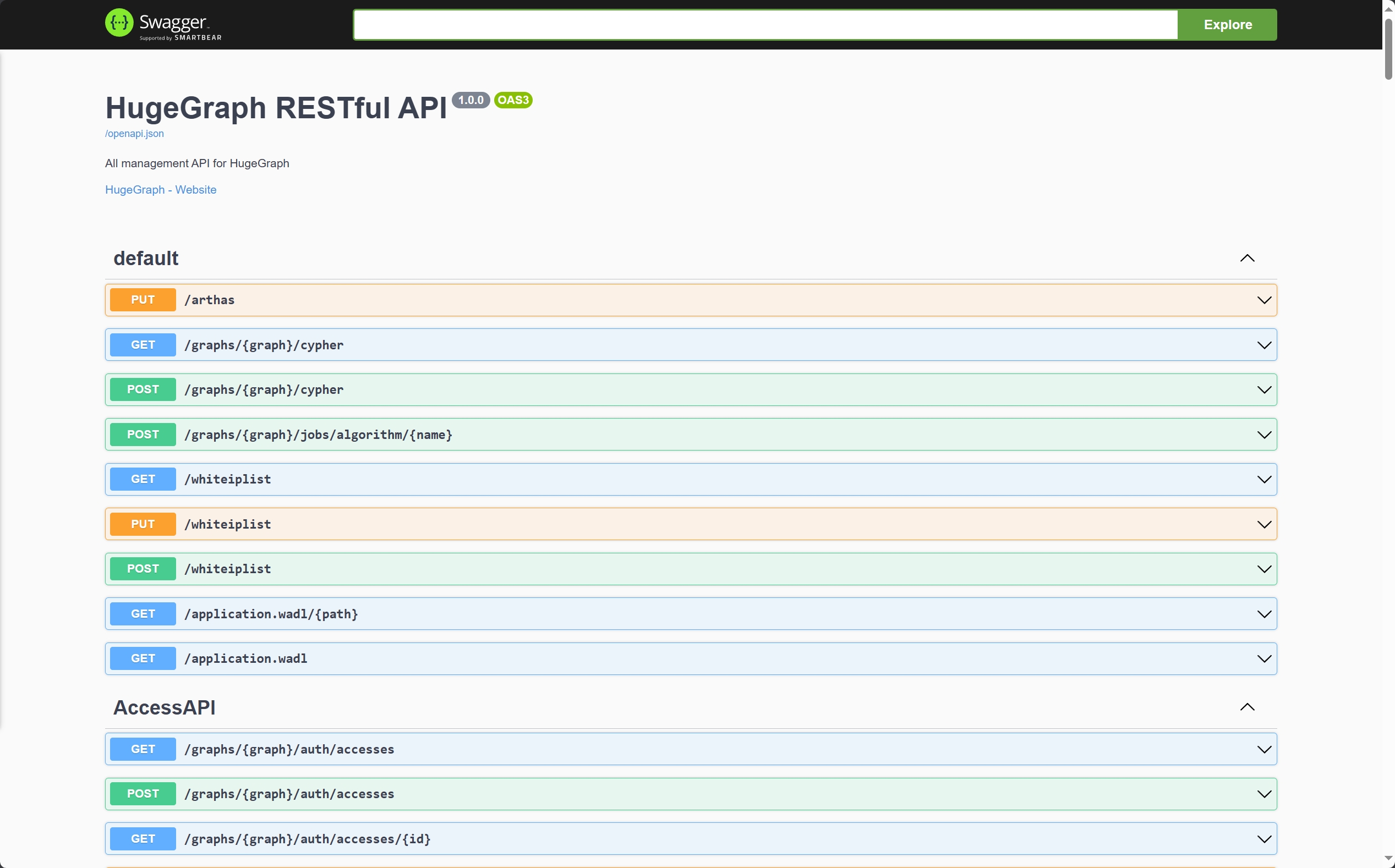
When using Swagger UI to debug the API provided by HugeGraph, if HugeGraph Server turns on authentication mode, you can enter authentication information on the Swagger page.
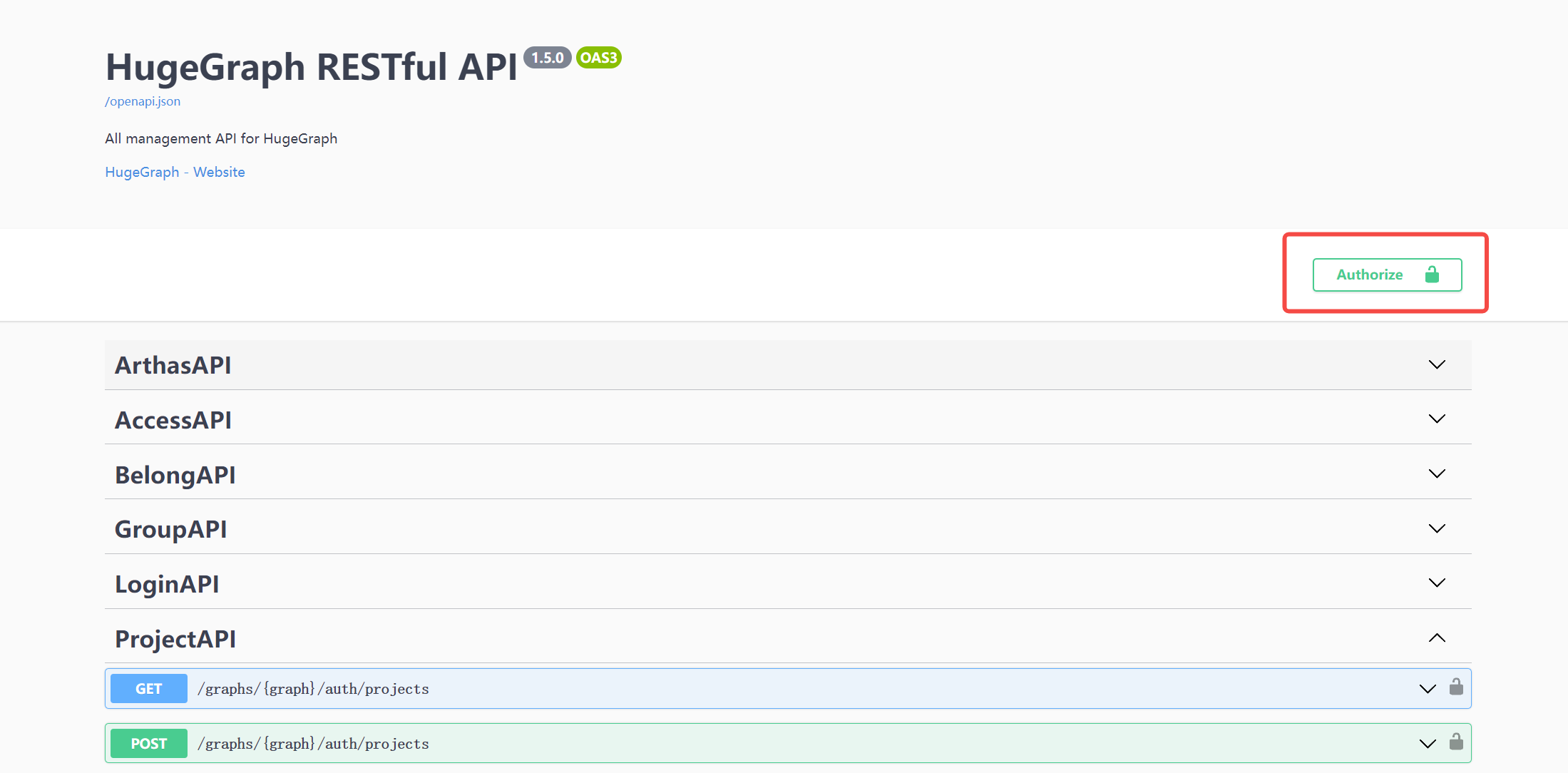
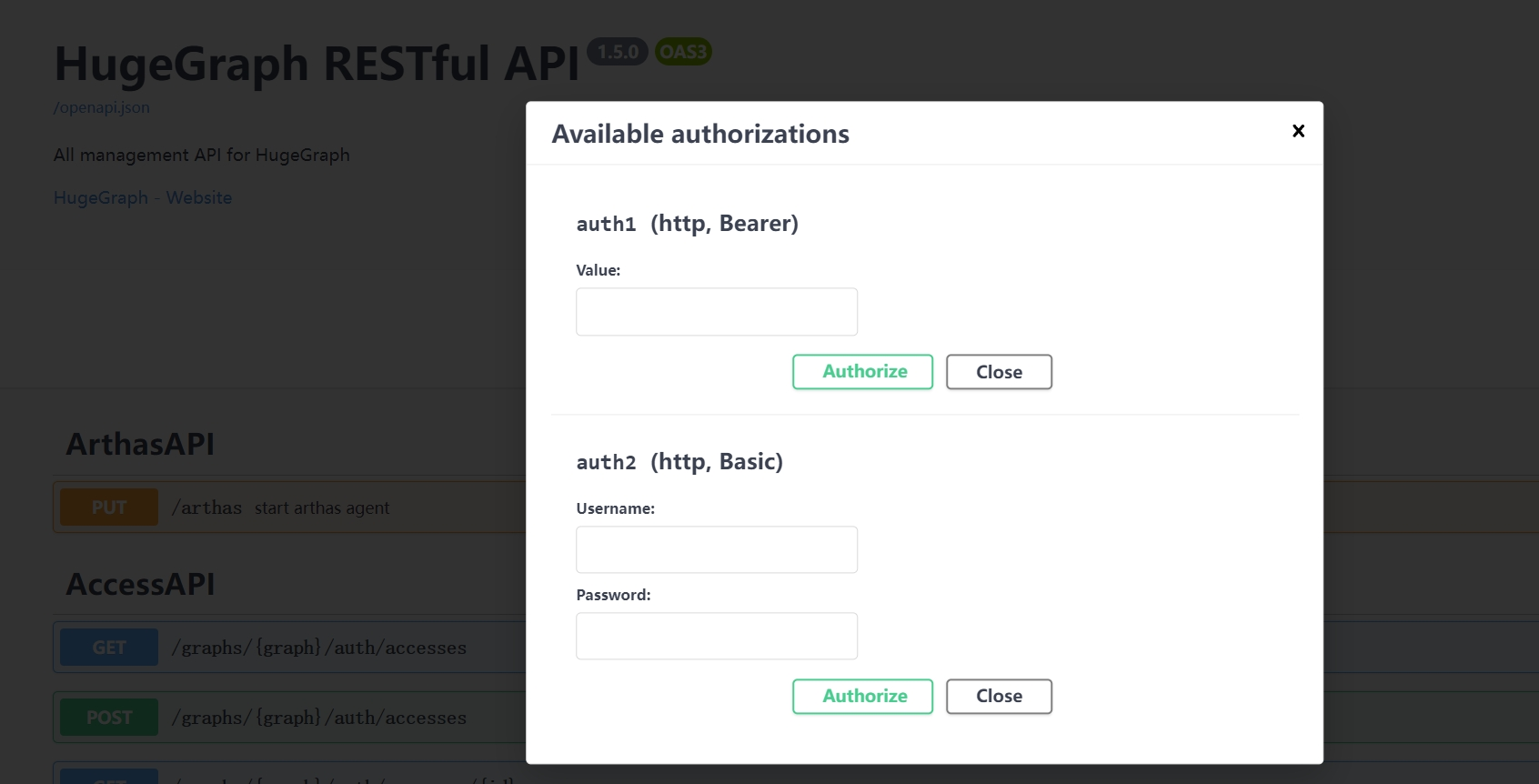
Currently, HugeGraph supports setting authentication information in two forms: Basic and Bearer.
7 Stop Server
8 Debug Server with IntelliJ IDEA
Please refer to Setup Server in IDEA
2 - HugeGraph-PD Quick Start
1 HugeGraph-PD Overview
HugeGraph-PD (Placement Driver) is the metadata management component of HugeGraph’s distributed version, responsible for managing the distribution of graph data and coordinating storage nodes. It plays a central role in distributed HugeGraph, maintaining cluster status and coordinating HugeGraph-Store storage nodes.
PD keeps cluster metadata in an embedded RocksDB store under pd.data-path and replicates it across PD nodes with Raft, so a 3-node or 5-node PD cluster keeps serving while a minority of nodes is down. On top of that it registers and activates Store nodes, allocates and rebalances partitions, tracks Store heartbeats, and answers service discovery queries from Store and Server.
PD listens on three ports:
| Port | Default | Configured by | Used by |
|---|---|---|---|
| gRPC | 8686 | grpc.port | Store and Server clients |
| REST | 8620 | server.port | Management, health checks, metrics |
| Raft | 8610 | raft.address | The other PD nodes only |
2 Prerequisites
2.1 Requirements
- Operating System: Linux or macOS (Windows has not been fully tested)
- Java version: Java 17 for HugeGraph 1.8.0+ (the Maven build accepts only JDK 17; the start script rejects older runtimes; 1.7.0 is the last release supporting Java 11)
- Maven version: ≥ 3.6.3 (for building from source)
3 Deployment
There are two ways to deploy the HugeGraph-PD component:
- Method 1: Download the tar package
- Method 2: Compile from source
3.1 Download the tar package
Apache downloads currently provide the complete 1.7.0 binary bundle containing PD, Store, and Server, without a separate PD binary. Verify version, signatures, and SHA512 on the official download page. This historical incubating release retains incubating in archive and extracted directory names:
3.2 Compile from source
To build only the PD distribution and the modules it depends on:
The unpacked distribution contains just three directories: bin (start and stop scripts), conf (application.yml, application.yml.template, log4j2.xml, verify-license.json) and lib (the hg-pd-service jar).
3.3 Docker Deployment
HG_PD_* mappings and /v1/ready are features of current master; the Server 1.7.0 source tag lacks these Docker mappings and readiness API. The following examples require images built from current master and tagged local. For release 1.7.0 assets, use bundled configuration and version-specific instructions:
To run master-built PD alone, first set a deployment-specific secret and replace example addresses with addresses reachable by the container:
| Variable | Required | Default | Configuration key | Description |
|---|---|---|---|---|
HG_PD_GRPC_HOST | Yes | None | grpc.host | Advertised gRPC hostname/IP; use container hostnames within a container network. |
HG_PD_RAFT_ADDRESS | Yes | None | raft.address | This PD node’s Raft address. |
HG_PD_RAFT_PEERS_LIST | Yes | None | raft.peers-list | Raft addresses of every PD node, including this node. |
HG_PD_INITIAL_STORE_LIST | Yes | None | pd.initial-store-list | Expected Store gRPC addresses. |
HG_PD_AUTH_SECRET_KEY | Yes | None | auth.secret-key | REST Basic password shared by all PD REST clients. |
HG_PD_GRPC_PORT | No | 8686 | grpc.port | gRPC service port. |
HG_PD_REST_PORT | No | 8620 | server.port | REST API port. |
HG_PD_DATA_PATH | No | /hugegraph-pd/pd_data | pd.data-path | Metadata path. |
HG_PD_INITIAL_STORE_COUNT | No | 1 | pd.initial-store-count | Minimum Store count needed for cluster availability. |
HG_PD_ACTUATOR_EXPOSURE | No | health,metrics,prometheus | management.endpoints.web.exposure.include | Public Actuator endpoint allowlist; * is forbidden. |
The master entrypoint requires all five mandatory variables, builds SPRING_APPLICATION_JSON overrides, then starts PD. Other settings come from image conf/application.yml; JAVA_OPTS is passed to the JVM. Deprecated GRPC_HOST, RAFT_ADDRESS, RAFT_PEERS, and PD_INITIAL_STORE_LIST remain supported with warnings.
Docker HEALTHCHECK polls /v1/health every 15 seconds, confirming only REST listener liveness, not a Raft quorum. Compose uses the same liveness check; verify /v1/ready separately before starting Store. Containers run Java in the foreground and exit when Java exits; automatic restart requires a Docker restart policy. Inspect logs with docker logs <container-name>.
See the Store Docker section and docker/README.md for master Compose and the minimal topology. When starting the full topology with Hubble, first generate the untracked Hubble configuration described in that README.
4 Configuration
PD startup reads installation conf/application.yml. Match this file to the installed version: 1.7.0 configuration or master configuration. Master leaves auth.secret-key empty, causing protected REST calls to be rejected until configured. Startup does not read application.yml.template.
4.1 Configuration Reference
These tables were checked against hg-pd-dist configuration and Java defaults at Server master commit 2f827d6e8c9c62ae858f2fc122b3a192d015e2f4; they do not describe every 1.7.0 behavior. Use original tagged configuration with release binaries and master configuration with master builds.
gRPC and REST
| Key | Master distribution value | Built-in default | Description |
|---|---|---|---|
grpc.host | 127.0.0.1 | none, required | Address this PD advertises for gRPC. Store and Server connect here, so set it to a reachable IPv4 address or hostname, never 127.0.0.1 or 0.0.0.0, in a distributed deployment. |
grpc.port | 8686 | none, required | gRPC port. |
server.port | 8620 | none, required | REST API port. Also the port reported in Raft member information. |
application.yml.template also carries grpc.netty-server.max-inbound-message-size: 100MB, but PD sets the gRPC server’s inbound message limit to 1 GB in code, so that key has no effect.
Raft
| Key | Master distribution value | Built-in default | Description |
|---|---|---|---|
raft.address | 127.0.0.1:8610 | none, required | Raft address of this node as host:port. Must be unique per node and must appear in raft.peers-list. |
raft.peers-list | 127.0.0.1:8610 | none, required | Comma separated Raft addresses of every PD node, including this one. Must be identical on all nodes. |
raft.enable | not set | true | When true, metadata writes go through the Raft state machine. When false, PD writes straight to its local store with no replication. |
raft.ip-whitelist.enabled | not set | true | When true, the Raft RPC port accepts connections only from the addresses resolved from raft.peers-list; other clients are dropped and logged as Blocked connection from <ip>. The allowlist is re-resolved when the peer list changes, but a peer that keeps its hostname and changes IP (a restarted container, for example) needs a PD restart. |
raft.snapshotInterval | not set | 300 | Seconds between Raft snapshots. |
raft.rpc-timeout | not set | 10000 | Raft RPC connect, request and install-snapshot timeout, in milliseconds. |
PD core
| Key | Master distribution value | Built-in default | Description |
|---|---|---|---|
pd.data-path | ./pd_data | none, required | Metadata directory. Holds the RocksDB store in rocksdb/ and the Raft log, metadata and snapshots in pd_raft/. |
pd.patrol-interval | 1800 | 300 | Seconds between patrol runs, which check partition health across stores and rebalance partition counts. |
pd.initial-store-count | 1 | 3 | Minimum number of active Store nodes. Below this the cluster state becomes Cluster_Not_Ready and the cluster is treated as unavailable. Set it to the number of stores you deploy. |
pd.initial-store-list | 127.0.0.1:8500 | empty | Comma separated Store gRPC addresses (ip:port) that are activated automatically when they register. An entry may also carry a group id as store_address/group_id. |
pd.cluster_id | not set | 1 | Cluster id, used to keep separate PD clusters apart. |
Store management
| Key | Master distribution value | Built-in default | Description |
|---|---|---|---|
store.keepAlive-timeout | not set | 300 | Seconds without a heartbeat after which a Store is treated as temporarily unavailable and its partition leaders move to other replicas. |
store.max-down-time | 172800 | 1800 | Seconds after which a Store is treated as permanently unavailable and its replicas are reallocated to other machines. |
store.monitor_data_enabled | true | false | Whether to persist Store monitoring samples. |
store.monitor_data_interval | 1 minute | 1 minute | Sampling interval, written as <number> <unit> with unit one of second, minute, hour, day, month, year. The number defaults to 1 when omitted. |
store.monitor_data_retention | 1 day | 1 day | How long monitoring samples are kept, same format as above. |
Partitions
| Key | Master distribution value | Built-in default | Description |
|---|---|---|---|
partition.default-shard-count | 1 | 3 | Number of replicas per partition. Use 3 for a production cluster. |
partition.store-max-shard-count | 12 | 24 | Maximum number of partition replicas one Store holds. |
The initial partition count is derived from these two values and the size of pd.initial-store-list:
Discovery, license and metrics
| Key | Master distribution value | Built-in default | Description |
|---|---|---|---|
discovery.heartbeat-try-count | not set | 3 | Number of missed heartbeats after which a registered client’s discovery entry is deleted. |
license.verify-path | ./conf/verify-license.json | None; required configuration key | The PD distribution includes this JSON file; current master has no runtime read of this configuration option. |
license.license-path | ./conf/hugegraph.license | None; required configuration key | No license file is bundled at this path. Internal gRPC putLicense writes uploads here. Master REST GET /v1/license returns an empty object; a missing file does not block startup. |
auth.secret-key | Empty | Empty | Master PD REST Basic password for usernames hg, store, hubble, or vermeer. Docker requires it; bare-metal PD can start with an empty secret, but rejects protected REST calls. |
management.metrics.export.prometheus.enabled | true | Spring Boot default | Exposes /actuator/prometheus. |
management.endpoints.web.exposure.include | health,metrics,prometheus | Spring Boot exposes only health by default | Actuator allowlist; these endpoints bypass the PD REST Basic interceptor. |
logging.config | file:./conf/log4j2.xml | none | Log4j2 configuration. Writes logs/hugegraph-pd.log, logs/hugegraph-pd_raft.log and logs/audit-hugegraph-pd.log. |
Thread pools
| Key | Built-in default | Description |
|---|---|---|
thread.pool.grpc.core | 600 | Core size of the pool that serves gRPC calls. |
thread.pool.grpc.max | 1000 | Maximum size of that pool. |
thread.pool.grpc.queue | unbounded | Queue capacity of that pool. |
job.uninterruptibleThreadPool.core | 0 | Core size of the background metadata job pool. A value of 0 or less means half the available processors. |
job.uninterruptibleThreadPool.max | 256 | Maximum size of that pool. |
job.uninterruptibleThreadPool.queue | unbounded | Queue capacity of that pool. |
4.2 Single-node configuration
For master-built distributions, start with conf/application.yml, adjust per-node gRPC/Raft addresses and data paths, and set auth.secret-key. The following values are for development and testing. One PD node provides no majority fault tolerance; partition.default-shard-count: 1 means one replica per partition.
Generate a deployment secret with openssl rand -hex 24; Docker supplies it through HG_PD_AUTH_SECRET_KEY. See REST API authentication for the different 1.7.0 behavior.
4.3 Three-node cluster configuration
For a production cluster run 3 or 5 PD nodes, an odd number so Raft always has a quorum. A 3-node cluster tolerates one node failure. raft.peers-list must list every node and must be byte-for-byte identical on all of them, while grpc.host and raft.address differ per node.
Node 1 (192.168.1.10):
Node 2 (192.168.1.11) and node 3 (192.168.1.12) use the same file with grpc.host and raft.address changed to their own address:
To put all three PD nodes on one machine for testing, give each node its own pd.data-path and its own ports, for example raft 8610/8611/8612, gRPC 8686/8687/8688 and REST 8620/8621/8622.
In Docker bridge networking the same configuration comes from environment variables and uses container hostnames instead of IP addresses:
5 Start and Stop
5.1 Start PD
In the PD installation directory, execute:
The script requires Java 17 or later on PATH or in JAVA_HOME (Java ≥ 11 on 1.7.0).
It exits without doing anything if it finds a Java process already using this installation’s conf directory.
The lifecycle details below describe current master builds. The downloaded 1.7.0 launcher does not include those repairs. Supported flags, with GC version limits noted below:
| Flag | Values | Default | Description |
|---|---|---|---|
-d | true, false | true | Daemon mode. See the note below. |
-g | See version limits below | not set | Select the garbage collector. Unsupported values abort startup. |
-j | JVM options | empty | Extra JVM options, for example -j "-Xmx8g -Xms8g". |
-y | true, false | false | Attach the OpenTelemetry Java agent. The agent is downloaded into plugins/ on first use, its MD5 is verified, and traces are exported over gRPC to http://127.0.0.1:4317. |
Master builds accept g1, G1, zgc and ZGC.
The downloaded 1.7.0 launcher accepts only zgc or ZGC as explicit choices; -g g1, -g G1 and other values abort startup.
Omit -g for the default path. For rejected values, inspect logs/hugegraph-pd-stdout.log.
The -d flag controls daemon mode:
-d true(default): run as a background daemon; the script returns immediately.-d false: run in foreground. The scriptexecs Java, so the container or supervisor process IS Java. Use this when running under Docker or a process supervisor (systemd, supervisord) so crashes are detected and the service is restarted automatically.
Each flag also has an environment variable equivalent: DAEMON, GC_OPTION, USER_OPTION and OPEN_TELEMETRY. Setting JAVA_OPTIONS replaces the computed heap settings entirely; otherwise the script sizes the heap between 512 MB and 32 GB from available memory. Setting STDOUT_MODE=true leaves the JVM output on stdout instead of redirecting it to logs/hugegraph-pd-stdout.log, which is what the Docker image does.
After successful startup, you can see logs similar to the following in logs/hugegraph-pd-stdout.log:
The process id is written to bin/pid.
5.2 Stop PD
In the PD installation directory, execute:
The script reads bin/pid, sends the process a termination signal, waits up to 30 seconds for it to exit, and removes the pid file. If bin/pid is missing it reports that and exits successfully.
6 Startup Order in a Distributed Cluster
Start the components in this order:
- All PD nodes. Form the Raft group and elect a leader. Check
GET /v1/readyon each node; start Store only after HTTP200withready:true./v1/healthchecks REST listener liveness only. - All Store nodes. Register with PD; wait for
/v1/storesto show every target Store asUp. - All Server nodes. Start after PD and Store are ready.
sequenceDiagram
    participant Operator
    participant PD
    participant Store
    participant Server
    Operator->>PD: GET /v1/ready (check each PD)
    PD-->>Operator: HTTP 200 and ready=true
    Operator->>Store: Start Store
    Store->>PD: gRPC registration and heartbeat
    Operator->>PD: GET /v1/stores (Basic authentication)
    PD-->>Operator: Every target Store is Up
    Operator->>Server: Start Server
    Server->>PD: gRPC partitions and discovery
    Server->>Store: gRPC graph data access
Master Compose waits on PD /v1/health through Store depends_on: condition: service_healthy, and on Store REST liveness before Server. Server also polls PD /v1/stores for an Up Store before starting. Therefore, docker compose up --wait does not replace PD Raft readiness and Store registration checks.
PD is also the last component to stop: shut down Server, then Store, then PD.
7 Verification
7.1 REST API Authentication
Current master requires HTTP Basic Authorization for all PD REST paths except /actuator/*, /v1/health, /v1/ready, and /v1/prom/targets/*. Username must be hg, store, hubble, or vermeer, and password must equal auth.secret-key. A missing secret or wrong password returns HTTP 401. Query Stores using the same secret configured at PD startup:
bin/wait-storage.sh uses the same credentials through PD_AUTH_USER and PD_AUTH_PASSWORD. Release 1.7.0 checks only internal service usernames and does not compare passwords; do not apply this older behavior to master builds.
Protect Server and PD ports separately in production
Enable Server authentication and authorization, an IP allowlist, and minimum graph API permissions; retain and protect Server audit-*.log. These controls do not protect PD. Master PD REST uses auth.secret-key, whereas 1.7.0 checks usernames only. Keep raft.ip-whitelist.enabled enabled for configured peers and restrict PD REST/gRPC to trusted networks. Unauthenticated /v1/health, /v1/ready, and Actuator probes require network restrictions too. Protect master PD audit logs at logs/audit-hugegraph-pd.log.
7.2 Health Checks
Unauthenticated GET /v1/health returns 200 with an empty body, confirming only PD REST listener startup:
Spring Boot Actuator also provides a readable health response:
Actuator {"status":"UP"} does not confirm an available PD Raft leader. Master GET /v1/ready returns HTTP 200 with ready:true when the PD Raft node is active and sees a leader; otherwise it returns HTTP 503 with ready:false:
7.3 Cluster and member status
Check the PD members and which node is the Raft leader:
The response carries pdList, the elected pdLeader, numOfService, numOfNormalService and a stateCountMap. In a healthy 3-node PD cluster numOfService and numOfNormalService are both 3 and exactly one member has role: "Leader".
GET /v1/cluster returns the same member list together with the Store list, graph list and overall cluster state, and GET / returns a short summary (leader address, cluster state, member count, store count, graph count, partition count).
7.4 Store status
You can also verify Store node status through the PD API:
If the response shows state as Up, the corresponding Store node is running normally. The example below shows a single Store node. In a healthy 3-node deployment, the storeId list should contain three IDs, and stateCountMap.Up, numOfService, and numOfNormalService should all be 3.
7.5 Other REST endpoints
All paths below are relative to http://<pd-host>:8620 and need the Basic header from section 7.1 unless noted.
| Method and path | Description |
|---|---|
GET / | Brief cluster statistics: leader, state, member count, store count, graph count, partition count |
GET /v1/health | Liveness only; HTTP 200 does not imply Raft readiness; no authentication |
GET /v1/ready | Master readiness: HTTP 200 with ready:true means an active node that sees a leader; no authentication |
GET /v1/cluster | Full cluster statistics: PD members, stores, graphs, partitions |
GET /v1/members | PD member list with roles and the elected leader |
POST /v1/members/change | Change the Raft peer list, body {"peerList": "..."} |
GET /v1/stores | Registered Store nodes with state and per-store statistics |
GET /v1/store/{storeId} | One Store node |
POST /v1/store/{storeId} | Update a Store’s state, body {"storeState": "..."} |
DELETE /v1/store/{storeId} | Remove a Store from the cluster |
POST /v1/store/log | Store state change log, body {"startTime": "...", "endTime": "..."} |
GET /v1/storesAndStats | Raw Store metadata, for debugging |
GET /v1/store_monitor/{storeId} | Store monitoring samples as text |
GET /v1/store_monitor/json/{storeId} | Store monitoring samples as JSON |
GET /v1/shards | Every shard of every partition, with store id, role, state and progress |
GET /v1/shardGroups | Shard groups |
GET /v1/shardGroupsCache | Shard groups from PD’s in-memory cache |
GET /v1/shardLeaders | Partition leaders grouped by Store raft address |
GET /v1/balanceLeaders | Rebalance partition leaders across Stores |
GET /v1/partitions | Partition list with state and statistics |
GET /v1/highLevelPartitions | Partitions with per-graph key counts and data sizes |
GET /v1/partitionsAndStats | Raw partition metadata, for debugging |
POST /v1/partitions/log | Partition change log, body {"startTime": "...", "endTime": "..."} |
GET /v1/resetPartitionState | Reset the state of every partition |
GET /v1/graphs | Graph list |
GET /v1/graph/** | One graph by name |
POST /v1/graph/** | Update a graph’s partition count, body {"partitionCount": N} |
GET /v1/graph/partitionSizeRange | Minimum and maximum partition count the cluster accepts |
GET /v1/graph-spaces | Graph space list |
GET /v1/graph-spaces/** | One graph space |
POST /v1/graph-spaces/** | Update a graph space |
POST /v1/registry | Register a service instance for discovery |
POST /v1/registryInfo | Query registered instances |
GET /v1/allInfo | All registered instances |
GET /v1/license | Legacy endpoint; current master returns an empty object |
GET /v1/license/machineInfo | IP and MAC addresses seen by the license check |
GET /v1/task/patrolStores | Run the store patrol task now |
GET /v1/task/patrolPartitions | Run the partition patrol task now |
GET /v1/task/balancePartitions | Rebalance partitions across Stores |
GET /v1/task/splitPartitions | Run automatic partition splitting now |
GET /v1/task/balanceLeaders | Rebalance partition leaders |
GET /v1/task/compact | Instruct Store nodes to compact the RocksDB files of their partitions |
GET /v1/prom/targets/{appName} | Prometheus service discovery targets, no authentication required |
GET /v1/prom/targets-all | Prometheus targets for all app types |
GET /v1/prom/sd_config | Prometheus HTTP service discovery config |
GET /actuator/health | Spring Boot health, no authentication required |
GET /actuator/metrics | Spring Boot metrics, no authentication required |
GET /actuator/prometheus | Prometheus scrape endpoint, no authentication required |
The two log endpoints take a time range as {"startTime": "...", "endTime": "..."}; yyyy-MM-dd HH:mm:ss and yyyy-MM-dd are among the accepted formats.
PD registers its own meters under the hg prefix, so /actuator/prometheus exposes hg_up, hg_graphs, hg_stores and hg_terms alongside the standard JVM metrics, plus per-graph partition and size meters once graphs exist.
In versions after 1.7.0, PD also exports, for each registered store, hg_store_state{store="<id>",state="<state>"}, which is 1 for the store’s current state (Unknown, Pending, Up, Offline, Exiting or Tombstone) and 0 for the others, and hg_store_leader_count{store="<id>"}, the number of shard groups whose leader is on that store. A rebuilt Store reports 0 leaders until leadership moves back to it. Every PD member reads the same replicated metadata, so select one instance before aggregating these series.
3 - HugeGraph-Store Quick Start
1 HugeGraph-Store Overview
HugeGraph-Store is the storage node component of HugeGraph’s distributed version, responsible for actually storing and managing graph data. It works in conjunction with HugeGraph-PD to form HugeGraph’s distributed storage engine, providing high availability and horizontal scalability.
Each Store node keeps graph data in RocksDB and replicates it with Raft (JRaft): every partition is a separate Raft group, so a partition survives the loss of a minority of its replicas. Store nodes do not know about each other directly. They register with PD, receive their partition assignment from PD, and report state back over a heartbeat. HugeGraph-Server reaches Store over gRPC after looking up partition locations in PD.
2 Prerequisites
2.1 Requirements
- Operating System: Linux or macOS (Windows has not been fully tested)
- Java version: Java 17 for HugeGraph 1.8.0+ (the Maven build accepts only JDK 17; the start script rejects older runtimes; 1.7.0 is the last release supporting Java 11)
- Maven version: ≥ 3.6.3 (for building from source)
- Deploy HugeGraph-PD first for multi-node deployment
3 Deployment
There are two ways to deploy the HugeGraph-Store component:
- Method 1: Download the tar package
- Method 2: Compile from source
3.1 Download the tar package
Apache downloads currently provide the complete 1.7.0 binary bundle containing PD, Store, and Server, without a separate Store binary. Verify version, signatures, and SHA512 on the official download page. This historical incubating release retains incubating in archive and directory names:
3.2 Compile from source
To build Store alone instead of the whole repository, build hugegraph-struct first, because Store depends on it:
The assembled directory contains only bin/, conf/ and lib/hg-store-node-{version}.jar.
3.3 Docker Deployment
HG_STORE_* mappings are current master features, absent from Server tag 1.7.0. These Docker examples require PD, Store, and HStore Server images built from the same current master source with matching local tags:
Before first startup, create .env in docker/ following the authentication environment instructions.
The procedure uses umask 077 and refuses to overwrite existing files. Keep an existing .env and add missing entries. Never regenerate HG_PD_AUTH_SECRET_KEY for initialized data directories. Although .gitignore excludes this file, do not commit it.
In every new shell, load the same file from docker/ before Compose or PD REST commands:
Load the same secret before subsequent restarts or PD REST calls; do not regenerate it for initialized directories. Explicitly include HUGEGRAPH_VERSION=local and HUGEGRAPH_PULL_POLICY=never in every Compose lifecycle command.
To start Hubble, use the topology-specific untracked configuration: minimal docker-compose-hstore.yml mounts conf/hubble/hstore.local.properties;
HA docker-compose-3pd-3store-3server.yml mounts conf/hubble/hstore-ha.local.properties.
The README initialization creates both files with the shared PD secret. If missing or requiring updates, load existing .env from docker/ and run:
Multi-node service names are pd0–pd2, store0–store2, and server0–server2. This master Compose file also requires matching locally built images; do not mix HUGEGRAPH_VERSION=1.7.0 release images with master Compose.
To run master-built Store alone, replace example addresses with actual routable Store and PD addresses:
Current Master Docker Environment Variables:
| Variable | Required | Default | Configuration key | Description |
|---|---|---|---|---|
HG_STORE_PD_ADDRESS | Yes | None | pdserver.address | Comma-separated PD gRPC addresses. |
HG_STORE_GRPC_HOST | Yes | None | grpc.host | Advertised hostname/IP; use a container hostname within a container network. |
HG_STORE_RAFT_ADDRESS | Yes | None | raft.address | This node’s Raft address. |
HG_STORE_GRPC_PORT | No | 8500 | grpc.port | gRPC service port. |
HG_STORE_REST_PORT | No | 8520 | server.port | REST API port. |
HG_STORE_DATA_PATH | No | /hugegraph-store/storage | app.data-path | Data path. |
The master entrypoint writes these values into SPRING_APPLICATION_JSON, overriding image conf/application.yml. Other options still come from that file and application-pd.yml; Java runs in the foreground. Deprecated PD_ADDRESS, GRPC_HOST, and RAFT_ADDRESS remain supported with warnings.
PD and Store Docker HEALTHCHECK use /v1/health, confirming only local REST responses. Compose depends_on uses the same startup gate; separately verify PD /v1/ready and Up Store state in /v1/stores. Store defaults to STDOUT_MODE=true; its Dockerfile declares only EXPOSE 8520, so publish gRPC 8500 and Raft 8510 separately if needed outside the Docker network.
4 Configuration
Store reads two files under conf/. Release 1.7.0 sources: application.yml, application-pd.yml. Master sources: application.yml, application-pd.yml. Master places RocksDB settings in the second file, included through spring.profiles.include: pd; startup selects application.yml.
application.yml: Main PD address, ports, Raft, and data path settings.application-pd.yml: Included throughspring.profiles.include: pd; RocksDB memory and Actuator exposure.
4.1 application.yml
The following tables were checked against distribution values and Java defaults at Server master commit 2f827d6e8c9c62ae858f2fc122b3a192d015e2f4. Use tagged configuration for release 1.7.0 without replacing it with another version’s files.
4.2 application-pd.yml
This file contains only rocksdb and Actuator exposure settings.
Protect Server and Store ports separately in production
Enable Server authentication and authorization, an IP allowlist, and minimum graph API permissions; retain and protect Server audit-*.log. These settings do not protect Store: master exposes all Actuator endpoints without PD-style Basic authentication. Restrict Store REST, gRPC, and Raft to cluster nodes and trusted operations networks.
4.3 Configuration reference
“Master distribution value” comes from the two master files above. “Code default” is the fallback when a key is absent; rely on code defaults for options omitted from the distribution files.
Core
| Key | Master distribution value | Code default | Meaning |
|---|---|---|---|
pdserver.address | localhost:8686 | required | PD gRPC endpoints, comma separated. Store registers itself here and receives its partition assignment. Must be PD’s grpc.port, not its REST port. |
grpc.host | 127.0.0.1 | required | Address this node advertises for its own gRPC service. Set it to a routable IP or hostname, 127.0.0.1 is only usable for a single-machine setup. |
grpc.port | 8500 | required | gRPC port. Server and the Store client connect here. |
grpc.netty-server.max-inbound-message-size | 1000MB | gRPC default | Maximum size of a single inbound gRPC message. Bound by the grpc-spring-boot-starter Netty server. |
grpc.server.wait-time | not set | 3600 | Seconds a scan stream waits for the client to consume a page before the server aborts it. |
server.port | 8520 | required | REST and Actuator port. Also reported to PD as the rest.port label. |
Raft
| Key | Master distribution value | Code default | Meaning |
|---|---|---|---|
raft.address | 127.0.0.1:8510 | required | Raft service address of this node, host:port. Must be reachable from every other Store node. There is no peer list to configure: PD tells each node which peers belong to a partition’s Raft group. |
raft.disruptorBufferSize | 1024 | 0 | Raft task queue size. 0 derives it from rocksdb.total_memory_size, by rounding that size in GB to the nearest power of two and multiplying by 32. |
raft.max-log-file-size | 600000000000 | 50000000000 | Maximum byte size of Raft logs. |
raft.snapshotInterval | 1800 | 300 | Seconds between Raft snapshots. |
raft.snapshotLogIndexMargin | not set | 0 | Minimum applied-index distance since the last snapshot before a snapshot is actually written. 0 disables the distance check. |
raft.rpc-timeout | not set | 10000 | Raft RPC timeout in milliseconds. |
raft.metrics | not set | true | Collect JRaft node metrics, readable at /metrics/raft. |
raft.useRocksDBSegmentLogStorage | not set | true | Store Raft logs in the RocksDB segment log storage. |
raft.maxSegmentFileSize | not set | 67108864 | Segment log file size in bytes (64 MB). |
raft.maxReplicatorInflightMsgs | not set | 256 | Maximum in-flight replication requests per follower. |
raft.maxEntriesSize | not set | 256 | Maximum number of entries in one AppendEntries request. |
raft.maxBodySize | not set | 524288 | Maximum byte size of one AppendEntries request. |
ave-logEntry-size-ratio | not set | 0.95 | Smoothing ratio used to estimate the average log entry size. Note that this key sits at the top level, not under raft. |
Storage and labels
| Key | Master distribution value | Code default | Meaning |
|---|---|---|---|
app.data-path | ./storage | store | RocksDB data directory. Multiple paths separated by commas spread partitions over several disks. |
app.raft-path | commented out | empty | Directory for Raft logs and snapshots. Falls back to app.data-path when empty. |
app.fake-pd | not set | false | Built-in PD mode for standalone testing. Do not use it in production. |
app.placeholder-size | not set | 10 | Size in GB of a placeholder file created in each data path at startup, so space can be freed in an emergency. 0 disables it. |
app.label.<name> | not set | none | Arbitrary key/value labels sent to PD in the store heartbeat. The node adds rest.port on its own. |
RocksDB
| Key | Master distribution value | Code default | Meaning |
|---|---|---|---|
rocksdb.total_memory_size | 32000000000 | 51539607552 | Memory budget shared by all RocksDB instances on this node. When absent or 0, the node uses the JVM max heap instead. |
rocksdb.write_buffer_size | 32000000 | 33554432 | Memtable size in bytes. When absent or 0, the node uses total_memory_size / 1000. |
rocksdb.min_write_buffer_number_to_merge | 16 | 16 | Number of memtables merged together before a flush. |
rocksdb.write_buffer_ratio | not set | 0.66 | Share of total_memory_size given to the write cache. The rest becomes the block cache. |
Any other option defined in org/apache/hugegraph/rocksdb/access/RocksDBOptions.java can be added under the same rocksdb: block, for example rocksdb.max_background_jobs, rocksdb.level0_file_num_compaction_trigger or rocksdb.bloom_filter_bits_per_key.
Thread pools
| Key | Code default | Meaning |
|---|---|---|
thread.pool.grpc.core | 600 | Core threads serving gRPC requests. |
thread.pool.grpc.max | 1000 | Maximum gRPC threads. |
thread.pool.grpc.queue | 2147483647 | gRPC task queue capacity. |
thread.pool.scan.core | 128 | Core threads serving scans. 0 means 4 times the CPU count. |
thread.pool.scan.max | 1000 | Maximum scan threads. |
thread.pool.scan.queue | 0 | Scan task queue capacity. |
gRPC callback queue (1.8.0)
Store uses an unbounded queue for gRPC callbacks so that a full queue does not discard cancellation or completion notifications and leave requests unfinished.
You can keep thread.pool.grpc.queue in the configuration, but it no longer limits this queue.
thread.pool.grpc.core and thread.pool.grpc.max still configure the thread pool. Because callbacks can continue to queue, a backlog normally does not grow
the pool from core to max; increasing max alone does not increase callback processing capacity.
Sustained overload can still grow the queue and increase memory usage. Limit client concurrency and size the scan and query worker pools for the node’s
resources; do not rely on thread.pool.grpc.queue for load control. Version 1.7.0 still uses the configured gRPC queue capacity.
Query pushdown
| Key | Code default | Meaning |
|---|---|---|
query.push-down.threads | 1500 | Thread pool size for pushed-down queries. |
query.push-down.fetch_batch | 20000 | Rows fetched per request. |
query.push-down.fetch_timeout | 300000 | Fetch timeout in milliseconds. |
query.push-down.memory_limit_count | 50000 | Row limit for in-memory operations such as sorting. |
query.push-down.index_size_limit_count | 50000 | Index sst file size limit in kB. |
Background jobs
| Key | Code default | Meaning |
|---|---|---|
job.interruptableThreadPool.core | 128 | Core threads of the TTL cleaner pool. 0 means the CPU count. |
job.interruptableThreadPool.max | 256 | Maximum threads of the TTL cleaner pool. 0 means 4 times the CPU count. |
job.interruptableThreadPool.queue | 2147483647 | Queue capacity of the TTL cleaner pool. |
job.uninterruptibleThreadPool.core | 0 | Core threads of the engine’s uninterruptible job pool. 0 means the CPU count. |
job.uninterruptibleThreadPool.max | 256 | Maximum threads of the uninterruptible job pool. |
job.uninterruptibleThreadPool.queue | 2147483647 | Queue capacity of the uninterruptible job pool. |
job.cleaner.batch.size | 10000 | Keys deleted per batch by the TTL cleaner. |
job.start-time | 0 | Hour of day (0 to 23) at which the daily TTL cleanup runs. Values outside that range fall back to 19. |
Built-in PD mode
Only for single-node development and debugging, activated by app.fake-pd: true. The node then plays PD’s role itself and ignores pdserver.address.
| Key | Code default | Meaning |
|---|---|---|
fake-pd.store-list | '' | gRPC addresses of the Store nodes in the fake cluster. |
fake-pd.peers-list | '' | Raft addresses of the same nodes. |
fake-pd.partition-count | 3 | Number of partitions. |
fake-pd.shard-count | 3 | Replicas per partition. |
Diagnostics
Starting with HugeGraph 1.8.0, Store HTTP activation (GET /v1/arthasstart) is disabled and returns 403. Legacy configuration fields are kept only
for compatibility. Run the bundled script as the service OS user on the host to diagnose the running JVM (official container images include JDK 17):
For multiple processes on one host, specify --pid <PID> --telnet-port 3659. For command options, authentication, and security practices, see
Start the Arthas agent.
4.4 Per-node changes
For multi-node deployment, you need to modify the following configurations for each Store node:
grpc.hostandgrpc.port(the address other components dial)raft.address(Raft protocol address)server.port(REST port)app.data-path(data storage path)
pdserver.address is the same on every node, it lists the whole PD cluster.
5 Start and Stop
5.1 Start Store
Ensure that the PD service is already started, then in the Store installation directory, execute:
The lifecycle and timeout details below describe master builds that include launcher script repairs. The downloaded 1.7.0 launcher does not include those repairs. The script accepts four flags, with GC version limits noted below:
| Flag | Values | Default | Description |
|---|---|---|---|
-d | true, false | true | Daemon mode. See below. |
-g | See version limits below | not set | Select the garbage collector. Unsupported values abort startup. |
-j | JVM options string | empty | Extra JVM options, for example -j "-Xmx16g -Xms8g". |
-y | true, false | false | Attach the OpenTelemetry Java agent, downloading it into plugins/ on first use, and export traces to 127.0.0.1:4317. |
Master builds accept g1, G1, zgc and ZGC.
The downloaded 1.7.0 launcher accepts only zgc or ZGC as explicit choices; -g g1, -g G1 and other values abort startup.
Omit -g for the default path. For rejected values, inspect logs/hugegraph-store-server.log.
Daemon mode:
-d true(default): run as a background daemon. The script returns immediately and writes the Java pid tobin/pid.-d false: run in the foreground. The scriptexecs Java, so the container or supervisor process is Java itself. Use this under Docker or a process supervisor (systemd, supervisord) so crashes are detected and the service is restarted automatically.
JVM memory, unless you set JAVA_OPTIONS yourself: -Xms512m, and -Xmx set to half the free memory, clamped to the 512 MB to 2048 MB range. The script also adds -XX:MetaspaceSize=256M, a heap dump on out-of-memory into logs/, and a rolling GC log at logs/gc.log. Production nodes normally need a much larger heap, so pass one explicitly, for example -j "-Xmx32g -Xms32g".
The script refuses to start if ulimit -n or ulimit -u is below 1024, and it preloads jemalloc on x86_64 and arm64 when the shared object can be downloaded and verified.
In master builds, each optional jemalloc download allows 5 seconds to connect and 30 seconds in total. The 1.7.0 helper has no connection or total timeout. A timeout or failed verification follows the existing fallback: startup continues without preloading the downloaded library. Verified cached libraries can still be reused; partial downloads are removed.
After successful startup, you can see logs similar to the following in logs/hugegraph-store-server.log:
5.2 Stop Store
In the Store installation directory, execute:
The script reads bin/pid, signals that process, and waits up to 30 seconds for it to exit before removing the pid file. If bin/pid is missing it exits without doing anything.
5.3 Restart Store
It sources the stop script and then the start script, and forwards the flags from section 5.1.
5.4 Startup order
- All PD nodes first. Each Store’s
grpc.host:grpc.portmust appear in PDpd.initial-store-list, or the node remainsPendinginstead ofUp, blocking partition allocation. On master, verify HTTP200withready:truefrom every PD/v1/readyfirst;/v1/healthis liveness only. - Store next. Registration retries while PD is unreachable, logging
store heartbeat error: PD UNREACHABLE. - Server last. Every Store should report
Up; partitions must be ready before opening or initializing graphs.
Master Compose uses depends_on: condition: service_healthy for local liveness, but PD and Store Docker checks only call /v1/health; they do not confirm Raft quorum or Store registration. Server waits for PD to report at least one Up Store. Operators should still check PD /v1/ready and /v1/stores.
6 Multi-Node Deployment Example
Below is a configuration example for a three-node deployment:
6.1 Three-Node Configuration Reference
- 3 PD nodes
- raft ports: 8610, 8611, 8612
- rpc ports: 8686, 8687, 8688
- rest ports: 8620, 8621, 8622
- 3 Store nodes
- raft ports: 8510, 8511, 8512
- rpc ports: 8500, 8501, 8502
- rest ports: 8520, 8521, 8522
6.2 Store Node Configuration
For the three Store nodes, the main configuration differences are as follows:
Node A:
Node B:
Node C:
All nodes should point to the same PD cluster:
And every PD node should list all three Store gRPC addresses:
6.3 Docker Distributed Cluster Configuration
The distributed Store cluster definition is included in docker/docker-compose-3pd-3store-3server.yml. Each Store node gets its own hostname and environment variables:
The container ports stay 8500/8510/8520 on every node, only the published host ports differ. The PD nodes set HG_PD_INITIAL_STORE_LIST: store0:8500,store1:8500,store2:8500 to match.
Store nodes start only after all PD nodes pass healthchecks (/v1/health), enforced via depends_on: condition: service_healthy.
To view runtime logs for a running Store container use docker logs <container-name> (e.g. docker logs hg-store0).
See docker/README.md for the full setup guide.
7 Verify Store Service
Confirm that the Store service is running properly:
Actuator {"status":"UP"} confirms local Store application health, without proving registration as Up in PD.
GET /v1/health is the lighter check used by the Docker image and the compose files. It answers HTTP 200 with an empty body, so use curl -fsS and check the exit code rather than the output:
7.1 Store REST endpoints
The Store node exposes these read-only endpoints on server.port:
| Method | Path | Description |
|---|---|---|
| GET | /v1/health | Liveness probe, HTTP 200 with an empty body |
| GET | /actuator/health | Spring Boot Actuator health, {"status":"UP"} |
| GET | /actuator/prometheus | Prometheus scrape endpoint |
| GET | / | Node summary, leaderCount and partitionCount |
| GET | /-/state | Operator-set STARTING, ONLINE, or STOPPING flag; distinct from PD registration state |
| GET | /-/echo?name=<text> | Echo check |
| GET | /-/scan | State of the running scan streams |
| GET | /v1/partitions | All Raft groups on this node with per-partition metrics. Add ?flags=accurate for exact key counts, which is slower. |
| GET | /v1/partition/{id} | One Raft group by partition id, including role, leader, peers and committed index |
| GET | /metrics/system | Host CPU and memory metrics |
| GET | /metrics/drive | Disk metrics for the data paths |
| GET | /metrics/raft | JRaft node metrics, needs raft.metrics: true |
Master Store configuration exposes all Actuator endpoints with management.endpoints.web.exposure.include: "*" and enables Prometheus. These endpoints lack PD REST Basic protection; restrict Store REST network access.
The node also serves maintenance endpoints that change state or run heavy work: PUT /-/state, GET /-/cleaner,
GET /v1/partition/dump/{id}, GET /v1/partition/clean/{id}, POST /v1/compat?id=<partition>, POST /raft/options, and the /fix/* and /test/* groups.
Use them only for troubleshooting, and keep the REST port off untrusted networks.
7.2 Check registration from PD
You can also check Store node status through the PD API:
For master builds, PD REST usernames must be hg, store, hubble, or vermeer, and the password must equal PD auth.secret-key. HG_PD_AUTH_SECRET_KEY configures PD and Server in Compose. /v1/health, /v1/ready, /actuator/*, and /v1/prom/targets/* require no authentication. Release 1.7.0 checks only usernames, without comparing passwords; do not use that old behavior for master builds.
If Store is configured successfully, the response should include status information for the current node, and state: "Up" means the node is running normally. A node stuck at Pending is usually missing from PD’s pd.initial-store-list.
The example below shows a single Store node. If all three nodes are configured correctly and running, the storeId list should contain three IDs, and stateCountMap.Up, numOfService, and numOfNormalService should all be 3.
7.3 Minimal Graph Read/Write Verification
After Store appears as Up in PD, start an HStore-backed Server connected to the same PD cluster. See the Server Quick Start. Once GET /versions responds and the default hugegraph graph is loaded, create a property key, vertex label, and vertex, then read it:
The final response should contain vertex ID pd-store-demo-1 and property pd_store_demo_name. If Server authentication is enabled, add credentials to each request.
4 - Deploy HugeGraph with Helm
This guide covers HugeGraph 1.8.0 and later, using Helm 3.10+ with OCI support and Kubernetes (K8s) 1.23+.
Install hugegraph-helm from GHCR or Docker Hub. Chart and HugeGraph versions are maintained separately:
for example, a 0.2.x Chart can deploy a 1.8.x service.
The current development Chart uses latest images and is intended for testing.
For production, choose a stable Chart once the corresponding HugeGraph service has been released, and review its image versions.
Image tags can change; set each component’s image.digest to keep using the same image content.
Artifact Hub helps you find the Chart, browse versions and read installation instructions. The packages themselves are downloaded from GHCR or Docker Hub. See the chart README for settings and source-based development, and the operations reference for lifecycle procedures.
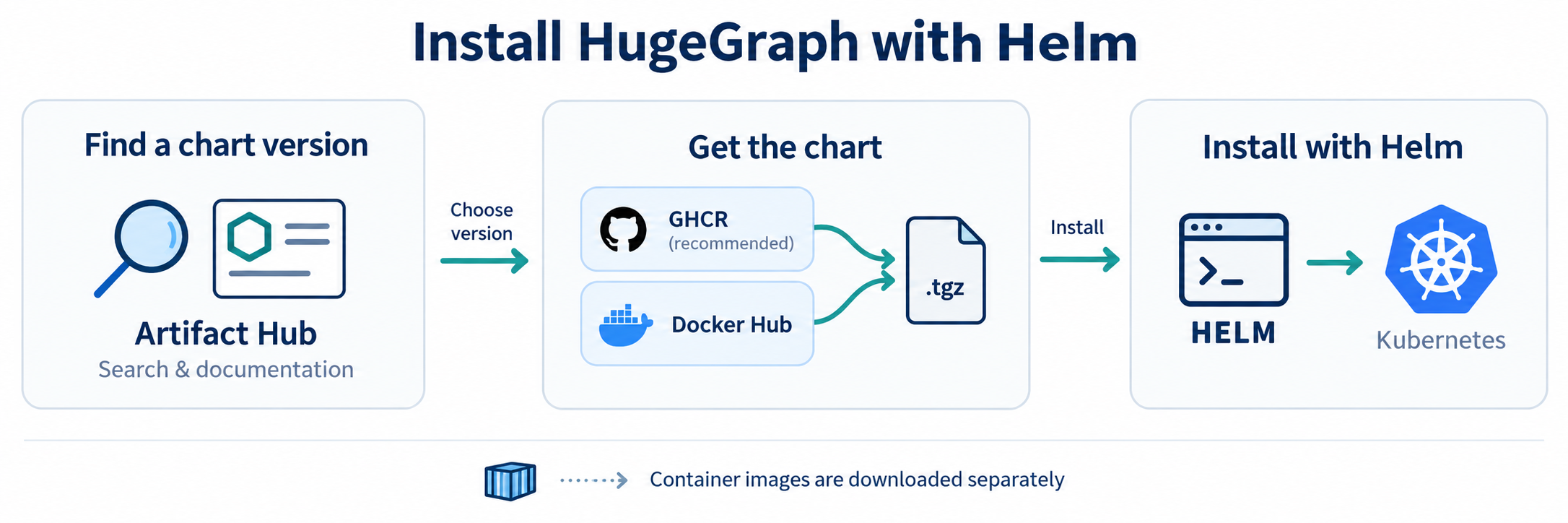
1 Install
Default Topology & Storage Prerequisites
- Components: Deploys 3 PD + 3 Store + 3 Server and Hubble by default, with authentication and persistent storage enabled.
- Volume Requirements: Requires a default dynamic StorageClass or matching pre-created static PVs, totaling 7 persistent volumes (3 × 10 GiB PD volumes, 3 × 50 GiB Store volumes, and 1 × 1 GiB Hubble volume).
- Memory Sizing: Retains container JVM memory auto-calculation; configure resource requests/limits to allocate sufficient physical memory for the 9 JVMs and Hubble.
Choose either registry; GHCR is recommended for public CI. For local lightweight testing, use the single-node preset.
--devel selects the highest Chart version, including development and stable versions, without limiting the version series.
For production or reproducible installations, replace --devel with --version <published-version> to pin your chosen version.
The single-node preset replaces the default installation with one replica per component and relaxed scheduling constraints.
2 Modes and entry points
The extracted package is rooted at hugegraph-helm/; the source directory remains helm/hugegraph/.
HugeGraph Helm Chart Layout
- hugegraph-helm/
- Chart.yamlChart metadata and version definitions
- values.yamlDefault values (easy mode: 3 PD + 3 Store + 3 Server + 1 Hubble, NodePort)
- values-single.yamlSingle-node preset (local Minikube/Kind testing with 1 replica and no anti-affinity)
- values-cluster.yamlMulti-node cluster preset (required anti-affinity, Store OnDelete rollout)
- values-strict.yamlHardened security preset (strict mode: ClusterIP only, strict NetworkPolicies)
- values.schema.jsonSchema validation for values configuration
- templates/Kubernetes workload templates
- pd-statefulset.yamlPD StatefulSet (metadata and scheduling)
- store-statefulset.yamlStore StatefulSet (storage engine)
- server-deployment.yamlServer Deployment (injects serviceId and graphSpace)
- hubble-deployment.yamlHubble UI Deployment
- tests/Smoke validation hook (helm test, supports custom testGraphAlias)
- examples/Seven complete production scenario examples (local PVs, GitOps secrets, Ingress)
- docs/operations.mdLifecycle operations and recovery guide
mode: easy is the default. Server and Hubble use automatic NodePorts; PD stays ClusterIP. HTTP works without a domain, certificate or acknowledgement.
mode: strict defaults Server/Hubble to ClusterIP and enables NetworkPolicy. Both modes keep authentication and persistence.
Explicit component parameters take priority over global parameters, which take priority over mode defaults; explicit false remains an override.
The global parameters are persistence.enabled and global.imageRegistry. Strict mode is also available through values-strict.yaml.
| Entry | Access | Requirements |
|---|---|---|
| NodePort | http://<reachable-node-ip>:<assigned-node-port> | Node connectivity and firewall access; no additional controller |
| ClusterIP | Internal Service IP/DNS, for example hugegraph-server.hugegraph.svc:8080 | External clients use port-forward or an existing gateway |
| LoadBalancer | Infrastructure-assigned address | Compatible load balancer controller |
| Ingress | HTTP routing through a controller | Installed controller; hostname and TLS optional |
Open Hubble on its assigned NodePort and log in as admin with this password. A node need not host the Pod with default externalTrafficPolicy: Cluster.
The internal ClusterIP is a virtual Service address, not a node IP; a laptop normally cannot reach it directly.
Use kubectl -n hugegraph port-forward svc/hugegraph-hubble 8088:8088 for a local browser at http://127.0.0.1:8088.
Each client Service supports externalTrafficPolicy, loadBalancerClass, loadBalancerIP, loadBalancerSourceRanges, externalIPs
and allocateLoadBalancerNodePorts, subject to the cluster/controller’s capabilities. Use LoadBalancer fields with that Service type.
NodePort omission or 0 means automatic allocation. Fixed ports are validated against the cluster’s configured range by Kubernetes;
the chart does not force 30000–32767. Legacy HTTP acknowledgement fields remain accepted but no longer gate rendering.
Server service identity and graph space
Both server.serviceId and server.graphSpace default to DEFAULT. To register the Server with a specific service name or graph space in PD:
For configuration-only changes, keep the installed Chart version and values.
Find the version with helm list and replace the placeholder below:
A non-default graph space must be created through the PD API before starting its assigned Server. server.testGraphAlias specifies the Gremlin binding checked
by helm test (case-sensitive) and does not auto-infer from graphSpace. Do not re-declare service ID or graph space in server.extraEnv.
3 Internal images and storage
Complete examples cover private registries, dynamic storage, seven local PVs, GitOps credentials, API-only deployment and a hostless HTTP Ingress.
Set global.imageRegistry to prefix unqualified image repositories; an explicit registry in a component repository takes precedence.
The default mirror inventory is only hugegraph/pd, hugegraph/store, hugegraph/server and hugegraph/hubble, at the configured tags/digests.
Store’s PD wait init container and the Helm test reuse Store and Server images respectively, which already contain curl.
No separate curl image or runtime package installation is required. Explicit store.waitImage / server.waitImage overrides remain supported.
Storage configuration
For storage, empty storageClassName inherits the cluster default, while "-" explicitly selects no StorageClass.
Local PVs require prepared host directories, matching capacities, nodeAffinity and a kubernetes.io/no-provisioner StorageClass;
WaitForFirstConsumer binds with the Pod’s scheduling constraints. See the complete seven-volume example before creating resources.
For a new temporary installation, set persistence.enabled=false to use emptyDir; component storage flags override it.
The chart never replaces a failed PVC with temporary storage and rejects PD/Store storage-mode changes on initialized releases.
Offline installation and internal repositories
Select the latest version, download that Chart and move the .tgz into your network.
Install it directly or upload it to an existing OCI or HTTP repository.
In air-gapped environments, override the image registry with --set global.imageRegistry=...,
see values-internal-registry.yaml.
Replace the example registry addresses with your own. The archive contains no container images: mirror all configured container images separately, then override their addresses.
4 Authentication and secrets
Normal Helm installations generate and reuse three credentials: <release>-admin (password), <release>-auth-token (token_secret)
and <release>-pd-auth (secret-key). PD REST requires the shared PD secret, supplied to the PD container as HG_PD_AUTH_SECRET_KEY;
Server’s storage wait and Hubble read the same credential. It is not a separate user password that must be invented for each Pod.
For GitOps, use fixed encrypted values or pre-created Secrets through pd.auth.existingSecret, server.auth.admin.existingSecret
and server.auth.token.existingSecret. existingSecret wins over inline values and is not managed by the chart.
The admin password must be printable ASCII without spaces, colons or backslashes; the PD secret must be printable ASCII without surrounding whitespace
or backslashes; the JWT signing key must be at least 32 bytes. Offline renderers cannot reuse live generated Secrets through lookup.
The admin Secret is an initial credential. Updating it does not rotate an existing account.
Change the password through PUT /graphspaces/DEFAULT/auth/users/admin with {"user_password":"<new-password>"} using the existing credential,
update the Secret/source to that same password, then restart the Server Deployment to clear every replica’s auth cache.
Hubble is enabled by default and its current login requires Server authentication. Set hubble.enabled=false for API-only access;
optionally also set server.auth.enabled=false for an unauthenticated API. Inactive credential settings may remain in your values file.
5 Upgrade and verification
Use native Helm value reuse to preserve an existing deployment’s UI, entry, storage and credentials:
Existing explicit helper images also remain under --reuse-values;
add --set-string store.waitImage= --set-string server.waitImage= to reuse component images.
Adopt new defaults deliberately with --reset-values and a reviewed file retaining your image, credential, storage and topology settings.
Do not treat PD membership, storage or credential changes as ordinary independent overrides; consult the lifecycle reference.
server.storageWaitTimeoutSeconds defaults to 300 and is passed as WAIT_STORAGE_TIMEOUT_S. An unspecified startup probe threshold is derived
from that wait plus 150 seconds; an explicit threshold is preserved and must cover the storage wait plus at least 120 seconds of Server startup.
A contradictory budget fails rendering with the relevant parameter names. Storage wait timeout is not a JVM memory setting.
The default helm test hook checks connectivity and reads. After installation or recovery, also test a new UI login and your application’s
read/write queries.
For scheduling, NetworkPolicy, rolling updates and recovery, see Kubernetes operations.
5 - Operate HugeGraph on Kubernetes
This guide accompanies Helm deployment. Detailed lifecycle checks and recovery notes are maintained in the
operations reference; all parameters are commented in values.yaml.
Commands assume release/namespace hugegraph; substitute the actual workload names if overridden.
1 Storage and private images
The default installation needs seven persistent volumes. Dynamic storage requires a working provisioner; static local storage requires prepared directories
and matching PVs on the named nodes. Use the complete examples
for all seven local PVs, WaitForFirstConsumer, registry mirrors and GitOps Secrets.
An initially Pending PVC with WaitForFirstConsumer can be normal; persistent Pending needs PVC/Pod events and PV matching checks.
A bound claim with a missing directory or permission mismatch can fail mounting. Do not replace failed PVCs with temporary data directories.
For ImagePullBackOff, inspect Pod events and registry access/credentials. The default image inventory contains four component images;
Store wait and Helm test reuse existing component images with curl already installed. Explicit helper-image overrides must also be mirrored.
2 Ports and health
PD listens on REST 8620, gRPC 8686 and Raft 8610; Store on REST 8520, gRPC 8500 and Raft 8510; Server HTTP on 8080; Hubble HTTP on 8088.
Client Services hide individual Pod addresses. NodePort is a separate allocated port on reachable nodes, not the application listener port.
PD /v1/ready requires a Raft leader; /v1/health only confirms the listener. Store startup waits for a majority of ready PD peers.
Server waits up to server.storageWaitTimeoutSeconds (default 300) before its application startup; adjust it for slow storage bootstrap.
No local Helm rendering verifies live cluster reachability, volumes or JVM capacity.
Helm test coverage
helm test validates graph binding on every Server Pod (DEFAULT-hugegraph by default, or configured via server.testGraphAlias), and requires
currently visible associated indexes to be in CREATED state.
Run it after index creation/rebuild jobs finish, with no schema changes during the test.
On HStore, reading an unfinished index can cache its temporary status on other Pods; retries do not refresh that state.
Indexed queries on those Pods may keep failing after the job succeeds; replace affected Server Pods only after the jobs finish.
The hook does not fix cross-Server schema cache consistency. Its 150-second internal retry window allows transient elections to settle;
Helm’s --timeout does not change that window.
It reads indexes by ID without refreshing the full index cache; it does not prove index query results or complete schema consistency.
For existing data, use --set-file server.testGremlin=assertions.groovy during Helm upgrade to add read-only business assertions on every Pod.
The script must use assert or throw on unexpected results; returning false alone does not fail the request.
See business query assertions
for an example and coverage limits. Without a script, business assertions are reported as skipped.
The default hook creates no schema or data. Custom scripts use the hook’s Server credential (admin with auth enabled);
read-only execution is not enforced, so supply trusted, read-only assertions.
Server API responses negotiate compression through Accept-Encoding. Gzip-capable clients can request gzip or use curl --compressed;
identity or no compression request keeps the response uncompressed. Build a new Server image from the updated source to include this behavior;
updating the chart alone does not update an existing image.
PD REST authentication
PD REST uses HTTP Basic auth: hg, store, hubble and vermeer share the PD REST Secret password.
Server’s admin account is not a PD REST account and receives 401. For the default release/Secret and a reachable PD REST address:
The HTTP example assumes a trusted internal network. For other access paths, use an HTTPS gateway or optionally forward the PD Service:
kubectl -n hugegraph port-forward service/hugegraph-pd-client 8620:8620, then query http://127.0.0.1:8620.
With pd.auth.existingSecret or a custom pd.auth.key, read the actual Secret and key. Do not use the Server admin password.
Variables avoid literal passwords in shell history, but expanded credentials can briefly appear in process arguments.
On shared terminals, use curl --user hg to prompt for the password or a private curl config with permissions 600;
the credentials guide
also covers password-update payloads. Keep credential files out of logs and version control.
3 Scheduling
The default preferred anti-affinity permits scheduling with fewer nodes than replicas. values-cluster.yaml sets required PD/Store anti-affinity,
so it needs at least three schedulable nodes. Explicit affinity takes priority over presets.
Local PV node affinity must match the workload’s placement constraints; PV capacity declarations do not enforce filesystem quotas.
Do not change a persisted PD/Store Raft hostname or port as an ordinary upgrade: those addresses are recorded identities.
4 Partition sharding
At first bootstrap, the chart seeds three shard replicas when there are at least three Stores, and one otherwise. PD persists the partition settings; changing chart values after initialization does not rewrite that metadata. Use the PD configuration API and a coordinated partition patrol for an existing cluster. An explicit shard count must be odd and no greater than Store replicas. See the topology constraints before changing a live cluster; the chart does not migrate existing shard metadata.
5 NetworkPolicy
Easy mode, including the ordinary cluster preset, defaults policies off. Strict mode enables them; explicit networkPolicy.enabled wins in either mode.
The cluster network plugin must enforce NetworkPolicy for these resources to have an effect.
The generated policies admit component traffic and DNS. External clients and Ingress controllers need suitable
networkPolicy.<component>.extraIngress rules; external discovery addresses may need matching extraEgress.
An empty list is valid and can block external traffic. Native Kubernetes rules are accepted, including {} to allow all;
there is no separate source-acknowledgement gate. Use your actual source addresses/selectors, considering NodePort SNAT and controller behavior.
6 Rolling Store images safely
Use store.updateStrategy.type=OnDelete for a controlled maintenance rollout, as the cluster preset does.
Delete one Store Pod at a time. Before replacing the next, verify the previous Pod is Ready, has a fresh Store heartbeat and each shard group has its
full membership and exactly one leader, read from the PD leader. PD’s Up status alone does not prove completed shard recovery.
PDBs limit voluntary eviction, not StatefulSet controller disruption. Stop on missing members or leaders.
The operations reference
summarizes these rollout conditions;
it does not provide a complete per-group diagnostic or disk-loss recovery procedure.
A single Store replacement can cause request errors or timeouts while Raft leadership and client routes converge, even with full replicas. There is no zero-error guarantee. Observe application errors as well as shard recovery before continuing; do not blindly retry writes.
PD patrol and leader balance
Partition patrol repairs shard membership; leader balance is a separate manual task and is not scheduled automatically.
Before either task, identify the PD leader through authenticated /v1/members (data.pdLeader.restUrl) and confirm its /v1/ready reports isLeader: true.
The GET tasks /v1/task/patrolPartitions and /v1/task/balanceLeaders change cluster state; target that confirmed leader with PD REST credentials.
Wait for membership recovery and split/move tasks to finish before balancing leaders; Stores must have fresh heartbeats and groups full, healthy membership.
A busy task returns body status: 1001. A follower may return empty success, and leader transfers are asynchronous:
HTTP 200 or a transfer plan does not prove completion. Recheck /v1/partitions, /v1/stores and application errors before further maintenance.
Follow the task procedure
for the separate patrol and balance steps; do not loop task requests while maintenance is busy.
7 Disaster recovery
Preserve existing volumes, claim identities and PD membership. Do not delete RocksDB lock files to recover a deployment, or replace persisted membership with freshly generated nodes. A new empty PVC does not restore the data from a lost Store disk. Local disks cannot migrate their files automatically when a node fails. Take backups outside these PVs and test recovery separately. The chart does not implement backup or automatic recovery. The recovery notes describe constraints, not a complete recovery sequence. Before destructive changes, establish and validate a recovery plan for the deployed version and remaining replicas or backups.
8 Scaling
Server replicas are routinely mutable; an HPA also needs CPU requests. Store growth is a coordinated storage/shard operation.
PD growth/shrink and Store shrink cannot be handled as ordinary replica changes, because persistent Raft/shard membership must be updated first.
Chart upgrade checks reject unsupported identity/membership changes on initialized StatefulSets; fresh installs do not query StatefulSets for upgrade checks.
Scale through the documented lifecycle procedure rather than kubectl scale, which can leave Hubble’s Store metrics configuration stale.
9 Running Hubble outside the cluster
Direct mode only needs an externally reachable Server URL. PD discovery also needs externally reachable PD gRPC, and Server addresses registered with PD
must be reachable from that external Hubble. Set server.advertiseUrl to a shared reachable Server URL when needed; it affects all discovery clients,
including in-cluster Hubble. In-chart Hubble already uses internal service discovery and needs no public PD entry point.
HTTP is supported directly; TLS termination remains optional. Hubble remains single-replica and its current login requires Server authentication.
10 When Gremlin fails with Could not rebind
A Server can become Ready and serve REST while Gremlin binding failed during a PD rollout. Run helm test hugegraph -n hugegraph --logs --timeout 5m;
the hook checks authenticated graph-bound Gremlin on every Server Pod. Once PD is stable, replace the failing Server Pod and verify again.
A test that only calls /versions does not prove graph binding; also check fresh Hubble login and a graph query.
For ERROR: missing required env 'HG_PD_AUTH_SECRET_KEY', inspect the PD Pod’s Secret reference and the corresponding key, not the Secret value in logs.
The chart normally injects this shared PD REST credential automatically. Custom containers/manifests must provide the same value to PD and its clients.
In GitOps, create the external Secret before workload reconciliation; with ordinary Helm, retain the chart-generated release Secret.