这是本节的多页打印视图。
点击此处打印 .
返回本页常规视图 .
HugeGraph RESTful API 本目录介绍当前 master 的 REST API。历史版本用法请切换到对应的多版本文档: HugeGraph 1.7 RESTful API 或
HugeGraph 1.5 RESTful API 。
默认图空间名是 DEFAULT。
HugeGraph 提供了完备的 RESTful HTTP API,涵盖 Schema 管理、图数据读写、图实例与图空间运维、认证鉴权及分析计算。默认图空间名为 DEFAULT。
Server 启动后,可直接访问 http://localhost:8080/swagger-ui/index.html 在线查看 OpenAPI 交互文档与调试接口(参见 Swagger UI 使用示例 )。
1 - Graphspace API Graphspace(图空间)REST 接口:多租户与资源隔离的创建、查看、更新与删除,以及使用前置条件与限制。
2.0 Graphspace 在 HugeGraph 中,多租户是通过图空间(graph space)来实现的,资源的分配和隔离可以通过图空间进行。
重要前置条件 :
目前图空间功能只支持在 hstore 模式下使用。 如果非 hstore 模式,则只能使用默认的图空间 DEFAULT,且不支持创建、删除和更新图空间的操作。 注意在 rest-server.properties 中,设置 usePD=true,并且 hugegraph.properties 中,设置 backend=hstore 生产环境必须启用 Server 认证与授权,并将新建图空间的 auth 设为 true。生产管理员密码必须替换公开默认值 pa(由 auth.admin_pa 配置)。 本页所有接口都只在 PD 模式下可用,单机模式下会返回 400 和 GraphSpace management is not supported in standalone mode 错误信息。 警告
限制图空间列表和详情接口的访问
GET /graphspaces 和 GET /graphspaces/{graphspace} 均未声明 @RolesAllowed;Server 未启用鉴权时这两个接口可匿名调用,启用鉴权后也没有方法级管理员角色限制。详情响应包含 dp_username 和 dp_password。生产环境必须将 white_ip.status 设为 enable 并通过 IP 白名单 API 启用、维护名单。网关必须按调用者身份或角色,仅允许管理员和可信运维调用方访问这两条路径;只限制来源 IP 范围仍会让同一网段的普通已认证业务账号读取 DP 凭据。Server 网络策略必须仅允许可信网关的出口地址访问 API 端口,阻断客户端绕过网关的直连路径。网关须记录这两条路径的调用身份、来源和结果;Server audit-*.log 用于鉴权授权记录,不能替代这两条路径的网关访问审计。业务账号须按最小权限授权。
2.0.1 创建一个图空间 Method & Url 1 POST http://localhost:8080/graphspaces Request Body 注意:目前 cpu,内存,以及 k8s 相关功能暂未开放
1 {
2 "name" : "gs1" ,
3 "description" : "1st graph space" ,
4 "max_graph_number" : 100 ,
5 "cpu_limit" : 1000 ,
6 "memory_limit" : 8192 ,
7 "storage_limit" : 1000000 ,
8 "max_role_number" : 10 ,
9 "auth" : true ,
10 "configs" : {}
11 } Response Status Response Body 1 {
2 "name" : "gs1" ,
3 "nickname" : "gs1" ,
4 "description" : "1st graph space" ,
5 "cpu_limit" : 1000 ,
6 "memory_limit" : 8192 ,
7 "storage_limit" : 1000000 ,
8 "compute_cpu_limit" : 0 ,
9 "compute_memory_limit" : 0 ,
10 "oltp_namespace" : "hugegraph-server" ,
11 "olap_namespace" : "hugegraph-server" ,
12 "storage_namespace" : "hugegraph-server" ,
13 "operator_image_path" : "127.0.0.1/hugegraph-registry/hugegraph-computer-operator:3.1.1" ,
14 "internal_algorithm_image_url" : "127.0.0.1/hugegraph-registry/hugegraph-computer-algorithm:3.1.1" ,
15 "max_graph_number" : 100 ,
16 "max_role_number" : 10 ,
17 "cpu_used" : 0 ,
18 "memory_used" : 0 ,
19 "storage_used" : 0 ,
20 "storage_used_kb" : 0 ,
21 "storage_percent" : 0.0 ,
22 "graph_number_used" : 0 ,
23 "role_number_used" : 0 ,
24 "auth" : true ,
25 "creator" : "admin" ,
26 "create_time" : "2024-05-01 12:00:00" ,
27 "update_time" : "2024-05-01 12:00:00"
28 } 2.0.2 列出系统所有图空间 Method & Url 1 GET http://localhost:8080/graphspaces Response Status Response Body 1 {
2 "graphSpaces" : [
3 "gs1" ,
4 "DEFAULT"
5 ]
6 } 2.0.3 查看某个图空间 Params 路径参数说明:
Method & Url 1 GET http://localhost:8080/graphspaces/gs1 Response Status Response Body 1 {
2 "name" : "gs1" ,
3 "nickname" : "gs1" ,
4 "description" : "1st graph space" ,
5 "cpu_limit" : 1000 ,
6 "memory_limit" : 8192 ,
7 "storage_limit" : 1000000 ,
8 "oltp_namespace" : "hugegraph-server" ,
9 "olap_namespace" : "hugegraph-server" ,
10 "storage_namespace" : "hugegraph-server" ,
11 "operator_image_path" : "127.0.0.1/hugegraph-registry/hugegraph-computer-operator:3.1.1" ,
12 "internal_algorithm_image_url" : "127.0.0.1/hugegraph-registry/hugegraph-computer-algorithm:3.1.1" ,
13 "compute_cpu_limit" : 0 ,
14 "compute_memory_limit" : 0 ,
15 "max_graph_number" : 100 ,
16 "max_role_number" : 10 ,
17 "cpu_used" : 0 ,
18 "memory_used" : 0 ,
19 "storage_used" : 0 ,
20 "storage_used_kb" : 0 ,
21 "storage_percent" : 0.0 ,
22 "graph_number_used" : 0 ,
23 "role_number_used" : 0 ,
24 "auth" : true ,
25 "creator" : "admin" ,
26 "create_time" : "2024-05-01 12:00:00" ,
27 "update_time" : "2024-05-01 12:00:00" ,
28 "dp_username" : "gs1_dp" ,
29 "dp_password" : "a1b2c3d4e5f60718"
30 } 上述 dp_username 和 dp_password 是文档示例值。实际详情响应会返回对应图空间的 DP 凭据,应按敏感凭据保护。
2.0.4 更新某个图空间 注意:auth 鉴权配置,在创建图空间的过程一旦确定下来,不允许更新
说明
动态配额更新与资源约束 :
动态配额更新 :管理员可通过 PUT /graphspaces/{name} 并携带 {"action":"update","update":{...}} 动态调整配额(包括 max_graph_number、
max_role_number、cpu_limit、memory_limit、storage_limit)。更新前建议先通过 GET /graphspaces/{name} 读取当前配置,并保留未修改字段的原值。计算资源配额继承 :当 compute_cpu_limit: 0 或 compute_memory_limit: 0(或创建时缺省)时,表示持续继承主图空间的 cpu_limit 和 memory_limit。
数值 0 代表继承,既非无限制也非分配 0 资源。配额超限约束 :图数量达到 max_graph_number 时,新建图请求将被拒绝并返回 reach graph limit;存储占用超过 storage_limit 时,PD 会将该图空间内的图标记为
ReadOnly(只读),待后续巡检检测到占用降至配额以下后自动恢复 ReadWrite。高精度存储指标 :响应体在保留以 GB 为单位的整数 storage_used 字段外,新增了 storage_used_kb 字段以支持 1GB 以下的高精度用量展示,storage_percent
比率直接基于该 KB 精度值计算得出。Params 路径参数说明:
请求体说明:
action: 标记本次操作为 Update 动作,取值固定为 “update” update: 即将更新的值,下述参数都应置于 update 中 Method & Url 1 PUT http://localhost:8080/graphspaces/gs1 Request Body 1 {
2 "action" : "update" ,
3 "update" : {
4 "name" : "gs1" ,
5 "description" : "1st graph space" ,
6 "cpu_limit" : 2000 ,
7 "memory_limit" : 40960 ,
8 "storage_limit" : 2048 ,
9 "oltp_namespace" : "hugegraph-server" ,
10 "olap_namespace" : "hugegraph-server" ,
11 "operator_image_path" : "127.0.0.1/hugegraph-registry/hugegraph-computer-operator:3.1.1" ,
12 "internal_algorithm_image_url" : "127.0.0.1/hugegraph-registry/hugegraph-computer-algorithm:3.1.1" ,
13 "max_graph_number" : 1000 ,
14 "max_role_number" : 100
15 }
16 } Response Status Response Body 1 {
2 "name" : "gs1" ,
3 "nickname" : "gs1" ,
4 "description" : "1st graph space" ,
5 "cpu_limit" : 2000 ,
6 "memory_limit" : 40960 ,
7 "storage_limit" : 2048 ,
8 "oltp_namespace" : "hugegraph-server" ,
9 "olap_namespace" : "hugegraph-server" ,
10 "storage_namespace" : "hugegraph-server" ,
11 "operator_image_path" : "127.0.0.1/hugegraph-registry/hugegraph-computer-operator:3.1.1" ,
12 "internal_algorithm_image_url" : "127.0.0.1/hugegraph-registry/hugegraph-computer-algorithm:3.1.1" ,
13 "compute_cpu_limit" : 0 ,
14 "compute_memory_limit" : 0 ,
15 "max_graph_number" : 1000 ,
16 "max_role_number" : 100 ,
17 "cpu_used" : 0 ,
18 "memory_used" : 0 ,
19 "storage_used" : 0 ,
20 "storage_used_kb" : 0 ,
21 "storage_percent" : 0.0 ,
22 "graph_number_used" : 0 ,
23 "role_number_used" : 0 ,
24 "auth" : true ,
25 "creator" : "admin" ,
26 "create_time" : "2024-05-01 12:00:00" ,
27 "update_time" : "2024-05-01 12:30:00"
28 } 2.0.5 删除某个图空间 Params 路径参数说明:
Method & Url 1 DELETE http://localhost:8080/graphspaces/gs1 Response Status 注意:删除图空间,会导致图空间的全部资源被释放。
2.0.6 列出系统所有图空间及其详情 Params 请求参数说明:
prefix: 只返回名称或显示名以该前缀开头的图空间 Method & Url 1 GET http://localhost:8080/graphspaces/profile Response Status Response Body 每条记录包含与 GET /graphspaces/{graphspace} 相同的字段,并额外带上 authed、default、create_time 和 update_time。authed 表示当前用户是否可以进入该图空间:当图空间开启了鉴权,而当前用户既不是管理员、也不是该空间的管理员或成员时为 false。default 目前恒为 false,默认图空间功能尚未实现。
1 [
2 {
3 "name" : "gs1" ,
4 "nickname" : "gs1" ,
5 "description" : "1st graph space" ,
6 "cpu_limit" : 1000 ,
7 "memory_limit" : 8192 ,
8 "storage_limit" : 1000000 ,
9 "compute_cpu_limit" : 0 ,
10 "compute_memory_limit" : 0 ,
11 "oltp_namespace" : "hugegraph-server" ,
12 "olap_namespace" : "hugegraph-server" ,
13 "storage_namespace" : "hugegraph-server" ,
14 "max_graph_number" : 100 ,
15 "max_role_number" : 10 ,
16 "cpu_used" : 0 ,
17 "memory_used" : 0 ,
18 "storage_used" : 0 ,
19 "storage_used_kb" : 0 ,
20 "storage_percent" : 0.0 ,
21 "graph_number_used" : 0 ,
22 "role_number_used" : 0 ,
23 "auth" : true ,
24 "creator" : "admin" ,
25 "authed" : true ,
26 "default" : false ,
27 "create_time" : "2024-05-01 12:00:00" ,
28 "update_time" : "2024-05-01 12:30:00"
29 }
30 ] 默认角色
每个图空间内置四种默认角色,可以一次性把一整组权限赋给某个用户或角色:
space:图空间管理员,只有管理员可以授予space_member:图空间成员analyst:图空间分析师observer:只读角色,传入 graph 时可以收窄到单个图user 既可以是用户名,也可以是角色名。当前用户是否具备某个默认角色也可以通过 GET /graphspaces/{graphspace}/auth/managers/default 查询,参见 Authentication API 。
2.0.7 授予默认角色 Params 路径参数说明:
请求体说明:
user: 用户名或角色名,必填 role: 取值为 space、space_member、analyst、observer 之一,必填 graph: 图名称,选填,只在 role=observer 时生效 Method & Url 1 POST http://localhost:8080/graphspaces/gs1/role Request Body 1 {
2 "user" : "boss" ,
3 "role" : "analyst"
4 } Response Status Response Body 只有在单个图上授予角色时才会回显 graph。
1 {
2 "user" : "boss" ,
3 "role" : "analyst" ,
4 "graphSpace" : "gs1"
5 } 2.0.8 查询默认角色 Params 路径参数说明:
请求参数说明:
user: 用户名或角色名,必填 role: 默认角色名称,必填 graph: 图名称,选填,只在 role=observer 时生效 Method & Url 1 GET http://localhost:8080/graphspaces/gs1/role?user=boss&role=analyst Response Status Response Body 2.0.9 回收默认角色 Params 路径参数说明:
请求参数说明:
user: 用户名或角色名,必填 role: 默认角色名称,必填 graph: 图名称,选填,只在 role=observer 时生效 Method & Url 1 DELETE http://localhost:8080/graphspaces/gs1/role?user=boss&role=analyst Response Status Schema 模板
Schema 模板把一段 Gremlin schema 脚本以名称保存下来,创建图时通过 schema 字段引用它来初始化图,参见 Graphs API 。模板可以由它的创建者、图空间管理员或系统管理员修改和删除。
2.0.10 创建 schema 模板 Params 路径参数说明:
请求体说明:
name: 模板名称,必填 schema: Gremlin schema 脚本,必填 Method & Url 1 POST http://localhost:8080/graphspaces/gs1/schematemplates Request Body 1 {
2 "name" : "template1" ,
3 "schema" : "schema.propertyKey('name').asText().ifNotExist().create();"
4 } Response Status Response Body 1 {
2 "name" : "template1" ,
3 "schema" : "schema.propertyKey('name').asText().ifNotExist().create();" ,
4 "creator" : "admin" ,
5 "create" : "2024-05-01 12:00:00.000" ,
6 "create_time" : "2024-05-01 12:00:00.000" ,
7 "update" : "2024-05-01 12:00:00.000" ,
8 "update_time" : "2024-05-01 12:00:00.000"
9 } 2.0.11 列出图空间的全部 schema 模板 Method & Url 1 GET http://localhost:8080/graphspaces/gs1/schematemplates Response Status Response Body 1 {
2 "schema_templates" : [
3 "template1"
4 ]
5 } 2.0.12 查看某个 schema 模板 Method & Url 1 GET http://localhost:8080/graphspaces/gs1/schematemplates/template1 Response Status 2.0.13 修改某个 schema 模板 只能修改 schema,模板名称不可修改。
Method & Url 1 PUT http://localhost:8080/graphspaces/gs1/schematemplates/template1 Request Body 1 {
2 "schema" : "schema.propertyKey('age').asInt().ifNotExist().create();"
3 } Response Status 2.0.14 删除某个 schema 模板 Method & Url 1 DELETE http://localhost:8080/graphspaces/gs1/schematemplates/template1 Response Status 2 - Schema API Schema(图模式)REST 接口:查询图的完整模式定义,包括属性键、顶点标签、边标签和索引标签的统一视图。
1.1 Schema HugeGraph 提供单一接口获取某个图的全部 Schema 信息,包括:PropertyKey、VertexLabel、EdgeLabel 和 IndexLabel。
Method & Url 1 GET http://localhost:8080/graphspaces/DEFAULT/graphs/{graph_name}/schema
2
3 e.g: GET http://localhost:8080/graphspaces/DEFAULT/graphs/hugegraph/schema Response Status Response Body 1 {
2 "propertykeys" : [
3 {
4 "id" : 7 ,
5 "name" : "price" ,
6 "data_type" : "DOUBLE" ,
7 "cardinality" : "SINGLE" ,
8 "aggregate_type" : "NONE" ,
9 "write_type" : "OLTP" ,
10 "properties" : [],
11 "status" : "CREATED" ,
12 "user_data" : {
13 "~create_time" : "2023-05-08 17:49:05.316"
14 }
15 },
16 {
17 "id" : 6 ,
18 "name" : "date" ,
19 "data_type" : "TEXT" ,
20 "cardinality" : "SINGLE" ,
21 "aggregate_type" : "NONE" ,
22 "write_type" : "OLTP" ,
23 "properties" : [],
24 "status" : "CREATED" ,
25 "user_data" : {
26 "~create_time" : "2023-05-08 17:49:05.309"
27 }
28 },
29 {
30 "id" : 3 ,
31 "name" : "city" ,
32 "data_type" : "TEXT" ,
33 "cardinality" : "SINGLE" ,
34 "aggregate_type" : "NONE" ,
35 "write_type" : "OLTP" ,
36 "properties" : [],
37 "status" : "CREATED" ,
38 "user_data" : {
39 "~create_time" : "2023-05-08 17:49:05.287"
40 }
41 },
42 {
43 "id" : 2 ,
44 "name" : "age" ,
45 "data_type" : "INT" ,
46 "cardinality" : "SINGLE" ,
47 "aggregate_type" : "NONE" ,
48 "write_type" : "OLTP" ,
49 "properties" : [],
50 "status" : "CREATED" ,
51 "user_data" : {
52 "~create_time" : "2023-05-08 17:49:05.280"
53 }
54 },
55 {
56 "id" : 5 ,
57 "name" : "lang" ,
58 "data_type" : "TEXT" ,
59 "cardinality" : "SINGLE" ,
60 "aggregate_type" : "NONE" ,
61 "write_type" : "OLTP" ,
62 "properties" : [],
63 "status" : "CREATED" ,
64 "user_data" : {
65 "~create_time" : "2023-05-08 17:49:05.301"
66 }
67 },
68 {
69 "id" : 4 ,
70 "name" : "weight" ,
71 "data_type" : "DOUBLE" ,
72 "cardinality" : "SINGLE" ,
73 "aggregate_type" : "NONE" ,
74 "write_type" : "OLTP" ,
75 "properties" : [],
76 "status" : "CREATED" ,
77 "user_data" : {
78 "~create_time" : "2023-05-08 17:49:05.294"
79 }
80 },
81 {
82 "id" : 1 ,
83 "name" : "name" ,
84 "data_type" : "TEXT" ,
85 "cardinality" : "SINGLE" ,
86 "aggregate_type" : "NONE" ,
87 "write_type" : "OLTP" ,
88 "properties" : [],
89 "status" : "CREATED" ,
90 "user_data" : {
91 "~create_time" : "2023-05-08 17:49:05.250"
92 }
93 }
94 ],
95 "vertexlabels" : [
96 {
97 "id" : 1 ,
98 "name" : "person" ,
99 "id_strategy" : "PRIMARY_KEY" ,
100 "primary_keys" : [
101 "name"
102 ],
103 "nullable_keys" : [
104 "age" ,
105 "city"
106 ],
107 "index_labels" : [
108 "personByAge" ,
109 "personByCity" ,
110 "personByAgeAndCity"
111 ],
112 "properties" : [
113 "name" ,
114 "age" ,
115 "city"
116 ],
117 "status" : "CREATED" ,
118 "ttl" : 0 ,
119 "enable_label_index" : true ,
120 "user_data" : {
121 "~create_time" : "2023-05-08 17:49:05.336"
122 }
123 },
124 {
125 "id" : 2 ,
126 "name" : "software" ,
127 "id_strategy" : "CUSTOMIZE_NUMBER" ,
128 "primary_keys" : [],
129 "nullable_keys" : [],
130 "index_labels" : [
131 "softwareByPrice"
132 ],
133 "properties" : [
134 "name" ,
135 "lang" ,
136 "price"
137 ],
138 "status" : "CREATED" ,
139 "ttl" : 0 ,
140 "enable_label_index" : true ,
141 "user_data" : {
142 "~create_time" : "2023-05-08 17:49:05.347"
143 }
144 }
145 ],
146 "edgelabels" : [
147 {
148 "id" : 1 ,
149 "name" : "knows" ,
150 "source_label" : "person" ,
151 "target_label" : "person" ,
152 "frequency" : "SINGLE" ,
153 "sort_keys" : [],
154 "nullable_keys" : [],
155 "index_labels" : [
156 "knowsByWeight"
157 ],
158 "properties" : [
159 "weight" ,
160 "date"
161 ],
162 "status" : "CREATED" ,
163 "ttl" : 0 ,
164 "enable_label_index" : true ,
165 "user_data" : {
166 "~create_time" : "2023-05-08 17:49:08.437"
167 }
168 },
169 {
170 "id" : 2 ,
171 "name" : "created" ,
172 "source_label" : "person" ,
173 "target_label" : "software" ,
174 "frequency" : "SINGLE" ,
175 "sort_keys" : [],
176 "nullable_keys" : [],
177 "index_labels" : [
178 "createdByDate" ,
179 "createdByWeight"
180 ],
181 "properties" : [
182 "weight" ,
183 "date"
184 ],
185 "status" : "CREATED" ,
186 "ttl" : 0 ,
187 "enable_label_index" : true ,
188 "user_data" : {
189 "~create_time" : "2023-05-08 17:49:08.446"
190 }
191 }
192 ],
193 "indexlabels" : [
194 {
195 "id" : 1 ,
196 "name" : "personByAge" ,
197 "base_type" : "VERTEX_LABEL" ,
198 "base_value" : "person" ,
199 "index_type" : "RANGE_INT" ,
200 "fields" : [
201 "age"
202 ],
203 "status" : "CREATED" ,
204 "user_data" : {
205 "~create_time" : "2023-05-08 17:49:05.375"
206 }
207 },
208 {
209 "id" : 2 ,
210 "name" : "personByCity" ,
211 "base_type" : "VERTEX_LABEL" ,
212 "base_value" : "person" ,
213 "index_type" : "SECONDARY" ,
214 "fields" : [
215 "city"
216 ],
217 "status" : "CREATED" ,
218 "user_data" : {
219 "~create_time" : "2023-05-08 17:49:06.898"
220 }
221 },
222 {
223 "id" : 3 ,
224 "name" : "personByAgeAndCity" ,
225 "base_type" : "VERTEX_LABEL" ,
226 "base_value" : "person" ,
227 "index_type" : "SECONDARY" ,
228 "fields" : [
229 "age" ,
230 "city"
231 ],
232 "status" : "CREATED" ,
233 "user_data" : {
234 "~create_time" : "2023-05-08 17:49:07.407"
235 }
236 },
237 {
238 "id" : 4 ,
239 "name" : "softwareByPrice" ,
240 "base_type" : "VERTEX_LABEL" ,
241 "base_value" : "software" ,
242 "index_type" : "RANGE_DOUBLE" ,
243 "fields" : [
244 "price"
245 ],
246 "status" : "CREATED" ,
247 "user_data" : {
248 "~create_time" : "2023-05-08 17:49:07.916"
249 }
250 },
251 {
252 "id" : 5 ,
253 "name" : "createdByDate" ,
254 "base_type" : "EDGE_LABEL" ,
255 "base_value" : "created" ,
256 "index_type" : "SECONDARY" ,
257 "fields" : [
258 "date"
259 ],
260 "status" : "CREATED" ,
261 "user_data" : {
262 "~create_time" : "2023-05-08 17:49:08.454"
263 }
264 },
265 {
266 "id" : 6 ,
267 "name" : "createdByWeight" ,
268 "base_type" : "EDGE_LABEL" ,
269 "base_value" : "created" ,
270 "index_type" : "RANGE_DOUBLE" ,
271 "fields" : [
272 "weight"
273 ],
274 "status" : "CREATED" ,
275 "user_data" : {
276 "~create_time" : "2023-05-08 17:49:08.963"
277 }
278 },
279 {
280 "id" : 7 ,
281 "name" : "knowsByWeight" ,
282 "base_type" : "EDGE_LABEL" ,
283 "base_value" : "knows" ,
284 "index_type" : "RANGE_DOUBLE" ,
285 "fields" : [
286 "weight"
287 ],
288 "status" : "CREATED" ,
289 "user_data" : {
290 "~create_time" : "2023-05-08 17:49:09.473"
291 }
292 }
293 ]
294 } 3 - PropertyKey API PropertyKey(属性键)REST 接口:定义图中所有属性的数据类型和基数约束,是构建图模式的基础元素。
1.2 PropertyKey Params 说明:
name:属性类型名称,必填 data_type:属性类型数据类型,包括:bool、byte、int、long、float、double、text、date、uuid、blob,默认 text 类型 (代表 string 字符串类型) cardinality:属性类型基数,包括:single、list、set,默认 single (代表单属性值) 请求体字段说明:
id:属性类型 id 值 properties:属性的属性,对于属性而言,此项为空 user_data:设置属性类型的通用信息,比如可设置 age 属性的取值范围,最小为 0,最大为 100;目前此项不做任何校验,只为后期拓展提供预留入口 1.2.1 创建一个 PropertyKey Method & Url 1 POST http://localhost:8080/graphspaces/DEFAULT/graphs/hugegraph/schema/propertykeys Request Body 1 {
2 "name" : "age" ,
3 "data_type" : "INT" ,
4 "cardinality" : "SINGLE"
5 } Response Status Response Body 1 {
2 "property_key" : {
3 "id" : 1 ,
4 "name" : "age" ,
5 "data_type" : "INT" ,
6 "cardinality" : "SINGLE" ,
7 "aggregate_type" : "NONE" ,
8 "write_type" : "OLTP" ,
9 "properties" : [],
10 "status" : "CREATED" ,
11 "user_data" : {
12 "~create_time" : "2022-05-13 13:47:23.745"
13 }
14 },
15 "task_id" : 0
16 } 1.2.2 为已存在的 PropertyKey 添加或移除 userdata Params action: 表示当前行为是添加还是移除,取值为append(添加)和eliminate(移除) Method & Url 1 PUT http://localhost:8080/graphspaces/DEFAULT/graphs/hugegraph/schema/propertykeys/age?action=append Request Body 1 {
2 "name" : "age" ,
3 "user_data" : {
4 "min" : 0 ,
5 "max" : 100
6 }
7 } Response Status Response Body 1 {
2 "property_key" : {
3 "id" : 1 ,
4 "name" : "age" ,
5 "data_type" : "INT" ,
6 "cardinality" : "SINGLE" ,
7 "aggregate_type" : "NONE" ,
8 "write_type" : "OLTP" ,
9 "properties" : [],
10 "status" : "CREATED" ,
11 "user_data" : {
12 "min" : 0 ,
13 "max" : 100 ,
14 "~create_time" : "2022-05-13 13:47:23.745"
15 }
16 },
17 "task_id" : 0
18 } 1.2.3 获取所有的 PropertyKey Method & Url 1 GET http://localhost:8080/graphspaces/DEFAULT/graphs/hugegraph/schema/propertykeys Response Status Response Body 1 {
2 "propertykeys" : [
3 {
4 "id" : 3 ,
5 "name" : "city" ,
6 "data_type" : "TEXT" ,
7 "cardinality" : "SINGLE" ,
8 "properties" : [],
9 "user_data" : {}
10 },
11 {
12 "id" : 2 ,
13 "name" : "age" ,
14 "data_type" : "INT" ,
15 "cardinality" : "SINGLE" ,
16 "properties" : [],
17 "user_data" : {}
18 },
19 {
20 "id" : 5 ,
21 "name" : "lang" ,
22 "data_type" : "TEXT" ,
23 "cardinality" : "SINGLE" ,
24 "properties" : [],
25 "user_data" : {}
26 },
27 {
28 "id" : 4 ,
29 "name" : "weight" ,
30 "data_type" : "DOUBLE" ,
31 "cardinality" : "SINGLE" ,
32 "properties" : [],
33 "user_data" : {}
34 },
35 {
36 "id" : 6 ,
37 "name" : "date" ,
38 "data_type" : "TEXT" ,
39 "cardinality" : "SINGLE" ,
40 "properties" : [],
41 "user_data" : {}
42 },
43 {
44 "id" : 1 ,
45 "name" : "name" ,
46 "data_type" : "TEXT" ,
47 "cardinality" : "SINGLE" ,
48 "properties" : [],
49 "user_data" : {}
50 },
51 {
52 "id" : 7 ,
53 "name" : "price" ,
54 "data_type" : "INT" ,
55 "cardinality" : "SINGLE" ,
56 "properties" : [],
57 "user_data" : {}
58 }
59 ]
60 } 1.2.4 根据 name 获取 PropertyKey Method & Url 1 GET http://localhost:8080/graphspaces/DEFAULT/graphs/hugegraph/schema/propertykeys/age 其中,age为要获取的 PropertyKey 的名称
Response Status Response Body 1 {
2 "id" : 1 ,
3 "name" : "age" ,
4 "data_type" : "INT" ,
5 "cardinality" : "SINGLE" ,
6 "aggregate_type" : "NONE" ,
7 "write_type" : "OLTP" ,
8 "properties" : [],
9 "status" : "CREATED" ,
10 "user_data" : {
11 "min" : 0 ,
12 "max" : 100 ,
13 "~create_time" : "2022-05-13 13:47:23.745"
14 }
15 } 1.2.5 根据 name 删除 PropertyKey Method & Url 1 DELETE http://localhost:8080/graphspaces/DEFAULT/graphs/hugegraph/schema/propertykeys/age 其中,age为要删除的 PropertyKey 的名称
Response Status Response Body 4 - VertexLabel API VertexLabel(顶点标签)REST 接口:定义顶点类型、ID策略及关联的属性,决定顶点的结构和约束规则。
1.3 VertexLabel 假设已经创建好了 1.1.3 中列出来的 PropertyKeys
Params 说明
id:顶点类型 id 值 name:顶点类型名称,必填 id_strategy: 顶点类型的 ID 策略,主键 ID、自动生成、自定义字符串、自定义数字、自定义 UUID,默认主键 ID properties: 顶点类型关联的属性类型 primary_keys: 主键属性,当 ID 策略为 PRIMARY_KEY 时必须有值,其他 ID 策略时必须为空; enable_label_index:是否开启类型索引,默认关闭 index_names:顶点类型创建的索引,详情见 3.4 nullable_keys:可为空的属性 user_data:设置顶点类型的通用信息,作用同属性类型 1.3.1 创建一个 VertexLabel Method & Url 1 POST http://localhost:8080/graphspaces/DEFAULT/graphs/hugegraph/schema/vertexlabels Request Body 1 {
2 "name" : "person" ,
3 "id_strategy" : "DEFAULT" ,
4 "properties" : [
5 "name" ,
6 "age"
7 ],
8 "primary_keys" : [
9 "name"
10 ],
11 "nullable_keys" : [],
12 "enable_label_index" : true
13 } Response Status Response Body 1 {
2 "id" : 1 ,
3 "primary_keys" : [
4 "name"
5 ],
6 "id_strategy" : "PRIMARY_KEY" ,
7 "name" : "person2" ,
8 "index_names" : [
9 ],
10 "properties" : [
11 "name" ,
12 "age"
13 ],
14 "nullable_keys" : [
15 ],
16 "enable_label_index" : true ,
17 "user_data" : {}
18 } 从 hugegraph-server v0.11.2 版本开始支持顶点的 TTL 功能。顶点的 TTL 是通过 VertexLabel 来设置的。比如希望 person 类型的顶点存活时间为一天,需要在创建 person VertexLabel 的时候将 TTL 字段设置为 86400000,即单位为毫秒。
1 {
2 "name" : "person" ,
3 "id_strategy" : "DEFAULT" ,
4 "properties" : [
5 "name" ,
6 "age"
7 ],
8 "primary_keys" : [
9 "name"
10 ],
11 "nullable_keys" : [],
12 "ttl" : 86400000 ,
13 "enable_label_index" : true
14 } 另外,当顶点中带有"创建时间"的属性且希望以"创建时间"属性作为计算顶点存活时间的起点时,可以设置 VertexLabel 中的 ttl_start_time 字段。比如 person VertexLabel 有 createdTime 属性,且 createdTime 是 Date 类型的参数,希望 person 类型的顶点从创建开始存活一天的时间,那么创建 person VertexLabel 的 Request Body 如下:
1 {
2 "name" : "person" ,
3 "id_strategy" : "DEFAULT" ,
4 "properties" : [
5 "name" ,
6 "age" ,
7 "createdTime"
8 ],
9 "primary_keys" : [
10 "name"
11 ],
12 "nullable_keys" : [],
13 "ttl" : 86400000 ,
14 "ttl_start_time" : "createdTime" ,
15 "enable_label_index" : true
16 } 1.3.2 为已存在的 VertexLabel 添加 properties 或 userdata,或者移除 userdata(目前不支持移除 properties) Params action: 表示当前行为是添加还是移除,取值为append(添加)和eliminate(移除) Method & Url 1 PUT http://localhost:8080/graphspaces/DEFAULT/graphs/hugegraph/schema/vertexlabels/person?action=append Request Body 1 {
2 "name" : "person" ,
3 "properties" : [
4 "city"
5 ],
6 "nullable_keys" : [ "city" ],
7 "user_data" : {
8 "super" : "animal"
9 }
10 } Response Status Response Body 1 {
2 "id" : 1 ,
3 "primary_keys" : [
4 "name"
5 ],
6 "id_strategy" : "PRIMARY_KEY" ,
7 "name" : "person" ,
8 "index_names" : [
9 ],
10 "properties" : [
11 "city" ,
12 "name" ,
13 "age"
14 ],
15 "nullable_keys" : [
16 "city"
17 ],
18 "enable_label_index" : true ,
19 "user_data" : {
20 "super" : "animal"
21 }
22 } 1.3.3 获取所有的 VertexLabel Method & Url 1 GET http://localhost:8080/graphspaces/DEFAULT/graphs/hugegraph/schema/vertexlabels Response Status Response Body 1 {
2 "vertexlabels" : [
3 {
4 "id" : 1 ,
5 "primary_keys" : [
6 "name"
7 ],
8 "id_strategy" : "PRIMARY_KEY" ,
9 "name" : "person" ,
10 "index_names" : [
11 ],
12 "properties" : [
13 "city" ,
14 "name" ,
15 "age"
16 ],
17 "nullable_keys" : [
18 "city"
19 ],
20 "enable_label_index" : true ,
21 "user_data" : {
22 "super" : "animal"
23 }
24 },
25 {
26 "id" : 2 ,
27 "primary_keys" : [
28 "name"
29 ],
30 "id_strategy" : "PRIMARY_KEY" ,
31 "name" : "software" ,
32 "index_names" : [
33 ],
34 "properties" : [
35 "price" ,
36 "name" ,
37 "lang"
38 ],
39 "nullable_keys" : [
40 "price"
41 ],
42 "enable_label_index" : false ,
43 "user_data" : {}
44 }
45 ]
46 } 1.3.4 根据 name 获取 VertexLabel Method & Url 1 GET http://localhost:8080/graphspaces/DEFAULT/graphs/hugegraph/schema/vertexlabels/person Response Status Response Body 1 {
2 "id" : 1 ,
3 "primary_keys" : [
4 "name"
5 ],
6 "id_strategy" : "PRIMARY_KEY" ,
7 "name" : "person" ,
8 "index_names" : [
9 ],
10 "properties" : [
11 "city" ,
12 "name" ,
13 "age"
14 ],
15 "nullable_keys" : [
16 "city"
17 ],
18 "enable_label_index" : true ,
19 "user_data" : {
20 "super" : "animal"
21 }
22 } 1.3.5 根据 name 删除 VertexLabel 删除 VertexLabel 会导致删除对应的顶点以及相关的索引数据,会产生一个异步任务
Method & Url 1 DELETE http://localhost:8080/graphspaces/DEFAULT/graphs/hugegraph/schema/vertexlabels/person Response Status Response Body 注:
可以通过GET http://localhost:8080/graphspaces/DEFAULT/graphs/hugegraph/tasks/1(其中"1"是 task_id)来查询异步任务的执行状态,更多异步任务 RESTful API
5 - EdgeLabel API EdgeLabel(边标签)REST 接口:定义边类型、源顶点和目标顶点的关系约束,构建图的连接规则。
1.4 EdgeLabel 假设已经创建好了 1.2.3 中的 PropertyKeys 和 1.3.3 中的 VertexLabels
Params 说明
name:顶点类型名称,必填 source_label: 源顶点类型的名称,必填 target_label: 目标顶点类型的名称,必填 frequency:两个点之间是否可以有多条边,可以取值 SINGLE 和 MULTIPLE,非必填,默认值 SINGLE properties: 边类型关联的属性类型,选填 sort_keys: 当允许关联多次时,指定区分键属性列表 nullable_keys:可为空的属性,选填,默认可为空 enable_label_index:是否开启类型索引,默认关闭 1.4.1 创建一个 EdgeLabel Method & Url 1 POST http://localhost:8080/graphspaces/DEFAULT/graphs/hugegraph/schema/edgelabels Request Body 1 {
2 "name" : "created" ,
3 "source_label" : "person" ,
4 "target_label" : "software" ,
5 "frequency" : "SINGLE" ,
6 "properties" : [
7 "date"
8 ],
9 "sort_keys" : [],
10 "nullable_keys" : [],
11 "enable_label_index" : true
12 } Response Status Response Body 1 {
2 "id" : 1 ,
3 "sort_keys" : [
4 ],
5 "source_label" : "person" ,
6 "name" : "created" ,
7 "index_names" : [
8 ],
9 "properties" : [
10 "date"
11 ],
12 "target_label" : "software" ,
13 "frequency" : "SINGLE" ,
14 "nullable_keys" : [
15 ],
16 "enable_label_index" : true ,
17 "user_data" : {}
18 } 从 hugegraph-server v0.11.2 版本开始支持边的 TTL 功能。边的 TTL 是通过 EdgeLabel 来设置的。比如希望 knows 类型的边存活时间为一天,需要在创建 knows EdgeLabel 的时候将 TTL 字段设置为 86400000,即单位为毫秒。
1 {
2 "id" : 1 ,
3 "sort_keys" : [
4 ],
5 "source_label" : "person" ,
6 "name" : "knows" ,
7 "index_names" : [
8 ],
9 "properties" : [
10 "date" ,
11 "createdTime"
12 ],
13 "target_label" : "person" ,
14 "frequency" : "SINGLE" ,
15 "nullable_keys" : [
16 ],
17 "enable_label_index" : true ,
18 "ttl" : 86400000 ,
19 "user_data" : {}
20 } 另外,当边中带有"创建时间"的属性且希望以"创建时间"属性作为计算边存活时间的起点时,可以设置 EdgeLabel 中的 ttl_start_time 字段。比如 knows EdgeLabel 有 createdTime 属性,且 createdTime 是 Date 类型的参数,希望 knows 类型的边从创建开始存活一天的时间,那么创建 knows EdgeLabel 的 Request Body 如下:
1 {
2 "id" : 1 ,
3 "sort_keys" : [
4 ],
5 "source_label" : "person" ,
6 "name" : "knows" ,
7 "index_names" : [
8 ],
9 "properties" : [
10 "date" ,
11 "createdTime"
12 ],
13 "target_label" : "person" ,
14 "frequency" : "SINGLE" ,
15 "nullable_keys" : [
16 ],
17 "enable_label_index" : true ,
18 "ttl" : 86400000 ,
19 "ttl_start_time" : "createdTime" ,
20 "user_data" : {}
21 } 1.4.2 为已存在的 EdgeLabel 添加 properties 或 userdata,或者移除 userdata(目前不支持移除 properties) Params action: 表示当前行为是添加还是移除,取值为append(添加)和eliminate(移除) Method & Url 1 PUT http://localhost:8080/graphspaces/DEFAULT/graphs/hugegraph/schema/edgelabels/created?action=append Request Body 1 {
2 "name" : "created" ,
3 "properties" : [
4 "weight"
5 ],
6 "nullable_keys" : [
7 "weight"
8 ]
9 } Response Status Response Body 1 {
2 "id" : 2 ,
3 "sort_keys" : [
4 ],
5 "source_label" : "person" ,
6 "name" : "created" ,
7 "index_names" : [
8 ],
9 "properties" : [
10 "date" ,
11 "weight"
12 ],
13 "target_label" : "software" ,
14 "frequency" : "SINGLE" ,
15 "nullable_keys" : [
16 "weight"
17 ],
18 "enable_label_index" : true ,
19 "user_data" : {}
20 } 1.4.3 获取所有的 EdgeLabel Method & Url 1 GET http://localhost:8080/graphspaces/DEFAULT/graphs/hugegraph/schema/edgelabels Response Status Response Body 1 {
2 "edgelabels" : [
3 {
4 "id" : 1 ,
5 "sort_keys" : [
6 ],
7 "source_label" : "person" ,
8 "name" : "created" ,
9 "index_names" : [
10 ],
11 "properties" : [
12 "date" ,
13 "weight"
14 ],
15 "target_label" : "software" ,
16 "frequency" : "SINGLE" ,
17 "nullable_keys" : [
18 "weight"
19 ],
20 "enable_label_index" : true ,
21 "user_data" : {}
22 },
23 {
24 "id" : 2 ,
25 "sort_keys" : [
26 ],
27 "source_label" : "person" ,
28 "name" : "knows" ,
29 "index_names" : [
30 ],
31 "properties" : [
32 "date" ,
33 "weight"
34 ],
35 "target_label" : "person" ,
36 "frequency" : "SINGLE" ,
37 "nullable_keys" : [
38 ],
39 "enable_label_index" : false ,
40 "user_data" : {}
41 }
42 ]
43 } 1.4.4 根据 name 获取 EdgeLabel Method & Url 1 GET http://localhost:8080/graphspaces/DEFAULT/graphs/hugegraph/schema/edgelabels/created Response Status Response Body 1 {
2 "id" : 1 ,
3 "sort_keys" : [
4 ],
5 "source_label" : "person" ,
6 "name" : "created" ,
7 "index_names" : [
8 ],
9 "properties" : [
10 "date" ,
11 "city" ,
12 "weight"
13 ],
14 "target_label" : "software" ,
15 "frequency" : "SINGLE" ,
16 "nullable_keys" : [
17 "city" ,
18 "weight"
19 ],
20 "enable_label_index" : true ,
21 "user_data" : {}
22 } 1.4.5 根据 name 删除 EdgeLabel 删除 EdgeLabel 会导致删除对应的边以及相关的索引数据,会产生一个异步任务
Method & Url 1 DELETE http://localhost:8080/graphspaces/DEFAULT/graphs/hugegraph/schema/edgelabels/created Response Status Response Body 注:
可以通过GET http://localhost:8080/graphspaces/DEFAULT/graphs/hugegraph/tasks/1(其中"1"是 task_id)来查询异步任务的执行状态,更多异步任务 RESTful API
6 - IndexLabel API IndexLabel(索引标签)REST 接口:为顶点和边的属性创建索引,加速基于属性的查询和过滤操作。
1.5 IndexLabel 假设已经创建好了 1.1.3 中的 PropertyKeys、1.2.3 中的 VertexLabels 以及 1.3.3 中的 EdgeLabels
1.5.1 创建一个 IndexLabel Method & Url 1 POST http://localhost:8080/graphspaces/DEFAULT/graphs/hugegraph/schema/indexlabels Request Body 1 {
2 "name" : "personByCity" ,
3 "base_type" : "VERTEX_LABEL" ,
4 "base_value" : "person" ,
5 "index_type" : "SECONDARY" ,
6 "fields" : [
7 "city"
8 ]
9 } Response Status Response Body 1 {
2 "index_label" : {
3 "id" : 1 ,
4 "base_type" : "VERTEX_LABEL" ,
5 "base_value" : "person" ,
6 "name" : "personByCity" ,
7 "fields" : [
8 "city"
9 ],
10 "index_type" : "SECONDARY"
11 },
12 "task_id" : 2
13 } 1.5.2 获取所有的 IndexLabel Method & Url 1 GET http://localhost:8080/graphspaces/DEFAULT/graphs/hugegraph/schema/indexlabels Response Status Response Body 1 {
2 "indexlabels" : [
3 {
4 "id" : 3 ,
5 "base_type" : "VERTEX_LABEL" ,
6 "base_value" : "software" ,
7 "name" : "softwareByPrice" ,
8 "fields" : [
9 "price"
10 ],
11 "index_type" : "RANGE"
12 },
13 {
14 "id" : 4 ,
15 "base_type" : "EDGE_LABEL" ,
16 "base_value" : "created" ,
17 "name" : "createdByDate" ,
18 "fields" : [
19 "date"
20 ],
21 "index_type" : "SECONDARY"
22 },
23 {
24 "id" : 1 ,
25 "base_type" : "VERTEX_LABEL" ,
26 "base_value" : "person" ,
27 "name" : "personByCity" ,
28 "fields" : [
29 "city"
30 ],
31 "index_type" : "SECONDARY"
32 },
33 {
34 "id" : 3 ,
35 "base_type" : "VERTEX_LABEL" ,
36 "base_value" : "person" ,
37 "name" : "personByAgeAndCity" ,
38 "fields" : [
39 "age" ,
40 "city"
41 ],
42 "index_type" : "SECONDARY"
43 }
44 ]
45 } 1.5.3 根据 name 获取 IndexLabel Method & Url 1 GET http://localhost:8080/graphspaces/DEFAULT/graphs/hugegraph/schema/indexlabels/personByCity Response Status Response Body 1 {
2 "id" : 1 ,
3 "base_type" : "VERTEX_LABEL" ,
4 "base_value" : "person" ,
5 "name" : "personByCity" ,
6 "fields" : [
7 "city"
8 ],
9 "index_type" : "SECONDARY"
10 } 1.5.4 根据 name 删除 IndexLabel 删除 IndexLabel 会导致删除相关的索引数据,响应为任务 ID,会产生一个异步任务。当前 Server 接口没有 delete_all 查询参数。
Method & Url 1 DELETE http://localhost:8080/graphspaces/DEFAULT/graphs/hugegraph/schema/indexlabels/personByCity Response Status Response Body 注:
可以通过GET http://localhost:8080/graphspaces/DEFAULT/graphs/hugegraph/tasks/1(其中"1"是 task_id)来查询异步任务的执行状态,更多异步任务 RESTful API
1.5.5 为已存在的 IndexLabel 添加或移除 userdata 该方式只能修改 user_data,请求体中不能带 base_type、base_value 和 index_type。
Params action: 表示当前行为是添加还是移除,取值为 append(添加)和 eliminate(移除) Method & Url 1 PUT http://localhost:8080/graphspaces/DEFAULT/graphs/hugegraph/schema/indexlabels/personByCity?action=append Request Body 1 {
2 "name" : "personByCity" ,
3 "user_data" : {
4 "comment" : "index on city"
5 }
6 } Response Status Response Body 1 {
2 "id" : 1 ,
3 "base_type" : "VERTEX_LABEL" ,
4 "base_value" : "person" ,
5 "name" : "personByCity" ,
6 "fields" : [
7 "city"
8 ],
9 "index_type" : "SECONDARY" ,
10 "user_data" : {
11 "comment" : "index on city" ,
12 "~create_time" : "2022-05-13 13:47:23.745"
13 }
14 } 7 - Rebuild API Rebuild(重建索引)REST 接口:重建图模式的索引,确保索引数据与图数据保持一致性。
1.6 Rebuild 重建顶点、边或索引标签使用 PUT .../jobs/rebuild/{type}/{name}:目标标签不存在时返回 HTTP 404;
已有标签返回 HTTP 202 与任务 ID,应轮询任务结果后再确认重建完成。
1.6.1 重建 IndexLabel Method & Url 1 PUT http://localhost:8080/graphspaces/DEFAULT/graphs/hugegraph/jobs/rebuild/indexlabels/personByCity Response Status Response Body 注:
可以通过GET http://localhost:8080/graphspaces/DEFAULT/graphs/hugegraph/tasks/1(其中"1"是 task_id)来查询异步任务的执行状态,更多异步任务 RESTful API
1.6.2 VertexLabel 对应的全部索引重建 Method & Url 1 PUT http://localhost:8080/graphspaces/DEFAULT/graphs/hugegraph/jobs/rebuild/vertexlabels/person Response Status Response Body 注:
可以通过GET http://localhost:8080/graphspaces/DEFAULT/graphs/hugegraph/tasks/2(其中"2"是 task_id)来查询异步任务的执行状态,更多异步任务 RESTful API
1.6.3 EdgeLabel 对应的全部索引重建 Method & Url 1 PUT http://localhost:8080/graphspaces/DEFAULT/graphs/hugegraph/jobs/rebuild/edgelabels/created Response Status Response Body 注:
可以通过GET http://localhost:8080/graphspaces/DEFAULT/graphs/hugegraph/tasks/3(其中"3"是 task_id)来查询异步任务的执行状态,更多异步任务 RESTful API
8 - Vertex API Vertex(顶点)REST 接口:创建、查询、更新和删除图中的顶点数据,支持批量操作和条件过滤。
2.1 Vertex 顶点类型中的 Id 策略决定了顶点的 Id 类型,其对应的 id 类型如下:
顶点的 GET/PUT/DELETE API 中 url 的 id 部分应该传入带有类型信息的 id 值,这个类型信息通过 json 串是否带引号来表示,也就是说:
当 id 类型为 number 时,url 中的 id 不带引号,例如 xxx/vertices/123456 当 id 类型为 string 时,url 中的 id 带引号,例如 xxx/vertices/"123456";在命令行或客户端转义保留字符时编码为 %221%3Amarko%22 追加属性使用 PUT .../vertices/{id}?action=append 并提交对应 JSON 属性体。
接下来的示例需要先根据以下 groovy 脚本创建图 schema
1 schema . propertyKey ( "name" ). asText (). ifNotExist (). create ();
2 schema . propertyKey ( "age" ). asInt (). ifNotExist (). create ();
3 schema . propertyKey ( "city" ). asText (). ifNotExist (). create ();
4 schema . propertyKey ( "weight" ). asDouble (). ifNotExist (). create ();
5 schema . propertyKey ( "lang" ). asText (). ifNotExist (). create ();
6 schema . propertyKey ( "price" ). asDouble (). ifNotExist (). create ();
7 schema . propertyKey ( "hobby" ). asText (). valueList (). ifNotExist (). create ();
8
9 schema . vertexLabel ( "person" ). properties ( "name" , "age" , "city" , "weight" , "hobby" ). primaryKeys ( "name" ). nullableKeys ( "age" , "city" , "weight" , "hobby" ). ifNotExist (). create ();
10 schema . vertexLabel ( "software" ). properties ( "name" , "lang" , "price" ). primaryKeys ( "name" ). nullableKeys ( "lang" , "price" ). ifNotExist (). create ();
11
12 schema . indexLabel ( "personByAge" ). onV ( "person" ). by ( "age" ). range (). ifNotExist (). create (); 2.1.1 创建一个顶点 Params 路径参数说明:
graphspace: 图空间名称 graph: 图名称 Method & Url 1 POST http://localhost:8080/graphspaces/DEFAULT/graphs/hugegraph/graph/vertices Request Body 1 {
2 "label" : "person" ,
3 "properties" : {
4 "name" : "marko" ,
5 "age" : 29
6 }
7 } Response Status Response Body 1 {
2 "id" : "1:marko" ,
3 "label" : "person" ,
4 "type" : "vertex" ,
5 "properties" : {
6 "name" : "marko" ,
7 "age" : 29
8 }
9 } 2.1.2 创建多个顶点 Params 路径参数说明:
graphspace: 图空间名称 graph: 图名称 Method & Url 1 POST http://localhost:8080/graphspaces/DEFAULT/graphs/hugegraph/graph/vertices/batch Request Body 1 [
2 {
3 "label" : "person" ,
4 "properties" : {
5 "name" : "marko" ,
6 "age" : 29
7 }
8 },
9 {
10 "label" : "software" ,
11 "properties" : {
12 "name" : "ripple" ,
13 "lang" : "java" ,
14 "price" : 199
15 }
16 }
17 ] Response Status Response Body 1 [
2 "1:marko" ,
3 "2:ripple"
4 ] 2.1.3 更新顶点属性 Params 路径参数说明:
graphspace: 图空间名称 graph: 图名称 id: 顶点 id,需要包含引号,例如"1:marko" Method & Url 1 PUT http://127.0.0.1:8080/graphspaces/DEFAULT/graphs/hugegraph/graph/vertices/"1:marko"?action=append Request Body 1 {
2 "label" : "person" ,
3 "properties" : {
4 "age" : 30 ,
5 "city" : "Beijing"
6 }
7 } 注意:属性的取值有三种类别,分别为 single、set 和 list。single 表示增加或更新属性值,set 或 list 表示追加属性值。
Response Status Response Body 1 {
2 "id" : "1:marko" ,
3 "label" : "person" ,
4 "type" : "vertex" ,
5 "properties" : {
6 "name" : "marko" ,
7 "age" : 30 ,
8 "city" : "Beijing"
9 }
10 } 2.1.4 批量更新顶点属性 功能说明 批量更新顶点的属性时,可以选择多种更新策略,如下:
SUM: 数值累加 BIGGER: 原值和新值 (数字、日期) 取更大的 SMALLER: 原值和新值 (数字、日期) 取更小的 UNION: Set 属性取并集 INTERSECTION: Set 属性取交集 APPEND: List 属性追加元素 ELIMINATE: List/Set属性删除元素 OVERRIDE: 覆盖已有属性,如果新属性为 null,则仍然使用旧属性 假设原顶点的属性如下:
1 {
2 "vertices" : [
3 {
4 "id" : "2:lop" ,
5 "label" : "software" ,
6 "type" : "vertex" ,
7 "properties" : {
8 "name" : "lop" ,
9 "lang" : "java" ,
10 "price" : 328
11 }
12 },
13 {
14 "id" : "1:josh" ,
15 "label" : "person" ,
16 "type" : "vertex" ,
17 "properties" : {
18 "name" : "josh" ,
19 "age" : 32 ,
20 "city" : "Beijing" ,
21 "weight" : 0.1 ,
22 "hobby" : [
23 "reading" ,
24 "football"
25 ]
26 }
27 }
28 ]
29 } 通过以下命令新增顶点:
1 curl -H "Content-Type: application/json" -d '[{"label":"person","properties":{"name":"josh","age":32,"city":"Beijing","weight":0.1,"hobby":["reading","football"]}},{"label":"software","properties":{"name":"lop","lang":"java","price":328}}]' http://127.0.0.1:8080/graphspaces/DEFAULT/graphs/hugegraph/graph/vertices/batch Params 路径参数说明:
graphspace: 图空间名称 graph: 图名称 Method & Url 1 PUT http://127.0.0.1:8080/graphspaces/DEFAULT/graphs/hugegraph/graph/vertices/batch Request Body 1 {
2 "vertices" : [
3 {
4 "label" : "software" ,
5 "type" : "vertex" ,
6 "properties" : {
7 "name" : "lop" ,
8 "lang" : "c++" ,
9 "price" : 299
10 }
11 },
12 {
13 "label" : "person" ,
14 "type" : "vertex" ,
15 "properties" : {
16 "name" : "josh" ,
17 "city" : "Shanghai" ,
18 "weight" : 0.2 ,
19 "hobby" : [
20 "swimming"
21 ]
22 }
23 }
24 ],
25 "update_strategies" : {
26 "price" : "BIGGER" ,
27 "age" : "OVERRIDE" ,
28 "city" : "OVERRIDE" ,
29 "weight" : "SUM" ,
30 "hobby" : "UNION"
31 },
32 "create_if_not_exist" : true
33 } Response Status Response Body 1 {
2 "vertices" : [
3 {
4 "id" : "2:lop" ,
5 "label" : "software" ,
6 "type" : "vertex" ,
7 "properties" : {
8 "name" : "lop" ,
9 "lang" : "c++" ,
10 "price" : 328
11 }
12 },
13 {
14 "id" : "1:josh" ,
15 "label" : "person" ,
16 "type" : "vertex" ,
17 "properties" : {
18 "name" : "josh" ,
19 "age" : 32 ,
20 "city" : "Shanghai" ,
21 "weight" : 0.3 ,
22 "hobby" : [
23 "reading" ,
24 "football" ,
25 "swimming"
26 ]
27 }
28 }
29 ]
30 } 结果分析如下:
lang 属性未指定更新策略,直接用新值覆盖旧值,无论新值是否为 null; price 属性指定 BIGGER 的更新策略,旧属性值为 328,新属性值为 299,所以仍然保留了旧属性值 328; age 属性指定 OVERRIDE 更新策略,而新属性值中未传入 age,相当于 age 为 null,所以仍然保留了原属性值 32; city 属性也指定了 OVERRIDE 更新策略,且新属性值不为 null,所以覆盖了旧值; weight 属性指定了 SUM 更新策略,旧属性值为 0.1,新属性值为 0.2,最后的值为 0.3; hobby 属性(基数为 Set)指定了 UNION 更新策略,所以新值与旧值取了并集; 其他更新策略的使用方式与此类似,此处不再详述。
2.1.5 删除顶点属性 Params 路径参数说明:
graphspace: 图空间名称 graph: 图名称 id: 顶点 id,需要包含引号,例如"1:marko" Method & Url 1 PUT http://127.0.0.1:8080/graphspaces/DEFAULT/graphs/hugegraph/graph/vertices/"1:marko"?action=eliminate Request Body 1 {
2 "label" : "person" ,
3 "properties" : {
4 "city" : "Beijing"
5 }
6 } 注意:这里会直接删除属性(删除 key 和所有 value),无论其属性的取值是 single、set 或 list。
Response Status Response Body 1 {
2 "id" : "1:marko" ,
3 "label" : "person" ,
4 "type" : "vertex" ,
5 "properties" : {
6 "name" : "marko" ,
7 "age" : 30
8 }
9 } 2.1.6 获取符合条件的顶点 Params 路径参数说明:
graphspace: 图空间名称 graph: 图名称 请求参数说明:
label: 顶点的类型 properties: 属性键值对(索引覆盖要求见下文) keep_start_p: 默认为 false,设置为 true 时不会自动转义范围匹配表达式,例如 properties={"age":"P.gt(18)"} 会被当作精确匹配,即 age 属性等于字符串 “P.gt(18)” offset: 偏移量,默认为 0 limit: 查询结果的最大数目,默认为 100 page: 分页的页号 以上参数都是可选的,page 不能与非 0 的 offset 同时使用,其余参数之间可以任意组合。
指定 label 且该标签使用 PRIMARY_KEY ID 策略时,如果 properties 为所有主键字段 提供精确值(P.eq 与 P.within 均视作精确值),查询直接按 ID 检索顶点,取回后再验证其余属性条件,无需属性索引。
若主键字段齐全但其中任一字段使用了 P.eq、P.within、P.contains 以外的谓词(如 P.neq、P.gt、P.between、P.textcontains 等),查询在进入属性索引阶段前即被拒绝,即使存在匹配索引也不例外。P.contains 用于主键字段时走单元素 ID 查找,不会被拦截。
对于其他 properties 查询:指定 label 时,该标签需要有与查询条件匹配的属性索引。候选标签 是指声明了全部待查非 OLAP 属性的顶点标签(包括暂无数据的标签)。
普通查询不可见的标签(包括正在删除的标签)不计入候选集,不需要索引覆盖。若所有候选标签均不可见或正在删除(或指定的 label 本身不可见或正在删除),查询直接返回空结果,不报索引错误。若没有任何 Schema 标签声明待查属性,仍会报索引错误。注意:仅建立标签索引不等于属性已建立索引。
若查询包含 OLAP 属性且读取模式已开放 OLAP 数据,HugeGraph 使用全局共享的 OLAP 索引,这类属性无需每个候选标签单独建立索引。
错误触发规则 :查询值与属性类型兼容,但缺少匹配索引或只覆盖了部分候选标签,均会报索引错误;仅当所有候选标签均被完整覆盖时,查询才通过索引执行。查询值与属性类型不兼容时,若已找到匹配索引则可能返回空结果(跳过部分覆盖检查);若无任何匹配索引仍报索引错误。查询不会自动回退到全量扫描。
说明
部分覆盖检查与候选标签不可见时返回空结果的机制自 1.8.0 起生效。早期版本仅返回命中索引标签的匹配结果,且在无标签具备匹配索引时直接报索引错误。
属性键值对由属性名称和属性值组成 JSON 格式的对象,可以使用多个属性键值对作为查询条件,属性值支持精确匹配和范围匹配,精确匹配的形式如properties={"age":29},范围匹配的形式如properties={"age":"P.gt(29)"},范围匹配支持以下表达式:
查询所有 age 为 29 且 label 为 person 的顶点
Method & Url 1 GET http://localhost:8080/graphspaces/DEFAULT/graphs/hugegraph/graph/vertices?label=person&properties={"age":29}&limit=1 Response Status Response Body 1 {
2 "vertices" : [
3 {
4 "id" : "1:marko" ,
5 "label" : "person" ,
6 "type" : "vertex" ,
7 "properties" : {
8 "name" : "marko" ,
9 "age" : 30
10 }
11 }
12 ]
13 } 分页查询所有顶点,获取第一页(page 不带参数值),限定 3 条
通过以下命令新增顶点:
1 curl -H "Content-Type: application/json" -d '[{"label":"person","properties":{"name":"peter","age":29,"city":"Shanghai"}},{"label":"person","properties":{"name":"vadas","age":27,"city":"Hongkong"}}]' http://localhost:8080/graphspaces/DEFAULT/graphs/hugegraph/graph/vertices/batch Method & Url 1 GET http://localhost:8080/graphspaces/DEFAULT/graphs/hugegraph/graph/vertices?page&limit=3 Response Status Response Body 1 {
2 "vertices" : [
3 {
4 "id" : "2:lop" ,
5 "label" : "software" ,
6 "type" : "vertex" ,
7 "properties" : {
8 "name" : "lop" ,
9 "lang" : "c++" ,
10 "price" : 328
11 }
12 },
13 {
14 "id" : "1:josh" ,
15 "label" : "person" ,
16 "type" : "vertex" ,
17 "properties" : {
18 "name" : "josh" ,
19 "age" : 32 ,
20 "city" : "Shanghai" ,
21 "weight" : 0.3 ,
22 "hobby" : [
23 "reading" ,
24 "football" ,
25 "swimming"
26 ]
27 }
28 },
29 {
30 "id" : "1:marko" ,
31 "label" : "person" ,
32 "type" : "vertex" ,
33 "properties" : {
34 "name" : "marko" ,
35 "age" : 30
36 }
37 }
38 ],
39 "page" : "CIYxOnBldGVyAAAAAAAAAAM="
40 } 返回的 body 里面是带有下一页的页号信息的,"page": "CIYxOnBldGVyAAAAAAAAAAM=",在查询下一页的时候将该值赋给 page 参数。
分页查询所有顶点,获取下一页(page 带上上一页返回的 page 值),限定 3 条
Method & Url 1 GET http://localhost:8080/graphspaces/DEFAULT/graphs/hugegraph/graph/vertices?page=CIYxOnBldGVyAAAAAAAAAAM=&limit=3 Response Status Response Body 1 {
2 "vertices" : [
3 {
4 "id" : "1:peter" ,
5 "label" : "person" ,
6 "type" : "vertex" ,
7 "properties" : {
8 "name" : "peter" ,
9 "age" : 29 ,
10 "city" : "Shanghai"
11 }
12 },
13 {
14 "id" : "1:vadas" ,
15 "label" : "person" ,
16 "type" : "vertex" ,
17 "properties" : {
18 "name" : "vadas" ,
19 "age" : 27 ,
20 "city" : "Hongkong"
21 }
22 },
23 {
24 "id" : "2:ripple" ,
25 "label" : "software" ,
26 "type" : "vertex" ,
27 "properties" : {
28 "name" : "ripple" ,
29 "lang" : "java" ,
30 "price" : 199
31 }
32 }
33 ],
34 "page" : null
35 } 当"page": null时,表示已经没有下一页了(注:如果后端使用的是 Cassandra,为了提高性能,当返回的页数刚好是最后一页时,返回的 page 值可能不为空,但是如果用这个 page 值再请求下一页数据时,就会返回 空数据 和 page = null,其他情况也类似)
2.1.7 根据 Id 获取顶点 Params 路径参数说明:
graphspace: 图空间名称 graph: 图名称 id: 顶点 id,需要包含引号,例如"1:marko" Method & Url 1 GET http://localhost:8080/graphspaces/DEFAULT/graphs/hugegraph/graph/vertices/"1:marko" Response Status Response Body 1 {
2 "id" : "1:marko" ,
3 "label" : "person" ,
4 "type" : "vertex" ,
5 "properties" : {
6 "name" : "marko" ,
7 "age" : 30
8 }
9 } 2.1.8 根据 Id 删除顶点 Params 路径参数说明:
graphspace: 图空间名称 graph: 图名称 id: 顶点 id,需要包含引号,例如"1:marko" 请求参数说明:
仅根据 Id 删除顶点
Method & Url 1 DELETE http://localhost:8080/graphspaces/DEFAULT/graphs/hugegraph/graph/vertices/"1:marko" Response Status 根据 Label+Id 删除顶点
通过指定 Label 参数和 Id 来删除顶点时,一般来说其性能比仅根据 Id 删除会更好。
Method & Url 1 DELETE http://localhost:8080/graphspaces/DEFAULT/graphs/hugegraph/graph/vertices/"1:marko"?label=person Response Status 9 - Edge API Edge(边)REST 接口:创建、查询、更新和删除顶点之间的关系数据,支持批量操作和方向查询。
2.2 Edge 顶点 id 格式的修改也影响到了边的 id 以及源顶点和目标顶点 id 的格式
EdgeId 是由 src-vertex-id + direction + label + sort-values + tgt-vertex-id 拼接而成,但是这里的顶点 id 类型不是通过引号区分的,而是根据前缀区分:
当 id 类型为 number 时,EdgeId 的顶点 id 前有一个前缀 L ,形如 “L123456>1»L987654” 当 id 类型为 string 时,EdgeId 的顶点 id 前有一个前缀 S ,形如 “S1:peter>1»S2:lop” 边 ID 使用 Server 的原始边 ID 格式,转义 URL 保留字符时不要额外加 JSON 引号。不能把顶点 ID 编码规则直接套到边 ID 上。
追加属性使用 PUT .../edges/{id}?action=append 并提交对应 JSON 属性体。
删除边时按后端要求提供 DELETE .../edges/{id}?label={label} 的标签参数。
接下来的示例需要先根据以下 groovy 脚本创建图 schema
1 import org.apache.hugegraph.HugeFactory
2 import org.apache.tinkerpop.gremlin.structure.T
3
4 conf = "conf/graphs/hugegraph.properties"
5 graph = HugeFactory . open ( conf )
6 schema = graph . schema ()
7
8 schema . propertyKey ( "name" ). asText (). ifNotExist (). create ()
9 schema . propertyKey ( "age" ). asInt (). ifNotExist (). create ()
10 schema . propertyKey ( "city" ). asText (). ifNotExist (). create ()
11 schema . propertyKey ( "weight" ). asDouble (). ifNotExist (). create ()
12 schema . propertyKey ( "lang" ). asText (). ifNotExist (). create ()
13 schema . propertyKey ( "date" ). asText (). ifNotExist (). create ()
14 schema . propertyKey ( "price" ). asInt (). ifNotExist (). create ()
15
16 schema . vertexLabel ( "person" ). properties ( "name" , "age" , "city" ). primaryKeys ( "name" ). ifNotExist (). create ()
17 schema . vertexLabel ( "software" ). properties ( "name" , "lang" , "price" ). primaryKeys ( "name" ). ifNotExist (). create ()
18 schema . indexLabel ( "personByCity" ). onV ( "person" ). by ( "city" ). secondary (). ifNotExist (). create ()
19 schema . indexLabel ( "personByAgeAndCity" ). onV ( "person" ). by ( "age" , "city" ). secondary (). ifNotExist (). create ()
20 schema . indexLabel ( "softwareByPrice" ). onV ( "software" ). by ( "price" ). range (). ifNotExist (). create ()
21 schema . edgeLabel ( "knows" ). sourceLabel ( "person" ). targetLabel ( "person" ). properties ( "date" , "weight" ). ifNotExist (). create ()
22 schema . edgeLabel ( "created" ). sourceLabel ( "person" ). targetLabel ( "software" ). properties ( "date" , "weight" ). ifNotExist (). create ()
23 schema . indexLabel ( "createdByDate" ). onE ( "created" ). by ( "date" ). secondary (). ifNotExist (). create ()
24 schema . indexLabel ( "createdByWeight" ). onE ( "created" ). by ( "weight" ). range (). ifNotExist (). create ()
25 schema . indexLabel ( "knowsByWeight" ). onE ( "knows" ). by ( "weight" ). range (). ifNotExist (). create ()
26
27 marko = graph . addVertex ( T . label , "person" , "name" , "marko" , "age" , 29 , "city" , "Beijing" )
28 vadas = graph . addVertex ( T . label , "person" , "name" , "vadas" , "age" , 27 , "city" , "Hongkong" )
29 lop = graph . addVertex ( T . label , "software" , "name" , "lop" , "lang" , "java" , "price" , 328 )
30 josh = graph . addVertex ( T . label , "person" , "name" , "josh" , "age" , 32 , "city" , "Beijing" )
31 ripple = graph . addVertex ( T . label , "software" , "name" , "ripple" , "lang" , "java" , "price" , 199 )
32 peter = graph . addVertex ( T . label , "person" , "name" , "peter" , "age" , 35 , "city" , "Shanghai" )
33
34 graph . tx (). commit ()
35 g = graph . traversal () 2.2.1 创建一条边 Params 路径参数说明:
graphspace: 图空间名称 graph:待操作的图 请求体说明:
label:边类型名称,必填 outV:源顶点 id,必填 inV:目标顶点 id,必填 outVLabel:源顶点类型,必填 inVLabel:目标顶点类型,必填 properties: 边关联的属性,对象内部结构为:name:属性名称 value:属性值 Method & Url 1 POST http://localhost:8080/graphspaces/DEFAULT/graphs/hugegraph/graph/edges Request Body 1 {
2 "label" : "created" ,
3 "outV" : "1:marko" ,
4 "inV" : "2:lop" ,
5 "outVLabel" : "person" ,
6 "inVLabel" : "software" ,
7 "properties" : {
8 "date" : "20171210" ,
9 "weight" : 0.4
10 }
11 } Response Status Response Body 1 {
2 "id" : "S1:marko>2>>S2:lop" ,
3 "label" : "created" ,
4 "type" : "edge" ,
5 "outV" : "1:marko" ,
6 "outVLabel" : "person" ,
7 "inV" : "2:lop" ,
8 "inVLabel" : "software" ,
9 "properties" : {
10 "weight" : 0.4 ,
11 "date" : "20171210"
12 }
13 } 2.2.2 创建多条边 Params 路径参数说明:
graphspace: 图空间名称 graph:待操作的图 请求参数说明:
check_vertex:是否检查顶点存在 (true | false),当设置为 true 而待插入边的源顶点或目标顶点不存在时会报错,默认为 true 请求体说明:
Method & Url 1 POST http://localhost:8080/graphspaces/DEFAULT/graphs/hugegraph/graph/edges/batch Request Body 1 [
2 {
3 "label" : "knows" ,
4 "outV" : "1:marko" ,
5 "inV" : "1:vadas" ,
6 "outVLabel" : "person" ,
7 "inVLabel" : "person" ,
8 "properties" : {
9 "date" : "20160110" ,
10 "weight" : 0.5
11 }
12 },
13 {
14 "label" : "knows" ,
15 "outV" : "1:marko" ,
16 "inV" : "1:josh" ,
17 "outVLabel" : "person" ,
18 "inVLabel" : "person" ,
19 "properties" : {
20 "date" : "20130220" ,
21 "weight" : 1.0
22 }
23 }
24 ] Response Status Response Body 1 [
2 "S1:marko>1>>S1:vadas" ,
3 "S1:marko>1>>S1:josh"
4 ] 2.2.3 更新边属性 Params 路径参数说明:
graphspace: 图空间名称 graph:待操作的图 id:待操作的边 id 请求参数说明:
请求体说明:
Method & Url 1 PUT http://localhost:8080/graphspaces/DEFAULT/graphs/hugegraph/graph/edges/S1:marko>2>>S2:lop?action=append Request Body 1 {
2 "properties" : {
3 "weight" : 1.0
4 }
5 } 注意:属性的取值是有三种类别的,分别是 single、set 和 list。如果是 single,表示增加或更新属性值;如果是 set 或 list,则表示追加属性值
Response Status Response Body 1 {
2 "id" : "S1:marko>2>>S2:lop" ,
3 "label" : "created" ,
4 "type" : "edge" ,
5 "outV" : "1:marko" ,
6 "outVLabel" : "person" ,
7 "inV" : "2:lop" ,
8 "inVLabel" : "software" ,
9 "properties" : {
10 "weight" : 1.0 ,
11 "date" : "20171210"
12 }
13 } 2.2.4 批量更新边属性 Params 路径参数说明:
graphspace: 图空间名称 graph:待操作的图 请求体说明:
edges:边信息的列表 update_strategies:对于每个属性,可以单独设置其更新策略,包括:SUM:仅支持 number 类型 BIGGER/SMALLER:仅支持 date/number 类型 UNION/INTERSECTION:仅支持 set 类型 APPEND/ELIMINATE:仅支持 collection 类型 OVERRIDE check_vertex:是否检查顶点存在 (true | false),当设置为 true 而待插入边的源顶点或目标顶点不存在时会报错,默认为 true create_if_not_exist:目前只支持设定为 true Method & Url 1 PUT http://127.0.0.1:8080/graphspaces/DEFAULT/graphs/hugegraph/graph/edges/batch Request Body 1 {
2 "edges" : [
3 {
4 "label" : "knows" ,
5 "outV" : "1:marko" ,
6 "inV" : "1:vadas" ,
7 "outVLabel" : "person" ,
8 "inVLabel" : "person" ,
9 "properties" : {
10 "date" : "20160111" ,
11 "weight" : 1.0
12 }
13 },
14 {
15 "label" : "knows" ,
16 "outV" : "1:marko" ,
17 "inV" : "1:josh" ,
18 "outVLabel" : "person" ,
19 "inVLabel" : "person" ,
20 "properties" : {
21 "date" : "20130221" ,
22 "weight" : 0.5
23 }
24 }
25 ],
26 "update_strategies" : {
27 "weight" : "SUM" ,
28 "date" : "OVERRIDE"
29 },
30 "check_vertex" : false ,
31 "create_if_not_exist" : true
32 } Response Status Response Body 1 {
2 "edges" : [
3 {
4 "id" : "S1:marko>1>>S1:vadas" ,
5 "label" : "knows" ,
6 "type" : "edge" ,
7 "outV" : "1:marko" ,
8 "outVLabel" : "person" ,
9 "inV" : "1:vadas" ,
10 "inVLabel" : "person" ,
11 "properties" : {
12 "weight" : 1.5 ,
13 "date" : "20160111"
14 }
15 },
16 {
17 "id" : "S1:marko>1>>S1:josh" ,
18 "label" : "knows" ,
19 "type" : "edge" ,
20 "outV" : "1:marko" ,
21 "outVLabel" : "person" ,
22 "inV" : "1:josh" ,
23 "inVLabel" : "person" ,
24 "properties" : {
25 "weight" : 1.5 ,
26 "date" : "20130221"
27 }
28 }
29 ]
30 } 2.2.5 删除边属性 Params 路径参数说明:
graphspace: 图空间名称 graph:待操作的图 id:待操作的边 id 请求参数说明:
请求体说明:
Method & Url 1 PUT http://localhost:8080/graphspaces/DEFAULT/graphs/hugegraph/graph/edges/S1:marko>2>>S2:lop?action=eliminate Request Body 1 {
2 "properties" : {
3 "weight" : 1.0
4 }
5 } 注意:这里会直接删除属性(删除 key 和所有 value),无论其属性的取值是 single、set 或 list
Response Status Response Body 无法删除未设置为 nullable 的属性
1 {
2 "exception" : "class java.lang.IllegalArgumentException" ,
3 "message" : "Can't remove non-null edge property 'p[weight->1.0]'" ,
4 "cause" : ""
5 } 2.2.6 获取符合条件的边 Params 路径参数说明:
graphspace: 图空间名称 graph:待操作的图 请求参数说明:
vertex_id: 顶点 id direction: 边的方向 (OUT | IN | BOTH),默认为 BOTH label: 边的标签 properties: 属性键值对(索引覆盖要求见下文) keep_start_p: 默认为 false,当设置为 true 后,不会自动转义范围匹配输入的表达式,例如此时 properties={"age":"P.gt(0.8)"} 会被理解为精确匹配,即 age 属性等于 “P.gt(0.8)” offset:偏移,默认为 0 limit: 查询数目,默认为 100 page: 页号 未指定 vertex_id 时,properties 在全图范围内查询边。指定 label 时,该标签需有与查询条件匹配的属性索引;若指定的是未单独建索引的子边标签,可以使用其父标签(查询可见的)上的匹配索引,同级其他子标签的边会被自动过滤。
候选标签 是可直接存边且声明了全部待查非 OLAP 属性的边标签(包括当前没有边的标签)。普通查询不可见的标签(包括正在删除的标签)不计入候选集,不需要索引覆盖。若所有候选标签均不可见或正在删除(或指定的 label 本身不可见或正在删除),查询返回空结果,不报索引错误。若没有任何 Schema 标签声明待查属性,仍会报索引错误。
未指定 label 时:base 父边标签不直接存边,子标签全部被覆盖时无需再为父标签单独建立索引。可以使用当前查询可见的父标签上的匹配索引覆盖子标签,也可以为每个候选子标签单独建立索引。父标签因隐藏或正在删除而被排除时,其索引不能用于覆盖子标签。仅有标签索引不等于属性已建立索引。
错误触发规则 :查询值与属性类型兼容,但缺少匹配索引或只覆盖了部分候选标签,均会报索引错误;仅当所有候选标签均被完整覆盖时,查询才通过索引执行。查询值与属性类型不兼容时,若已找到匹配索引则可能返回空结果(跳过部分覆盖检查);若无任何匹配索引仍报索引错误。查询不会自动回退到全量扫描。
说明
部分覆盖检查、子边标签复用父标签索引,以及候选标签不可见时返回空结果的机制,自 1.8.0 起生效。早期版本仅使用指定标签自身建立的索引,未指定 label 时仅返回命中索引标签的匹配结果,且在无标签具备匹配索引时直接报索引错误。
指定 vertex_id 时,查询过滤该顶点的邻接边,不适用上述全图查询的索引覆盖要求。
属性键值对由 JSON 格式的属性名称和属性值组成,允许多个属性键值对作为查询条件,属性值支持精确匹配和范围匹配,精确匹配时形如 properties={"weight":0.8},范围匹配时形如 properties={"age":"P.gt(0.8)"},范围匹配支持的表达式如下:
查询与顶点 person:marko(vertex_id=“1:marko”) 相连且 label 为 knows 的且 date 属性等于 “20160111” 的边
Method & Url 1 GET http://127.0.0.1:8080/graphspaces/DEFAULT/graphs/hugegraph/graph/edges?vertex_id="1:marko"&label=knows&properties={"date":"P.within(\"20160111\")"} Response Status Response Body 1 {
2 "edges" : [
3 {
4 "id" : "S1:marko>1>>S1:vadas" ,
5 "label" : "knows" ,
6 "type" : "edge" ,
7 "outV" : "1:marko" ,
8 "outVLabel" : "person" ,
9 "inV" : "1:vadas" ,
10 "inVLabel" : "person" ,
11 "properties" : {
12 "weight" : 1.5 ,
13 "date" : "20160111"
14 }
15 }
16 ]
17 } 分页查询所有边,获取第一页(page 不带参数值),限定 2 条
Method & Url 1 GET http://127.0.0.1:8080/graphspaces/DEFAULT/graphs/hugegraph/graph/edges?page&limit=2 Response Status Response Body 1 {
2 "edges" : [
3 {
4 "id" : "S1:marko>1>>S1:josh" ,
5 "label" : "knows" ,
6 "type" : "edge" ,
7 "outV" : "1:marko" ,
8 "outVLabel" : "person" ,
9 "inV" : "1:josh" ,
10 "inVLabel" : "person" ,
11 "properties" : {
12 "weight" : 1.5 ,
13 "date" : "20130221"
14 }
15 },
16 {
17 "id" : "S1:marko>1>>S1:vadas" ,
18 "label" : "knows" ,
19 "type" : "edge" ,
20 "outV" : "1:marko" ,
21 "outVLabel" : "person" ,
22 "inV" : "1:vadas" ,
23 "inVLabel" : "person" ,
24 "properties" : {
25 "weight" : 1.5 ,
26 "date" : "20160111"
27 }
28 }
29 ],
30 "page" : "EoYxOm1hcmtvgggCAIQyOmxvcAAAAAAAAAAC"
31 } 返回的 body 里面是带有下一页的页号信息的,"page": "EoYxOm1hcmtvgggCAIQyOmxvcAAAAAAAAAAC",在查询下一页的时候将该值赋给 page 参数
分页查询所有边,获取下一页(page 带上上一页返回的 page 值),限定 2 条
Method & Url 1 GET http://127.0.0.1:8080/graphspaces/DEFAULT/graphs/hugegraph/graph/edges?page=EoYxOm1hcmtvgggCAIQyOmxvcAAAAAAAAAAC&limit=2 Response Status Response Body 1 {
2 "edges" : [
3 {
4 "id" : "S1:marko>2>>S2:lop" ,
5 "label" : "created" ,
6 "type" : "edge" ,
7 "outV" : "1:marko" ,
8 "outVLabel" : "person" ,
9 "inV" : "2:lop" ,
10 "inVLabel" : "software" ,
11 "properties" : {
12 "weight" : 1.0 ,
13 "date" : "20171210"
14 }
15 }
16 ],
17 "page" : null
18 } 此时 "page": null 表示已经没有下一页了
注:后端为 Cassandra 时,为了性能考虑,返回页恰好为最后一页时,返回 page 值可能非空,通过该 page 再请求下一页数据时则返回 空数据 及 page = null,其他情况类似
2.2.7 根据 id 获取边 Params 路径参数说明:
graphspace: 图空间名称 graph:待操作的图 id:待操作的边 id Method & Url 1 GET http://localhost:8080/graphspaces/DEFAULT/graphs/hugegraph/graph/edges/S1:marko>2>>S2:lop Response Status Response Body 1 {
2 "id" : "S1:marko>2>>S2:lop" ,
3 "label" : "created" ,
4 "type" : "edge" ,
5 "outV" : "1:marko" ,
6 "outVLabel" : "person" ,
7 "inV" : "2:lop" ,
8 "inVLabel" : "software" ,
9 "properties" : {
10 "weight" : 1.0 ,
11 "date" : "20171210"
12 }
13 } 2.2.8 根据 id 删除边 Params 路径参数说明:
graphspace: 图空间名称 graph:待操作的图 id:待操作的边 id 请求参数说明:
仅根据 id 删除边
Method & Url 1 DELETE http://localhost:8080/graphspaces/DEFAULT/graphs/hugegraph/graph/edges/S1:marko>2>>S2:lop Response Status 根据 label + id 删除边
通过指定 label 参数和 id 来删除边时,一般来说其性能比仅根据 id 删除会更好
Method & Url 1 DELETE http://localhost:8080/graphspaces/DEFAULT/graphs/hugegraph/graph/edges/S1:marko>1>>S1:vadas?label=knows Response Status 10 - Traverser API Traverser(图遍历)REST 接口:执行复杂的图算法和路径查询,包括最短路径、K近邻、相似度计算等高级分析功能。
3.1 traverser API 概述 HugeGraphServer 为 HugeGraph 图数据库提供了 RESTful API 接口。除了顶点和边的 CRUD 基本操作以外,还提供了一些遍历(traverser)方法,我们称为traverser API。这些遍历方法实现了一些复杂的图算法,方便用户对图进行分析和挖掘。
HugeGraph 支持的 Traverser API 包括:
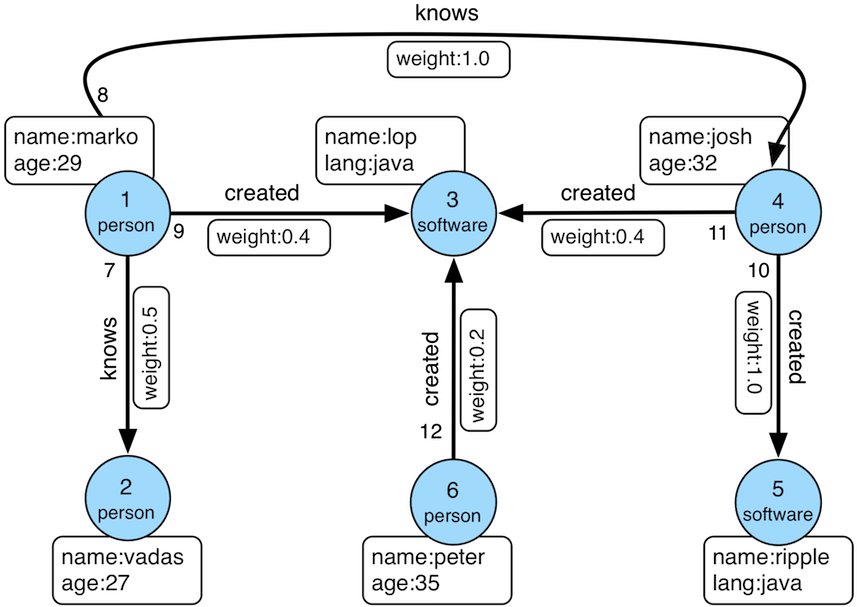
K-out API,根据起始顶点,查找恰好 N 步可达的邻居,分为基础版和高级版:基础版使用 GET 方法,根据起始顶点,查找恰好 N 步可达的邻居 高级版使用 POST 方法,根据起始顶点,查找恰好 N 步可达的邻居,与基础版的不同在于:支持只统计邻居数量 支持顶点和边属性过滤 支持返回到达邻居的最短路径 K-neighbor API,根据起始顶点,查找 N 步以内可达的所有邻居,分为基础版和高级版:基础版使用 GET 方法,根据起始顶点,查找 N 步以内可达的所有邻居 高级版使用 POST 方法,根据起始顶点,查找 N 步以内可达的所有邻居,与基础版的不同在于:支持只统计邻居数量 支持顶点和边属性过滤 支持返回到达邻居的最短路径 Same Neighbors,查询顶点的共同邻居。GET 接口用于查询两个顶点的共同邻居;POST 批量接口用于在单次请求中独立计算多组顶点对的共同邻居。 Jaccard Similarity API,计算 jaccard 相似度,包括两种:一种是使用 GET 方法,计算两个顶点的邻居的相似度(交并比) 一种是使用 POST 方法,在全图中查找与起点的 jaccard similarity 最高的 N 个点 Shortest Path API,查找两个顶点之间的最短路径 All Shortest Paths,查找两个顶点间的全部最短路径 Weighted Shortest Path,查找起点到目标点的带权最短路径 Single Source Shortest Path,查找一个点到其他各个点的加权最短路径 Multi Node Shortest Path,查找指定顶点集之间两两最短路径 Paths API,查找两个顶点间的全部路径,分为基础版和高级版:基础版使用 GET 方法,根据起点和终点,查找两个顶点间的全部路径 高级版使用 POST 方法,根据一组起点和一组终点,查找两个集合间符合条件的全部路径 Customized Paths API,从一批顶点出发,按(一种)模式遍历经过的全部路径 Template Path API,指定起点和终点以及起点和终点间路径信息,查找符合的路径 Crosspoints API,查找两个顶点的交点(共同祖先或者共同子孙) Customized Crosspoints API,从一批顶点出发,按多种模式遍历,最后一步到达的顶点的交点 Rings API,从起始顶点出发,可到达的环路路径 Rays API,从起始顶点出发,可到达边界的路径(即无环路径) Fusiform Similarity API,查找一个顶点的梭形相似点 Adamic-Adar API,计算两个顶点的 Adamic-Adar 指标 Resource Allocation API,计算两个顶点的资源分配指标 Edge Existence API,查询两个顶点之间存在的边 Count API,统计经过若干步遍历后可达的顶点数量,不返回顶点本身 Vertices API按 ID 批量查询顶点; 获取顶点的分区; 按分区查询顶点; Edges API按 ID 批量查询边; 获取边的分区; 按分区查询边; 3.2. traverser API 详解 使用方法中的例子,都是基于 TinkerPop 官网给出的图:
数据导入程序如下:
1 public class Loader {
2 public static void main ( String [] args ) {
3 HugeClient client = new HugeClient ( "http://127.0.0.1:8080" , "hugegraph" );
4 SchemaManager schema = client . schema ();
5 schema . propertyKey ( "name" ). asText (). ifNotExist (). create ();
6 schema . propertyKey ( "age" ). asInt (). ifNotExist (). create ();
7 schema . propertyKey ( "city" ). asText (). ifNotExist (). create ();
8 schema . propertyKey ( "weight" ). asDouble (). ifNotExist (). create ();
9 schema . propertyKey ( "lang" ). asText (). ifNotExist (). create ();
10 schema . propertyKey ( "date" ). asText (). ifNotExist (). create ();
11 schema . propertyKey ( "price" ). asInt (). ifNotExist (). create ();
12
13 schema . vertexLabel ( "person" )
14 . properties ( "name" , "age" , "city" )
15 . primaryKeys ( "name" )
16 . nullableKeys ( "age" )
17 . ifNotExist ()
18 . create ();
19
20 schema . vertexLabel ( "software" )
21 . properties ( "name" , "lang" , "price" )
22 . primaryKeys ( "name" )
23 . nullableKeys ( "price" )
24 . ifNotExist ()
25 . create ();
26
27 schema . indexLabel ( "personByCity" )
28 . onV ( "person" )
29 . by ( "city" )
30 . secondary ()
31 . ifNotExist ()
32 . create ();
33
34 schema . indexLabel ( "personByAgeAndCity" )
35 . onV ( "person" )
36 . by ( "age" , "city" )
37 . secondary ()
38 . ifNotExist ()
39 . create ();
40
41 schema . indexLabel ( "softwareByPrice" )
42 . onV ( "software" )
43 . by ( "price" )
44 . range ()
45 . ifNotExist ()
46 . create ();
47
48 schema . edgeLabel ( "knows" )
49 . multiTimes ()
50 . sourceLabel ( "person" )
51 . targetLabel ( "person" )
52 . properties ( "date" , "weight" )
53 . sortKeys ( "date" )
54 . nullableKeys ( "weight" )
55 . ifNotExist ()
56 . create ();
57
58 schema . edgeLabel ( "created" )
59 . sourceLabel ( "person" ). targetLabel ( "software" )
60 . properties ( "date" , "weight" )
61 . nullableKeys ( "weight" )
62 . ifNotExist ()
63 . create ();
64
65 schema . indexLabel ( "createdByDate" )
66 . onE ( "created" )
67 . by ( "date" )
68 . secondary ()
69 . ifNotExist ()
70 . create ();
71
72 schema . indexLabel ( "createdByWeight" )
73 . onE ( "created" )
74 . by ( "weight" )
75 . range ()
76 . ifNotExist ()
77 . create ();
78
79 schema . indexLabel ( "knowsByWeight" )
80 . onE ( "knows" )
81 . by ( "weight" )
82 . range ()
83 . ifNotExist ()
84 . create ();
85
86 GraphManager graph = client . graph ();
87 Vertex marko = graph . addVertex ( T . label , "person" , "name" , "marko" ,
88 "age" , 29 , "city" , "Beijing" );
89 Vertex vadas = graph . addVertex ( T . label , "person" , "name" , "vadas" ,
90 "age" , 27 , "city" , "Hongkong" );
91 Vertex lop = graph . addVertex ( T . label , "software" , "name" , "lop" ,
92 "lang" , "java" , "price" , 328 );
93 Vertex josh = graph . addVertex ( T . label , "person" , "name" , "josh" ,
94 "age" , 32 , "city" , "Beijing" );
95 Vertex ripple = graph . addVertex ( T . label , "software" , "name" , "ripple" ,
96 "lang" , "java" , "price" , 199 );
97 Vertex peter = graph . addVertex ( T . label , "person" , "name" , "peter" ,
98 "age" , 35 , "city" , "Shanghai" );
99
100 marko . addEdge ( "knows" , vadas , "date" , "20160110" , "weight" , 0 . 5 );
101 marko . addEdge ( "knows" , josh , "date" , "20130220" , "weight" , 1 . 0 );
102 marko . addEdge ( "created" , lop , "date" , "20171210" , "weight" , 0 . 4 );
103 josh . addEdge ( "created" , lop , "date" , "20091111" , "weight" , 0 . 4 );
104 josh . addEdge ( "created" , ripple , "date" , "20171210" , "weight" , 1 . 0 );
105 peter . addEdge ( "created" , lop , "date" , "20170324" , "weight" , 0 . 2 );
106 }
107 } 顶点 ID 为:
1 "2:ripple",
2 "1:vadas",
3 "1:peter",
4 "1:josh",
5 "1:marko",
6 "2:lop" 边 ID 为:
1 "S1:peter>2>>S2:lop",
2 "S1:josh>2>>S2:lop",
3 "S1:josh>2>>S2:ripple",
4 "S1:marko>1>20130220>S1:josh",
5 "S1:marko>1>20160110>S1:vadas",
6 "S1:marko>2>>S2:lop" 3.2.1 K-out API(GET,基础版) 3.2.1.1 功能介绍 根据起始顶点、方向、边的类型(可选)和深度 depth,查找从起始顶点出发恰好 depth 步可达的顶点
Params source:起始顶点 id,必填项 direction:起始顶点向外发散的方向(OUT,IN,BOTH),选填项,默认是 BOTH max_depth:步数,必填项 label:边的类型,选填项,默认代表所有 edge label nearest:nearest 为 true 时,代表起始顶点到达结果顶点的最短路径长度为 depth,不存在更短的路径;nearest 为 false 时,代表起始顶点到结果顶点有一条长度为 depth 的路径(未必最短且可以有环),选填项,默认为 true max_degree:查询过程中,单个顶点遍历的最大邻接边数目,选填项,默认为 10000 capacity:遍历过程中最大的访问的顶点数目,选填项,默认为 10000000 limit:返回的顶点的最大数目,选填项,默认为 10000000 3.2.1.2 使用方法 Method & Url 1 GET http://localhost:8080/graphspaces/DEFAULT/graphs/{graph}/traversers/kout?source="1:marko"&max_depth=2 Response Status Response Body 1 {
2 "vertices" :[
3 "2:ripple" ,
4 "1:peter"
5 ]
6 } 3.2.1.3 适用场景 查找恰好 N 步关系可达的顶点。两个例子:
家族关系中,查找一个人的所有孙子,person A 通过连续的两条“儿子”边到达的顶点集合。 社交关系中发现潜在好友,例如:与目标用户相隔两层朋友关系的用户,可以通过连续两条“朋友”边到达的顶点。 3.2.2 K-out API(POST,高级版) 3.2.2.1 功能介绍 根据起始顶点、步骤(包括方向、边类型和过滤属性)和深度 depth,查找从起始顶点出发恰好 depth 步可达的顶点。
与 K-out 基础版的不同在于:
支持只统计邻居数量 支持边属性过滤 支持返回到达邻居的最短路径 Params source:起始顶点 id,必填项 steps: 从起始点出发的 Steps,必填项,结构如下:direction:表示边的方向(OUT,IN,BOTH),默认是 BOTH edge_steps:边 Step 集合,支持对单边的类型和属性过滤,如果为空,则不过滤 vertex_steps:顶点 Step 集合,支持对单点的类型和属性过滤,如果为空,则不过滤label:顶点类型 properties:顶点属性 max_degree:查询过程中,单个顶点遍历的最大邻接边数目,默认为 10000;当前也兼容参数名 degree。 skip_degree:用于设置查询过程中舍弃超级顶点的最小边数,即当某个顶点的邻接边数目大于 skip_degree 时,完全舍弃该顶点。选填项,如果开启时,需满足 skip_degree >= max_degree 约束,默认为 0 (不启用),表示不跳过任何点 (注意:开启此配置后,遍历时会尝试访问一个顶点的 skip_degree 条边,而不仅仅是 max_degree 条边,这样有额外的遍历开销,对查询性能影响可能有较大影响,请确认理解后再开启) max_depth:步数,必填项 nearest:nearest 为 true 时,代表起始顶点到达结果顶点的最短路径长度为 depth,不存在更短的路径;nearest 为 false 时,代表起始顶点到结果顶点有一条长度为 depth 的路径(未必最短且可以有环),选填项,默认为 true count_only:Boolean 值,true 表示只统计结果的数目,不返回具体结果;false 表示返回具体的结果,默认为 false with_path:true 表示返回起始点到每个邻居的最短路径,false 表示不返回起始点到每个邻居的最短路径,选填项,默认为 false with_edge,选填项,默认为 false:如果设置为 true,则结果将包含所有边的完整信息,即路径中的所有边当 with_path 为 true 时,将返回所有路径中的边的完整信息 当 with_path 为 false 时,不返回任何信息 如果设置为 false,则仅返回边的 id with_vertex,选填项,默认为 false:如果设置为 true,则结果将包含所有顶点的完整信息,即路径中的所有顶点当 with_path 为 true 时,将返回所有路径中的顶点的完整信息 当 with_path 为 false 时,返回所有邻居顶点的完整信息 如果设置为 false,则仅返回顶点的 id capacity:遍历过程中最大的访问的顶点数目,选填项,默认为 10000000 limit:返回的顶点的最大数目,选填项,默认为 10000000 traverse_mode: 遍历方式,可选择“breadth_first_search”或“depth_first_search”作为参数,默认为“breadth_first_search” 3.2.2.2 使用方法 Method & Url 1 POST http://localhost:8080/graphspaces/DEFAULT/graphs/{graph}/traversers/kout Request Body 1 {
2 "source" : "1:marko" ,
3 "steps" : {
4 "direction" : "BOTH" ,
5 "edge_steps" : [
6 {
7 "label" : "knows" ,
8 "properties" : {
9 "weight" : "P.gt(0.1)"
10 }
11 },
12 {
13 "label" : "created" ,
14 "properties" : {
15 "weight" : "P.gt(0.1)"
16 }
17 }
18 ],
19 "vertex_steps" : [
20 {
21 "label" : "person" ,
22 "properties" : {
23 "age" : "P.lt(32)"
24 }
25 },
26 {
27 "label" : "software" ,
28 "properties" : {}
29 }
30 ],
31 "max_degree" : 10000 ,
32 "skip_degree" : 100000
33 },
34 "max_depth" : 1 ,
35 "nearest" : true ,
36 "limit" : 10000 ,
37 "with_vertex" : true ,
38 "with_path" : true ,
39 "with_edge" : true
40 } Response Status Response Body 1 {
2 "size" : 2 ,
3 "kout" : [
4 "1:vadas" ,
5 "2:lop"
6 ],
7 "paths" : [
8 {
9 "objects" : [
10 "1:marko" ,
11 "2:lop"
12 ]
13 },
14 {
15 "objects" : [
16 "1:marko" ,
17 "1:vadas"
18 ]
19 }
20 ],
21 "vertices" : [
22 {
23 "id" : "1:marko" ,
24 "label" : "person" ,
25 "type" : "vertex" ,
26 "properties" : {
27 "name" : "marko" ,
28 "age" : 29 ,
29 "city" : "Beijing"
30 }
31 },
32 {
33 "id" : "1:vadas" ,
34 "label" : "person" ,
35 "type" : "vertex" ,
36 "properties" : {
37 "name" : "vadas" ,
38 "age" : 27 ,
39 "city" : "Hongkong"
40 }
41 },
42 {
43 "id" : "2:lop" ,
44 "label" : "software" ,
45 "type" : "vertex" ,
46 "properties" : {
47 "name" : "lop" ,
48 "lang" : "java" ,
49 "price" : 328
50 }
51 }
52 ],
53 "edges" : [
54 {
55 "id" : "S1:marko>1>20160110>S1:vadas" ,
56 "label" : "knows" ,
57 "type" : "edge" ,
58 "outV" : "1:marko" ,
59 "outVLabel" : "person" ,
60 "inV" : "1:vadas" ,
61 "inVLabel" : "person" ,
62 "properties" : {
63 "weight" : 0.5 ,
64 "date" : "20160110"
65 }
66 },
67 {
68 "id" : "S1:marko>2>>S2:lop" ,
69 "label" : "created" ,
70 "type" : "edge" ,
71 "outV" : "1:marko" ,
72 "outVLabel" : "person" ,
73 "inV" : "2:lop" ,
74 "inVLabel" : "software" ,
75 "properties" : {
76 "weight" : 0.4 ,
77 "date" : "20171210"
78 }
79 }
80 ]
81 } 3.2.2.3 适用场景 参见 3.2.1.3
3.2.3 K-neighbor(GET,基础版) 3.2.3.1 功能介绍 根据起始顶点、方向、边的类型(可选)和深度 depth,查找包括起始顶点在内、depth 步之内可达的所有顶点
相当于:起始顶点、K-out(1)、K-out(2)、… 、K-out(max_depth) 的并集
Params source: 起始顶点 id,必填项 direction:起始顶点向外发散的方向(OUT,IN,BOTH),选填项,默认是 BOTH max_depth:步数,必填项 label:边的类型,选填项,默认代表所有 edge label max_degree:查询过程中,单个顶点遍历的最大邻接边数目,选填项,默认为 10000 limit:返回的顶点的最大数目,也即遍历过程中最大的访问的顶点数目,选填项,默认为 10000000 3.2.3.2 使用方法 Method & Url 1 GET http://localhost:8080/graphspaces/DEFAULT/graphs/{graph}/traversers/kneighbor?source=%221:marko%22&max_depth=2 Response Status Response Body 1 {
2 "vertices" :[
3 "2:ripple" ,
4 "1:marko" ,
5 "1:josh" ,
6 "1:vadas" ,
7 "1:peter" ,
8 "2:lop"
9 ]
10 } 3.2.3.3 适用场景 查找 N 步以内可达的所有顶点,例如:
家族关系中,查找一个人五服以内所有子孙,person A 通过连续的 5 条“亲子”边到达的顶点集合。 社交关系中发现好友圈子,例如目标用户通过 1 条、2 条、3 条“朋友”边可到达的用户可以组成目标用户的朋友圈子 3.2.4 K-neighbor API(POST,高级版) 3.2.4.1 功能介绍 根据起始顶点、步骤(包括方向、边类型和过滤属性)和深度 depth,查找从起始顶点出发 depth 步内可达的所有顶点。
与 K-neighbor 基础版的不同在于:
支持只统计邻居数量 支持边属性过滤 支持返回到达邻居的最短路径 Params source:起始顶点 id,必填项 steps: 从起始点出发的 Steps,必填项,结构如下:direction:表示边的方向(OUT,IN,BOTH),默认是 BOTH 从起始点出发的 Steps,必填项,结构如下:direction:表示边的方向(OUT,IN,BOTH),默认是 BOTH edge_steps:边 Step 集合,支持对单边的类型和属性过滤,如果为空,则不过滤 vertex_steps:顶点 Step 集合,支持对单点的类型和属性过滤,如果为空,则不过滤label:顶点类型 properties:顶点属性 max_degree:查询过程中,单个顶点遍历的最大邻接边数目,默认为 10000;当前也兼容参数名 degree。 skip_degree:用于设置查询过程中舍弃超级顶点的最小边数,即当某个顶点的邻接边数目大于 skip_degree 时,完全舍弃该顶点。选填项,如果开启时,需满足 skip_degree >= max_degree 约束,默认为 0 (不启用),表示不跳过任何点 (注意:开启此配置后,遍历时会尝试访问一个顶点的 skip_degree 条边,而不仅仅是 max_degree 条边,这样有额外的遍历开销,对查询性能影响可能有较大影响,请确认理解后再开启) max_depth:步数,必填项 count_only:Boolean 值,true 表示只统计结果的数目,不返回具体结果;false 表示返回具体的结果,默认为 false with_path:true 表示返回起始点到每个邻居的最短路径,false 表示不返回起始点到每个邻居的最短路径,选填项,默认为 false with_edge,选填项,默认为 false:如果设置为 true,则结果将包含所有边的完整信息,即路径中的所有边当 with_path 为 true 时,将返回所有路径中的边的完整信息 当 with_path 为 false 时,不返回任何信息 如果设置为 false,则仅返回边的 id with_vertex,选填项,默认为 false:如果设置为 true,则结果将包含所有顶点的完整信息,即路径中的所有顶点当 with_path 为 true 时,将返回所有路径中的顶点的完整信息 当 with_path 为 false 时,返回所有邻居顶点的完整信息 如果设置为 false,则仅返回顶点的 id limit:返回的顶点的最大数目,选填项,默认为 10000000 3.2.4.2 使用方法 Method & Url 1 POST http://localhost:8080/graphspaces/DEFAULT/graphs/{graph}/traversers/kneighbor Request Body 1 {
2 "source" : "1:marko" ,
3 "steps" : {
4 "direction" : "BOTH" ,
5 "edge_steps" : [
6 {
7 "label" : "knows" ,
8 "properties" : {}
9 },
10 {
11 "label" : "created" ,
12 "properties" : {}
13 }
14 ],
15 "vertex_steps" : [
16 {
17 "label" : "person" ,
18 "properties" : {
19 "age" : "P.gt(28)"
20 }
21 },
22 {
23 "label" : "software" ,
24 "properties" : {}
25 }
26 ],
27 "max_degree" : 10000 ,
28 "skip_degree" : 100000
29 },
30 "max_depth" : 3 ,
31 "limit" : 10000 ,
32 "with_vertex" : true ,
33 "with_path" : true ,
34 "with_edge" : true
35 } Response Status Response Body 1 {
2 "size" : 4 ,
3 "kneighbor" : [
4 "1:josh" ,
5 "2:lop" ,
6 "1:peter" ,
7 "2:ripple"
8 ],
9 "paths" : [
10 {
11 "objects" : [
12 "1:marko" ,
13 "2:lop"
14 ]
15 },
16 {
17 "objects" : [
18 "1:marko" ,
19 "2:lop" ,
20 "1:peter"
21 ]
22 },
23 {
24 "objects" : [
25 "1:marko" ,
26 "1:josh"
27 ]
28 },
29 {
30 "objects" : [
31 "1:marko" ,
32 "1:josh" ,
33 "2:ripple"
34 ]
35 }
36 ],
37 "vertices" : [
38 {
39 "id" : "2:ripple" ,
40 "label" : "software" ,
41 "type" : "vertex" ,
42 "properties" : {
43 "name" : "ripple" ,
44 "lang" : "java" ,
45 "price" : 199
46 }
47 },
48 {
49 "id" : "1:marko" ,
50 "label" : "person" ,
51 "type" : "vertex" ,
52 "properties" : {
53 "name" : "marko" ,
54 "age" : 29 ,
55 "city" : "Beijing"
56 }
57 },
58 {
59 "id" : "1:josh" ,
60 "label" : "person" ,
61 "type" : "vertex" ,
62 "properties" : {
63 "name" : "josh" ,
64 "age" : 32 ,
65 "city" : "Beijing"
66 }
67 },
68 {
69 "id" : "1:peter" ,
70 "label" : "person" ,
71 "type" : "vertex" ,
72 "properties" : {
73 "name" : "peter" ,
74 "age" : 35 ,
75 "city" : "Shanghai"
76 }
77 },
78 {
79 "id" : "2:lop" ,
80 "label" : "software" ,
81 "type" : "vertex" ,
82 "properties" : {
83 "name" : "lop" ,
84 "lang" : "java" ,
85 "price" : 328
86 }
87 }
88 ],
89 "edges" : [
90 {
91 "id" : "S1:josh>2>>S2:ripple" ,
92 "label" : "created" ,
93 "type" : "edge" ,
94 "outV" : "1:josh" ,
95 "outVLabel" : "person" ,
96 "inV" : "2:ripple" ,
97 "inVLabel" : "software" ,
98 "properties" : {
99 "weight" : 1.0 ,
100 "date" : "20171210"
101 }
102 },
103 {
104 "id" : "S1:marko>2>>S2:lop" ,
105 "label" : "created" ,
106 "type" : "edge" ,
107 "outV" : "1:marko" ,
108 "outVLabel" : "person" ,
109 "inV" : "2:lop" ,
110 "inVLabel" : "software" ,
111 "properties" : {
112 "weight" : 0.4 ,
113 "date" : "20171210"
114 }
115 },
116 {
117 "id" : "S1:marko>1>20130220>S1:josh" ,
118 "label" : "knows" ,
119 "type" : "edge" ,
120 "outV" : "1:marko" ,
121 "outVLabel" : "person" ,
122 "inV" : "1:josh" ,
123 "inVLabel" : "person" ,
124 "properties" : {
125 "weight" : 1.0 ,
126 "date" : "20130220"
127 }
128 },
129 {
130 "id" : "S1:peter>2>>S2:lop" ,
131 "label" : "created" ,
132 "type" : "edge" ,
133 "outV" : "1:peter" ,
134 "outVLabel" : "person" ,
135 "inV" : "2:lop" ,
136 "inVLabel" : "software" ,
137 "properties" : {
138 "weight" : 0.2 ,
139 "date" : "20170324"
140 }
141 }
142 ]
143 } 3.2.4.3 适用场景 参见 3.2.3.3
3.2.5 Same Neighbors 3.2.5.1 功能介绍 查询两个点的共同邻居
Params vertex:一个顶点 id,必填项 other:另一个顶点 id,必填项 direction:顶点向外发散的方向(OUT,IN,BOTH),选填项,默认是 BOTH label:边的类型,选填项,默认代表所有 edge label max_degree:查询过程中,单个顶点遍历的最大邻接边数目,选填项,默认为 10000 limit:返回的共同邻居的最大数目,选填项,默认为 10000000 3.2.5.2 使用方法 Method & Url 1 GET http://localhost:8080/graphspaces/DEFAULT/graphs/{graph}/traversers/sameneighbors?vertex=%221:marko%22&other=%221:josh%22 Response Status Response Body 1 {
2 "same_neighbors" :[
3 "2:lop"
4 ]
5 } 3.2.5.3 适用场景 查找两个顶点的共同邻居:
3.2.6 Jaccard Similarity (GET) 3.2.6.1 功能介绍 计算两个顶点的 jaccard similarity(两个顶点邻居的交集比上两个顶点邻居的并集)
对于并集非空的邻居集合 N(u) 和 N(v),上述定义可写为:
J ( u , v ) = ∣ N ( u ) ∩ N ( v ) ∣ ∣ N ( u ) ∪ N ( v ) ∣ J(u,v) = \frac{|N(u) \cap N(v)|}{|N(u) \cup N(v)|} J ( u , v ) = ∣ N ( u ) ∪ N ( v ) ∣ ∣ N ( u ) ∩ N ( v ) ∣ Params vertex:一个顶点 id,必填项 other:另一个顶点 id,必填项 direction:顶点向外发散的方向(OUT,IN,BOTH),选填项,默认是 BOTH label:边的类型,选填项,默认代表所有 edge label max_degree:查询过程中,单个顶点遍历的最大邻接边数目,选填项,默认为 10000 3.2.6.2 使用方法 Method & Url 1 GET http://localhost:8080/graphspaces/DEFAULT/graphs/{graph}/traversers/jaccardsimilarity?vertex="1:marko"&other="1:josh" Response Status Response Body 1 {
2 "jaccard_similarity" : 0.2
3 } 3.2.6.3 适用场景 用于评估两个点的相似性或者紧密度
3.2.7 Jaccard Similarity (POST) 3.2.7.1 功能介绍 计算与指定顶点的 jaccard similarity 最大的 N 个点
jaccard similarity 的计算方式为:两个顶点邻居的交集比上两个顶点邻居的并集
Params vertex:一个顶点 id,必填项 从起始点出发的 Step,必填项,结构如下:direction:表示边的方向(OUT,IN,BOTH),默认是 BOTH labels:边的类型列表 properties:通过属性的值过滤边 max_degree:查询过程中,单个顶点遍历的最大邻接边数目,默认为 10000;当前也兼容参数名 degree。 skip_degree:用于设置查询过程中舍弃超级顶点的最小边数,即当某个顶点的邻接边数目大于 skip_degree 时,完全舍弃该顶点。选填项,如果开启时,需满足 skip_degree >= max_degree 约束,默认为 0 (不启用),表示不跳过任何点 (注意:开启此配置后,遍历时会尝试访问一个顶点的 skip_degree 条边,而不仅仅是 max_degree 条边,这样有额外的遍历开销,对查询性能影响可能有较大影响,请确认理解后再开启) top:返回一个起点的 jaccard similarity 中最大的 top 个,选填项,默认为 100 capacity:遍历过程中最大的访问的顶点数目,选填项,默认为 10000000 3.2.7.2 使用方法 Method & Url 1 POST http://localhost:8080/graphspaces/DEFAULT/graphs/{graph}/traversers/jaccardsimilarity Request Body 1 {
2 "vertex" : "1:marko" ,
3 "step" : {
4 "direction" : "BOTH" ,
5 "labels" : [],
6 "max_degree" : 10000 ,
7 "skip_degree" : 100000
8 },
9 "top" : 3
10 } Response Status Response Body 1 {
2 "2:ripple" : 0.3333333333333333 ,
3 "1:peter" : 0.3333333333333333 ,
4 "1:josh" : 0.2
5 } 3.2.7.3 适用场景 用于在图中找出与指定顶点相似性最高的顶点
3.2.8 Shortest Path 3.2.8.1 功能介绍 根据起始顶点、目的顶点、方向、边的类型(可选)和最大深度,查找一条最短路径
Params source:起始顶点 id,必填项 target:目的顶点 id,必填项 direction:起始顶点向外发散的方向(OUT,IN,BOTH),选填项,默认是 BOTH max_depth:最大步数,必填项 label:边的类型,选填项,默认代表所有 edge label max_degree:查询过程中,单个顶点遍历的最大邻接边数目,选填项,默认为 10000 skip_degree:用于设置查询过程中舍弃超级顶点的最小边数,即当某个顶点的邻接边数目大于 skip_degree 时,完全舍弃该顶点。选填项,如果开启时,需满足 skip_degree >= max_degree 约束,默认为 0 (不启用),表示不跳过任何点 (注意:开启此配置后,遍历时会尝试访问一个顶点的 skip_degree 条边,而不仅仅是 max_degree 条边,这样有额外的遍历开销,对查询性能影响可能有较大影响,请确认理解后再开启) capacity:遍历过程中最大的访问的顶点数目,选填项,默认为 10000000 3.2.8.2 使用方法 Method & Url 1 GET http://localhost:8080/graphspaces/DEFAULT/graphs/{graph}/traversers/shortestpath?source="1:marko"&target="2:ripple"&max_depth=3 Response Status Response Body 1 {
2 "path" :[
3 "1:marko" ,
4 "1:josh" ,
5 "2:ripple"
6 ]
7 } 3.2.8.3 适用场景 查找两个顶点间的最短路径,例如:
社交关系网中,查找两个用户有关系的最短路径,即最近的朋友关系链 设备关联网络中,查找两个设备最短的关联关系 3.2.9 All Shortest Paths 3.2.9.1 功能介绍 根据起始顶点、目的顶点、方向、边的类型(可选)和最大深度,查找两点间所有的最短路径
Params source:起始顶点 id,必填项 target:目的顶点 id,必填项 direction:起始顶点向外发散的方向(OUT,IN,BOTH),选填项,默认是 BOTH max_depth:最大步数,必填项 label:边的类型,选填项,默认代表所有 edge label max_degree:查询过程中,单个顶点遍历的最大邻接边数目,选填项,默认为 10000 skip_degree:用于设置查询过程中舍弃超级顶点的最小边数,即当某个顶点的邻接边数目大于 skip_degree 时,完全舍弃该顶点。选填项,如果开启时,需满足 skip_degree >= max_degree 约束,默认为 0 (不启用),表示不跳过任何点 (注意:开启此配置后,遍历时会尝试访问一个顶点的 skip_degree 条边,而不仅仅是 max_degree 条边,这样有额外的遍历开销,对查询性能影响可能有较大影响,请确认理解后再开启) capacity:遍历过程中最大的访问的顶点数目,选填项,默认为 10000000 3.2.9.2 使用方法 Method & Url 1 GET http://localhost:8080/graphspaces/DEFAULT/graphs/{graph}/traversers/allshortestpaths?source="A"&target="Z"&max_depth=10 Response Status Response Body 1 {
2 "paths" :[
3 {
4 "objects" : [
5 "A" ,
6 "B" ,
7 "C" ,
8 "Z"
9 ]
10 },
11 {
12 "objects" : [
13 "A" ,
14 "M" ,
15 "N" ,
16 "Z"
17 ]
18 }
19 ]
20 } 3.2.9.3 适用场景 查找两个顶点间的所有最短路径,例如:
社交关系网中,查找两个用户有关系的全部最短路径,即最近的朋友关系链 设备关联网络中,查找两个设备全部的最短关联关系 3.2.10 Weighted Shortest Path 3.2.10.1 功能介绍 根据起始顶点、目的顶点、方向、边的类型(可选)和最大深度,查找一条带权最短路径
Params source:起始顶点 id,必填项 target:目的顶点 id,必填项 direction:起始顶点向外发散的方向(OUT,IN,BOTH),选填项,默认是 BOTH label:边的类型,选填项,默认代表所有 edge label weight:边的权重属性,必填项,必须是数字类型的属性 max_degree:查询过程中,单个顶点遍历的最大邻接边数目,选填项,默认为 10000 skip_degree:用于设置查询过程中舍弃超级顶点的最小边数,即当某个顶点的邻接边数目大于 skip_degree 时,完全舍弃该顶点。选填项,如果开启时,需满足 skip_degree >= max_degree 约束,默认为 0 (不启用),表示不跳过任何点 (注意:开启此配置后,遍历时会尝试访问一个顶点的 skip_degree 条边,而不仅仅是 max_degree 条边,这样有额外的遍历开销,对查询性能影响可能有较大影响,请确认理解后再开启) capacity:遍历过程中最大的访问的顶点数目,选填项,默认为 10000000 with_vertex:true 表示返回结果包含完整的顶点信息(路径中的全部顶点),false 时表示只返回顶点 id,选填项,默认为 false 3.2.10.2 使用方法 Method & Url 1 GET http://localhost:8080/graphspaces/DEFAULT/graphs/{graph}/traversers/weightedshortestpath?source="1:marko"&target="2:ripple"&weight="weight"&with_vertex=true Response Status Response Body 1 {
2 "path" : {
3 "weight" : 2.0 ,
4 "vertices" : [
5 "1:marko" ,
6 "1:josh" ,
7 "2:ripple"
8 ]
9 },
10 "vertices" : [
11 {
12 "id" : "1:marko" ,
13 "label" : "person" ,
14 "type" : "vertex" ,
15 "properties" : {
16 "name" : "marko" ,
17 "age" : 29 ,
18 "city" : "Beijing"
19 }
20 },
21 {
22 "id" : "1:josh" ,
23 "label" : "person" ,
24 "type" : "vertex" ,
25 "properties" : {
26 "name" : "josh" ,
27 "age" : 32 ,
28 "city" : "Beijing"
29 }
30 },
31 {
32 "id" : "2:ripple" ,
33 "label" : "software" ,
34 "type" : "vertex" ,
35 "properties" : {
36 "name" : "ripple" ,
37 "lang" : "java" ,
38 "price" : 199
39 }
40 }
41 ]
42 } 3.2.10.3 适用场景 查找两个顶点间的带权最短路径,例如:
交通线路中查找从 A 城市到 B 城市花钱最少的交通方式 3.2.11 Single Source Shortest Path 3.2.11.1 功能介绍 从一个顶点出发,查找该点到图中其他顶点的最短路径(可选是否带权重)
Params source:起始顶点 id,必填项 direction:起始顶点向外发散的方向(OUT,IN,BOTH),选填项,默认是 BOTH label:边的类型,选填项,默认代表所有 edge label weight:边的权重属性,选填项,必须是数字类型的属性,如果不填或者虽然填了但是边没有该属性,则权重为 1.0 max_degree:查询过程中,单个顶点遍历的最大邻接边数目,选填项,默认为 10000 skip_degree:用于设置查询过程中舍弃超级顶点的最小边数,即当某个顶点的邻接边数目大于 skip_degree 时,完全舍弃该顶点。选填项,如果开启时,需满足 skip_degree >= max_degree 约束,默认为 0 (不启用),表示不跳过任何点 (注意:开启此配置后,遍历时会尝试访问一个顶点的 skip_degree 条边,而不仅仅是 max_degree 条边,这样有额外的遍历开销,对查询性能影响可能有较大影响,请确认理解后再开启) capacity:遍历过程中最大的访问的顶点数目,选填项,默认为 10000000 limit:查询到的目标顶点个数,也是返回的最短路径的条数,选填项,默认为 10 with_vertex:true 表示返回结果包含完整的顶点信息(路径中的全部顶点),false 时表示只返回顶点 id,选填项,默认为 false 3.2.11.2 使用方法 Method & Url 1 GET http://localhost:8080/graphspaces/DEFAULT/graphs/{graph}/traversers/singlesourceshortestpath?source="1:marko"&with_vertex=true Response Status Response Body 1 {
2 "paths" : {
3 "2:ripple" : {
4 "weight" : 2.0 ,
5 "vertices" : [
6 "1:marko" ,
7 "1:josh" ,
8 "2:ripple"
9 ]
10 },
11 "1:josh" : {
12 "weight" : 1.0 ,
13 "vertices" : [
14 "1:marko" ,
15 "1:josh"
16 ]
17 },
18 "1:vadas" : {
19 "weight" : 1.0 ,
20 "vertices" : [
21 "1:marko" ,
22 "1:vadas"
23 ]
24 },
25 "1:peter" : {
26 "weight" : 2.0 ,
27 "vertices" : [
28 "1:marko" ,
29 "2:lop" ,
30 "1:peter"
31 ]
32 },
33 "2:lop" : {
34 "weight" : 1.0 ,
35 "vertices" : [
36 "1:marko" ,
37 "2:lop"
38 ]
39 }
40 },
41 "vertices" : [
42 {
43 "id" : "2:ripple" ,
44 "label" : "software" ,
45 "type" : "vertex" ,
46 "properties" : {
47 "name" : "ripple" ,
48 "lang" : "java" ,
49 "price" : 199
50 }
51 },
52 {
53 "id" : "1:marko" ,
54 "label" : "person" ,
55 "type" : "vertex" ,
56 "properties" : {
57 "name" : "marko" ,
58 "age" : 29 ,
59 "city" : "Beijing"
60 }
61 },
62 {
63 "id" : "1:josh" ,
64 "label" : "person" ,
65 "type" : "vertex" ,
66 "properties" : {
67 "name" : "josh" ,
68 "age" : 32 ,
69 "city" : "Beijing"
70 }
71 },
72 {
73 "id" : "1:vadas" ,
74 "label" : "person" ,
75 "type" : "vertex" ,
76 "properties" : {
77 "name" : "vadas" ,
78 "age" : 27 ,
79 "city" : "Hongkong"
80 }
81 },
82 {
83 "id" : "1:peter" ,
84 "label" : "person" ,
85 "type" : "vertex" ,
86 "properties" : {
87 "name" : "peter" ,
88 "age" : 35 ,
89 "city" : "Shanghai"
90 }
91 },
92 {
93 "id" : "2:lop" ,
94 "label" : "software" ,
95 "type" : "vertex" ,
96 "properties" : {
97 "name" : "lop" ,
98 "lang" : "java" ,
99 "price" : 328
100 }
101 }
102 ]
103 } 3.2.11.3 适用场景 查找从一个点出发到其他顶点的带权最短路径,比如:
查找从北京出发到全国其他所有城市的耗时最短的乘车方案 3.2.12 Multi Node Shortest Path 3.2.12.1 功能介绍 查找指定顶点集两两之间的最短路径
Params vertices:定义起始顶点,必填项,指定方式包括:ids:通过顶点 id 列表提供起始顶点 label 和 properties:如果没有指定 ids,则使用 label 和 properties 的联合条件查询起始顶点label:顶点的类型 properties:通过属性的值查询起始顶点 注意:properties 中的属性值可以是列表,表示只要 key 对应的 value 在列表中就可以
step:表示从起始顶点到终止顶点走过的路径,必填项,Step 的结构如下:direction:表示边的方向(OUT,IN,BOTH),默认是 BOTH labels:边的类型列表 properties:通过属性的值过滤边 max_degree:查询过程中,单个顶点遍历的最大邻接边数目,默认为 10000;当前也兼容参数名 degree。 skip_degree:用于设置查询过程中舍弃超级顶点的最小边数,即当某个顶点的邻接边数目大于 skip_degree 时,完全舍弃该顶点。选填项,如果开启时,需满足 skip_degree >= max_degree 约束,默认为 0 (不启用),表示不跳过任何点 (注意:开启此配置后,遍历时会尝试访问一个顶点的 skip_degree 条边,而不仅仅是 max_degree 条边,这样有额外的遍历开销,对查询性能影响可能有较大影响,请确认理解后再开启) max_depth:步数,必填项 capacity:遍历过程中最大的访问的顶点数目,选填项,默认为 10000000 with_vertex:true 表示返回结果包含完整的顶点信息(路径中的全部顶点),false 时表示只返回顶点 id,选填项,默认为 false 3.2.12.2 使用方法 Method & Url 1 POST http://localhost:8080/graphspaces/DEFAULT/graphs/{graph}/traversers/multinodeshortestpath Request Body 1 {
2 "vertices" : {
3 "ids" : [ "382:marko" , "382:josh" , "382:vadas" , "382:peter" , "383:lop" , "383:ripple" ]
4 },
5 "step" : {
6 "direction" : "BOTH" ,
7 "properties" : {
8 }
9 },
10 "max_depth" : 10 ,
11 "capacity" : 100000000 ,
12 "with_vertex" : true
13 } Response Status Response Body 1 {
2 "paths" : [
3 {
4 "objects" : [
5 "382:peter" ,
6 "383:lop"
7 ]
8 },
9 {
10 "objects" : [
11 "382:peter" ,
12 "383:lop" ,
13 "382:marko"
14 ]
15 },
16 {
17 "objects" : [
18 "382:peter" ,
19 "383:lop" ,
20 "382:josh"
21 ]
22 },
23 {
24 "objects" : [
25 "382:peter" ,
26 "383:lop" ,
27 "382:marko" ,
28 "382:vadas"
29 ]
30 },
31 {
32 "objects" : [
33 "383:lop" ,
34 "382:marko"
35 ]
36 },
37 {
38 "objects" : [
39 "383:lop" ,
40 "382:josh"
41 ]
42 },
43 {
44 "objects" : [
45 "383:lop" ,
46 "382:marko" ,
47 "382:vadas"
48 ]
49 },
50 {
51 "objects" : [
52 "382:peter" ,
53 "383:lop" ,
54 "382:josh" ,
55 "383:ripple"
56 ]
57 },
58 {
59 "objects" : [
60 "382:marko" ,
61 "382:josh"
62 ]
63 },
64 {
65 "objects" : [
66 "383:lop" ,
67 "382:josh" ,
68 "383:ripple"
69 ]
70 },
71 {
72 "objects" : [
73 "382:marko" ,
74 "382:vadas"
75 ]
76 },
77 {
78 "objects" : [
79 "382:marko" ,
80 "382:josh" ,
81 "383:ripple"
82 ]
83 },
84 {
85 "objects" : [
86 "382:josh" ,
87 "383:ripple"
88 ]
89 },
90 {
91 "objects" : [
92 "382:josh" ,
93 "382:marko" ,
94 "382:vadas"
95 ]
96 },
97 {
98 "objects" : [
99 "382:vadas" ,
100 "382:marko" ,
101 "382:josh" ,
102 "383:ripple"
103 ]
104 }
105 ],
106 "vertices" : [
107 {
108 "id" : "382:peter" ,
109 "label" : "person" ,
110 "type" : "vertex" ,
111 "properties" : {
112 "name" : "peter" ,
113 "age" : 29 ,
114 "city" : "Shanghai"
115 }
116 },
117 {
118 "id" : "383:lop" ,
119 "label" : "software" ,
120 "type" : "vertex" ,
121 "properties" : {
122 "name" : "lop" ,
123 "lang" : "java" ,
124 "price" : 328
125 }
126 },
127 {
128 "id" : "382:marko" ,
129 "label" : "person" ,
130 "type" : "vertex" ,
131 "properties" : {
132 "name" : "marko" ,
133 "age" : 29 ,
134 "city" : "Beijing"
135 }
136 },
137 {
138 "id" : "382:josh" ,
139 "label" : "person" ,
140 "type" : "vertex" ,
141 "properties" : {
142 "name" : "josh" ,
143 "age" : 32 ,
144 "city" : "Beijing"
145 }
146 },
147 {
148 "id" : "382:vadas" ,
149 "label" : "person" ,
150 "type" : "vertex" ,
151 "properties" : {
152 "name" : "vadas" ,
153 "age" : 27 ,
154 "city" : "Hongkong"
155 }
156 },
157 {
158 "id" : "383:ripple" ,
159 "label" : "software" ,
160 "type" : "vertex" ,
161 "properties" : {
162 "name" : "ripple" ,
163 "lang" : "java" ,
164 "price" : 199
165 }
166 }
167 ]
168 } 3.2.12.3 适用场景 查找多个点之间的最短路径,比如:
3.2.13 Paths(GET,基础版) 3.2.13.1 功能介绍 根据起始顶点、目的顶点、方向、边的类型(可选)和最大深度等条件查找所有路径
Params source:起始顶点 id,必填项 target:目的顶点 id,必填项 direction:起始顶点向外发散的方向(OUT,IN,BOTH),选填项,默认是 BOTH label:边的类型,选填项,默认代表所有 edge label max_depth:步数,必填项 max_degree:查询过程中,单个顶点遍历的最大邻接边数目,选填项,默认为 10000 capacity:遍历过程中最大的访问的顶点数目,选填项,默认为 10000000 limit:返回的路径的最大数目,选填项,默认为 10 3.2.13.2 使用方法 Method & Url 1 GET http://localhost:8080/graphspaces/DEFAULT/graphs/{graph}/traversers/paths?source="1:marko"&target="1:josh"&max_depth=5 Response Status Response Body 1 {
2 "paths" :[
3 {
4 "objects" :[
5 "1:marko" ,
6 "1:josh"
7 ]
8 },
9 {
10 "objects" :[
11 "1:marko" ,
12 "2:lop" ,
13 "1:josh"
14 ]
15 }
16 ]
17 } 3.2.13.3 适用场景 查找两个顶点间的所有路径,例如:
社交网络中,查找两个用户所有可能的关系路径 设备关联网络中,查找两个设备之间所有的关联路径 3.2.14 Paths(POST,高级版) 3.2.14.1 功能介绍 根据起始顶点、目的顶点、步骤(step)和最大深度等条件查找所有路径
Params sources:定义起始顶点,必填项,指定方式包括:ids:通过顶点 id 列表提供起始顶点 label 和 properties:如果没有指定 ids,则使用 label 和 properties 的联合条件查询起始顶点label:顶点的类型 properties:通过属性的值查询起始顶点 注意:properties 中的属性值可以是列表,表示只要 key 对应的 value 在列表中就可以
targets:定义终止顶点,必填项,指定方式包括:ids:通过顶点 id 列表提供终止顶点 label 和 properties:如果没有指定 ids,则使用 label 和 properties 的联合条件查询终止顶点label:顶点的类型 properties:通过属性的值查询终止顶点 注意:properties 中的属性值可以是列表,表示只要 key 对应的 value 在列表中就可以
step:表示从起始顶点到终止顶点走过的路径,必填项,Step 的结构如下:direction:表示边的方向(OUT,IN,BOTH),默认是 BOTH labels:边的类型列表 properties:通过属性的值过滤边 max_degree:查询过程中,单个顶点遍历的最大邻接边数目,默认为 10000;当前也兼容参数名 degree。 skip_degree:用于设置查询过程中舍弃超级顶点的最小边数,即当某个顶点的邻接边数目大于 skip_degree 时,完全舍弃该顶点。选填项,如果开启时,需满足 skip_degree >= max_degree 约束,默认为 0 (不启用),表示不跳过任何点 (注意:开启此配置后,遍历时会尝试访问一个顶点的 skip_degree 条边,而不仅仅是 max_degree 条边,这样有额外的遍历开销,对查询性能影响可能有较大影响,请确认理解后再开启) max_depth:步数,必填项 nearest:nearest 为 true 时,代表起始顶点到达结果顶点的最短路径长度为 depth,不存在更短的路径;nearest 为 false 时,代表起始顶点到结果顶点有一条长度为 depth 的路径(未必最短且可以有环),选填项,默认为 true capacity:遍历过程中最大的访问的顶点数目,选填项,默认为 10000000 limit:返回的路径的最大数目,选填项,默认为 10 with_vertex:true 表示返回结果包含完整的顶点信息(路径中的全部顶点),false 时表示只返回顶点 id,选填项,默认为 false 3.2.14.2 使用方法 Method & Url 1 POST http://localhost:8080/graphspaces/DEFAULT/graphs/{graph}/traversers/paths Request Body 1 {
2 "sources" : {
3 "ids" : [ "1:marko" ]
4 },
5 "targets" : {
6 "ids" : [ "1:peter" ]
7 },
8 "step" : {
9 "direction" : "BOTH" ,
10 "properties" : {
11 "weight" : "P.gt(0.01)"
12 }
13 },
14 "max_depth" : 10 ,
15 "capacity" : 100000000 ,
16 "limit" : 10000000 ,
17 "with_vertex" : false
18 } Response Status Response Body 1 {
2 "paths" : [
3 {
4 "objects" : [
5 "1:marko" ,
6 "1:josh" ,
7 "2:lop" ,
8 "1:peter"
9 ]
10 },
11 {
12 "objects" : [
13 "1:marko" ,
14 "2:lop" ,
15 "1:peter"
16 ]
17 }
18 ]
19 } 3.2.14.3 适用场景 查找两个顶点间的所有路径,例如:
社交网络中,查找两个用户所有可能的关系路径 设备关联网络中,查找两个设备之间所有的关联路径 3.2.15 Customized Paths 3.2.15.1 功能介绍 根据一批起始顶点、边规则(包括方向、边的类型和属性过滤)和最大深度等条件查找符合条件的所有的路径
Params sources:定义起始顶点,必填项,指定方式包括:ids:通过顶点 id 列表提供起始顶点 label 和 properties:如果没有指定 ids,则使用 label 和 properties 的联合条件查询起始顶点label:顶点的类型 properties:通过属性的值查询起始顶点 注意:properties 中的属性值可以是列表,表示只要 key 对应的 value 在列表中就可以
steps:表示从起始顶点走过的路径规则,是一组 Step 的列表。必填项。每个 Step 的结构如下:direction:表示边的方向(OUT,IN,BOTH),默认是 BOTH labels:边的类型列表 properties:通过属性的值过滤边 weight_by:根据指定的属性计算边的权重,sort_by 不为 NONE 时有效,与 default_weight 互斥 default_weight:当边没有属性作为权重计算值时,采取的默认权重,sort_by 不为 NONE 时有效,与 weight_by 互斥 max_degree:查询过程中,单个顶点遍历的最大邻接边数目,默认为 10000;当前也兼容参数名 degree。 sample:当需要对某个 step 的符合条件的边进行采样时设置,-1 表示不采样,默认为采样 100 sort_by:根据路径的权重排序,选填项,默认为 NONE:NONE 表示不排序,默认值 INCR 表示按照路径权重的升序排序 DECR 表示按照路径权重的降序排序 capacity:遍历过程中最大的访问的顶点数目,选填项,默认为 10000000 limit:返回的路径的最大数目,选填项,默认为 10 with_vertex:true 表示返回结果包含完整的顶点信息(路径中的全部顶点),false 时表示只返回顶点 id,选填项,默认为 false 3.2.15.2 使用方法 Method & Url 1 POST http://localhost:8080/graphspaces/DEFAULT/graphs/{graph}/traversers/customizedpaths Request Body 1 {
2 "sources" :{
3 "ids" :[
4
5 ],
6 "label" : "person" ,
7 "properties" :{
8 "name" : "marko"
9 }
10 },
11 "steps" :[
12 {
13 "direction" : "OUT" ,
14 "labels" :[
15 "knows"
16 ],
17 "weight_by" : "weight" ,
18 "max_degree" : -1
19 },
20 {
21 "direction" : "OUT" ,
22 "labels" :[
23 "created"
24 ],
25 "default_weight" : 8 ,
26 "max_degree" : -1 ,
27 "sample" : 1
28 }
29 ],
30 "sort_by" : "INCR" ,
31 "with_vertex" : true ,
32 "capacity" : -1 ,
33 "limit" : -1
34 } Response Status Response Body 1 {
2 "paths" :[
3 {
4 "objects" :[
5 "1:marko" ,
6 "1:josh" ,
7 "2:lop"
8 ],
9 "weights" :[
10 1 ,
11 8
12 ]
13 }
14 ],
15 "vertices" :[
16 {
17 "id" : "1:marko" ,
18 "label" : "person" ,
19 "type" : "vertex" ,
20 "properties" :{
21 "city" :[
22 {
23 "id" : "1:marko>city" ,
24 "value" : "Beijing"
25 }
26 ],
27 "name" :[
28 {
29 "id" : "1:marko>name" ,
30 "value" : "marko"
31 }
32 ],
33 "age" :[
34 {
35 "id" : "1:marko>age" ,
36 "value" : 29
37 }
38 ]
39 }
40 },
41 {
42 "id" : "1:josh" ,
43 "label" : "person" ,
44 "type" : "vertex" ,
45 "properties" :{
46 "city" :[
47 {
48 "id" : "1:josh>city" ,
49 "value" : "Beijing"
50 }
51 ],
52 "name" :[
53 {
54 "id" : "1:josh>name" ,
55 "value" : "josh"
56 }
57 ],
58 "age" :[
59 {
60 "id" : "1:josh>age" ,
61 "value" : 32
62 }
63 ]
64 }
65 },
66 {
67 "id" : "2:lop" ,
68 "label" : "software" ,
69 "type" : "vertex" ,
70 "properties" :{
71 "price" :[
72 {
73 "id" : "2:lop>price" ,
74 "value" : 328
75 }
76 ],
77 "name" :[
78 {
79 "id" : "2:lop>name" ,
80 "value" : "lop"
81 }
82 ],
83 "lang" :[
84 {
85 "id" : "2:lop>lang" ,
86 "value" : "java"
87 }
88 ]
89 }
90 }
91 ]
92 } 3.2.15.3 适用场景 适合查找各种复杂的路径集合,例如:
社交网络中,查找看过张艺谋所导演的电影的用户关注的大 V 的路径(张艺谋—>电影—->用户—>大 V) 风控网络中,查找多个高风险用户的直系亲属的朋友的路径(高风险用户—>直系亲属—>朋友) 3.2.16 Template Paths 3.2.16.1 功能介绍 根据一批起始顶点、边规则(包括方向、边的类型和属性过滤)和最大深度等条件查找符合条件的所有的路径
Params sources:定义起始顶点,必填项,指定方式包括:ids:通过顶点 id 列表提供起始顶点 label 和 properties:如果没有指定 ids,则使用 label 和 properties 的联合条件查询起始顶点label:顶点的类型 properties:通过属性的值查询起始顶点 注意:properties 中的属性值可以是列表,表示只要 key 对应的 value 在列表中就可以
targets:定义终止顶点,必填项,指定方式包括:ids:通过顶点 id 列表提供终止顶点 label 和 properties:如果没有指定 ids,则使用 label 和 properties 的联合条件查询终止顶点label:顶点的类型 properties:通过属性的值查询终止顶点 注意:properties 中的属性值可以是列表,表示只要 key 对应的 value 在列表中就可以
steps:表示从起始顶点走过的路径规则,是一组 Step 的列表。必填项。每个 Step 的结构如下:direction:表示边的方向(OUT,IN,BOTH),默认是 BOTH labels:边的类型列表 properties:通过属性的值过滤边 max_times:当前 step 可以重复的次数,当为 N 时,表示从起始顶点可以经过当前 step 1-N 次 max_degree:查询过程中,单个顶点遍历的最大邻接边数目,默认为 10000;当前也兼容参数名 degree。 skip_degree:用于设置查询过程中舍弃超级顶点的最小边数,即当某个顶点的邻接边数目大于 skip_degree 时,完全舍弃该顶点。选填项,如果开启时,需满足 skip_degree >= max_degree 约束,默认为 0 (不启用),表示不跳过任何点 (注意:开启此配置后,遍历时会尝试访问一个顶点的 skip_degree 条边,而不仅仅是 max_degree 条边,这样有额外的遍历开销,对查询性能影响可能有较大影响,请确认理解后再开启) with_ring:Boolean 值,true 表示包含环路;false 表示不包含环路,默认为 false capacity:遍历过程中最大的访问的顶点数目,选填项,默认为 10000000 limit:返回的路径的最大数目,选填项,默认为 10 with_vertex:true 表示返回结果包含完整的顶点信息(路径中的全部顶点),false 时表示只返回顶点 id,选填项,默认为 false 3.2.16.2 使用方法 Method & Url 1 POST http://localhost:8080/graphspaces/DEFAULT/graphs/{graph}/traversers/templatepaths Request Body 1 {
2 "sources" : {
3 "ids" : [],
4 "label" : "person" ,
5 "properties" : {
6 "name" : "vadas"
7 }
8 },
9 "targets" : {
10 "ids" : [],
11 "label" : "software" ,
12 "properties" : {
13 "name" : "ripple"
14 }
15 },
16 "steps" : [
17 {
18 "direction" : "IN" ,
19 "labels" : [ "knows" ],
20 "properties" : {
21 },
22 "max_degree" : 10000 ,
23 "skip_degree" : 100000
24 },
25 {
26 "direction" : "OUT" ,
27 "labels" : [ "created" ],
28 "properties" : {
29 },
30 "max_degree" : 10000 ,
31 "skip_degree" : 100000
32 },
33 {
34 "direction" : "IN" ,
35 "labels" : [ "created" ],
36 "properties" : {
37 },
38 "max_degree" : 10000 ,
39 "skip_degree" : 100000
40 },
41 {
42 "direction" : "OUT" ,
43 "labels" : [ "created" ],
44 "properties" : {
45 },
46 "max_degree" : 10000 ,
47 "skip_degree" : 100000
48 }
49 ],
50 "capacity" : 10000 ,
51 "limit" : 10 ,
52 "with_vertex" : true
53 } Response Status Response Body 1 {
2 "paths" : [
3 {
4 "objects" : [
5 "1:vadas" ,
6 "1:marko" ,
7 "2:lop" ,
8 "1:josh" ,
9 "2:ripple"
10 ]
11 }
12 ],
13 "vertices" : [
14 {
15 "id" : "2:ripple" ,
16 "label" : "software" ,
17 "type" : "vertex" ,
18 "properties" : {
19 "name" : "ripple" ,
20 "lang" : "java" ,
21 "price" : 199
22 }
23 },
24 {
25 "id" : "1:marko" ,
26 "label" : "person" ,
27 "type" : "vertex" ,
28 "properties" : {
29 "name" : "marko" ,
30 "age" : 29 ,
31 "city" : "Beijing"
32 }
33 },
34 {
35 "id" : "1:josh" ,
36 "label" : "person" ,
37 "type" : "vertex" ,
38 "properties" : {
39 "name" : "josh" ,
40 "age" : 32 ,
41 "city" : "Beijing"
42 }
43 },
44 {
45 "id" : "1:vadas" ,
46 "label" : "person" ,
47 "type" : "vertex" ,
48 "properties" : {
49 "name" : "vadas" ,
50 "age" : 27 ,
51 "city" : "Hongkong"
52 }
53 },
54 {
55 "id" : "2:lop" ,
56 "label" : "software" ,
57 "type" : "vertex" ,
58 "properties" : {
59 "name" : "lop" ,
60 "lang" : "java" ,
61 "price" : 328
62 }
63 }
64 ]
65 } 3.2.16.3 适用场景 适合查找各种复杂的模板路径,比如 personA -(朋友)-> personB -(同学)-> personC,其中"朋友"和"同学"边可以分别是最多 3 层和 4 层的情况
3.2.17 Crosspoints 3.2.17.1 功能介绍 根据起始顶点、目的顶点、方向、边的类型(可选)和最大深度等条件查找相交点
Params source:起始顶点 id,必填项 target:目的顶点 id,必填项 direction:起始顶点到目的顶点的方向,目的点到起始点是反方向,BOTH 时不考虑方向(OUT,IN,BOTH),选填项,默认是 BOTH label:边的类型,选填项,默认代表所有 edge label max_depth:步数,必填项 max_degree:查询过程中,单个顶点遍历的最大邻接边数目,选填项,默认为 10000 capacity:遍历过程中最大的访问的顶点数目,选填项,默认为 10000000 limit:返回的交点的最大数目,选填项,默认为 10 3.2.17.2 使用方法 Method & Url 1 GET http://localhost:8080/graphspaces/DEFAULT/graphs/{graph}/traversers/crosspoints?source="2:lop"&target="2:ripple"&max_depth=5&direction=IN Response Status Response Body 1 {
2 "crosspoints" :[
3 {
4 "crosspoint" : "1:josh" ,
5 "objects" :[
6 "2:lop" ,
7 "1:josh" ,
8 "2:ripple"
9 ]
10 }
11 ]
12 } 3.2.17.3 适用场景 查找两个顶点的交点及其路径,例如:
社交网络中,查找两个用户共同关注的话题或者大 V 家族关系中,查找共同的祖先 3.2.18 Customized Crosspoints 3.2.18.1 功能介绍 根据一批起始顶点、多种边规则(包括方向、边的类型和属性过滤)和最大深度等条件查找符合条件的所有的路径终点的交集
Params sources:定义起始顶点,必填项,指定方式包括:
ids:通过顶点 id 列表提供起始顶点 label 和 properties:如果没有指定 ids,则使用 label 和 properties 的联合条件查询起始顶点label:顶点的类型 properties:通过属性的值查询起始顶点 注意:properties 中的属性值可以是列表,表示只要 key 对应的 value 在列表中就可以
path_patterns:表示从起始顶点走过的路径规则,是一组规则的列表。必填项。每个规则是一个 PathPattern
每个 PathPattern 是一组 Step 列表,每个 Step 结构如下:direction:表示边的方向(OUT,IN,BOTH),默认是 BOTH labels:边的类型列表 properties:通过属性的值过滤边 max_degree:查询过程中,单个顶点遍历的最大邻接边数目,默认为 10000;当前也兼容参数名 degree。 skip_degree:用于设置查询过程中舍弃超级顶点的最小边数,即当某个顶点的邻接边数目大于 skip_degree 时,完全舍弃该顶点。选填项,如果开启时,需满足 skip_degree >= max_degree 约束,默认为 0 (不启用),表示不跳过任何点 (注意:开启此配置后,遍历时会尝试访问一个顶点的 skip_degree 条边,而不仅仅是 max_degree 条边,这样有额外的遍历开销,对查询性能影响可能有较大影响,请确认理解后再开启) capacity:遍历过程中最大的访问的顶点数目,选填项,默认为 10000000
limit:返回的路径的最大数目,选填项,默认为 10
with_path:true 表示返回交点所在的路径,false 表示不返回交点所在的路径,选填项,默认为 false
with_vertex,选填项,默认为 false:
true 表示返回结果包含完整的顶点信息(路径中的全部顶点)with_path 为 true 时,返回所有路径中的顶点的完整信息 with_path 为 false 时,返回所有交点的完整信息 false 时表示只返回顶点 id 3.2.18.2 使用方法 Method & Url 1 POST http://localhost:8080/graphspaces/DEFAULT/graphs/{graph}/traversers/customizedcrosspoints Request Body 1 {
2 "sources" :{
3 "ids" :[
4 "2:lop" ,
5 "2:ripple"
6 ]
7 },
8 "path_patterns" :[
9 {
10 "steps" :[
11 {
12 "direction" : "IN" ,
13 "labels" :[
14 "created"
15 ],
16 "max_degree" : -1
17 }
18 ]
19 }
20 ],
21 "with_path" : true ,
22 "with_vertex" : true ,
23 "capacity" : -1 ,
24 "limit" : -1
25 } Response Status Response Body 1 {
2 "crosspoints" :[
3 "1:josh"
4 ],
5 "paths" :[
6 {
7 "objects" :[
8 "2:ripple" ,
9 "1:josh"
10 ]
11 },
12 {
13 "objects" :[
14 "2:lop" ,
15 "1:josh"
16 ]
17 }
18 ],
19 "vertices" :[
20 {
21 "id" : "2:ripple" ,
22 "label" : "software" ,
23 "type" : "vertex" ,
24 "properties" :{
25 "price" :[
26 {
27 "id" : "2:ripple>price" ,
28 "value" : 199
29 }
30 ],
31 "name" :[
32 {
33 "id" : "2:ripple>name" ,
34 "value" : "ripple"
35 }
36 ],
37 "lang" :[
38 {
39 "id" : "2:ripple>lang" ,
40 "value" : "java"
41 }
42 ]
43 }
44 },
45 {
46 "id" : "1:josh" ,
47 "label" : "person" ,
48 "type" : "vertex" ,
49 "properties" :{
50 "city" :[
51 {
52 "id" : "1:josh>city" ,
53 "value" : "Beijing"
54 }
55 ],
56 "name" :[
57 {
58 "id" : "1:josh>name" ,
59 "value" : "josh"
60 }
61 ],
62 "age" :[
63 {
64 "id" : "1:josh>age" ,
65 "value" : 32
66 }
67 ]
68 }
69 },
70 {
71 "id" : "2:lop" ,
72 "label" : "software" ,
73 "type" : "vertex" ,
74 "properties" :{
75 "price" :[
76 {
77 "id" : "2:lop>price" ,
78 "value" : 328
79 }
80 ],
81 "name" :[
82 {
83 "id" : "2:lop>name" ,
84 "value" : "lop"
85 }
86 ],
87 "lang" :[
88 {
89 "id" : "2:lop>lang" ,
90 "value" : "java"
91 }
92 ]
93 }
94 }
95 ]
96 } 3.2.18.3 适用场景 查询一组顶点通过多种路径在终点有交集的情况。例如:
在商品图谱中,多款手机、学习机、游戏机通过不同的低级别的类目路径,最终都属于一级类目的电子设备 3.2.19 Rings 3.2.19.1 功能介绍 根据起始顶点、方向、边的类型(可选)和最大深度等条件查找可达的环路
例如:1 -> 25 -> 775 -> 14690 -> 25, 其中环路为 25 -> 775 -> 14690 -> 25
Params source:起始顶点 id,必填项 direction:起始顶点发出的边的方向(OUT,IN,BOTH),选填项,默认是 BOTH label:边的类型,选填项,默认代表所有 edge label max_depth:步数,必填项 source_in_ring:环路是否包含起点,选填项,默认为 true max_degree:查询过程中,单个顶点遍历的最大邻接边数目,选填项,默认为 10000 capacity:遍历过程中最大的访问的顶点数目,选填项,默认为 10000000 limit:返回的可达环路的最大数目,选填项,默认为 10 3.2.19.2 使用方法 Method & Url 1 GET http://localhost:8080/graphspaces/DEFAULT/graphs/{graph}/traversers/rings?source="1:marko"&max_depth=2 Response Status Response Body 1 {
2 "rings" :[
3 {
4 "objects" :[
5 "1:marko" ,
6 "1:josh" ,
7 "1:marko"
8 ]
9 },
10 {
11 "objects" :[
12 "1:marko" ,
13 "1:vadas" ,
14 "1:marko"
15 ]
16 },
17 {
18 "objects" :[
19 "1:marko" ,
20 "2:lop" ,
21 "1:marko"
22 ]
23 }
24 ]
25 } 3.2.19.3 适用场景 查询起始顶点可达的环路,例如:
风控项目中,查询一个用户可达的循环担保的人或者设备 设备关联网络中,发现一个设备周围的循环引用的设备 3.2.20 Rays 3.2.20.1 功能介绍 根据起始顶点、方向、边的类型(可选)和最大深度等条件查找发散到边界顶点的路径
例如:1 -> 25 -> 775 -> 14690 -> 2289 -> 18379, 其中 18379 为边界顶点,即没有从 18379 发出的边
Params source:起始顶点 id,必填项 direction:起始顶点发出的边的方向(OUT,IN,BOTH),选填项,默认是 BOTH label:边的类型,选填项,默认代表所有 edge label max_depth:步数,必填项 max_degree:查询过程中,单个顶点遍历的最大邻接边数目,选填项,默认为 10000 capacity:遍历过程中最大的访问的顶点数目,选填项,默认为 10000000 limit:返回的非环路的最大数目,选填项,默认为 10 3.2.20.2 使用方法 Method & Url 1 GET http://localhost:8080/graphspaces/DEFAULT/graphs/{graph}/traversers/rays?source="1:marko"&max_depth=2&direction=OUT Response Status Response Body 1 {
2 "rays" :[
3 {
4 "objects" :[
5 "1:marko" ,
6 "1:vadas"
7 ]
8 },
9 {
10 "objects" :[
11 "1:marko" ,
12 "2:lop"
13 ]
14 },
15 {
16 "objects" :[
17 "1:marko" ,
18 "1:josh" ,
19 "2:ripple"
20 ]
21 },
22 {
23 "objects" :[
24 "1:marko" ,
25 "1:josh" ,
26 "2:lop"
27 ]
28 }
29 ]
30 } 3.2.20.3 适用场景 查找起始顶点到某种关系的边界顶点的路径,例如:
家族关系中,查找一个人到所有还没有孩子的子孙的路径 设备关联网络中,找到某个设备到终端设备的路径 3.2.21.1 功能介绍 按照条件查询一批顶点对应的"梭形相似点"。当两个顶点跟很多共同的顶点之间有某种关系的时候,我们认为这两个点为"梭形相似点"。举个例子说明"梭形相似点":“读者 A"读了 100 本书,可以定义读过这 100 本书中的 80 本以上的读者,是"读者 A"的"梭形相似点”
Params sources:定义起始顶点,必填项,指定方式包括:
ids:通过顶点 id 列表提供起始顶点 label 和 properties:如果没有指定 ids,则使用 label 和 properties 的联合条件查询起始顶点label:顶点的类型 properties:通过属性的值查询起始顶点 注意:properties 中的属性值可以是列表,表示只要 key 对应的 value 在列表中就可以
label:边的类型,选填项,默认代表所有 edge label
direction:起始顶点向外发散的方向(OUT,IN,BOTH),选填项,默认是 BOTH
min_neighbors:最少邻居数目,邻居数目少于这个阈值时,认为起点不具备"梭形相似点"。比如想要找一个"读者 A"读过的书的"梭形相似点",那么min_neighbors为 100 时,表示"读者 A"至少要读过 100 本书才可以有"梭形相似点",必填项
alpha:相似度,代表:起点与"梭形相似点"的共同邻居数目占起点的全部邻居数目的比例,必填项
min_similars:“梭形相似点"的最少个数,只有当起点的"梭形相似点"数目大于或等于该值时,才会返回起点及其"梭形相似点”,选填项,默认值为 1
top:返回一个起点的"梭形相似点"中相似度最高的 top 个,必填项,0 表示全部
group_property:与min_groups一起使用,当起点跟其所有的"梭形相似点"某个属性的值有至少min_groups个不同值时,才会返回该起点及其"梭形相似点"。比如为"读者 A"推荐"异地"书友时,需要设置group_property为读者的"城市"属性,min_group至少为 2,选填项,不填代表不需要根据属性过滤
min_groups:与group_property一起使用,只有group_property设置时才有意义
max_degree:查询过程中,单个顶点遍历的最大邻接边数目,选填项,默认为 10000
capacity:遍历过程中最大的访问的顶点数目,选填项,默认为 10000000
limit:返回的结果数目上限(一个起点及其"梭形相似点"算一个结果),选填项,默认为 10
with_intermediary:是否返回起点及其"梭形相似点"共同关联的中间点,默认为 false
with_vertex,选填项,默认为 false:
true 表示返回结果包含完整的顶点信息 false 时表示只返回顶点 id 3.2.21.2 使用方法 Method & Url 1 POST http://localhost:8080/graphspaces/DEFAULT/graphs/hugegraph/traversers/fusiformsimilarity Request Body 1 {
2 "sources" :{
3 "ids" :[],
4 "label" : "person" ,
5 "properties" : {
6 "name" : "p1"
7 }
8 },
9 "label" : "read" ,
10 "direction" : "OUT" ,
11 "min_neighbors" : 8 ,
12 "alpha" : 0.75 ,
13 "min_similars" : 1 ,
14 "top" : 0 ,
15 "group_property" : "city" ,
16 "min_group" : 2 ,
17 "max_degree" : 10000 ,
18 "capacity" : -1 ,
19 "limit" : -1 ,
20 "with_intermediary" : false ,
21 "with_vertex" : true
22 } Response Status Response Body 1 {
2 "similars" : {
3 "3:p1" : [
4 {
5 "id" : "3:p2" ,
6 "score" : 0.8888888888888888 ,
7 "intermediaries" : [
8 ]
9 },
10 {
11 "id" : "3:p3" ,
12 "score" : 0.7777777777777778 ,
13 "intermediaries" : [
14 ]
15 }
16 ]
17 },
18 "vertices" : [
19 {
20 "id" : "3:p1" ,
21 "label" : "person" ,
22 "type" : "vertex" ,
23 "properties" : {
24 "name" : "p1" ,
25 "city" : "Beijing"
26 }
27 },
28 {
29 "id" : "3:p2" ,
30 "label" : "person" ,
31 "type" : "vertex" ,
32 "properties" : {
33 "name" : "p2" ,
34 "city" : "Shanghai"
35 }
36 },
37 {
38 "id" : "3:p3" ,
39 "label" : "person" ,
40 "type" : "vertex" ,
41 "properties" : {
42 "name" : "p3" ,
43 "city" : "Beijing"
44 }
45 }
46 ]
47 } 3.2.21.3 适用场景 查询一组顶点相似度很高的顶点。例如:
跟一个读者有类似书单的读者 跟一个玩家玩类似游戏的玩家 3.2.22 Vertices 3.2.22.1 根据顶点的 id 列表,批量查询顶点 Params Method & Url 1 GET http://localhost:8080/graphspaces/DEFAULT/graphs/hugegraph/traversers/vertices?ids="1:marko"&ids="2:lop" Response Status Response Body 1 {
2 "vertices" :[
3 {
4 "id" : "1:marko" ,
5 "label" : "person" ,
6 "type" : "vertex" ,
7 "properties" :{
8 "city" :[
9 {
10 "id" : "1:marko>city" ,
11 "value" : "Beijing"
12 }
13 ],
14 "name" :[
15 {
16 "id" : "1:marko>name" ,
17 "value" : "marko"
18 }
19 ],
20 "age" :[
21 {
22 "id" : "1:marko>age" ,
23 "value" : 29
24 }
25 ]
26 }
27 },
28 {
29 "id" : "2:lop" ,
30 "label" : "software" ,
31 "type" : "vertex" ,
32 "properties" :{
33 "price" :[
34 {
35 "id" : "2:lop>price" ,
36 "value" : 328
37 }
38 ],
39 "name" :[
40 {
41 "id" : "2:lop>name" ,
42 "value" : "lop"
43 }
44 ],
45 "lang" :[
46 {
47 "id" : "2:lop>lang" ,
48 "value" : "java"
49 }
50 ]
51 }
52 }
53 ]
54 } 3.2.22.2 获取顶点 Shard 信息 通过指定的分片大小 split_size,获取顶点分片信息(可以与 3.2.21.3 中的 Scan 配合使用来获取顶点)。
Params Method & Url 1 GET http://localhost:8080/graphspaces/DEFAULT/graphs/hugegraph/traversers/vertices/shards?split_size=67108864 Response Status Response Body 1 {
2 "shards" :[
3 {
4 "start" : "0" ,
5 "end" : "2165893" ,
6 "length" : 0
7 },
8 {
9 "start" : "2165893" ,
10 "end" : "4331786" ,
11 "length" : 0
12 },
13 {
14 "start" : "4331786" ,
15 "end" : "6497679" ,
16 "length" : 0
17 },
18 {
19 "start" : "6497679" ,
20 "end" : "8663572" ,
21 "length" : 0
22 },
23 ......
24 ]
25 } 3.2.22.3 根据 Shard 信息批量获取顶点 通过指定的分片信息批量查询顶点(Shard 信息的获取参见 3.2.21.2 Shard)。
Params start:分片起始位置,必填项 end:分片结束位置,必填项 page:分页位置,选填项,默认为 null,不分页;当 page 为“”时表示分页的第一页,从 start 指示的位置开始 page_limit:分页获取顶点时,一页中顶点数目的上限,选填项,默认为 100000 Method & Url 1 GET http://localhost:8080/graphspaces/DEFAULT/graphs/hugegraph/traversers/vertices/scan?start=0&end=4294967295 Response Status Response Body 1 {
2 "vertices" :[
3 {
4 "id" : "2:ripple" ,
5 "label" : "software" ,
6 "type" : "vertex" ,
7 "properties" :{
8 "price" :[
9 {
10 "id" : "2:ripple>price" ,
11 "value" : 199
12 }
13 ],
14 "name" :[
15 {
16 "id" : "2:ripple>name" ,
17 "value" : "ripple"
18 }
19 ],
20 "lang" :[
21 {
22 "id" : "2:ripple>lang" ,
23 "value" : "java"
24 }
25 ]
26 }
27 },
28 {
29 "id" : "1:vadas" ,
30 "label" : "person" ,
31 "type" : "vertex" ,
32 "properties" :{
33 "city" :[
34 {
35 "id" : "1:vadas>city" ,
36 "value" : "Hongkong"
37 }
38 ],
39 "name" :[
40 {
41 "id" : "1:vadas>name" ,
42 "value" : "vadas"
43 }
44 ],
45 "age" :[
46 {
47 "id" : "1:vadas>age" ,
48 "value" : 27
49 }
50 ]
51 }
52 },
53 {
54 "id" : "1:peter" ,
55 "label" : "person" ,
56 "type" : "vertex" ,
57 "properties" :{
58 "city" :[
59 {
60 "id" : "1:peter>city" ,
61 "value" : "Shanghai"
62 }
63 ],
64 "name" :[
65 {
66 "id" : "1:peter>name" ,
67 "value" : "peter"
68 }
69 ],
70 "age" :[
71 {
72 "id" : "1:peter>age" ,
73 "value" : 35
74 }
75 ]
76 }
77 },
78 {
79 "id" : "1:josh" ,
80 "label" : "person" ,
81 "type" : "vertex" ,
82 "properties" :{
83 "city" :[
84 {
85 "id" : "1:josh>city" ,
86 "value" : "Beijing"
87 }
88 ],
89 "name" :[
90 {
91 "id" : "1:josh>name" ,
92 "value" : "josh"
93 }
94 ],
95 "age" :[
96 {
97 "id" : "1:josh>age" ,
98 "value" : 32
99 }
100 ]
101 }
102 },
103 {
104 "id" : "1:marko" ,
105 "label" : "person" ,
106 "type" : "vertex" ,
107 "properties" :{
108 "city" :[
109 {
110 "id" : "1:marko>city" ,
111 "value" : "Beijing"
112 }
113 ],
114 "name" :[
115 {
116 "id" : "1:marko>name" ,
117 "value" : "marko"
118 }
119 ],
120 "age" :[
121 {
122 "id" : "1:marko>age" ,
123 "value" : 29
124 }
125 ]
126 }
127 },
128 {
129 "id" : "2:lop" ,
130 "label" : "software" ,
131 "type" : "vertex" ,
132 "properties" :{
133 "price" :[
134 {
135 "id" : "2:lop>price" ,
136 "value" : 328
137 }
138 ],
139 "name" :[
140 {
141 "id" : "2:lop>name" ,
142 "value" : "lop"
143 }
144 ],
145 "lang" :[
146 {
147 "id" : "2:lop>lang" ,
148 "value" : "java"
149 }
150 ]
151 }
152 }
153 ]
154 } 3.2.22.4 适用场景 按 id 列表查询顶点,可用于批量查询顶点,比如在 path 查询到多条路径之后,可以进一步查询某条路径的所有顶点属性。 获取分片和按分片查询顶点,可以用来遍历全部顶点 3.2.23 Edges 3.2.23.1 根据边的 id 列表,批量查询边 Params Method & Url 1 GET http://localhost:8080/graphspaces/DEFAULT/graphs/hugegraph/traversers/edges?ids="S1:josh>1>>S2:lop"&ids="S1:josh>1>>S2:ripple" Response Status Response Body 1 {
2 "edges" : [
3 {
4 "id" : "S1:josh>1>>S2:lop" ,
5 "label" : "created" ,
6 "type" : "edge" ,
7 "inVLabel" : "software" ,
8 "outVLabel" : "person" ,
9 "inV" : "2:lop" ,
10 "outV" : "1:josh" ,
11 "properties" : {
12 "date" : "20091111" ,
13 "weight" : 0.4
14 }
15 },
16 {
17 "id" : "S1:josh>1>>S2:ripple" ,
18 "label" : "created" ,
19 "type" : "edge" ,
20 "inVLabel" : "software" ,
21 "outVLabel" : "person" ,
22 "inV" : "2:ripple" ,
23 "outV" : "1:josh" ,
24 "properties" : {
25 "date" : "20171210" ,
26 "weight" : 1
27 }
28 }
29 ]
30 } 3.2.23.2 获取边 Shard 信息 通过指定的分片大小 split_size,获取边分片信息(可以与 3.2.22.3 中的 Scan 配合使用来获取边)。
Params Method & Url 1 GET http://localhost:8080/graphspaces/DEFAULT/graphs/hugegraph/traversers/edges/shards?split_size=4294967295 Response Status Response Body 1 {
2 "shards" :[
3 {
4 "start" : "0" ,
5 "end" : "1073741823" ,
6 "length" : 0
7 },
8 {
9 "start" : "1073741823" ,
10 "end" : "2147483646" ,
11 "length" : 0
12 },
13 {
14 "start" : "2147483646" ,
15 "end" : "3221225469" ,
16 "length" : 0
17 },
18 {
19 "start" : "3221225469" ,
20 "end" : "4294967292" ,
21 "length" : 0
22 },
23 {
24 "start" : "4294967292" ,
25 "end" : "4294967295" ,
26 "length" : 0
27 }
28 ]
29 } 3.2.23.3 根据 Shard 信息批量获取边 通过指定的分片信息批量查询边(Shard 信息的获取参见 3.2.22.2)。
Params start:分片起始位置,必填项 end:分片结束位置,必填项 page:分页位置,选填项,默认为 null,不分页;当 page 为“”时表示分页的第一页,从 start 指示的位置开始 page_limit:分页获取边时,一页中边数目的上限,选填项,默认为 100000 Method & Url 1 GET http://localhost:8080/graphspaces/DEFAULT/graphs/hugegraph/traversers/edges/scan?start=0&end=3221225469 Response Status Response Body 1 {
2 "edges" :[
3 {
4 "id" : "S1:peter>2>>S2:lop" ,
5 "label" : "created" ,
6 "type" : "edge" ,
7 "inVLabel" : "software" ,
8 "outVLabel" : "person" ,
9 "inV" : "2:lop" ,
10 "outV" : "1:peter" ,
11 "properties" :{
12 "weight" : 0.2 ,
13 "date" : "20170324"
14 }
15 },
16 {
17 "id" : "S1:josh>2>>S2:lop" ,
18 "label" : "created" ,
19 "type" : "edge" ,
20 "inVLabel" : "software" ,
21 "outVLabel" : "person" ,
22 "inV" : "2:lop" ,
23 "outV" : "1:josh" ,
24 "properties" :{
25 "weight" : 0.4 ,
26 "date" : "20091111"
27 }
28 },
29 {
30 "id" : "S1:josh>2>>S2:ripple" ,
31 "label" : "created" ,
32 "type" : "edge" ,
33 "inVLabel" : "software" ,
34 "outVLabel" : "person" ,
35 "inV" : "2:ripple" ,
36 "outV" : "1:josh" ,
37 "properties" :{
38 "weight" : 1 ,
39 "date" : "20171210"
40 }
41 },
42 {
43 "id" : "S1:marko>1>20130220>S1:josh" ,
44 "label" : "knows" ,
45 "type" : "edge" ,
46 "inVLabel" : "person" ,
47 "outVLabel" : "person" ,
48 "inV" : "1:josh" ,
49 "outV" : "1:marko" ,
50 "properties" :{
51 "weight" : 1 ,
52 "date" : "20130220"
53 }
54 },
55 {
56 "id" : "S1:marko>1>20160110>S1:vadas" ,
57 "label" : "knows" ,
58 "type" : "edge" ,
59 "inVLabel" : "person" ,
60 "outVLabel" : "person" ,
61 "inV" : "1:vadas" ,
62 "outV" : "1:marko" ,
63 "properties" :{
64 "weight" : 0.5 ,
65 "date" : "20160110"
66 }
67 },
68 {
69 "id" : "S1:marko>2>>S2:lop" ,
70 "label" : "created" ,
71 "type" : "edge" ,
72 "inVLabel" : "software" ,
73 "outVLabel" : "person" ,
74 "inV" : "2:lop" ,
75 "outV" : "1:marko" ,
76 "properties" :{
77 "weight" : 0.4 ,
78 "date" : "20171210"
79 }
80 }
81 ]
82 } 3.2.23.4 适用场景 按 id 列表查询边,可用于批量查询边 获取分片和按分片查询边,可以用来遍历全部边 3.2.24 Adamic-Adar 3.2.24.1 功能介绍 计算两个顶点的 Adamic-Adar 指标,即每个共同邻居的度取对数后倒数之和。
Params vertex:一个顶点 id,必填项 other:另一个顶点 id,必填项,不能与 vertex 相同 direction:顶点向外发散的方向(OUT,IN,BOTH),选填项,默认是 BOTH label:边的类型,选填项,默认代表所有 edge label max_degree:查询过程中,单个顶点遍历的最大邻接边数目,选填项,默认为 10000 limit:参与计算的共同邻居的最大数目,选填项,默认为 10000000 3.2.24.2 使用方法 Method & Url 1 GET http://localhost:8080/graphspaces/DEFAULT/graphs/{graph}/traversers/adamicadar?vertex="1:marko"&other="1:josh" Response Status Response Body 度为 0 的共同邻居会被跳过,因此两个顶点没有共同邻居时结果为 0.0。
1 {
2 "adamic_adar" : 0.9102392266268373
3 } 3.2.24.3 适用场景 预测两个顶点之间是否可能出现连边,其中冷门的共同邻居比热门的共同邻居权重更高。
3.2.25 Resource Allocation 3.2.25.1 功能介绍 计算两个顶点的资源分配指标,即每个共同邻居的度的倒数之和。
Params vertex:一个顶点 id,必填项 other:另一个顶点 id,必填项,不能与 vertex 相同 direction:顶点向外发散的方向(OUT,IN,BOTH),选填项,默认是 BOTH label:边的类型,选填项,默认代表所有 edge label max_degree:查询过程中,单个顶点遍历的最大邻接边数目,选填项,默认为 10000 limit:参与计算的共同邻居的最大数目,选填项,默认为 10000000 3.2.25.2 使用方法 Method & Url 1 GET http://localhost:8080/graphspaces/DEFAULT/graphs/{graph}/traversers/resourceallocation?vertex="1:marko"&other="1:josh" Response Status Response Body 1 {
2 "resource_allocation" : 0.3333333333333333
3 } 3.2.25.3 适用场景 连边预测,相比 Adamic-Adar 对高度数的共同邻居惩罚更强。
3.2.26 Edge Existence 3.2.26.1 功能介绍 查询起点和终点之间存在的边。
Params source:起始顶点 id,必填项 target:目标顶点 id,必填项 label:边的类型,选填项,默认代表所有 edge label sort_values:排序键的取值,当 edge label 的 frequency 为 MULTIPLE 时用于从多条平行边中选定一条,选填项,默认为空字符串 limit:返回的边的最大数目,选填项,默认为 100 3.2.26.2 使用方法 Method & Url 1 GET http://localhost:8080/graphspaces/DEFAULT/graphs/{graph}/traversers/edgeexist?source="1:marko"&target="2:lop" Response Status Response Body 1 {
2 "edges" :[
3 {
4 "id" : "S1:marko>2>>S2:lop" ,
5 "label" : "created" ,
6 "type" : "edge" ,
7 "inVLabel" : "software" ,
8 "outVLabel" : "person" ,
9 "inV" : "2:lop" ,
10 "outV" : "1:marko" ,
11 "properties" :{
12 "weight" : 0.4 ,
13 "date" : "20171210"
14 }
15 }
16 ]
17 } 3.2.26.3 适用场景 判断两个顶点之间是否直接相连,并在一次请求中拿到连接边的属性。
3.2.27 Count 3.2.27.1 功能介绍 统计从起始顶点出发,经过若干步遍历后可达的顶点数量,不返回顶点本身。
Params source:起始顶点 id,必填项 steps:遍历的步骤,必填项,每个 step 支持以下字段:direction:顶点向外发散的方向(OUT,IN,BOTH),选填项,默认是 BOTH labels:当前 step 的边类型列表,选填项,默认代表所有 edge label properties:当前 step 的边属性过滤条件,选填项 max_degree:当前 step 中单个顶点遍历的最大邻接边数目,选填项,默认为 10000 skip_degree:当前 step 中跳过超级点的阈值,选填项,默认为 100000 contains_traversed:是否把中间各步到达的顶点也计入结果,选填项,默认为 false dedup_size:用于去重的顶点数上限,-1 表示不限制,选填项,默认为 1000000 3.2.27.2 使用方法 Method & Url 1 POST http://localhost:8080/graphspaces/DEFAULT/graphs/{graph}/traversers/count Request Body 1 {
2 "source" : "1:marko" ,
3 "steps" : [
4 {
5 "direction" : "BOTH" ,
6 "labels" : [],
7 "max_degree" : 100 ,
8 "skip_degree" : 100
9 },
10 {
11 "direction" : "BOTH" ,
12 "labels" : [],
13 "max_degree" : 100 ,
14 "skip_degree" : 100
15 },
16 {
17 "direction" : "BOTH" ,
18 "labels" : [],
19 "max_degree" : 100 ,
20 "skip_degree" : 100
21 }
22 ]
23 } Response Status Response Body 3.2.27.3 适用场景 只关心多步邻居的规模时使用,避免序列化和传输大量顶点。
3.2.28 Same Neighbors Batch (POST) 3.2.28.1 功能介绍 在单次批量 HTTP 请求中独立计算多组顶点对的共同邻居。
与接收单组顶点的 GET sameneighbors 接口不同,sameneighborsbatch 接收一个顶点对列表,并独立计算每一对顶点的共同邻居。
Params vertex_list:顶点对列表,必填项。每个元素必须且仅包含两个非空的顶点 ID。数值型 ID 必须为 64 位整型范围内的整数(-9223372036854775808 至 9223372036854775807),也支持 String 和 UUID 格式。 direction:顶点向外发散的方向(OUT, IN, BOTH),选填项,默认是 BOTH。 label:边的类型过滤条件,选填项,默认代表所有 edge label。 max_degree:遍历过程中单个顶点访问的最大邻接边数,选填项,默认为 10000,必须为正数或 -1(不限制)。 limit:每组顶点对返回的共同邻居最大数目,选填项,默认为 10000000,必须为不超过 2147483647 的正数或 -1。 3.2.28.2 使用方法 Method & Url 1 POST http://localhost:8080/graphspaces/DEFAULT/graphs/{graph}/traversers/sameneighborsbatch Request Body 1 {
2 "vertex_list" : [
3 [ "1:marko" , "1:josh" ],
4 [ "1:peter" , "1:josh" ]
5 ],
6 "direction" : "BOTH" ,
7 "label" : "knows" ,
8 "max_degree" : 10000 ,
9 "limit" : 100
10 } Response Status Response Body 响应体包含与输入对顺序对应的二维数组 same_neighbors,以及包含遍历迭代计数和耗时的 measure:
1 {
2 "same_neighbors" : [
3 [
4 "2:lop"
5 ],
6 []
7 ],
8 "measure" : {
9 "vertice_iterations" : 6 ,
10 "edge_iterations" : 8 ,
11 "cost(ns)" : 3000000
12 }
13 } 说明
遍历开始前会对 vertex_list 中的所有顶点对执行校验。若存在非法或不支持的顶点 ID,请求将直接拒绝。
无共同邻居的顶点对返回空数组 []。measure 中的计数统计涵盖该批次的所有顶点对。
3.2.28.3 适用场景 批量查询多组候选顶点之间的共同好友、共同关注或关联实体(如社交推荐、协同过滤),避免发起大量连续串行的 HTTP 请求。
Python 调用方:异步全图任务使用 client.olap(),立即返回的 OLTP 查询使用 client.traverser() 或 client.rank(),
详见 Python 客户端指南 。
11 - Rank API Rank(图排序)REST 接口:执行图节点排序算法,如 PageRank、个性化 PageRank 等中心性分析。
4.1 rank API 概述 HugeGraphServer 除了上一节提到的遍历(traverser)方法,还提供了一类专门做推荐的方法,我们称为rank API,可在图中为一个点推荐与其关系密切的其它点。
4.2 rank API 详解 4.2.1 Personal Rank API Personal Rank 算法典型场景是用于推荐应用中,根据某个点现有的出边,推荐具有相近 / 相同关系的其他点,比如根据某个人的阅读记录 / 习惯,向它推荐其他可能感兴趣的书,或潜在的书友,举例如下:
假设给定 1 个 Person 点 是 tom, 它喜欢 a,b,c,d,e 5 本书,我们的想给 tom 推荐一些书友,以及一些书,最容易的想法就是看看还有哪些人喜欢过这些书 (共同兴趣) 那么此时,需要有其它的 Person 点比如 neo, 他喜欢 b,d,f 3 本书,以及 jay, 它喜欢 c,d,e,g 4 本书,lee 它喜欢 a,d,e,f 4 本书 由于 tom 已经看过的书不需要重复推荐,所以返回结果里应该期望推荐有共同喜好的其他书友看过,但 tom 没看过的书,比如推荐 “f” 和 “g” 书,且优先级 f > g 此时再计算 tom 的个性化 rank 值,就会返回排序后 TopN 推荐的 书友 + 书 的结果了 (如果只需要推荐的书,选择 OTHER_LABEL 即可) 4.2.1.0 数据准备 上面是一个简单的例子,这里再提供一个公开的 1MB 测试数据集 MovieLens 为例,用户需下载该数据集,然后使用 HugeGraph-Loader 导入到 HugeGraph 中,简单起见,数据中顶点 user
和 movie 的属性都忽略,仅使用 id 字段即可,边 rating 的具体评分值也忽略。loader 使用的元数据文件和输入源映射文件内容如下:
1 ////////////////////////////////////////////////////////////
2 // UserID::Gender::Age::Occupation::Zip-code
3 // MovieID::Title::Genres
4 // UserID::MovieID::Rating::Timestamp
5 ////////////////////////////////////////////////////////////
6
7 // Define schema
8 schema . propertyKey ( "id" ). asInt (). ifNotExist (). create ();
9 schema . propertyKey ( "rate" ). asInt (). ifNotExist (). create ();
10
11 schema . vertexLabel ( "user" )
12 . properties ( "id" )
13 . primaryKeys ( "id" )
14 . ifNotExist ()
15 . create ();
16 schema . vertexLabel ( "movie" )
17 . properties ( "id" )
18 . primaryKeys ( "id" )
19 . ifNotExist ()
20 . create ();
21
22 schema . edgeLabel ( "rating" )
23 . sourceLabel ( "user" )
24 . targetLabel ( "movie" )
25 . properties ( "rate" )
26 . ifNotExist ()
27 . create (); 1 {
2 "vertices" : [
3 {
4 "label" : "user" ,
5 "input" : {
6 "type" : "file" ,
7 "path" : "users.dat" ,
8 "format" : "TEXT" ,
9 "delimiter" : "::" ,
10 "header" : [ "UserID" , "Gender" , "Age" , "Occupation" , "Zip-code" ]
11 },
12 "ignored" : [ "Gender" , "Age" , "Occupation" , "Zip-code" ],
13 "mapping" : {
14 "UserID" : "id"
15 }
16 },
17 {
18 "label" : "movie" ,
19 "input" : {
20 "type" : "file" ,
21 "path" : "movies.dat" ,
22 "format" : "TEXT" ,
23 "delimiter" : "::" ,
24 "header" : [ "MovieID" , "Title" , "Genres" ]
25 },
26 "ignored" : [ "Title" , "Genres" ],
27 "mapping" : {
28 "MovieID" : "id"
29 }
30 }
31 ],
32 "edges" : [
33 {
34 "label" : "rating" ,
35 "source" : [ "UserID" ],
36 "target" : [ "MovieID" ],
37 "input" : {
38 "type" : "file" ,
39 "path" : "ratings.dat" ,
40 "format" : "TEXT" ,
41 "delimiter" : "::" ,
42 "header" : [ "UserID" , "MovieID" , "Rating" , "Timestamp" ]
43 },
44 "ignored" : [ "Timestamp" ],
45 "mapping" : {
46 "UserID" : "id" ,
47 "MovieID" : "id" ,
48 "Rating" : "rate"
49 }
50 }
51 ]
52 } 注意将映射文件中input.path的值修改为自己本地的路径。
4.2.1.1 功能介绍 适用于二分图,给出所有源顶点相关的其他顶点及其相关性组成的列表。
二分图:也称二部图,是图论里的一种特殊模型,也是一种特殊的网络流。其最大的特点在于,可以将图里的顶点分为两个集合,两个集合之间的点有边相连,但集合内的点之间没有直接关联。
假设有一个用户和物品的二分图,基于随机游走的 PersonalRank 算法步骤如下:
选定一个起点用户 u,其初始权重为 1.0,从 Vu 开始游走(有 alpha 的概率走到邻居点,1 - alpha 的概率停留); 如果决定向外游走,那么会选取某一个类型的出边,例如 rating 来查找共同的打分人:那就从当前节点的邻居节点中按照均匀分布随机选择一个,并且按照均匀分布划分权重值; 给源顶点补偿权重 1 - alpha; 重复步骤 2; 达到一定步数或达到精度后收敛,得到推荐列表。 Params 必填项 :
source: 源顶点 id label: 源点出发的某类边 label,须连接两类不同顶点 选填项 :
alpha:每轮迭代时从某个点往外走的概率,与 PageRank 算法中的 alpha 类似,取值区间为 (0, 1], 默认值 0.85 max_degree: 查询过程中,单个顶点遍历的最大邻接边数目,默认为 10000 max_depth: 迭代次数,取值区间为 [2, 5000], 默认值 5 with_label:筛选结果中保留哪些结果,可选以下三类,默认为 BOTH_LABELSAME_LABEL:仅保留与源顶点相同类别的顶点 OTHER_LABEL:仅保留与源顶点不同类别(二分图的另一端)的顶点 BOTH_LABEL:同时保留与源顶点相同和相反类别的顶点 limit: 返回的顶点的最大数目,默认为 100 max_diff: 提前收敛的精度差,默认为 0.0001 (后续实现 ) sorted:返回的结果是否根据 rank 排序,为 true 时降序排列,反之不排序,默认为 true 4.2.1.2 使用方法 Method & Url 1 POST http://localhost:8080/graphspaces/DEFAULT/graphs/hugegraph/traversers/personalrank Request Body 1 {
2 "source" : "1:1" ,
3 "label" : "rating" ,
4 "alpha" : 0.6 ,
5 "max_depth" : 15 ,
6 "with_label" : "OTHER_LABEL" ,
7 "sorted" : true ,
8 "limit" : 10
9 } Response Status Response Body 1 {
2 "2:2858" : 0.0005014026017816927 ,
3 "2:1196" : 0.0004336708357653617 ,
4 "2:1210" : 0.0004128083140214213 ,
5 "2:593" : 0.00038117341069881513 ,
6 "2:480" : 0.00037005373269728036 ,
7 "2:1198" : 0.000366641614652057 ,
8 "2:2396" : 0.0003622362410538888 ,
9 "2:2571" : 0.0003593312457300953 ,
10 "2:589" : 0.00035922123055598566 ,
11 "2:110" : 0.0003466135844390885
12 } 4.2.1.3 适用场景 两类不同顶点连接形成的二分图中,给某个点推荐相关性最高的其他顶点,例如:
阅读推荐: 找出优先给某人推荐的其他书籍 , 也可以同时推荐共同喜好最高的书友 (例: 微信 “你的好友也在看 xx 文章” 功能) 社交推荐: 找出拥有相同关注话题的其他博主 , 也可以推荐可能感兴趣的新闻/消息 (例: Weibo 中的 “热点推荐” 功能) 商品推荐: 通过某人现在的购物习惯, 找出应优先推给它的商品列表 , 也可以给它推荐带货 播主 (例: TaoBao 的 “猜你喜欢” 功能) 4.2.2 Neighbor Rank API 4.2.2.0 数据准备 1 public class Loader {
2 public static void main ( String [] args ) {
3 HugeClient client = new HugeClient ( "http://127.0.0.1:8080" , "hugegraph" );
4 SchemaManager schema = client . schema ();
5
6 schema . propertyKey ( "name" ). asText (). ifNotExist (). create ();
7
8 schema . vertexLabel ( "person" )
9 . properties ( "name" )
10 . useCustomizeStringId ()
11 . ifNotExist ()
12 . create ();
13
14 schema . vertexLabel ( "movie" )
15 . properties ( "name" )
16 . useCustomizeStringId ()
17 . ifNotExist ()
18 . create ();
19
20 schema . edgeLabel ( "follow" )
21 . sourceLabel ( "person" )
22 . targetLabel ( "person" )
23 . ifNotExist ()
24 . create ();
25
26 schema . edgeLabel ( "like" )
27 . sourceLabel ( "person" )
28 . targetLabel ( "movie" )
29 . ifNotExist ()
30 . create ();
31
32 schema . edgeLabel ( "directedBy" )
33 . sourceLabel ( "movie" )
34 . targetLabel ( "person" )
35 . ifNotExist ()
36 . create ();
37
38 GraphManager graph = client . graph ();
39
40 Vertex O = graph . addVertex ( T . label , "person" , T . id , "O" , "name" , "O" );
41
42 Vertex A = graph . addVertex ( T . label , "person" , T . id , "A" , "name" , "A" );
43 Vertex B = graph . addVertex ( T . label , "person" , T . id , "B" , "name" , "B" );
44 Vertex C = graph . addVertex ( T . label , "person" , T . id , "C" , "name" , "C" );
45 Vertex D = graph . addVertex ( T . label , "person" , T . id , "D" , "name" , "D" );
46
47 Vertex E = graph . addVertex ( T . label , "movie" , T . id , "E" , "name" , "E" );
48 Vertex F = graph . addVertex ( T . label , "movie" , T . id , "F" , "name" , "F" );
49 Vertex G = graph . addVertex ( T . label , "movie" , T . id , "G" , "name" , "G" );
50 Vertex H = graph . addVertex ( T . label , "movie" , T . id , "H" , "name" , "H" );
51 Vertex I = graph . addVertex ( T . label , "movie" , T . id , "I" , "name" , "I" );
52 Vertex J = graph . addVertex ( T . label , "movie" , T . id , "J" , "name" , "J" );
53
54 Vertex K = graph . addVertex ( T . label , "person" , T . id , "K" , "name" , "K" );
55 Vertex L = graph . addVertex ( T . label , "person" , T . id , "L" , "name" , "L" );
56 Vertex M = graph . addVertex ( T . label , "person" , T . id , "M" , "name" , "M" );
57
58 O . addEdge ( "follow" , A );
59 O . addEdge ( "follow" , B );
60 O . addEdge ( "follow" , C );
61 D . addEdge ( "follow" , O );
62
63 A . addEdge ( "follow" , B );
64 A . addEdge ( "like" , E );
65 A . addEdge ( "like" , F );
66
67 B . addEdge ( "like" , G );
68 B . addEdge ( "like" , H );
69
70 C . addEdge ( "like" , I );
71 C . addEdge ( "like" , J );
72
73 E . addEdge ( "directedBy" , K );
74 F . addEdge ( "directedBy" , B );
75 F . addEdge ( "directedBy" , L );
76
77 G . addEdge ( "directedBy" , M );
78 }
79 } 4.2.2.1 功能介绍 在一般图结构中,找出每一层与给定起点相关性最高的前 N 个顶点及其相关度,用图的语义理解就是:从起点往外走,走到各层各个顶点的概率。
Params source: 源顶点 id,必填项 alpha:每轮迭代时从某个点往外走的概率,与 PageRank 算法中的 alpha 类似,必填项,取值区间为 (0, 1] steps: 表示从起始顶点走过的路径规则,是一组 Step 的列表,每个 Step 对应结果中的一层,必填项。每个 Step 的结构如下:direction:表示边的方向(OUT, IN, BOTH),默认是 BOTH labels:边的类型列表,多个边类型取并集 max_degree:查询过程中,单个顶点遍历的最大邻接边数目,默认为 10000;当前也兼容参数名 degree。 skip_degree:当前层跳过超级点的阈值,默认为 0,表示不跳过 top:在结果中每一层只保留权重最高的前 N 个结果,默认为 10,最大值为 1000 capacity: 遍历过程中最大的访问的顶点数目,选填项,默认为 10000000 4.2.2.2 使用方法 Method & Url 1 POST http://localhost:8080/graphspaces/DEFAULT/graphs/hugegraph/traversers/neighborrank Request Body 1 {
2 "source" : "O" ,
3 "steps" :[
4 {
5 "direction" : "OUT" ,
6 "labels" :[
7 "follow"
8 ],
9 "max_degree" : -1 ,
10 "top" : 100
11 },
12 {
13 "direction" : "OUT" ,
14 "labels" :[
15 "follow" ,
16 "like"
17 ],
18 "max_degree" : -1 ,
19 "top" : 100
20 },
21 {
22 "direction" : "OUT" ,
23 "labels" :[
24 "directedBy"
25 ],
26 "max_degree" : -1 ,
27 "top" : 100
28 }
29 ],
30 "alpha" : 0.9 ,
31 "capacity" : -1
32 } Response Status Response Body 1 {
2 "ranks" : [
3 {
4 "O" : 1
5 },
6 {
7 "B" : 0.4305 ,
8 "A" : 0.3 ,
9 "C" : 0.3
10 },
11 {
12 "G" : 0.17550000000000002 ,
13 "H" : 0.17550000000000002 ,
14 "I" : 0.135 ,
15 "J" : 0.135 ,
16 "E" : 0.09000000000000001 ,
17 "F" : 0.09000000000000001
18 },
19 {
20 "M" : 0.15795 ,
21 "K" : 0.08100000000000002 ,
22 "L" : 0.04050000000000001
23 }
24 ]
25 } 4.2.2.3 适用场景 为给定的起点在不同的层中找到最应该推荐的顶点。
比如:在观众、朋友、电影、导演的四层图结构中,根据某个观众的朋友们喜欢的电影,为这个观众推荐电影;或者根据这些电影是谁拍的,为其推荐导演。 Python 调用方:异步全图任务使用 client.olap(),立即返回的 OLTP 查询使用 client.traverser() 或 client.rank(),
详见 Python 客户端指南 。
12 - Variable API Variable(变量)REST 接口:存储和管理键值对形式的全局变量,支持图级别的配置和状态管理。
5.1 Variables Variables 可以用来存储有关整个图的数据,数据按照键值对的方式存取
5.1.1 创建或者更新某个键值对 Method & Url 1 PUT http://localhost:8080/graphspaces/DEFAULT/graphs/hugegraph/variables/name Request Body Response Status Response Body 5.1.2 列出全部键值对 Method & Url 1 GET http://localhost:8080/graphspaces/DEFAULT/graphs/hugegraph/variables Response Status Response Body 5.1.3 列出某个键值对 Method & Url 1 GET http://localhost:8080/graphspaces/DEFAULT/graphs/hugegraph/variables/name Response Status Response Body 5.1.4 删除某个键值对 Method & Url 1 DELETE http://localhost:8080/graphspaces/DEFAULT/graphs/hugegraph/variables/name Response Status 13 - Graphs API Graphs(图管理)REST 接口:管理图实例的生命周期,包括创建、查询、克隆、清空和删除图数据库。
6.1 Graphs 警告
生产环境必须启用 Server 认证与授权 ,通过 IP 白名单及最小权限控制图管理接口的访问,并保留 audit-*.log 审计记录。下文非鉴权配置仅用于隔离的本地测试。
本页介绍当前 master 的 Graphs API。历史版本的路径和请求体请切换到对应多版本页面: 1.7 版 Graphs API 或
1.5 版 Graphs API 。
启用鉴权时,创建、克隆、删除、清空、修改图显示名、读取图配置、设置读模式和手动压缩等操作要求图空间管理权限(space);管理员可按权限继承规则满足。创建或恢复快照、设置数据模式允许图空间管理者或该图所有者操作;列表、详情、数据模式读取和读模式读取按图读取权限校验。Raft API 另要求图空间成员权限。
GET /apis 是资源索引。索引中的资源路径属于 Server 根地址,应使用 /versions、/graphspaces 与 /gremlin,不要再加 /apis 前缀。旧版索引没有前导斜杠,应相对 Server 根路径解析,不能拼到索引目录下面。网关另有公开路径前缀时,保留该前缀。GET /graphspaces 仅支持 PD 模式;独立部署模式请使用 GET /graphs 列出已配置的图。动态建图使用 POST /graphspaces/{space}/graphs/{graph},并提供后端要求的图配置。POST /graphs 不是建图接口。旧形态 /graphs 能列出图,并不表示 GraphSpace API 不存在。运行 SeaTunnel 自带 sink 示例前,请按 SeaTunnel 指南 先创建目标图。 6.1.1 列出图空间中全部的图 Params 路径参数说明:
Method & Url 1 GET http://localhost:8080/graphspaces/DEFAULT/graphs Response Status Response Body 1 {
2 "graphs" : [
3 "hugegraph" ,
4 "hugegraph1"
5 ]
6 } 6.1.2 查看某个图的信息 Params 路径参数说明:
graphspace: 图空间名称 graph: 图名称 Method & Url 1 GET http://localhost:8080/graphspaces/DEFAULT/graphs/hugegraph Response Status Response Body 1 {
2 "name" : "hugegraph" ,
3 "backend" : "rocksdb"
4 } 6.1.3 清空某个图的全部数据,包括 schema、vertex、edge 和 index 等 Params 路径参数说明:
graphspace: 图空间名称 graph: 图名称 请求参数说明:
由于清空图是一个比较危险的操作,为避免用户误调用,我们给 API 添加了用于确认的参数:
confirm_message: 默认为I'm sure to delete all data Method & Url 1 DELETE http://localhost:8080/graphspaces/DEFAULT/graphs/hugegraph/clear?confirm_message=I%27m+sure+to+delete+all+data Response Status 6.1.4 克隆一个图 HugeGraph 提供两种图克隆方式:
模式一:仅配置克隆(Configuration Clone) :仅复制源图的配置信息,不复制 Schema、顶点或边数据。模式二:Schema 克隆(Schema Clone,Server API 0.73+) :在同一图空间内复制源图配置及属性键、顶点标签和索引标签,不复制顶点与边数据。模式一:仅配置克隆 通过图创建端点配合查询参数 clone_graph_name 复制源图配置。
说明
在 PD 模式下,若源图配置了 schema.init_template,克隆出的新图也会继承该配置并基于模板初始化 Schema。
Params 路径参数:
graphspace: 图空间名称graph: 要创建的新图名称查询参数:
clone_graph_name: 源图名称。注意必须作为 Query 参数传入,不能放在请求体 JSON 中。Method & Url 1 POST http://localhost:8080/graphspaces/DEFAULT/graphs/cloneGraph?clone_graph_name=hugegraph Request Body (可选) 可选择传入 JSON 配置覆盖源图配置(例如自定义存储目录等):
1 {
2 "gremlin.graph" : "org.apache.hugegraph.HugeFactory" ,
3 "backend" : "rocksdb" ,
4 "serializer" : "binary" ,
5 "store" : "cloneGraph" ,
6 "rocksdb.data_path" : "./rks-data-xx" ,
7 "rocksdb.wal_path" : "./rks-data-xx"
8 } 说明
RocksDB 存储路径不能与现有图冲突,需指定不同目录。 如需开启权限认证,需设置 "gremlin.graph": "org.apache.hugegraph.auth.HugeFactoryAuthProxy"。 Response Status Response Body 1 {
2 "name" : "cloneGraph" ,
3 "nickname" : "cloneGraph" ,
4 "backend" : "rocksdb" ,
5 "description" : ""
6 } 模式二:Schema 克隆(Server API 0.73+) 自 HugeGraph 1.8.0(Server REST API 0.73+)起提供同步的 Schema 克隆接口。该接口在同一图空间内创建新图,并复制源图的所有属性键、顶点标签及相关索引,但不复制顶点与边数据。复制时会自动清空 schema.init_template,以准确复制源图当时的实际 Schema。
克隆期间请保持源图 Schema 不变。开启鉴权时,调用该接口需要图空间管理权限(Space Admin)。
注意
暂不支持包含边标签(EdgeLabel)的源图 :由于部分后端存储无法可靠还原边标签的继承层级,若源图包含任何边标签,服务端将在创建目标图前直接拦截拒绝;克隆过程中若有新增边标签也会报错中断。
警告
非原子操作与残留清理 :Schema 复制不是原子事务。若在创建目标图后复制 Schema 元素失败,新图可能处于部分初始化的状态且对外可见。服务端不会自动回滚或删除已建的图;遇到失败需排查并显式调用删除接口清理该目标图后再重试。
Params 路径参数:
graphspace: 图空间名称graph: 要创建的目标图名称查询参数:
Method & Url 1 POST http://localhost:8080/graphspaces/DEFAULT/graphs/schema_copy/schema-clone?source=vertices_only Request Body (可选) 仅支持通过 JSON 指定 nickname(可选):
1 {
2 "nickname" : "Schema copy"
3 } Response Status Response Body 1 {
2 "name" : "schema_copy" ,
3 "nickname" : "Schema copy" ,
4 "backend" : "rocksdb"
5 } 6.1.5 创建一个图 Params 路径参数说明:
graphspace: 图空间名称 graph: 图名称 Method & Url 1 POST http://localhost:8080/graphspaces/DEFAULT/graphs/hugegraph-xx Request Body 创建一个图(设置 Content-Type: application/json)
gremlin.graph 配置说明:
鉴权模式:"gremlin.graph": "org.apache.hugegraph.auth.HugeFactoryAuthProxy"(生产环境必须使用) 非鉴权模式:"gremlin.graph": "org.apache.hugegraph.HugeFactory" 注意 :如果 backend 是 hstore,请确保 HugeGraph-Server 已正确配置 PD,参见 HStore 配置 。调度器由后端类型决定:hstore 使用分布式调度器,其他后端使用本地调度器。
选填字段及其默认值:
gremlin.graph 默认为 org.apache.hugegraph.HugeFactorybackend 在 PD 模式下默认为 hstore,否则默认为 rocksdbserializer 默认为 binarystore 默认为图名称nickname 设置图的显示名,在图空间内必须唯一schema 指定初始化该图所用的 schema 模板 ,会被保存为 schema.init_templatedescription 会原样返回在响应中RocksDB 示例:
1 {
2 "gremlin.graph" : "org.apache.hugegraph.auth.HugeFactoryAuthProxy" ,
3 "backend" : "rocksdb" ,
4 "serializer" : "binary" ,
5 "store" : "hugegraph" ,
6 "rocksdb.data_path" : "./rks-data-xx" ,
7 "rocksdb.wal_path" : "./rks-data-xx"
8 } HStore 示例:
1 {
2 "gremlin.graph" : "org.apache.hugegraph.auth.HugeFactoryAuthProxy" ,
3 "backend" : "hstore" ,
4 "serializer" : "binary" ,
5 "store" : "hugegraph2" ,
6 "pd.peers" : "127.0.0.1:8686"
7 } Note: Rocksdb 存储路径不能与现有图相同(需使用不同的目录)
Response Status Response Body 1 {
2 "name" : "hugegraph2" ,
3 "nickname" : "hugegraph2" ,
4 "backend" : "rocksdb" ,
5 "description" : ""
6 } 6.1.6 删除某个图及其全部数据 启用鉴权时需要图空间管理权限(space)。
删图前停止所有使用该图的 Server 的写入和任务,并在失败及重试期间持续保持停止状态。
所有 Server 上的删除完成且经确认前,不得重建同名图。通知送达不构成集群范围的屏障。
执行删除的 Server 会关闭新任务准入,并等待实际执行、取消回调和事务清理结束。
配置的任务等待超时(task.wait_timeout,单位秒)时,会在移除数据、配置或元数据前拒绝删除;待执行对象退出后再重试。
因任务未排空而拒绝删除后,任务准入仍保持关闭。若要在破坏性清理前恢复正常用图,保持写入和任务生产者停止,
等待全部已准入任务和取消清理结束后再重启 Server;重启不会恢复已经移除的数据或元数据。
仅关闭调度器时,尚未开始的持久化任务仍保留在存储中。
删图不是事务操作,破坏性清理后的失败不会恢复已移除的数据或元数据。执行对象或原生资源的清理结果不确定时需要人工检查,
不能强制移除调度器,也不能仅凭任务 Future 已完成就恢复写入。
在启用 PD 且 graph.load_from_local_config=true 的部署中,若因使用本地配置而拒绝删除,
移除对应配置文件并重启 Server 仅会阻止 Server 继续加载该图,其后端存储数据仍会保留。
Params 路径参数说明:
graphspace: 图空间名称 graph: 图名称 请求参数说明:
由于删除图是一个比较危险的操作,为避免用户误调用,我们给 API 添加了用于确认的参数:
confirm_message: 默认为I'm sure to drop the graph Method & Url 1 DELETE http : //localhost:8080/graphspaces/DEFAULT/graphs/graphA?confirm_message=I%27m%20sure%20to%20drop%20the%20graph
Response Status 6.1.7 列出图空间中全部的图及其配置 对当前用户有读权限的每个图返回一条记录,其中包含该图的配置(形如密码、密钥、token、凭证、私钥的配置项会被过滤掉)以及下面这些字段。当前用户的默认图会排在前面。
Params 路径参数说明:
请求参数说明:
prefix: 只返回名称或显示名以该前缀开头的图 Method & Url 1 GET http://localhost:8080/graphspaces/DEFAULT/graphs/profile Response Status Response Body default_update_time 只在该图是当前用户的默认图时返回,create_time 只在该图记录了创建时间时返回。
1 [
2 {
3 "backend" : "rocksdb" ,
4 "serializer" : "binary" ,
5 "store" : "hugegraph" ,
6 "name" : "hugegraph" ,
7 "nickname" : "hugegraph" ,
8 "graphspace_nickname" : "DEFAULT" ,
9 "default" : true ,
10 "default_update_time" : "2024-05-01 12:30:00" ,
11 "create_time" : "2024-05-01 12:00:00"
12 }
13 ] 6.1.8 修改某个图的显示名 Params 路径参数说明:
graphspace: 图空间名称 graph: 图名称 请求参数说明:
action: 固定为 update update: 需要修改的字段。name 必填且必须与路径中的图名一致,nickname 是新的显示名,在图空间内必须唯一。 Method & Url 1 PUT http://localhost:8080/graphspaces/DEFAULT/graphs/hugegraph Request Body 1 {
2 "action" : "update" ,
3 "update" : {
4 "name" : "hugegraph" ,
5 "nickname" : "MyGraph"
6 }
7 } Response Status Response Body 1 {
2 "hugegraph" : "updated"
3 } 6.1.9 管理当前用户的默认图 默认图是按用户记录的,因此下面的接口都以调用者的身份生效。它们依赖权限系统,未开启权限的单机模式下会返回 400 和 GraphSpace management is not supported in standalone mode。
设置默认图 Method & Url 1 POST http://localhost:8080/graphspaces/DEFAULT/graphs/hugegraph/default Response Status Response Body 1 {
2 "default_graph" : [
3 "hugegraph"
4 ]
5 } 取消默认图 Method & Url 1 DELETE http://localhost:8080/graphspaces/DEFAULT/graphs/hugegraph/default Response Status Response Body 1 {
2 "default_graph" : []
3 } 查看默认图 Method & Url 1 GET http://localhost:8080/graphspaces/DEFAULT/graphs/default Response Status Response Body 1 {
2 "default_graph" : [
3 "hugegraph"
4 ]
5 } 6.1.10 重新加载图空间中的图 图配置变化通过重启 Server 应用。热重载恢复尚未实现,不要使用此接口进行配置维护。
当前未启用 PD 的执行路径中,reload 会调用删图流程,可能清空后端数据。重启完成并确认加载了预期图之前,持续停止写入和任务。
下方请求及响应仅说明 API 格式,不代表维护或恢复保障。
Params 路径参数说明:
请求参数说明:
Method & Url 1 PUT http://localhost:8080/graphspaces/DEFAULT/graphs/manage Request Body 1 {
2 "action" : "reload"
3 } Response Status Response Body 1 {
2 "graphs" : "reloaded"
3 } 6.1.11 克隆图 Schema 从 Server API 版本 0.73 起,支持将同一图空间内已有源图的 Schema 同步克隆到新建的目标图中。
该接口会同步复制源图的全部属性类型(Property Key)、顶点类型(Vertex Label)和索引标签(Index Label)。
说明
该接口仅复制 Schema,不复制图中的顶点和边数据。若源图包含任何边类型(Edge Label),接口将在创建目标图前直接拒绝,
因为部分后端存储无法安全保留边类型所需的层次元数据。克隆期间应停止对源图 Schema 进行修改。
若目标图创建后克隆过程出错,目标图可能处于部分 Schema 状态,需人工排查并显式删除后重试。
Params 路径参数说明:
graphspace: 图空间名称 graph: 要创建的目标图名称 请求参数说明:
Method & Url 1 POST http://localhost:8080/graphspaces/DEFAULT/graphs/cloned_target_graph/schema-clone?source=hugegraph Request Body (可选) 可选的 JSON 请求体,仅支持设置目标图的 nickname(设置 Content-Type: application/json):
1 {
2 "nickname" : "ClonedGraph"
3 } Response Status Response Body 1 {
2 "name" : "cloned_target_graph" ,
3 "nickname" : "ClonedGraph" ,
4 "backend" : "rocksdb"
5 } 6.2 Conf 6.2.1 查看某个图的配置 Method & Url 1 GET
2 http : //localhost:8080/graphspaces/DEFAULT/graphs/hugegraph/conf
Response Status Response Body 1 # gremlin entrence to create graph
2 gremlin.graph = org.apache.hugegraph.HugeFactory
3 # cache config
4 #schema.cache_capacity=1048576
5 #graph.cache_capacity=10485760
6 #graph.cache_expire=600
7
8 # schema illegal name template
9 #schema.illegal_name_regex=\s+|~.*
10
11 #vertex.default_label=vertex
12
13 backend = rocksdb
14 serializer = binary
15
16 store = hugegraph
17 ... = 6.3 Mode 合法的图模式包括:NONE,RESTORING,MERGING,LOADING
None 模式(默认),元数据和图数据的写入属于正常状态。特别的:元数据(schema)创建时不允许指定 ID 图数据(vertex)在 id strategy 为 Automatic 时,不允许指定 ID LOADING:批量导入数据时自动启用,特别的: Restore 时存在两种不同的模式:Restoring 和 Merging
Restoring 模式,恢复到一个新图中,特别的:元数据(schema)创建时允许指定 ID 图数据(vertex)在 id strategy 为 Automatic 时,允许指定 ID Merging 模式,合并到一个已存在元数据和图数据的图中,特别的:元数据(schema)创建时不允许指定 ID 图数据(vertex)在 id strategy 为 Automatic 时,允许指定 ID 正常情况下,图模式为 None,当需要 Restore 图时,需要根据需要临时修改图模式为 Restoring 模式或者 Merging 模式,并在完成 Restore 时,恢复图模式为 None。
6.3.1 查看某个图的模式 启用鉴权时需要图读取权限(space_member 或该图的所有者)。
Method & Url 1 GET http://localhost:8080/graphspaces/DEFAULT/graphs/hugegraph/mode Response Status Response Body 合法的图模式包括:NONE,RESTORING,MERGING,LOADING
6.3.2 设置某个图的模式 启用鉴权时需要图空间管理权限(space)或该图所有者权限;管理员可按权限继承规则满足。
Method & Url 1 PUT http://localhost:8080/graphspaces/DEFAULT/graphs/hugegraph/mode Request Body 合法的图模式包括:NONE,RESTORING,MERGING,LOADING
存在活跃的 loading owner 时,此枚举 PUT 会拒绝所有模式修改,包括 "LOADING"。请先停止导入 worker,再释放其 owner。
Response Status Response Body 1 {
2 "mode" : "RESTORING"
3 } 6.3.3 查看某个图的读模式 启用鉴权时需要图读取权限(space_member 或该图的所有者)。
Params Method & Url 1 GET http://localhost:8080/graphspaces/DEFAULT/graphs/hugegraph/graph_read_mode Response Status Response Body 1 {
2 "graph_read_mode" : "ALL"
3 } 6.3.4 设置某个图的读模式 启用鉴权时需要图空间管理权限(space);管理员可按权限继承规则满足。
Params Method & Url 1 PUT http://localhost:8080/graphspaces/DEFAULT/graphs/hugegraph/graph_read_mode Request Body 合法的读模式包括:ALL,OLTP_ONLY。传入 OLAP_ONLY 时接口会报错 Graph-read-mode could be ALL or OLTP_ONLY。
Response Status Response Body 1 {
2 "graph_read_mode" : "OLTP_ONLY"
3 } 6.3.5 LOADING owner 管理 自 HugeGraph 1.8.0 起提供 owner 协议 1 接口(需配合返回 protocol: 1 的新版 Server 与对应 Loader;当前 master 分支暂未包含该协议);
Loader 需使用配套的 1.8.0 及以上版本客户端。旧版本发行包、早期 1.8 构建以及当前 master 分支均不包含该协议;仅支持 LOADING 枚举不能说明支持这些接口。
启用鉴权时,两个接口沿用模式设置接口的权限要求,即图空间管理权限(space)或该图所有者权限,并校验 STATUS 写权限。
Server 将句柄绑定到实际鉴权用户;token 本身不赋予权限。申请、释放和重试必须保持相同身份。
1 GET http://localhost:8080/graphspaces/DEFAULT/graphs/hugegraph/mode/owners 200 能力响应包含图实例 UUID、当前非负 epoch 及状态 revision:
1 {
2 "protocol" : 1 ,
3 "instance" : "<instance UUID>" ,
4 "epoch" : 0 ,
5 "revision" : 0
6 } 每轮导入生成一个新的小写连字符 UUID(lowercase hyphenated UUID)作为 token,保留返回的 instance 和 epoch,通过以下请求申请,并设置 Content-Type: application/json:
1 PUT http://localhost:8080/graphspaces/DEFAULT/graphs/hugegraph/mode/owners 1 {
2 "action" : "acquire" ,
3 "instance" : "<instance UUID>" ,
4 "epoch" : 0 ,
5 "token" : "<import UUID>"
6 } 只有响应中包含 state: "active" 时才表示申请成功;此时返回 200 并回显 protocol、instance、epoch、token 以及 mode: "LOADING"。
若返回 200 但 state: "released",说明该句柄已失效或已被提前取消,此时并未获得 owner 保护;必须先停止并排空该次导入尝试,然后再通过 GET 获取新的 instance 和 epoch 并使用新 token 重新发起尝试。
释放时将 action 设置为 release,句柄保持不变;响应中包含 state: "released" 和当前实际模式。未申请前直接调用释放会被记录,并导致后续使用该句柄的申请直接返回 released。
重试保留同一句柄;Server 校验其鉴权身份、instance 和 epoch。已释放句柄不能再次申请。
当异常中断(如 kill -9)导致句柄残留时,管理员可发起强制恢复请求:
1 PUT http://localhost:8080/graphspaces/DEFAULT/graphs/hugegraph/mode/owners 1 {
2 "action" : "recover" ,
3 "instance" : "<instance UUID>" ,
4 "epoch" : 0 ,
5 "revision" : 0 ,
6 "confirm" : "I'm sure all imports have stopped"
7 } 管理员恢复需要全局管理员权限(admin)。调用方必须传入从 GET /mode/owners 获取的当前 revision、instance 和 epoch,
以及确认文案 confirm: "I'm sure all imports have stopped"。
若传入的 revision 与服务端当前状态不一致,请求将被拒绝并返回 HTTP 409 Conflict。
恢复成功后服务端清除所有残留 owner,将图模式重置为 NONE 并递增 epoch,返回 HTTP 200(含 state: "recovered" 和 mode: "NONE")。
首个 owner 要求 NONE;其他 owner 共享由 owner 管理的 LOADING,最后一个释放后恢复 NONE。
手动设置的 LOADING、RESTORING 和 MERGING 不会被接管;owner 活跃时,旧枚举 PUT 会拒绝模式修改。
该协议保护同一 Server 上实际运行的图实例中的普通导入,句柄绑定到实际鉴权身份、instance 和 epoch。
它不提供跨 Server 协调、数据写入隔离或自动过期。请使用固定的 Server 直连地址,在导入停止后释放。
升级后的 Loader 仅在 owner 探测返回接口路由不受支持的 404 时回退到旧行为;其他错误仍失败。
图数据源和恢复导入保留原有枚举模式行为,参见 Loader 兼容与恢复说明 。
6.4 Snapshot 6.4.1 创建快照 启用鉴权时需要图空间管理权限(space)或该图所有者权限;管理员可按权限继承规则满足。
Params Method & Url 1 PUT http://localhost:8080/graphspaces/DEFAULT/graphs/hugegraph/snapshot_create Response Status Response Body 1 {
2 "hugegraph" : "snapshot_created"
3 } 6.4.2 快照恢复 启用鉴权时需要图空间管理权限(space)或该图所有者权限;管理员可按权限继承规则满足。
Params Method & Url 1 PUT http://localhost:8080/graphspaces/DEFAULT/graphs/hugegraph/snapshot_resume Response Status Response Body 1 {
2 "hugegraph" : "snapshot_resumed"
3 } 6.5 Compact 6.5.1 手动压缩图 启用鉴权时需要图空间管理权限(space);管理员可按权限继承规则满足。
Params Method & Url 1 PUT http://localhost:8080/graphspaces/DEFAULT/graphs/hugegraph/compact Response Status Response Body 1 {
2 "nodes" : 1 ,
3 "cluster_id" : "local" ,
4 "servers" : {
5 "local" : "OK"
6 }
7 } 6.6 Raft 以下接口只在图运行于 raft 模式时可用,参见 配置项 中的 raft.mode。未开启 raft 模式的图会返回 400 和 Allowed <operation> operation only when working on raft mode。
启用鉴权时需要图空间成员权限(space_member);管理员可按权限继承规则满足。
Params 路径参数说明:
graphspace: 图空间名称 graph: 图名称 请求参数说明:
group: raft 组名称,默认为 default endpoint: 节点地址,形如 host:port。transfer_leader、set_leader、add_peer 和 remove_peer 必填。 6.6.1 查看 raft 组的成员列表 Method & Url 1 GET http://localhost:8080/graphspaces/DEFAULT/graphs/hugegraph/raft/list_peers Response Status Response Body 返回对象的 key 是 raft 组名称。
1 {
2 "default" : [
3 "127.0.0.1:8281" ,
4 "127.0.0.1:8282" ,
5 "127.0.0.1:8283"
6 ]
7 } 6.6.2 查看 raft 组的 leader Method & Url 1 GET http://localhost:8080/graphspaces/DEFAULT/graphs/hugegraph/raft/get_leader Response Status Response Body 1 {
2 "default" : "127.0.0.1:8281"
3 } 6.6.3 转移 raft 组的 leader Method & Url 1 POST http://localhost:8080/graphspaces/DEFAULT/graphs/hugegraph/raft/transfer_leader?endpoint=127.0.0.1:8282 Response Status Response Body 1 {
2 "default" : "127.0.0.1:8282"
3 } 6.6.4 指定 raft 组的 leader Method & Url 1 POST http://localhost:8080/graphspaces/DEFAULT/graphs/hugegraph/raft/set_leader?endpoint=127.0.0.1:8282 Response Status Response Body 1 {
2 "default" : "127.0.0.1:8282"
3 } 6.6.5 向 raft 组添加成员 该操作会创建一个异步任务,参见 Task API 。
Method & Url 1 POST http://localhost:8080/graphspaces/DEFAULT/graphs/hugegraph/raft/add_peer?endpoint=127.0.0.1:8284 Response Status Response Body 6.6.6 从 raft 组移除成员 该操作会创建一个异步任务,参见 Task API 。
Method & Url 1 POST http://localhost:8080/graphspaces/DEFAULT/graphs/hugegraph/raft/remove_peer?endpoint=127.0.0.1:8284 Response Status Response Body 14 - Task API Task(任务管理)REST 接口:查询和管理异步任务的执行状态,如索引重建、图遍历等长时任务。
7.1 Task 轮询到 task_status 为终态后再读取 task_result;running 不表示任务已经完成。
Hubble 客户端传输超时与 Server 执行超时是不同限制,仅调整其中一个不会移除另一个。
不要把 Hubble 封装的任务 ID(可能映射为负数)直接传给 Server 原生 /tasks/{id}。
7.1.1 列出某个图中全部的异步任务 Params status: 异步任务的状态,取值为 NEW、SCHEDULING、SCHEDULED、QUEUED、RESTORING、RUNNING、SUCCESS、CANCELLING、CANCELLED、FAILED、HANGING、DELETING 之一,不区分大小写 ids: 需要查询的任务 id,可以重复传多个。不能与 status 或 page 同时使用,并且会忽略 limit limit:返回异步任务数目上限,默认为 100 page: 分页的页标记,传该参数时响应中会带上下一页的 page 字段 Method & Url 1 GET http://localhost:8080/graphspaces/DEFAULT/graphs/hugegraph/tasks?status=success Response Status Response Body 1 {
2 "tasks" : [{
3 "task_name" : "hugegraph.traversal().V()" ,
4 "task_progress" : 0 ,
5 "task_create" : 1532943976585 ,
6 "task_status" : "success" ,
7 "task_update" : 1532943976736 ,
8 "task_result" : "0" ,
9 "task_retries" : 0 ,
10 "id" : 2 ,
11 "task_type" : "gremlin" ,
12 "task_callable" : "org.apache.hugegraph.api.job.GremlinAPI$GremlinJob" ,
13 "task_input" : "{\"gremlin\":\"hugegraph.traversal().V()\",\"bindings\":{},\"language\":\"gremlin-groovy\",\"aliases\":{\"hugegraph\":\"graph\"}}"
14 }]
15 } 7.1.2 查看某个异步任务的信息 Params with_result: 是否加载任务的结果,默认为 true Method & Url 1 GET http://localhost:8080/graphspaces/DEFAULT/graphs/hugegraph/tasks/2 Response Status Response Body 1 {
2 "task_name" : "hugegraph.traversal().V()" ,
3 "task_progress" : 0 ,
4 "task_create" : 1532943976585 ,
5 "task_status" : "success" ,
6 "task_update" : 1532943976736 ,
7 "task_result" : "0" ,
8 "task_retries" : 0 ,
9 "id" : 2 ,
10 "task_type" : "gremlin" ,
11 "task_callable" : "org.apache.hugegraph.api.job.GremlinAPI$GremlinJob" ,
12 "task_input" : "{\"gremlin\":\"hugegraph.traversal().V()\",\"bindings\":{},\"language\":\"gremlin-groovy\",\"aliases\":{\"hugegraph\":\"graph\"}}"
13 } 7.1.3 删除某个异步任务信息,不删除异步任务本身 Params force: 任务仍在运行时是否强制删除,默认为 false 任务记录删除与删图是不同操作。图维护须遵守图 API 中的停写和任务清理要求。
Method & Url 1 DELETE http://localhost:8080/graphspaces/DEFAULT/graphs/hugegraph/tasks/2 Response Status 7.1.4 取消某个异步任务,该异步任务必须具有处理中断的能力 假设已经通过Gremlin API 创建了一个异步任务如下:
1 "for (int i = 0; i < 10; i++) {" +
2 "hugegraph.addVertex(T.label, 'man');" +
3 "hugegraph.tx().commit();" +
4 "try {" +
5 "sleep(1000);" +
6 "} catch (InterruptedException e) {" +
7 "break;" +
8 "}" +
9 "}" Method & Url 1 PUT http://localhost:8080/graphspaces/DEFAULT/graphs/hugegraph/tasks/2?action=cancel 请保证在 10 秒内发送该请求,如果超过 10 秒发送,任务可能已经执行完成,无法取消。
Response Status 对已经完成或者正在取消中的任务发起取消会返回 400。
Response Body 返回整个任务对象,其中 task_status 为 cancelling 或 cancelled:
1 {
2 "task_name" : "for (int i = 0; i < 10; i++) {...}" ,
3 "task_progress" : 0 ,
4 "task_create" : 1532943976585 ,
5 "task_status" : "cancelling" ,
6 "task_update" : 1532943977001 ,
7 "task_retries" : 0 ,
8 "id" : 2 ,
9 "task_type" : "gremlin" ,
10 "task_callable" : "org.apache.hugegraph.api.job.GremlinAPI$GremlinJob"
11 } 此时查询 label 为 man 的顶点数目,一定是小于 10 的。
7.2 Algorithm Job 在服务内部以异步任务的方式调度一个 OLAP 算法,返回的 task id 可以用上面的 Task API 跟踪。
Params 路径参数说明:
graphspace: 图空间名称 graph: 图名称 name: 算法名称,已注册的算法有 count_vertex、count_edge、degree_centrality、stress_centrality、betweenness_centrality、closeness_centrality、eigenvector_centrality、triangle_count、cluster_coefficient、lpa、louvain、weak_connected_component、fusiform_similarity、rings、k_core、page_rank 和 subgraph_stat。名称不存在时返回 404。 Method & Url 1 POST http://localhost:8080/graphspaces/DEFAULT/graphs/hugegraph/jobs/algorithm/page_rank Request Body 请求体是算法的参数集合,每个算法各自校验自己的参数。传 {} 表示全部使用默认值。
1 {
2 "alpha" : 0.15 ,
3 "times" : 10
4 } Response Status Response Body 7.3 Computer Job 以异步任务的方式调度一个 HugeGraph-Computer 作业。该作业在服务外部执行,参见 HugeGraph-Computer 。
Params 路径参数说明:
graphspace: 图空间名称 graph: 图名称 name: 算法名称,已注册的有 page_rank、weak_connected_component、lpa、triangle_count 和 louvain。名称不存在时返回 404。 Method & Url 1 POST http://localhost:8080/graphspaces/DEFAULT/graphs/hugegraph/jobs/computer/page_rank Request Body 请求体是作业的参数集合,传 {} 表示全部使用默认值。
Response Status Response Body Python 调用方:异步全图任务使用 client.olap(),立即返回的 OLTP 查询使用 client.traverser() 或 client.rank(),
详见 Python 客户端指南 。
15 - Gremlin API Gremlin(图查询语言)REST 接口:通过 HTTP 接口执行 Gremlin 图遍历查询语言脚本。
8.1 Gremlin 警告
生产环境下安全使用原生查询接口
图查询语言 (如 Gremlin/Cypher) 本身的灵活性会带来一些潜在的安全隐患。为了保障核心安全,请避免直接在公网环境暴露任何相关的原生查询接口 。
生产环境必须开启 鉴权体系 (Auth) IP 白名单 ,并按最小权限控制用户可执行的操作。Server 标准配置会把鉴权代理的授权记录写入 audit-*.log;必须保留并限制其读取权限。auth.audit_log_rate 只限制每用户日志输出速率,不是审计日志的启停开关。
8.1.1 向 HugeGraphServer 发送 gremlin 语句(GET),同步执行 Params gremlin: 要发送给HugeGraphServer执行的gremlin语句 bindings: 用来绑定参数,key 是字符串,value 是绑定的值(只能是字符串或者数字),功能类似于 MySQL 的 Prepared Statement,用于加速语句执行 language: 发送语句的语言类型,默认为gremlin-groovy aliases: 为存在于图空间的已有变量添加别名 此 REST 代理的 GET 查询不能可靠地传递含 JSON 花括号的 aliases 参数;当前图绑定名带连字符,也不能直接作为 Groovy 变量。以下用简单表达式示范 GET。需要选择图执行遍历时,请使用下方带 aliases 的 POST 示例。
Method & Url 1 curl --compressed --get \
2 --data-urlencode "gremlin=1+1" \
3 http://127.0.0.1:8080/gremlin Response Status Response Body 1 {
2 "requestId" : "<request_id>" ,
3 "status" : { "message" : "" , "code" : 200 , "attributes" : {}},
4 "result" : { "data" : [ 2 ], "meta" : {}}
5 } 8.1.2 向 HugeGraphServer 发送 gremlin 语句(POST),同步执行 查询顶点数
可执行请求命令 1 curl --compressed -sS -X POST http://127.0.0.1:8080/gremlin \
2 -H 'Content-Type: application/json' \
3 --data-binary '{"gremlin":"g.V().count()","aliases":{"g":"__g_DEFAULT-hugegraph"}}' /gremlin 是顶层接口。图空间 DEFAULT 中图 hugegraph 对应的 traversal source 名为 __g_DEFAULT-hugegraph,请求通过 aliases 映射为脚本中的 g。若使用不同图空间或图名,应按 Server 绑定名调整 alias。批量结果可能以 gzip 返回,curl 使用 --compressed 可自动解压。
绑定名区分大小写:<space>-<graph> 是图,__g_<space>-<graph> 是遍历源。多图 Server 没有隐含的全局 g。
bindings 用于查询变量,不能注册图;alias 目标也不能写成 graph.traversal() 表达式。
没有 GraphSpace 的旧版独立图使用 <graph> 与 __g_<graph>。Server 启用鉴权时,补充配置要求的 HTTP 凭据,例如 -u "$HG_USER:$HG_PASSWORD"。
同步 Gremlin 默认执行上限为 30000 毫秒,由 gremlin-server.yaml 的 evaluationTimeout 配置。
全图计数与按标签过滤计数可能走不同执行路径,不能用 g.V().count() 的耗时推断标签扫描耗时。
可能超过同步限制的查询应提交 Server 异步任务(见下文 8.1.3 节)。
轮询到 task_status 为终态后再读取 task_result;running 不表示计数已经完成。
Hubble 客户端传输超时与 Server 执行超时是不同限制,仅调整其中一个不会移除另一个。
Response Status Response Body 1 {
2 "requestId" : "<request_id>" ,
3 "status" : { "message" : "" , "code" : 200 , "attributes" : {}},
4 "result" : { "data" : [ 6 ], "meta" : {}}
5 } 顶点数取决于当前图中的数据;上面的 6 仅为示例结果。
响应体的结构与其他 Vertex 或 Edge 的 RESTful API 的结构有区别,用户可能需要自行解析。
查询边
Request Body 1 {
2 "gremlin" : "g.E().hasLabel('created').limit(1)" ,
3 "bindings" : {},
4 "language" : "gremlin-groovy" ,
5 "aliases" : {
6 "g" : "__g_DEFAULT-hugegraph"
7 }
8 } Response Status Response Body 1 {
2 "requestId" : "<request_id>" ,
3 "status" : {
4 "message" : "" ,
5 "code" : 200 ,
6 "attributes" : {}
7 },
8 "result" : {
9 "data" : [{
10 "id" : "<edge_id>" ,
11 "label" : "created" ,
12 "type" : "edge" ,
13 "outVLabel" : "person" ,
14 "inVLabel" : "software" ,
15 "outV" : "<source_vertex_id>" ,
16 "inV" : "<target_vertex_id>" ,
17 "properties" : {
18 "weight" : 0.4 ,
19 "date" : "<date>"
20 }
21 }],
22 "meta" : {}
23 }
24 } 边 ID、端点和属性值取决于当前图中的数据。
8.1.3 向 HugeGraphServer 发送 gremlin 语句(POST),异步执行 Method & Url 1 POST http://localhost:8080/graphspaces/DEFAULT/graphs/hugegraph/jobs/gremlin 查询顶点
Request Body 1 {
2 "gremlin" : "g.V('1:marko')" ,
3 "bindings" : {},
4 "language" : "gremlin-groovy" ,
5 "aliases" : {}
6 } 注意:
异步请求不能自行传入 aliases 字段;Server 会自动绑定 graph(当前图对象)和 g(当前遍历源),并把 URL 中的图名作为 graph 的别名。因此脚本可以使用 graph 或 g,也可以使用当前请求路径中的图名。
Response Status Response Body 注:
可以通过GET http://localhost:8080/graphspaces/DEFAULT/graphs/hugegraph/tasks/1(其中"1"是 task_id)来查询异步任务的执行状态,更多异步任务 RESTful API
查询边
Request Body 1 {
2 "gremlin" : "g.E().hasLabel('created').limit(1)" ,
3 "bindings" : {},
4 "language" : "gremlin-groovy" ,
5 "aliases" : {}
6 } Response Status Response Body 注:
可以通过GET http://localhost:8080/graphspaces/DEFAULT/graphs/hugegraph/tasks/2(其中"2"是 task_id)来查询异步任务的执行状态,更多异步任务 RESTful API
16 - Cypher API Cypher(图查询语言)REST 接口:通过 HTTP 接口执行 OpenCypher 声明式图查询语言。
9.1 Cypher 当服务端未开启鉴权时,无需携带 Authorization 请求头且凭证不参与鉴权校验;
开启鉴权后,支持 Basic(标准 RFC 4648 Base64 编码)或 Bearer Token(未携带认证信息的请求返回 401),并沿用已验证的调用者权限执行查询。
在 1.2.0 至 1.7.0 版本中,未开启鉴权时也必须携带该头。
9.1.1 向 HugeGraphServer 发送 Cypher 语句(GET),同步执行 Method & Url 1 GET / graphspaces / { graphspace } / graphs / { graph } / cypher ? cypher = { cypher } Params 路径参数说明:
graphspace: 图空间名称 graph: 图名称 请求参数说明:
使用示例 1 GET
2 http : //localhost:8080/graphspaces/DEFAULT/graphs/hugecypher1/cypher?cypher=match(n:person) return n.name as name order by n.name limit 1
Response Status Response Body 1 {
2 "requestId" : "766b9f48-2f10-40d9-951a-3027d0748ab7" ,
3 "status" : {
4 "message" : "" ,
5 "code" : 200 ,
6 "attributes" : {
7 }
8 },
9 "result" : {
10 "data" : [
11 {
12 "name" : "hello"
13 }
14 ],
15 "meta" : {
16 }
17 }
18 } 9.1.2 向 HugeGraphServer 发送 Cypher 语句(POST 原始文本),同步执行 Method & Url 1 POST / graphspaces / { graphspace } / graphs / { graph } / cypher Params 路径参数说明:
graphspace: 图空间名称 graph: 图名称 Body {cypher}
注意:
请求体包含原始 Cypher 纯文本语句(也支持传入 JSON 对象体,详见 9.1.3)。但服务端接口使用 @Consumes(APPLICATION_JSON) 约束,POST 请求必须显式声明 -H "Content-Type: application/json" 请求头;若使用 text/plain 会被拒绝并返回 HTTP 415。
使用示例 1 curl -X POST http://localhost:8080/graphspaces/DEFAULT/graphs/hugecypher1/cypher \
2 -H "Authorization: Bearer $TOKEN " \
3 -H "Content-Type: application/json" \
4 -d 'match(n:person) return n.name as name order by n.name limit 1' Response Status Response Body 1 {
2 "requestId" : "f096bee0-e249-498f-b5a3-ea684fc84f57" ,
3 "status" : {
4 "message" : "" ,
5 "code" : 200 ,
6 "attributes" : {
7 }
8 },
9 "result" : {
10 "data" : [
11 {
12 "name" : "hello"
13 }
14 ],
15 "meta" : {
16 }
17 }
18 } 9.1.3 向 HugeGraphServer 发送参数化 Cypher 语句(POST JSON,推荐),同步执行 Method & Url 1 POST / graphspaces / { graphspace } / graphs / { graph } / cypher Params 路径参数说明:
graphspace: 图空间名称 graph: 图名称 Body 1 {
2 "cypher" : "match(n:person) where n.name = $name return n.name as name order by n.name limit 1" ,
3 "parameters" : {
4 "name" : "hello"
5 }
6 } cypher: Cypher 查询语句(引用绑定参数使用 $param 形式) parameters: 参数映射表(JSON 对象,顶层最多支持 16 个键;更多属性可放入嵌套 Map 中) 使用示例 1 curl -X POST http://localhost:8080/graphspaces/DEFAULT/graphs/hugecypher1/cypher \
2 -H "Content-Type: application/json" \
3 -d '{"cypher":"match(n:person) where n.name = $name return n.name as name order by n.name limit 1","parameters":{"name":"hello"}}' Response Status Response Body 1 {
2 "requestId" : "f096bee0-e249-498f-b5a3-ea684fc84f57" ,
3 "status" : {
4 "message" : "" ,
5 "code" : 200 ,
6 "attributes" : {
7 }
8 },
9 "result" : {
10 "data" : [
11 {
12 "name" : "hello"
13 }
14 ],
15 "meta" : {
16 }
17 }
18 } 9.1.4 Cypher 结构化错误响应与错误码 当 Cypher 语句解析、转译或执行失败时,HugeGraphServer 返回兼容 Gremlin 规范的响应体,HTTP 状态码保持为 200,status.code 为 400。
结构化的错误详情挂载在 status.attributes.errors 数组中。
说明
HTTP 层错误(如鉴权失败 401 或不支持的媒体类型 415)属于独立处理路径,不使用此响应封套。
客户端应检查响应体中的 status.code,而非单纯依赖 HTTP 状态码。响应中不包含顶层 errors 字段。
错误响应结构 status.attributes.errors 中的每个元素包含以下字段:
code: 稳定的错误代码字符串。message: 来自转译器或执行引擎的详细错误信息(具体文字描述不作为强约束契约)。hint: 明确的操作指引与排错建议(无具体指引时为空字符串)。 1 {
2 "requestId" : "example-request-id" ,
3 "status" : {
4 "message" : "Expected exactly one statement per query but got: 2" ,
5 "code" : 400 ,
6 "attributes" : {
7 "errors" : [
8 {
9 "code" : "HugeGraph.Cypher.SyntaxError" ,
10 "message" : "Expected exactly one statement per query but got: 2" ,
11 "hint" : "Submit exactly one Cypher statement per request"
12 }
13 ]
14 }
15 },
16 "result" : {
17 "data" : null ,
18 "meta" : {}
19 }
20 } 错误码列表 SyntaxError : 语法解析错误、不支持的内置函数、带行列位置的语义错误、单次请求包含多条语句,或未在 MATCH、UNWIND、WITH 中声明即引用的变量。ExecutionError : 顶点类型、边类型、属性或索引未定义错误。该错误码同时作为未分类转译错误及底层运行时异常的统一兜底分类,并不意味着图遍历已开始执行。UnsupportedFeature : 当前 Cypher 转译器不支持的子句、匹配/创建模式、属性类型或自定义谓词。17 - Authentication API Authentication(认证鉴权)REST 接口:管理用户、角色、权限和访问控制,实现细粒度的图数据安全机制。
版本说明 :本页介绍当前 master 的接口。历史用法请切换到对应多版本页面: 1.7 版认证 API 或
1.5 版认证 API 。
用户、图空间用户组、资源、关联和赋权接口使用 /graphspaces/{graphspace}/auth/...。登录、登出和 token 校验仍使用 /auth/login、/auth/logout、/auth/verify;图空间默认角色接口位于 /graphspaces/{graphspace}/role。源码保留顶层 /auth/groups,本页组接口示例使用图空间范围接口。
下文 {group_id}、{target_id}、{another_target_id}、{belong_id} 和 {access_id} 均为占位符,使用前须替换为对应响应中的 id。将 ID 放入 URL 路径时,还须按 URL 路径组件规则编码。
10.1 用户认证与权限控制 开启权限及相关配置请先参考 权限配置 文档
用户认证与权限控制概述: HugeGraph 支持多用户认证、以及细粒度的权限访问控制,采用基于“用户 - 用户组 - 操作 - 资源”的 4 层设计,灵活控制用户角色与权限。 资源描述了图数据库中的数据,比如符合某一类条件的顶点,每一个资源包括 type、label、properties 三个要素,共有 18 种 type、
任意 label、任意 properties 的组合形成的资源,一个资源的内部条件是且关系,多个资源之间的条件是或关系。用户可以属于一个或多个用户组,每个用户组可以拥有对任意个资源的操作权限,操作类型包括:读、写、删除、执行等种类。HugeGraph 支持动态创建用户、用户组、资源,
支持动态分配或取消权限。初始化数据库时超级管理员用户被创建,后续可通过超级管理员创建各类角色用户,新创建的用户如果被分配足够权限后,可以由其创建或管理更多的用户。
举例说明: user(name=boss) -belong-> group(name=all) -access(read)-> target(graph=graph1, resource={label: person,
city: Beijing})
接口说明: 用户认证与权限控制的核心接口包括 5 类核心接口与配套管理 API:
10.2 用户(User)API 用户接口包括:创建用户,删除用户,修改用户,和查询用户相关信息接口。
10.2.1 创建用户 Params user_name: 用户名称 user_password: 用户密码 user_nickname: 用户昵称 user_phone: 用户手机号 user_email: 用户邮箱 user_avatar: 用户头像地址 user_description: 用户描述 其中 user_name 和 user_password 为必填,其余为选填。
Request Body 1 {
2 "user_name" : "boss" ,
3 "user_password" : "******" ,
4 "user_phone" : "182****9088" ,
5 "user_email" : "123@xx.com"
6 } Method & Url 1 POST http://localhost:8080/graphspaces/DEFAULT/auth/users Response Status Response Body 返回报文中,密码为加密后的密文
1 {
2 "user_password" : "******" ,
3 "user_email" : "123@xx.com" ,
4 "user_update" : "2020-11-17 14:31:07.833" ,
5 "user_name" : "boss" ,
6 "user_creator" : "admin" ,
7 "user_phone" : "182****9088" ,
8 "id" : "boss" ,
9 "user_create" : "2020-11-17 14:31:07.833"
10 } 10.2.2 删除用户 Params Method & Url 1 DELETE http://localhost:8080/graphspaces/DEFAULT/auth/users/test Response Status 10.2.3 修改用户 Params Method & Url 1 PUT http://localhost:8080/graphspaces/DEFAULT/auth/users/test Request Body 修改 user_password 和 user_phone。user_name 不可修改,传了也必须与已有名称一致。
1 {
2 "user_name" : "test" ,
3 "user_password" : "******" ,
4 "user_phone" : "183****9266"
5 } Response Status Response Body 返回结果是包含修改过的内容在内的整个用户对象
1 {
2 "user_password" : "******" ,
3 "user_update" : "2020-11-12 10:29:30.455" ,
4 "user_name" : "test" ,
5 "user_creator" : "admin" ,
6 "user_phone" : "183****9266" ,
7 "id" : "test" ,
8 "user_create" : "2020-11-12 10:27:13.601"
9 } 10.2.4 查询用户列表 Params name: 只返回该名称的用户,传该参数时返回的是单个用户对象而不是列表,用户不存在时返回 404 limit: 返回结果条数的上限,默认为 100 Method & Url 1 GET http://localhost:8080/graphspaces/DEFAULT/auth/users Response Status Response Body 1 {
2 "users" : [
3 {
4 "user_password" : "******" ,
5 "user_update" : "2020-11-11 11:41:12.254" ,
6 "user_name" : "admin" ,
7 "user_creator" : "system" ,
8 "id" : "admin" ,
9 "user_create" : "2020-11-11 11:41:12.254"
10 }
11 ]
12 } 10.2.5 查询某个用户 Params Method & Url 1 GET http://localhost:8080/graphspaces/DEFAULT/auth/users/admin Response Status Response Body 1 {
2 "user_password" : "******" ,
3 "user_update" : "2020-11-11 11:41:12.254" ,
4 "user_name" : "admin" ,
5 "user_creator" : "system" ,
6 "id" : "admin" ,
7 "user_create" : "2020-11-11 11:41:12.254"
8 } 10.2.6 查询某个用户的角色 Method & Url 1 GET http://localhost:8080/graphspaces/DEFAULT/auth/users/boss/role Response Status Response Body 1 {
2 "roles" : {
3 "hugegraph" : {
4 "READ" : [
5 {
6 "type" : "ALL" ,
7 "label" : "*" ,
8 "properties" : null
9 }
10 ]
11 }
12 }
13 } 10.3 用户组(Group)API 用户组会赋予相应的资源权限,用户会被分配不同的用户组,即可拥有不同的资源权限。
GraphSpace 用户组名由服务端生成,格式为 ~hubble_role:v1: + GraphSpace 名称的 base64url 编码 + : + 32 个十六进制字符。
例如,DEFAULT 的名称和 ID 都是 ~hubble_role:v1:REVGQVVMVA:<32 hex>。请求中的 group_name 只是客户端标签;后续请求请用创建响应返回的 ID。
10.3.1 创建用户组 Params group_name: 必填的客户端标签;持久化名称由服务端生成 group_description: 用户组描述 Request Body 1 {
2 "group_name" : "all" ,
3 "group_description" : "group can do anything"
4 } group_name 为必填字段;图空间范围的用户组持久化名称由服务端生成,不能用此字段自定义。请从创建响应中复制 id,用于后续关联、授权、查询、更新或删除。
Method & Url 1 POST http://localhost:8080/graphspaces/DEFAULT/auth/groups Response Status Response Body 1 {
2 "group_creator" : "admin" ,
3 "group_name" : "<服务端生成的图空间范围名称>" ,
4 "group_create" : "2020-11-11 15:46:08.791" ,
5 "group_update" : "2020-11-11 15:46:08.791" ,
6 "id" : "{group_id}" ,
7 "group_description" : "group can do anything"
8 } 10.3.2 删除用户组 Params Method & Url 1 DELETE http://localhost:8080/graphspaces/DEFAULT/auth/groups/{group_id} Response Status 10.3.3 修改用户组 Params Method & Url 1 PUT http://localhost:8080/graphspaces/DEFAULT/auth/groups/{group_id} Request Body 修改 group_description。GraphSpace 形式下这里的 group_name 应当省略,或等于服务端生成的名称,传入其他值会被拒绝并提示 “The name of group can’t be updated”。
1 {
2 "group_description" : "grant"
3 } Response Status Response Body 返回结果是包含修改过的内容在内的整个用户组对象
1 {
2 "group_creator" : "admin" ,
3 "group_name" : "<服务端生成的图空间范围名称>" ,
4 "group_create" : "2020-11-12 09:50:58.458" ,
5 "group_update" : "2020-11-12 09:57:58.155" ,
6 "id" : "{group_id}" ,
7 "group_description" : "grant"
8 } 10.3.4 查询用户组列表 Params Method & Url 1 GET http://localhost:8080/graphspaces/DEFAULT/auth/groups Response Status Response Body 1 {
2 "groups" : [
3 {
4 "group_creator" : "admin" ,
5 "group_name" : "<服务端生成的图空间范围名称>" ,
6 "group_create" : "2020-11-11 15:46:08.791" ,
7 "group_update" : "2020-11-11 15:46:08.791" ,
8 "id" : "{group_id}" ,
9 "group_description" : "group can do anything"
10 }
11 ]
12 } 10.3.5 查询某个用户组 Params Method & Url 1 GET http://localhost:8080/graphspaces/DEFAULT/auth/groups/{group_id} Response Status Response Body 1 {
2 "group_creator" : "admin" ,
3 "group_name" : "<服务端生成的图空间范围名称>" ,
4 "group_create" : "2020-11-11 15:46:08.791" ,
5 "group_update" : "2020-11-11 15:46:08.791" ,
6 "id" : "{group_id}" ,
7 "group_description" : "group can do anything"
8 } 10.4 资源(Target)API 资源描述了图数据库中的数据,比如符合某一类条件的顶点,每一个资源包括 type、label、properties 三个要素,共有 18 种 type、
任意 label、任意 properties 的组合形成的资源,一个资源的内部条件是且关系,多个资源之间的条件是或关系。
10.4.1 创建资源 Params target_name: 资源名称 target_graph: 资源图 target_url: 资源地址 target_resources: 资源定义 (列表) target_resources 可以包括多个 target_resource,以列表的形式存储。
type:可选值 VERTEX, EDGE 等,可填 ALL,则表示可以是顶点或边; label:可选值,⼀个顶点或边类型的名称,可填*,则表示任意类型; properties:map 类型,可包含多个属性的键值对,必须匹配所有属性值,属性值⽀持填条件范围(age:
P.gte(18)),properties 如果为 null 表示任意属性均可,如果属性名和属性值均为‘*ʼ也表示任意属性均可。 如精细资源:“target_resources”: [{“type”:“VERTEX”,“label”:“person”,“properties”:{“city”:“Beijing”,“age”:“P.gte(20)”}}]**
Request Body 1 {
2 "target_name" : "all" ,
3 "target_graph" : "hugegraph" ,
4 "target_url" : "127.0.0.1:8080" ,
5 "target_resources" : [
6 {
7 "type" : "ALL"
8 }
9 ]
10 } Method & Url 1 POST http://localhost:8080/graphspaces/DEFAULT/auth/targets Response Status Response Body 1 {
2 "target_creator" : "admin" ,
3 "target_name" : "all" ,
4 "target_url" : "127.0.0.1:8080" ,
5 "target_graph" : "hugegraph" ,
6 "target_create" : "2020-11-11 15:32:01.192" ,
7 "target_resources" : [
8 {
9 "type" : "ALL" ,
10 "label" : "*" ,
11 "properties" : null
12 }
13 ],
14 "id" : "{target_id}" ,
15 "target_update" : "2020-11-11 15:32:01.192"
16 } 10.4.2 删除资源 Params Method & Url 1 DELETE http://localhost:8080/graphspaces/DEFAULT/auth/targets/{target_id} Response Status 10.4.3 修改资源 Params Method & Url 1 PUT http://localhost:8080/graphspaces/DEFAULT/auth/targets/{target_id} Request Body 修改资源定义中的 type
1 {
2 "target_resources" : [
3 {
4 "type" : "NONE"
5 }
6 ]
7 } Response Status Response Body 返回结果是包含修改过的内容在内的整个用户组对象
1 {
2 "target_creator" : "admin" ,
3 "target_name" : "all" ,
4 "target_url" : "127.0.0.1:8080" ,
5 "target_graph" : "hugegraph" ,
6 "target_create" : "2020-11-12 09:34:13.848" ,
7 "target_resources" : [
8 {
9 "type" : "NONE" ,
10 "label" : "*" ,
11 "properties" : null
12 }
13 ],
14 "id" : "{target_id}" ,
15 "target_update" : "2020-11-12 09:37:12.780"
16 } 10.4.4 查询资源列表 Params Method & Url 1 GET http://localhost:8080/graphspaces/DEFAULT/auth/targets Response Status Response Body 1 {
2 "targets" : [
3 {
4 "target_creator" : "admin" ,
5 "target_name" : "all" ,
6 "target_url" : "127.0.0.1:8080" ,
7 "target_graph" : "hugegraph" ,
8 "target_create" : "2020-11-11 15:32:01.192" ,
9 "target_resources" : [
10 {
11 "type" : "ALL" ,
12 "label" : "*" ,
13 "properties" : null
14 }
15 ],
16 "id" : "{target_id}" ,
17 "target_update" : "2020-11-11 15:32:01.192"
18 },
19 {
20 "target_creator" : "admin" ,
21 "target_name" : "grant" ,
22 "target_url" : "127.0.0.1:8080" ,
23 "target_graph" : "hugegraph" ,
24 "target_create" : "2020-11-11 15:43:24.841" ,
25 "target_resources" : [
26 {
27 "type" : "GRANT" ,
28 "label" : "*" ,
29 "properties" : null
30 }
31 ],
32 "id" : "{another_target_id}" ,
33 "target_update" : "2020-11-11 15:43:24.841"
34 }
35 ]
36 } 10.4.5 查询某个资源 Params Method & Url 1 GET http://localhost:8080/graphspaces/DEFAULT/auth/targets/{target_id} Response Status Response Body 1 {
2 "target_creator" : "admin" ,
3 "target_name" : "all" ,
4 "target_url" : "127.0.0.1:8080" ,
5 "target_graph" : "hugegraph" ,
6 "target_create" : "2020-11-11 15:32:01.192" ,
7 "target_resources" : [
8 {
9 "type" : "ALL" ,
10 "label" : "*" ,
11 "properties" : null
12 }
13 ],
14 "id" : "{target_id}" ,
15 "target_update" : "2020-11-11 15:32:01.192"
16 } 10.5 关联角色(Belong)API 关联用户和用户组的关系,一个用户可以关联一个或者多个用户组。用户组拥有相关资源的权限,不同用户组的资源权限可以理解为不同的角色。即给用户关联角色。
下例沿用 10.3 的用户组 ID。实际调用时请换成自己创建响应中的 ID。后续操作使用 Belong 创建响应里的 id,并将 URL 路径中的 > 编码为 %3E。
10.5.1 创建用户的关联角色 Params user: 用户 Id group: 用户组 Id belong_description: 描述 Request Body 1 {
2 "user" : "boss" ,
3 "group" : "{group_id}"
4 } Method & Url 1 POST http://localhost:8080/graphspaces/DEFAULT/auth/belongs Response Status Response Body 1 {
2 "belong_create" : "2020-11-11 16:19:35.422" ,
3 "belong_creator" : "admin" ,
4 "belong_update" : "2020-11-11 16:19:35.422" ,
5 "id" : "{belong_id}" ,
6 "user" : "boss" ,
7 "group" : "{group_id}"
8 } 10.5.2 删除关联角色 Params Method & Url 1 DELETE http://localhost:8080/graphspaces/DEFAULT/auth/belongs/{belong_id} Response Status 10.5.3 修改关联角色 关联角色只能修改描述,不能修改 user 和 group 属性,如果需要修改关联角色,需要删除原来关联关系,新增关联角色。
Params Method & Url 1 PUT http://localhost:8080/graphspaces/DEFAULT/auth/belongs/{belong_id} Request Body 修改 belong_description
1 {
2 "belong_description" : "update test"
3 } Response Status Response Body 返回结果是包含修改过的内容在内的整个用户组对象
1 {
2 "belong_description" : "update test" ,
3 "belong_create" : "2020-11-12 10:40:21.720" ,
4 "belong_creator" : "admin" ,
5 "belong_update" : "2020-11-12 10:42:47.265" ,
6 "id" : "{belong_id}" ,
7 "user" : "boss" ,
8 "group" : "{group_id}"
9 } 10.5.4 查询关联角色列表 Params user: 只返回该用户的关联关系 group: 只返回该角色的关联关系 limit: 返回结果条数的上限,默认为 100 user 和 group 不能同时使用。
Method & Url 1 GET http://localhost:8080/graphspaces/DEFAULT/auth/belongs Response Status Response Body 1 {
2 "belongs" : [
3 {
4 "belong_create" : "2020-11-11 16:19:35.422" ,
5 "belong_creator" : "admin" ,
6 "belong_update" : "2020-11-11 16:19:35.422" ,
7 "id" : "{belong_id}" ,
8 "user" : "boss" ,
9 "group" : "{group_id}"
10 }
11 ]
12 } 10.5.5 查看某个关联角色 Params Method & Url 1 GET http://localhost:8080/graphspaces/DEFAULT/auth/belongs/{belong_id} Response Status Response Body 1 {
2 "belong_create" : "2020-11-11 16:19:35.422" ,
3 "belong_creator" : "admin" ,
4 "belong_update" : "2020-11-11 16:19:35.422" ,
5 "id" : "{belong_id}" ,
6 "user" : "boss" ,
7 "group" : "{group_id}"
8 } 10.6 赋权(Access)API 给用户组赋予资源的权限,主要包含:读操作 (READ)、写操作 (WRITE)、删除操作 (DELETE)、执行操作 (EXECUTE) 等。
下例使用 10.3 和 10.4 返回的用户组 ID、资源 ID。实际调用时请换成自己的响应值。后续操作使用 Access 创建响应里的 id,并将 URL 路径中的 > 编码为 %3E。
10.6.1 创建赋权 (用户组赋予资源的权限) Params group: 用户组 Id target: 资源 Id access_permission: 权限许可 access_description: 赋权描述 access_permission:
READ:读操作,所有的查询,包括查询 Schema、查顶点/边,查询顶点和边的数量 VERTEX_AGGR/EDGE_AGGR,也包括读图的状态 STATUS、变量 VAR、任务 TASK 等; WRITE:写操作,所有的创建、更新操作,包括给 Schema 增加 property key,给顶点增加或更新属性等; DELETE:删除操作,包括删除元数据、删除顶点/边; EXECUTE:执⾏操作,包括执⾏ Gremlin 语句、执⾏ Task、执⾏ metadata 函数; Request Body 1 {
2 "group" : "{group_id}" ,
3 "target" : "{target_id}" ,
4 "access_permission" : "READ"
5 } Method & Url 1 POST http://localhost:8080/graphspaces/DEFAULT/auth/accesses Response Status Response Body 1 {
2 "access_permission" : "READ" ,
3 "access_create" : "2020-11-11 15:54:54.008" ,
4 "id" : "{access_id}" ,
5 "access_update" : "2020-11-11 15:54:54.008" ,
6 "access_creator" : "admin" ,
7 "group" : "{group_id}" ,
8 "target" : "{target_id}"
9 } 10.6.2 删除赋权 Params Method & Url 1 DELETE http://localhost:8080/graphspaces/DEFAULT/auth/accesses/{access_id} Response Status 10.6.3 修改赋权 赋权只能修改描述,不能修改用户组、资源和权限许可,如果需要修改赋权的关系,可以删除原来的赋权关系,新增赋权。
Params Method & Url 1 PUT http://localhost:8080/graphspaces/DEFAULT/auth/accesses/{access_id} Request Body 修改 access_description
1 {
2 "access_description" : "test"
3 } Response Status Response Body 返回结果是包含修改过的内容在内的整个用户组对象
1 {
2 "access_description" : "test" ,
3 "access_permission" : "READ" ,
4 "access_create" : "2020-11-12 10:12:03.074" ,
5 "id" : "{access_id}" ,
6 "access_update" : "2020-11-12 10:16:18.637" ,
7 "access_creator" : "admin" ,
8 "group" : "{group_id}" ,
9 "target" : "{target_id}"
10 } 10.6.4 查询赋权列表 Params group: 只返回该角色的赋权记录 target: 只返回该资源上的赋权记录 limit: 返回结果条数的上限,默认为 100 group 和 target 不能同时使用。
Method & Url 1 GET http://localhost:8080/graphspaces/DEFAULT/auth/accesses Response Status Response Body 1 {
2 "accesses" : [
3 {
4 "access_permission" : "READ" ,
5 "access_create" : "2020-11-11 15:54:54.008" ,
6 "id" : "{access_id}" ,
7 "access_update" : "2020-11-11 15:54:54.008" ,
8 "access_creator" : "admin" ,
9 "group" : "{group_id}" ,
10 "target" : "{target_id}"
11 }
12 ]
13 } 10.6.5 查询某个赋权 Params Method & Url 1 GET http://localhost:8080/graphspaces/DEFAULT/auth/accesses/{access_id} Response Status Response Body 1 {
2 "access_permission" : "READ" ,
3 "access_create" : "2020-11-11 15:54:54.008" ,
4 "id" : "{access_id}" ,
5 "access_update" : "2020-11-11 15:54:54.008" ,
6 "access_creator" : "admin" ,
7 "group" : "{group_id}" ,
8 "target" : "{target_id}"
9 } 10.7 图空间管理员(Manager)API 重要提示 :在使用以下 API 之前,需要先创建图空间(graphspace)。请参考 Graphspace API 创建名为 gs1 的图空间。文档中的示例均假设已存在名为 gs1 的图空间
重要提示 :管理员相关接口只在 PD 模式下可用,单机模式下会返回 400 和 GraphSpace management is not supported in standalone mode 错误信息。
图空间管理员 API 用于在 graphspace 维度给用户授予/回收管理员角色,并查询当前用户或其他用户在该 graphspace 下的角色信息。角色类型可取 SPACE、SPACE_MEMBER、ADMIN 。 10.7.1 检查当前登录用户是否拥有某个角色 Params type: 需要校验的角色类型,必填,取值为 SPACE、SPACE_MEMBER、ADMIN 之一 Method & Url 1 GET http://localhost:8080/graphspaces/gs1/auth/managers/check?type=SPACE_MEMBER Response Status Response Body 10.7.2 查询图空间管理员列表 Params type: 角色类型,必填,取值为 SPACE、SPACE_MEMBER、ADMIN 之一。SPACE 返回图空间管理员,SPACE_MEMBER 返回图空间成员,ADMIN 返回整个集群的管理员 Method & Url 1 GET http://localhost:8080/graphspaces/gs1/auth/managers?type=SPACE Response Status Response Body 1 {
2 "admins" : [
3 "admin"
4 ]
5 } 10.7.3 授权/创建图空间管理员 下面在 gs1 下,将用户 boss 授权为 SPACE_MEMBER 角色 Params user: 用户或角色名称,必填 type: 角色类型,必填,取值为 SPACE、SPACE_MEMBER、ADMIN 之一 把已经是图空间成员的用户授权为 SPACE 时会先回收其成员角色,反之同理。只有管理员可以授予 ADMIN。
Request Body 1 {
2 "user" : "boss" ,
3 "type" : "SPACE_MEMBER"
4 } Method & Url 1 POST http://localhost:8080/graphspaces/gs1/auth/managers Response Status Response Body 1 {
2 "user" : "boss" ,
3 "type" : "SPACE_MEMBER" ,
4 "graphspace" : "gs1"
5 } 10.7.4 取消图空间管理员权限 下面在 gs1 下,将用户 boss 的 SPACE_MEMBER 角色删除 Params user: 需要删除的用户名称,内置的 admin 用户不能从 ADMIN 中移除 type: 需要删除的角色类型,取值为 SPACE、SPACE_MEMBER、ADMIN 之一 Method & Url 1 DELETE http://localhost:8080/graphspaces/gs1/auth/managers?user=boss&type=SPACE_MEMBER Response Status 10.7.5 查询指定用户在图空间中的角色 Params Method & Url 1 GET http://localhost:8080/graphspaces/gs1/auth/managers/role?user=boss Response Status Response Body 返回的角色取自 ADMIN、SPACE、SPACE_MEMBER;用户在该图空间下不具备其中任何角色时返回 NONE。
1 {
2 "user" : "boss" ,
3 "graphspace" : "gs1" ,
4 "roles" : [
5 "SPACE_MEMBER"
6 ]
7 } 10.7.6 检查当前登录用户是否拥有某个默认角色 默认角色是图空间的内置角色,参见 Graphspace API 。role 的合法取值为 space、space_member、analyst 和 observer;graph 只在 role=observer 时生效。
Params role: 默认角色名称,必填 graph: 图名称,选填,只在 role=observer 时使用 Method & Url 1 GET http://localhost:8080/graphspaces/gs1/auth/managers/default?role=analyst Response Status Response Body 10.8 登录(Login)API 除了 HTTP Basic 认证之外,服务还可以签发 JWT token,之后通过 Authorization: Bearer <token> 请求头携带。登录相关接口不带图空间前缀。
token 使用 auth.token_secret 配置项签名,有效期为 auth.token_expire 秒(默认 86400)。该密钥的默认值在启动时随机生成,因此当 token 需要在重启后继续有效、或者需要被多个服务节点接受时,必须显式配置该项。
10.8.1 登录并获取 token Params user_name: 用户名称,必填 user_password: 用户密码,必填 token_expire: token 有效期(秒),选填 Request Body 1 {
2 "user_name" : "test" ,
3 "user_password" : "******"
4 } Method & Url 1 POST http://localhost:8080/auth/login Response Status 用户名或密码错误时返回 401。
Response Body 1 {
2 "token" : "eyJhbGciOiJIUzI1NiJ9.eyJ1c2VyX25hbWUiOiJ0ZXN0IiwidXNlcl9pZCI6InRlc3QiLCJleHAiOjE3MTIxMjM0NTZ9.PBs0iBt0PtqvLDpJvKrPHkyIzT1TICz9zJmMy8FvXVo"
3 } 10.8.2 登出并使 token 失效 需要失效的 token 从请求头中获取,无需请求体。
Params 请求头说明:
Authorization: Bearer <token>,必填。只接受 Bearer 方式,其他方式返回 400。 Method & Url 1 DELETE http://localhost:8080/auth/logout Response Status token 非法或已过期时返回 401。
10.8.3 校验 token Params 请求头说明:
Authorization: Bearer <token>,必填 Method & Url 1 GET http://localhost:8080/auth/verify Response Status token 非法或已过期时返回 401。
Response Body 1 {
2 "user_name" : "test" ,
3 "user_id" : "test"
4 } 10.9 项目(Project)API 项目把一组图和一个管理员角色、一个操作员角色绑定在一起,从而可以一次性对这组图授权。创建项目时会同时生成它的 project_target、project_admin_group 和 project_op_group,这些字段会在响应中返回,但不能由客户端设置。
10.9.1 创建项目 Params project_name: 项目名称,必填 project_description: 项目描述,选填 创建时不能传 project_graphs,请使用下面的 add_graph 操作。
Request Body 1 {
2 "project_name" : "test_project" ,
3 "project_description" : "this is a good project"
4 } Method & Url 1 POST http://localhost:8080/graphspaces/DEFAULT/auth/projects Response Status Response Body 1 {
2 "project_name" : "test_project" ,
3 "project_description" : "this is a good project" ,
4 "project_target" : "project_test_project" ,
5 "project_admin_group" : "project_test_project_admin" ,
6 "project_op_group" : "project_test_project_op" ,
7 "project_create" : "2024-01-10 09:30:00.000" ,
8 "project_update" : "2024-01-10 09:30:00.000" ,
9 "project_creator" : "admin" ,
10 "id" : "test_project"
11 } 10.9.2 向项目中添加或移除图 Params id: 项目 Id action: add_graph 表示添加,remove_graph 表示移除 Request Body 1 {
2 "project_graphs" : [
3 "hugegraph"
4 ]
5 } Method & Url 1 PUT http://localhost:8080/graphspaces/DEFAULT/auth/projects/test_project?action=add_graph Response Status Response Body 返回整个项目对象,其中包含更新后的图列表。
10.9.3 修改项目描述 Params 不传 action 时表示修改描述,此时请求体中不能带 project_graphs。
Request Body 1 {
2 "project_description" : "update desc"
3 } Method & Url 1 PUT http://localhost:8080/graphspaces/DEFAULT/auth/projects/test_project Response Status 10.9.4 查询项目列表 Params Method & Url 1 GET http://localhost:8080/graphspaces/DEFAULT/auth/projects Response Status Response Body 1 {
2 "projects" : [
3 {
4 "project_name" : "test_project" ,
5 "project_description" : "this is a good project" ,
6 "project_target" : "project_test_project" ,
7 "project_admin_group" : "project_test_project_admin" ,
8 "project_op_group" : "project_test_project_op" ,
9 "project_create" : "2024-01-10 09:30:00.000" ,
10 "project_update" : "2024-01-10 09:30:00.000" ,
11 "project_creator" : "admin" ,
12 "id" : "test_project"
13 }
14 ]
15 } 10.9.5 查询某个项目 Params Method & Url 1 GET http://localhost:8080/graphspaces/DEFAULT/auth/projects/test_project Response Status 10.9.6 删除项目 Params 删除前需要先把项目中的图全部移除。
Method & Url 1 DELETE http://localhost:8080/graphspaces/DEFAULT/auth/projects/test_project Response Status 18 - Metrics API Metrics(监控指标)REST 接口:获取系统运行时的性能指标、统计信息和健康状态数据。
HugeGraph 提供了获取监控信息的 Metrics 接口,比如各个 Gremlin 执行时间的统计、缓存的占用大小等。Metrics
接口包括如下几类:基础指标、统计指标、系统指标、后端存储指标。
1. 基础指标 1.1 获取所有基础指标 Params type:如果传值为json,则以 json 格式返回,否则以 Promethaus 格式返回。 1.1.1 Method & Url 1 http://localhost:8080/metrics/?type=json Response Status Response Body 1 {
2 "gauges" : {
3 "org.apache.hugegraph.backend.cache.Cache.edge-hugegraph.capacity" : {
4 "value" : 1000000
5 },
6 "org.apache.hugegraph.backend.cache.Cache.edge-hugegraph.expire" : {
7 "value" : 600000
8 },
9 "org.apache.hugegraph.backend.cache.Cache.edge-hugegraph.hits" : {
10 "value" : 0
11 },
12 "org.apache.hugegraph.backend.cache.Cache.edge-hugegraph.miss" : {
13 "value" : 0
14 },
15 "org.apache.hugegraph.backend.cache.Cache.edge-hugegraph.size" : {
16 "value" : 0
17 },
18 "org.apache.hugegraph.backend.cache.Cache.instances" : {
19 "value" : 7
20 },
21 "org.apache.hugegraph.backend.cache.Cache.schema-id-hugegraph.capacity" : {
22 "value" : 10000
23 },
24 "org.apache.hugegraph.backend.cache.Cache.schema-id-hugegraph.expire" : {
25 "value" : 0
26 },
27 "org.apache.hugegraph.backend.cache.Cache.schema-id-hugegraph.hits" : {
28 "value" : 0
29 },
30 "org.apache.hugegraph.backend.cache.Cache.schema-id-hugegraph.miss" : {
31 "value" : 0
32 },
33 "org.apache.hugegraph.backend.cache.Cache.schema-id-hugegraph.size" : {
34 "value" : 17
35 },
36 "org.apache.hugegraph.backend.cache.Cache.schema-name-hugegraph.capacity" : {
37 "value" : 10000
38 },
39 "org.apache.hugegraph.backend.cache.Cache.schema-name-hugegraph.expire" : {
40 "value" : 0
41 },
42 "org.apache.hugegraph.backend.cache.Cache.schema-name-hugegraph.hits" : {
43 "value" : 0
44 },
45 "org.apache.hugegraph.backend.cache.Cache.schema-name-hugegraph.miss" : {
46 "value" : 0
47 },
48 "org.apache.hugegraph.backend.cache.Cache.schema-name-hugegraph.size" : {
49 "value" : 17
50 },
51 "org.apache.hugegraph.backend.cache.Cache.token-hugegraph.capacity" : {
52 "value" : 10240
53 },
54 "org.apache.hugegraph.backend.cache.Cache.token-hugegraph.expire" : {
55 "value" : 600000
56 },
57 "org.apache.hugegraph.backend.cache.Cache.token-hugegraph.hits" : {
58 "value" : 0
59 },
60 "org.apache.hugegraph.backend.cache.Cache.token-hugegraph.miss" : {
61 "value" : 0
62 },
63 "org.apache.hugegraph.backend.cache.Cache.token-hugegraph.size" : {
64 "value" : 0
65 },
66 "org.apache.hugegraph.backend.cache.Cache.users-hugegraph.capacity" : {
67 "value" : 10240
68 },
69 "org.apache.hugegraph.backend.cache.Cache.users-hugegraph.expire" : {
70 "value" : 600000
71 },
72 "org.apache.hugegraph.backend.cache.Cache.users-hugegraph.hits" : {
73 "value" : 0
74 },
75 "org.apache.hugegraph.backend.cache.Cache.users-hugegraph.miss" : {
76 "value" : 0
77 },
78 "org.apache.hugegraph.backend.cache.Cache.users-hugegraph.size" : {
79 "value" : 0
80 },
81 "org.apache.hugegraph.backend.cache.Cache.users_pwd-hugegraph.capacity" : {
82 "value" : 10240
83 },
84 "org.apache.hugegraph.backend.cache.Cache.users_pwd-hugegraph.expire" : {
85 "value" : 600000
86 },
87 "org.apache.hugegraph.backend.cache.Cache.users_pwd-hugegraph.hits" : {
88 "value" : 0
89 },
90 "org.apache.hugegraph.backend.cache.Cache.users_pwd-hugegraph.miss" : {
91 "value" : 0
92 },
93 "org.apache.hugegraph.backend.cache.Cache.users_pwd-hugegraph.size" : {
94 "value" : 0
95 },
96 "org.apache.hugegraph.backend.cache.Cache.vertex-hugegraph.capacity" : {
97 "value" : 10000000
98 },
99 "org.apache.hugegraph.backend.cache.Cache.vertex-hugegraph.expire" : {
100 "value" : 600000
101 },
102 "org.apache.hugegraph.backend.cache.Cache.vertex-hugegraph.hits" : {
103 "value" : 0
104 },
105 "org.apache.hugegraph.backend.cache.Cache.vertex-hugegraph.miss" : {
106 "value" : 0
107 },
108 "org.apache.hugegraph.backend.cache.Cache.vertex-hugegraph.size" : {
109 "value" : 0
110 },
111 "org.apache.hugegraph.server.RestServer.max-write-threads" : {
112 "value" : 0
113 },
114 "org.apache.hugegraph.task.TaskManager.pending-tasks" : {
115 "value" : 0
116 },
117 "org.apache.hugegraph.task.TaskManager.workers" : {
118 "value" : 4
119 },
120 "org.apache.tinkerpop.gremlin.server.GremlinServer.gremlin-groovy.sessionless.class-cache.average-load-penalty" : {
121 "value" : 922769200
122 },
123 "org.apache.tinkerpop.gremlin.server.GremlinServer.gremlin-groovy.sessionless.class-cache.estimated-size" : {
124 "value" : 2
125 },
126 "org.apache.tinkerpop.gremlin.server.GremlinServer.gremlin-groovy.sessionless.class-cache.eviction-count" : {
127 "value" : 0
128 },
129 "org.apache.tinkerpop.gremlin.server.GremlinServer.gremlin-groovy.sessionless.class-cache.eviction-weight" : {
130 "value" : 0
131 },
132 "org.apache.tinkerpop.gremlin.server.GremlinServer.gremlin-groovy.sessionless.class-cache.hit-count" : {
133 "value" : 0
134 },
135 "org.apache.tinkerpop.gremlin.server.GremlinServer.gremlin-groovy.sessionless.class-cache.hit-rate" : {
136 "value" : 0
137 },
138 "org.apache.tinkerpop.gremlin.server.GremlinServer.gremlin-groovy.sessionless.class-cache.load-count" : {
139 "value" : 2
140 },
141 "org.apache.tinkerpop.gremlin.server.GremlinServer.gremlin-groovy.sessionless.class-cache.load-failure-count" : {
142 "value" : 0
143 },
144 "org.apache.tinkerpop.gremlin.server.GremlinServer.gremlin-groovy.sessionless.class-cache.load-failure-rate" : {
145 "value" : 0
146 },
147 "org.apache.tinkerpop.gremlin.server.GremlinServer.gremlin-groovy.sessionless.class-cache.load-success-count" : {
148 "value" : 2
149 },
150 "org.apache.tinkerpop.gremlin.server.GremlinServer.gremlin-groovy.sessionless.class-cache.long-run-compilation-count" : {
151 "value" : 0
152 },
153 "org.apache.tinkerpop.gremlin.server.GremlinServer.gremlin-groovy.sessionless.class-cache.miss-count" : {
154 "value" : 2
155 },
156 "org.apache.tinkerpop.gremlin.server.GremlinServer.gremlin-groovy.sessionless.class-cache.miss-rate" : {
157 "value" : 1
158 },
159 "org.apache.tinkerpop.gremlin.server.GremlinServer.gremlin-groovy.sessionless.class-cache.request-count" : {
160 "value" : 2
161 },
162 "org.apache.tinkerpop.gremlin.server.GremlinServer.gremlin-groovy.sessionless.class-cache.total-load-time" : {
163 "value" : 1845538400
164 },
165 "org.apache.tinkerpop.gremlin.server.GremlinServer.sessions" : {
166 "value" : 0
167 }
168 },
169 "counters" : {
170 "favicon.ico/GET/FAILED_COUNTER" : {
171 "count" : 1
172 },
173 "favicon.ico/GET/TOTAL_COUNTER" : {
174 "count" : 1
175 },
176 "metrics/POST/FAILED_COUNTER" : {
177 "count" : 1
178 },
179 "metrics/POST/TOTAL_COUNTER" : {
180 "count" : 1
181 },
182 "metrics/backend/GET/SUCCESS_COUNTER" : {
183 "count" : 2
184 },
185 "metrics/backend/GET/TOTAL_COUNTER" : {
186 "count" : 2
187 },
188 "metrics/gauges/GET/SUCCESS_COUNTER" : {
189 "count" : 1
190 },
191 "metrics/gauges/GET/TOTAL_COUNTER" : {
192 "count" : 1
193 },
194 "metrics/system/GET/SUCCESS_COUNTER" : {
195 "count" : 2
196 },
197 "metrics/system/GET/TOTAL_COUNTER" : {
198 "count" : 2
199 },
200 "system/GET/FAILED_COUNTER" : {
201 "count" : 1
202 },
203 "system/GET/TOTAL_COUNTER" : {
204 "count" : 1
205 }
206 },
207 "histograms" : {
208 "favicon.ico/GET/RESPONSE_TIME_HISTOGRAM" : {
209 "count" : 1 ,
210 "min" : 1 ,
211 "mean" : 1 ,
212 "max" : 1 ,
213 "stddev" : 0 ,
214 "p50" : 1 ,
215 "p75" : 1 ,
216 "p95" : 1 ,
217 "p98" : 1 ,
218 "p99" : 1 ,
219 "p999" : 1
220 },
221 "metrics/POST/RESPONSE_TIME_HISTOGRAM" : {
222 "count" : 1 ,
223 "min" : 21 ,
224 "mean" : 21 ,
225 "max" : 21 ,
226 "stddev" : 0 ,
227 "p50" : 21 ,
228 "p75" : 21 ,
229 "p95" : 21 ,
230 "p98" : 21 ,
231 "p99" : 21 ,
232 "p999" : 21
233 },
234 "metrics/backend/GET/RESPONSE_TIME_HISTOGRAM" : {
235 "count" : 2 ,
236 "min" : 6 ,
237 "mean" : 12.6852124529148 ,
238 "max" : 20 ,
239 "stddev" : 6.992918475157571 ,
240 "p50" : 6 ,
241 "p75" : 20 ,
242 "p95" : 20 ,
243 "p98" : 20 ,
244 "p99" : 20 ,
245 "p999" : 20
246 },
247 "metrics/gauges/GET/RESPONSE_TIME_HISTOGRAM" : {
248 "count" : 1 ,
249 "min" : 7 ,
250 "mean" : 7 ,
251 "max" : 7 ,
252 "stddev" : 0 ,
253 "p50" : 7 ,
254 "p75" : 7 ,
255 "p95" : 7 ,
256 "p98" : 7 ,
257 "p99" : 7 ,
258 "p999" : 7
259 },
260 "metrics/system/GET/RESPONSE_TIME_HISTOGRAM" : {
261 "count" : 2 ,
262 "min" : 0 ,
263 "mean" : 8.942674506664073 ,
264 "max" : 40 ,
265 "stddev" : 16.665399873223066 ,
266 "p50" : 0 ,
267 "p75" : 0 ,
268 "p95" : 40 ,
269 "p98" : 40 ,
270 "p99" : 40 ,
271 "p999" : 40
272 },
273 "system/GET/RESPONSE_TIME_HISTOGRAM" : {
274 "count" : 1 ,
275 "min" : 2 ,
276 "mean" : 2 ,
277 "max" : 2 ,
278 "stddev" : 0 ,
279 "p50" : 2 ,
280 "p75" : 2 ,
281 "p95" : 2 ,
282 "p98" : 2 ,
283 "p99" : 2 ,
284 "p999" : 2
285 }
286 },
287 "meters" : {
288 "org.apache.hugegraph.api.API.commit-succeed" : {
289 "count" : 0 ,
290 "mean_rate" : 0 ,
291 "m15_rate" : 0 ,
292 "m5_rate" : 0 ,
293 "m1_rate" : 0 ,
294 "rate_unit" : "events/second"
295 },
296 "org.apache.hugegraph.api.API.expected-error" : {
297 "count" : 0 ,
298 "mean_rate" : 0 ,
299 "m15_rate" : 0 ,
300 "m5_rate" : 0 ,
301 "m1_rate" : 0 ,
302 "rate_unit" : "events/second"
303 },
304 "org.apache.hugegraph.api.API.illegal-arg" : {
305 "count" : 0 ,
306 "mean_rate" : 0 ,
307 "m15_rate" : 0 ,
308 "m5_rate" : 0 ,
309 "m1_rate" : 0 ,
310 "rate_unit" : "events/second"
311 },
312 "org.apache.hugegraph.api.API.unknown-error" : {
313 "count" : 0 ,
314 "mean_rate" : 0 ,
315 "m15_rate" : 0 ,
316 "m5_rate" : 0 ,
317 "m1_rate" : 0 ,
318 "rate_unit" : "events/second"
319 },
320 "org.apache.tinkerpop.gremlin.server.GremlinServer.errors" : {
321 "count" : 0 ,
322 "mean_rate" : 0 ,
323 "m15_rate" : 0 ,
324 "m5_rate" : 0 ,
325 "m1_rate" : 0 ,
326 "rate_unit" : "events/second"
327 }
328 },
329 "timers" : {
330 "org.apache.hugegraph.api.auth.AccessAPI.create" : {
331 "count" : 0 ,
332 "min" : 0 ,
333 "mean" : 0 ,
334 "max" : 0 ,
335 "stddev" : 0 ,
336 "p50" : 0 ,
337 "p75" : 0 ,
338 "p95" : 0 ,
339 "p98" : 0 ,
340 "p99" : 0 ,
341 "p999" : 0 ,
342 "duration_unit" : "milliseconds" ,
343 "mean_rate" : 0 ,
344 "m15_rate" : 0 ,
345 "m5_rate" : 0 ,
346 "m1_rate" : 0 ,
347 "rate_unit" : "calls/second"
348 },
349 "org.apache.hugegraph.api.auth.AccessAPI.delete" : {
350 "count" : 0 ,
351 "min" : 0 ,
352 "mean" : 0 ,
353 "max" : 0 ,
354 "stddev" : 0 ,
355 "p50" : 0 ,
356 "p75" : 0 ,
357 "p95" : 0 ,
358 "p98" : 0 ,
359 "p99" : 0 ,
360 "p999" : 0 ,
361 "duration_unit" : "milliseconds" ,
362 "mean_rate" : 0 ,
363 "m15_rate" : 0 ,
364 "m5_rate" : 0 ,
365 "m1_rate" : 0 ,
366 "rate_unit" : "calls/second"
367 },
368 "org.apache.hugegraph.api.auth.AccessAPI.get" : {
369 "count" : 0 ,
370 "min" : 0 ,
371 "mean" : 0 ,
372 "max" : 0 ,
373 "stddev" : 0 ,
374 "p50" : 0 ,
375 "p75" : 0 ,
376 "p95" : 0 ,
377 "p98" : 0 ,
378 "p99" : 0 ,
379 "p999" : 0 ,
380 "duration_unit" : "milliseconds" ,
381 "mean_rate" : 0 ,
382 "m15_rate" : 0 ,
383 "m5_rate" : 0 ,
384 "m1_rate" : 0 ,
385 "rate_unit" : "calls/second"
386 },
387 "org.apache.hugegraph.api.auth.AccessAPI.list" : {
388 "count" : 0 ,
389 "min" : 0 ,
390 "mean" : 0 ,
391 "max" : 0 ,
392 "stddev" : 0 ,
393 "p50" : 0 ,
394 "p75" : 0 ,
395 "p95" : 0 ,
396 "p98" : 0 ,
397 "p99" : 0 ,
398 "p999" : 0 ,
399 "duration_unit" : "milliseconds" ,
400 "mean_rate" : 0 ,
401 "m15_rate" : 0 ,
402 "m5_rate" : 0 ,
403 "m1_rate" : 0 ,
404 "rate_unit" : "calls/second"
405 },
406 ...
407 }
408 } 1.1.2 Method & Url 1 http://localhost:8080/metrics/ Response Status Response Body 1 # HELP hugegraph_info
2 # TYPE hugegraph_info untyped
3 hugegraph_info{version="0.69",
4 } 1.0
5 # HELP org_apache_hugegraph_backend_cache_Cache_edge_hugegraph_capacity
6 # TYPE org_apache_hugegraph_backend_cache_Cache_edge_hugegraph_capacity gauge
7 org_apache_hugegraph_backend_cache_Cache_edge_hugegraph_capacity 1000000
8 # HELP org_apache_hugegraph_backend_cache_Cache_edge_hugegraph_expire
9 # TYPE org_apache_hugegraph_backend_cache_Cache_edge_hugegraph_expire gauge
10 org_apache_hugegraph_backend_cache_Cache_edge_hugegraph_expire 600000
11 # HELP org_apache_hugegraph_backend_cache_Cache_edge_hugegraph_hits
12 # TYPE org_apache_hugegraph_backend_cache_Cache_edge_hugegraph_hits gauge
13 org_apache_hugegraph_backend_cache_Cache_edge_hugegraph_hits 0
14 # HELP org_apache_hugegraph_backend_cache_Cache_edge_hugegraph_miss
15 # TYPE org_apache_hugegraph_backend_cache_Cache_edge_hugegraph_miss gauge
16 org_apache_hugegraph_backend_cache_Cache_edge_hugegraph_miss 0
17 # HELP org_apache_hugegraph_backend_cache_Cache_edge_hugegraph_size
18 # TYPE org_apache_hugegraph_backend_cache_Cache_edge_hugegraph_size gauge
19 org_apache_hugegraph_backend_cache_Cache_edge_hugegraph_size 0
20 # HELP org_apache_hugegraph_backend_cache_Cache_instances
21 # TYPE org_apache_hugegraph_backend_cache_Cache_instances gauge
22 org_apache_hugegraph_backend_cache_Cache_instances 7
23 # HELP org_apache_hugegraph_backend_cache_Cache_schema_id_hugegraph_capacity
24 # TYPE org_apache_hugegraph_backend_cache_Cache_schema_id_hugegraph_capacity gauge
25 org_apache_hugegraph_backend_cache_Cache_schema_id_hugegraph_capacity 10000
26 # HELP org_apache_hugegraph_backend_cache_Cache_schema_id_hugegraph_expire
27 # TYPE org_apache_hugegraph_backend_cache_Cache_schema_id_hugegraph_expire gauge
28 org_apache_hugegraph_backend_cache_Cache_schema_id_hugegraph_expire 0
29 # HELP org_apache_hugegraph_backend_cache_Cache_schema_id_hugegraph_hits
30 # TYPE org_apache_hugegraph_backend_cache_Cache_schema_id_hugegraph_hits gauge
31 org_apache_hugegraph_backend_cache_Cache_schema_id_hugegraph_hits 0
32 # HELP org_apache_hugegraph_backend_cache_Cache_schema_id_hugegraph_miss
33 # TYPE org_apache_hugegraph_backend_cache_Cache_schema_id_hugegraph_miss gauge
34 org_apache_hugegraph_backend_cache_Cache_schema_id_hugegraph_miss 0
35 # HELP org_apache_hugegraph_backend_cache_Cache_schema_id_hugegraph_size
36 # TYPE org_apache_hugegraph_backend_cache_Cache_schema_id_hugegraph_size gauge
37 org_apache_hugegraph_backend_cache_Cache_schema_id_hugegraph_size 17
38 # HELP org_apache_hugegraph_backend_cache_Cache_schema_name_hugegraph_capacity
39 # TYPE org_apache_hugegraph_backend_cache_Cache_schema_name_hugegraph_capacity gauge
40 org_apache_hugegraph_backend_cache_Cache_schema_name_hugegraph_capacity 10000
41 # HELP org_apache_hugegraph_backend_cache_Cache_schema_name_hugegraph_expire
42 # TYPE org_apache_hugegraph_backend_cache_Cache_schema_name_hugegraph_expire gauge
43 org_apache_hugegraph_backend_cache_Cache_schema_name_hugegraph_expire 0
44 # HELP org_apache_hugegraph_backend_cache_Cache_schema_name_hugegraph_hits
45 # TYPE org_apache_hugegraph_backend_cache_Cache_schema_name_hugegraph_hits gauge
46 org_apache_hugegraph_backend_cache_Cache_schema_name_hugegraph_hits 0
47 # HELP org_apache_hugegraph_backend_cache_Cache_schema_name_hugegraph_miss
48 # TYPE org_apache_hugegraph_backend_cache_Cache_schema_name_hugegraph_miss gauge
49 org_apache_hugegraph_backend_cache_Cache_schema_name_hugegraph_miss 0
50 # HELP org_apache_hugegraph_backend_cache_Cache_schema_name_hugegraph_size
51 # TYPE org_apache_hugegraph_backend_cache_Cache_schema_name_hugegraph_size gauge
52 org_apache_hugegraph_backend_cache_Cache_schema_name_hugegraph_size 17
53 ... 1.2 获取 Gauges 指标 Method & Url 1 http://localhost:8080/metrics/gauges Response Status Response Body 1 {
2 "org.apache.hugegraph.backend.cache.Cache.edge-hugegraph.capacity" : {
3 "value" : 1000000
4 },
5 "org.apache.hugegraph.backend.cache.Cache.edge-hugegraph.expire" : {
6 "value" : 600000
7 },
8 "org.apache.hugegraph.backend.cache.Cache.edge-hugegraph.hits" : {
9 "value" : 0
10 },
11 "org.apache.hugegraph.backend.cache.Cache.edge-hugegraph.miss" : {
12 "value" : 0
13 },
14 "org.apache.hugegraph.backend.cache.Cache.edge-hugegraph.size" : {
15 "value" : 0
16 },
17 "org.apache.hugegraph.backend.cache.Cache.instances" : {
18 "value" : 7
19 },
20 "org.apache.hugegraph.backend.cache.Cache.schema-id-hugegraph.capacity" : {
21 "value" : 10000
22 },
23 "org.apache.hugegraph.backend.cache.Cache.schema-id-hugegraph.expire" : {
24 "value" : 0
25 },
26 "org.apache.hugegraph.backend.cache.Cache.schema-id-hugegraph.hits" : {
27 "value" : 0
28 },
29 "org.apache.hugegraph.backend.cache.Cache.schema-id-hugegraph.miss" : {
30 "value" : 0
31 },
32 "org.apache.hugegraph.backend.cache.Cache.schema-id-hugegraph.size" : {
33 "value" : 17
34 },
35 "org.apache.hugegraph.backend.cache.Cache.schema-name-hugegraph.capacity" : {
36 "value" : 10000
37 },
38 "org.apache.hugegraph.backend.cache.Cache.schema-name-hugegraph.expire" : {
39 "value" : 0
40 },
41 "org.apache.hugegraph.backend.cache.Cache.schema-name-hugegraph.hits" : {
42 "value" : 0
43 },
44 "org.apache.hugegraph.backend.cache.Cache.schema-name-hugegraph.miss" : {
45 "value" : 0
46 },
47 "org.apache.hugegraph.backend.cache.Cache.schema-name-hugegraph.size" : {
48 "value" : 17
49 },
50 "org.apache.hugegraph.backend.cache.Cache.token-hugegraph.capacity" : {
51 "value" : 10240
52 },
53 "org.apache.hugegraph.backend.cache.Cache.token-hugegraph.expire" : {
54 "value" : 600000
55 },
56 "org.apache.hugegraph.backend.cache.Cache.token-hugegraph.hits" : {
57 "value" : 0
58 },
59 "org.apache.hugegraph.backend.cache.Cache.token-hugegraph.miss" : {
60 "value" : 0
61 },
62 "org.apache.hugegraph.backend.cache.Cache.token-hugegraph.size" : {
63 "value" : 0
64 },
65 "org.apache.hugegraph.backend.cache.Cache.users-hugegraph.capacity" : {
66 "value" : 10240
67 },
68 "org.apache.hugegraph.backend.cache.Cache.users-hugegraph.expire" : {
69 "value" : 600000
70 },
71 "org.apache.hugegraph.backend.cache.Cache.users-hugegraph.hits" : {
72 "value" : 0
73 },
74 "org.apache.hugegraph.backend.cache.Cache.users-hugegraph.miss" : {
75 "value" : 0
76 },
77 "org.apache.hugegraph.backend.cache.Cache.users-hugegraph.size" : {
78 "value" : 0
79 },
80 "org.apache.hugegraph.backend.cache.Cache.users_pwd-hugegraph.capacity" : {
81 "value" : 10240
82 },
83 "org.apache.hugegraph.backend.cache.Cache.users_pwd-hugegraph.expire" : {
84 "value" : 600000
85 },
86 "org.apache.hugegraph.backend.cache.Cache.users_pwd-hugegraph.hits" : {
87 "value" : 0
88 },
89 "org.apache.hugegraph.backend.cache.Cache.users_pwd-hugegraph.miss" : {
90 "value" : 0
91 },
92 "org.apache.hugegraph.backend.cache.Cache.users_pwd-hugegraph.size" : {
93 "value" : 0
94 },
95 "org.apache.hugegraph.backend.cache.Cache.vertex-hugegraph.capacity" : {
96 "value" : 10000000
97 },
98 "org.apache.hugegraph.backend.cache.Cache.vertex-hugegraph.expire" : {
99 "value" : 600000
100 },
101 "org.apache.hugegraph.backend.cache.Cache.vertex-hugegraph.hits" : {
102 "value" : 0
103 },
104 "org.apache.hugegraph.backend.cache.Cache.vertex-hugegraph.miss" : {
105 "value" : 0
106 },
107 "org.apache.hugegraph.backend.cache.Cache.vertex-hugegraph.size" : {
108 "value" : 0
109 },
110 "org.apache.hugegraph.server.RestServer.max-write-threads" : {
111 "value" : 0
112 },
113 "org.apache.hugegraph.task.TaskManager.pending-tasks" : {
114 "value" : 0
115 },
116 "org.apache.hugegraph.task.TaskManager.workers" : {
117 "value" : 4
118 },
119 "org.apache.tinkerpop.gremlin.server.GremlinServer.gremlin-groovy.sessionless.class-cache.average-load-penalty" : {
120 "value" : 9.227692E8
121 },
122 "org.apache.tinkerpop.gremlin.server.GremlinServer.gremlin-groovy.sessionless.class-cache.estimated-size" : {
123 "value" : 2
124 },
125 "org.apache.tinkerpop.gremlin.server.GremlinServer.gremlin-groovy.sessionless.class-cache.eviction-count" : {
126 "value" : 0
127 },
128 "org.apache.tinkerpop.gremlin.server.GremlinServer.gremlin-groovy.sessionless.class-cache.eviction-weight" : {
129 "value" : 0
130 },
131 "org.apache.tinkerpop.gremlin.server.GremlinServer.gremlin-groovy.sessionless.class-cache.hit-count" : {
132 "value" : 0
133 },
134 "org.apache.tinkerpop.gremlin.server.GremlinServer.gremlin-groovy.sessionless.class-cache.hit-rate" : {
135 "value" : 0.0
136 },
137 "org.apache.tinkerpop.gremlin.server.GremlinServer.gremlin-groovy.sessionless.class-cache.load-count" : {
138 "value" : 2
139 },
140 "org.apache.tinkerpop.gremlin.server.GremlinServer.gremlin-groovy.sessionless.class-cache.load-failure-count" : {
141 "value" : 0
142 },
143 "org.apache.tinkerpop.gremlin.server.GremlinServer.gremlin-groovy.sessionless.class-cache.load-failure-rate" : {
144 "value" : 0.0
145 },
146 "org.apache.tinkerpop.gremlin.server.GremlinServer.gremlin-groovy.sessionless.class-cache.load-success-count" : {
147 "value" : 2
148 },
149 "org.apache.tinkerpop.gremlin.server.GremlinServer.gremlin-groovy.sessionless.class-cache.long-run-compilation-count" : {
150 "value" : 0
151 },
152 "org.apache.tinkerpop.gremlin.server.GremlinServer.gremlin-groovy.sessionless.class-cache.miss-count" : {
153 "value" : 2
154 },
155 "org.apache.tinkerpop.gremlin.server.GremlinServer.gremlin-groovy.sessionless.class-cache.miss-rate" : {
156 "value" : 1.0
157 },
158 "org.apache.tinkerpop.gremlin.server.GremlinServer.gremlin-groovy.sessionless.class-cache.request-count" : {
159 "value" : 2
160 },
161 "org.apache.tinkerpop.gremlin.server.GremlinServer.gremlin-groovy.sessionless.class-cache.total-load-time" : {
162 "value" : 1845538400
163 },
164 "org.apache.tinkerpop.gremlin.server.GremlinServer.sessions" : {
165 "value" : 0
166 }
167 } 1.3 获取 Counters 指标 Method & Url 1 GET http://localhost:8080/metrics/counters Response Status Response Body 1 {
2 "favicon.ico/GET/FAILED_COUNTER" : {
3 "count" : 1
4 },
5 "favicon.ico/GET/TOTAL_COUNTER" : {
6 "count" : 1
7 },
8 "metrics//GET/SUCCESS_COUNTER" : {
9 "count" : 2
10 },
11 "metrics//GET/TOTAL_COUNTER" : {
12 "count" : 2
13 },
14 "metrics/POST/FAILED_COUNTER" : {
15 "count" : 1
16 },
17 "metrics/POST/TOTAL_COUNTER" : {
18 "count" : 1
19 },
20 "metrics/backend/GET/SUCCESS_COUNTER" : {
21 "count" : 2
22 },
23 "metrics/backend/GET/TOTAL_COUNTER" : {
24 "count" : 2
25 },
26 "metrics/gauges/GET/SUCCESS_COUNTER" : {
27 "count" : 1
28 },
29 "metrics/gauges/GET/TOTAL_COUNTER" : {
30 "count" : 1
31 },
32 "metrics/statistics/GET/SUCCESS_COUNTER" : {
33 "count" : 2
34 },
35 "metrics/statistics/GET/TOTAL_COUNTER" : {
36 "count" : 2
37 },
38 "metrics/system/GET/SUCCESS_COUNTER" : {
39 "count" : 2
40 },
41 "metrics/system/GET/TOTAL_COUNTER" : {
42 "count" : 2
43 },
44 "metrics/timers/GET/SUCCESS_COUNTER" : {
45 "count" : 1
46 },
47 "metrics/timers/GET/TOTAL_COUNTER" : {
48 "count" : 1
49 },
50 "system/GET/FAILED_COUNTER" : {
51 "count" : 1
52 },
53 "system/GET/TOTAL_COUNTER" : {
54 "count" : 1
55 }
56 } 1.4 获取 histograms 指标 Method & Url 1 GET http://localhost:8080/metrics/gauges Response Status Response Body 1 {
2 "favicon.ico/GET/RESPONSE_TIME_HISTOGRAM" : {
3 "count" : 1 ,
4 "min" : 1 ,
5 "mean" : 1.0 ,
6 "max" : 1 ,
7 "stddev" : 0.0 ,
8 "p50" : 1.0 ,
9 "p75" : 1.0 ,
10 "p95" : 1.0 ,
11 "p98" : 1.0 ,
12 "p99" : 1.0 ,
13 "p999" : 1.0
14 },
15 "metrics//GET/RESPONSE_TIME_HISTOGRAM" : {
16 "count" : 2 ,
17 "min" : 10 ,
18 "mean" : 10.0 ,
19 "max" : 10 ,
20 "stddev" : 0.0 ,
21 "p50" : 10.0 ,
22 "p75" : 10.0 ,
23 "p95" : 10.0 ,
24 "p98" : 10.0 ,
25 "p99" : 10.0 ,
26 "p999" : 10.0
27 },
28 "metrics/POST/RESPONSE_TIME_HISTOGRAM" : {
29 "count" : 1 ,
30 "min" : 21 ,
31 "mean" : 21.0 ,
32 "max" : 21 ,
33 "stddev" : 0.0 ,
34 "p50" : 21.0 ,
35 "p75" : 21.0 ,
36 "p95" : 21.0 ,
37 "p98" : 21.0 ,
38 "p99" : 21.0 ,
39 "p999" : 21.0
40 },
41 "metrics/backend/GET/RESPONSE_TIME_HISTOGRAM" : {
42 "count" : 2 ,
43 "min" : 6 ,
44 "mean" : 12.6852124529148 ,
45 "max" : 20 ,
46 "stddev" : 6.992918475157571 ,
47 "p50" : 6.0 ,
48 "p75" : 20.0 ,
49 "p95" : 20.0 ,
50 "p98" : 20.0 ,
51 "p99" : 20.0 ,
52 "p999" : 20.0
53 },
54 "metrics/gauges/GET/RESPONSE_TIME_HISTOGRAM" : {
55 "count" : 1 ,
56 "min" : 7 ,
57 "mean" : 7.0 ,
58 "max" : 7 ,
59 "stddev" : 0.0 ,
60 "p50" : 7.0 ,
61 "p75" : 7.0 ,
62 "p95" : 7.0 ,
63 "p98" : 7.0 ,
64 "p99" : 7.0 ,
65 "p999" : 7.0
66 },
67 "metrics/statistics/GET/RESPONSE_TIME_HISTOGRAM" : {
68 "count" : 2 ,
69 "min" : 1 ,
70 "mean" : 1.4551211076264199 ,
71 "max" : 2 ,
72 "stddev" : 0.49798181193626 ,
73 "p50" : 1.0 ,
74 "p75" : 2.0 ,
75 "p95" : 2.0 ,
76 "p98" : 2.0 ,
77 "p99" : 2.0 ,
78 "p999" : 2.0
79 },
80 "metrics/system/GET/RESPONSE_TIME_HISTOGRAM" : {
81 "count" : 2 ,
82 "min" : 0 ,
83 "mean" : 8.942674506664073 ,
84 "max" : 40 ,
85 "stddev" : 16.665399873223066 ,
86 "p50" : 0.0 ,
87 "p75" : 0.0 ,
88 "p95" : 40.0 ,
89 "p98" : 40.0 ,
90 "p99" : 40.0 ,
91 "p999" : 40.0
92 },
93 "metrics/timers/GET/RESPONSE_TIME_HISTOGRAM" : {
94 "count" : 1 ,
95 "min" : 3 ,
96 "mean" : 3.0 ,
97 "max" : 3 ,
98 "stddev" : 0.0 ,
99 "p50" : 3.0 ,
100 "p75" : 3.0 ,
101 "p95" : 3.0 ,
102 "p98" : 3.0 ,
103 "p99" : 3.0 ,
104 "p999" : 3.0
105 },
106 "system/GET/RESPONSE_TIME_HISTOGRAM" : {
107 "count" : 1 ,
108 "min" : 2 ,
109 "mean" : 2.0 ,
110 "max" : 2 ,
111 "stddev" : 0.0 ,
112 "p50" : 2.0 ,
113 "p75" : 2.0 ,
114 "p95" : 2.0 ,
115 "p98" : 2.0 ,
116 "p99" : 2.0 ,
117 "p999" : 2.0
118 }
119 } 1.5 获取 meters 指标 Method & Url 1 GET http://localhost:8080/metrics/meters Response Status Response Body 1 {
2 "org.apache.hugegraph.api.API.commit-succeed" : {
3 "count" : 0 ,
4 "mean_rate" : 0.0 ,
5 "m15_rate" : 0.0 ,
6 "m5_rate" : 0.0 ,
7 "m1_rate" : 0.0 ,
8 "rate_unit" : "events/second"
9 },
10 "org.apache.hugegraph.api.API.expected-error" : {
11 "count" : 0 ,
12 "mean_rate" : 0.0 ,
13 "m15_rate" : 0.0 ,
14 "m5_rate" : 0.0 ,
15 "m1_rate" : 0.0 ,
16 "rate_unit" : "events/second"
17 },
18 "org.apache.hugegraph.api.API.illegal-arg" : {
19 "count" : 0 ,
20 "mean_rate" : 0.0 ,
21 "m15_rate" : 0.0 ,
22 "m5_rate" : 0.0 ,
23 "m1_rate" : 0.0 ,
24 "rate_unit" : "events/second"
25 },
26 "org.apache.hugegraph.api.API.unknown-error" : {
27 "count" : 0 ,
28 "mean_rate" : 0.0 ,
29 "m15_rate" : 0.0 ,
30 "m5_rate" : 0.0 ,
31 "m1_rate" : 0.0 ,
32 "rate_unit" : "events/second"
33 },
34 "org.apache.tinkerpop.gremlin.server.GremlinServer.errors" : {
35 "count" : 0 ,
36 "mean_rate" : 0.0 ,
37 "m15_rate" : 0.0 ,
38 "m5_rate" : 0.0 ,
39 "m1_rate" : 0.0 ,
40 "rate_unit" : "events/second"
41 }
42 } 1.6 获取 timers 指标 Method & Url 1 GET http://localhost:8080/metrics/timers Response Status Response Body 1 {
2 "org.apache.hugegraph.api.auth.AccessAPI.create" : {
3 "count" : 0 ,
4 "min" : 0.0 ,
5 "mean" : 0.0 ,
6 "max" : 0.0 ,
7 "stddev" : 0.0 ,
8 "p50" : 0.0 ,
9 "p75" : 0.0 ,
10 "p95" : 0.0 ,
11 "p98" : 0.0 ,
12 "p99" : 0.0 ,
13 "p999" : 0.0 ,
14 "duration_unit" : "milliseconds" ,
15 "mean_rate" : 0.0 ,
16 "m15_rate" : 0.0 ,
17 "m5_rate" : 0.0 ,
18 "m1_rate" : 0.0 ,
19 "rate_unit" : "calls/second"
20 },
21 "org.apache.hugegraph.api.auth.AccessAPI.delete" : {
22 "count" : 0 ,
23 "min" : 0.0 ,
24 "mean" : 0.0 ,
25 "max" : 0.0 ,
26 "stddev" : 0.0 ,
27 "p50" : 0.0 ,
28 "p75" : 0.0 ,
29 "p95" : 0.0 ,
30 "p98" : 0.0 ,
31 "p99" : 0.0 ,
32 "p999" : 0.0 ,
33 "duration_unit" : "milliseconds" ,
34 "mean_rate" : 0.0 ,
35 "m15_rate" : 0.0 ,
36 "m5_rate" : 0.0 ,
37 "m1_rate" : 0.0 ,
38 "rate_unit" : "calls/second"
39 },
40 ...
41 } 2.统计指标 Params type:如果传值为 json,则以 json 格式返回,否则以 Promethaus 格式返回。 2.1 Method & Url 1 GET http://localhost:8080/metrics/statistics Response Status 1 # HELP hugegraph_info
2 # TYPE hugegraph_info untyped
3 hugegraph_info{version="0.69",
4 } 1.0
5 # HELP metrics_POST
6 # TYPE metrics_POST gauge
7 metrics_POST{name=FAILED_REQUEST,} 1
8 metrics_POST{name=MEAN_RESPONSE_TIME,} 21.0
9 metrics_POST{
10 name=MAX_RESPONSE_TIME,
11 } 21
12 metrics_POST{name=SUCCESS_REQUEST,
13 } 0
14 metrics_POST{
15 name=TOTAL_REQUEST,
16 } 1
17 # HELP metrics_backend_GET
18 # TYPE metrics_backend_GET gauge
19 metrics_backend_GET{name=FAILED_REQUEST,
20 } 0
21 metrics_backend_GET{
22 name=MEAN_RESPONSE_TIME,
23 } 12.6852124529148
24 metrics_backend_GET{
25 name=MAX_RESPONSE_TIME,
26 } 20
27 metrics_backend_GET{
28 name=SUCCESS_REQUEST,
29 } 2
30 metrics_backend_GET{name=TOTAL_REQUEST,} 2
31 # HELP system_GET
32 # TYPE system_GET gauge
33 system_GET{name=FAILED_REQUEST,} 1
34 system_GET{name=MEAN_RESPONSE_TIME,} 2.0
35 system_GET{name=MAX_RESPONSE_TIME,} 2
36 system_GET{
37 name=SUCCESS_REQUEST,
38 } 0
39 system_GET{name=TOTAL_REQUEST,
40 } 1
41 # HELP metrics_gauges_GET
42 # TYPE metrics_gauges_GET gauge
43 metrics_gauges_GET{name=FAILED_REQUEST,} 0
44 metrics_gauges_GET{name=MEAN_RESPONSE_TIME,
45 } 7.0
46 metrics_gauges_GET{
47 name=MAX_RESPONSE_TIME,
48 } 7
49 metrics_gauges_GET{
50 name=SUCCESS_REQUEST,
51 } 1
52 metrics_gauges_GET{
53 name=TOTAL_REQUEST,
54 } 1
55 # HELP favicon.ico_GET
56 # TYPE favicon.ico_GET gauge
57 favicon.ico_GET{name=FAILED_REQUEST,
58 } 1
59 favicon.ico_GET{
60 name=MEAN_RESPONSE_TIME,
61 } 1.0
62 favicon.ico_GET{name=MAX_RESPONSE_TIME,} 1
63 favicon.ico_GET{name=SUCCESS_REQUEST,} 0
64 favicon.ico_GET{
65 name=TOTAL_REQUEST,
66 } 1
67 # HELP metrics__GET
68 # TYPE metrics__GET gauge
69 metrics__GET{name=FAILED_REQUEST,} 0
70 metrics__GET{name=MEAN_RESPONSE_TIME,} 10.0
71 metrics__GET{name=MAX_RESPONSE_TIME,
72 } 10
73 metrics__GET{
74 name=SUCCESS_REQUEST,
75 } 2
76 metrics__GET{
77 name=TOTAL_REQUEST,
78 } 2
79 # HELP metrics_system_GET
80 # TYPE metrics_system_GET gauge
81 metrics_system_GET{name=FAILED_REQUEST,} 0
82 metrics_system_GET{name=MEAN_RESPONSE_TIME,
83 } 8.942674506664073
84 metrics_system_GET{
85 name=MAX_RESPONSE_TIME,
86 } 40
87 metrics_system_GET{name=SUCCESS_REQUEST,} 2
88 metrics_system_GET{name=TOTAL_REQUEST,
89 } 2 Response Body 2.2 Method & Url 1 GET http://localhost:8080/metrics/statistics?type=json Response Status Response Body 1 {
2 "metrics/POST" : {
3 "FAILED_REQUEST" : 1 ,
4 "MEAN_RESPONSE_TIME" : 21 ,
5 "MAX_RESPONSE_TIME" : 21 ,
6 "SUCCESS_REQUEST" : 0 ,
7 "TOTAL_REQUEST" : 1
8 },
9 "metrics/backend/GET" : {
10 "FAILED_REQUEST" : 0 ,
11 "MEAN_RESPONSE_TIME" : 12.6852124529148 ,
12 "MAX_RESPONSE_TIME" : 20 ,
13 "SUCCESS_REQUEST" : 2 ,
14 "TOTAL_REQUEST" : 2
15 },
16 "system/GET" : {
17 "FAILED_REQUEST" : 1 ,
18 "MEAN_RESPONSE_TIME" : 2 ,
19 "MAX_RESPONSE_TIME" : 2 ,
20 "SUCCESS_REQUEST" : 0 ,
21 "TOTAL_REQUEST" : 1
22 },
23 "metrics/gauges/GET" : {
24 "FAILED_REQUEST" : 0 ,
25 "MEAN_RESPONSE_TIME" : 7 ,
26 "MAX_RESPONSE_TIME" : 7 ,
27 "SUCCESS_REQUEST" : 1 ,
28 "TOTAL_REQUEST" : 1
29 },
30 "favicon.ico/GET" : {
31 "FAILED_REQUEST" : 1 ,
32 "MEAN_RESPONSE_TIME" : 1 ,
33 "MAX_RESPONSE_TIME" : 1 ,
34 "SUCCESS_REQUEST" : 0 ,
35 "TOTAL_REQUEST" : 1
36 },
37 "metrics//GET" : {
38 "FAILED_REQUEST" : 0 ,
39 "MEAN_RESPONSE_TIME" : 10 ,
40 "MAX_RESPONSE_TIME" : 10 ,
41 "SUCCESS_REQUEST" : 2 ,
42 "TOTAL_REQUEST" : 2
43 },
44 "metrics/system/GET" : {
45 "FAILED_REQUEST" : 0 ,
46 "MEAN_RESPONSE_TIME" : 8.942674506664073 ,
47 "MAX_RESPONSE_TIME" : 40 ,
48 "SUCCESS_REQUEST" : 2 ,
49 "TOTAL_REQUEST" : 2
50 }
51 } 3.系统指标 系统指标主要返回机器运行指标,如内存、线程等信息。
Method & Url 1 GET http://localhost:8080/metrics/system Response Status Response Body 1 {
2 "basic" : {
3 "mem" : 1010 ,
4 "mem_total" : 911 ,
5 "mem_used" : 239 ,
6 "mem_free" : 671 ,
7 "mem_unit" : "MB" ,
8 "processors" : 20 ,
9 "uptime" : 137503 ,
10 "systemload_average" : -1.0
11 },
12 "heap" : {
13 "committed" : 911 ,
14 "init" : 254 ,
15 "used" : 239 ,
16 "max" : 3596
17 },
18 "nonheap" : {
19 "committed" : 98 ,
20 "init" : 2 ,
21 "used" : 95 ,
22 "max" : 0
23 },
24 "thread" : {
25 "peak" : 82 ,
26 "daemon" : 34 ,
27 "total_started" : 108 ,
28 "count" : 82
29 },
30 "class_loading" : {
31 "count" : 11495 ,
32 "loaded" : 11495 ,
33 "unloaded" : 0
34 },
35 "garbage_collector" : {
36 "ps_scavenge_count" : 16 ,
37 "ps_scavenge_time" : 155 ,
38 "ps_marksweep_count" : 3 ,
39 "ps_marksweep_time" : 494 ,
40 "time_unit" : "ms"
41 }
42 } 4.后端指标 hugeGraph 支持多种后端存储,后端指标包括内存、磁盘等信息。
Method & Url 1 GET http://localhost:8080/metrics/backend Response Status Response Body 1 {
2 "hugegraph" : {
3 "backend" : "rocksdb" ,
4 "nodes" : 1 ,
5 "cluster_id" : "local" ,
6 "servers" : {
7 "local" : {
8 "mem_unit" : "MB" ,
9 "disk_unit" : "GB" ,
10 "mem_used" : 0.1 ,
11 "mem_used_readable" : "103.53 KB" ,
12 "disk_usage" : 0.03 ,
13 "disk_usage_readable" : "29.03 KB" ,
14 "block_cache_usage" : 0.00359344482421875 ,
15 "block_cache_pinned_usage" : 0.00359344482421875 ,
16 "block_cache_capacity" : 304.0 ,
17 "estimate_table_readers_mem" : 0.019697189331054688 ,
18 "size_all_mem_tables" : 0.07421875 ,
19 "cur_size_all_mem_tables" : 0.07421875 ,
20 "estimate_live_data_size" : 5.536526441574097E-5 ,
21 "total_sst_files_size" : 5.536526441574097E-5 ,
22 "live_sst_files_size" : 5.536526441574097E-5 ,
23 "estimate_pending_compaction_bytes" : 0.0 ,
24 "estimate_num_keys" : 0 ,
25 "num_entries_active_mem_table" : 0 ,
26 "num_entries_imm_mem_tables" : 0 ,
27 "num_deletes_active_mem_table" : 0 ,
28 "num_deletes_imm_mem_tables" : 0 ,
29 "num_running_flushes" : 0 ,
30 "mem_table_flush_pending" : 0 ,
31 "num_running_compactions" : 0 ,
32 "compaction_pending" : 0 ,
33 "num_immutable_mem_table" : 0 ,
34 "num_snapshots" : 0 ,
35 "oldest_snapshot_time" : 0 ,
36 "num_live_versions" : 38 ,
37 "current_super_version_number" : 38
38 }
39 }
40 }
41 } 19 - Other API Other(其他接口)REST 接口:提供版本查询、API 列表、异常堆栈开关、IP 白名单和 Arthas 诊断代理等辅助功能。
11.1 Other 11.1.1 查看HugeGraph的版本信息 Method & Url 1 GET http://localhost:8080/versions Response Status Response Body 1 {
2 "versions" : {
3 "version" : "v1" ,
4 "core" : "1.7.0" ,
5 "gremlin" : "3.5.1" ,
6 "api" : "0.72.0.0"
7 }
8 } 11.1.2 查看服务的概要信息 返回服务名、内核版本、文档地址以及当前节点注册的 API 分组。
Method & Url 1 GET http://localhost:8080/ Response Status Response Body swagger_ui 由 restserver.url 拼接得到,apis 是当前节点注册的 API 分组,按名称排序。
1 {
2 "service" : "hugegraph" ,
3 "version" : "1.7.0" ,
4 "doc" : "https://hugegraph.apache.org/docs/" ,
5 "api_doc" : "https://hugegraph.apache.org/docs/clients/" ,
6 "swagger_ui" : "http://127.0.0.1:8080/swagger-ui/index.html" ,
7 "apis" : [
8 "arthas" ,
9 "auth" ,
10 "cypher" ,
11 "filter" ,
12 "graph" ,
13 "gremlin" ,
14 "job" ,
15 "metrics" ,
16 "profile" ,
17 "raft" ,
18 "schema" ,
19 "space" ,
20 "traversers" ,
21 "variables"
22 ]
23 } 11.1.3 列出服务的全部 API 按 API 分组和资源类列出所有已注册的接口方法,每条记录包含 url、HTTP 方法,以及查询参数的类型和默认值。
Method & Url 1 GET http://localhost:8080/apis Response Status Response Body 返回内容较长,下面的片段展示了它的结构:
1 {
2 "apis" : {
3 "schema" : {
4 "PropertyKeyAPI" : [
5 {
6 "url" : "graphspaces/{graphspace}/graphs/{graph}/schema/propertykeys" ,
7 "method" : "GET" ,
8 "parameters" : [
9 {
10 "name" : "names" ,
11 "type" : "java.util.List<java.lang.String>" ,
12 "default_value" : null
13 }
14 ]
15 }
16 ]
17 }
18 }
19 } 11.1.4 查看和切换异常堆栈开关 服务返回的错误信息中是否带上 exception 和 cause 等异常堆栈字段,由 exception.allow_trace 配置项(默认 true)决定。下面的接口是一个节点级别的运行期覆盖开关:打开时无论配置项取值如何都会带上堆栈。GET 返回的是该覆盖开关的状态,初始为 false。
Method & Url 1 GET http://localhost:8080/exception/trace Response Status Response Body Method & Url 1 PUT http://localhost:8080/exception/trace Request Body Response Status Response Body 11.1.5 管理 IP 白名单,该操作需要管理员权限 白名单只在开关打开时生效,参见 white_ip.status 配置项(默认 disable)。
查看白名单 Method & Url 1 GET http://localhost:8080/whiteiplist Response Status Response Body 1 {
2 "whiteIpList" : [
3 "127.0.0.1"
4 ]
5 } 向白名单添加或删除 IP Params ips: IPv4 地址列表 action: load 表示添加,remove 表示删除 Method & Url 1 POST http://localhost:8080/whiteiplist Request Body 1 {
2 "ips" : [
3 "10.0.0.1" ,
4 "10.0.0.2"
5 ],
6 "action" : "load"
7 } Response Status Response Body existed_ips 是已经在白名单中的地址,added_ips 是新增的地址,illegal_ips 只在存在非法 IPv4 地址时返回。action=remove 时返回的是 removed_ips 和 non_existed_ips。
1 {
2 "existed_ips" : [],
3 "added_ips" : [
4 "10.0.0.1" ,
5 "10.0.0.2"
6 ]
7 } 启用或关闭白名单 Params status: true 表示启用,false 表示关闭 Method & Url 1 PUT http://localhost:8080/whiteiplist?status=true Response Status Response Body 1 {
2 "WhiteIpListOpen" : true
3 } 11.1.6 启动 Arthas 诊断代理 自 HugeGraph 1.8.0 起,Server 与 Store 发行包统一内置 Arthas 4.1.5(PD 未内置)。
可通过本地脚本或管理员 HTTP 接口挂载到正在运行的 JVM 进行在线诊断。
重要
安全与访问控制说明
默认本地监听 :Arthas 默认仅监听 127.0.0.1。若绑定通配地址(如 0.0.0.0),请务必收紧网络防火墙并开启认证。管理员权限限制 :HTTP API 激活(PUT /arthas)仅限已开启鉴权的管理员调用;未开启鉴权时直接返回 403。Store 端点禁用 :Store 服务的 GET /v1/arthasstart 已禁用并返回 403,统一推荐使用 bin/arthas.sh。免重启与自动清理 :推荐在宿主机以服务属主身份直接运行 bin/arthas.sh,无需重启服务;
交互会话退出时脚本会自动卸载代理。激活与使用方式 本地免重启诊断 (推荐)
1 # 以服务进程所属的 OS 用户执行(离线使用内置代理,无需重启)
2 bin/arthas.sh
3
4 # 官方容器镜像内置 JDK 17,可在容器内直接运行
5 docker exec -it <container> bin/arthas.sh 常用诊断参数
1 # 指定目标 JVM PID 及自定义 telnet 端口(同机多实例场景)
2 bin/arthas.sh --pid <PID> --telnet-port 3659
3
4 # 指定远程监听地址与原生认证凭据
5 bin/arthas.sh --target-ip 0.0.0.0 --username admin --password '<password>'
6
7 # 非交互模式执行单条命令并退出
8 bin/arthas.sh --command version 管理员 HTTP API 激活
1 # 1. 管理员调用 REST API 挂载诊断代理(默认端口 8562/8561,监听 127.0.0.1)
2 curl -u admin:pa -X PUT http://127.0.0.1:8080/arthas
3
4 # 2. 使用本地脚本连接已有代理
5 bin/arthas.sh --telnet-port 8562 运维说明与安全配置 会话退出与清理 :本地脚本会在退出时(输入 quit、stop 或 --command 执行完成)自动停止 Arthas 代理并释放端口,
服务 JVM 保持运行。若仅通过 HTTP API 激活,会话结束后需显式执行 stop 彻底卸载代理。用户认证与安全 :对外暴露诊断端口前强烈建议启用原生认证。可通过脚本参数 --username/--password 传递凭据,
或在服务 JVM 参数中设置 -Darthas.username 与 -Darthas.password。
详细认证机制及安全配置请参考 Arthas 官方用户认证文档 。禁用高危命令 :Server 可在 rest-server.properties 中通过 arthas.disabled_commands 配置禁用命令列表
(以逗号分隔,如 jad,mc)。请勿禁用 session 与 stop,以便工具管理生命周期。
各命令详情请参见 Arthas 官方命令列表 。HTTP 响应体示例 成功激活后返回 HTTP 200 及生效配置:
1 {
2 "arthas.telnetPort" : "8562" ,
3 "arthas.httpPort" : "8561" ,
4 "arthas.ip" : "127.0.0.1" ,
5 "arthas.disabledCommands" : ""
6 } 说明
配置项 采用规范的 snake_case 命名:arthas.telnet_port、arthas.http_port、
arthas.ip 与 arthas.disabled_commands。旧版 camelCase 命名仍作为兼容回退;显式配置的 snake_case 选项优先
(参见配置指南升级说明 )。
响应内容保持 Arthas 代理的原始键名以便兼容现有客户端。