DeepWiki 提供实时更新的项目文档,内容更全面准确,适合快速了解项目最新情况。
GitHub 访问: https://github.com/apache/hugegraph
This is the multi-page printable view of this section. Click here to print.
DeepWiki 提供实时更新的项目文档,内容更全面准确,适合快速了解项目最新情况。
GitHub 访问: https://github.com/apache/hugegraph
HugeGraph-Server 是 HugeGraph 项目的核心部分,包含 graph-core、backend、API 等子模块。
Core 模块是 Tinkerpop 接口的实现,Backend 模块用于管理数据存储,1.7.0+ 版本支持的后端包括:RocksDB(单机默认)、HStore(分布式)、HBase 和 Memory。API 模块提供 HTTP Server,将 Client 的 HTTP 请求转化为对 Core 的调用。
⚠️ 重要变更: 从 1.7.0 版本开始,MySQL、PostgreSQL、Cassandra、ScyllaDB 等遗留后端已被移除。如需使用这些后端,请使用 1.5.x 或更早版本。
文档中会出现
HugeGraph-Server与HugeGraphServer两种写法,其他组件也类似。 两者在含义上并无明显差异,可简单区分为:HugeGraph-Server表示服务端相关组件代码,HugeGraphServer表示服务进程。
建议在 Java 11 环境中运行 HugeGraph-Server(1.5.0 之前的版本仍保留对 Java 8 的基本兼容)。
在继续阅读前,请先执行 java -version 命令确认 JDK 版本。
注:使用 Java 8 启动 HugeGraph-Server 会失去部分安全性保障,也会影响性能表现。请尽早升级或迁移,1.7.0 起已不再支持 Java 8。
有四种方式可以部署 HugeGraph-Server 组件:
注意:生产环境或对公网暴露的环境必须使用 Java 11,并开启 Auth 权限认证,否则存在安全风险。
可参考 Docker 部署方式。
可以使用 docker run -itd --name=server -p 8080:8080 -e PASSWORD=xxx hugegraph/hugegraph:1.7.0 快速启动一个内置 RocksDB 后端的 HugeGraph-Server 实例。
可选项:
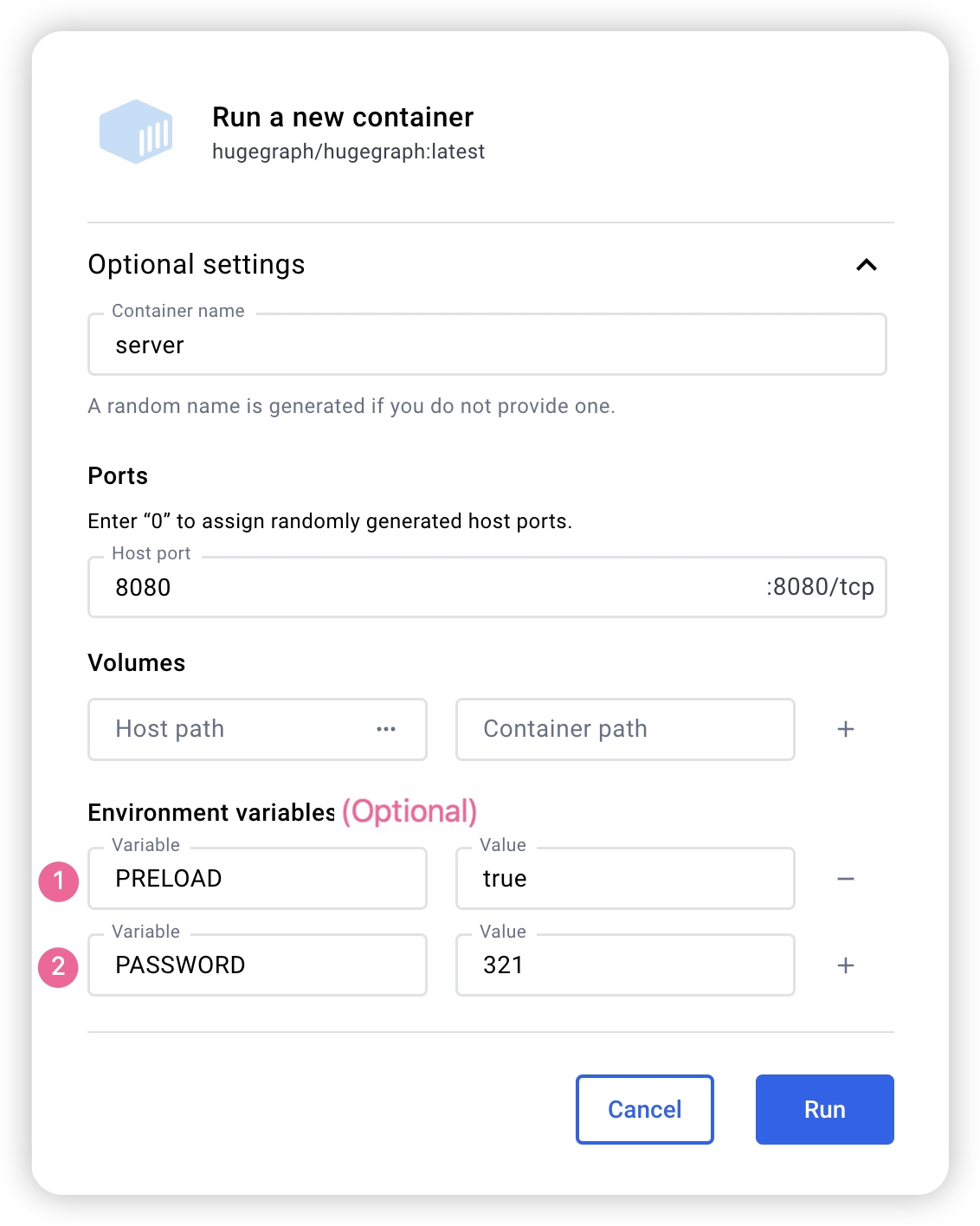
docker exec -it server bash 进入容器执行运维或调试操作。docker run -itd --name=server -p 8080:8080 -e PRELOAD="true" hugegraph/hugegraph:1.7.0 在启动时预加载一个内置样例图。可通过 RESTful API 进行验证,具体步骤可参考 5.1.8。-e PASSWORD=xxx 开启鉴权模式并设置 admin 密码,具体步骤可参考 Config Authentication。如果使用 Docker Desktop,则可以按如下方式设置相关选项:
注意:Docker Compose 文件使用桥接网络(
hg-net),适用于 Linux 和 Mac(Docker Desktop)。如需运行 3 节点分布式集群,请为 Docker Desktop 分配至少 12 GB 内存(设置 → 资源 → 内存)。Linux 上 Docker 直接使用宿主机内存。
如果希望通过一个配置文件统一管理 HugeGraph 的多个服务实例,则可以使用 docker compose。
docker/ 目录下提供了两个 compose 文件:
docker/docker-compose.ymldocker/docker-compose.dev.ymlcd hugegraph/docker
# 注意版本号请随时保持更新 → 1.x.0
HUGEGRAPH_VERSION=1.7.0 docker compose up -d
如需开启鉴权,可在 compose 文件的环境变量中添加 PASSWORD=xxx,或在 docker run 命令中传入 -e PASSWORD=xxx。
完整的部署指南请参阅 docker/README.md。
注意:
HugeGraph 的 Docker 镜像主要用于便捷地快速启动 HugeGraph,并不是 ASF 官方发布物料包。你可以从 ASF Release Distribution Policy 中了解更多细节。
推荐使用
release tag(如1.7.0/1.x.0) 以获取稳定版。使用latesttag 可以使用开发中的最新功能。
# use the latest version, here is 1.7.0 for example
wget https://downloads.apache.org/hugegraph/{version}/apache-hugegraph-incubating-{version}.tar.gz
tar zxf *hugegraph*.tar.gz
源码编译前请确保本机有安装 wget/curl 命令
下载 HugeGraph 源代码
git clone https://github.com/apache/hugegraph.git
编译打包生成 tar 包
cd hugegraph
# (Optional) use "-P stage" param if you build failed with the latest code(during pre-release period)
mvn package -DskipTests
执行日志如下:
......
[INFO] Reactor Summary for hugegraph 1.5.0:
[INFO]
[INFO] hugegraph .......................................... SUCCESS [  2.405 s]
[INFO] hugegraph-core ..................................... SUCCESS [ 13.405 s]
[INFO] hugegraph-api ...................................... SUCCESS [ 25.943 s]
[INFO] hugegraph-cassandra ................................ SUCCESS [ 54.270 s]
[INFO] hugegraph-scylladb ................................. SUCCESS [  1.032 s]
[INFO] hugegraph-rocksdb .................................. SUCCESS [ 34.752 s]
[INFO] hugegraph-mysql .................................... SUCCESS [  1.778 s]
[INFO] hugegraph-palo ..................................... SUCCESS [  1.070 s]
[INFO] hugegraph-hbase .................................... SUCCESS [ 32.124 s]
[INFO] hugegraph-postgresql ............................... SUCCESS [  1.823 s]
[INFO] hugegraph-dist ..................................... SUCCESS [ 17.426 s]
[INFO] hugegraph-example .................................. SUCCESS [  1.941 s]
[INFO] hugegraph-test ..................................... SUCCESS [01:01 min]
[INFO] ------------------------------------------------------------------------
[INFO] BUILD SUCCESS
[INFO] ------------------------------------------------------------------------
......
执行成功后,在 hugegraph 目录下生成 *hugegraph-*.tar.gz 文件,就是编译生成的 tar 包。
HugeGraph-Tools 提供了一键部署的命令行工具,用户可以使用该工具快速地一键下载、解压、配置并启动 HugeGraph-Server 和 HugeGraph-Hubble,最新的 HugeGraph-Toolchain 中已经包含所有的这些工具,直接下载它解压就有工具包集合了
# download toolchain package, it includes loader + tool + hubble, please check the latest version (here is 1.7.0)
wget https://downloads.apache.org/hugegraph/1.7.0/apache-hugegraph-toolchain-incubating-1.7.0.tar.gz
tar zxf *hugegraph-*.tar.gz
# enter the tool's package
cd *hugegraph*/*tool*
注:
${version}为版本号,最新版本号可参考 Download 页面,或直接从 Download 页面点击链接下载
HugeGraph-Tools 的总入口脚本是 bin/hugegraph,用户可以使用 help 子命令查看其用法,这里只介绍一键部署的命令。
bin/hugegraph deploy -v {hugegraph-version} -p {install-path} [-u {download-path-prefix}]
{hugegraph-version} 表示要部署的 HugeGraphServer 及 HugeGraphStudio 的版本,用户可查看 conf/version-mapping.yaml 文件获取版本信息,{install-path} 指定 HugeGraphServer 及 HugeGraphStudio 的安装目录,{download-path-prefix} 可选,指定 HugeGraphServer 及 HugeGraphStudio tar 包的下载地址,不提供时使用默认下载地址,比如要启动 0.6 版本的 HugeGraph-Server 及 HugeGraphStudio 将上述命令写为 bin/hugegraph deploy -v 0.6 -p services 即可。
如果需要快速启动 HugeGraph 仅用于测试,那么只需要进行少数几个配置项的修改即可(见下一节)。
启动流程分为“首次启动”和“非首次启动”。首次启动前需要先初始化后端数据库,然后再启动服务。
如果服务曾被手动停止,或因其他原因需要再次启动,由于后端数据库已持久化存在,通常可以直接启动服务。
HugeGraphServer 启动时会连接后端存储并检查其版本信息。如果后端尚未初始化,或者已初始化但版本不匹配(例如存在旧版本数据),HugeGraphServer 会启动失败并给出错误信息。
如果需要外部访问 HugeGraphServer,请修改 rest-server.properties 的 restserver.url 配置项(默认为 http://127.0.0.1:8080),修改成机器名或 IP 地址。
由于各种后端所需的配置(hugegraph.properties)及启动步骤略有不同,下面逐一对各后端的配置及启动做介绍。
注: 如果想要开启 HugeGraph 权限系统,在启动 Server 之前应按照 Server 鉴权配置 进行配置。(尤其是生产环境/外网环境须开启)
分布式存储是 HugeGraph 1.5.0 之后推出的新特性,它基于 HugeGraph-PD 和 HugeGraph-Store 组件实现了分布式的数据存储和计算。
要使用分布式存储引擎,需要先部署 HugeGraph-PD 和 HugeGraph-Store,详见 HugeGraph-PD 快速入门 和 HugeGraph-Store 快速入门。
确保 PD 和 Store 服务均已启动后
hugegraph.properties 配置:backend=hstore
serializer=binary
task.scheduler_type=distributed
# PD 服务地址,多个 PD 地址用逗号分割,配置 PD 的 RPC 端口
pd.peers=127.0.0.1:8686,127.0.0.1:8687,127.0.0.1:8688
# 简单示例(带鉴权)
gremlin.graph=org.apache.hugegraph.auth.HugeFactoryAuthProxy

# 指定存储 hstore(必须)
backend=hstore
serializer=binary
store=hugegraph

# 指定任务调度器(1.7.0及之前,hstore 存储必须)
task.scheduler_type=distributed

# pd config
pd.peers=127.0.0.1:8686
rest-server.properties 配置:usePD=true
# 注意,1.7.0 必须在 rest-server.properties 配置 pd.peers
pd.peers=127.0.0.1:8686,127.0.0.1:8687,127.0.0.1:8688
# 若需要 auth
# auth.authenticator=org.apache.hugegraph.auth.StandardAuthenticator
如果配置多个 HugeGraph-Server 节点,需要为每个节点修改 rest-server.properties 配置文件,例如:
节点 1(主节点):
usePD=true
restserver.url=http://127.0.0.1:8081
gremlinserver.url=http://127.0.0.1:8181
pd.peers=127.0.0.1:8686

rpc.server_host=127.0.0.1
rpc.server_port=8091

server.id=server-1
server.role=master
节点 2(工作节点):
usePD=true
restserver.url=http://127.0.0.1:8082
gremlinserver.url=http://127.0.0.1:8182
pd.peers=127.0.0.1:8686

rpc.server_host=127.0.0.1
rpc.server_port=8092

server.id=server-2
server.role=worker
同时,还需要修改每个节点的 gremlin-server.yaml 中的端口配置:
节点 1:
host: 127.0.0.1
port: 8181
节点 2:
host: 127.0.0.1
port: 8182
初始化数据库:
cd *hugegraph-${version}
bin/init-store.sh
启动 Server:
bin/start-hugegraph.sh
使用分布式存储引擎的启动顺序为:
验证服务是否正常启动:
curl http://localhost:8081/graphs
# 应返回:{"graphs":["hugegraph"]}
停止服务的顺序应该与启动顺序相反:
bin/stop-hugegraph.sh
通过 Docker-Compose 运行完整的分布式集群(3 PD + 3 Store + 3 Server):
cd hugegraph/docker
HUGEGRAPH_VERSION=1.7.0 docker compose -f docker-compose-3pd-3store-3server.yml up -d
服务通过 hg-net 桥接网络上的容器主机名进行通信。配置通过环境变量注入:
# Server 配置
HG_SERVER_BACKEND: hstore
HG_SERVER_PD_PEERS: pd0:8686,pd1:8686,pd2:8686
验证集群:
curl http://localhost:8080/versions
curl http://localhost:8620/v1/stores
运行时日志可通过 docker logs <container-name>(如 docker logs hg-pd0)直接查看,无需进入容器。
完整的环境变量参考、端口表和故障排查指南请参阅 docker/README.md。
RocksDB 是一个嵌入式的数据库,不需要手动安装部署,要求 GCC 版本 >= 4.3.0(GLIBCXX_3.4.10),如不满足,需要提前升级 GCC
修改 hugegraph.properties
backend=rocksdb
serializer=binary
rocksdb.data_path=.
rocksdb.wal_path=.
初始化数据库(第一次启动时或在 conf/graphs/ 下手动添加了新配置时需要进行初始化)
cd *hugegraph-${version}
bin/init-store.sh
启动 server
bin/start-hugegraph.sh
Starting HugeGraphServer...
Connecting to HugeGraphServer (http://127.0.0.1:8080/graphs)....OK
提示的 url 与 rest-server.properties 中配置的 restserver.url 一致
ToplingDB (Beta): 作为 RocksDB 的高性能替代方案,配置方式请参考: ToplingDB Quick Start
用户需自行安装 HBase,要求版本 2.0 以上,下载地址
修改 hugegraph.properties
backend=hbase
serializer=hbase

# hbase backend config
hbase.hosts=localhost
hbase.port=2181
# Note: recommend to modify the HBase partition number by the actual/env data amount & RS amount before init store
# it may influence the loading speed a lot
#hbase.enable_partition=true
#hbase.vertex_partitions=10
#hbase.edge_partitions=30
初始化数据库(第一次启动时或在 conf/graphs/ 下手动添加了新配置时需要进行初始化)
cd *hugegraph-${version}
bin/init-store.sh
启动 server
bin/start-hugegraph.sh
Starting HugeGraphServer...
Connecting to HugeGraphServer (http://127.0.0.1:8080/graphs)....OK
更多其它后端配置可参考配置项介绍
⚠️ 已废弃: 此后端从 HugeGraph 1.7.0 版本开始已移除。如需使用,请参考 1.5.x 版本文档。
由于 MySQL 是在 GPL 协议下,与 Apache 协议不兼容,用户需自行安装 MySQL,下载地址
下载 MySQL 的驱动包,比如 mysql-connector-java-8.0.30.jar,并放入 HugeGraph-Server 的 lib 目录下。
修改 hugegraph.properties,配置数据库 URL,用户名和密码,store 是数据库名,如果没有会被自动创建。
backend=mysql
serializer=mysql

store=hugegraph

# mysql backend config
jdbc.driver=com.mysql.cj.jdbc.Driver
jdbc.url=jdbc:mysql://127.0.0.1:3306
jdbc.username=
jdbc.password=
jdbc.reconnect_max_times=3
jdbc.reconnect_interval=3
jdbc.ssl_mode=false
初始化数据库(第一次启动时或在 conf/graphs/ 下手动添加了新配置时需要进行初始化)
cd *hugegraph-${version}
bin/init-store.sh
启动 server
bin/start-hugegraph.sh
Starting HugeGraphServer...
Connecting to HugeGraphServer (http://127.0.0.1:8080/graphs)....OK
⚠️ 已废弃: 此后端从 HugeGraph 1.7.0 版本开始已移除。如需使用,请参考 1.5.x 版本文档。
用户需自行安装 Cassandra,要求版本 3.0 以上,下载地址
修改 hugegraph.properties
backend=cassandra
serializer=cassandra

# cassandra backend config
cassandra.host=localhost
cassandra.port=9042
cassandra.username=
cassandra.password=
#cassandra.connect_timeout=5
#cassandra.read_timeout=20

#cassandra.keyspace.strategy=SimpleStrategy
#cassandra.keyspace.replication=3
初始化数据库(第一次启动时或在 conf/graphs/ 下手动添加了新配置时需要进行初始化)
cd *hugegraph-${version}
bin/init-store.sh
Initing HugeGraph Store...
2017-12-01 11:26:51 1424  [main] [INFO ] org.apache.hugegraph.HugeGraph [] - Opening backend store: 'cassandra'
2017-12-01 11:26:52 2389  [main] [INFO ] org.apache.hugegraph.backend.store.cassandra.CassandraStore [] - Failed to connect keyspace: hugegraph, try init keyspace later
2017-12-01 11:26:52 2472  [main] [INFO ] org.apache.hugegraph.backend.store.cassandra.CassandraStore [] - Failed to connect keyspace: hugegraph, try init keyspace later
2017-12-01 11:26:52 2557  [main] [INFO ] org.apache.hugegraph.backend.store.cassandra.CassandraStore [] - Failed to connect keyspace: hugegraph, try init keyspace later
2017-12-01 11:26:53 2797  [main] [INFO ] org.apache.hugegraph.backend.store.cassandra.CassandraStore [] - Store initialized: huge_graph
2017-12-01 11:26:53 2945  [main] [INFO ] org.apache.hugegraph.backend.store.cassandra.CassandraStore [] - Store initialized: huge_schema
2017-12-01 11:26:53 3044  [main] [INFO ] org.apache.hugegraph.backend.store.cassandra.CassandraStore [] - Store initialized: huge_index
2017-12-01 11:26:53 3046  [pool-3-thread-1] [INFO ] org.apache.hugegraph.backend.Transaction [] - Clear cache on event 'store.init'
2017-12-01 11:26:59 9720  [main] [INFO ] org.apache.hugegraph.HugeGraph [] - Opening backend store: 'cassandra'
2017-12-01 11:27:00 9805  [main] [INFO ] org.apache.hugegraph.backend.store.cassandra.CassandraStore [] - Failed to connect keyspace: hugegraph1, try init keyspace later
2017-12-01 11:27:00 9886  [main] [INFO ] org.apache.hugegraph.backend.store.cassandra.CassandraStore [] - Failed to connect keyspace: hugegraph1, try init keyspace later
2017-12-01 11:27:00 9955  [main] [INFO ] org.apache.hugegraph.backend.store.cassandra.CassandraStore [] - Failed to connect keyspace: hugegraph1, try init keyspace later
2017-12-01 11:27:00 10175 [main] [INFO ] org.apache.hugegraph.backend.store.cassandra.CassandraStore [] - Store initialized: huge_graph
2017-12-01 11:27:00 10321 [main] [INFO ] org.apache.hugegraph.backend.store.cassandra.CassandraStore [] - Store initialized: huge_schema
2017-12-01 11:27:00 10413 [main] [INFO ] org.apache.hugegraph.backend.store.cassandra.CassandraStore [] - Store initialized: huge_index
2017-12-01 11:27:00 10413 [pool-3-thread-1] [INFO ] org.apache.hugegraph.backend.Transaction [] - Clear cache on event 'store.init'
启动 server
bin/start-hugegraph.sh
Starting HugeGraphServer...
Connecting to HugeGraphServer (http://127.0.0.1:8080/graphs)....OK
修改 hugegraph.properties
backend=memory
serializer=text
Memory 后端的数据是保存在内存中无法持久化的,不需要初始化后端,这也是唯一一个不需要初始化的后端。
启动 server
bin/start-hugegraph.sh
Starting HugeGraphServer...
Connecting to HugeGraphServer (http://127.0.0.1:8080/graphs)....OK
提示的 url 与 rest-server.properties 中配置的 restserver.url 一致
⚠️ 已废弃: 此后端从 HugeGraph 1.7.0 版本开始已移除。如需使用,请参考 1.5.x 版本文档。
用户需自行安装 ScyllaDB,推荐版本 2.1 以上,下载地址
修改 hugegraph.properties
backend=scylladb
serializer=scylladb

# cassandra backend config
cassandra.host=localhost
cassandra.port=9042
cassandra.username=
cassandra.password=
#cassandra.connect_timeout=5
#cassandra.read_timeout=20

#cassandra.keyspace.strategy=SimpleStrategy
#cassandra.keyspace.replication=3
由于 scylladb 数据库本身就是基于 cassandra 的"优化版",如果用户未安装 scylladb,也可以直接使用 cassandra 作为后端存储,只需要把 backend 和 serializer 修改为 scylladb,host 和 post 指向 cassandra 集群的 seeds 和 port 即可,但是并不建议这样做,这样发挥不出 scylladb 本身的优势了。
初始化数据库(第一次启动时或在 conf/graphs/ 下手动添加了新配置时需要进行初始化)
cd *hugegraph-${version}
bin/init-store.sh
启动 server
bin/start-hugegraph.sh
Starting HugeGraphServer...
Connecting to HugeGraphServer (http://127.0.0.1:8080/graphs)....OK
在启动脚本时携带 -p true 参数,表示开启 preload,即创建示例图。
bin/start-hugegraph.sh -p true
Starting HugeGraphServer in daemon mode...
Connecting to HugeGraphServer (http://127.0.0.1:8080/graphs)......OK
并且使用 RESTful API 请求 HugeGraphServer 得到如下结果:
> curl "http://localhost:8080/graphs/hugegraph/graph/vertices" | gunzip

{"vertices":[{"id":"2:lop","label":"software","type":"vertex","properties":{"name":"lop","lang":"java","price":328}},{"id":"1:josh","label":"person","type":"vertex","properties":{"name":"josh","age":32,"city":"Beijing"}},{"id":"1:marko","label":"person","type":"vertex","properties":{"name":"marko","age":29,"city":"Beijing"}},{"id":"1:peter","label":"person","type":"vertex","properties":{"name":"peter","age":35,"city":"Shanghai"}},{"id":"1:vadas","label":"person","type":"vertex","properties":{"name":"vadas","age":27,"city":"Hongkong"}},{"id":"2:ripple","label":"software","type":"vertex","properties":{"name":"ripple","lang":"java","price":199}}]}
代表创建示例图成功。
在 3.1 使用 Docker 容器 中,我们已经介绍了如何使用 docker 部署 hugegraph-server。此外,也可以通过切换后端存储或设置参数,在 Server 启动时加载样例图。
⚠️ 已废弃: Cassandra 后端从 HugeGraph 1.7.0 版本开始已移除。如需使用,请参考 1.5.x 版本文档。
在使用 Docker 的时候,我们可以使用 Cassandra 作为后端存储。我们更加推荐直接使用 docker-compose 来对于 server 以及 Cassandra 进行统一管理
样例的 docker-compose.yml 可以在 github 中获取,使用 docker-compose up -d 启动。(如果使用 cassandra 4.0 版本作为后端存储,则需要大约两个分钟初始化,请耐心等待)
version: "3"

services:
  server:
    image: hugegraph/hugegraph
    container_name: cas-server
    ports:
      - 8080:8080
    environment:
      hugegraph.backend: cassandra
      hugegraph.serializer: cassandra
      hugegraph.cassandra.host: cas-cassandra
      hugegraph.cassandra.port: 9042
    networks:
      - ca-network
    depends_on:
      - cassandra
    healthcheck:
      test: ["CMD", "bin/gremlin-console.sh", "--" ,"-e", "scripts/remote-connect.groovy"]
      interval: 10s
      timeout: 30s
      retries: 3

  cassandra:
    image: cassandra:4
    container_name: cas-cassandra
    ports:
      - 7000:7000
      - 9042:9042
    security_opt:
      - seccomp:unconfined
    networks:
      - ca-network
    healthcheck:
      test: ["CMD", "cqlsh", "--execute", "describe keyspaces;"]
      interval: 10s
      timeout: 30s
      retries: 5

networks:
  ca-network:

volumes:
  hugegraph-data:
在这个 yaml 中,需要在环境变量中以 hugegraph.<parameter_name>的形式进行参数传递,配置 Cassandra 相关的参数。
具体来说,在 hugegraph.properties 配置文件中,提供了 backend=xxx、cassandra.host=xxx 等配置项。为了通过环境变量传递这些配置,需要在配置项前加上 hugegraph.,例如 hugegraph.backend 和 hugegraph.cassandra.host。
其他配置可以参照 4 配置
在 Docker 启动时设置环境变量 PRELOAD=true,即可在启动脚本执行过程中加载样例数据。
使用docker run
使用 docker run -itd --name=server -p 8080:8080 -e PRELOAD=true hugegraph/hugegraph:1.7.0
使用docker-compose
创建docker-compose.yml,具体文件如下,在环境变量中设置 PRELOAD=true。其中,example.groovy 是一个预定义的脚本,用于预加载样例数据。如果有需要,可以通过挂载新的 example.groovy 脚本改变预加载的数据。
version: '3'
services:
  server:
    image: hugegraph/hugegraph:1.7.0
    container_name: server
    environment:
      - PRELOAD=true
      - PASSWORD=xxx
    volumes:
      - /path/to/yourscript:/hugegraph/scripts/example.groovy
    ports:
      - 8080:8080
使用命令 docker-compose up -d 启动容器
使用 RESTful API 请求 HugeGraphServer 得到如下结果:
> curl "http://localhost:8080/graphs/hugegraph/graph/vertices" | gunzip

{"vertices":[{"id":"2:lop","label":"software","type":"vertex","properties":{"name":"lop","lang":"java","price":328}},{"id":"1:josh","label":"person","type":"vertex","properties":{"name":"josh","age":32,"city":"Beijing"}},{"id":"1:marko","label":"person","type":"vertex","properties":{"name":"marko","age":29,"city":"Beijing"}},{"id":"1:peter","label":"person","type":"vertex","properties":{"name":"peter","age":35,"city":"Shanghai"}},{"id":"1:vadas","label":"person","type":"vertex","properties":{"name":"vadas","age":27,"city":"Hongkong"}},{"id":"2:ripple","label":"software","type":"vertex","properties":{"name":"ripple","lang":"java","price":199}}]}
代表创建示例图成功。
jps 查看服务进程
jps
6475 HugeGraphServer
curl 请求 RESTful API
echo `curl -o /dev/null -s -w %{http_code} "http://localhost:8080/graphs/hugegraph/graph/vertices"`
返回结果 200,代表 server 启动正常
HugeGraphServer 的 RESTful API 包括多种类型的资源,典型的包括 graph、schema、gremlin、traverser 和 task
graph 包含 vertices、edgesschema 包含 vertexlabels、propertykeys、edgelabels、indexlabelsgremlin 包含各种 Gremlin 语句,如 g.v(),可以同步或者异步执行traverser 包含各种高级查询,包括最短路径、交叉点、N 步可达邻居等task 包含异步任务的查询和删除hugegraph 的顶点及相关属性curl http://localhost:8080/graphs/hugegraph/graph/vertices
说明
由于图的点和边很多,对于 list 型的请求,比如获取所有顶点,获取所有边等,Server 会将数据压缩再返回,所以使用 curl 时得到一堆乱码,可以重定向至 gunzip 进行解压。推荐使用 Chrome 浏览器 + Restlet 插件发送 HTTP 请求进行测试。
curl "http://localhost:8080/graphs/hugegraph/graph/vertices" | gunzip
当前 HugeGraphServer 的默认配置只能是本机访问,可以修改配置,使其能在其他机器访问。
vim conf/rest-server.properties

restserver.url=http://0.0.0.0:8080
响应体如下:
{
    "vertices": [
        {
            "id": "2lop",
            "label": "software",
            "type": "vertex",
            "properties": {
                "price": [
                    {
                        "id": "price",
                        "value": 328
                    }
                ],
                "name": [
                    {
                        "id": "name",
                        "value": "lop"
                    }
                ],
                "lang": [
                    {
                        "id": "lang",
                        "value": "java"
                    }
                ]
            }
        },
        {
            "id": "1josh",
            "label": "person",
            "type": "vertex",
            "properties": {
                "name": [
                    {
                        "id": "name",
                        "value": "josh"
                    }
                ],
                "age": [
                    {
                        "id": "age",
                        "value": 32
                    }
                ]
            }
        },
        ...
    ]
}
详细的 API 请参考 RESTful-API 文档。
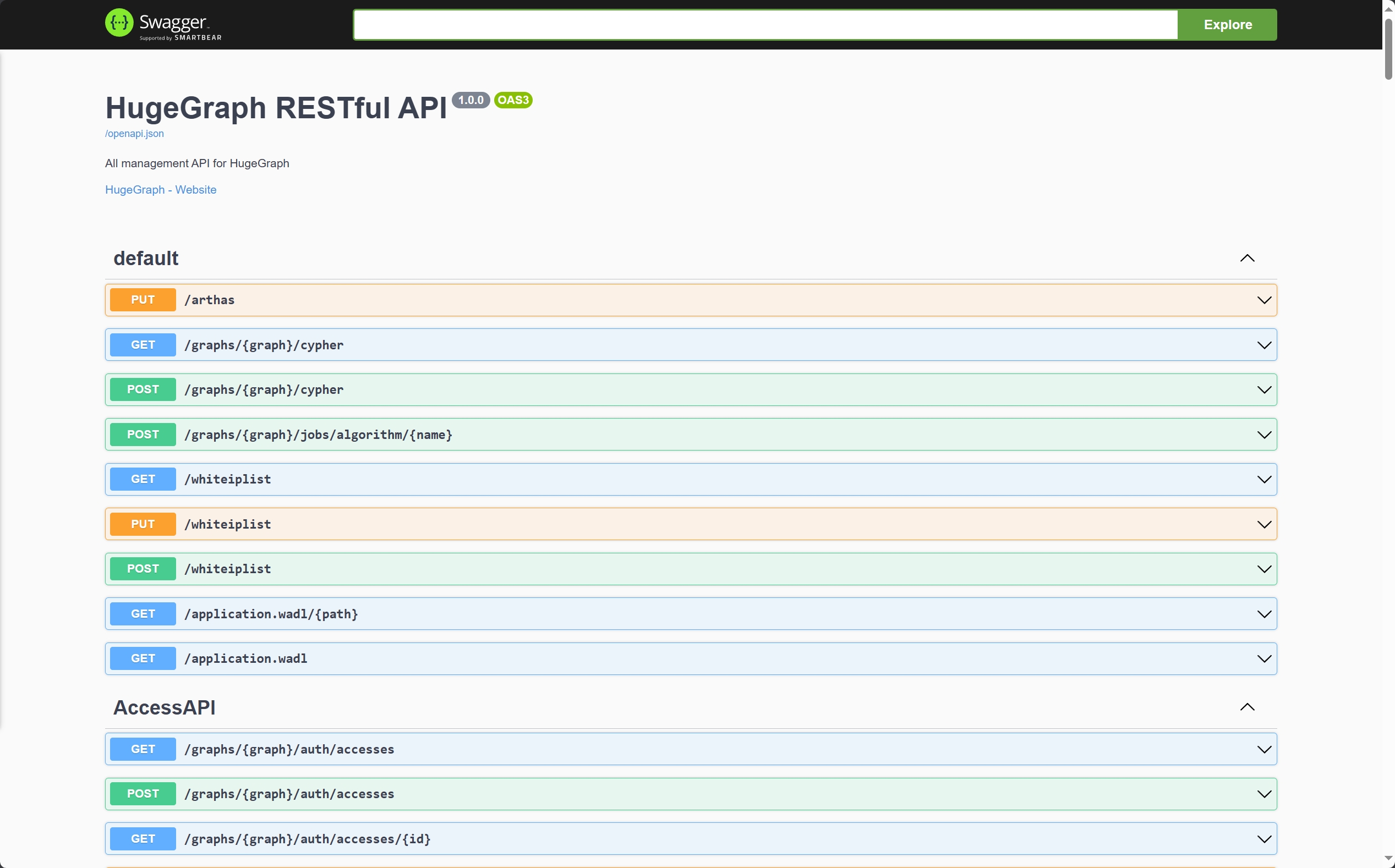
另外也可以通过访问 localhost:8080/swagger-ui/index.html 查看 API。
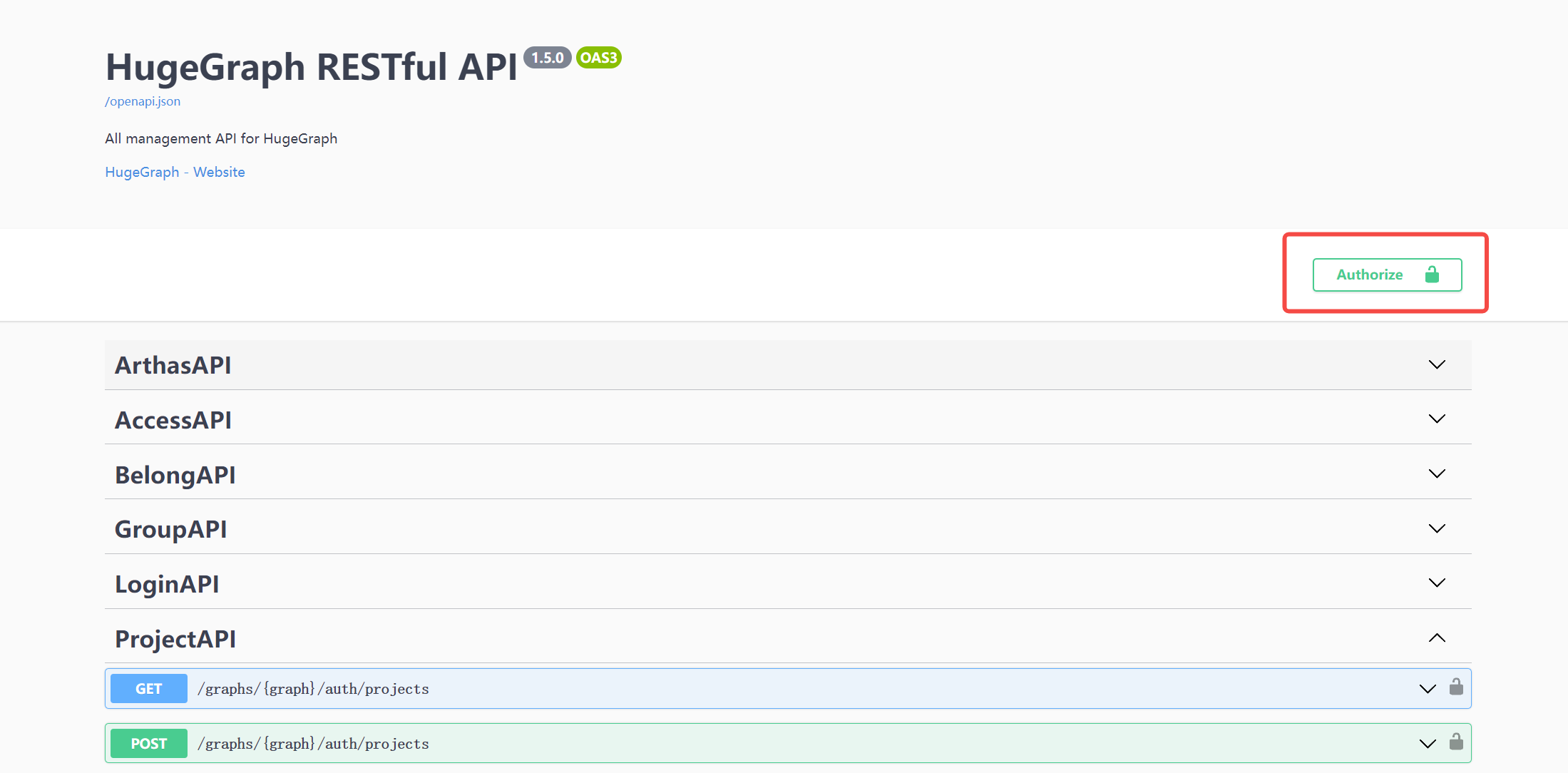
在使用 Swagger UI 调试 HugeGraph 提供的 API 时,如果 HugeGraph Server 开启了鉴权模式,可以在 Swagger 页面输入鉴权信息。
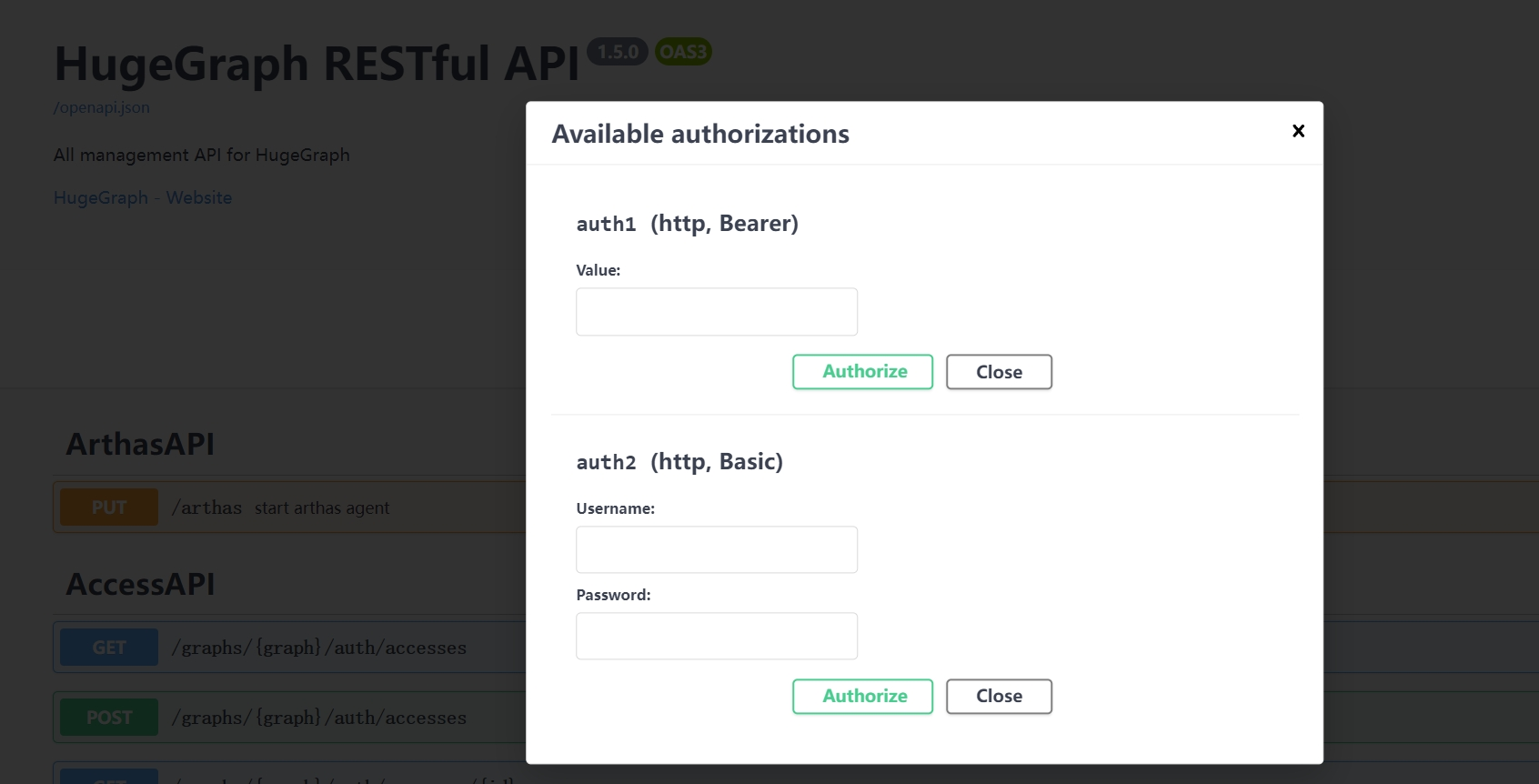
当前 HugeGraph 支持基于 Basic 和 Bearer 两种形式设置鉴权信息。
$cd *hugegraph-${version}
$bin/stop-hugegraph.sh
HugeGraph-PD (Placement Driver) 是 HugeGraph 分布式版本的元数据管理组件,负责管理图数据的分布和存储节点的协调。它在分布式 HugeGraph 中扮演着核心角色,维护集群状态并协调 HugeGraph-Store 存储节点。
有两种方式可以部署 HugeGraph-PD 组件:
从 Apache HugeGraph 官方下载页面下载最新版本的 HugeGraph-PD:
# 用最新版本号替换 {version},例如 1.5.0
wget https://downloads.apache.org/hugegraph/{version}/apache-hugegraph-incubating-{version}.tar.gz
tar zxf apache-hugegraph-incubating-{version}.tar.gz
cd apache-hugegraph-incubating-{version}/apache-hugegraph-pd-incubating-{version}
# 1. 克隆源代码
git clone https://github.com/apache/hugegraph.git

# 2. 编译项目
cd hugegraph
mvn clean install -DskipTests=true

# 3. 编译成功后,PD 模块的构建产物将位于
#    apache-hugegraph-incubating-{version}/apache-hugegraph-pd-incubating-{version}
#    target/apache-hugegraph-incubating-{version}.tar.gz
HugeGraph-PD Docker 镜像已发布在 Docker Hub,镜像名为 hugegraph/pd。
注: 后续步骤皆假设你本地已拉取
hugegraph主仓库代码 (至少是 docker 目录)
使用 docker-compose 模式部署完整的 3 节点集群(PD + Store + Server):
cd hugegraph/docker
# 注意版本号请随时保持更新 → 1.x.0
HUGEGRAPH_VERSION=1.7.0 docker compose -f docker-compose-3pd-3store-3server.yml up -d
通过 docker run 运行单个 PD 节点时,通过环境变量提供配置:
docker run -d \
  -p 8620:8620 \
  -p 8686:8686 \
  -p 8610:8610 \
  -e HG_PD_GRPC_HOST=<your-ip> \
  -e HG_PD_RAFT_ADDRESS=<your-ip>:8610 \
  -e HG_PD_RAFT_PEERS_LIST=<your-ip>:8610 \
  -e HG_PD_INITIAL_STORE_LIST=<store-ip>:8500 \
  -v /path/to/data:/hugegraph-pd/pd_data \
  --name hugegraph-pd \
  hugegraph/pd:1.7.0
环境变量参考:
| 变量 | 必填 | 默认值 | 描述 |
|---|---|---|---|
HG_PD_GRPC_HOST | 是 | — | 本节点的 gRPC 主机名/IP(Docker 中使用 pd0,裸机使用 192.168.1.10) |
HG_PD_RAFT_ADDRESS | 是 | — | 本节点的 Raft 地址(如 pd0:8610) |
HG_PD_RAFT_PEERS_LIST | 是 | — | 所有 PD 节点的 Raft 地址(如 pd0:8610,pd1:8610,pd2:8610) |
HG_PD_INITIAL_STORE_LIST | 是 | — | 预期的 Store gRPC 地址(如 store0:8500,store1:8500,store2:8500) |
HG_PD_GRPC_PORT | 否 | 8686 | gRPC 服务端口 |
HG_PD_REST_PORT | 否 | 8620 | REST API 端口 |
HG_PD_DATA_PATH | 否 | /hugegraph-pd/pd_data | 元数据存储路径 |
HG_PD_INITIAL_STORE_COUNT | 否 | 1 | 集群可用所需的最小 Store 数量 |
注意:在 Docker 桥接网络中,
HG_PD_GRPC_HOST和HG_PD_RAFT_ADDRESS应使用容器主机名(如pd0)而非 IP 地址。
已弃用的别名:
GRPC_HOST、RAFT_ADDRESS、RAFT_PEERS、PD_INITIAL_STORE_LIST仍可使用,但会输出弃用警告。新部署请使用HG_PD_*名称。
运行时日志可通过 docker logs <container-name>(如 docker logs hg-pd0)直接查看,无需进入容器。
完整的集群部署指南请参阅 docker/README.md。
PD 的主要配置文件为 conf/application.yml,以下是关键配置项:
spring:
  application:
    name: hugegraph-pd

grpc:
  # 集群模式下的 gRPC 端口
  port: 8686
  host: 127.0.0.1

server:
  # REST 服务端口号
  port: 8620

pd:
  # 存储路径
  data-path: ./pd_data
  # 自动扩容的检查周期(秒)
  patrol-interval: 1800
  # 集群可用所需的最小 Store 数量
  initial-store-count: 1
  # store 的配置信息,格式为 IP:gRPC端口
  initial-store-list: 127.0.0.1:8500

raft:
  # 集群模式
  address: 127.0.0.1:8610
  # 集群中所有 PD 节点的 raft 地址
  peers-list: 127.0.0.1:8610

store:
  # store 下线时间(秒)。超过该时间,认为 store 永久不可用,分配副本到其他机器
  max-down-time: 172800
  # 是否开启 store 监控数据存储
  monitor_data_enabled: true
  # 监控数据的间隔
  monitor_data_interval: 1 minute
  # 监控数据的保留时间
  monitor_data_retention: 1 day
  initial-store-count: 1

partition:
  # 默认每个分区副本数
  default-shard-count: 1
  # 默认每机器最大副本数
  store-max-shard-count: 12
对于多节点部署,需要修改各节点的端口和地址配置,确保各节点之间能够正常通信。
在 PD 安装目录下执行:
./bin/start-hugegraph-pd.sh
启动成功后,可以在 logs/hugegraph-pd-stdout.log 中看到类似以下的日志:
YYYY-mm-dd xx:xx:xx [main] [INFO] o.a.h.p.b.HugePDServer - Started HugePDServer in x.xxx seconds (JVM running for x.xxx)
在 PD 安装目录下执行:
./bin/stop-hugegraph-pd.sh
确认 PD 服务是否正常运行:
curl http://localhost:8620/actuator/health
如果返回 {"status":"UP"},则表示 PD 服务已成功启动。
此外,也可以通过 PD API 查看 Store 节点状态:
curl http://localhost:8620/v1/stores
如果响应中 state 为 Up,说明对应的 Store 节点运行正常。在一个健康的 3 节点部署中,storeId 列表应包含 3 个 ID,且 stateCountMap.Up、numOfService 和 numOfNormalService 都应为 3。
HugeGraph-Store 是 HugeGraph 分布式版本的存储节点组件,负责实际存储和管理图数据。它与 HugeGraph-PD 协同工作,共同构成 HugeGraph 的分布式存储引擎,提供高可用性和水平扩展能力。
有两种方式可以部署 HugeGraph-Store 组件:
从 Apache HugeGraph 官方下载页面下载最新版本的 HugeGraph-Store:
# 用最新版本号替换 {version},例如 1.5.0
wget https://downloads.apache.org/hugegraph/{version}/apache-hugegraph-incubating-{version}.tar.gz
tar zxf apache-hugegraph-incubating-{version}.tar.gz
cd apache-hugegraph-incubating-{version}/apache-hugegraph-hstore-incubating-{version}
# 1. 克隆源代码
git clone https://github.com/apache/hugegraph.git

# 2. 编译项目
cd hugegraph
mvn clean install -DskipTests=true

# 3. 编译成功后,Store 模块的构建产物将位于
#    apache-hugegraph-incubating-{version}/apache-hugegraph-hstore-incubating-{version}
#    target/apache-hugegraph-incubating-{version}.tar.gz
HugeGraph-Store Docker 镜像已发布在 Docker Hub,镜像名是 hugegraph/store。
注: 后续步骤皆假设你本地已拉取
hugegraph主仓库代码 (至少是 docker 目录)
使用 docker-compose 文件部署完整的 3 节点集群(PD + Store + Server):
cd hugegraph/docker
# 注意版本号请随时保持更新 → 1.x.0
HUGEGRAPH_VERSION=1.7.0 docker compose -f docker-compose-3pd-3store-3server.yml up -d
通过 docker run 运行单个 Store 节点:
docker run -d \
  -p 8520:8520 \
  -p 8500:8500 \
  -p 8510:8510 \
  -e HG_STORE_PD_ADDRESS=<pd-ip>:8686 \
  -e HG_STORE_GRPC_HOST=<your-ip> \
  -e HG_STORE_RAFT_ADDRESS=<your-ip>:8510 \
  -v /path/to/storage:/hugegraph-store/storage \
  --name hugegraph-store \
  hugegraph/store:1.7.0
环境变量参考:
| 变量 | 必填 | 默认值 | 描述 |
|---|---|---|---|
HG_STORE_PD_ADDRESS | 是 | — | PD gRPC 地址(如 pd0:8686,pd1:8686,pd2:8686) |
HG_STORE_GRPC_HOST | 是 | — | 本节点的 gRPC 主机名/IP(如 store0) |
HG_STORE_RAFT_ADDRESS | 是 | — | 本节点的 Raft 地址(如 store0:8510) |
HG_STORE_GRPC_PORT | 否 | 8500 | gRPC 服务端口 |
HG_STORE_REST_PORT | 否 | 8520 | REST API 端口 |
HG_STORE_DATA_PATH | 否 | /hugegraph-store/storage | 数据存储路径 |
注意:在 Docker 桥接网络中,
HG_STORE_GRPC_HOST应使用容器主机名(如store0)而非 IP 地址。
已弃用的别名:
PD_ADDRESS、GRPC_HOST、RAFT_ADDRESS仍可使用,但会输出弃用警告。新部署请使用HG_STORE_*名称。
Store 的主要配置文件为 conf/application.yml,以下是关键配置项:
pdserver:
  # PD 服务地址,多个 PD 地址用逗号分割(配置 PD 的 gRPC 端口)
  address: 127.0.0.1:8686

grpc:
  # gRPC 的服务地址
  host: 127.0.0.1
  port: 8500
  netty-server:
    max-inbound-message-size: 1000MB

raft:
  # raft 缓存队列大小
  disruptorBufferSize: 1024
  address: 127.0.0.1:8510
  max-log-file-size: 600000000000
  # 快照生成时间间隔,单位秒
  snapshotInterval: 1800

server:
  # REST 服务地址
  port: 8520

app:
  # 存储路径,支持多个路径,逗号分割
  data-path: ./storage
  #raft-path: ./storage

spring:
  application:
    name: store-node-grpc-server
  profiles:
    active: default
    include: pd

logging:
  config: 'file:./conf/log4j2.xml'
  level:
    root: info
对于多节点部署,需要为每个 Store 节点修改以下配置:
grpc.port(RPC 端口)raft.address(Raft 协议端口)server.port(REST 端口)app.data-path(数据存储路径)确保 PD 服务已经启动,然后在 Store 安装目录下执行:
./bin/start-hugegraph-store.sh
启动成功后,可以在 logs/hugegraph-store-server.log 中看到类似以下的日志:
YYYY-mm-dd xx:xx:xx [main] [INFO] o.a.h.s.n.StoreNodeApplication - Started StoreNodeApplication in x.xxx seconds (JVM running for x.xxx)
在 Store 安装目录下执行:
./bin/stop-hugegraph-store.sh
以下是一个三节点部署的配置示例:
对于三个 Store 节点,每个节点的主要配置差异如下:
节点 A:
grpc:
  port: 8500
raft:
  address: 127.0.0.1:8510
server:
  port: 8520
app:
  data-path: ./storage-a
节点 B:
grpc:
  port: 8501
raft:
  address: 127.0.0.1:8511
server:
  port: 8521
app:
  data-path: ./storage-b
节点 C:
grpc:
  port: 8502
raft:
  address: 127.0.0.1:8512
server:
  port: 8522
app:
  data-path: ./storage-c
所有节点都应该指向相同的 PD 集群:
pdserver:
  address: 127.0.0.1:8686,127.0.0.1:8687,127.0.0.1:8688
3 节点 Store 集群包含在 docker/docker-compose-3pd-3store-3server.yml 中。每个 Store 节点拥有独立的主机名和环境变量:
# store0
HG_STORE_PD_ADDRESS: pd0:8686,pd1:8686,pd2:8686
HG_STORE_GRPC_HOST: store0
HG_STORE_GRPC_PORT: "8500"
HG_STORE_REST_PORT: "8520"
HG_STORE_RAFT_ADDRESS: store0:8510
HG_STORE_DATA_PATH: /hugegraph-store/storage

# store1
HG_STORE_PD_ADDRESS: pd0:8686,pd1:8686,pd2:8686
HG_STORE_GRPC_HOST: store1
HG_STORE_RAFT_ADDRESS: store1:8510

# store2
HG_STORE_PD_ADDRESS: pd0:8686,pd1:8686,pd2:8686
HG_STORE_GRPC_HOST: store2
HG_STORE_RAFT_ADDRESS: store2:8510
Store 节点仅在所有 PD 节点通过健康检查后才会启动,其中 docker-compose 中的 healthcheck 实际访问的是 PD 的 REST 接口 /v1/health(也可以通过 Actuator 暴露的 /actuator/health 进行手动检查),并通过 depends_on: condition: service_healthy 强制执行依赖关系。
运行时日志可通过 docker logs <container-name>(如 docker logs hg-store0)直接查看,无需进入容器。
完整的部署指南请参阅 docker/README.md。
确认 Store 服务是否正常运行:
curl http://localhost:8520/actuator/health
如果返回 {"status":"UP"},则表示 Store 服务已成功启动。
此外,可以通过 PD 的 API 查看集群中的 Store 节点状态:
curl http://localhost:8620/v1/stores
如果 Store 配置成功,上述接口响应中应包含当前节点的状态信息,其中 state 为 Up 表示节点运行正常。
下方示例仅展示 1 个 Store 节点的返回结果。如果 3 个节点都已正确配置并正在运行,则响应中的 storeId 列表应包含 3 个 ID,且 stateCountMap.Up、numOfService 和 numOfNormalService 都应为 3。
{
  "message": "OK",
  "data": {
    "stores": [
      {
        "storeId": 8319292642220586694,
        "address": "127.0.0.1:8500",
        "raftAddress": "127.0.0.1:8510",
        "version": "",
        "state": "Up",
        "deployPath": "/Users/{your_user_name}/hugegraph/apache-hugegraph-incubating-1.5.0/apache-hugegraph-store-incubating-1.5.0/lib/hg-store-node-1.5.0.jar",
        "dataPath": "./storage",
        "startTimeStamp": 1754027127969,
        "registedTimeStamp": 1754027127969,
        "lastHeartBeat": 1754027909444,
        "capacity": 494384795648,
        "available": 346535829504,
        "partitionCount": 0,
        "graphSize": 0,
        "keyCount": 0,
        "leaderCount": 0,
        "serviceName": "127.0.0.1:8500-store",
        "serviceVersion": "",
        "serviceCreatedTimeStamp": 1754027127000,
        "partitions": []
      }
    ],
    "stateCountMap": {
      "Up": 1
    },
    "numOfService": 1,
    "numOfNormalService": 1
  },
  "status": 0
}