HugeGraph-LLM
Please refer to the AI repository README for the most up-to-date documentation, and the official website regularly is updated and synchronized.
Bridge the gap between Graph Databases and Large Language Models
AI summarizes the project documentation:

🎯 Overview
HugeGraph-LLM is a comprehensive toolkit that combines the power of graph databases with large language models. It enables seamless integration between HugeGraph and LLMs for building intelligent applications.
Key Features
- 🏗️ Knowledge Graph Construction - Build KGs automatically using LLMs + HugeGraph
- 🗣️ Natural Language Querying - Operate graph databases using natural language (Gremlin/Cypher)
- 🔍 Graph-Enhanced RAG - Leverage knowledge graphs to improve answer accuracy (GraphRAG & Graph Agent)
For detailed source code doc, visit our DeepWiki page. (Recommended)
📋 Prerequisites
[!IMPORTANT]
- Python: 3.10+ (not tested on 3.12)
- HugeGraph Server: 1.3+ (recommended: 1.5+)
- UV Package Manager: 0.7+
🚀 Quick Start
Choose your preferred deployment method:
Option 1: Docker Compose (Recommended)
The fastest way to get started with both HugeGraph Server and RAG Service:
# 1. Set up environment
cp docker/env.template docker/.env
# Edit docker/.env and set PROJECT_PATH to your actual project path

# 2. Deploy services
cd docker
docker-compose -f docker-compose-network.yml up -d

# 3. Verify deployment
docker-compose -f docker-compose-network.yml ps

# 4. Access services
# HugeGraph Server: http://localhost:8080
# RAG Service: http://localhost:8001
Option 2: Individual Docker Containers
For more control over individual components:
Available Images
hugegraph/rag- Development image with source code accesshugegraph/rag-bin- Production-optimized binary (compiled with Nuitka)
# 1. Create network
docker network create -d bridge hugegraph-net

# 2. Start HugeGraph Server
docker run -itd --name=server -p 8080:8080 --network hugegraph-net hugegraph/hugegraph

# 3. Start RAG Service
docker pull hugegraph/rag:latest
docker run -itd --name rag \
  -v /path/to/your/hugegraph-llm/.env:/home/work/hugegraph-llm/.env \
  -p 8001:8001 --network hugegraph-net hugegraph/rag

# 4. Monitor logs
docker logs -f rag
Option 3: Build from Source
For development and customization:
# 1. Start HugeGraph Server
docker run -itd --name=server -p 8080:8080 hugegraph/hugegraph

# 2. Install UV package manager
curl -LsSf https://astral.sh/uv/install.sh | sh

# 3. Clone and setup project
git clone https://github.com/apache/hugegraph-ai.git
cd hugegraph-ai/hugegraph-llm

# 4. Create virtual environment and install dependencies
uv venv && source .venv/bin/activate
uv pip install -e .

# 5. Launch RAG demo
python -m hugegraph_llm.demo.rag_demo.app
# Access at: http://127.0.0.1:8001

# 6. (Optional) Custom host/port
python -m hugegraph_llm.demo.rag_demo.app --host 127.0.0.1 --port 18001
Additional Setup (Optional)
# Download NLTK stopwords for better text processing
python ./hugegraph_llm/operators/common_op/nltk_helper.py

# Update configuration files
python -m hugegraph_llm.config.generate --update
[!TIP] Check our Quick Start Guide for detailed usage examples and query logic explanations.
💡 Usage Examples
Knowledge Graph Construction
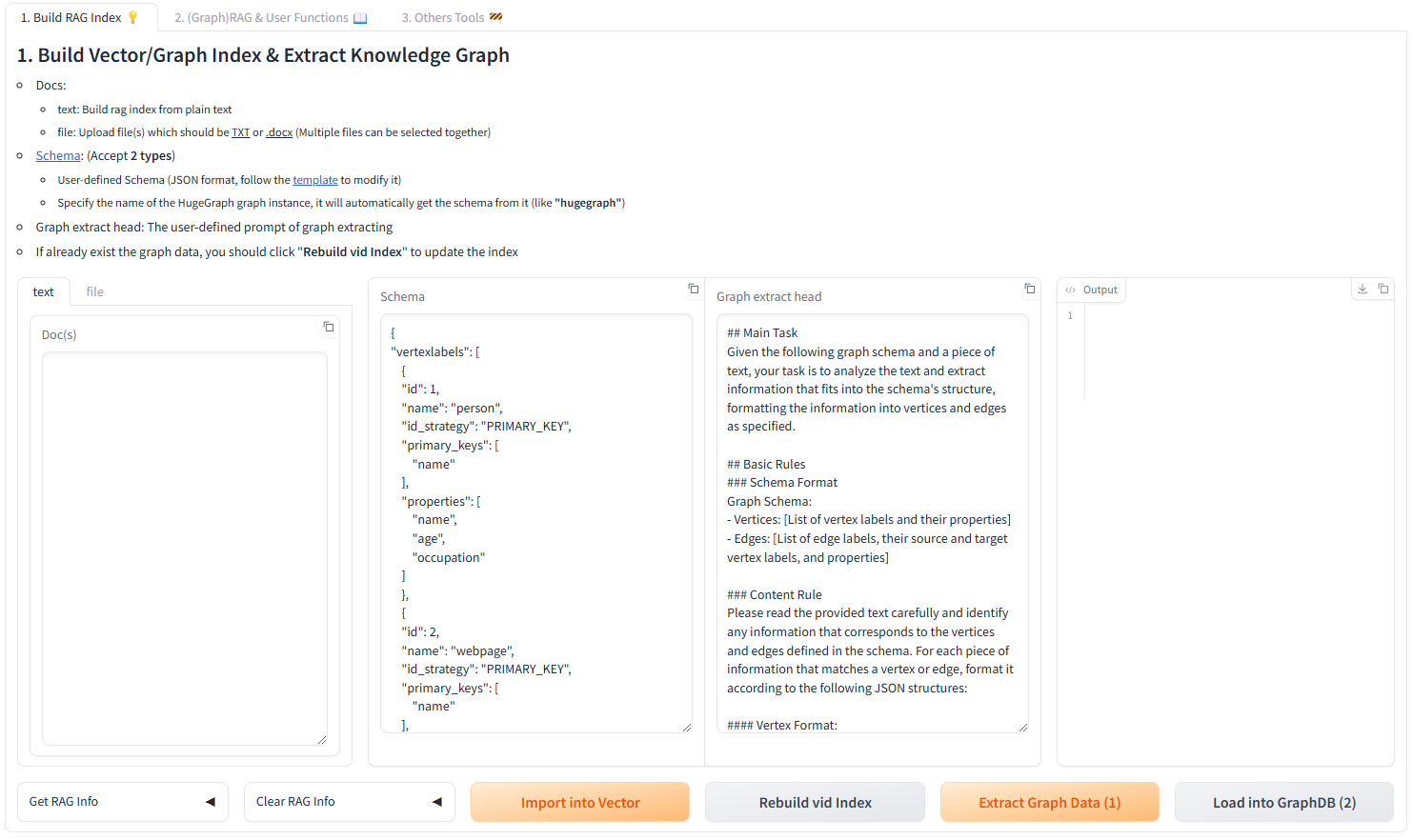
Interactive Web Interface
Use the Gradio interface for visual knowledge graph building:
Input Options:
- Text: Direct text input for RAG index creation
- Files: Upload TXT or DOCX files (multiple selection supported)
Schema Configuration:
- Custom Schema: JSON format following our template
- HugeGraph Schema: Use existing graph instance schema (e.g., “hugegraph”)
Programmatic Construction
Build knowledge graphs with code using the KgBuilder class:
from hugegraph_llm.models.llms.init_llm import LLMs
from hugegraph_llm.operators.kg_construction_task import KgBuilder

# Initialize and chain operations
TEXT = "Your input text here..."
builder = KgBuilder(LLMs().get_chat_llm())

(
    builder
    .import_schema(from_hugegraph="talent_graph").print_result()
    .chunk_split(TEXT).print_result()
    .extract_info(extract_type="property_graph").print_result()
    .commit_to_hugegraph()
    .run()
)
Pipeline Workflow:
graph LR
    A[Import Schema] --> B[Chunk Split]
    B --> C[Extract Info]
    C --> D[Commit to HugeGraph]
    D --> E[Execute Pipeline]

    style A fill:#fff2cc
    style B fill:#d5e8d4
    style C fill:#dae8fc
    style D fill:#f8cecc
    style E fill:#e1d5e7
Graph-Enhanced RAG
Leverage HugeGraph for retrieval-augmented generation:
from hugegraph_llm.operators.graph_rag_task import RAGPipeline

# Initialize RAG pipeline
graph_rag = RAGPipeline()

# Execute RAG workflow
(
    graph_rag
    .extract_keywords(text="Tell me about Al Pacino.")
    .keywords_to_vid()
    .query_graphdb(max_deep=2, max_graph_items=30)
    .merge_dedup_rerank()
    .synthesize_answer(vector_only_answer=False, graph_only_answer=True)
    .run(verbose=True)
)
RAG Pipeline Flow:
graph TD
    A[User Query] --> B[Extract Keywords]
    B --> C[Match Graph Nodes]
    C --> D[Retrieve Graph Context]
    D --> E[Rerank Results]
    E --> F[Generate Answer]

    style A fill:#e3f2fd
    style B fill:#f3e5f5
    style C fill:#e8f5e8
    style D fill:#fff3e0
    style E fill:#fce4ec
    style F fill:#e0f2f1
🔧 Configuration
After running the demo, configuration files are automatically generated:
- Environment:
hugegraph-llm/.env - Prompts:
hugegraph-llm/src/hugegraph_llm/resources/demo/config_prompt.yaml
[!NOTE] Configuration changes are automatically saved when using the web interface. For manual changes, simply refresh the page to load updates.
LLM Provider Configuration
This project uses LiteLLM for multi-provider LLM support, enabling unified access to OpenAI, Anthropic, Google, Cohere, and 100+ other providers.
Option 1: Direct LLM Connection (OpenAI, Ollama)
# .env configuration
chat_llm_type=openai           # or ollama/local
openai_api_key=sk-xxx
openai_api_base=https://api.openai.com/v1
openai_language_model=gpt-4o-mini
openai_max_tokens=4096
Option 2: LiteLLM Multi-Provider Support
LiteLLM acts as a unified proxy for multiple LLM providers:
# .env configuration
chat_llm_type=litellm
extract_llm_type=litellm
text2gql_llm_type=litellm

# LiteLLM settings
litellm_api_base=http://localhost:4000  # LiteLLM proxy server
litellm_api_key=sk-1234                  # LiteLLM API key

# Model selection (provider/model format)
litellm_language_model=anthropic/claude-3-5-sonnet-20241022
litellm_max_tokens=4096
Supported Providers: OpenAI, Anthropic, Google (Gemini), Azure, Cohere, Bedrock, Vertex AI, Hugging Face, and more.
For full provider list and configuration details, visit LiteLLM Providers.
Reranker Configuration
Rerankers improve RAG accuracy by reordering retrieved results. Supported providers:
# Cohere Reranker
reranker_type=cohere
cohere_api_key=your-cohere-key
cohere_rerank_model=rerank-english-v3.0

# SiliconFlow Reranker
reranker_type=siliconflow
siliconflow_api_key=your-siliconflow-key
siliconflow_rerank_model=BAAI/bge-reranker-v2-m3
Text2Gremlin Configuration
Convert natural language to Gremlin queries:
from hugegraph_llm.operators.graph_rag_task import Text2GremlinPipeline

# Initialize pipeline
text2gremlin = Text2GremlinPipeline()

# Generate Gremlin query
result = (
    text2gremlin
    .query_to_gremlin(query="Find all movies directed by Francis Ford Coppola")
    .execute_gremlin_query()
    .run()
)
REST API Endpoint: See the REST API documentation for HTTP endpoint details.
📚 Additional Resources
- Graph Visualization: Use HugeGraph Hubble for data analysis and schema management
- API Documentation: Explore our REST API endpoints for integration
- Community: Join our discussions and contribute to the project
License: Apache License 2.0 | Community: Apache HugeGraph