HugeGraph-LLM
HugeGraph-LLM supports knowledge graph construction, GraphRAG, and natural-language graph queries. Its demo service hosts Gradio and FastAPI in one process. Source launches listen locally at 127.0.0.1:8001, accessible at http://localhost:8001; explicitly use --host 127.0.0.1 for local-only access. Dockerfile.llm overrides this to 0.0.0.0:8001; do not use loopback inside the container, or published ports will not reach the service.
Production requires HugeGraph-LLM login (ENABLE_LOGIN=True, replacing USER_TOKEN and ADMIN_TOKEN) and a source IP allowlist at the firewall or network entry point. Separately enable Server authentication and authorization, retain Server audit logs (normally audit-*.log), and grant GRAPH_USER only the permissions this service needs. AI service tokens authenticate the LLM UI and API, not HugeGraph Server.
Requirements
AI-generated project documentation: Ask DeepWiki
- Python 3.10 or 3.11 (
>=3.10,<3.12) uv0.7 or later- HugeGraph Server 1.5.0 or later; the current workspace client rejects detectable older versions
Deploy with Docker Compose
Prepare the environment files from the HugeGraph-AI repository root:
After startup, HugeGraph Server is available at http://localhost:8080, and the RAG service and Web UI are available at http://localhost:8001.
The Compose file mounts ${PROJECT_PATH}/hugegraph-llm/.env into the container at /home/work/hugegraph-llm/.env, so the file has to exist before the container starts. The resource directory hugegraph-llm/src/hugegraph_llm/resources can be mounted the same way; the mount is commented out by default.
The application reads GRAPH_URL; Compose-provided HUGEGRAPH_HOST and HUGEGRAPH_PORT do not override it. Set GRAPH_URL=server:8080 and matching Server credentials in the container’s .env.
Container Images
| Build recipe | Description |
|---|---|
docker/Dockerfile.llm | Source runtime image recipe; starts python -m hugegraph_llm.demo.rag_demo.app --host 0.0.0.0 --port 8001 |
docker/Dockerfile.nk | Nuitka binary image recipe using the nk-llm extra; starts ./app.dist/app.bin |
Compose references untagged hugegraph/rag, which resolves to latest. scripts/build_llm_image.sh builds docker/Dockerfile.llm locally as hugegraph/graphrag:1.7.0. These are different images: building locally does not replace Compose’s image. To run the build, change Compose’s image to hugegraph/graphrag:1.7.0. The script builds but does not push. Both Dockerfiles expose 8001, run as non-root user work, declare a resource-directory volume, and use curl -f http://localhost:8001/ as their health check.
Deploy on Kubernetes
docker/charts/hg-llm is a Helm chart for the RAG service. It deploys the hugegraph/graphrag image and, by default, publishes a NodePort service that maps node port 8039 and service port 8080 onto container port 8001. The release name is fixed to hg-llm-service. Ingress and horizontal pod autoscaling are present but disabled by default.
The chart deploys only the RAG service, not HugeGraph Server. Set GRAPH_URL in the mounted .env to a Server address reachable from the Pod, with matching credentials.
image.tag still defaults to v0.0.1. The build script produces local hugegraph/graphrag:1.7.0; before deployment, push the image to a registry reachable by the cluster or load it onto cluster nodes, then set matching tag and pull policy values.
The .env and prompt YAML mounts are commented out in values.yaml. Prompt YAML can use a ConfigMap, but .env may contain secrets and passwords: use a Secret and change the env-config volume from configMap to secret. Create them separately:
Uncomment the volumeMounts entries and enable the prompt ConfigMap volume/mount if needed. Helm renders these volume definitions directly from values.yaml.
Start from Source
Install dependencies through the workspace at the repository root:
To use a custom address and port:
Set HG_DEV_RELOAD=1 to start uvicorn with auto-reload during development.
The service stores model, HugeGraph, and login settings in hugegraph-llm/.env. Prompts are stored separately in hugegraph-llm/src/hugegraph_llm/resources/demo/config_prompt.yaml. The configuration code creates missing files with default values.
The .env location is resolved in this order: HUGEGRAPH_LLM_ENV_PATH if it is set, then hugegraph-llm/.env when the package runs from a source checkout, then .env in the current working directory.
Main Capabilities
Build RAG Indexes
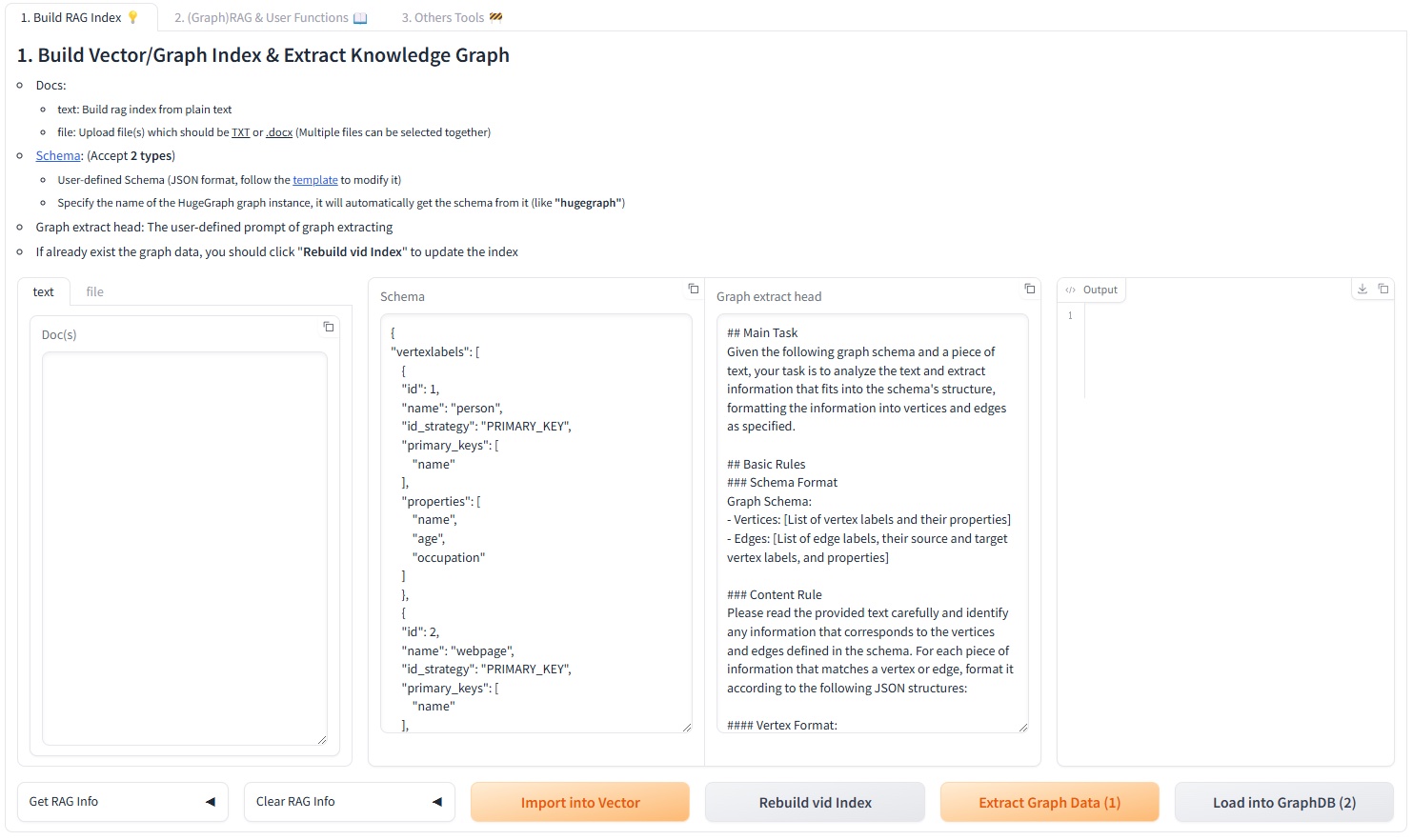
The first Web UI tab splits text into a chunk vector index, extracts vertices and edges according to a schema, writes the graph to HugeGraph, and updates the vertex vector index. Input can be typed into the text tab or uploaded through the file tab, which accepts .txt, .docx, and .pdf files and allows selecting several at once. Encrypted PDFs and scanned PDFs without an extractable text layer are rejected.
The schema can be inline JSON or the name of an existing graph. Through the REST API, a graph name requires a matching client_config.graph; inline JSON neither connects to HugeGraph nor accepts client_config.
The tab also carries two generators. Graph Schema Generator derives a schema from query examples plus a few-shot example. Graph Extraction Prompt Generator writes an extraction prompt from a described scenario and a selected reference example. A Graph Extraction Split Type dropdown chooses document, paragraph, or sentence granularity before extraction.
GraphRAG
The query pipeline can combine direct LLM answers, chunk-vector retrieval, and graph retrieval. Graph retrieval first extracts keywords and matches vertices, then attempts Text2Gremlin. If generation or execution fails, it can fall back to predefined graph traversals. Request parameters control result limits, vector distance thresholds, template counts, and reranking.
The same tab has a batch back-testing panel that reads questions from an .xlsx or .csv file, answers each one, and returns a downloadable file. A template file is offered for download next to the upload control.
Text2Gremlin
POST /text2gremlin generates Gremlin from natural language, the graph schema, and optional examples. A custom prompt must retain {query}, {schema}, {example}, and {vertices}.
The matching UI tab can first build the example vector index from a .json or .csv file of question and Gremlin pairs. The bundled resources/demo/text2gremlin.csv is used when no file is supplied.
Graph and Admin Tools
The Graph Tools tab runs a Gremlin query directly, triggers a manual graph backup, and can initialize demo data in HugeGraph. The Admin Tools tab shows the last lines of logs/llm-server.log behind an ADMIN_TOKEN prompt, and can refresh or clear that file.
Two background tasks run for the lifetime of the process: a cron job that backs up the graph every day at 01:00, and a task that keeps vertex-id embeddings up to date.
Models and Vector Backends
Chat, information extraction, and Text2Gremlin can independently use an OpenAI-compatible endpoint, Ollama, or LiteLLM. The embedding model is configured separately and supports the same three providers. Reranking supports Cohere and SiliconFlow.
FAISS is the default vector index. CUR_VECTOR_INDEX selects Faiss, Milvus, or Qdrant, and the same choice is available in the 5. Set up the vector engine. panel of the Web UI. Milvus and Qdrant require the optional dependencies:
See the workflow guide, the configuration reference, and the REST API for details.
Programmatic Use
The former RAGPipeline and KgBuilder classes were replaced by a pipeline scheduler. Call a flow by name through SchedulerSingleton:
The registered flow names are rag_raw, rag_vector_only, rag_graph_only, rag_graph_vector, text2gremlin, build_examples_index, build_vector_index, graph_extract, import_graph_data, update_vid_embeddings, get_graph_index_info, build_schema, and prompt_generate. schedule_stream_flow is the async streaming variant.
Development Checks
Install the module and the development tools from the repository root, then run the checks that mirror CI:
Git hooks are available through pre-commit: