Deploy HugeGraph with Helm
This guide covers HugeGraph 1.8.0 and later, using Helm 3.10+ with OCI support and Kubernetes (K8s) 1.23+.
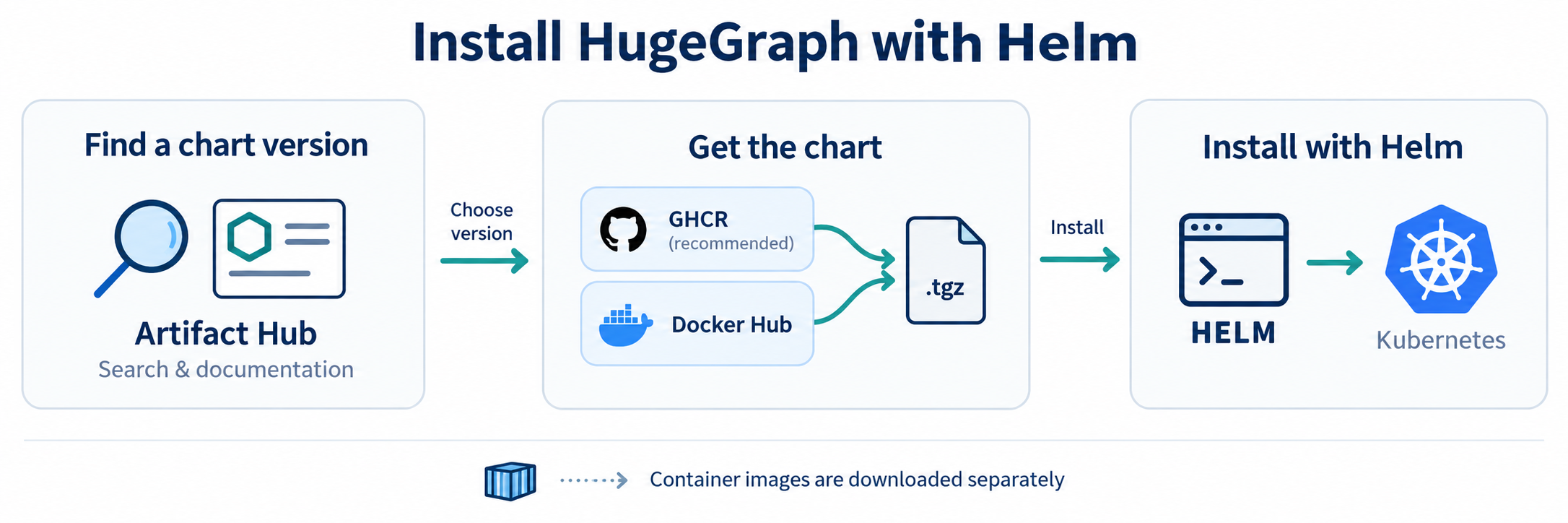
Install hugegraph-helm from GHCR or Docker Hub. Chart and HugeGraph versions are maintained separately:
for example, a 0.4.x Chart can deploy a 1.8.x service.
The current development Chart uses latest images for the base HugeGraph components and is intended for testing.
Optional Vermeer is pinned to a verified published image and digest; see optional engines.
For production, choose a stable Chart once the corresponding HugeGraph service has been released, and review its image versions.
Image tags can change; set each component’s image.digest to keep using the same image content.
Artifact Hub helps you find the Chart, browse versions and read installation instructions. The packages themselves are downloaded from GHCR or Docker Hub. See the chart README for settings and source-based development, and the operations reference for lifecycle procedures.
1 Install
Default Topology & Storage Prerequisites
- Components: Deploys 3 PD + 3 Store + 3 Server and Hubble by default, with authentication and persistent storage enabled.
- Volume Requirements: Requires a default dynamic StorageClass or matching pre-created static PVs, totaling 7 persistent volumes (3 × 10 GiB PD volumes, 3 × 50 GiB Store volumes, and 1 × 1 GiB Hubble volume).
- Memory Sizing: Retains container JVM memory auto-calculation; configure resource requests/limits to allocate sufficient physical memory for the 9 JVMs and Hubble.
Choose either registry; GHCR is recommended for public CI. For local lightweight testing, use the single-node preset.
--devel selects the highest Chart version, including development and stable versions, without limiting the version series.
For production or reproducible installations, replace --devel with --version <published-version> to pin your chosen version.
The single-node preset selects 1 PD + 1 Store + 1 Server using HStore, plus Hubble, with relaxed scheduling constraints. It leaves SeaTunnel and Vermeer disabled.
2 Modes and entry points
The extracted package is rooted at hugegraph-helm/; the source directory remains helm/hugegraph/.
HugeGraph Helm Chart Layout
hugegraph-helm/
- Chart.yamlChart metadata and version definitions
- values.yamlDefault values (easy mode: 3 PD + 3 Store + 3 Server + 1 Hubble, NodePort)
- values-single.yamlSingle-node preset (local Minikube/Kind testing with 1 replica and no anti-affinity)
- values-cluster.yamlMulti-node cluster preset (required anti-affinity, Store OnDelete rollout)
- values-strict.yamlHardened security preset (strict mode: ClusterIP only, strict NetworkPolicies)
- values.schema.jsonSchema validation for values configuration
templates/Kubernetes workload templates
- pd-statefulset.yamlPD StatefulSet (metadata and scheduling)
- store-statefulset.yamlStore StatefulSet (storage engine)
- server-deployment.yamlServer Deployment (injects serviceId and graphSpace)
- hubble-deployment.yamlHubble UI Deployment
- tests/Smoke validation hook (helm test, supports custom testGraphAlias)
- examples/Deployment examples: local PVs, GitOps credentials, optional engines and Ingress
- docs/operations.mdLifecycle operations and recovery guide
mode: easy is the default. Server and Hubble use automatic NodePorts; PD stays ClusterIP. HTTP works without a domain, certificate or acknowledgement.
mode: strict defaults Server/Hubble to ClusterIP and enables full NetworkPolicy isolation.
Enabled SeaTunnel and Vermeer native HTTP/UI default to NodePort in easy mode and ClusterIP in strict mode; both require login.
Internal RPC, Worker HTTP and SeaTunnel member ports remain private.
Both modes keep authentication and persistence.
Explicit component parameters take priority over global parameters, which take priority over mode defaults; explicit false remains an override.
The global parameters are persistence.enabled and global.imageRegistry. Strict mode is also available through values-strict.yaml.
| Entry | Access | Requirements |
|---|---|---|
| NodePort | http://<reachable-node-ip>:<assigned-node-port> | Node connectivity and firewall access; no additional controller |
| ClusterIP | Internal Service IP/DNS, for example hugegraph-server.hugegraph.svc:8080 | External clients use port-forward or an existing gateway |
| LoadBalancer | Infrastructure-assigned address | Compatible load balancer controller |
| Ingress | HTTP routing through a controller | Installed controller; hostname and TLS optional |
Open Hubble on its assigned NodePort and log in as admin with this password. A node need not host the Pod with default externalTrafficPolicy: Cluster.
The internal ClusterIP is a virtual Service address, not a node IP; a laptop normally cannot reach it directly.
Use kubectl -n hugegraph port-forward svc/hugegraph-hubble 8088:8088 for a local browser at http://127.0.0.1:8088.
The base PD/Server/Hubble client Services support externalTrafficPolicy, loadBalancerClass, loadBalancerIP, loadBalancerSourceRanges, externalIPs
and allocateLoadBalancerNodePorts, subject to the cluster/controller’s capabilities. Use LoadBalancer fields with that Service type.
NodePort omission or 0 means automatic allocation. Fixed ports are validated against the cluster’s configured range by Kubernetes;
the chart does not force 30000–32767. Legacy HTTP acknowledgement fields remain accepted but no longer gate rendering.
Optional engines: disabled by default
By default, the Chart provisions only the core graph services (PD + Store + Server + Hubble). For data migration and distributed memory graph computing, the Chart offers SeaTunnel and Vermeer as native optional engines, both disabled by default:
| Engine | Default | Purpose | Topologies (*.mode) | Access & Security |
|---|---|---|---|---|
| Hubble | Enabled (true) | Graph visualization, multi-graphspace management & metrics | Single-replica Deployment | Follows global mode (NodePort or ClusterIP) |
| SeaTunnel | Disabled (false) | Heterogeneous data ingestion & full graph migration | standalone / cluster | NodePort in easy, ClusterIP in strict; HTTP Basic auth |
| Vermeer | Disabled (false) | Memory-first high-performance distributed graph algorithms | standalone / cluster | NodePort in easy, ClusterIP in strict; Token auth, auto-wired to Hubble |
Enable either engine by setting its enabled key to true in values. Their administrator passwords are generated independently from Server.
For seatunnel.service.type and vermeer.service.type, null inherits the mode default: NodePort in easy mode, ClusterIP in strict mode.
An explicit ClusterIP stays private; an explicit NodePort, including in strict mode, exposes authenticated HTTP/UI.
Clear an older explicit ClusterIP override to null to inherit easy mode. With service.nodePort omitted or null, Kubernetes assigns the port.
The engines’ standalone / cluster topologies are independent of these access settings.
SeaTunnel: On-demand Data Import, Export, and Migration
Topologies:
standaloneruns 1 Hybrid node for lightweight testing;clusterruns multiple homogeneous nodes for high-throughput batch jobs.Access & Authentication: In easy mode, open
http://<reachable-node-ip>:<NodePort>/#/overviewusing the assigned HTTP NodePort:Log in with HTTP Basic username
adminand the password fromhugegraph-seatunnel-authSecret. Strict mode defaults to ClusterIP; usekubectl -n hugegraph port-forward svc/hugegraph-seatunnel 8081:8080for local access. Port5801remains internal.See the SeaTunnel Deployment Section or SeaTunnel Guide for full job configs and migration steps.
Vermeer: In-Memory Graph Computing Integrated with Hubble
Topologies:
standaloneruns Master and Worker in one Pod;clusterprovides a separate Master coordinator Pod and scalable Worker computing Pods (default 3 replicas).Hubble Integration: Hubble automatically acquires the internal Master Service URL and service tokens. Operators can trigger 15+ graph algorithms directly from Hubble without manual token configuration.
Native Dashboard Access: In easy mode, open
http://<reachable-node-ip>:<NodePort>/using the Master HTTP NodePort:Sign in with the password from Secret
<release>-vermeer-adminunder Admin credential. Strict mode defaults to ClusterIP; usekubectl -n hugegraph port-forward svc/hugegraph-vermeer-master 6688:6688for local access. Master/Worker RPC and Worker HTTP remain internal.For image pinning and credentials management, see the Vermeer Deployment Guide.
PD metadata namespace
The top-level metadataCluster parameter (default hg-test) specifies the PD metadata cluster prefix. The Chart injects this value into Server HG_SERVER_CLUSTER and Store PD_CLUSTER, ensuring Store correctly locates the Schema initialized by Server when processing Vermeer graph scans.
metadataCluster is a metadata namespace prefix, not a Raft group name. Modifying it does not automatically migrate existing graph data. Always preserve the original cluster prefix when enabling Vermeer; if graph load tasks fail with Schema missing or no such vertex label, check that the namespace prefix matches across all components. Refer to the Metadata Namespace Operations Guide for details.
Standard older releases using hg-test need no namespace-adoption step. For a custom legacy prefix, follow
metadata namespace adoption before upgrading.
Server service identity and graph space
Both server.serviceId and server.graphSpace default to DEFAULT. To register the Server with a specific service name or graph space in PD:
For configuration-only changes, keep the installed Chart version and values.
Find the version with helm list and replace the placeholder below:
A non-default graph space must be created through the PD API before starting its assigned Server. server.testGraphAlias specifies the Gremlin binding checked
by helm test (case-sensitive) and does not auto-infer from graphSpace. Do not re-declare service ID or graph space in server.extraEnv.
3 Internal images and storage
Complete examples cover private registries, dynamic storage, seven local PVs, GitOps credentials, API-only deployment and a hostless HTTP Ingress.
Set global.imageRegistry to prefix unqualified image repositories; an explicit registry in a component repository takes precedence.
The default mirror inventory is only hugegraph/pd, hugegraph/store, hugegraph/server and hugegraph/hubble, at the configured tags/digests.
Store’s PD wait init container and the Helm test reuse Store and Server images respectively, which already contain curl.
No separate curl image or runtime package installation is required. Explicit store.waitImage / server.waitImage overrides remain supported.
Enabled SeaTunnel additionally needs its configured apache/seatunnel image; enabled Vermeer uses the published build pinned above.
Vermeer reuses that image for Master, Worker and service-token initialization. Mirror every enabled image and explicit helper override.
For a custom Vermeer image, also update vermeer.image.digest, or explicitly clear it when selecting by tag; a nonempty digest takes priority.
Storage configuration
For storage, empty storageClassName inherits the cluster default, while "-" explicitly selects no StorageClass.
Local PVs require prepared host directories, matching capacities, nodeAffinity and a kubernetes.io/no-provisioner StorageClass;
WaitForFirstConsumer binds with the Pod’s scheduling constraints. See the complete seven-volume example before creating resources.
For a new temporary installation, set persistence.enabled=false to use emptyDir; component storage flags override it.
The chart never replaces a failed PVC with temporary storage and rejects PD/Store storage-mode changes on initialized releases.
Vermeer uses separate Master and Worker claims, even in its single-Pod mode: two additional volumes in standalone, or one Master volume plus one per Worker in cluster mode. With the default base topology this means 9 or 11 volumes respectively. The small HugeGraph preset plus standalone Vermeer needs 5. The seven-volume local example covers only the base installation. SeaTunnel checkpoints remain temporary local files.
Offline installation and internal repositories
Select the latest version, download that Chart and move the .tgz into your network.
Install it directly or upload it to an existing OCI or HTTP repository.
In air-gapped environments, override the image registry with --set global.imageRegistry=...,
see values-internal-registry.yaml.
Replace the example registry addresses with your own. The archive contains no container images: mirror all configured container images separately, then override their addresses.
4 Authentication and secrets
Normal Helm installations generate and reuse three credentials: <release>-admin (password), <release>-auth-token (token_secret)
and <release>-pd-auth (secret-key). PD REST requires the shared PD secret, supplied to the PD container as HG_PD_AUTH_SECRET_KEY;
Server’s storage wait and Hubble read the same credential. It is not a separate user password that must be invented for each Pod.
For GitOps, use fixed encrypted values or pre-created Secrets through pd.auth.existingSecret, server.auth.admin.existingSecret
and server.auth.token.existingSecret. existingSecret wins over inline values and is not managed by the chart.
The admin password must be printable ASCII without spaces, colons or backslashes; the PD secret must be printable ASCII without surrounding whitespace
or backslashes; the JWT signing key must be at least 32 bytes. Offline renderers cannot reuse live generated Secrets through lookup.
The admin Secret is an initial credential. Updating it does not rotate an existing account.
Change the password through PUT /graphspaces/DEFAULT/auth/users/admin with {"user_password":"<new-password>"} using the existing credential,
update the Secret/source to that same password, then restart the Server Deployment to clear every replica’s auth cache.
Hubble is enabled by default and its current login requires Server authentication. Set hubble.enabled=false for API-only access;
optionally also set server.auth.enabled=false for an unauthenticated API. Inactive credential settings may remain in your values file.
Enabled optional engines always require native login, including in easy mode. Newly generated administrator passwords use 6 random alphanumeric
characters in easy mode or 16 in strict mode. SeaTunnel uses HTTP Basic, while Vermeer uses Secret <release>-vermeer-admin and its
Admin credential login. Upgrades retain existing passwords, including when changing mode; mode changes do not rotate them automatically.
Vermeer password sources are vermeer.auth.admin.password or vermeer.auth.admin.existingSecret/key;
only Master reads that password. Access native administration according to the final Service type:
NodePort connects via the node IP and assigned port, while ClusterIP uses port-forwarding. Hubble service credentials are automatic.
Advanced: Vermeer deployment credentials and GitOps
For GitOps, preserve stable administrator credentials and the separate internal service identity.
The service signing factor uses vermeer.auth.value or vermeer.auth.existingSecret/key; Hubble generates its service token automatically.
Ordinary Hubble use and native password login do not require retrieving that token.
Changing an external native administrator Secret needs a Master restart only. Service-factor rotation requires Master and Hubble,
not Workers. Worker Schema reads reuse the deployment administrator unless vermeer.hugegraphCredentials.existingSecret/key
supplies protected username/password JSON for an existing account with the required Schema permissions. No account is created automatically.
5 Upgrade and verification
Use native Helm value reuse to preserve an existing deployment’s UI, entry, storage and credentials:
Existing explicit helper images also remain under --reuse-values;
add --set-string store.waitImage= --set-string server.waitImage= to reuse component images.
Adopt new defaults deliberately with --reset-values and a reviewed file retaining your image, credential, storage and topology settings.
Do not treat PD membership, storage or credential changes as ordinary independent overrides; consult the lifecycle reference.
PD, Store and Server images built from current master run as UID/GID 10001. The chart gives the PD and Store pods fsGroup: 10001 (with
fsGroupChangePolicy: OnRootMismatch) unless their podSecurityContext sets fsGroup, also when --reuse-values keeps an older release’s empty value,
so they can write PVCs created by older images, which ran as root.
Switch PD and Store to images built from this version in the same rollout that first applies fsGroup, so the kubelet changes the volume ownership right
before the 10001 image starts. Do not run images that still run as root with this chart first, for example a latest that has not moved to this version:
files they create stay owned by root, and OnRootMismatch checks only the volume root, so it does not fix them later. Pin pd.image and store.image to a
build from this version rather than relying on latest. A non-empty image.digest wins over image.tag, and --reuse-values keeps an existing digest,
so a release pinned by digest must change the digest, not only the tag.
If a release already ran root images with fsGroup set, roll out the first 10001 image together with a one-time recursive ownership change. Set the
images in the same command, so the recursive change runs for the 10001 image rather than for a pinned root image. The example clears any reused digest so
the tag applies; a release pinned by digest sets pd.image.digest and store.image.digest to the digests of this version’s images instead:
Before switching the policy back, check that every PD and Store Pod runs the 10001 image you set, not an older root image:
--reuse-values keeps Always, which walks the whole volume on every Pod start, so set the policy back once those Pods are running:
Volumes whose CSI driver ignores fsGroup (for example many NFS drivers) and hostPath volumes need a one-time chown -R 10001:10001 instead.
server.storageWaitTimeoutSeconds defaults to 300 and is passed as WAIT_STORAGE_TIMEOUT_S. An unspecified startup probe threshold is derived
from that wait plus 150 seconds; an explicit threshold is preserved and must cover the storage wait plus at least 120 seconds of Server startup.
A contradictory budget fails rendering with the relevant parameter names. Storage wait timeout is not a JVM memory setting.
The default helm test hook checks connectivity and reads. After installation or recovery, also test a new UI login and your application’s
read/write queries.
For scheduling, NetworkPolicy, rolling updates and recovery, see Kubernetes operations.
6 Deploy and Use SeaTunnel (Optional Engine)
SeaTunnel is an optional data integration engine supported by HugeGraph, disabled by default. When enabled, Helm provisions a persistent SeaTunnel Zeta engine alongside a task Web dashboard within the same release.
The official apache/seatunnel:3.0.0 image comes with built-in HugeGraph connectors (Source and Sink), requiring no custom image builds or plugin installation.
flowchart TB
    A["External Data Source / Remote Graph"] --> ST
    subgraph Release["Same Helm Release"]
        ST["SeaTunnel Zeta<br/>Hybrid Node"] -->|Read / Write| HG["HugeGraph<br/>Server + PD + Store"]
    end
U["Operators"] -->|Web UI / REST (HTTP Basic)| ST6.1 Choose Standalone or Cluster Mode
SeaTunnel uses a Hybrid node architecture where each node handles both job scheduling and execution:
- Standalone Mode: Starts 1 persistent node, minimizing memory footprint for development and lightweight jobs.
- Cluster Mode: Starts multiple uniform nodes forming a cluster for distributed high availability and higher throughput.
SeaTunnel scaling is fully decoupled from the HugeGraph cluster topology. Install from the extracted chart directory or repository root by combining presets:
To add SeaTunnel to an existing HugeGraph deployment, simply set seatunnel.enabled: true with the chosen topology values and run helm upgrade. Existing graph services remain uninterrupted. Because the SeaTunnel image is large, mirror it to your private registry beforehand in air-gapped environments.
6.2 Access Web UI and Authentication
SeaTunnel inherits the global mode setting when seatunnel.service.type: null: easy defaults to NodePort, strict to ClusterIP.
An explicit ClusterIP stays private; explicit NodePort, including in strict mode, exposes HTTP/UI with the same required login.
Clear an older explicit ClusterIP override to null to inherit easy mode. Omit seatunnel.service.nodePort or use null for automatic allocation.
The standalone / cluster topology does not change this access choice:
The Web dashboard and REST APIs require independent HTTP Basic authentication in both modes, distinct from HugeGraph Server credentials.
The username is admin; newly generated passwords use 6 random alphanumeric characters in easy mode or 16 in strict mode.
Upgrades and mode changes retain the existing password. Read it from the release Secret:
Port 5801 is reserved for internal Zeta communication and CLI commands; it does not use HTTP Basic auth and remains private.
External access uses only the authenticated HTTP Service through its assigned NodePort; the application still listens on 8080.
6.3 Run Pre-configured Example Jobs
The Chart mounts sample jobs inside the SeaTunnel Pod, pre-configured with environment variables referencing the in-release Server address, graph name, and credentials:
Prepare Graph: Ensure an empty target graph exists via Hubble or REST API (default
DEFAULT/graph_a).Run Import Job: Ingest 10 sample vertices under the
seatunnel_demo_personlabel:Verify with Export Job: Run the Source sample job to read back the same vertices and print them to standard logs:
Inspect job status and DAG progress in real time on the Web dashboard. To use custom graphs or credentials, override environment variables under seatunnel.env or mount external configurations via seatunnel.config.
6.4 Full Migration and Topology Switches
- Topology Switch: Switch between standalone and cluster modes by updating values and running
helm upgrade. Since the engine process restarts, complete all running batch jobs before switching. - Full Graph Migration: Follow the sequence Schema metadata → Vertices → Edges. See
examples/seatunnel/clone/for automated migration scripts and configs. When migrating fields withDATEtypes, explicitly specify matching server timezones (e.g.timeZone = "UTC") in the Sink config to prevent timezone shift. See the SeaTunnel Source migration guide for details.