HugeGraph-Server Quick Start
1 HugeGraph-Server Overview
HugeGraph-Server is the core server component of the HugeGraph project. It includes submodules such as graph-core, backend, and API.
The Core module implements the TinkerPop interfaces. The Backend module manages data storage. Starting from 1.7.0, supported backends include RocksDB (the default standalone backend), HStore (distributed), HBase, and Memory. The API module provides an HTTP server that converts client requests into calls to the Core module.
⚠️ Important Change: Starting from version 1.7.0, legacy backends such as MySQL, PostgreSQL, Cassandra, and ScyllaDB have been removed. If you need to use these backends, please use version 1.5.x or earlier.
The documentation uses both
HugeGraph-ServerandHugeGraphServer, and the same pattern applies to other components. The two names are nearly interchangeable:HugeGraph-Serverusually refers to the server-side codebase, whileHugeGraphServerrefers to the running service process.
2 Dependency for Building/Running
2.1 Install Java 11 (JDK 11)
Use Java 11 to run HugeGraph-Server. Versions earlier than 1.5.0 kept basic compatibility with Java 8, but Java 11 is recommended.
Before continuing, run java -version to confirm your JDK version.
Note: Running HugeGraph-Server on Java 8 loses some security protections and may reduce performance. Please upgrade as soon as possible. Java 8 is no longer supported starting from 1.7.0.
3 Deploy
There are four ways to deploy HugeGraph-Server components:
- Method 1: Use Docker container (Convenient for Test/Dev)
- Method 2: Download the binary tarball
- Method 3: Source code compilation
- Method 4: One-click deployment
Note: For production environments or environments exposed to the public network, you must use Java 11 and enable Auth authentication to avoid security risks.
3.1 Use Docker container (Convenient for Test/Dev)
You can refer to the Docker deployment guide.
You can use docker run -itd --name=server -p 8080:8080 -e PASSWORD=xxx hugegraph/hugegraph:1.7.0 to quickly start a HugeGraph-Server instance with a built-in RocksDB backend.
Optional:
- You can use
docker exec -it server bashto enter the container for troubleshooting or other maintenance operations. - You can use
docker run -itd --name=server -p 8080:8080 -e PRELOAD="true" hugegraph/hugegraph:1.7.0to preload a built-in sample graph at startup. You can verify it through theRESTful API. See 5.1.8 for details. - You can use
-e PASSWORD=xxxto enable authentication mode and set the admin password. See Config Authentication for details.
If you use Docker Desktop, you can set the options as follows:
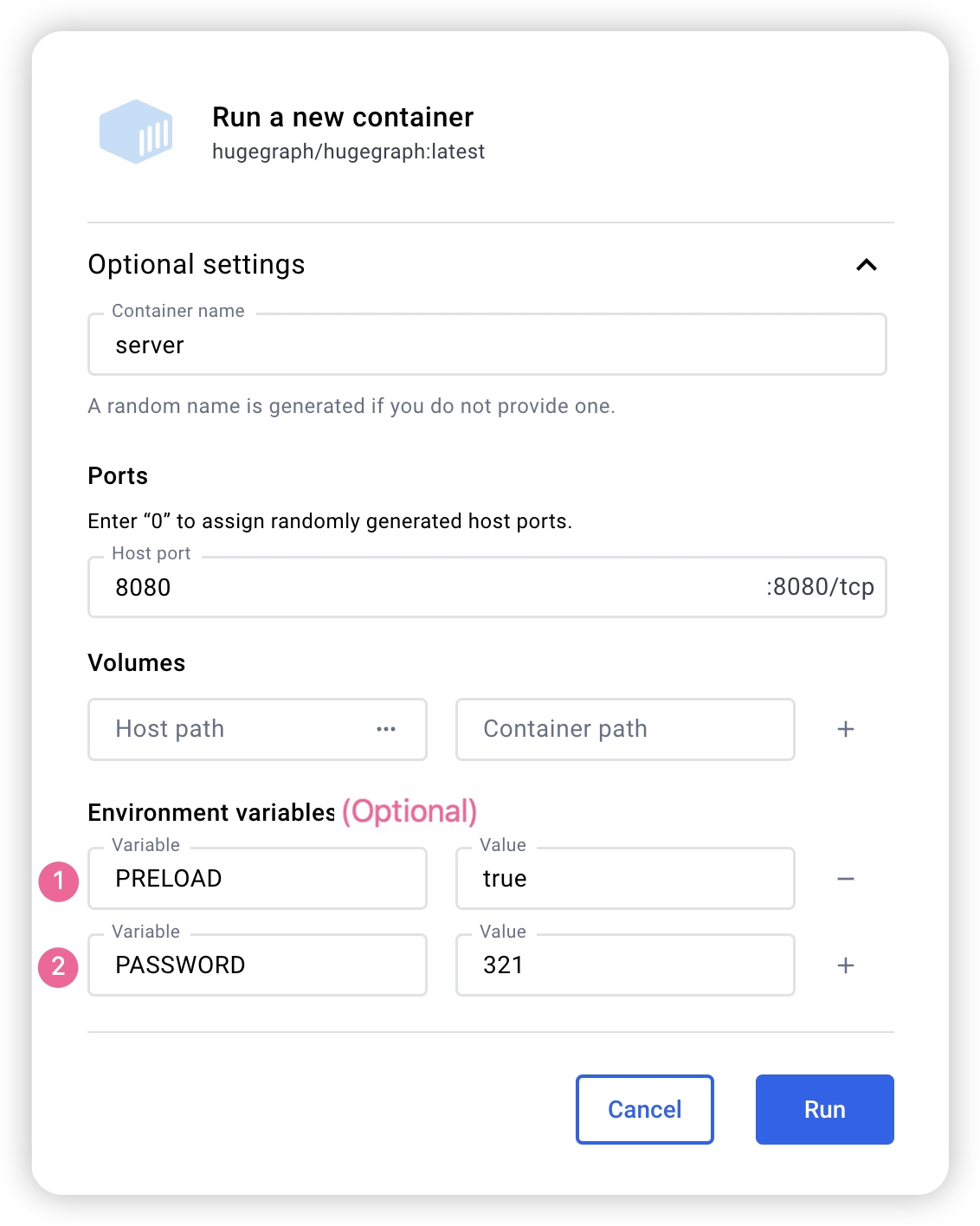
Note: The Docker Compose files use bridge networking (
hg-net) and work on Linux and Mac (Docker Desktop). For the 3-node distributed cluster on Mac (Docker Desktop), allocate at least 12 GB of memory (Settings → Resources → Memory). On Linux, Docker uses host memory directly.
If you want a single, unified setup for multiple HugeGraph services, you can use docker compose.
Two compose files are available in the docker/ directory:
- Single-node quickstart (pre-built images):
docker/docker-compose.yml - Single-node dev build (build from source):
docker/docker-compose.dev.yml
cd hugegraph/docker
# Keep the version aligned with the latest release, for example 1.x.0
HUGEGRAPH_VERSION=1.7.0 docker compose up -d
To enable authentication, add PASSWORD=xxx to the service environment in the compose file or pass -e PASSWORD=xxx to docker run.
See docker/README.md for the full setup guide.
Note:
HugeGraph Docker images are provided as a convenient way to start HugeGraph quickly, but they are not official ASF distribution artifacts. You can find more details in the ASF Release Distribution Policy.
We recommend using a release tag (such as
1.7.0or1.x.0) for stable deployments. Use thelatesttag only if you want the newest features still under development.
3.2 Download the binary tarball
You could download the binary tarball from the download page of the ASF site like this:
# use the latest version, here is 1.7.0 for example
wget https://downloads.apache.org/hugegraph/{version}/apache-hugegraph-incubating-{version}.tar.gz
tar zxf *hugegraph*.tar.gz

# (Optional) verify the integrity with SHA512 (recommended)
shasum -a 512 apache-hugegraph-incubating-{version}.tar.gz
curl https://downloads.apache.org/hugegraph/{version}/apache-hugegraph-incubating-{version}.tar.gz.sha512
3.3 Source code compilation
Please ensure that the wget/curl commands are installed before compiling the source code
Download HugeGraph source code in either of the following 2 ways (so as the other HugeGraph repos/modules):
- download the stable/release version from the ASF site
- clone the unstable/latest version by GitBox(ASF) or GitHub
# Way 1. download release package from the ASF site
wget https://downloads.apache.org/hugegraph/{version}/apache-hugegraph-incubating-src-{version}.tar.gz
tar zxf *hugegraph*.tar.gz

# (Optional) verify the integrity with SHA512 (recommended)
shasum -a 512 apache-hugegraph-incubating-src-{version}.tar.gz
curl https://downloads.apache.org/hugegraph/{version}/apache-hugegraph-incubating-{version}-src.tar.gz.sha512

# Way2 : clone the latest code by git way (e.g GitHub)
git clone https://github.com/apache/hugegraph.git
Compile and generate tarball
cd *hugegraph
# (Optional) use "-P stage" param if you build failed with the latest code(during pre-release period)
mvn package -DskipTests -ntp
The execution log is as follows:
......
[INFO] Reactor Summary for hugegraph 1.5.0:
[INFO]
[INFO] hugegraph .......................................... SUCCESS [  2.405 s]
[INFO] hugegraph-core ..................................... SUCCESS [ 13.405 s]
[INFO] hugegraph-api ...................................... SUCCESS [ 25.943 s]
[INFO] hugegraph-cassandra ................................ SUCCESS [ 54.270 s]
[INFO] hugegraph-scylladb ................................. SUCCESS [  1.032 s]
[INFO] hugegraph-rocksdb .................................. SUCCESS [ 34.752 s]
[INFO] hugegraph-mysql .................................... SUCCESS [  1.778 s]
[INFO] hugegraph-palo ..................................... SUCCESS [  1.070 s]
[INFO] hugegraph-hbase .................................... SUCCESS [ 32.124 s]
[INFO] hugegraph-postgresql ............................... SUCCESS [  1.823 s]
[INFO] hugegraph-dist ..................................... SUCCESS [ 17.426 s]
[INFO] hugegraph-example .................................. SUCCESS [  1.941 s]
[INFO] hugegraph-test ..................................... SUCCESS [01:01 min]
[INFO] ------------------------------------------------------------------------
[INFO] BUILD SUCCESS
[INFO] ------------------------------------------------------------------------
......
After successful execution, *hugegraph-*.tar.gz files will be generated in the hugegraph directory, which is the tarball generated by compilation.
Outdated tools
#### 3.4 One-click deployment (Outdated)HugeGraph-Tools provides a command-line tool for one-click deployment, users can use this tool to quickly download, decompress, configure and start HugeGraphServer and HugeGraph-Hubble with one click.
Of course, you should download the tarball of HugeGraph-Toolchain first.
# download toolchain binary package, it includes loader + tool + hubble
# please check the latest version (e.g. here is 1.7.0)
wget https://downloads.apache.org/hugegraph/1.7.0/apache-hugegraph-toolchain-incubating-1.7.0.tar.gz
tar zxf *hugegraph-*.tar.gz

# enter the tool's package
cd *hugegraph*/*tool*
note:
${version}is the version, The latest version can refer to Download Page, or click the link to download directly from the Download page
The general entry script for HugeGraph-Tools is bin/hugegraph, Users can use the help command to view its usage, here only the commands for one-click deployment are introduced.
bin/hugegraph deploy -v {hugegraph-version} -p {install-path} [-u {download-path-prefix}]
{hugegraph-version} indicates the version of HugeGraphServer and HugeGraphStudio to be deployed, users can view the conf/version-mapping.yaml file for version information, {install-path} specify the installation directory of HugeGraphServer and HugeGraphStudio, {download-path-prefix} optional, specify the download address of HugeGraphServer and HugeGraphStudio tarball, use default download URL if not provided, for example, to start HugeGraph-Server and HugeGraphStudio version 0.6, write the above command as bin/hugegraph deploy -v 0.6 -p services.
4 Config
If you need to quickly start HugeGraph just for testing, then you only need to modify a few configuration items (see next section). For detailed configuration introduction, please refer to configuration document and introduction to configuration items
5 Startup
5.1 Use a startup script to startup
Startup is divided into “first startup” and “non-first startup”. On the first startup, you need to initialize the backend database before starting the service.
If the service was stopped manually, or needs to be started again for any other reason, you can usually start it directly because the backend database is persistent.
When HugeGraphServer starts, it connects to the backend storage and checks its version information. If the backend has not been initialized, or if it was initialized with an incompatible version (for example, old-version data), HugeGraphServer will fail to start and report an error.
If you need to access HugeGraphServer externally, modify the restserver.url configuration item in rest-server.properties (the default is http://127.0.0.1:8080) and change it to the machine name or IP address.
Since the configuration (hugegraph.properties) and startup steps required by various backends are slightly different, the following will introduce the configuration and startup of each backend one by one.
Note: Configure Server Authentication before starting HugeGraphServer if you need Auth mode (especially for production or public network environments).
5.1.1 Distributed Storage (HStore)
Click to expand/collapse Distributed Storage configuration and startup method
Distributed storage is a new feature introduced after HugeGraph 1.5.0, which implements distributed data storage and computation based on HugeGraph-PD and HugeGraph-Store components.
To use the distributed storage engine, you need to deploy HugeGraph-PD and HugeGraph-Store first. See HugeGraph-PD Quick Start and HugeGraph-Store Quick Start.
After ensuring that both PD and Store services are started, modify the hugegraph.properties configuration of HugeGraph-Server:
backend=hstore
serializer=binary
task.scheduler_type=distributed

# PD service address, multiple PD addresses are separated by commas, configure PD's RPC port
pd.peers=127.0.0.1:8686,127.0.0.1:8687,127.0.0.1:8688
# Simple example (with authentication)
gremlin.graph=org.apache.hugegraph.auth.HugeFactoryAuthProxy

# Specify storage backend hstore
backend=hstore
serializer=binary
store=hugegraph

# Specify the task scheduler (for versions 1.7.0 and earlier, hstore storage is required)
task.scheduler_type=distributed

# pd config
pd.peers=127.0.0.1:8686
Then enable PD discovery in rest-server.properties (required for every HugeGraph-Server node):
usePD=true

# notice: must have this conf in 1.7.0
pd.peers=127.0.0.1:8686,127.0.0.1:8687,127.0.0.1:8688
# If auth is needed
# auth.authenticator=org.apache.hugegraph.auth.StandardAuthenticator
If configuring multiple HugeGraph-Server nodes, you need to modify the rest-server.properties configuration file for each node, for example:
Node 1 (Master node):
usePD=true
restserver.url=http://127.0.0.1:8081
gremlinserver.url=http://127.0.0.1:8181
pd.peers=127.0.0.1:8686

rpc.server_host=127.0.0.1
rpc.server_port=8091

server.id=server-1
server.role=master
Node 2 (Worker node):
usePD=true
restserver.url=http://127.0.0.1:8082
gremlinserver.url=http://127.0.0.1:8182
pd.peers=127.0.0.1:8686

rpc.server_host=127.0.0.1
rpc.server_port=8092

server.id=server-2
server.role=worker
Also, you need to modify the port configuration in gremlin-server.yaml for each node:
Node 1:
host: 127.0.0.1
port: 8181
Node 2:
host: 127.0.0.1
port: 8182
Initialize the database:
cd *hugegraph-${version}
bin/init-store.sh
Start the Server:
bin/start-hugegraph.sh
The startup sequence for using the distributed storage engine is:
- Start HugeGraph-PD
- Start HugeGraph-Store
- Initialize the database (only for the first time)
- Start HugeGraph-Server
Verify that the service is started properly:
curl http://localhost:8081/graphs
# Should return: {"graphs":["hugegraph"]}
The sequence to stop the services should be the reverse of the startup sequence:
- Stop HugeGraph-Server
- Stop HugeGraph-Store
- Stop HugeGraph-PD
bin/stop-hugegraph.sh
Docker Distributed Cluster
Run the full distributed cluster (3 PD + 3 Store + 3 Server) with Docker Compose:
cd hugegraph/docker
HUGEGRAPH_VERSION=1.7.0 docker compose -f docker-compose-3pd-3store-3server.yml up -d
Services communicate via container hostnames on the hg-net bridge network. Configuration is injected via environment variables:
# Server configuration
HG_SERVER_BACKEND: hstore
HG_SERVER_PD_PEERS: pd0:8686,pd1:8686,pd2:8686
Verify the cluster:
curl http://localhost:8080/versions
curl http://localhost:8620/v1/stores
To view runtime logs for any container use docker logs <container-name> (e.g. docker logs hg-pd0).
See docker/README.md for the full environment variable reference, port table, and troubleshooting guide.
5.1.2 Memory
Click to expand/collapse Memory configuration and startup methods
Update hugegraph.properties
backend=memory
serializer=text
The data of the Memory backend is stored in memory and cannot be persisted. It does not need to initialize the backend. This is the only backend that does not require initialization.
Start server
bin/start-hugegraph.sh
Starting HugeGraphServer...
Connecting to HugeGraphServer (http://127.0.0.1:8080/graphs)....OK
The prompted url is the same as the restserver.url configured in rest-server.properties
5.1.3 RocksDB / ToplingDB
Click to expand/collapse RocksDB configuration and startup methods
RocksDB is an embedded database that does not require manual installation and deployment. GCC version >= 4.3.0 (GLIBCXX_3.4.10) is required. If not, GCC needs to be upgraded in advance
Update hugegraph.properties
backend=rocksdb
serializer=binary
rocksdb.data_path=.
rocksdb.wal_path=.
Initialize the database (required on the first startup, or a new configuration was manually added under ‘conf/graphs/’)
cd *hugegraph-${version}
bin/init-store.sh
Start server
bin/start-hugegraph.sh
Starting HugeGraphServer...
Connecting to HugeGraphServer (http://127.0.0.1:8080/graphs)....OK
ToplingDB (Beta): As a high-performance alternative to RocksDB, please refer to the configuration guide: ToplingDB Quick Start
5.1.4 Cassandra
⚠️ Deprecated: This backend has been removed starting from HugeGraph 1.7.0. If you need to use it, please refer to version 1.5.x documentation.
Click to expand/collapse Cassandra configuration and startup methods
users need to install Cassandra by themselves, requiring version 3.0 or above, download link
Update hugegraph.properties
backend=cassandra
serializer=cassandra

# cassandra backend config
cassandra.host=localhost
cassandra.port=9042
cassandra.username=
cassandra.password=
#cassandra.connect_timeout=5
#cassandra.read_timeout=20

#cassandra.keyspace.strategy=SimpleStrategy
#cassandra.keyspace.replication=3
Initialize the database (required on the first startup, or a new configuration was manually added under ‘conf/graphs/’)
cd *hugegraph-${version}
bin/init-store.sh
Initing HugeGraph Store...
2017-12-01 11:26:51 1424  [main] [INFO ] org.apache.hugegraph.HugeGraph [] - Opening backend store: 'cassandra'
2017-12-01 11:26:52 2389  [main] [INFO ] org.apache.hugegraph.backend.store.cassandra.CassandraStore [] - Failed to connect keyspace: hugegraph, try init keyspace later
2017-12-01 11:26:52 2472  [main] [INFO ] org.apache.hugegraph.backend.store.cassandra.CassandraStore [] - Failed to connect keyspace: hugegraph, try init keyspace later
2017-12-01 11:26:52 2557  [main] [INFO ] org.apache.hugegraph.backend.store.cassandra.CassandraStore [] - Failed to connect keyspace: hugegraph, try init keyspace later
2017-12-01 11:26:53 2797  [main] [INFO ] org.apache.hugegraph.backend.store.cassandra.CassandraStore [] - Store initialized: huge_graph
2017-12-01 11:26:53 2945  [main] [INFO ] org.apache.hugegraph.backend.store.cassandra.CassandraStore [] - Store initialized: huge_schema
2017-12-01 11:26:53 3044  [main] [INFO ] org.apache.hugegraph.backend.store.cassandra.CassandraStore [] - Store initialized: huge_index
2017-12-01 11:26:53 3046  [pool-3-thread-1] [INFO ] org.apache.hugegraph.backend.Transaction [] - Clear cache on event 'store.init'
2017-12-01 11:26:59 9720  [main] [INFO ] org.apache.hugegraph.HugeGraph [] - Opening backend store: 'cassandra'
2017-12-01 11:27:00 9805  [main] [INFO ] org.apache.hugegraph.backend.store.cassandra.CassandraStore [] - Failed to connect keyspace: hugegraph1, try init keyspace later
2017-12-01 11:27:00 9886  [main] [INFO ] org.apache.hugegraph.backend.store.cassandra.CassandraStore [] - Failed to connect keyspace: hugegraph1, try init keyspace later
2017-12-01 11:27:00 9955  [main] [INFO ] org.apache.hugegraph.backend.store.cassandra.CassandraStore [] - Failed to connect keyspace: hugegraph1, try init keyspace later
2017-12-01 11:27:00 10175 [main] [INFO ] org.apache.hugegraph.backend.store.cassandra.CassandraStore [] - Store initialized: huge_graph
2017-12-01 11:27:00 10321 [main] [INFO ] org.apache.hugegraph.backend.store.cassandra.CassandraStore [] - Store initialized: huge_schema
2017-12-01 11:27:00 10413 [main] [INFO ] org.apache.hugegraph.backend.store.cassandra.CassandraStore [] - Store initialized: huge_index
2017-12-01 11:27:00 10413 [pool-3-thread-1] [INFO ] org.apache.hugegraph.backend.Transaction [] - Clear cache on event 'store.init'
Start server
bin/start-hugegraph.sh
Starting HugeGraphServer...
Connecting to HugeGraphServer (http://127.0.0.1:8080/graphs)....OK
5.1.5 ScyllaDB
⚠️ Deprecated: This backend has been removed starting from HugeGraph 1.7.0. If you need to use it, please refer to version 1.5.x documentation.
Click to expand/collapse ScyllaDB configuration and startup methods
users need to install ScyllaDB by themselves, version 2.1 or above is recommended, download link
Update hugegraph.properties
backend=scylladb
serializer=scylladb

# cassandra backend config
cassandra.host=localhost
cassandra.port=9042
cassandra.username=
cassandra.password=
#cassandra.connect_timeout=5
#cassandra.read_timeout=20

#cassandra.keyspace.strategy=SimpleStrategy
#cassandra.keyspace.replication=3
Since the scylladb database itself is an “optimized version” based on cassandra, if the user does not have scylladb installed, they can also use cassandra as the backend storage directly. They only need to change the backend and serializer to scylladb, and the host and post point to the seeds and port of the cassandra cluster. Yes, but it is not recommended to do so, it will not take advantage of scylladb itself.
Initialize the database (required on the first startup, or a new configuration was manually added under ‘conf/graphs/’)
cd *hugegraph-${version}
bin/init-store.sh
Start server
bin/start-hugegraph.sh
Starting HugeGraphServer...
Connecting to HugeGraphServer (http://127.0.0.1:8080/graphs)....OK
5.1.6 HBase
Click to expand/collapse HBase configuration and startup methods
users need to install HBase by themselves, requiring version 2.0 or above,download link
Update hugegraph.properties
backend=hbase
serializer=hbase

# hbase backend config
hbase.hosts=localhost
hbase.port=2181
# Note: recommend to modify the HBase partition number by the actual/env data amount & RS amount before init store
# it may influence the loading speed a lot
#hbase.enable_partition=true
#hbase.vertex_partitions=10
#hbase.edge_partitions=30
Initialize the database (required on the first startup, or a new configuration was manually added under ‘conf/graphs/’)
cd *hugegraph-${version}
bin/init-store.sh
Start server
bin/start-hugegraph.sh
Starting HugeGraphServer...
Connecting to HugeGraphServer (http://127.0.0.1:8080/graphs)....OK
for more other backend configurations, please refer tointroduction to configuration options
5.1.7 MySQL
⚠️ Deprecated: This backend has been removed starting from HugeGraph 1.7.0. If you need to use it, please refer to version 1.5.x documentation.
Click to expand/collapse MySQL configuration and startup methods
Because MySQL is licensed under the GPL and incompatible with the Apache License, users must install MySQL themselves, download link
Download the MySQL driver package, such as mysql-connector-java-8.0.30.jar, and place it in the lib directory of HugeGraph-Server.
Update hugegraph.properties to configure the database URL, username, and password.
store is the database name; it will be created automatically if it doesn’t exist.
backend=mysql
serializer=mysql

store=hugegraph

# mysql backend config
jdbc.driver=com.mysql.cj.jdbc.Driver
jdbc.url=jdbc:mysql://127.0.0.1:3306
jdbc.username=
jdbc.password=
jdbc.reconnect_max_times=3
jdbc.reconnect_interval=3
jdbc.ssl_mode=false
Initialize the database (required for first startup or when manually adding new configurations to conf/graphs/)
cd *hugegraph-${version}
bin/init-store.sh
Start server
bin/start-hugegraph.sh
Starting HugeGraphServer...
Connecting to HugeGraphServer (http://127.0.0.1:8080/graphs)....OK
5.1.8 Create an example graph when startup
Pass the -p true argument when starting the script to enable preload, which creates a sample graph.
bin/start-hugegraph.sh -p true
Starting HugeGraphServer in daemon mode...
Connecting to HugeGraphServer (http://127.0.0.1:8080/graphs)......OK
And use the RESTful API to request HugeGraphServer and get the following result:
> curl "http://localhost:8080/graphs/hugegraph/graph/vertices" | gunzip

{"vertices":[{"id":"2:lop","label":"software","type":"vertex","properties":{"name":"lop","lang":"java","price":328}},{"id":"1:josh","label":"person","type":"vertex","properties":{"name":"josh","age":32,"city":"Beijing"}},{"id":"1:marko","label":"person","type":"vertex","properties":{"name":"marko","age":29,"city":"Beijing"}},{"id":"1:peter","label":"person","type":"vertex","properties":{"name":"peter","age":35,"city":"Shanghai"}},{"id":"1:vadas","label":"person","type":"vertex","properties":{"name":"vadas","age":27,"city":"Hongkong"}},{"id":"2:ripple","label":"software","type":"vertex","properties":{"name":"ripple","lang":"java","price":199}}]}
This indicates the successful creation of the sample graph.
5.2 Use Docker to startup
In 3.1 Use Docker container, we introduced how to deploy hugegraph-server with Docker. You can also switch storage backends or preload a sample graph by setting the corresponding parameters.
5.2.1 Uses Cassandra as storage
⚠️ Deprecated: Cassandra backend has been removed starting from HugeGraph 1.7.0. If you need to use it, please refer to version 1.5.x documentation.
Click to expand/collapse Cassandra configuration and startup methods
When using Docker, we can use Cassandra as the backend storage. We highly recommend using docker-compose directly to manage both the server and Cassandra.
The sample docker-compose.yml can be obtained on GitHub, and you can start it with docker-compose up -d. (If using Cassandra 4.0 as the backend storage, it takes approximately two minutes to initialize. Please be patient.)
version: "3"

services:
  graph:
    image: hugegraph/hugegraph
    container_name: cas-server
    ports:
      - 8080:8080
    environment:
      hugegraph.backend: cassandra
      hugegraph.serializer: cassandra
      hugegraph.cassandra.host: cas-cassandra
      hugegraph.cassandra.port: 9042
    networks:
      - ca-network
    depends_on:
      - cassandra
    healthcheck:
      test: ["CMD", "bin/gremlin-console.sh", "--" ,"-e", "scripts/remote-connect.groovy"]
      interval: 10s
      timeout: 30s
      retries: 3

  cassandra:
    image: cassandra:4
    container_name: cas-cassandra
    ports:
      - 7000:7000
      - 9042:9042
    security_opt:
      - seccomp:unconfined
    networks:
      - ca-network
    healthcheck:
      test: ["CMD", "cqlsh", "--execute", "describe keyspaces;"]
      interval: 10s
      timeout: 30s
      retries: 5

networks:
  ca-network:

volumes:
  hugegraph-data:
In this YAML file, configuration parameters related to Cassandra need to be passed as environment variables in the format of hugegraph.<parameter_name>.
Specifically, the hugegraph.properties file contains settings such as backend=xxx and cassandra.host=xxx. To pass these settings through environment variables, prepend hugegraph. to the configuration keys, for example hugegraph.backend and hugegraph.cassandra.host.
Refer to 4 Config for the remaining settings.
5.2.2 Create an example graph when starting a server
Set the environment variable PRELOAD=true when starting Docker so that sample data is loaded during startup.
Use
docker runUse
docker run -itd --name=server -p 8080:8080 -e PRELOAD=true hugegraph/hugegraph:1.7.0Use
docker-composeCreate a
docker-compose.ymlfile like the following and setPRELOAD=truein the environment.example.groovyis a predefined script used to preload sample data. If needed, you can mount a newexample.groovyscript to change the preload data.version: '3' services: server: image: hugegraph/hugegraph:1.7.0 container_name: server environment: - PRELOAD=true - PASSWORD=xxx volumes: - /path/to/yourscript:/hugegraph/scripts/example.groovy ports: - 8080:8080Use
docker-compose up -dto start the container.
And use the RESTful API to request HugeGraphServer and get the following result:
> curl "http://localhost:8080/graphs/hugegraph/graph/vertices" | gunzip

{"vertices":[{"id":"2:lop","label":"software","type":"vertex","properties":{"name":"lop","lang":"java","price":328}},{"id":"1:josh","label":"person","type":"vertex","properties":{"name":"josh","age":32,"city":"Beijing"}},{"id":"1:marko","label":"person","type":"vertex","properties":{"name":"marko","age":29,"city":"Beijing"}},{"id":"1:peter","label":"person","type":"vertex","properties":{"name":"peter","age":35,"city":"Shanghai"}},{"id":"1:vadas","label":"person","type":"vertex","properties":{"name":"vadas","age":27,"city":"Hongkong"}},{"id":"2:ripple","label":"software","type":"vertex","properties":{"name":"ripple","lang":"java","price":199}}]}
This indicates that the sample graph was created successfully.
6. Access server
6.1 Service startup status check
Use jps to see a service process
jps
6475 HugeGraphServer
curl request RESTfulAPI
echo `curl -o /dev/null -s -w %{http_code} "http://localhost:8080/graphs/hugegraph/graph/vertices"`
Return 200, which means the server starts normally.
6.2 Request Server
The RESTful API of HugeGraphServer includes various types of resources, typically including graph, schema, gremlin, traverser and task.
graphcontainsvertices、edgesschemacontainsvertexlabels、propertykeys、edgelabels、indexlabelsgremlincontains variousGremlinstatements, such asg.v(), which can be executed synchronously or asynchronouslytraversercontains various advanced queries including shortest paths, intersections, N-step reachable neighbors, etc.taskcontains query and delete with asynchronous tasks
6.2.1 Get vertices and its related properties in hugegraph
curl http://localhost:8080/graphs/hugegraph/graph/vertices
explanation
Since there are many vertices and edges in the graph, for list-type requests, such as getting all vertices, getting all edges, etc., the server will compress the data and return it, so when use curl, you get a bunch of garbled characters, you can redirect to gunzip for decompression. It is recommended to use the Chrome browser + Restlet plugin to send HTTP requests for testing.
curl "http://localhost:8080/graphs/hugegraph/graph/vertices" | gunzipThe current default configuration of HugeGraphServer can only be accessed locally, and the configuration can be modified so that it can be accessed on other machines.
vim conf/rest-server.properties

restserver.url=http://0.0.0.0:8080
response body:
{
    "vertices": [
        {
            "id": "2lop",
            "label": "software",
            "type": "vertex",
            "properties": {
                "price": [
                    {
                        "id": "price",
                        "value": 328
                    }
                ],
                "name": [
                    {
                        "id": "name",
                        "value": "lop"
                    }
                ],
                "lang": [
                    {
                        "id": "lang",
                        "value": "java"
                    }
                ]
            }
        },
        {
            "id": "1josh",
            "label": "person",
            "type": "vertex",
            "properties": {
                "name": [
                    {
                        "id": "name",
                        "value": "josh"
                    }
                ],
                "age": [
                    {
                        "id": "age",
                        "value": 32
                    }
                ]
            }
        },
        ...
    ]
}
For the detailed API, please refer to RESTful-API
You can also visit localhost:8080/swagger-ui/index.html to check the API.
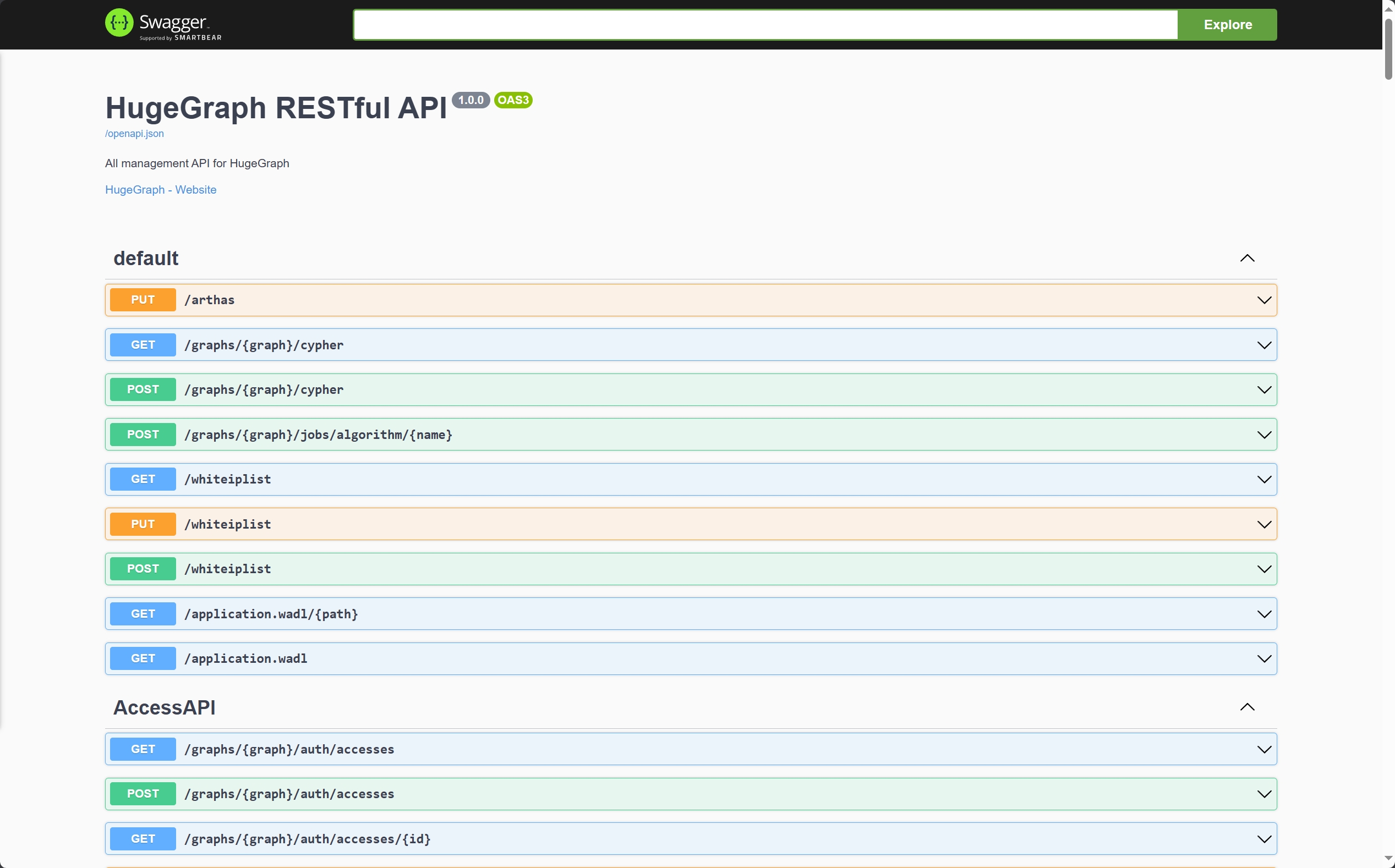
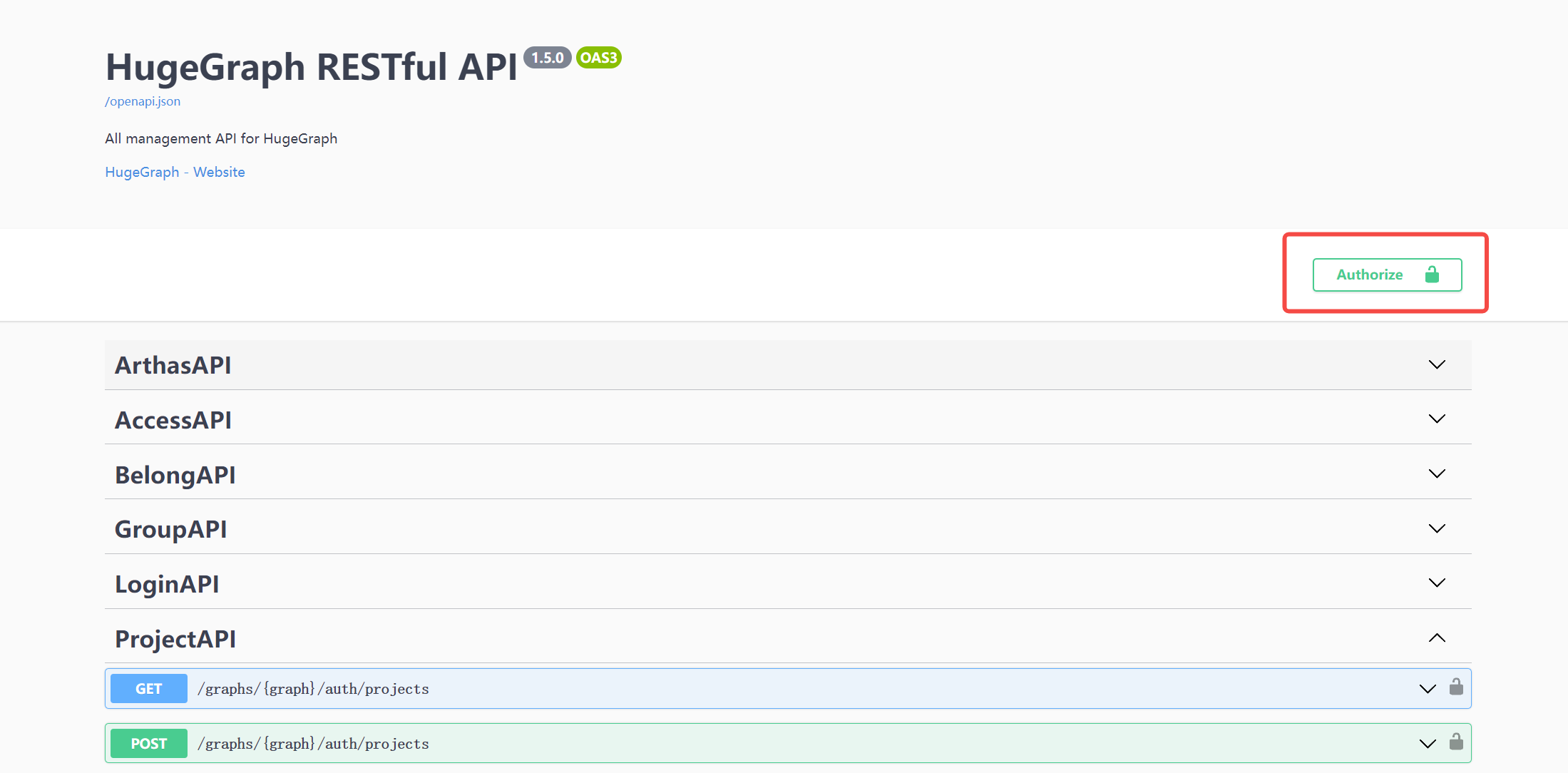
When using Swagger UI to debug the API provided by HugeGraph, if HugeGraph Server turns on authentication mode, you can enter authentication information on the Swagger page.
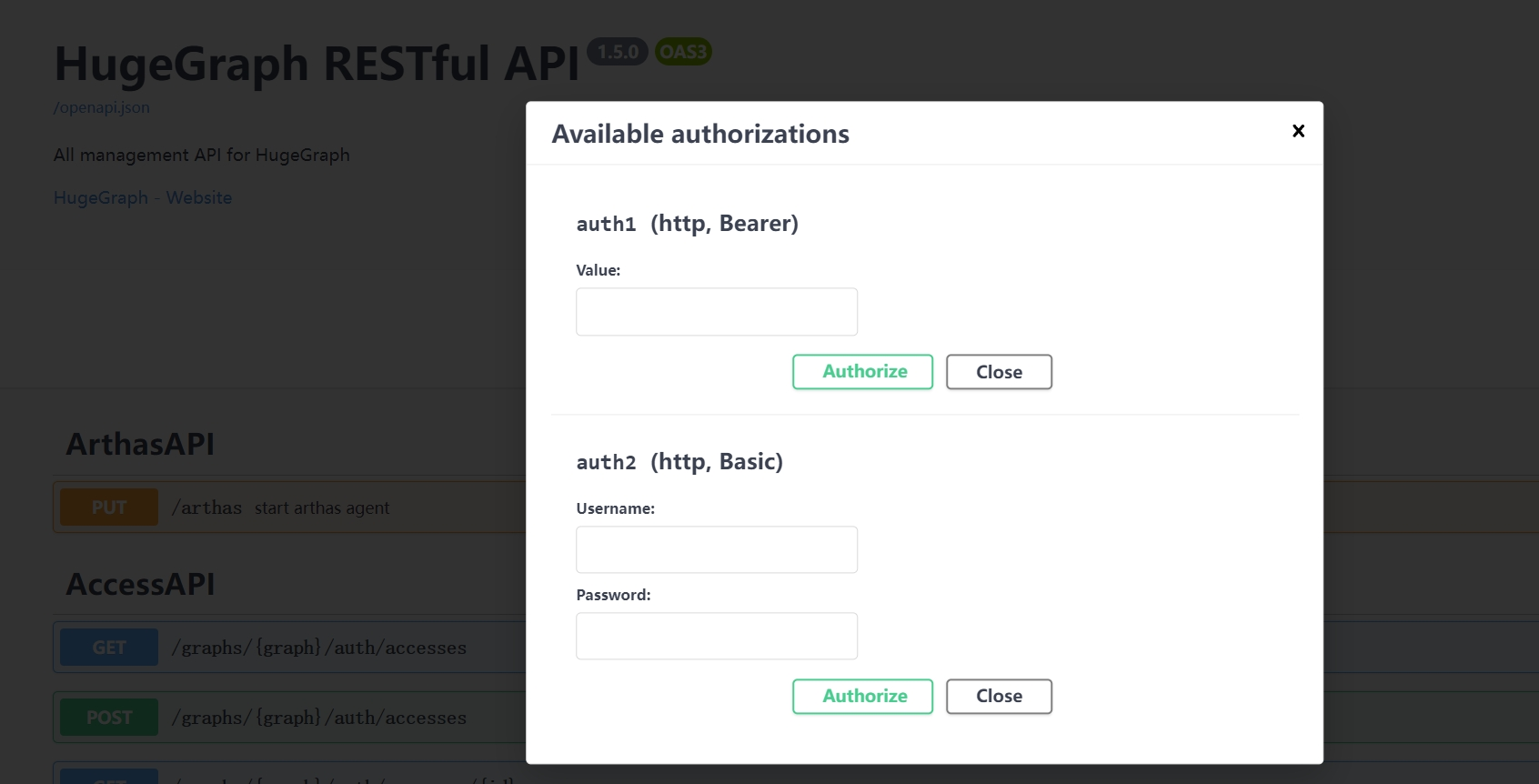
Currently, HugeGraph supports setting authentication information in two forms: Basic and Bearer.
7 Stop Server
$cd *hugegraph-${version}
$bin/stop-hugegraph.sh
8 Debug Server with IntelliJ IDEA
Please refer to Setup Server in IDEA