HugeGraph Server Quick Start
1 HugeGraph Server Overview
apache/hugegraph is the main repository for the HugeGraph graph database. Its top-level modules include hugegraph-server, hugegraph-pd, and hugegraph-store. This page describes the hugegraph-server module and the service it runs.
The hugegraph-server module contains hugegraph-core, hugegraph-api, hugegraph-dist, and storage adapters. Core implements the property graph model, transactions, and TinkerPop interfaces. API provides the HTTP service and delegates client requests to Core. Graph data is stored in RocksDB (the default standalone backend), HStore (distributed), or HBase.
Version scope: Download examples use the ASF HugeGraph 1.7.0 release. Source builds, configuration defaults, and startup behavior follow apache/hugegraph master. A master build is not an ASF release artifact, even if its version number matches a release. This guide covers RocksDB, HStore, and HBase; see 1.5.x documentation for other legacy backends.
Naming:
HugeGraphmeans the overall project or main repository,hugegraph-serveris its Server module, andHugeGraphServeris the Java service class. Server below means the running graph database service.
The map uses short labels for the repository modules described above. server, core, api, dist, pd, and store refer to the corresponding
hugegraph- modules; dist packages the distribution.
---
markmap:
  spacingHorizontal: 40
---
# HugeGraph
## server
- core
- api
- dist
## pd
## store
2 Dependency for Building/Running
2.1 Install Java 17 (JDK 17)
Starting with HugeGraph 1.8.0, use Java 17; 1.7.0 is the last release supporting Java 11.
Build all modules with JDK 17 and Maven 3.6.3 or later, and run Server, PD and Store with JDK 17.
Server security check (-s true) requires Java 17 to 23 and a readable conf/java-security.properties;
on Java 24 or later, start Server with -s false (JDK 24+ dropped Security Manager via JEP 486).
Before continuing, run java -version to confirm your JDK version.
TinkerPop 3.8.1 Compatibility & Key Changes
HugeGraph 1.8.0 upgrades to TinkerPop 3.8.1 and Groovy 4.0.25. Use the Gremlin configuration files bundled with Server.
- Serializer Packages: Driver serializer classes moved from
org.apache.tinkerpop.gremlin.driver.sertoorg.apache.tinkerpop.gremlin.util.ser. Keep HugeGraph registries. - Graph.Features:
supportsUniformListValues()returnsfalsefor properties. SchemavalueList()/LISTproperties remain supported without rewriting existing data. - Traversal Multiplicity: Mid-traversal scans retain input multiplicity (e.g. for 3 vertices,
g.V().V().count()returns9L). - Date & Time Types:
DATEproperties acceptOffsetDateTimefor writes and indexed equality/range queries (instant normalized to milliseconds). - Filtering Behavior:
P.typeOf()runs as a local filter; count filtering applies range optimizations only when predicate branches are provably safe.
For complete client configuration and migration details, see the server runtime documentation.
3 Deploy
There are four ways to deploy the Server service:
- Docker container Quickly start a Server service for testing or development.
- ASF release archive Download a released tarball and verify it before installation.
- master source Build the development branch; its output is not an ASF release archive.
- Legacy one-click deployment (outdated) Reference for the older deployment workflow.
Production requires authentication and restricted network access
HugeGraph disables user authentication by default. Enable authentication and authorization, maintain an IP allowlist, and grant minimum permissions. Do not expose Gremlin, Cypher, or other query APIs directly to the public Internet. Retain Server audit-*.log and restrict read access. auth.audit_log_rate limits per-user output rate rather than turning audit logging on or off. See the security guide.
3.1 Use Docker container (Convenient for Test/Dev)
You can refer to the Docker deployment guide.
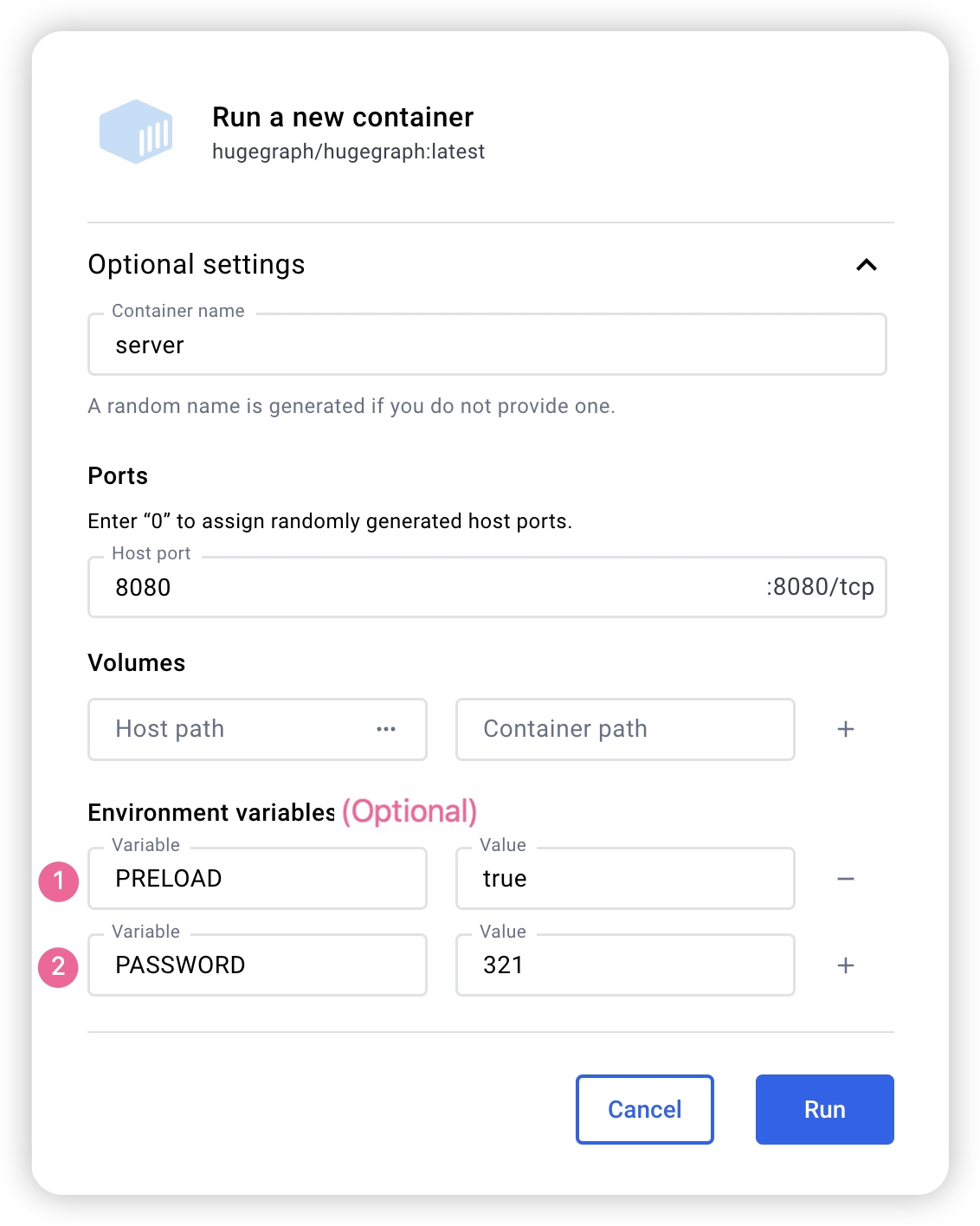
You can use docker run -itd --name=server -p 8080:8080 -e PASSWORD=xxx hugegraph/hugegraph:1.7.0 to quickly start a Server instance using the RocksDB backend.
Optional:
- You can use
docker exec -it server bashto enter the container for troubleshooting or other maintenance operations. - You can use
docker run -itd --name=server -p 8080:8080 -e PRELOAD="true" hugegraph/hugegraph:1.7.0to preload a built-in sample graph at startup. You can verify it through theRESTful API. See 5.1.4 for details. - You can use
-e PASSWORD=xxxto enable authentication mode and set the admin password. See Config Authentication for details.
If you use Docker Desktop, you can set the options as follows:
The Docker Compose files use bridge networking (hg-net) and work on Linux and Mac (Docker Desktop). For the 3-node distributed cluster on Mac (Docker Desktop), allocate at least 12 GB of memory (Settings → Resources → Memory). On Linux, Docker uses host memory directly.
Use docker compose to manage multiple HugeGraph services from one configuration. Four Compose files are available in the docker/ directory:
| Topology | Compose file | Services |
|---|---|---|
| Standalone (start here) | docker-compose.yml | 1 RocksDB Server + 1 Hubble |
| Minimal HStore (current master) | docker-compose-hstore.yml | 1 PD + 1 Store + 1 Server + 1 Hubble; locally built master images required |
| HA reference (current master) | docker-compose-3pd-3store-3server.yml | 3 PD + 3 Store + 3 Server + 1 Hubble; locally built master images required |
| Source build override for the minimal HStore topology | docker-compose.dev.yml | (used together with docker-compose-hstore.yml) |
The standalone topology publishes the Server on port 8080 and Hubble on 127.0.0.1:8088. HUGEGRAPH_VERSION selects the Server, PD, and Store image tags; Hubble is selected separately with HUBBLE_IMAGE.
The standalone docker-compose.yml example uses hugegraph/hugegraph:1.7.0; its docker/conf/hubble/standalone.properties is bundled in source. Compose reads the administrator password from HUGEGRAPH_ADMIN_PASSWORD and JWT secret from HUGEGRAPH_AUTH_TOKEN_SECRET, normally in docker/.env. A nonempty password enables authentication, automatically detected by Hubble. With docker run, use -e PASSWORD=xxx. Master HStore Compose files cannot be combined with 1.7.0 PD/Store/Server release images.
JWT version differences: Master-built Server maps HUGEGRAPH_AUTH_TOKEN_SECRET to HG_SERVER_AUTH_TOKEN_SECRET and writes startup configuration; preserve the secret across recreation. The 1.7.0 entrypoint handles older variables such as PASSWORD, ignoring HG_SERVER_AUTH_TOKEN_SECRET. To keep a stable JWT secret in 1.7.0, persist auth.token_secret in that version’s conf/graphs/hugegraph.properties. With a randomly generated default, do not assume issued JWTs survive Server restarts.
See docker/README.md for the full setup guide.
Server service identity with PD
For a PD-backed Server, the Helm chart exposes server.serviceId and server.graphSpace.
Both default to DEFAULT, which preserves the existing server.service_id and server.graphspace
values in conf/rest-server.properties. A non-default chart value injects HG_SERVER_SERVICE_ID
or HG_SERVER_GRAPHSPACE into the Server container.
These service identity chart settings (server.serviceId, server.graphSpace, and server.testGraphAlias)
apply to development 1.8.0+ builds and charts; older versions such as 1.7.0 do not support these options.
Do not use this example with older chart or image versions lacking these features.
Non-empty service IDs supplied through HG_SERVER_SERVICE_ID, SERVICE_ID, or server.serviceId
must use printable ASCII; spaces and backslashes are supported, while deployment checks reject
non-ASCII and control characters. This entrypoint restriction does not change Core Service naming
or existing manually supplied properties. Helm preserves dollar signs in server.serviceId literally,
including $(POD_IP); this field does not expand Kubernetes environment references.
The full service ID, including / and -, is retained when service metadata is reloaded or its graph space is cleared.
Set the identity through these chart values; Server extraEnv reserves both the new and legacy identity variable names.
HG_SERVER_GRAPHSPACE, the effective GRAPH_SPACE fallback,
and server.graphSpace accept DEFAULT or an existing space name of up to 48 lowercase letters, digits,
and underscores, starting with a letter:
Before deploying Servers assigned to team_a, create that graph space through an existing Server
in DEFAULT, using an account with permission to create graph spaces. The chart and these environment
variables do not create graph spaces; all replicas in the Server Deployment use the same identity.
To check a graph in that space with helm test, first create the target graph and set
--set-string server.testGraphAlias=team_a-demo to its actual Gremlin binding. Creating the graph space does not create a hugegraph graph.
For container deployments, HG_SERVER_SERVICE_ID and HG_SERVER_GRAPHSPACE write the same two
properties. The legacy SERVICE_ID and GRAPH_SPACE names remain accepted: a non-empty new variable
wins over its legacy counterpart. If both names for a property are unset or empty, its existing value
is preserved. Compose does not automatically forward these host variables; add explicit Server
environment: entries in a Compose override. See the Helm chart documentation for details.
These settings select the Server’s PD service metadata. They do not move existing graphs or change
server.path_graphspace for REST paths that omit the graph space. Use /graphspaces/team_a/... paths
and select the matching graph space and service in Hubble. When authentication is enabled, explicit paths
still require authorization.
server.testGraphAlias defaults to DEFAULT-hugegraph. The hook checks this existing local binding on every Server Pod;
it does not derive the alias from server.graphSpace. A local binding may exist independently of the Server’s assigned PD graph space,
so a successful default hook does not validate graphs in team_a. If Could not rebind appears, first check that the requested graph exists
and that its alias is correct. A Pod restart cannot create a missing graph or correct an alias.
Match the binding’s case: a local Demo.properties can bind DEFAULT-Demo, while REST-created graph names are lowercase.
Configuration rendering and entrypoint checks alone do not establish non-default Linux discovery, authentication, or isolation between graph spaces.
HugeGraph Docker images are provided as a convenient way to start HugeGraph quickly, but they are not official ASF distribution artifacts. You can find more details in the ASF Release Distribution Policy.
We recommend using a release tag (such as
1.7.0or1.x.0) for stable deployments. Use thelatesttag only if you want the newest features still under development.
3.2 Download a Released Archive
This example uses HugeGraph 1.7.0. For other versions, confirm the release and filenames in the ASF download directory. A master source build is not a released binary.
Extract only after SHA-512 verification succeeds. You can also verify the PGP signature following Apache release procedures:
Trust publisher keys only after verifying them through Apache project channels. Signature verification can complement SHA-512 checks.
3.3 Build from master Source
These commands build the development branch, not the 1.7.0 release.
Install wget or curl before building.
Download HugeGraph source:
Compile and package:
A successful build logs:
The build creates an aggregate master archive under repository-root target/ (the current source version property is 1.8.0):
The filename version comes from source revision; it does not make the build an ASF release artifact. The build also creates repository-root apache-hugegraph-1.8.0/, containing a Server directory named by that module’s final.name, currently apache-hugegraph-server-1.8.0. If retaining only the archive, first run tar zxf target/apache-hugegraph-1.8.0.tar.gz, then enter the Server directory.
Default builds bundle rocksdb, hbase, and hstore modules, listed in backends within backend.properties in the hugegraph-dist JAR. For a RocksDB-only distribution, add -Drocksdb-only:
Outdated tools
3.4 One-click deployment (Outdated)
Outdated This status applies only to this one-click deployment entry.
HugeGraph-Tools provides a one-click deployment command that downloads, extracts, configures, and starts the Server service and HugeGraph-Hubble. These tools are included in the HugeGraph-Toolchain distribution.
Of course, you should download the tarball of HugeGraph-Toolchain first.
note:
${version}is the version, The latest version can refer to Download Page, or click the link to download directly from the Download page
The general entry script for HugeGraph-Tools is bin/hugegraph, Users can use the help command to view its usage, here only the commands for one-click deployment are introduced.
{hugegraph-version} is the Server service and HugeGraphStudio version; see conf/version-mapping.yaml for supported mappings. {install-path} is the installation directory, while {download-path-prefix} optionally overrides the tarball download location. For example, deploy version 0.6 with bin/hugegraph deploy -v 0.6 -p services.
4 Configuration
Server archives include conf/rest-server.properties, conf/gremlin-server.yaml, and conf/graphs/hugegraph.properties; source builds assemble them from hugegraph-server/hugegraph-dist/src/assembly/static/conf/. Edit them inside the extracted Server directory without a separate generation step. Defaults vary by release; the following defaults and startup behavior describe master.
For standalone RocksDB, confirm backend=rocksdb and serializer=binary in conf/graphs/hugegraph.properties. Normal Server initialization scans conf/graphs/ and loads local graphs without requiring graph.load_from_local_config=true. This option defaults to false and controls constructor preloading. Restart Server to apply graph configuration changes; do not use hot reload for maintenance.
See the configuration guide and option reference for details.
5 Startup
5.1 Use a startup script to startup
Startup is divided into “first startup” and “non-first startup”. On the first startup, you need to initialize the backend database before starting the service.
If the service was stopped manually, or needs to be started again for any other reason, you can usually start it directly because the backend database is persistent.
When HugeGraphServer starts, it connects to the backend storage and checks its version information. If the backend has not been initialized, or if it was initialized with an incompatible version (for example, old-version data), HugeGraphServer will fail to start and report an error.
If you need to access HugeGraphServer externally, modify the restserver.url configuration item in rest-server.properties (the default is http://127.0.0.1:8080) and change it to the machine name or IP address.
Since the configuration (hugegraph.properties) and startup steps required by various backends are slightly different, the following will introduce the configuration and startup of each backend one by one.
Configure authentication before production startup
Enable Server authentication and authorization with a strong, nondefault administrator password, an IP allowlist, and minimum business-user permissions.
5.1.1 Distributed Storage (HStore)
First deploy PD and Store; see the PD Quick Start and Store Quick Start.
umask 077 protects the new .env, but set-hubble-pd-password.sh sets generated .local.properties permissions to 0644, making the PD secret readable by other local users. This example assumes trusted local users. On shared hosts, set ownership and read permissions for the Hubble runtime user so Hubble can read the files while unauthorized users cannot. Keeping files untracked does not replace file permission controls.
Distributed storage configuration and startup
Distributed storage, introduced after HugeGraph 1.5.0, uses HugeGraph-PD and HugeGraph-Store for distributed data storage and computing.
After PD and Store are running:
- Edit Server
hugegraph.properties:
The distribution includes conf/graphs/hstore.properties.template; copy it over conf/graphs/hugegraph.properties and adjust pd.peers.
This example uses cluster=hg in rest-server.properties and pd.cluster=hg in graph configuration, matching the master Compose cluster below. These are separate keys for the Server process and graph respectively, not one setting. Select an appropriate cluster name. Likewise, pd.peers in each file has its own configuration scope; this example supplies the same PD RPC addresses to both.
The backend selects the task scheduler: HStore uses distributed scheduling; others use local scheduling. task.scheduler_type is unnecessary and is ignored with a warning when retained for compatibility.
- Edit Server
rest-server.properties:
These addresses support multiple Server processes on one machine; 127.0.0.1 is local only. Across hosts, use routable IPs or DNS for restserver.url, gremlinserver.url, pd.peers, Gremlin host, and rpc.server_host. Advertised RPC addresses and ports must be mutually reachable.
For multiple Servers, edit each node’s rest-server.properties:
Node 1 (master):
Node 2 (worker):
Also configure each node’s gremlin-server.yaml ports:
Node 1:
Node 2:
Start Server:
Distributed startup order:
- Start HugeGraph-PD
- Start HugeGraph-Store
- Start Server
PD and Store manage HStore metadata and storage, so init-store skips that backend. With authentication enabled, init-store still creates the built-in admin account. If storage already holds this account, set init_store.enabled=false in rest-server.properties to skip the entire step, as Docker HStore topologies do.
Verify startup:
Stop in reverse order:
- Stop Server
- Stop HugeGraph-Store
- Stop HugeGraph-PD
Docker HStore HA Cluster (Current Master)
docker-compose-3pd-3store-3server.yml uses master HG_PD_*, HG_STORE_*, and HG_SERVER_* variables unsupported by 1.7.0 release images. Build PD, Store, and Server from the same master source, all tagged local:
Create the authentication environment in docker/ and generate HStore Hubble configuration. Replace the example administrator password; because .env uses single quotes, the password must contain neither single quotes nor newlines. The script generates random JWT and PD secrets and writes the PD secret to two untracked .local.properties files mounted by HStore Compose:
Start HA from docker/. HUGEGRAPH_VERSION=local selects the locally built PD, Store, and Server images; Compose pull_policy: missing uses existing local tags first. HUBBLE_IMAGE still selects Hubble independently:
Generate HG_PD_AUTH_SECRET_KEY once for new data directories and reuse it on restart or when retaining data. Do not commit .env or generated conf/hubble/*.local.properties. Services communicate through container hostnames on the hg-net bridge. Server replicas need the shared JWT secret as well as the administrator password; set HUGEGRAPH_AUTH_TOKEN_SECRET. See the Docker cluster guide and docker/README.md for all variables.
Verify the cluster:
Master PD /v1/stores requires Basic authentication; this uses the generated, loaded HG_PD_AUTH_SECRET_KEY as the hg password.
Inspect runtime logs with docker logs <container-name>, such as docker logs hg-pd0.
See docker/README.md for variables, ports, and troubleshooting.
5.1.2 RocksDB / ToplingDB
The minimal standalone flow below uses a master build and preloads sample data to verify graph reads and writes.
- Check Java against the master build requirements.
- Build master source; the commands below use its nested Server directory.
- Confirm RocksDB configuration, then enter the build output’s nested Server directory.
- Initialize storage, then start the service with sample data using the commands below.
- Request
/versionsand sample graph vertices, and check the actual response contents.
RocksDB is embedded and needs no separate deployment. GCC ≥ 4.3.0 (GLIBCXX_3.4.10) is required; upgrade first if needed.
Master conf/graphs/hugegraph.properties already sets backend=rocksdb and serializer=binary. Keep the defaults if using default data directories; otherwise check your backend and paths before initialization.
Initialize storage on first startup or after adding graph configuration under conf/graphs/:
Start Server and preload the built-in sample graph:
The startup script polls /graphs at configured restserver.url and exits nonzero on timeout or process failure. Check service version, then read sample vertices:
The first response should contain versions; the second should contain vertices with sample names such as marko and lop. A process check or HTTP status alone does not prove backend and business request health.
ToplingDB (Beta): A high-performance RocksDB alternative; see the ToplingDB Quick Start.
5.1.3 HBase
users need to install HBase by themselves, requiring version 2.0 or above,download link
HBase configuration and startup methods
Update hugegraph.properties
Initialize the database (required on the first startup, or a new configuration was manually added under ‘conf/graphs/’)
Start server
5.1.4 Create an example graph when startup
Pass the -p true argument when starting the script to enable preload, which creates a sample graph.
And use the RESTful API to request HugeGraphServer and get the following result:
This indicates the successful creation of the sample graph.
5.1.5 Startup script options
bin/start-hugegraph.sh accepts the following options. Every one of them takes a value, so write -d false, not a bare -d.
| Option | Values | Default | Purpose |
|---|---|---|---|
-d | true, false | true | Daemon mode. With -d false the script stays in the foreground and forwards SIGTERM/SIGINT to the server. |
-g | g1, G1, zgc, ZGC | JVM default | Garbage collector to use (g1/G1 sets -XX:+UseG1GC; zgc/ZGC sets -XX:+UseZGC). Omitting -g uses the JVM default collector. |
-m | true, false | false | Install the cron-based monitor task (bin/start-monitor.sh). For VM and bare-metal deployments only. |
-p | true, false | false | Preload the sample graph, as in 5.1.4. |
-s | true, false | true | Enable HugeSecurityManager; requires Java 17 to 23 and readable conf/java-security.properties. On Java 24+, start with -s false. |
-j | JVM options | empty | Extra JVM options appended to the server command line. |
-t | seconds | 30 | How long to wait for the service to answer before reporting a failed startup. |
-y | true, false | false | Enable the OpenTelemetry agent for traces. |
bin/stop-hugegraph.sh accepts -m true|false (default true), which controls whether the cron monitor task is removed along with the service.
bin/hugegraph-server.sh puts -XX:+HeapDumpOnOutOfMemoryError, -XX:HeapDumpPath and -XX:ErrorFile first in JAVA_TOOL_OPTIONS, so, whether or not
JAVA_OPTIONS is set and with the exceptions below, an out-of-memory heap dump (heapdump_<host>_<launch time>/java_pid<pid>.hprof) and a JVM crash log
(hs_err_pid<pid>_<host>_<launch time>.log) land in logs/, where <launch time> is the local time as YYYYMMDD-HHMMSS. Each start gets its own heapdump_*
directory, so the server and the JVMs it starts, such as computer jobs, write separate dumps (HotSpot names each dump and crash log after the JVM’s PID, so a
JVM that reuses an earlier PID from the same start cannot write its dump, and its crash log replaces the earlier one’s). The host name keeps servers that share
one log directory from picking the same name, and a counter (<launch time>-1, -2, …) is added when the same host already used that second. If the
directory cannot be created, for example on a full disk, the server still starts and dumps go to logs/ itself, as a best effort: a full disk may have no room
for the dump either. A heap dump can be as large as the heap. The launcher never deletes dumps or heapdump_* directories: each start that reaches Java leaves
one, empty unless something ran out of memory, and the launcher keeps it because a computer-job JVM can go on using it after the server exits. Move or delete
old ones once no HugeGraph JVM from that launch is running, but never the newest one of a running server; without it, the next dump is written as a file with
that name. The JVM reads your own JAVA_TOOL_OPTIONS, JDK_JAVA_OPTIONS (including @argfiles), the command line (JAVA_OPTIONS, or -j when JAVA_OPTIONS
is unset or empty) and _JAVA_OPTIONS after these defaults, so a value for one of these flags in any of them overrides the default. Only the environment
variables reach the JVMs the server starts: to turn dumps off for all of them, set JAVA_TOOL_OPTIONS=-XX:-HeapDumpOnOutOfMemoryError, while -j or
JAVA_OPTIONS turns them off for the server JVM only. Either way each start that reaches Java still creates its empty heapdump_* directory, unless creating
it failed and dumps fell back to logs/. If the logs path contains a double quote or %, the launcher warns and heap dumps go to logs/ itself, with no
per-launch directory and no crash log default; the JAVA_TOOL_OPTIONS opt-out still applies. A path with both quote characters gets no heap dump default at
all. Because of the defaults, the JVM prints Picked up JAVA_TOOL_OPTIONS: ... on stderr at startup.
Version scope: this applies to current development/master builds. In 1.7.0 the heap dump flags are added only when
JAVA_OPTIONSis unset, heap dumps go directly tologs/java_pid<pid>.hprof, and JVM crash logs go to the install directory.
5.2 Use Docker to startup
In 3.1 Use Docker container, we introduced how to deploy hugegraph-server with Docker. You can also switch storage backends or preload a sample graph by setting the corresponding parameters.
5.2.1 Create an example graph when starting a server
Set the environment variable PRELOAD=true when starting Docker so that sample data is loaded during startup.
Use
docker runUse
docker run -itd --name=server -p 8080:8080 -e PRELOAD=true hugegraph/hugegraph:1.7.0Use
docker-composeCreate a
docker-compose.ymlfile like the following and setPRELOAD=truein the environment.example.groovyis a predefined script used to preload sample data. If needed, you can mount a newexample.groovyscript to change the preload data.Use
docker compose up -dto start the container.
And use the RESTful API to request HugeGraphServer and get the following result:
This indicates that the sample graph was created successfully.
6. Access server
6.1 Service startup status check
Use jps to see a service process
curl request RESTfulAPI
HTTP 2xx with a JSON versions field confirms REST responsiveness. HugeGraphServer in jps confirms only process existence; verify backend health by preloading the sample graph and requesting vertices as above.
6.2 Request Server
The RESTful API of HugeGraphServer includes various types of resources, typically including graph, schema, gremlin, traverser and task.
graphcontainsvertices、edgesschemacontainsvertexlabels、propertykeys、edgelabels、indexlabelsgremlincontains variousGremlinstatements, such asg.v(), which can be executed synchronously or asynchronouslytraversercontains various advanced queries including shortest paths, intersections, N-step reachable neighbors, etc.taskcontains query and delete with asynchronous tasks
6.2.1 Get vertices and its related properties in hugegraph
explanation
Server can compress vertex, edge, and other list responses. Use
curl --compressedfor automatic decompression:The default listener is
127.0.0.1, inaccessible directly from other machines.
Changing the Server listener
Setting 0.0.0.0 listens on every interface. In production, enable authentication and authorization, an IP allowlist, and minimum permissions; retain and protect audit logs. Do not expose Gremlin or Cypher directly to the public Internet.
response body:
For the detailed API, please refer to RESTful-API
You can also visit localhost:8080/swagger-ui/index.html to check the API.
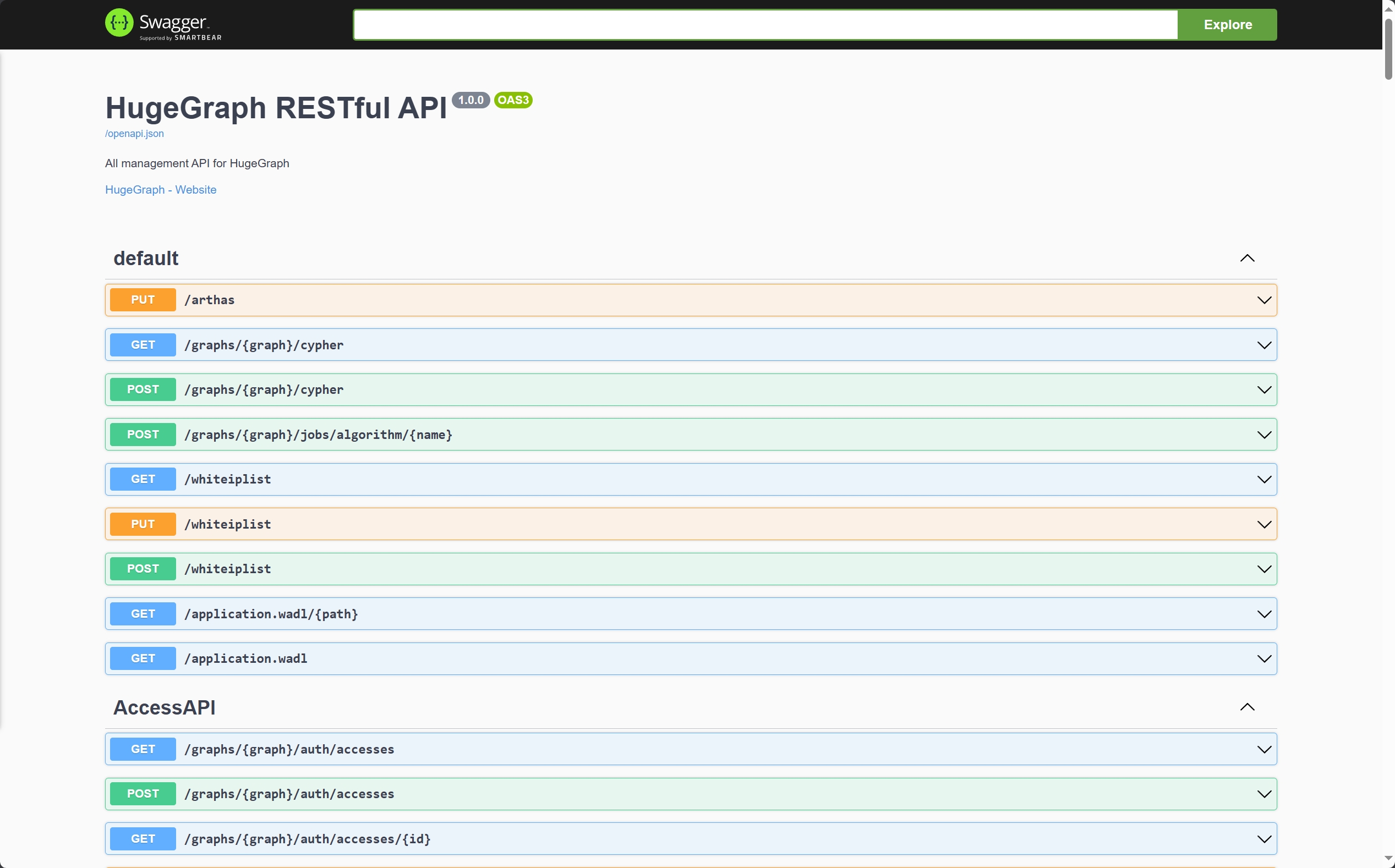
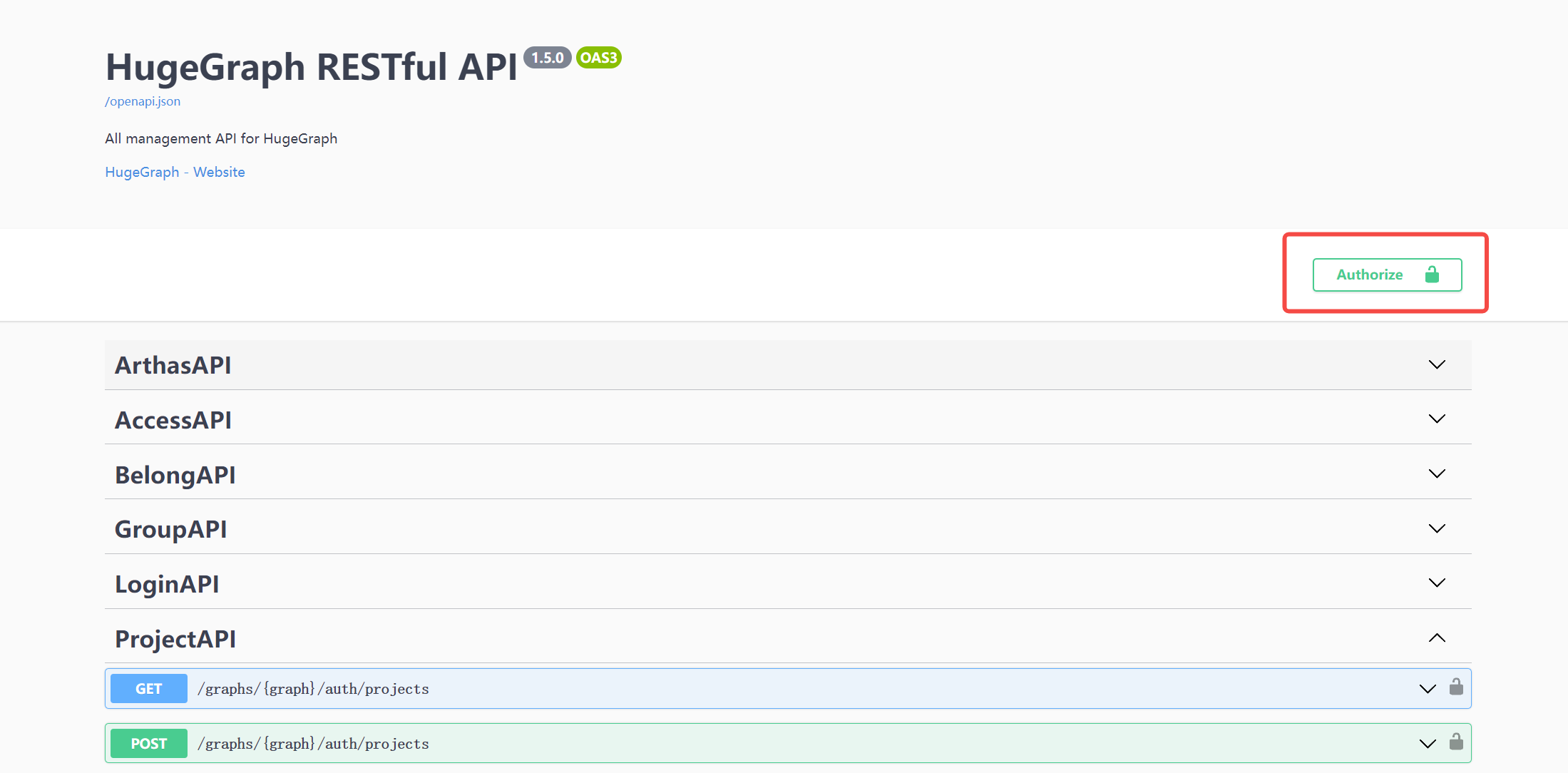
When using Swagger UI to debug the API provided by HugeGraph, if HugeGraph Server turns on authentication mode, you can enter authentication information on the Swagger page.
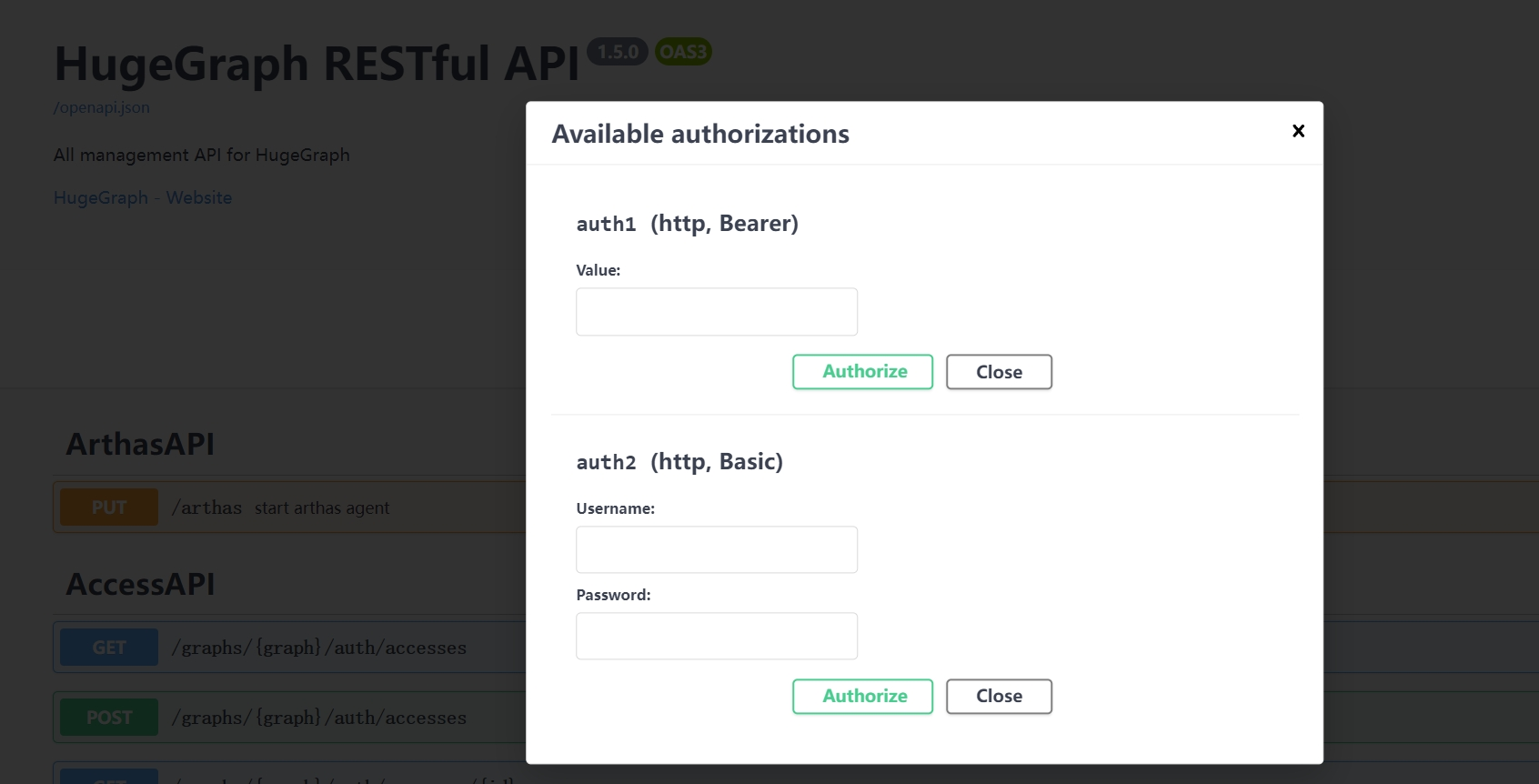
Currently, HugeGraph supports setting authentication information in two forms: Basic and Bearer.
7 Stop Server
8 Debug Server with IntelliJ IDEA
Please refer to Setup Server in IDEA