Export and Migrate Graph Data with SeaTunnel Source
If you need to copy data from one HugeGraph graph to another, use graph2graph: HugeGraph Source reads vertices and edges from the source graph (graph A), and HugeGraph Sink writes them to the target graph (graph B), with an optional Transform in between. The data path is graph A → HugeGraph Source → (optional Transform) → HugeGraph Sink → graph B. If you need to export graph data to a file, JDBC, Kafka, or another system, use graph2any, where a downstream Sink receives the records read by HugeGraph Source. This page covers both job types.
Version requirement: This guide targets SeaTunnel 3.0+
SeaTunnel 3.0+ provides HugeGraph Source, with schema auto-discovery and multi-label reads. See the official Source documentation for parallel-scan backend requirements and configuration limits.
Before starting, complete the shared environment and configuration steps on the import page. They cover JDK, HOCON, plugin installation, and the sample graph model.
1 Migrate a HugeGraph graph (graph2graph)
The following example migrates person vertices and knows edges from a source graph. Use a separate target graph. This section uses CUSTOMIZE_STRING to preserve vertex IDs. Do not reuse the person label created earlier with PRIMARY_KEY.
These two jobs migrate only the selected labels and properties. They do not copy every source schema setting, such as indexes and TTLs. Pause writes to the source graph during the migration so both jobs read a consistent point in time. Afterward, compare vertex and edge counts and sample properties.
1.1 Migrate vertices first
Source adds a ~id column for the original ID, and Sink stores it as a string. Do not declare ~id in schema.fields; manually declaring this reserved column is rejected.
Expand the configuration and save it as config/graph2graph-person.conf
1.2 Migrate edges second
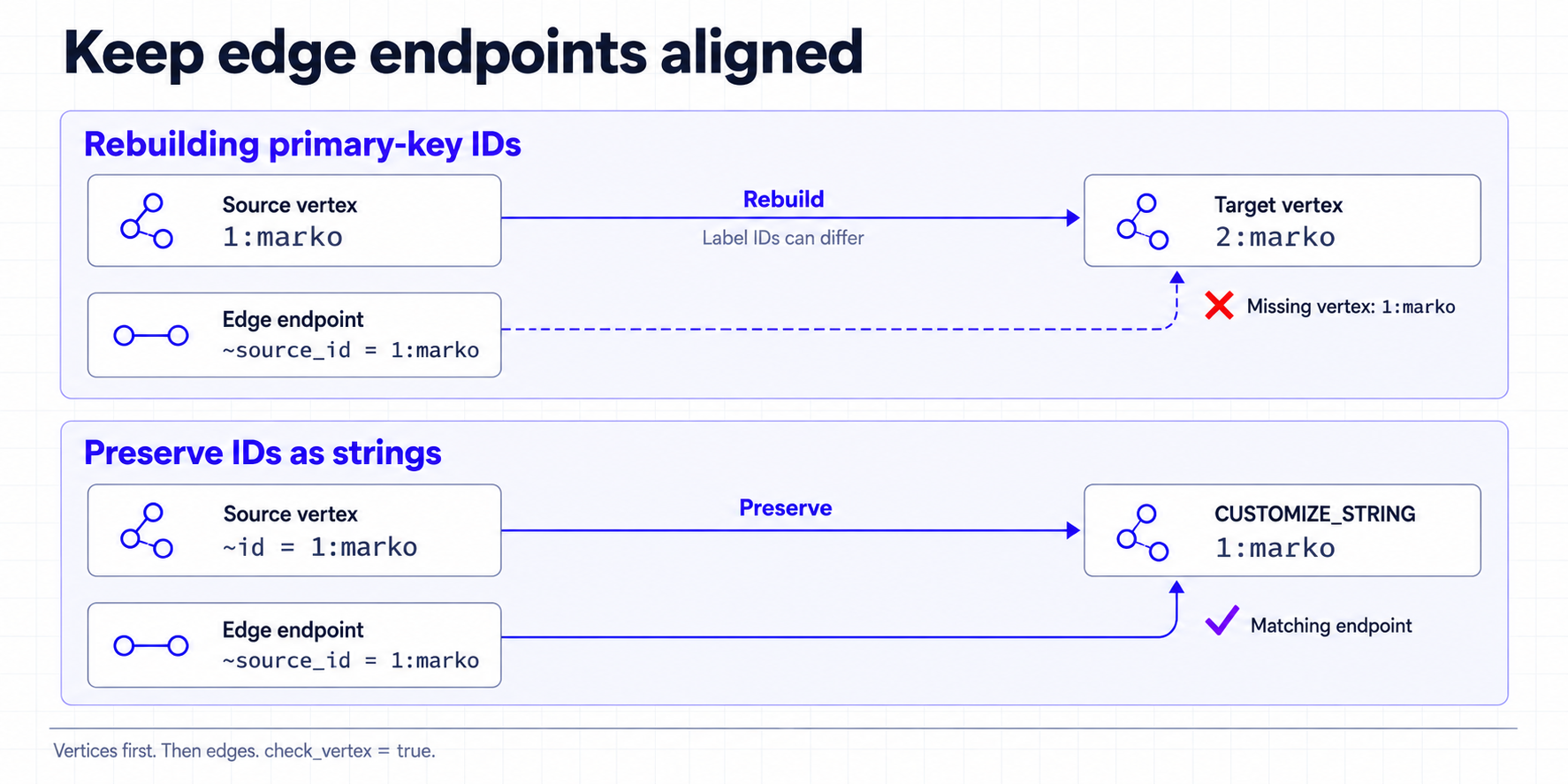
After the vertex job succeeds, use the ~source_id and ~target_id columns added by Source to locate endpoints. Because the previous job preserved the original IDs, these columns can refer directly to vertices in the target graph.
Expand the configuration and save it as config/graph2graph-knows.conf
This example checks endpoints and makes write errors fail the job. The default check_vertex = false does not guarantee a consistent result: a missing endpoint can create a dangling edge, so a successful job is not a substitute for checking the migrated graph.
Why preserve IDs? A HugeGraph
PRIMARY_KEYID contains the internal ID of the vertex label, and that internal ID can differ between graphs. For example, a source vertex can be1:marko, while regenerating the primary key in the target graph can produce2:marko. Reusing the source edge endpoints after regenerating vertex IDs can connect edges to the wrong vertices. This example stores the original ID as a string, which changes the target graph’s ID strategy
When Source reads every label, omit label to read all labels of label_type (default VERTEX). It produces one output table per label. Bind each Sink mapping to its table with sourceTable, for example sourceTable = "default.person"; use the full table name shown in the Writer log for the exact value. Do not reuse the single-label configuration from this section. See the HugeGraph Source documentation for other limitations.
2 Export to another system (graph2any)
graph2any uses HugeGraph Source[1] to read vertices or edges and sends them to a downstream Sink. The example below exports person vertices to local JSON files; to export to JDBC, Kafka, or another system, replace LocalFile[2] and its options.
Save this as config/graph2file-person.conf and run it from the SeaTunnel installation directory:
To export edges, change the Source label to an edge label, set label_type = "EDGE", and declare the edge properties in schema.fields. Source also outputs the reserved columns ~source_id, ~source_label, ~target_id, and ~target_label; write them to the file or pass them to downstream transforms as needed.
This page covers row reads and writes. It does not copy source indexes, TTLs, or other schema settings. For the complete Source options and shared environment guidance, return to the SeaTunnel graph import guide[3].
3 References
Connectors
[1] HugeGraph Source
[2] LocalFile Sink
Related guide
[3] SeaTunnel graph import guide