Import Graph Data with SeaTunnel Sink
SeaTunnel connects data sources such as databases and Kafka to HugeGraph. The connector has two parts: Source reads data and Sink writes data[1][2], with SeaTunnel transform components available between them. To export or migrate data from HugeGraph, see the SeaTunnel Source export and migration guide.
Version requirement: This guide targets SeaTunnel 3.0+. All examples use the
mappingsconfiguration available in SeaTunnel 3.0+.
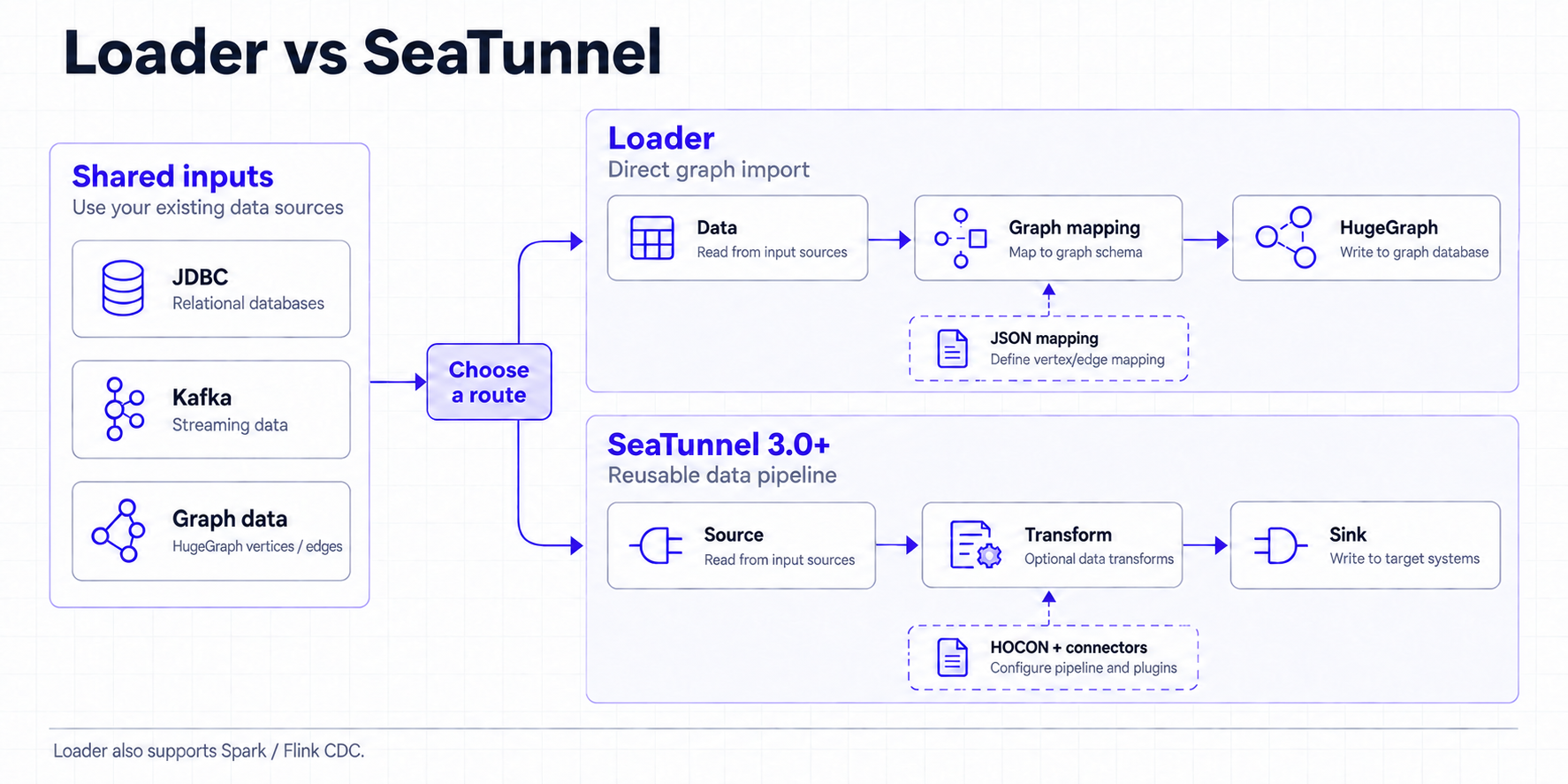
Click a diagram to view the original size.
1 Loader, Tools, and SeaTunnel
HugeGraph-Loader is suited to direct imports from common data sources. HugeGraph-Tools focuses on standalone graph management, backup, and export. SeaTunnel organizes a job as Source → Transform → Sink, so you can reuse existing connectors, transforms, and data pipelines.
Table legend
✅ Supported natively; ⚠️ conditional support or requires an extra component/external platform; ❌ not provided
| Comparison | Loader | Tools | SeaTunnel |
|---|---|---|---|
| Task coverage | ✅ Direct graph imports | ✅ Backup, restore, and export | ✅ Import, export, and migration with composable Source, Transform, and Sink stages |
| Job configuration | JSON mapping file describing the source, vertices, and edges | Command-line options and operations | HOCON job file[3] combining Source, Transform, and Sink |
| Default deployment | ✅ Standalone CLI; ⚠️ Spark Loader can extend it | ✅ Standalone CLI | ✅ Standalone; ✅ distributed |
| Execution engine | ⚠️ Mainly CLI; Spark Loader is a separate extension | ❌ Does not provide a Spark/Flink execution engine | ✅ HugeGraph Source and Sink support Zeta, Spark, and Flink[1][2][7][8][9][10] |
| Frontend and observability | ❌ No built-in frontend; inspect CLI logs | ❌ No built-in frontend; inspect CLI logs | ✅ Built-in Web UI job panel for task status and runtime information |
| Input and output | ⚠️ Focused on graph imports and common files, JDBC, Kafka, and similar sources | ⚠️ Focused on graph data and backup files in common storage | ✅ Dozens of connectors, including JDBC, Kafka, and SQL-CDC |
| Scheduling and resource management | ❌ No unified cross-task scheduling or resource allocation | ❌ No unified cross-task scheduling or resource allocation | ⚠️ Can integrate with DolphinScheduler for scheduling and task management |
| Simplicity | ✅ Focused and simple; a future binary CLI will make quick use easier | ✅ Direct commands for standalone operations | ⚠️ More runtime components, suited to long-lived data pipelines |
| High-throughput import | ✅ Supports bypass-server and other optimizations; measured peaks can reach 1-2 million records/s with specific backends and hardware, so benchmark the actual setup | ⚠️ Focuses on backup and export rather than bulk-import throughput | ✅ Scales throughput through parallelism, distributed engines, and connectors |
SeaTunnel covers Loader’s graph-import and Tools’ export and migration scenarios in one expandable pipeline, and it also supports SQL-CDC and dozens of input and output types. Loader and Tools normally run on one machine, while SeaTunnel supports both standalone and distributed deployments and scales with data and task volume. Tools’ schedule-backup can create a crontab entry, but it does not provide unified workflow orchestration and resource management.
Existing Spark/Flink daily jobs
Both HugeGraph Source and Sink list SeaTunnel Engine (Zeta), Spark, and Flink as supported engines in SeaTunnel 3.0+. If you express the daily job as a SeaTunnel job and submit it to that engine, records can move directly from Source to Transform to Sink without an intermediate file. If you keep the existing Spark/Flink DAG, SeaTunnel does not automatically take over its in-memory DataFrame or stream. Adapt it into a SeaTunnel job or expose the data through a Source connector
Loader and Tools are focused, direct, and quick to start. Use Loader for a direct graph import; use Tools for backup, restore, export, or daily operations. If a SeaTunnel job already exists, adding HugeGraph to that pipeline is usually simpler. For higher import throughput, Loader’s bypass-server path and other import optimizations are a better fit; measured peaks of 1-2 million records/s require a specific backend, data set, and hardware configuration and are not a general performance guarantee. For new SeaTunnel jobs, use 3.0+ and mappings. Recheck the connector configuration when using another version.
2 Prepare the environment
2.1 Get SeaTunnel 3.0+
Use JDK 11 and set JAVA_HOME; the official deployment guide
lists Java 8 and 11 as prerequisites. Choose a 3.0+ binary distribution from the
official release page[4] and verify its checksum or signature using the files linked there.
The commands below use 3.0.0 as an example; set SEATUNNEL_VERSION to the release you downloaded.
The binary distribution does not include connector plugins. In config/plugin_config, select the connectors needed by the examples:
Install the matching released plugins using the upstream plugin installation instructions[5]:
Run the remaining commands from this installation directory and keep the engine and connector plugins at the same version.
This guide uses the bundled Zeta engine in local mode[6][7]. Check that connectors/ contains HugeGraph, JDBC, and Kafka
as needed[11][12]. The JDBC examples also require the MySQL driver JAR in lib/, with driver class com.mysql.cj.jdbc.Driver.
2.2 Prepare HugeGraph and data sources
Start HugeGraph Server and create a graph for testing. The examples use the hugegraph graph in the DEFAULT graph space. Adjust these names to match the server configuration; graph space names are case-sensitive. If authentication is enabled, provide username and password in the HugeGraph Source and Sink configurations.
The following graph model is shared by the JDBC and Kafka examples. mappings creates missing PropertyKey, VertexLabel, and EdgeLabel definitions by default; existing schema definitions must be compatible.
| Graph element | Name and properties |
|---|---|
| Properties | name is Text; age and since are Int |
| Vertex | person, primary key name, properties name and age |
| Edge | knows, from person to person, property since |
The mysql, kafka, and hugegraph host names in the examples are placeholders. Replace them with addresses reachable from the SeaTunnel runtime. Inside a container, 127.0.0.1 points to that container; services on the same Docker network can use their service names. Set host to a host name or IP address, and set the port separately.
3 Import from a relational database (sql2graph)
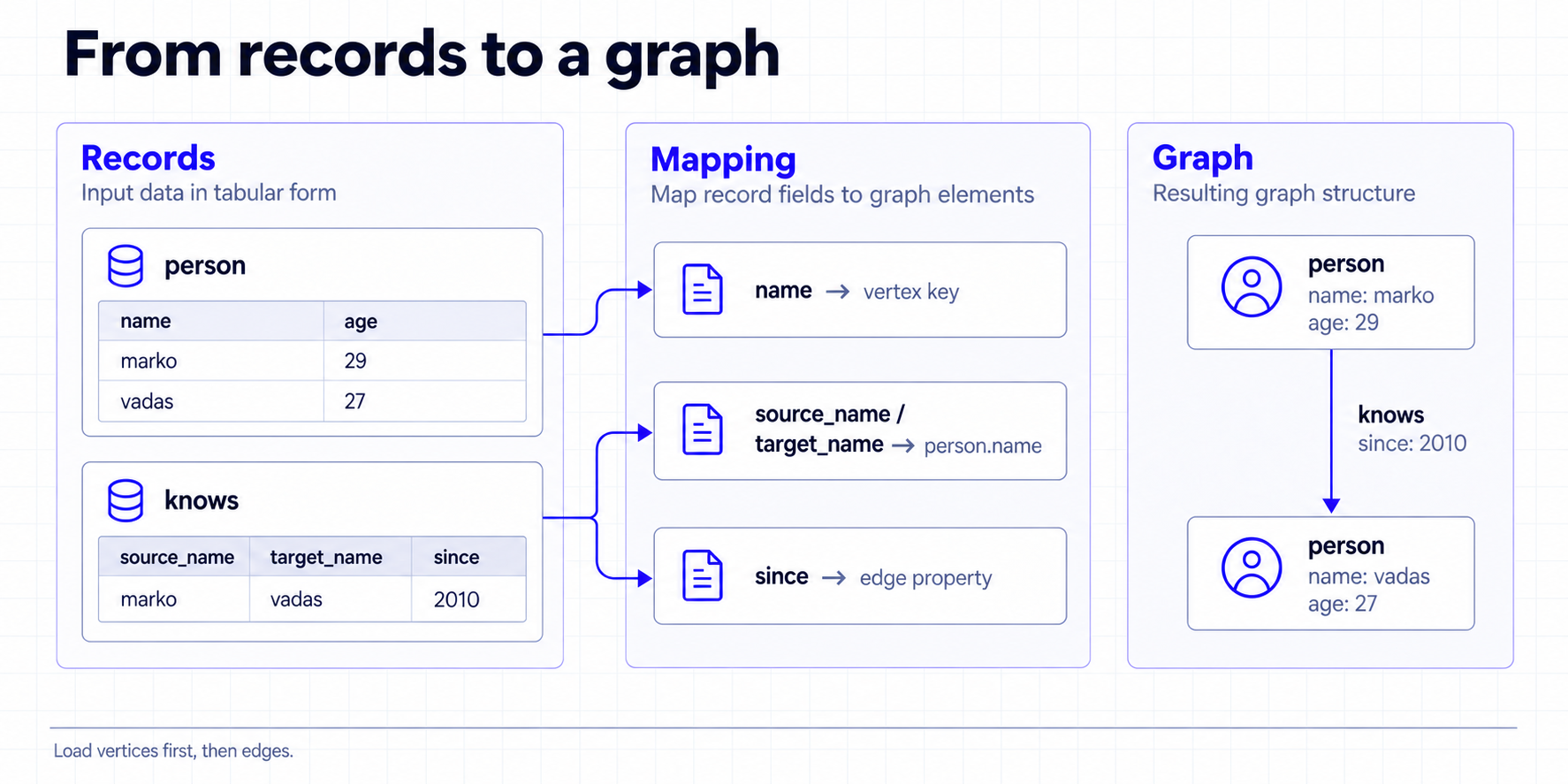
Use two jobs for this import: write the person table as vertices first, then write the knows table as edges. Both edge endpoints will already exist when the edge job runs.
3.1 Import vertices
Prepare the sample data in the MySQL demo database and grant the configured account read access:
Save the following as config/sql2graph-person.conf and replace the database user name and password:
Check the result in Hubble or Gremlin. You should find marko and vadas with their ages:
idFields = ["name"] uses the name to generate the primary key. Importing the same name again writes to the same vertex. properties lists the source fields to write.
3.2 Import edges
Prepare the relation table. Its two endpoint fields correspond to person.name from the vertex job:
Expand the configuration and save it as config/sql2graph-knows.conf
After the vertex job succeeds, run the edge job:
The following query should return a knows edge from marko to vadas with since set to 2010:
sourceConfig and targetConfig identify the endpoint fields. fieldMapping maps them to the vertex primary key name, and properties = ["since"] writes only the edge property. The example enables check_vertex = true and disables per-record fallback after a batch failure (batch_failure_fallback = false), so a missing endpoint or write failure causes the job to fail.
If the relation table has only numeric foreign keys while the graph uses names as primary keys, join the names in SQL before passing the records to the Sink. See MySQL CDC Source[13] for MySQL CDC integration.
4 Import from Kafka (kafka2graph)
Kafka is useful for a continuous stream of events. Create the user-events topic and publish the following JSON message. Each message becomes one person vertex:
Save the following as config/kafka2graph.conf:
Use the Gremlin query from section 3.1 to check the data. The streaming job keeps running. checkpoint.interval saves job state every 10 seconds, while sink.flush.interval asks Zeta to flush every 5 seconds so a small number of messages does not wait for a full batch.
HugeGraph Sink writes with at-least-once semantics, so recovery can replay records. PRIMARY_KEY sends the same name to the same vertex, but it does not make every update exactly-once. Scheduled flushing is provided by Zeta and does not apply to Spark or Flink engines.
5 Common configuration and troubleshooting
The following table applies to the SeaTunnel 3.0+ version used by this guide:
| Configuration | Purpose |
|---|---|
host, port | Set the HugeGraph host and port |
graph_name, graph_space | Select an existing graph and graph space |
mappings | Define how input fields become vertices or edges |
properties | List the source fields written by each mapping |
schema_save_mode | mappings creates missing schema by default; existing schema must still be compatible |
batch_size | Number of records per batch; default 500 |
env.sink.flush.interval | Zeta scheduled flush interval in milliseconds |
check_vertex | Check edge endpoints; the edge job in this guide sets it to true |
batch_failure_fallback[2] | Defaults to true, so a failed batch falls back to record-by-record retries, capped by max_insert_errors; the examples explicitly set false so a batch failure stops the job |
max_insert_errors | Number of failed records that record-by-record fallback may skip; default 500, -1 for unlimited, and only applies when batch_failure_fallback is enabled |
Use these checks when a job fails:
mappingsis unknown or HugeGraph Source is missing: Check that the engine and HugeGraph connector come from the same SeaTunnel 3.0+ build.- Connection failure: Check the host, port, graph space, authentication details, and whether the SeaTunnel runtime can reach the service.
- Schema incompatibility: Check the ID strategy, property types, and edge endpoints. Automatic creation does not change an existing
PRIMARY_KEYlabel intoCUSTOMIZE_STRING. - Small Kafka batches do not appear promptly: Confirm that the job uses Zeta and set
sink.flush.intervalinenv. In this version,batch_interval_msis retained only for compatibility and cannot replace it.
6 Choosing a tool
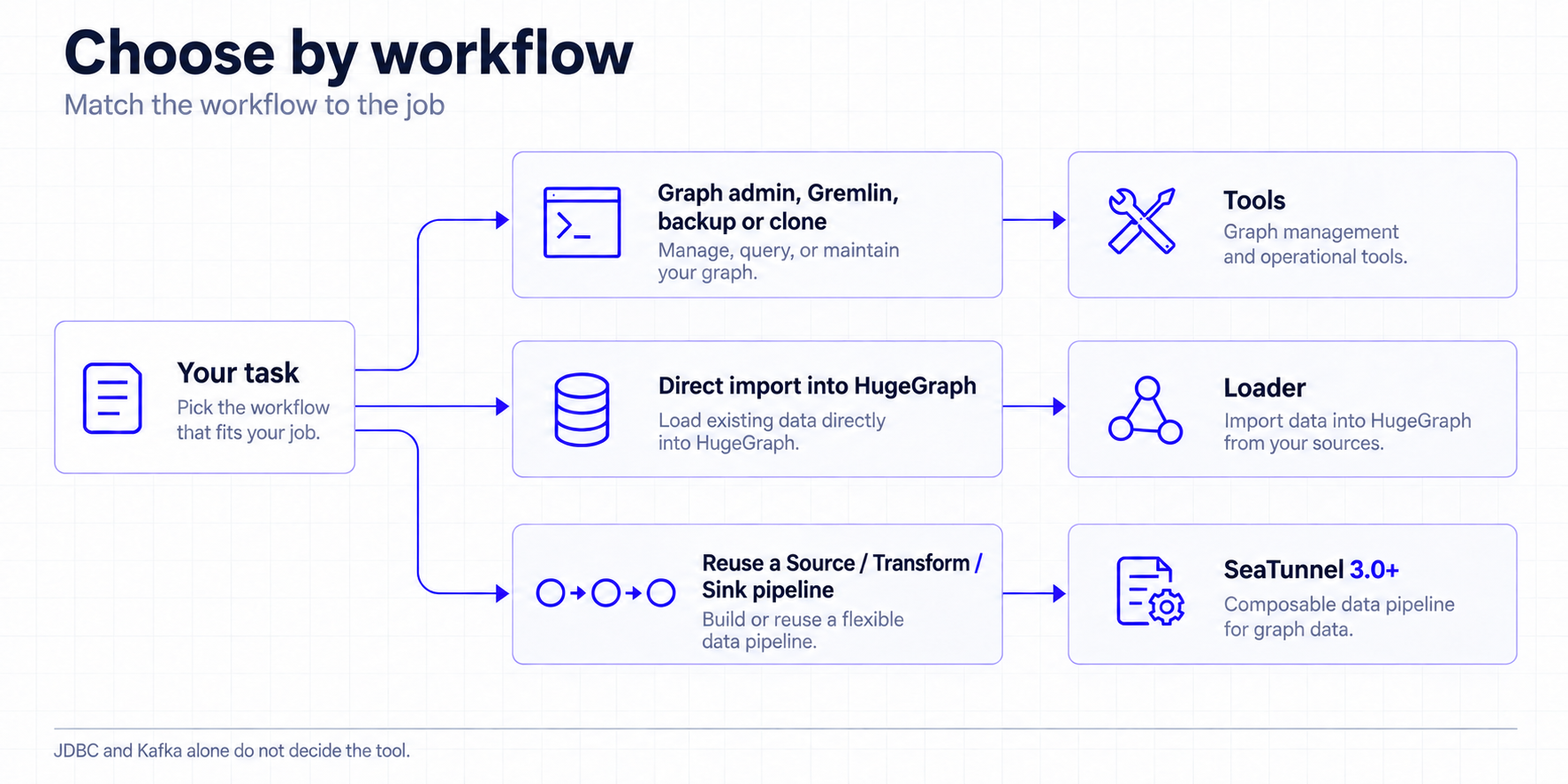
Choose a tool based on the work to complete. Use Tools for graph management, Gremlin, backup, or cloning. Use Loader for a direct graph import. Choose SeaTunnel when you need to reuse a Source, Transform, and Sink pipeline. For SeaTunnel graph reads and migrations, prepare the environment using the SeaTunnel 3.0+ version used by this guide.
7 References
HugeGraph connectors
[1] HugeGraph Source
[2] HugeGraph Sink
Configuration and deployment
[3] HOCON job configuration
[4] SeaTunnel 3.0+ release download
[5] Connector plugin installation
[6] SeaTunnel local deployment
Execution engines
[7] SeaTunnel Engine Overview
[8] SeaTunnel Spark Engine
[9] SeaTunnel Flink Engine
[10] Connector V2 multi-engine support
Data source connectors
[11] JDBC Source
[12] Kafka Source
[13] MySQL CDC Source