另外,当顶点中带有"创建时间"的属性且希望以"创建时间"属性作为计算顶点存活时间的起点时,可以设置 VertexLabel 中的 ttl_start_time 字段。比如 person VertexLabel 有 createdTime 属性,且 createdTime 是 Date 类型的参数,希望 person 类型的顶点从创建开始存活一天的时间,那么创建 person VertexLabel 的 Request Body 如下:
You can get the asynchronous job status by GET http://localhost:8080/graphs/hugegraph/tasks/${task_id} (the task_id here should be 1). See More AsyncJob RESTfull API
You can get the asynchronous job status by GET http://localhost:8080/graphs/hugegraph/tasks/${task_id} (the task_id here should be 2). See More AsyncJob RESTfull API
You can get the asynchronous job status by GET http://localhost:8080/graphs/hugegraph/tasks/${task_id} (the task_id here should be 3). See More AsyncJob RESTfull API
1.7 - Vertex API
2.1 Vertex
顶点类型中的 Id 策略决定了顶点的 Id 类型,其对应关系如下:
Id_Strategy
id type
AUTOMATIC
number
PRIMARY_KEY
string
CUSTOMIZE_STRING
string
CUSTOMIZE_NUMBER
number
CUSTOMIZE_UUID
uuid
顶点的 GET/PUT/DELETE API 中 url 的 id 部分传入的应是带有类型信息的 id 值,这个类型信息用 json 串是否带引号表示,也就是说:
当 id 类型为 number 时,url 中的 id 不带引号,形如 xxx/vertices/123456
当 id 类型为 string 时,url 中的 id 带引号,形如 xxx/vertices/“123456”
Not only the Graph iteration (traverser) method, HugeGraph-Server also provide Rank API for recommendation purpose.
You can use it to recommend some vertexes much closer to a vertex.
4.2 Details of Rank API
4.2.1 Personal Rank API
A typical scenario for Personal Rank algorithm is in recommendation application. According to the out edges of a vertex,
recommend some other vertices that having the same or similar edges.
Here is a use case:
According to someone’s reading habit or reading history, we can recommend some books he may be interested or some book pal.
For Example:
Suppose we have a vertex, Person type, and named tom.He like 5 books a,b,c,d,e. If we want to recommend some book pal and books for tom, an easier idea is let’s check whoever also liked these books (common hobby based).
Now, we need someone else, like neo, he like three books b,d,f. And Jay, he like 4 books c,d,e,g, and Lee, he also like 4 books a,d,e,f.
For we don’t need to recommend books tom already read, the recommend-list should only contain the books Tom’s book pal already read but tom haven’t read yet. Such as book “f” and “g”, and with priority f > g.
Now, we recompute Tom’s personal rank value, we will get a sorted TopN book pal or book recommend-list. (Choose OTHER_LABEL,for Only Book purpose)
4.2.1.0 Data Preparation
The case above is simple. Here we also provide a public test dataset MovieLens for use case.
You should download the dataset. The load it into HugeGraph with HugeGraph-Loader. To make it simple, we ignore all properties data of user and move. only field id is enough. we also ignore the value of edge rating.
The metadata for input file and mapping file as follows:
suitable for bipartite graph, will return all vertex or a list of its correlation which related to all source vertex.
Bipartite Graph is a special model in Graph Theory, as well as a special flow in network. The strongest feature is, it split all vertex in graph into two sets. The vertex in the set is not connected. However,the vertex in two sets may connect with each other.
Suppose we have one bipartite graph based on user and things.
A random walk based PersonalRank algorithm should be likes this:
Choose a user u as start vertex, let’s set the initial weight to be 1.0 . Go from Vu with probability alpha to a neighbor vertex, and (1-alpha) to stay.
If we decide to go outside, we would like to choose an edge, such as rating, to find a common judge.
Then choose the neighbors of current vertex randomly with uniform distribution, and reset the weights with uniform distribution.
Compensate the source vertex’s weight with (1 - alpha)
Repeat step 2;
Convergence after reaching a certain number of steps or precision, then we got a recommend-list.
Params
Required:
source: the id of source vertex
label: edge label go from the source vertex, should connect two different type of vertex
Optional:
alpha: the probability of going out for one vertex in each iteration,similar to the alpha of PageRank,required, value range is (0, 1], default 0.85.
max_degree: in query process, the max iteration number of adjacency edge for a vertex, default 10000
In a bipartite graph build by two different type of vertex, recommend other most related vertex to one vertex. for example:
Reading recommendation: find out the books should be recommended to someone first, It is also possible to recommend book pal with the highest common preferences at the same time (just like: WeChat “your friend also read xx " function)
Social recommendation: find out other Poster who interested in same topics, or other News/Messages you may be interested with (Such as : “Hot News” function in Weibo)
Commodity recommendation: according to someone’s shopping habit,find out a commodity list should recommend first, some online salesman may also be good (Such as : “You May Like” function in TaoBao)
In a general graph structure,find the first N vertices of each layer with the highest correlation with a given starting point and their relevance.
In graph words: to go out from the starting point, get the probability of going to each vertex of each layer.
Params
source: id of source vertex,required
alpha:the probability of going out for one vertex in each iteration,similar to the alpha of PageRank,required, value range is (0, 1]
steps: a path rule for source vertex visited,it’s a list of Step,each Step map to a layout in result,required.The structure of each Step as follows:
direction:the direction of edge(OUT, IN, BOTH), BOTH for default.
labels:a list of edge types, will union all edge types
max_degree:in query process, the max iteration number of adjacency edge for a vertex, default 10000
(Note: before v0.12 step only support degree as parameter name, from v0.12, use max_degree, compatible with degree)
top: retains only the top N results with the highest weight in each layer of the results, default 100, max 1000
capacity: the maximum number of vertexes visited during the traversal, optional, default 10000000
Find the vertices in different layers for a given start point that should be most recommended
For example, in the four-layered structure of the audience, friends, movies, and directors, according to the movies that a certain audience’s friends like, recommend movies for that audience, or recommend directors for those movies based on who made them.
clone_graph_name: name of an exist graph.
To clone from an existing graph, the user can choose to transfer the configuration file,
which will replace the configuration in the existing graph
Not support create vertex with id for AUTOMATIC id strategy
LOADING mode used to load data via hugegraph-loader.
When adding vertices / edges, it is not checked whether the required attributes are passed in
Restore has two different modes: Restoring and Merging
Restoring mode is used to restore schema and graph data to an new graph.
Support create schema with specified id
Support create vertex with id for AUTOMATIC id strategy
Merging mode is used to merge schema and graph data to an existing graph.
Not allowed create schema with specified id
Support create vertex with id for AUTOMATIC id strategy
Under normal circumstances, the graph mode is None. When you need to restore the graph,
you need to temporarily modify the graph mode to Restoring or Merging as needed.
When you complete the restore, change the graph mode to None.
1{2"group_creator":"admin",3"group_name":"all",4"group_create":"2020-11-11 15:46:08.791",5"group_update":"2020-11-11 15:46:08.791",6"id":"-69:all",7"group_description":"group can do anything"8}
1{2"group_creator":"admin",3"group_name":"all",4"group_create":"2020-11-11 15:46:08.791",5"group_update":"2020-11-11 15:46:08.791",6"id":"-69:all",7"group_description":"group can do anything"8}
The code in this document is written in java, but its style is very similar to gremlin(groovy). The user only needs to replace the variable declaration in the code with def or remove it directly,
You can convert java code into groovy; in addition, each line of statement can be without a semicolon at the end, groovy considers a line to be a statement.
The gremlin(groovy) written by the user in HugeGraph-Studio can refer to the java code in this document, and some examples will be given below.
1 HugeGraph-Client
HugeGraph-Client is the general entry for operating graph. Users must first create a HugeGraph-Client object and establish a connection (pseudo connection) with HugeGraph-Server before they can obtain the operation entry objects of schema, graph and gremlin.
Currently, HugeGraph-Client only allows connections to existing graphs on the server, and cannot create custom graphs. Its creation method is as follows:
If the above process of creating HugeClient fails, an exception will be thrown, and the user needs to use try-catch. If successful, continue to get schema, graph and gremlin manager.
When operating through gremlin in HugeGraph-Hubble(or HugeGraph-Studio), HugeClient is not required and can be ignored.
2 Schema
2.1 SchemaManager
SchemaManager is used to manage four kinds of schema in HugeGraph, namely PropertyKey (property type), VertexLabel (vertex type), EdgeLabel (edge type) and IndexLabel (index label). A SchemaManager object can be created for schema information definition.
The user can obtain the SchemaManager object using the following methods:
1SchemaManagerschema=hugeClient.schema()
Create a schema object via gremlin in HugeGraph-Hubble:
1schema=graph.schema()
The definition process of the 4 kinds of schema is described below.
2.2 PropertyKey
2.2.1 Interface and parameter introduction
PropertyKey is used to standardize the property constraints of vertices and edges, and properties of properties are not currently supported.
The constraint information that PropertyKey allows to define includes: name, datatype, cardinality, and userdata, which are introduced one by one below.
name: The name of the property, used to distinguish different PropertyKeys, PropertyKeys with the same name are not allowed.
interface
param
must set
propertyKey(String name)
name
y
datatype: property value type, you must select an explicit setting from the following table that conforms to the specific business scenario:
interface
Java Class
asText()
String
asInt()
Integer
asDate()
Date
asUuid()
UUID
asBoolean()
Boolean
asByte()
Byte
asBlob()
Byte[]
asDouble()
Double
asFloat()
Float
asLong()
Long
cardinality: Whether the property value is single-valued or multivalued, in the case of multivalued, it is divided into allowing-duplicate values and not-allowing-duplicate values. This item is single by default. If necessary, you can select a setting from the following table:
interface
cardinality
description
valueSingle()
single
single value
valueList()
list
multi-values that allow duplicate value
valueSet()
set
multi-values that not allow duplicate value
userdata: Users can add some constraints or additional information by themselves, and then check whether the incoming properties satisfy the constraints, or extract additional information when necessary:
The syntax of creating the above PropertyKey object through gremlin in HugeGraph-Hubble is exactly the same. If the user does not define the schema variable, it should be written like this:
In the following examples, the syntax of gremlin and java is exactly the same, so we won’t repeat them.
ifNotExist(): Add a judgment mechanism for create, if the current PropertyKey already exists, it will not be created, otherwise the property will be created. If no ifNotExist() is added, an exception will be thrown if a property-key with the same name already exists. The same as below, and will not be repeated there.
2.2.3 Delete PropertyKey
1schema.propertyKey("name").remove()
2.2.4 Query PropertyKey
1// Get PropertyKey2schema.getPropertyKey("name")34// Get attributes of PropertyKey5schema.getPropertyKey("name").cardinality()6schema.getPropertyKey("name").dataType()7schema.getPropertyKey("name").name()8schema.getPropertyKey("name").userdata()
2.3 VertexLabel
2.3.1 Interface and parameter introduction
VertexLabel is used to define the vertex type and describe the constraint information of the vertex.
The constraint information that VertexLabel allows to define include: name, idStrategy, properties, primaryKeys and nullableKeys, which are introduced one by one below.
name: The name of the VertexLabel, used to distinguish different VertexLabels, VertexLabels with the same name are not allowed.
interface
param
must set
vertexLabel(String name)
name
y
idStrategy: Each VertexLabel can choose its own ID strategy. There are currently three strategies to choose from, namely Automatic (automatically generated), Customize (user input) and PrimaryKey (primary attribute key). Among them, Automatic uses the Snowflake algorithm to generate Id, Customize requires the user to pass in the Id of string or number type, and PrimaryKey allows the user to select several properties of VertexLabel as the basis for differentiation. HugeGraph will be spliced and generated ID according to the value of the primary properties. idStrategy uses Automatic by default, but if the user does not explicitly set idStrategy and calls the primaryKeys(…) method to set the primary property, then idStrategy will automatically use PrimaryKey.
interface
idStrategy
description
useAutomaticId
AUTOMATIC
generate id automatically by Snowflake algorithm
useCustomizeStringId
CUSTOMIZE_STRING
passed id by user, must be string type
useCustomizeNumberId
CUSTOMIZE_NUMBER
passed id by user, must be number type
usePrimaryKeyId
PRIMARY_KEY
choose some important prop as primary key to splice id
properties: define the properties of the vertex, the incoming parameter is the name of the PropertyKey.
interface
description
properties(String… properties)
allow to pass multi properties
primaryKeys: When the user selects the ID strategy of PrimaryKey, several primary properties need to be selected from the properties of VertexLabel as the basis for differentiation;
interface
description
primaryKeys(String… keys)
allow to choose multi prop as primaryKeys
Note that the selection of the ID strategy and the setting of primaryKeys have some mutual constraints, which cannot be called at will. The constraints are shown in the following table:
useAutomaticId
useCustomizeStringId
useCustomizeNumberId
usePrimaryKeyId
unset primaryKeys
AUTOMATIC
CUSTOMIZE_STRING
CUSTOMIZE_NUMBER
ERROR
set primaryKeys
ERROR
ERROR
ERROR
PRIMARY_KEY
nullableKeys: For properties set by the properties(…) method, all of them are non-nullable by default, that is, the property must be assigned a value when creating a vertex, which may impose too strict integrity requirements on user data. In order to avoid such strong constraints, the user can set some properties to be nullable through this method, so that the properties can be unassigned when adding vertices.
interface
description
nullableKeys(String… properties)
allow to pass multi props
Note: primaryKeys and nullableKeys cannot intersect, because a property cannot be both primary and nullable.
enableLabelIndex: The user can specify whether to create an index for the label. If you don’t create it, you can’t globally search for the vertices and edges of the specified label. If you create it, you can search globally, like g.V().hasLabel('person'), g.E().has('label', 'person') query, but the performance will be slower when inserting data, and it will take up more storage space. This defaults to true.
interface
description
enableLabelIndex(boolean enable)
Whether to create a label index
userdata: Users can add some constraints or additional information by themselves, and then check whether the incoming properties meet the constraints, or extract additional information when necessary.
interface
description
userdata(String key, Object value)
The same key, the latter will cover the former
2.3.2 Create VertexLabel
1// Use Automatic Id strategy 2schema.vertexLabel("person").properties("name","age").ifNotExist().create(); 3schema.vertexLabel("person").useAutomaticId().properties("name","age").ifNotExist().create(); 4 5// Use Customize_String Id strategy 6schema.vertexLabel("person").useCustomizeStringId().properties("name","age").ifNotExist().create(); 7// Use Customize_Number Id strategy 8schema.vertexLabel("person").useCustomizeNumberId().properties("name","age").ifNotExist().create(); 910// Use PrimaryKey Id strategy11schema.vertexLabel("person").properties("name","age").primaryKeys("name").ifNotExist().create();12schema.vertexLabel("person").usePrimaryKeyId().properties("name","age").primaryKeys("name").ifNotExist().create();
2.3.3 Update VertexLabel
VertexLabel can append constraints, but only properties and nullableKeys, and the appended properties must also be added to the nullableKeys collection.
1// Get VertexLabel 2schema.getVertexLabel("name") 3 4// Get attributes of VertexLabel 5schema.getVertexLabel("person").idStrategy() 6schema.getVertexLabel("person").primaryKeys() 7schema.getVertexLabel("person").name() 8schema.getVertexLabel("person").properties() 9schema.getVertexLabel("person").nullableKeys()10schema.getVertexLabel("person").userdata()
2.4 EdgeLabel
2.4.1 Interface and parameter introduction
EdgeLabel is used to define the edge type and describe the constraint information of the edge.
The constraint information that EdgeLabel allows to define include: name, sourceLabel, targetLabel, frequency, properties, sortKeys and nullableKeys, which are introduced one by one below.
name: The name of the EdgeLabel, used to distinguish different EdgeLabels, EdgeLabels with the same name are not allowed.
interface
param
must set
edgeLabel(String name)
name
y
sourceLabel: The name of the source vertex type of the edge link, only one is allowed;
targetLabel: The name of the target vertex type of the edge link, only one is allowed;
interface
param
must set
sourceLabel(String label)
label
y
targetLabel(String label)
label
y
frequency: Indicating the number of times a relationship occurs between two specific vertices, which can be single (single) or multiple (frequency), the default is single.
interface
frequency
description
singleTime()
single
a relationship can only occur once
multiTimes()
multiple
a relationship can occur many times
properties: Define the properties of the edge.
interface
description
properties(String… properties)
allow to pass multi props
sortKeys: When the frequency of EdgeLabel is multiple, some properties are needed to distinguish the multiple relationships, so sortKeys (sorted keys) is introduced;
interface
description
sortKeys(String… keys)
allow to choose multi prop as sortKeys
nullableKeys: Consistent with the concept of nullableKeys in vertices.
Note: sortKeys and nullableKeys also cannot intersect.
enableLabelIndex: It is consistent with the concept of enableLabelIndex in the vertex.
userdata: Users can add some constraints or additional information by themselves, and then check whether the incoming properties meet the constraints, or extract additional information when necessary.
1// Get EdgeLabel 2schema.getEdgeLabel("knows") 3 4// Get attributes of EdgeLabel 5schema.getEdgeLabel("knows").frequency() 6schema.getEdgeLabel("knows").sourceLabel() 7schema.getEdgeLabel("knows").targetLabel() 8schema.getEdgeLabel("knows").sortKeys() 9schema.getEdgeLabel("knows").name()10schema.getEdgeLabel("knows").properties()11schema.getEdgeLabel("knows").nullableKeys()12schema.getEdgeLabel("knows").userdata()
2.5 IndexLabel
2.5.1 Interface and parameter introduction
IndexLabel is used to define the index type and describe the constraint information of the index, mainly for the convenience of query.
The constraint information that IndexLabel allows to define include: name, baseType, baseValue, indexFields, indexType, which are introduced one by one below.
name: The name of the IndexLabel, used to distinguish different IndexLabels, IndexLabels with the same name are not allowed.
interface
param
must set
indexLabel(String name)
name
y
baseType: Indicates whether to index VertexLabel or EdgeLabel, used in conjunction with the baseValue below.
baseValue: Specifies the name of the VertexLabel or EdgeLabel to be indexed.
interface
param
description
onV(String baseValue)
baseValue
build index for VertexLabel: ‘baseValue’
onE(String baseValue)
baseValue
build index for EdgeLabel: ‘baseValue’
indexFields: on which fields to index, it can be a joint index for multiple columns.
interface
param
description
by(String… fields)
files
allow to build index for multi fields for secondary index
indexType: There are currently five types of indexes established, namely Secondary, Range, Search, Shard and Unique.
Secondary Index supports exact matching secondary index, allow to build joint index, joint index supports index prefix search
Single Property Secondary Index, support equality query, for example: the secondary index of the city property of the person vertex, you can use g.V().has("city", "Beijing") to query all the vertices with “city attribute value is Beijing”
Joint Secondary Index, supports prefix query and equality query, such as: joint index of city and street properties of person vertex, you can use g.V().has("city", "Beijing").has('street', 'Zhongguancun street ') to query all vertices of “city property value is Beijing and street property value is ZhongGuanCun”, or g.V().has("city", "Beijing") to query all vertices of “city property value is Beijing”.
The query of Secondary Index is based on the query condition of “yes” or “equal”, and does not support “partial matching”.
Range Index supports for range queries of numeric types
Must be a single number or date attribute, for example: the range index of the age property of the person vertex, you can use g.V().has("age", P.gt(18)) to query the vertices with “age property value greater than 18” . In addition to P.gt(), also supports P.gte(), P.lte(), P.lt(), P.eq(), P.between() , P.inside() and P.outside() etc.
Search Index supports full-text search
It must be a single text property, such as: full-text index of the address property of the person vertex, you can use g.V().has("address", Text.contains('building') to query all vertices whose “address property contains a ‘building’”
The query of the Search Index is based on the query condition of “is” or “contains”.
Shard Index supports prefix matching + numeric range query
The shard index of N properties supports range queries with equal prefixes. For example, the shard index of the city and age properties of the person vertex can use g.V().has("city", "Beijing").has ("age", P.between(18, 30))Query “city property is Beijing and all vertices whose age is greater than or equal to 18 and less than 30”.
When all N properties are text properties in a Shard Index, it is equivalent to Secondary Index.
When there is only one single number or date property in a Shard Index, it is equivalent to the Range Index.
Shard Index can have any number or date property, but at most one range search condition can be provided when querying, and the prefix properties of the Shard Search conditions must be “equals”.
Unique Index supports properties uniqueness constraints, that is, the value of properties can be limited to not repeat, and joint indexing is allowed, but querying is not supported now
The unique index of single or multiple properties cannot be used for query, only the value of the property can be limited, and an error will be reported when there is a duplicate value.
interface
indexType
description
secondary()
Secondary
support prefix search
range()
Range
support range(numeric or date type) search
search()
Search
support full text search
shard()
Shard
support prefix + range(numeric or date type) search
1// Get IndexLabel2schema.getIndexLabel("personByAge")34// Get attributes of IndexLabel5schema.getIndexLabel("personByAge").baseType()6schema.getIndexLabel("personByAge").baseValue()7schema.getIndexLabel("personByAge").indexFields()8schema.getIndexLabel("personByAge").indexType()9schema.getIndexLabel("personByAge").name()
3 Graph
3.1 Vertex
Vertices are the most basic elements of a graph, and there can be many vertices in a graph. Here is an example of adding vertices:
The key to adding vertices is the vertex properties. The number of parameters of the vertex adding function must be an even number and satisfy the order of key1 -> val1, key2 -> val2 ..., and the order between key-value pairs is free .
The parameter must contain a special key-value pair, namely T.label -> "val", which is used to define the category of the vertex, so that the program can obtain the schema definition of the VertexLabel from the cache or backend, and then do subsequent constraint checks. The label in the example is defined as person.
If the vertex type’s ID policy is AUTOMATIC, users are not allowed to pass in id key-value pairs.
If the ID policy of the vertex type is CUSTOMIZE_STRING, the user needs to pass in the value of the id of the String type. The key-value pair is like: "T.id", "123456".
If the ID policy of the vertex type is CUSTOMIZE_NUMBER, the user needs to pass in the value of the id of the Number type. The key-value pair is like: "T.id", 123456.
If the ID policy of the vertex type is PRIMARY_KEY, the parameters must also contain the name and value of the properties corresponding to the primaryKeys, if not set an exception will be thrown. For example, the primaryKeys of person is name, in the example, the value of name is set to marko.
For properties that are not nullableKeys, a value must be assigned.
The remaining parameters are the settings of other properties of the vertex, but they are not required.
After calling the addVertex method, the vertices are inserted into the backend storage system immediately.
3.2 Edge
After added vertices, edges are also needed to form a complete graph. Here is an example of adding edges:
The function addEdge() of the (source) vertex is to add an edge(relationship) between itself and another vertex. The first parameter of the function is the label of the edge, and the second parameter is the target vertex. The position and order of these two parameters are fixed. The subsequent parameters are the order of key1 -> val1, key2 -> val2 ..., set the properties of the edge, and the key-value pair order is free.
The source and target vertices must conform to the definitions of source-label and target label in EdgeLabel, and cannot be added arbitrarily.
For properties that are not nullableKeys, a value must be assigned.
Note: When frequency is multiple, the value of the property type corresponding to sortKeys must be set.
Gremlin-Console is an interactive client developed by TinkerPop. Users can use this client to perform various operations on Graph. There are two main usage modes:
Stand-alone offline mode;
Client/Server mode;
1 Stand-alone offline mode
Since the lib directory already contains the HugeCore jar package, and HugeGraph has been registered in the Console as a plug-in, the users can write a groovy script directly to call the code of HugeGraph-Core, and then hand it over to the parsing engine in Gremlin-Console for execution. As a result, the users can operate the graph without starting the Server.
This mode is convenient for users to get started quickly, but it is not suitable for scenarios where a large amount of data is inserted and queried. Here is an example:
There is a sample script in the script directory:example.groovy
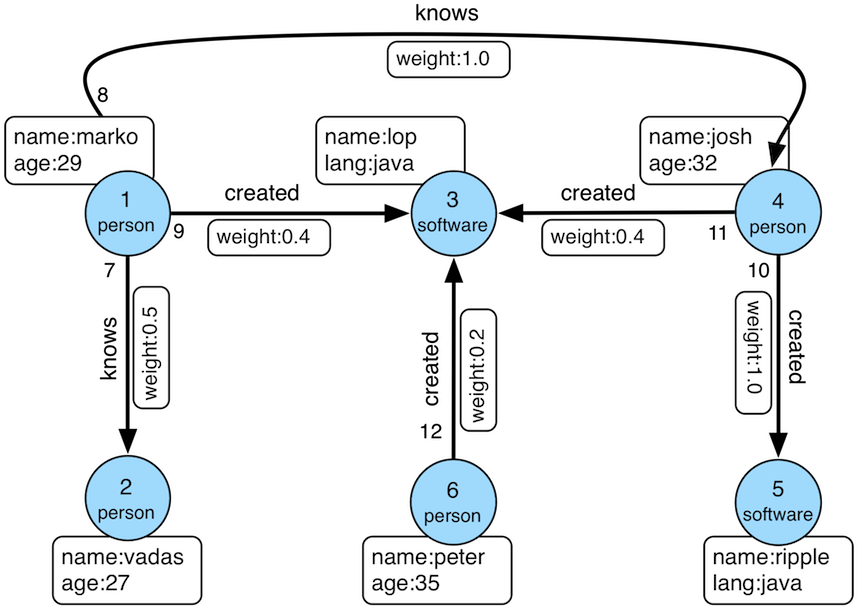
1importcom.baidu.hugegraph.HugeFactory 2importcom.baidu.hugegraph.dist.RegisterUtil 3importorg.apache.tinkerpop.gremlin.structure.T 4 5RegisterUtil.registerCassandra(); 6RegisterUtil.registerScyllaDB(); 7 8conf="conf/hugegraph.properties" 9graph=HugeFactory.open(conf);10schema=graph.schema();1112schema.propertyKey("name").asText().ifNotExist().create();13schema.propertyKey("age").asInt().ifNotExist().create();14schema.propertyKey("city").asText().ifNotExist().create();15schema.propertyKey("weight").asDouble().ifNotExist().create();16schema.propertyKey("lang").asText().ifNotExist().create();17schema.propertyKey("date").asText().ifNotExist().create();18schema.propertyKey("price").asInt().ifNotExist().create();1920schema.vertexLabel("person").properties("name","age","city").primaryKeys("name").ifNotExist().create();21schema.vertexLabel("software").properties("name","lang","price").primaryKeys("name").ifNotExist().create();22schema.indexLabel("personByName").onV("person").by("name").secondary().ifNotExist().create();23schema.indexLabel("personByCity").onV("person").by("city").secondary().ifNotExist().create();24schema.indexLabel("personByAgeAndCity").onV("person").by("age","city").secondary().ifNotExist().create();25schema.indexLabel("softwareByPrice").onV("software").by("price").range().ifNotExist().create();26schema.edgeLabel("knows").sourceLabel("person").targetLabel("person").properties("date","weight").ifNotExist().create();27schema.edgeLabel("created").sourceLabel("person").targetLabel("software").properties("date","weight").ifNotExist().create();28schema.indexLabel("createdByDate").onE("created").by("date").secondary().ifNotExist().create();29schema.indexLabel("createdByWeight").onE("created").by("weight").range().ifNotExist().create();30schema.indexLabel("knowsByWeight").onE("knows").by("weight").range().ifNotExist().create();3132marko=graph.addVertex(T.label,"person","name","marko","age",29,"city","Beijing");33vadas=graph.addVertex(T.label,"person","name","vadas","age",27,"city","Hongkong");34lop=graph.addVertex(T.label,"software","name","lop","lang","java","price",328);35josh=graph.addVertex(T.label,"person","name","josh","age",32,"city","Beijing");36ripple=graph.addVertex(T.label,"software","name","ripple","lang","java","price",199);37peter=graph.addVertex(T.label,"person","name","peter","age",35,"city","Shanghai");3839marko.addEdge("knows",vadas,"date","20160110","weight",0.5);40marko.addEdge("knows",josh,"date","20130220","weight",1.0);41marko.addEdge("created",lop,"date","20171210","weight",0.4);42josh.addEdge("created",lop,"date","20091111","weight",0.4);43josh.addEdge("created",ripple,"date","20171210","weight",1.0);44peter.addEdge("created",lop,"date","20170324","weight",0.2);4546graph.tx().commit();4748g=graph.traversal();4950System.out.println(">>>> query all vertices: size="+g.V().toList().size());51System.out.println(">>>> query all edges: size="+g.E().toList().size());
In fact, this groovy script is almost Java code, the only difference is that the variable definition can be written without the type declaration, and the semicolon at the end of each line can be removed.
g.V() is to get all the vertices, g.E() is to get all the edges, toList() is to store the result in a List, refer toTinkerPop Terminal Steps。
Enter the gremlin-console below and pass in the script to execute it:
1bin/gremlin-console.sh scripts/example.groovy
2objc[5038]: Class JavaLaunchHelper is implemented in both /Library/Java/JavaVirtualMachines/jdk1.8.0_121.jdk/Contents/Home/bin/java (0x10137a4c0) and /Library/Java/JavaVirtualMachines/jdk1.8.0_121.jdk/Contents/Home/jre/lib/libinstrument.dylib (0x102bbb4e0). One of the two will be used. Which one is undefined.
3 4\,,,/
5(o o) 6-----oOOo-(3)-oOOo-----
7plugin activated: com.baidu.hugegraph
8plugin activated: tinkerpop.server
9plugin activated: tinkerpop.utilities
10plugin activated: tinkerpop.tinkergraph
112018-01-15 14:36:19 7516[main][WARN ] com.baidu.hugegraph.config.HugeConfig [] - The config option 'rocksdb.data_path' is redundant, please ensure it has been registered
122018-01-15 14:36:19 7523[main][WARN ] com.baidu.hugegraph.config.HugeConfig [] - The config option 'rocksdb.wal_path' is redundant, please ensure it has been registered
132018-01-15 14:36:19 7604[main][INFO ] com.baidu.hugegraph.HugeGraph [] - Opening backend store 'cassandra'for graph 'hugegraph'14>>>> query all vertices: size=615>>>> query all edges: size=6
As you can see, 6 vertices and 6 edges are inserted and queried. After entering the console, you can continue to enter groovy statements to operate on the graph:
Because Gremlin-Console can only connect to HugeGraph-Server through WebSocket, HugeGraph-Server provides HTTP connections by default, so modify the configuration of gremlin-server first.
Note: After changing the connection method to WebSocket, HugeGraph-Client, HugeGraph-Loader, HugeGraph-Studio and other supporting tools cannot be used.
1# vim conf/gremlin-server.yaml 2host:127.0.0.1 3port:8182 4scriptEvaluationTimeout:30000 5# If you want to start gremlin-server for gremlin-console(web-socket), 6# please change `HttpChannelizer` to `WebSocketChannelizer` or comment this line. 7channelizer:org.apache.tinkerpop.gremlin.server.channel.HttpChannelizer 8graphs:{ 9hugegraph:conf/hugegraph.properties,10hugegraph1:conf/hugegraph1.properties11}12plugins:13- com.baidu.hugegraph14scriptEngines:{15gremlin-groovy:{16imports:[java.lang.Math],17staticImports:[java.lang.Math.PI],18scripts:[scripts/empty-sample.groovy]19}20}21serializers:22- {className:org.apache.tinkerpop.gremlin.driver.ser.GryoLiteMessageSerializerV1d0,23config:{24serializeResultToString:false,25ioRegistries:[com.baidu.hugegraph.io.HugeGraphIoRegistry]26}27}28- {className:org.apache.tinkerpop.gremlin.driver.ser.GryoMessageSerializerV1d0,29config:{30serializeResultToString:true,31ioRegistries:[com.baidu.hugegraph.io.HugeGraphIoRegistry]32}33}34- {className:org.apache.tinkerpop.gremlin.driver.ser.GraphSONMessageSerializerGremlinV1d0,35config:{36serializeResultToString:false,37ioRegistries:[com.baidu.hugegraph.io.HugeGraphIoRegistry]38}39}40- {className:org.apache.tinkerpop.gremlin.driver.ser.GraphSONMessageSerializerGremlinV2d0,41config:{42serializeResultToString:false,43ioRegistries:[com.baidu.hugegraph.io.HugeGraphIoRegistry]44}45}46- {className:org.apache.tinkerpop.gremlin.driver.ser.GraphSONMessageSerializerV1d0,47config:{48serializeResultToString:false,49ioRegistries:[com.baidu.hugegraph.io.HugeGraphIoRegistry]50}51}52metrics:{53consoleReporter:{enabled:false, interval:180000},54csvReporter:{enabled:true, interval:180000, fileName:/tmp/gremlin-server-metrics.csv},55jmxReporter:{enabled:false},56slf4jReporter:{enabled:false, interval:180000},57gangliaReporter:{enabled:false, interval:180000, addressingMode:MULTICAST},58graphiteReporter:{enabled:false, interval:180000}59}60maxInitialLineLength:409661maxHeaderSize:819262maxChunkSize:819263maxContentLength:6553664maxAccumulationBufferComponents:102465resultIterationBatchSize:6466writeBufferLowWaterMark:3276867writeBufferHighWaterMark:6553668ssl:{69enabled:false70}
Modify channelizer: org.apache.tinkerpop.gremlin.server.channel.HttpChannelizer to channelizer: org.apache.tinkerpop.gremlin.server.channel.WebSocketChannelizer or comment directly, and then follow the steps to start the Server.
Then enter gremlin-console
1bin/gremlin-console.sh
2objc[5761]: Class JavaLaunchHelper is implemented in both /Library/Java/JavaVirtualMachines/jdk1.8.0_121.jdk/Contents/Home/bin/java (0x10ec584c0) and /Library/Java/JavaVirtualMachines/jdk1.8.0_121.jdk/Contents/Home/jre/lib/libinstrument.dylib (0x10ecdc4e0). One of the two will be used. Which one is undefined.
3 4\,,,/
5(o o) 6-----oOOo-(3)-oOOo-----
7plugin activated: com.baidu.hugegraph
8plugin activated: tinkerpop.server
9plugin activated: tinkerpop.utilities
10plugin activated: tinkerpop.tinkergraph
To connect to the server, you need to specify the connection parameters in the configuration file, and there is a default remote.yaml file in the conf directory
1gremlin>:remoteconnecttinkerpop.serverconf/remote.yaml
22018-01-15 15:30:31 11528 [main] [INFO ] org.apache.tinkerpop.gremlin.driver.Connection [] - Created new connection for ws://localhost:8182/gremlin32018-01-1515:30:3111538[main][INFO]org.apache.tinkerpop.gremlin.driver.Connection[]-Creatednewconnectionforws://localhost:8182/gremlin
42018-01-1515:30:3111538[main][INFO]org.apache.tinkerpop.gremlin.driver.ConnectionPool[]-OpeningconnectionpoolonHost{address=localhost/127.0.0.1:8182, hostUri=ws://localhost:8182/gremlin}withcoresizeof25==>Configuredlocalhost/127.0.0.1:8182
After the connection is successful, the only variables that can be used in the context of the console are two graph objects, hugegraph and hugegraph1 (configured in gremlin-server.yaml), and if you want to have more variables, you can add them in scripts/empty-sample.groovy, such as:
1importorg.apache.tinkerpop.gremlin.server.util.LifeCycleHook 2 3// an init script that returns a Map allows explicit setting of global bindings.
4defglobals=[:] 5 6// defines a sample LifeCycleHook that prints some output to the Gremlin Server console.
7// note that the name of the key in the "global" map is unimportant.
8globals<<[hook:[ 9onStartUp:{ctx->10ctx.logger.info("Executed once at startup of Gremlin Server.")11},12onShutDown:{ctx->13ctx.logger.info("Executed once at shutdown of Gremlin Server.")14}15]asLifeCycleHook]1617// define schema manger for hugegraph
18schema=hugegraph.schema()19// define the default TraversalSource to bind queries to - this one will be named "g".
20g=hugegraph.traversal()
In this way, the two objects schema and g can be directly used in the console for metadata management and graph query.
It doesn’t matter if it is not defined, because all objects are available through the graph, for example: