This is the multi-page printable view of this section. .
HugeGraph RESTful API
- 1: Schema API
- 2: PropertyKey API
- 3: VertexLabel API
- 4: EdgeLabel API
- 5: IndexLabel API
- 6: Rebuild API
- 7: Vertex API
- 8: Edge API
- 9: Traverser API
- 10: Rank API
- 11: Variable API
- 12: Graphs API
- 13: Task API
- 14: Gremlin API
- 15: Authentication API
- 16: Other API
HugeGraph-Server通过HugeGraph-API基于HTTP协议为Client提供操作图的接口,主要包括元数据和 图数据的增删改查,遍历算法,变量,图操作及其他操作。
1 - Schema API
1.1 Schema
HugeGraph 提供单一接口获取某个图的全部 Schema 信息,包括:PropertyKey、VertexLabel、EdgeLabel 和 IndexLabel。
Method & Url
Response Status
Response Body
2 - PropertyKey API
1.2 PropertyKey
Params说明:
- name:属性类型名称,必填
- data_type:属性类型数据类型,包括:bool、byte、int、long、float、double、string、date、uuid、blob,默认string类型
- cardinality:属性类型基数,包括:single、list、set,默认single
请求体字段说明:
- id:属性类型id值
- properties:属性的属性,对于属性而言,此项为空
- user_data:设置属性类型的通用信息,比如可设置age属性的取值范围,最小为0,最大为100;目前此项不做任何校验,只为后期拓展提供预留入口
1.2.1 创建一个 PropertyKey
Method & Url
Request Body
Response Status
Response Body
1.2.2 为已存在的 PropertyKey 添加或移除 userdata
Params
- action: 表示当前行为是添加还是移除,取值为
append(添加)和eliminate(移除)
Method & Url
Request Body
Response Status
Response Body
1.2.3 获取所有的 PropertyKey
Method & Url
Response Status
Response Body
1.2.4 根据name获取PropertyKey
Method & Url
其中,age为要获取的PropertyKey的名字
Response Status
Response Body
1.2.5 根据name删除PropertyKey
Method & Url
其中,age为要获取的PropertyKey的名字
Response Status
Response Body
3 - VertexLabel API
1.3 VertexLabel
假设已经创建好了1.1.3中列出来的 PropertyKeys
Params说明
- id:顶点类型id值
- name:顶点类型名称,必填
- id_strategy: 顶点类型的ID策略,主键ID、自动生成、自定义字符串、自定义数字、自定义UUID,默认主键ID
- properties: 顶点类型关联的属性类型
- primary_keys: 主键属性,当ID策略为PRIMARY_KEY时必须有值,其他ID策略时必须为空;
- enable_label_index: 是否开启类型索引,默认关闭
- index_names:顶点类型创建的索引,详情见3.4
- nullable_keys:可为空的属性
- user_data:设置顶点类型的通用信息,作用同属性类型
1.3.1 创建一个VertexLabel
Method & Url
Request Body
Response Status
Response Body
从 hugegraph-server v0.11.2 版本开始支持顶点的 TTL 功能。顶点的 TTL 是通过 VertexLabel 来设置的。比如希望 person 类型的顶点存活时间为一天,需要在创建 person VertexLabel 的时候将 TTL 字段设置为 86400000,即单位为毫秒。
另外,当顶点中带有"创建时间"的属性且希望以"创建时间"属性作为计算顶点存活时间的起点时,可以设置 VertexLabel 中的 ttl_start_time 字段。比如 person VertexLabel 有 createdTime 属性,且 createdTime 是 Date 类型的参数,希望 person 类型的顶点从创建开始存活一天的时间,那么创建 person VertexLabel 的 Request Body 如下:
1.3.2 为已存在的VertexLabel添加properties或userdata,或者移除userdata(目前不支持移除properties)
Params
- action: 表示当前行为是添加还是移除,取值为
append(添加)和eliminate(移除)
Method & Url
Request Body
Response Status
Response Body
1.3.3 获取所有的VertexLabel
Method & Url
Response Status
Response Body
1.3.4 根据name获取VertexLabel
Method & Url
Response Status
Response Body
1.3.5 根据name删除VertexLabel
删除 VertexLabel 会导致删除对应的顶点以及相关的索引数据,会产生一个异步任务
Method & Url
Response Status
Response Body
注:
可以通过
GET http://localhost:8080/graphs/hugegraph/tasks/1(其中"1"是task_id)来查询异步任务的执行状态,更多异步任务RESTful API
4 - EdgeLabel API
1.4 EdgeLabel
假设已经创建好了1.2.3中的 PropertyKeys 和 1.3.3中的 VertexLabels
Params说明
- name:顶点类型名称,必填
- source_label: 源顶点类型的名称,必填
- target_label: 目标顶点类型的名称,必填
- frequency:两个点之间是否可以有多条边,可以取值SINGLE和MULTIPLE,非必填,默认值SINGLE
- properties: 边类型关联的属性类型,选填
- sort_keys: 当允许关联多次时,指定区分键属性列表
- nullable_keys:可为空的属性,选填,默认可为空
- enable_label_index: 是否开启类型索引,默认关闭
1.4.1 创建一个EdgeLabel
Method & Url
Request Body
Response Status
Response Body
从 hugegraph-server v0.11.2 版本开始支持边的 TTL 功能。边的 TTL 是通过 EdgeLabel 来设置的。比如希望 knows 类型的边存活时间为一天,需要在创建 knows EdgeLabel 的时候将 TTL 字段设置为 86400000,即单位为毫秒。
另外,当边中带有"创建时间"的属性且希望以"创建时间"属性作为计算边存活时间的起点时,可以设置 EdgeLabel 中的 ttl_start_time 字段。比如 knows EdgeLabel 有 createdTime 属性,且 createdTime 是 Date 类型的参数,希望 knows 类型的边从创建开始存活一天的时间,那么创建 knows EdgeLabel 的 Request Body 如下:
1.4.2 为已存在的EdgeLabel添加properties或userdata,或者移除userdata(目前不支持移除properties)
Params
- action: 表示当前行为是添加还是移除,取值为
append(添加)和eliminate(移除)
Method & Url
Request Body
Response Status
Response Body
1.4.3 获取所有的EdgeLabel
Method & Url
Response Status
Response Body
1.4.4 根据name获取EdgeLabel
Method & Url
Response Status
Response Body
1.4.5 根据name删除EdgeLabel
删除 EdgeLabel 会导致删除对应的边以及相关的索引数据,会产生一个异步任务
Method & Url
Response Status
Response Body
注:
可以通过
GET http://localhost:8080/graphs/hugegraph/tasks/1(其中"1"是task_id)来查询异步任务的执行状态,更多异步任务RESTful API
5 - IndexLabel API
1.5 IndexLabel
假设已经创建好了1.1.3中的 PropertyKeys 、1.2.3中的 VertexLabels 以及 1.3.3中的 EdgeLabels
1.5.1 创建一个IndexLabel
Method & Url
Request Body
Response Status
Response Body
1.5.2 获取所有的IndexLabel
Method & Url
Response Status
Response Body
1.5.3 根据name获取IndexLabel
Method & Url
Response Status
Response Body
1.5.4 根据name删除IndexLabel
删除 IndexLabel 会导致删除相关的索引数据,会产生一个异步任务
Method & Url
Response Status
Response Body
注:
可以通过
GET http://localhost:8080/graphs/hugegraph/tasks/1(其中"1"是task_id)来查询异步任务的执行状态,更多异步任务RESTful API
6 - Rebuild API
1.6 Rebuild
1.6.1 Rebuild IndexLabel
Method & Url
Response Status
Response Body
Note:
You can get the asynchronous job status by
GET http://localhost:8080/graphs/hugegraph/tasks/${task_id}(the task_id here should be 1). See More AsyncJob RESTfull API
1.6.2 Rebulid all Indexs of VertexLabel
Method & Url
Response Status
Response Body
Note:
You can get the asynchronous job status by
GET http://localhost:8080/graphs/hugegraph/tasks/${task_id}(the task_id here should be 2). See More AsyncJob RESTfull API
1.6.3 Rebulid all Indexs of EdgeLabel
Method & Url
Response Status
Response Body
Note:
You can get the asynchronous job status by
GET http://localhost:8080/graphs/hugegraph/tasks/${task_id}(the task_id here should be 3). See More AsyncJob RESTfull API
7 - Vertex API
2.1 Vertex
顶点类型中的 Id 策略决定了顶点的 Id 类型,其对应关系如下:
| Id_Strategy | id type |
|---|---|
| AUTOMATIC | number |
| PRIMARY_KEY | string |
| CUSTOMIZE_STRING | string |
| CUSTOMIZE_NUMBER | number |
| CUSTOMIZE_UUID | uuid |
顶点的 GET/PUT/DELETE API 中 url 的 id 部分传入的应是带有类型信息的 id 值,这个类型信息用 json 串是否带引号表示,也就是说:
- 当 id 类型为 number 时,url 中的 id 不带引号,形如 xxx/vertices/123456
- 当 id 类型为 string 时,url 中的 id 带引号,形如 xxx/vertices/“123456”
接下来的示例均假设已经创建好了前述的各种 schema 信息
2.1.1 创建一个顶点
Method & Url
Request Body
Response Status
Response Body
2.1.2 创建多个顶点
Method & Url
Request Body
Response Status
Response Body
2.1.3 更新顶点属性
Method & Url
Request Body
注意:属性的取值是有三种类别的,分别是single、set和list。如果是single,表示增加或更新属性值;如果是set或list,则表示追加属性值。
Response Status
Response Body
2.1.4 批量更新顶点属性
功能说明
批量更新顶点的属性,并支持多种更新策略,包括
- SUM: 数值累加
- BIGGER: 两个数字/日期取更大的
- SMALLER: 两个数字/日期取更小的
- UNION: Set属性取并集
- INTERSECTION: Set属性取交集
- APPEND: List属性追加元素
- ELIMINATE: List/Set属性删除元素
- OVERRIDE: 覆盖已有属性,如果新属性为null,则仍然使用旧属性
假设原顶点及属性为:
Method & Url
Request Body
Response Status
Response Body
结果分析:
- lang 属性未指定更新策略,直接用新值覆盖旧值,无论新值是否为null;
- price 属性指定 BIGGER 的更新策略,旧属性值为328,新属性值为299,所以仍然保留了旧属性值328;
- age 属性指定 OVERRIDE 更新策略,而新属性值中未传入age,相当于age为null,所以仍然保留了原属性值32;
- city 属性也指定了 OVERRIDE 更新策略,且新属性值不为null,所以覆盖了旧值;
- weight 属性指定了 SUM 更新策略,旧属性值为0.1,新属性值为0.2,最后的值为0.3;
- hobby 属性(基数为Set)指定了 UNION 更新策略,所以新值与旧值取了并集;
其他的更新策略使用方式可以类推,不再赘述。
2.1.5 删除顶点属性
Method & Url
Request Body
注意:这里会直接删除属性(删除key和所有value),无论其属性的取值是single、set或list。
Response Status
Response Body
2.1.6 获取符合条件的顶点
Params
- label: 顶点类型
- properties: 属性键值对(根据属性查询的前提是预先建立了索引)
- limit: 查询最大数目
- page: 页号
以上参数都是可选的,如果提供page参数,必须提供limit参数,不允许带其他参数。label, properties和limit可以任意组合。
属性键值对由JSON格式的属性名称和属性值组成,允许多个属性键值对作为查询条件,属性值支持精确匹配和范围匹配,精确匹配时形如properties={"age":29},范围匹配时形如properties={"age":"P.gt(29)"},范围匹配支持的表达式如下:
| 表达式 | 说明 |
|---|---|
| P.eq(number) | 属性值等于number的顶点 |
| P.neq(number) | 属性值不等于number的顶点 |
| P.lt(number) | 属性值小于number的顶点 |
| P.lte(number) | 属性值小于等于number的顶点 |
| P.gt(number) | 属性值大于number的顶点 |
| P.gte(number) | 属性值大于等于number的顶点 |
| P.between(number1,number2) | 属性值大于等于number1且小于number2的顶点 |
| P.inside(number1,number2) | 属性值大于number1且小于number2的顶点 |
| P.outside(number1,number2) | 属性值小于number1且大于number2的顶点 |
| P.within(value1,value2,value3,…) | 属性值等于任何一个给定value的顶点 |
查询所有 age 为 20 且 label 为 person 的顶点
Method & Url
Response Status
Response Body
分页查询所有顶点,获取第一页(page不带参数值),限定3条
Method & Url
Response Status
Response Body
返回的body里面是带有下一页的页号信息的,"page": "001000100853313a706574657200f07ffffffc00e797c6349be736fffc8699e8a502efe10004",
在查询下一页的时候将该值赋给page参数。
分页查询所有顶点,获取下一页(page带上上一页返回的page值),限定3条
Method & Url
Response Status
Response Body
此时"page": null表示已经没有下一页了 (注: 后端为 Cassandra 时,为了性能考虑,返回页恰好为最后一页时,返回 page 值可能非空,通过该 page 再请求下一页数据时则返回 空数据 及 page = null,其他情况类似)
2.1.7 根据Id获取顶点
Method & Url
Response Status
Response Body
2.1.8 根据Id删除顶点
Params
- label: 顶点类型,可选参数
仅根据Id删除顶点
Method & Url
Response Status
根据Label+Id删除顶点
通过指定Label参数和Id来删除顶点时,一般来说其性能比仅根据Id删除会更好。
Method & Url
Response Status
8 - Edge API
2.2 Edge
顶点 id 格式的修改也影响到了边的 Id 以及源顶点和目标顶点 id 的格式。
EdgeId是由 src-vertex-id + direction + label + sort-values + tgt-vertex-id 拼接而成,
但是这里的顶点id类型不是通过引号区分的,而是根据前缀区分:
- 当 id 类型为 number 时,EdgeId 的顶点 id 前有一个前缀
L,形如 “L123456>1»L987654” - 当 id 类型为 string 时,EdgeId 的顶点 id 前有一个前缀
S,形如 “S1:peter>1»S2:lop”
接下来的示例均假设已经创建好了前述的各种schema和vertex信息
2.2.1 创建一条边
Params说明
- label:边类型名称,必填
- outV:源顶点id,必填
- inV:目标顶点id,必填
- outVLabel:源顶点类型。必填
- inVLabel:目标顶点类型。必填
- properties: 边关联的属性,对象内部结构为:
- name:属性名称
- value:属性值
Method & Url
Request Body
Response Status
Response Body
2.2.2 创建多条边
Params
- check_vertex: 是否检查顶点存在(true | false),当设置为 true 而待插入边的源顶点或目标顶点不存在时会报错。
Method & Url
Request Body
Response Status
Response Body
2.2.3 更新边属性
Method & Url
Request Body
注意:属性的取值是有三种类别的,分别是single、set和list。如果是single,表示增加或更新属性值;如果是set或list,则表示追加属性值。
Response Status
Response Body
2.2.4 批量更新边属性
功能说明
与批量更新顶点属性类似
假设原边及属性为:
Method & Url
Request Body
Response Status
Response Body
2.2.5 删除边属性
Method & Url
Request Body
注意:这里会直接删除属性(删除key和所有value),无论其属性的取值是single、set或list。
Response Status
Response Body
2.2.6 获取符合条件的边
Params
- vertex_id: 顶点id
- direction: 边的方向(OUT | IN | BOTH)
- label: 边的标签
- properties: 属性键值对(根据属性查询的前提是预先建立了索引)
- offset:偏移,默认为0
- limit: 查询数目,默认为100
- page: 页号
支持的查询有以下几种:
- 提供vertex_id参数时,不可以使用参数page,direction、label、properties可选,offset和limit可以 限制结果范围
- 不提供vertex_id参数时,label和properties可选
- 如果使用page参数,则:offset参数不可用(不填或者为0),direction不可用,properties最多只能有一个
- 如果不使用page参数,则:offset和limit可以用来限制结果范围,direction参数忽略
属性键值对由JSON格式的属性名称和属性值组成,允许多个属性键值对作为查询条件,属性值支持精确匹配和范围匹配,精确匹配时形如properties={"weight":0.8},范围匹配时形如properties={"age":"P.gt(0.8)"},范围匹配支持的表达式如下:
| 表达式 | 说明 |
|---|---|
| P.eq(number) | 属性值等于number的边 |
| P.neq(number) | 属性值不等于number的边 |
| P.lt(number) | 属性值小于number的边 |
| P.lte(number) | 属性值小于等于number的边 |
| P.gt(number) | 属性值大于number的边 |
| P.gte(number) | 属性值大于等于number的边 |
| P.between(number1,number2) | 属性值大于等于number1且小于number2的边 |
| P.inside(number1,number2) | 属性值大于number1且小于number2的边 |
| P.outside(number1,number2) | 属性值小于number1且大于number2的边 |
| P.within(value1,value2,value3,…) | 属性值等于任何一个给定value的边 |
查询与顶点 person:josh(vertex_id=“1:josh”) 相连且 label 为 created 的边
Method & Url
Response Status
Response Body
分页查询所有边,获取第一页(page不带参数值),限定3条
Method & Url
Response Status
Response Body
返回的body里面是带有下一页的页号信息的,"page": "002500100753313a6a6f73681210010004000000020953323a726970706c65f07ffffffcf07ffffffd8460d63f4b398dd2721ed4fdb7716b420004",
在查询下一页的时候将该值赋给page参数。
分页查询所有边,获取下一页(page带上上一页返回的page值),限定3条
Method & Url
Response Status
Response Body
此时"page": null表示已经没有下一页了 (注: 后端为 Cassandra 时,为了性能考虑,返回页恰好为最后一页时,返回 page 值可能非空,通过该 page 再请求下一页数据时则返回 空数据 及 page = null,其他情况类似)
2.2.7 根据Id获取边
Method & Url
Response Status
Response Body
2.2.8 根据Id删除边
Params
- label: 边类型,可选参数
仅根据Id删除边
Method & Url
Response Status
根据Label+Id删除边
通过指定Label参数和Id来删除边时,一般来说其性能比仅根据Id删除会更好。
Method & Url
Response Status
9 - Traverser API
3.1 traverser API概述
HugeGraphServer为HugeGraph图数据库提供了RESTful API接口。除了顶点和边的CRUD基本操作以外,还提供了一些遍历(traverser)方法,我们称为traverser API。这些遍历方法实现了一些复杂的图算法,方便用户对图进行分析和挖掘。
HugeGraph支持的Traverser API包括:
- K-out API,根据起始顶点,查找恰好N步可达的邻居,分为基础版和高级版:
- 基础版使用GET方法,根据起始顶点,查找恰好N步可达的邻居
- 高级版使用POST方法,根据起始顶点,查找恰好N步可达的邻居,与基础版的不同在于:
- 支持只统计邻居数量
- 支持边属性过滤
- 支持返回到达邻居的最短路径
- K-neighbor API,根据起始顶点,查找N步以内可达的所有邻居,分为基础版和高级版:
- 基础版使用GET方法,根据起始顶点,查找N步以内可达的所有邻居
- 高级版使用POST方法,根据起始顶点,查找N步以内可达的所有邻居,与基础版的不同在于:
- 支持只统计邻居数量
- 支持边属性过滤
- 支持返回到达邻居的最短路径
- Same Neighbors, 查询两个顶点的共同邻居
- Jaccard Similarity API,计算jaccard相似度,包括两种:
- 一种是使用GET方法,计算两个顶点的邻居的相似度(交并比)
- 一种是使用POST方法,在全图中查找与起点的jaccard similarity最高的N个点
- Shortest Path API,查找两个顶点之间的最短路径
- All Shortest Paths,查找两个顶点间的全部最短路径
- Weighted Shortest Path,查找起点到目标点的带权最短路径
- Single Source Shortest Path,查找一个点到其他各个点的加权最短路径
- Multi Node Shortest Path,查找指定顶点集之间两两最短路径
- Paths API,查找两个顶点间的全部路径,分为基础版和高级版:
- 基础版使用GET方法,根据起点和终点,查找两个顶点间的全部路径
- 高级版使用POST方法,根据一组起点和一组终点,查找两个集合间符合条件的全部路径
- Customized Paths API,从一批顶点出发,按(一种)模式遍历经过的全部路径
- Template Path API,指定起点和终点以及起点和终点间路径信息,查找符合的路径
- Crosspoints API,查找两个顶点的交点(共同祖先或者共同子孙)
- Customized Crosspoints API,从一批顶点出发,按多种模式遍历,最后一步到达的顶点的交点
- Rings API,从起始顶点出发,可到达的环路路径
- Rays API,从起始顶点出发,可到达边界的路径(即无环路径)
- Fusiform Similarity API,查找一个顶点的梭形相似点
- Vertices API
- 按ID批量查询顶点;
- 获取顶点的分区;
- 按分区查询顶点;
- Edges API
- 按ID批量查询边;
- 获取边的分区;
- 按分区查询边;
3.2. traverser API详解
使用方法中的例子,都是基于TinkerPop官网给出的图:
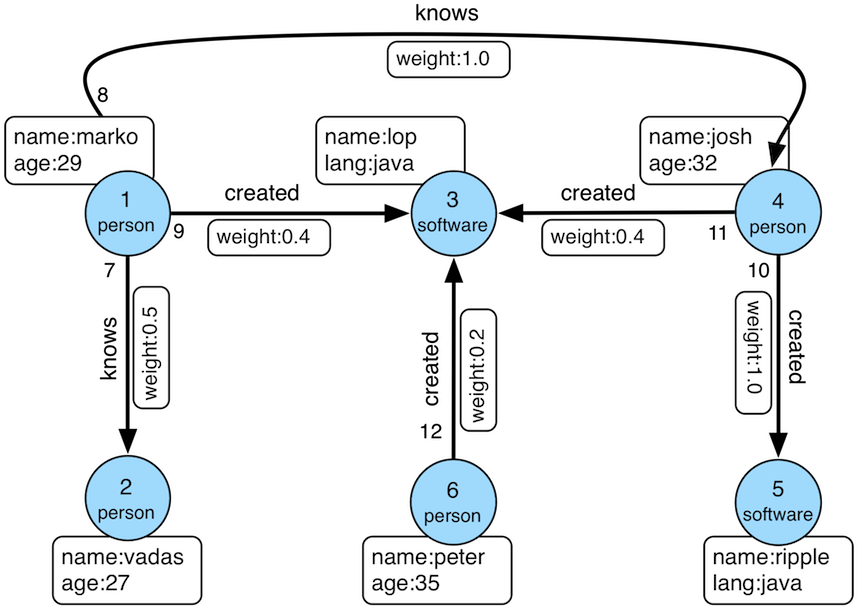
数据导入程序如下:
顶点ID为:
边ID为:
3.2.1 K-out API(GET,基础版)
3.2.1.1 功能介绍
根据起始顶点、方向、边的类型(可选)和深度depth,查找从起始顶点出发恰好depth步可达的顶点
Params
- source:起始顶点id,必填项
- direction:起始顶点向外发散的方向(OUT,IN,BOTH),选填项,默认是BOTH
- max_depth:步数,必填项
- label:边的类型,选填项,默认代表所有edge label
- nearest:nearest为true时,代表起始顶点到达结果顶点的最短路径长度为depth,不存在更短的路径;nearest为false时,代表起始顶点到结果顶点有一条长度为depth的路径(未必最短且可以有环),选填项,默认为true
- max_degree:查询过程中,单个顶点遍历的最大邻接边数目,选填项,默认为10000
- capacity:遍历过程中最大的访问的顶点数目,选填项,默认为10000000
- limit:返回的顶点的最大数目,选填项,默认为10000000
3.2.1.2 使用方法
Method & Url
Response Status
Response Body
3.2.1.3 适用场景
查找恰好N步关系可达的顶点。两个例子:
- 家族关系中,查找一个人的所有孙子,person A通过连续的两条“儿子”边到达的顶点集合。
- 社交关系中发现潜在好友,例如:与目标用户相隔两层朋友关系的用户,可以通过连续两条“朋友”边到达的顶点。
3.2.2 K-out API(POST,高级版)
3.2.2.1 功能介绍
根据起始顶点、步骤(包括方向、边类型和过滤属性)和深度depth,查找从起始顶点出发恰好depth步可达的顶点。
与K-out基础版的不同在于:
- 支持只统计邻居数量
- 支持边属性过滤
- 支持返回到达邻居的最短路径
Params
- source:起始顶点id,必填项
- 从起始点出发的Step,必填项,结构如下:
- direction:表示边的方向(OUT,IN,BOTH),默认是BOTH
- labels:边的类型列表
- properties:通过属性的值过滤边
- max_degree:查询过程中,单个顶点遍历的最大邻接边数目,默认为 10000 (注: 0.12版之前 step 内仅支持 degree 作为参数名, 0.12开始统一使用 max_degree, 并向下兼容 degree 写法)
- skip_degree:用于设置查询过程中舍弃超级顶点的最小边数,即当某个顶点的邻接边数目大于 skip_degree 时,完全舍弃该顶点。选填项,如果开启时,需满足
skip_degree >= max_degree约束,默认为0 (不启用),表示不跳过任何点 (注意: 开启此配置后,遍历时会尝试访问一个顶点的 skip_degree 条边,而不仅仅是 max_degree 条边,这样有额外的遍历开销,对查询性能影响可能有较大影响,请确认理解后再开启)
- max_depth:步数,必填项
- nearest:nearest为true时,代表起始顶点到达结果顶点的最短路径长度为depth,不存在更短的路径;nearest为false时,代表起始顶点到结果顶点有一条长度为depth的路径(未必最短且可以有环),选填项,默认为true
- count_only:Boolean值,true表示只统计结果的数目,不返回具体结果;false表示返回具体的结果,默认为false
- with_path:true表示返回起始点到每个邻居的最短路径,false表示不返回起始点到每个邻居的最短路径,选填项,默认为false
- with_vertex,选填项,默认为false:
- true表示返回结果包含完整的顶点信息(路径中的全部顶点)
- with_path为true时,返回所有路径中的顶点的完整信息
- with_path为false时,返回所有邻居的完整信息
- false时表示只返回顶点id
- true表示返回结果包含完整的顶点信息(路径中的全部顶点)
- capacity:遍历过程中最大的访问的顶点数目,选填项,默认为10000000
- limit:返回的顶点的最大数目,选填项,默认为10000000
3.2.2.2 使用方法
Method & Url
Request Body
Response Status
Response Body
3.2.2.3 适用场景
参见3.2.1.3
3.2.3 K-neighbor(GET,基础版)
3.2.3.1 功能介绍
根据起始顶点、方向、边的类型(可选)和深度depth,查找包括起始顶点在内、depth步之内可达的所有顶点
相当于:起始顶点、K-out(1)、K-out(2)、… 、K-out(max_depth)的并集
Params
- source: 起始顶点id,必填项
- direction:起始顶点向外发散的方向(OUT,IN,BOTH),选填项,默认是BOTH
- max_depth:步数,必填项
- label:边的类型,选填项,默认代表所有edge label
- max_degree:查询过程中,单个顶点遍历的最大邻接边数目,选填项,默认为10000
- limit:返回的顶点的最大数目,也即遍历过程中最大的访问的顶点数目,选填项,默认为10000000
3.2.3.2 使用方法
Method & Url
Response Status
Response Body
3.2.3.3 适用场景
查找N步以内可达的所有顶点,例如:
- 家族关系中,查找一个人五服以内所有子孙,person A通过连续的5条“亲子”边到达的顶点集合。
- 社交关系中发现好友圈子,例如目标用户通过1条、2条、3条“朋友”边可到达的用户可以组成目标用户的朋友圈子
3.2.4 K-neighbor API(POST,高级版)
3.2.4.1 功能介绍
根据起始顶点、步骤(包括方向、边类型和过滤属性)和深度depth,查找从起始顶点出发depth步内可达的所有顶点。
与K-neighbor基础版的不同在于:
- 支持只统计邻居数量
- 支持边属性过滤
- 支持返回到达邻居的最短路径
Params
- source:起始顶点id,必填项
- 从起始点出发的Step,必填项,结构如下:
- direction:表示边的方向(OUT,IN,BOTH),默认是BOTH
- labels:边的类型列表
- properties:通过属性的值过滤边
- max_degree:查询过程中,单个顶点遍历的最大邻接边数目,默认为 10000 (注: 0.12版之前 step 内仅支持 degree 作为参数名, 0.12开始统一使用 max_degree, 并向下兼容 degree 写法)
- skip_degree:用于设置查询过程中舍弃超级顶点的最小边数,即当某个顶点的邻接边数目大于 skip_degree 时,完全舍弃该顶点。选填项,如果开启时,需满足
skip_degree >= max_degree约束,默认为0 (不启用),表示不跳过任何点 (注意: 开启此配置后,遍历时会尝试访问一个顶点的 skip_degree 条边,而不仅仅是 max_degree 条边,这样有额外的遍历开销,对查询性能影响可能有较大影响,请确认理解后再开启)
- max_depth:步数,必填项
- count_only:Boolean值,true表示只统计结果的数目,不返回具体结果;false表示返回具体的结果,默认为false
- with_path:true表示返回起始点到每个邻居的最短路径,false表示不返回起始点到每个邻居的最短路径,选填项,默认为false
- with_vertex,选填项,默认为false:
- true表示返回结果包含完整的顶点信息(路径中的全部顶点)
- with_path为true时,返回所有路径中的顶点的完整信息
- with_path为false时,返回所有邻居的完整信息
- false时表示只返回顶点id
- true表示返回结果包含完整的顶点信息(路径中的全部顶点)
- limit:返回的顶点的最大数目,选填项,默认为10000000
3.2.4.2 使用方法
Method & Url
Request Body
Response Status
Response Body
3.2.4.3 适用场景
参见3.2.3.3
3.2.5 Same Neighbors
3.2.5.1 功能介绍
查询两个点的共同邻居
Params
- vertex:一个顶点id,必填项
- other:另一个顶点id,必填项
- direction:顶点向外发散的方向(OUT,IN,BOTH),选填项,默认是BOTH
- label:边的类型,选填项,默认代表所有edge label
- max_degree:查询过程中,单个顶点遍历的最大邻接边数目,选填项,默认为10000
- limit:返回的共同邻居的最大数目,选填项,默认为10000000
3.2.5.2 使用方法
Method & Url
Response Status
Response Body
3.2.5.3 适用场景
查找两个顶点的共同邻居:
- 社交关系中发现两个用户的共同粉丝或者共同关注用户
3.2.6 Jaccard Similarity(GET)
3.2.6.1 功能介绍
计算两个顶点的jaccard similarity(两个顶点邻居的交集比上两个顶点邻居的并集)
Params
- vertex:一个顶点id,必填项
- other:另一个顶点id,必填项
- direction:顶点向外发散的方向(OUT,IN,BOTH),选填项,默认是BOTH
- label:边的类型,选填项,默认代表所有edge label
- max_degree:查询过程中,单个顶点遍历的最大邻接边数目,选填项,默认为10000
3.2.6.2 使用方法
Method & Url
Response Status
Response Body
3.2.6.3 适用场景
用于评估两个点的相似性或者紧密度
3.2.7 Jaccard Similarity(POST)
3.2.7.1 功能介绍
计算与指定顶点的jaccard similarity最大的N个点
jaccard similarity的计算方式为:两个顶点邻居的交集比上两个顶点邻居的并集
Params
- vertex:一个顶点id,必填项
- 从起始点出发的Step,必填项,结构如下:
- direction:表示边的方向(OUT,IN,BOTH),默认是BOTH
- labels:边的类型列表
- properties:通过属性的值过滤边
- max_degree:查询过程中,单个顶点遍历的最大邻接边数目,默认为 10000 (注: 0.12版之前 step 内仅支持 degree 作为参数名, 0.12开始统一使用 max_degree, 并向下兼容 degree 写法)
- skip_degree:用于设置查询过程中舍弃超级顶点的最小边数,即当某个顶点的邻接边数目大于 skip_degree 时,完全舍弃该顶点。选填项,如果开启时,需满足
skip_degree >= max_degree约束,默认为0 (不启用),表示不跳过任何点 (注意: 开启此配置后,遍历时会尝试访问一个顶点的 skip_degree 条边,而不仅仅是 max_degree 条边,这样有额外的遍历开销,对查询性能影响可能有较大影响,请确认理解后再开启)
- top:返回一个起点的jaccard similarity中最大的top个,选填项,默认为100
- capacity:遍历过程中最大的访问的顶点数目,选填项,默认为10000000
3.2.7.2 使用方法
Method & Url
Request Body
Response Status
Response Body
3.2.7.3 适用场景
用于在图中找出与指定顶点相似性最高的顶点
3.2.8 Shortest Path
3.2.8.1 功能介绍
根据起始顶点、目的顶点、方向、边的类型(可选)和最大深度,查找一条最短路径
Params
- source:起始顶点id,必填项
- target:目的顶点id,必填项
- direction:起始顶点向外发散的方向(OUT,IN,BOTH),选填项,默认是BOTH
- max_depth:最大步数,必填项
- label:边的类型,选填项,默认代表所有edge label
- max_degree:查询过程中,单个顶点遍历的最大邻接边数目,选填项,默认为10000
- skip_degree:用于设置查询过程中舍弃超级顶点的最小边数,即当某个顶点的邻接边数目大于 skip_degree 时,完全舍弃该顶点。选填项,如果开启时,需满足
skip_degree >= max_degree约束,默认为0 (不启用),表示不跳过任何点 (注意: 开启此配置后,遍历时会尝试访问一个顶点的 skip_degree 条边,而不仅仅是 max_degree 条边,这样有额外的遍历开销,对查询性能影响可能有较大影响,请确认理解后再开启) - capacity:遍历过程中最大的访问的顶点数目,选填项,默认为10000000
3.2.8.2 使用方法
Method & Url
Response Status
Response Body
3.2.8.3 适用场景
查找两个顶点间的最短路径,例如:
- 社交关系网中,查找两个用户有关系的最短路径,即最近的朋友关系链
- 设备关联网络中,查找两个设备最短的关联关系
3.2.9 All Shortest Paths
3.2.9.1 功能介绍
根据起始顶点、目的顶点、方向、边的类型(可选)和最大深度,查找两点间所有的最短路径
Params
- source:起始顶点id,必填项
- target:目的顶点id,必填项
- direction:起始顶点向外发散的方向(OUT,IN,BOTH),选填项,默认是BOTH
- max_depth:最大步数,必填项
- label:边的类型,选填项,默认代表所有edge label
- max_degree:查询过程中,单个顶点遍历的最大邻接边数目,选填项,默认为10000
- skip_degree:用于设置查询过程中舍弃超级顶点的最小边数,即当某个顶点的邻接边数目大于 skip_degree 时,完全舍弃该顶点。选填项,如果开启时,需满足
skip_degree >= max_degree约束,默认为0 (不启用),表示不跳过任何点 (注意: 开启此配置后,遍历时会尝试访问一个顶点的 skip_degree 条边,而不仅仅是 max_degree 条边,这样有额外的遍历开销,对查询性能影响可能有较大影响,请确认理解后再开启) - capacity:遍历过程中最大的访问的顶点数目,选填项,默认为10000000
3.2.9.2 使用方法
Method & Url
Response Status
Response Body
3.2.9.3 适用场景
查找两个顶点间的所有最短路径,例如:
- 社交关系网中,查找两个用户有关系的全部最短路径,即最近的朋友关系链
- 设备关联网络中,查找两个设备全部的最短关联关系
3.2.10 Weighted Shortest Path
3.2.10.1 功能介绍
根据起始顶点、目的顶点、方向、边的类型(可选)和最大深度,查找一条带权最短路径
Params
- source:起始顶点id,必填项
- target:目的顶点id,必填项
- direction:起始顶点向外发散的方向(OUT,IN,BOTH),选填项,默认是BOTH
- label:边的类型,选填项,默认代表所有edge label
- weight:边的权重属性,必填项,必须是数字类型的属性
- max_degree:查询过程中,单个顶点遍历的最大邻接边数目,选填项,默认为10000
- skip_degree:用于设置查询过程中舍弃超级顶点的最小边数,即当某个顶点的邻接边数目大于 skip_degree 时,完全舍弃该顶点。选填项,如果开启时,需满足
skip_degree >= max_degree约束,默认为0 (不启用),表示不跳过任何点 (注意: 开启此配置后,遍历时会尝试访问一个顶点的 skip_degree 条边,而不仅仅是 max_degree 条边,这样有额外的遍历开销,对查询性能影响可能有较大影响,请确认理解后再开启) - capacity:遍历过程中最大的访问的顶点数目,选填项,默认为10000000
- with_vertex:true表示返回结果包含完整的顶点信息(路径中的全部顶点),false时表示只返回顶点id,选填项,默认为false
3.2.10.2 使用方法
Method & Url
Response Status
Response Body
3.2.10.3 适用场景
查找两个顶点间的带权最短路径,例如:
- 交通线路中查找从A城市到B城市花钱最少的交通方式
3.2.11 Single Source Shortest Path
3.2.11.1 功能介绍
从一个顶点出发,查找该点到图中其他顶点的最短路径(可选是否带权重)
Params
- source:起始顶点id,必填项
- direction:起始顶点向外发散的方向(OUT,IN,BOTH),选填项,默认是BOTH
- label:边的类型,选填项,默认代表所有edge label
- weight:边的权重属性,选填项,必须是数字类型的属性,如果不填或者虽然填了但是边没有该属性,则权重为1.0
- max_degree:查询过程中,单个顶点遍历的最大邻接边数目,选填项,默认为10000
- skip_degree:用于设置查询过程中舍弃超级顶点的最小边数,即当某个顶点的邻接边数目大于 skip_degree 时,完全舍弃该顶点。选填项,如果开启时,需满足
skip_degree >= max_degree约束,默认为0 (不启用),表示不跳过任何点 (注意: 开启此配置后,遍历时会尝试访问一个顶点的 skip_degree 条边,而不仅仅是 max_degree 条边,这样有额外的遍历开销,对查询性能影响可能有较大影响,请确认理解后再开启) - capacity:遍历过程中最大的访问的顶点数目,选填项,默认为10000000
- limit:查询到的目标顶点个数,也是返回的最短路径的条数,选填项,默认为10
- with_vertex:true表示返回结果包含完整的顶点信息(路径中的全部顶点),false时表示只返回顶点id,选填项,默认为false
3.2.11.2 使用方法
Method & Url
Response Status
Response Body
3.2.11.3 适用场景
查找从一个点出发到其他顶点的带权最短路径,比如:
- 查找从北京出发到全国其他所有城市的耗时最短的乘车方案
3.2.12 Multi Node Shortest Path
3.2.12.1 功能介绍
查找指定顶点集两两之间的最短路径
Params
- vertices:定义起始顶点,必填项,指定方式包括:
- ids:通过顶点id列表提供起始顶点
- label和properties:如果没有指定ids,则使用label和properties的联合条件查询起始顶点
- label:顶点的类型
- properties:通过属性的值查询起始顶点
注意:properties中的属性值可以是列表,表示只要key对应的value在列表中就可以
- step:表示从起始顶点到终止顶点走过的路径,必填项,Step的结构如下:
- direction:表示边的方向(OUT,IN,BOTH),默认是BOTH
- labels:边的类型列表
- properties:通过属性的值过滤边
- max_degree:查询过程中,单个顶点遍历的最大邻接边数目,默认为 10000 (注: 0.12版之前 step 内仅支持 degree 作为参数名, 0.12开始统一使用 max_degree, 并向下兼容 degree 写法)
- skip_degree:用于设置查询过程中舍弃超级顶点的最小边数,即当某个顶点的邻接边数目大于 skip_degree 时,完全舍弃该顶点。选填项,如果开启时,需满足
skip_degree >= max_degree约束,默认为0 (不启用),表示不跳过任何点 (注意: 开启此配置后,遍历时会尝试访问一个顶点的 skip_degree 条边,而不仅仅是 max_degree 条边,这样有额外的遍历开销,对查询性能影响可能有较大影响,请确认理解后再开启)
- max_depth:步数,必填项
- capacity:遍历过程中最大的访问的顶点数目,选填项,默认为10000000
- with_vertex:true表示返回结果包含完整的顶点信息(路径中的全部顶点),false时表示只返回顶点id,选填项,默认为false
3.2.12.2 使用方法
Method & Url
Request Body
Response Status
Response Body
3.2.12.3 适用场景
查找多个点之间的最短路径,比如:
- 查找多个公司和法人之间的最短路径
3.2.13 Paths (GET,基础版)
3.2.13.1 功能介绍
根据起始顶点、目的顶点、方向、边的类型(可选)和最大深度等条件查找所有路径
Params
- source:起始顶点id,必填项
- target:目的顶点id,必填项
- direction:起始顶点向外发散的方向(OUT,IN,BOTH),选填项,默认是BOTH
- label:边的类型,选填项,默认代表所有edge label
- max_depth:步数,必填项
- max_degree:查询过程中,单个顶点遍历的最大邻接边数目,选填项,默认为10000
- capacity:遍历过程中最大的访问的顶点数目,选填项,默认为10000000
- limit:返回的路径的最大数目,选填项,默认为10
3.2.13.2 使用方法
Method & Url
Response Status
Response Body
3.2.13.3 适用场景
查找两个顶点间的所有路径,例如:
- 社交网络中,查找两个用户所有可能的关系路径
- 设备关联网络中,查找两个设备之间所有的关联路径
3.2.14 Paths (POST,高级版)
3.2.14.1 功能介绍
根据起始顶点、目的顶点、步骤(step)和最大深度等条件查找所有路径
Params
- sources:定义起始顶点,必填项,指定方式包括:
- ids:通过顶点id列表提供起始顶点
- label和properties:如果没有指定ids,则使用label和properties的联合条件查询起始顶点
- label:顶点的类型
- properties:通过属性的值查询起始顶点
注意:properties中的属性值可以是列表,表示只要key对应的value在列表中就可以
- targets:定义终止顶点,必填项,指定方式包括:
- ids:通过顶点id列表提供终止顶点
- label和properties:如果没有指定ids,则使用label和properties的联合条件查询终止顶点
- label:顶点的类型
- properties:通过属性的值查询终止顶点
注意:properties中的属性值可以是列表,表示只要key对应的value在列表中就可以
- step:表示从起始顶点到终止顶点走过的路径,必填项,Step的结构如下:
- direction:表示边的方向(OUT,IN,BOTH),默认是BOTH
- labels:边的类型列表
- properties:通过属性的值过滤边
- max_degree:查询过程中,单个顶点遍历的最大邻接边数目,默认为 10000 (注: 0.12版之前 step 内仅支持 degree 作为参数名, 0.12开始统一使用 max_degree, 并向下兼容 degree 写法)
- skip_degree:用于设置查询过程中舍弃超级顶点的最小边数,即当某个顶点的邻接边数目大于 skip_degree 时,完全舍弃该顶点。选填项,如果开启时,需满足
skip_degree >= max_degree约束,默认为0 (不启用),表示不跳过任何点 (注意: 开启此配置后,遍历时会尝试访问一个顶点的 skip_degree 条边,而不仅仅是 max_degree 条边,这样有额外的遍历开销,对查询性能影响可能有较大影响,请确认理解后再开启)
- max_depth:步数,必填项
- nearest:nearest为true时,代表起始顶点到达结果顶点的最短路径长度为depth,不存在更短的路径;nearest为false时,代表起始顶点到结果顶点有一条长度为depth的路径(未必最短且可以有环),选填项,默认为true
- capacity:遍历过程中最大的访问的顶点数目,选填项,默认为10000000
- limit:返回的路径的最大数目,选填项,默认为10
- with_vertex:true表示返回结果包含完整的顶点信息(路径中的全部顶点),false时表示只返回顶点id,选填项,默认为false
3.2.14.2 使用方法
Method & Url
Request Body
Response Status
Response Body
3.2.14.3 适用场景
查找两个顶点间的所有路径,例如:
- 社交网络中,查找两个用户所有可能的关系路径
- 设备关联网络中,查找两个设备之间所有的关联路径
3.2.15 Customized Paths
3.2.15.1 功能介绍
根据一批起始顶点、边规则(包括方向、边的类型和属性过滤)和最大深度等条件查找符合条件的所有的路径
Params
- sources:定义起始顶点,必填项,指定方式包括:
- ids:通过顶点id列表提供起始顶点
- label和properties:如果没有指定ids,则使用label和properties的联合条件查询起始顶点
- label:顶点的类型
- properties:通过属性的值查询起始顶点
注意:properties中的属性值可以是列表,表示只要key对应的value在列表中就可以
- steps:表示从起始顶点走过的路径规则,是一组Step的列表。必填项。每个Step的结构如下:
- direction:表示边的方向(OUT,IN,BOTH),默认是BOTH
- labels:边的类型列表
- properties:通过属性的值过滤边
- weight_by:根据指定的属性计算边的权重,sort_by不为NONE时有效,与default_weight互斥
- default_weight:当边没有属性作为权重计算值时,采取的默认权重,sort_by不为NONE时有效,与weight_by互斥
- max_degree:查询过程中,单个顶点遍历的最大邻接边数目,默认为 10000 (注: 0.12版之前 step 内仅支持 degree 作为参数名, 0.12开始统一使用 max_degree, 并向下兼容 degree 写法)
- sample:当需要对某个step的符合条件的边进行采样时设置,-1表示不采样,默认为采样100
- sort_by:根据路径的权重排序,选填项,默认为NONE:
- NONE表示不排序,默认值
- INCR表示按照路径权重的升序排序
- DECR表示按照路径权重的降序排序
- capacity:遍历过程中最大的访问的顶点数目,选填项,默认为10000000
- limit:返回的路径的最大数目,选填项,默认为10
- with_vertex:true表示返回结果包含完整的顶点信息(路径中的全部顶点),false时表示只返回顶点id,选填项,默认为false
3.2.15.2 使用方法
Method & Url
Request Body
Response Status
Response Body
3.2.15.3 适用场景
适合查找各种复杂的路径集合,例如:
- 社交网络中,查找看过张艺谋所导演的电影的用户关注的大V的路径(张艺谋—>电影—->用户—>大V)
- 风控网络中,查找多个高风险用户的直系亲属的朋友的路径(高风险用户—>直系亲属—>朋友)
3.2.16 Template Paths
3.2.16.1 功能介绍
根据一批起始顶点、边规则(包括方向、边的类型和属性过滤)和最大深度等条件查找符合条件的所有的路径
Params
- sources:定义起始顶点,必填项,指定方式包括:
- ids:通过顶点id列表提供起始顶点
- label和properties:如果没有指定ids,则使用label和properties的联合条件查询起始顶点
- label:顶点的类型
- properties:通过属性的值查询起始顶点
注意:properties中的属性值可以是列表,表示只要key对应的value在列表中就可以
- targets:定义终止顶点,必填项,指定方式包括:
- ids:通过顶点id列表提供终止顶点
- label和properties:如果没有指定ids,则使用label和properties的联合条件查询终止顶点
- label:顶点的类型
- properties:通过属性的值查询终止顶点
注意:properties中的属性值可以是列表,表示只要key对应的value在列表中就可以
- steps:表示从起始顶点走过的路径规则,是一组Step的列表。必填项。每个Step的结构如下:
- direction:表示边的方向(OUT,IN,BOTH),默认是BOTH
- labels:边的类型列表
- properties:通过属性的值过滤边
- max_times:当前step可以重复的次数,当为N时,表示从起始顶点可以经过当前step 1-N 次
- max_degree:查询过程中,单个顶点遍历的最大邻接边数目,默认为 10000 (注: 0.12版之前 step 内仅支持 degree 作为参数名, 0.12开始统一使用 max_degree, 并向下兼容 degree 写法)
- skip_degree:用于设置查询过程中舍弃超级顶点的最小边数,即当某个顶点的邻接边数目大于 skip_degree 时,完全舍弃该顶点。选填项,如果开启时,需满足
skip_degree >= max_degree约束,默认为0 (不启用),表示不跳过任何点 (注意: 开启此配置后,遍历时会尝试访问一个顶点的 skip_degree 条边,而不仅仅是 max_degree 条边,这样有额外的遍历开销,对查询性能影响可能有较大影响,请确认理解后再开启)
- with_ring:Boolean值,true表示包含环路;false表示不包含环路,默认为false
- capacity:遍历过程中最大的访问的顶点数目,选填项,默认为10000000
- limit:返回的路径的最大数目,选填项,默认为10
- with_vertex:true表示返回结果包含完整的顶点信息(路径中的全部顶点),false时表示只返回顶点id,选填项,默认为false
3.2.16.2 使用方法
Method & Url
Request Body
Response Status
Response Body
3.2.16.3 适用场景
适合查找各种复杂的模板路径,比如personA -(朋友)-> personB -(同学)-> personC,其中"朋友"和"同学"边可以分别是最多3层和4层的情况
3.2.17 Crosspoints
3.2.17.1 功能介绍
根据起始顶点、目的顶点、方向、边的类型(可选)和最大深度等条件查找相交点
Params
- source:起始顶点id,必填项
- target:目的顶点id,必填项
- direction:起始顶点到目的顶点的方向, 目的点到起始点是反方向,BOTH时不考虑方向(OUT,IN,BOTH),选填项,默认是BOTH
- label:边的类型,选填项,默认代表所有edge label
- max_depth:步数,必填项
- max_degree:查询过程中,单个顶点遍历的最大邻接边数目,选填项,默认为10000
- capacity:遍历过程中最大的访问的顶点数目,选填项,默认为10000000
- limit:返回的交点的最大数目,选填项,默认为10
3.2.17.2 使用方法
Method & Url
Response Status
Response Body
3.2.17.3 适用场景
查找两个顶点的交点及其路径,例如:
- 社交网络中,查找两个用户共同关注的话题或者大V
- 家族关系中,查找共同的祖先
3.2.18 Customized Crosspoints
3.2.18.1 功能介绍
根据一批起始顶点、多种边规则(包括方向、边的类型和属性过滤)和最大深度等条件查找符合条件的所有的路径终点的交集
Params
sources:定义起始顶点,必填项,指定方式包括:
- ids:通过顶点id列表提供起始顶点
- label和properties:如果没有指定ids,则使用label和properties的联合条件查询起始顶点
- label:顶点的类型
- properties:通过属性的值查询起始顶点
注意:properties中的属性值可以是列表,表示只要key对应的value在列表中就可以
path_patterns:表示从起始顶点走过的路径规则,是一组规则的列表。必填项。每个规则是一个PathPattern
- 每个PathPattern是一组Step列表,每个Step结构如下:
- direction:表示边的方向(OUT,IN,BOTH),默认是BOTH
- labels:边的类型列表
- properties:通过属性的值过滤边
- max_degree:查询过程中,单个顶点遍历的最大邻接边数目,默认为 10000 (注: 0.12版之前 step 内仅支持 degree 作为参数名, 0.12开始统一使用 max_degree, 并向下兼容 degree 写法)
- skip_degree:用于设置查询过程中舍弃超级顶点的最小边数,即当某个顶点的邻接边数目大于 skip_degree 时,完全舍弃该顶点。选填项,如果开启时,需满足
skip_degree >= max_degree约束,默认为0 (不启用),表示不跳过任何点 (注意: 开启此配置后,遍历时会尝试访问一个顶点的 skip_degree 条边,而不仅仅是 max_degree 条边,这样有额外的遍历开销,对查询性能影响可能有较大影响,请确认理解后再开启)
- 每个PathPattern是一组Step列表,每个Step结构如下:
capacity:遍历过程中最大的访问的顶点数目,选填项,默认为10000000
limit:返回的路径的最大数目,选填项,默认为10
with_path:true表示返回交点所在的路径,false表示不返回交点所在的路径,选填项,默认为false
with_vertex,选填项,默认为false:
- true表示返回结果包含完整的顶点信息(路径中的全部顶点)
- with_path为true时,返回所有路径中的顶点的完整信息
- with_path为false时,返回所有交点的完整信息
- false时表示只返回顶点id
- true表示返回结果包含完整的顶点信息(路径中的全部顶点)
3.2.18.2 使用方法
Method & Url
Request Body
Response Status
Response Body
3.2.18.3 适用场景
查询一组顶点通过多种路径在终点有交集的情况。例如:
- 在商品图谱中,多款手机、学习机、游戏机通过不同的低级别的类目路径,最终都属于一级类目的电子设备
3.2.19 Rings
3.2.19.1 功能介绍
根据起始顶点、方向、边的类型(可选)和最大深度等条件查找可达的环路
例如:1 -> 25 -> 775 -> 14690 -> 25, 其中环路为 25 -> 775 -> 14690 -> 25
Params
- source:起始顶点id,必填项
- direction:起始顶点发出的边的方向(OUT,IN,BOTH),选填项,默认是BOTH
- label:边的类型,选填项,默认代表所有edge label
- max_depth:步数,必填项
- source_in_ring:环路是否包含起点,选填项,默认为true
- max_degree:查询过程中,单个顶点遍历的最大邻接边数目,选填项,默认为10000
- capacity:遍历过程中最大的访问的顶点数目,选填项,默认为10000000
- limit:返回的可达环路的最大数目,选填项,默认为10
3.2.19.2 使用方法
Method & Url
Response Status
Response Body
3.2.19.3 适用场景
查询起始顶点可达的环路,例如:
- 风控项目中,查询一个用户可达的循环担保的人或者设备
- 设备关联网络中,发现一个设备周围的循环引用的设备
3.2.20 Rays
3.2.20.1 功能介绍
根据起始顶点、方向、边的类型(可选)和最大深度等条件查找发散到边界顶点的路径
例如:1 -> 25 -> 775 -> 14690 -> 2289 -> 18379, 其中 18379 为边界顶点,即没有从 18379 发出的边
Params
- source:起始顶点id,必填项
- direction:起始顶点发出的边的方向(OUT,IN,BOTH),选填项,默认是BOTH
- label:边的类型,选填项,默认代表所有edge label
- max_depth:步数,必填项
- max_degree:查询过程中,单个顶点遍历的最大邻接边数目,选填项,默认为10000
- capacity:遍历过程中最大的访问的顶点数目,选填项,默认为10000000
- limit:返回的非环路的最大数目,选填项,默认为10
3.2.20.2 使用方法
Method & Url
Response Status
Response Body
3.2.20.3 适用场景
查找起始顶点到某种关系的边界顶点的路径,例如:
- 家族关系中,查找一个人到所有还没有孩子的子孙的路径
- 设备关联网络中,找到某个设备到终端设备的路径
3.2.21 Fusiform Similarity
3.2.21.1 功能介绍
按照条件查询一批顶点对应的"梭形相似点"。当两个顶点跟很多共同的顶点之间有某种关系的时候,我们认为这两个点为"梭形相似点"。举个例子说明"梭形相似点":“读者A"读了100本书,可以定义读过这100本书中的80本以上的读者,是"读者A"的"梭形相似点”
Params
sources:定义起始顶点,必填项,指定方式包括:
- ids:通过顶点id列表提供起始顶点
- label和properties:如果没有指定ids,则使用label和properties的联合条件查询起始顶点
- label:顶点的类型
- properties:通过属性的值查询起始顶点
注意:properties中的属性值可以是列表,表示只要key对应的value在列表中就可以
label:边的类型,选填项,默认代表所有edge label
direction:起始顶点向外发散的方向(OUT,IN,BOTH),选填项,默认是BOTH
min_neighbors:最少邻居数目,邻居数目少于这个阈值时,认为起点不具备"梭形相似点"。比如想要找一个"读者A"读过的书的"梭形相似点",那么
min_neighbors为100时,表示"读者A"至少要读过100本书才可以有"梭形相似点",必填项alpha:相似度,代表:起点与"梭形相似点"的共同邻居数目占起点的全部邻居数目的比例,必填项
min_similars:“梭形相似点"的最少个数,只有当起点的"梭形相似点"数目大于或等于该值时,才会返回起点及其"梭形相似点”,选填项,默认值为1
top:返回一个起点的"梭形相似点"中相似度最高的top个,必填项,0表示全部
group_property:与
min_groups一起使用,当起点跟其所有的"梭形相似点"某个属性的值有至少min_groups个不同值时,才会返回该起点及其"梭形相似点"。比如为"读者A"推荐"异地"书友时,需要设置group_property为读者的"城市"属性,min_group至少为2,选填项,不填代表不需要根据属性过滤min_groups:与
group_property一起使用,只有group_property设置时才有意义max_degree:查询过程中,单个顶点遍历的最大邻接边数目,选填项,默认为10000
capacity:遍历过程中最大的访问的顶点数目,选填项,默认为10000000
limit:返回的结果数目上限(一个起点及其"梭形相似点"算一个结果),选填项,默认为10
with_intermediary:是否返回起点及其"梭形相似点"共同关联的中间点,默认为false
with_vertex,选填项,默认为false:
- true表示返回结果包含完整的顶点信息
- false时表示只返回顶点id
3.2.21.2 使用方法
Method & Url
Request Body
Response Status
Response Body
3.2.21.3 适用场景
查询一组顶点相似度很高的顶点。例如:
- 跟一个读者有类似书单的读者
- 跟一个玩家玩类似游戏的玩家
3.2.22 Vertices
3.2.22.1 根据顶点的id列表,批量查询顶点
Params
- ids:要查询的顶点id列表
Method & Url
Response Status
Response Body
3.2.22.2 获取顶点 Shard 信息
通过指定的分片大小split_size,获取顶点分片信息(可以与 3.2.21.3 中的 Scan 配合使用来获取顶点)。
Params
- split_size:分片大小,必填项
Method & Url
Response Status
Response Body
3.2.22.3 根据Shard信息批量获取顶点
通过指定的分片信息批量查询顶点(Shard信息的获取参见 3.2.21.2 Shard)。
Params
- start:分片起始位置,必填项
- end:分片结束位置,必填项
- page:分页位置,选填项,默认为null,不分页;当page为“”时表示分页的第一页,从start指示的位置开始
- page_limit:分页获取顶点时,一页中顶点数目的上限,选填项,默认为100000
Method & Url
Response Status
Response Body
3.2.22.4 适用场景
- 按id列表查询顶点,可用于批量查询顶点,比如在path查询到多条路径之后,可以进一步查询某条路径的所有顶点属性。
- 获取分片和按分片查询顶点,可以用来遍历全部顶点
3.2.23 Edges
3.2.23.1 根据边的id列表,批量查询边
Params
- ids:要查询的边id列表
Method & Url
Response Status
Response Body
3.2.23.2 获取边 Shard 信息
通过指定的分片大小split_size,获取边分片信息(可以与 3.2.22.3 中的 Scan 配合使用来获取边)。
Params
- split_size:分片大小,必填项
Method & Url
Response Status
Response Body
3.2.23.3 根据 Shard 信息批量获取边
通过指定的分片信息批量查询边(Shard信息的获取参见 3.2.22.2)。
Params
- start:分片起始位置,必填项
- end:分片结束位置,必填项
- page:分页位置,选填项,默认为null,不分页;当page为“”时表示分页的第一页,从start指示的位置开始
- page_limit:分页获取边时,一页中边数目的上限,选填项,默认为100000
Method & Url
Response Status
Response Body
3.2.23.4 适用场景
- 按id列表查询边,可用于批量查询边
- 获取分片和按分片查询边,可以用来遍历全部边
10 - Rank API
4.1 Rank API overview
Not only the Graph iteration (traverser) method, HugeGraph-Server also provide Rank API for recommendation purpose.
You can use it to recommend some vertexes much closer to a vertex.
4.2 Details of Rank API
4.2.1 Personal Rank API
A typical scenario for Personal Rank algorithm is in recommendation application. According to the out edges of a vertex,
recommend some other vertices that having the same or similar edges.
Here is a use case: According to someone’s reading habit or reading history, we can recommend some books he may be interested or some book pal.
For Example:
- Suppose we have a vertex, Person type, and named tom.He like 5 books
a,b,c,d,e. If we want to recommend some book pal and books for tom, an easier idea is let’s check whoever also liked these books (common hobby based). - Now, we need someone else, like neo, he like three books
b,d,f. And Jay, he like 4 booksc,d,e,g, and Lee, he also like 4 booksa,d,e,f. - For we don’t need to recommend books tom already read, the recommend-list should only contain the books Tom’s book pal already read but tom haven’t read yet. Such as book “f” and “g”, and with priority f > g.
- Now, we recompute Tom’s personal rank value, we will get a sorted TopN book pal or book recommend-list. (Choose OTHER_LABEL,for Only Book purpose)
4.2.1.0 Data Preparation
The case above is simple. Here we also provide a public test dataset MovieLens for use case. You should download the dataset. The load it into HugeGraph with HugeGraph-Loader. To make it simple, we ignore all properties data of user and move. only field id is enough. we also ignore the value of edge rating.
The metadata for input file and mapping file as follows:
Note: modify the
input.pathto your local path.
4.2.1.1 Function Introduction
suitable for bipartite graph, will return all vertex or a list of its correlation which related to all source vertex.
Bipartite Graph is a special model in Graph Theory, as well as a special flow in network. The strongest feature is, it split all vertex in graph into two sets. The vertex in the set is not connected. However,the vertex in two sets may connect with each other.
Suppose we have one bipartite graph based on user and things. A random walk based PersonalRank algorithm should be likes this:
- Choose a user u as start vertex, let’s set the initial weight to be 1.0 . Go from Vu with probability alpha to a neighbor vertex, and (1-alpha) to stay.
- If we decide to go outside, we would like to choose an edge, such as
rating, to find a common judge.- Then choose the neighbors of current vertex randomly with uniform distribution, and reset the weights with uniform distribution.
- Compensate the source vertex’s weight with (1 - alpha)
- Repeat step 2;
- Convergence after reaching a certain number of steps or precision, then we got a recommend-list.
Params
Required:
- source: the id of source vertex
- label: edge label go from the source vertex, should connect two different type of vertex
Optional:
- alpha: the probability of going out for one vertex in each iteration,similar to the alpha of PageRank,required, value range is (0, 1], default 0.85.
- max_degree: in query process, the max iteration number of adjacency edge for a vertex, default
10000 - max_depth: iteration number,range [2, 50], default
5 - with_label:result filter,default
BOTH_LABEL,optional list as follows:- SAME_LABEL:Only keep vertex which has the same type as source vertex
- OTHER_LABEL:Only keep vertex which has different type as source vertex (the another part in bipartite graph)
- BOTH_LABEL:Keep both type vertex
- limit: max return vertex number,default
100 - max_diff: accuracy for convergence, default
0.0001(will implement soon) - sorted: whether sort the result by rank or not, true for descending sort, false for none, default
true
4.2.1.2 Usage
Method & Url
Request Body
Response Status
Response Body
4.2.1.3 Suitable Scenario
In a bipartite graph build by two different type of vertex, recommend other most related vertex to one vertex. for example:
- Reading recommendation: find out the books should be recommended to someone first, It is also possible to recommend book pal with the highest common preferences at the same time (just like: WeChat “your friend also read xx " function)
- Social recommendation: find out other Poster who interested in same topics, or other News/Messages you may be interested with (Such as : “Hot News” function in Weibo)
- Commodity recommendation: according to someone’s shopping habit,find out a commodity list should recommend first, some online salesman may also be good (Such as : “You May Like” function in TaoBao)
4.2.2 Neighbor Rank API
4.2.2.0 Data Preparation
4.2.2.1 Function Introduction
In a general graph structure,find the first N vertices of each layer with the highest correlation with a given starting point and their relevance.
In graph words: to go out from the starting point, get the probability of going to each vertex of each layer.
Params
- source: id of source vertex,required
- alpha:the probability of going out for one vertex in each iteration,similar to the alpha of PageRank,required, value range is (0, 1]
- steps: a path rule for source vertex visited,it’s a list of Step,each Step map to a layout in result,required.The structure of each Step as follows:
- direction:the direction of edge(OUT, IN, BOTH), BOTH for default.
- labels:a list of edge types, will union all edge types
- max_degree:in query process, the max iteration number of adjacency edge for a vertex, default
10000(Note: before v0.12 step only support degree as parameter name, from v0.12, use max_degree, compatible with degree) - top: retains only the top N results with the highest weight in each layer of the results, default 100, max 1000
- capacity: the maximum number of vertexes visited during the traversal, optional, default 10000000
4.2.2.2 Usage
Method & Url
Request Body
Response Status
Response Body
4.2.2.3 Suitable Scenario
Find the vertices in different layers for a given start point that should be most recommended
- For example, in the four-layered structure of the audience, friends, movies, and directors, according to the movies that a certain audience’s friends like, recommend movies for that audience, or recommend directors for those movies based on who made them.
11 - Variable API
5.1 Variables
Variables可以用来存储有关整个图的数据,数据按照键值对的方式存取
5.1.1 创建或者更新某个键值对
Method & Url
Request Body
Response Status
Response Body
5.1.2 列出全部键值对
Method & Url
Response Status
Response Body
5.1.3 列出某个键值对
Method & Url
Response Status
Response Body
5.1.4 删除某个键值对
Method & Url
Response Status
12 - Graphs API
6.1 Graphs
6.1.1 List all graphs
Method & Url
Response Status
Response Body
6.1.2 Get details of the graph
Method & Url
Response Status
Response Body
6.1.3 Clear all data of a graph,include: schema、vertex、edge and index .etc,This operation requires administrator privileges
Params
Since emptying the graph is a dangerous operation, we have added parameters for confirmation to the API to avoid false calls by users:
- confirm_message: default by
I'm sure to delete all data
Method & Url
Response Status
6.1.4 Clone graph,This operation requires administrator privileges
Params
- clone_graph_name: name of an exist graph. To clone from an existing graph, the user can choose to transfer the configuration file, which will replace the configuration in the existing graph
Method & Url
Request Body [Optional]
Response Status
Response Body
6.1.5 Create graph,This operation requires administrator privileges
Method & Url
Request Body
Response Status
Response Body
6.1.6 Delete graph and it’s data
Params
Since deleting a graph is a dangerous operation, we have added parameters for confirmation to the API to avoid false calls by users:
- confirm_message: default by
I'm sure to drop the graph
Method & Url
Response Status
6.2 Conf
6.2.1 Get configuration for a graph,This operation requires administrator privileges
Method & Url
Response Status
Response Body
6.3 Mode
Allowed graph mode values are:NONE,RESTORING,MERGING,LOADING
- None mode is regular mode
- Not allowed create schema with specified id
- Not support create vertex with id for AUTOMATIC id strategy
- LOADING mode used to load data via hugegraph-loader.
- When adding vertices / edges, it is not checked whether the required attributes are passed in
Restore has two different modes: Restoring and Merging
- Restoring mode is used to restore schema and graph data to an new graph.
- Support create schema with specified id
- Support create vertex with id for AUTOMATIC id strategy
- Merging mode is used to merge schema and graph data to an existing graph.
- Not allowed create schema with specified id
- Support create vertex with id for AUTOMATIC id strategy
Under normal circumstances, the graph mode is None. When you need to restore the graph, you need to temporarily modify the graph mode to Restoring or Merging as needed. When you complete the restore, change the graph mode to None.
6.3.1 Get graph mode.
Method & Url
Response Status
Response Body
Allowed graph mode values are:NONE,RESTORING,MERGING
6.3.2 Modify graph mode. This operation requires administrator privileges
Method & Url
Request Body
Allowed graph mode values are:NONE,RESTORING,MERGING
Response Status
Response Body
6.3.3 Get graph’s read mode.
Params
- name: name of a graph
Method & Url
Response Status
Response Body
6.3.4 Modify graph’s read mode. This operation requires administrator privileges
Params
- name: name of a graph
Method & Url
Request Body
Allowed read mode values are:ALL,OLTP_ONLY,OLAP_ONLY
Response Status
Response Body
6.4 Snapshot
6.4.1 Create a snapshot
Params
- name: name of a graph
Method & Url
Response Status
Response Body
6.4.2 Resume a snapshot
Params
- name: name of a graph
Method & Url
Response Status
Response Body
6.5 Compact
6.5.1 Manually compact graph,This operation requires administrator privileges
Params
- name: name of a graph
Method & Url
Response Status
Response Body
13 - Task API
7.1 Task
7.1.1 List all async tasks in graph
Params
- status: the status of asyncTasks
- limit:the max number of tasks to return
Method & Url
Response Status
Response Body
7.1.2 View the details of an async task
Method & Url
Response Status
Response Body
7.1.3 Delete task information of an async task,won’t delete the task itself
Method & Url
Response Status
7.1.4 Cancel an async task, the task should be able to be canceled
If you already created an async task via Gremlin API as follows:
Method & Url
cancel it in 10s. if more than 10s,the task may already be finished, then can’t be cancelled.
Response Status
Response Body
At this point, the number of vertices whose label is man must be less than 10.
14 - Gremlin API
8.1 Gremlin
8.1.1 向HugeGraphServer发送gremlin语句(GET),同步执行
Params
- gremlin: 要发送给
HugeGraphServer执行的gremlin语句 - bindings: 用来绑定参数,key是字符串,value是绑定的值(只能是字符串或者数字),功能类似于MySQL的 Prepared Statement,用于加速语句执行
- language: 发送语句的语言类型,默认为
gremlin-groovy - aliases: 为存在于图空间的已有变量添加别名
查询顶点
Method & Url
Response Status
Response Body
8.1.2 向HugeGraphServer发送gremlin语句(POST),同步执行
Method & Url
查询顶点
Request Body
Response Status
Response Body
注意:
这里是直接使用图对象(hugegraph),先获取其遍历器(traversal()),再获取顶点。 不能直接写成
graph.traversal().V()或g.V(),可以通过"aliases": {"graph": "hugegraph", "g": "__g_hugegraph"}为图和遍历器添加别名后使用别名操作。其中,hugegraph是原生存在的变量,__g_hugegraph是HugeGraphServer额外添加的变量, 每个图都会存在一个对应的这样格式(_g${graph})的遍历器对象。
响应体的结构与其他 Vertex 或 Edge 的 RESTful API的结构有区别,用户可能需要自行解析。
查询边
Request Body
Response Status
Response Body
8.1.3 向HugeGraphServer发送gremlin语句(POST),异步执行
Method & Url
查询顶点
Request Body
注意:
异步执行Gremlin语句暂不支持aliases,可以使用
graph代表要操作的图,也可以直接使用图的名字, 例如hugegraph; 另外g代表 traversal,等价于graph.traversal()或者hugegraph.traversal()
Response Status
Response Body
注:
可以通过
GET http://localhost:8080/graphs/hugegraph/tasks/1(其中"1"是task_id)来查询异步任务的执行状态,更多异步任务RESTful API
查询边
Request Body
Response Status
Response Body
注:
可以通过
GET http://localhost:8080/graphs/hugegraph/tasks/2(其中"2"是task_id)来查询异步任务的执行状态,更多异步任务RESTful API
15 - Authentication API
9.1 用户认证与权限控制
开启权限及相关配置请先参考 权限配置 文档
用户认证与权限控制概述:
HugeGraph支持多用户认证、以及细粒度的权限访问控制,采用基于“用户-用户组-操作-资源”的4层设计,灵活控制用户角色与权限。 资源描述了图数据库中的数据,比如符合某一类条件的顶点,每一个资源包括type、label、properties三个要素,共有18种type、 任意label、任意properties的组合形成的资源,一个资源的内部条件是且关系,多个资源之间的条件是或关系。用户可以属于一个或多个用户组, 每个用户组可以拥有对任意个资源的操作权限,操作类型包括:读、写、删除、执行等种类。 HugeGraph支持动态创建用户、用户组、资源, 支持动态分配或取消权限。初始化数据库时超级管理员用户被创建,后续可通过超级管理员创建各类角色用户,新创建的用户如果被分配足够权限后,可以由其创建或管理更多的用户。
举例说明:
user(name=boss) -belong-> group(name=all) -access(read)-> target(graph=graph1, resource={label: person,
city: Beijing})
描述:用户’boss’拥有对’graph1’图中北京人的读权限。
接口说明:
用户认证与权限控制接口包括5类:UserAPI、GroupAPI、TargetAPI、BelongAPI、AccessAPI。
9.2 用户(User)API
用户接口包括:创建用户,删除用户,修改用户,和查询用户相关信息接口。
9.2.1 创建用户
Params
- user_name: 用户名称
- user_password: 用户密码
- user_phone: 用户手机号
- user_email: 用户邮箱
其中 user_name 和 user_password 为必填。
Request Body
Method & Url
Response Status
Response Body
返回报文中,密码为加密后的密文
9.2.2 删除用户
Params
- id: 需要删除的用户 Id
Method & Url
Response Status
Response Body
9.2.3 修改用户
Params
- id: 需要修改的用户 Id
Method & Url
Request Body
修改user_name、user_password和user_phone
Response Status
Response Body
返回结果是包含修改过的内容在内的整个用户组对象
9.2.4 查询用户列表
Params
- limit: 返回结果条数的上限
Method & Url
Response Status
Response Body
9.2.5 查询某个用户
Params
- id: 需要查询的用户 Id
Method & Url
Response Status
Response Body
9.2.6 查询某个用户的角色
Method & Url
Response Status
Response Body
9.3 用户组(Group)API
用户组会赋予相应的资源权限,用户会被分配不同的用户组,即可拥有不同的资源权限。
用户组接口包括:创建用户组,删除用户组,修改用户组,和查询用户组相关信息接口。
9.3.1 创建用户组
Params
- group_name: 用户组名称
- group_description: 用户组描述
Request Body
Method & Url
Response Status
Response Body
9.3.2 删除用户组
Params
- id: 需要删除的用户组 Id
Method & Url
Response Status
Response Body
9.3.3 修改用户组
Params
- id: 需要修改的用户组 Id
Method & Url
Request Body
修改group_description
Response Status
Response Body
返回结果是包含修改过的内容在内的整个用户组对象
9.3.4 查询用户组列表
Params
- limit: 返回结果条数的上限
Method & Url
Response Status
Response Body
9.3.5 查询某个用户组
Params
- id: 需要查询的用户组 Id
Method & Url
Response Status
Response Body
9.4 资源(Target)API
资源描述了图数据库中的数据,比如符合某一类条件的顶点,每一个资源包括type、label、properties三个要素,共有18种type、
任意label、任意properties的组合形成的资源,一个资源的内部条件是且关系,多个资源之间的条件是或关系。
资源接口包括:资源的创建、删除、修改和查询。
9.4.1 创建资源
Params
- target_name: 资源名称
- target_graph: 资源图
- target_url: 资源地址
- target_resources: 资源定义(列表)
target_resources可以包括多个target_resource,以列表的形式存储。
每个target_resource包含:
- type:可选值 VERTEX, EDGE等, 可填ALL,则表示可以是顶点或边;
- label:可选值,⼀个顶点或边类型的名称,可填*,则表示任意类型;
- properties:map类型,可包含多个属性的键值对,必须匹配所有属性值,属性值⽀持填条件范围(age: P.gte(18)),properties如果为null表示任意属性均可,如果属性名和属性值均为‘*ʼ也表示任意属性均可。
如精细资源:“target_resources”: [{“type”:“VERTEX”,“label”:“person”,“properties”:{“city”:“Beijing”,“age”:“P.gte(20)”}}]**
资源定义含义:类型是’person’的顶点,且城市属性是’Beijing’,年龄属性大于等于20。
Request Body
Method & Url
Response Status
Response Body
9.4.2 删除资源
Params
- id: 需要删除的资源 Id
Method & Url
Response Status
Response Body
9.4.3 修改资源
Params
- id: 需要修改的资源 Id
Method & Url
Request Body
修改资源定义中的type
Response Status
Response Body
返回结果是包含修改过的内容在内的整个用户组对象
9.4.4 查询资源列表
Params
- limit: 返回结果条数的上限
Method & Url
Response Status
Response Body
9.4.5 查询某个资源
Params
- id: 需要查询的资源 Id
Method & Url
Response Status
Response Body
9.5 关联角色(Belong)API
关联用户和用户组的关系,一个用户可以关联一个或者多个用户组。用户组拥有相关资源的权限,不同用户组的资源权限可以理解为不同的角色。即给用户关联角色。
关联角色接口包括:用户关联角色的创建、删除、修改和查询。
9.5.1 创建用户的关联角色
Params
- user: 用户 Id
- group: 用户组 Id
- belong_description: 描述
Request Body
Method & Url
Response Status
Response Body
9.5.2 删除关联角色
Params
- id: 需要删除的关联角色 Id
Method & Url
Response Status
Response Body
9.5.3 修改关联角色
关联角色只能修改描述,不能修改 user 和 group 属性,如果需要修改关联角色,需要删除原来关联关系,新增关联角色。
Params
- id: 需要修改的关联角色 Id
Method & Url
Request Body
修改belong_description
Response Status
Response Body
返回结果是包含修改过的内容在内的整个用户组对象
9.5.4 查询关联角色列表
Params
- limit: 返回结果条数的上限
Method & Url
Response Status
Response Body
9.5.5 查看某个关联角色
Params
- id: 需要查询的关联角色 Id
Method & Url
Response Status
Response Body
9.6 赋权(Access)API
给用户组赋予资源的权限,主要包含:读操作(READ)、写操作(WRITE)、删除操作(DELETE)、执行操作(EXECUTE)等。
赋权接口包括:赋权的创建、删除、修改和查询。
9.6.1 创建赋权(用户组赋予资源的权限)
Params
- group: 用户组 Id
- target: 资源 Id
- access_permission: 权限许可
- access_description: 赋权描述
access_permission:
- READ:读操作,所有的查询,包括查询Schema、查顶点/边,查询顶点和边的数量VERTEX_AGGR/EDGE_AGGR,也包括读图的状态STATUS、变量VAR、任务TASK等;
- WRITE:写操作,所有的创建、更新操作,包括给Schema增加property key,给顶点增加或更新属性等;
- DELETE:删除操作,包括删除元数据、删除顶点/边;
- EXECUTE:执⾏操作,包括执⾏Gremlin语句、执⾏Task、执⾏metadata函数;
Request Body
Method & Url
Response Status
Response Body
9.6.2 删除赋权
Params
- id: 需要删除的赋权 Id
Method & Url
Response Status
Response Body
9.6.3 修改赋权
赋权只能修改描述,不能修改用户组、资源和权限许可,如果需要修改赋权的关系,可以删除原来的赋权关系,新增赋权。
Params
- id: 需要修改的赋权 Id
Method & Url
Request Body
修改access_description
Response Status
Response Body
返回结果是包含修改过的内容在内的整个用户组对象
9.6.4 查询赋权列表
Params
- limit: 返回结果条数的上限
Method & Url
Response Status
Response Body
9.6.5 查询某个赋权
Params
- id: 需要查询的赋权 Id