This is the multi-page printable view of this section. .
Contribution Guidelines
1 - How to Contribute to HugeGraph
Thanks for taking the time to contribute! As an open source project, HugeGraph is looking forward to be contributed from everyone, and we are also grateful to all the contributors.
The following is a contribution guide for HugeGraph:
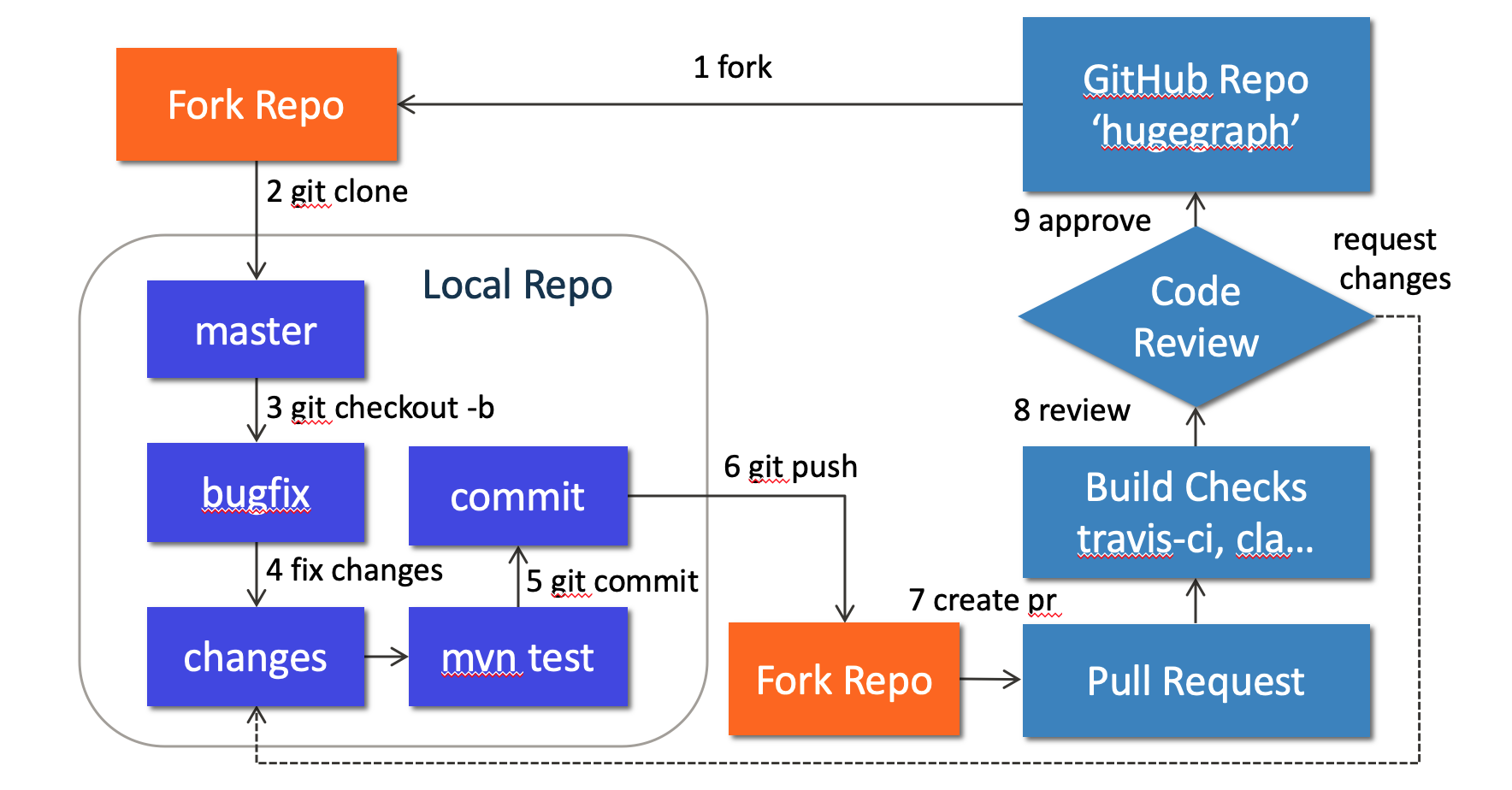 {width=“884” height=“462”}
1. Preparation
We can contribute by reporting issues, submitting code patches or any other feedback.
Before submitting the code, we need to do some preparation:
Sign up or login to GitHub: https://github.com
Fork HugeGraph repo from GitHub: https://github.com/apache/incubator-hugegraph/fork
Clone code from fork repo to local: https://github.com/${GITHUB_USER_NAME}/hugegraph
Configure local HugeGraph repo
Optional: You can use GitHub desktop to greatly simplify the commit and update process.
2. Create an Issue on GitHub
If you encounter bugs or have any questions, please go to GitHub Issues to report them and feel free to create an issue.
3. Make changes of code locally
3.1 Create a new branch
Please don’t use master branch for development. We should create a new branch instead:
3.2 Change the code
Assume that we need to modify some files like “HugeGraph.java” and “HugeFactory.java”:
Note: In order to be consistent with the code style easily, if you use IDEA as your IDE, you can directly import our code style configuration file.
3.3 Commit changes to git repo
After the code has been completed, we submit them to the local git repo:
Please edit the commit message after running git commit, we can explain what and how to fix a bug or implement a feature, the following is an example:
Please remember to fill in the issue id, which was generated by GitHub after issue creation.
3.4 Push commit to GitHub fork repo
Push the local commit to GitHub fork repo:
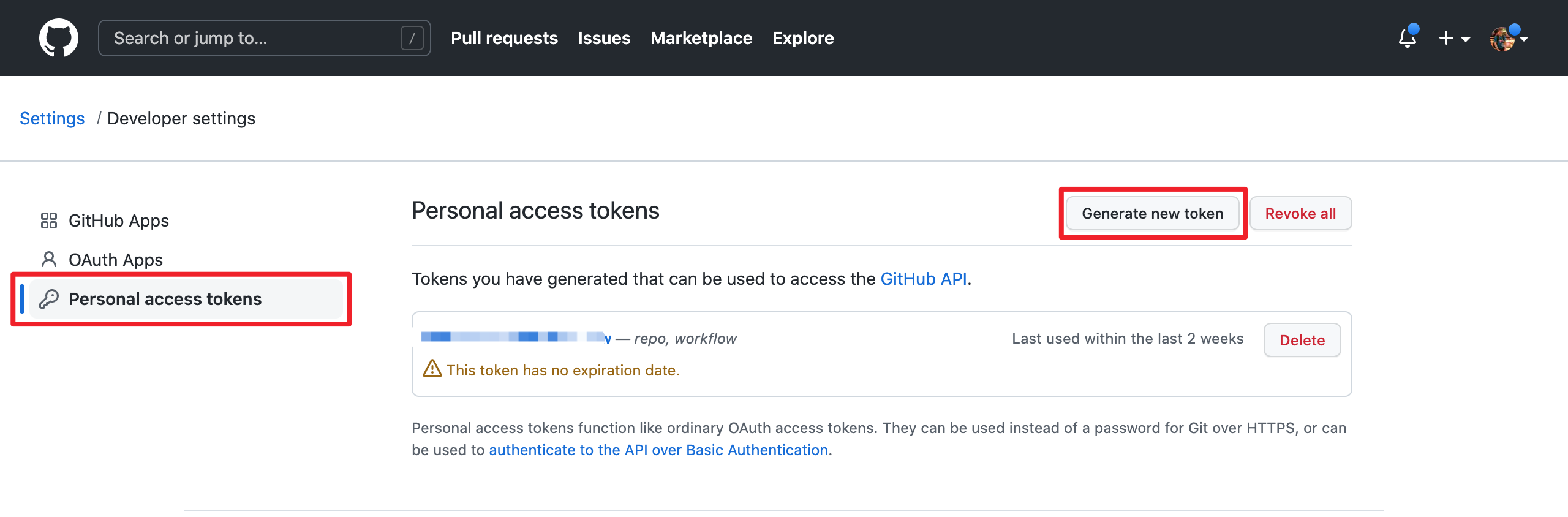
Note that since GitHub requires submitting code through username + token (instead of using username + password directly), you need to create a GitHub token from https://github.com/settings/tokens:
 {width=“1280” height=“422”}
4. Create a Pull Request
Go to the web page of GitHub fork repo, there would be a chance to create a Pull Request after pushing to a new branch, just click button “Compare & pull request” to do it. Then edit the description for proposed changes, which can just be copied from the commit message.
Please sign the HugeGraph CLA when contributing code for the first time. You can sign the CLA by just posting a Pull Request Comment same as the below format:
I have read the CLA Document and I hereby sign the CLA
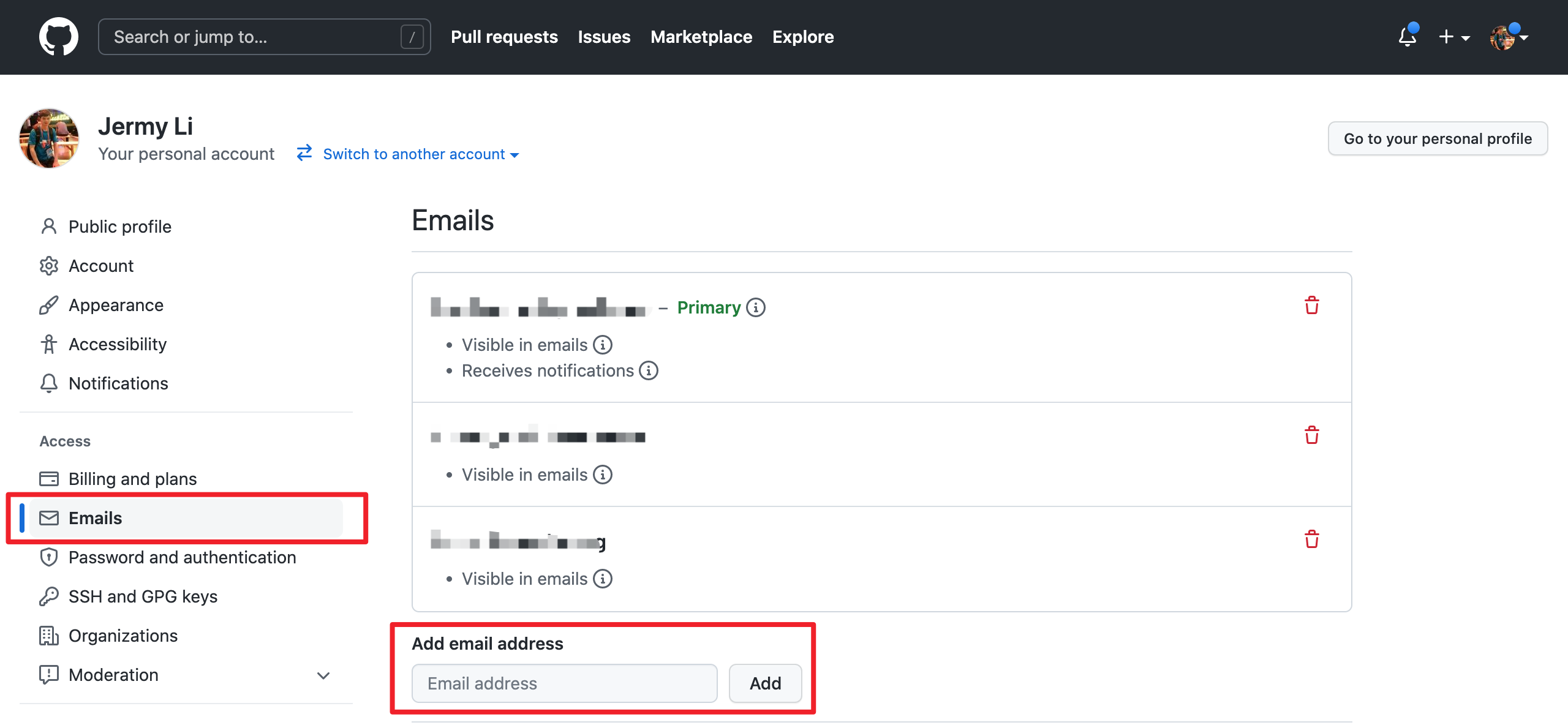
Note: please make sure the email address you used to submit the code is bound to the GitHub account. For how to bind the email address, please refer to https://github.com/settings/emails:
 {width=“1280” height=“592”}
5. Code review
Maintainers will start the code review after all the automatic checks are passed:
- Check: Contributor License Agreement is signed
- Check: Travis CI builds is passed (automatically Test and Deploy)
The commit will be accepted and merged if there is no problem after review.
Please click on “Details” to find the problem if any check does not pass.
If there are checks not passed or changes requested, then continue to modify the code and push again.
6. More changes after review
If we have not passed the review, don’t be discouraged. Usually a commit needs to be reviewed several times before being accepted! Please follow the review comments and make further changes.
After the further changes, we submit them to the local repo:
If there are conflicts that prevent the code from being merged, we need to rebase on master branch:
And push it to GitHub fork repo again:
GitHub will automatically update the Pull Request after we push it, just wait for code review.
2 - Subscribe Mailing Lists
It is highly recommended to subscribe to the development mailing list to keep up-to-date with the community.
In the process of using HugeGraph, if you have any questions or ideas, suggestions, you can participate in the HugeGraph community building through the Apache mailing list. Sending a subscription email is also very simple, the steps are as follows:
Email dev-subscribe@hugegraph.apache.org with your own email address, subject and content are arbitrary.
Receive confirmation email and reply. After completing step 1, you will receive a confirmation email from dev-help@hugegraph.apache.org (if not received, please confirm whether the email is automatically classified as spam, promotion email, subscription email, etc.) . Then reply directly to the email, or click on the link in the email to reply quickly, the subject and content are arbitrary.
Receive a welcome email. After completing the above steps, you will receive a welcome email with the subject WELCOME to dev@hugegraph.apache.org, and you have successfully subscribed to the Apache HugeGraph mailing list.
Unsubscribe Mailing Lists
If you do not need to know what’s going on with HugeGraph, you can unsubscribe from the mailing list.
Unsubscribe from the mailing list steps are as follows:
Email dev-unsubscribe@hugegraph.apache.org with your subscribed email address, subject and content are arbitrary.
Receive confirmation email and reply. After completing step 1, you will receive a confirmation email from dev-help@hugegraph.apache.org (if not received, please confirm whether the email is automatically classified as spam, promotion email, subscription email, etc.) . Then reply directly to the email, or click on the link in the email to reply quickly, the subject and content are arbitrary.
Receive a goodbye email. After completing the above steps, you will receive a goodbye email with the subject GOODBYE from dev@hugegraph.apache.org, and you have successfully unsubscribed to the Apache HugeGraph mailing list, and you will not receive emails from dev@hugegraph.apache.org.
3 - Validate Apache Release
TODO: Translate this article to English!
验证阶段
当内部的临时发布和打包工作完成后, 其他的社区开发者(尤其是 PMC)需要参与到验证环节确保某个人发布版本的"正确性 + 完整性", 这里需要每个人都尽量参与, 然后后序邮件回复的时候说明自己已检查了哪些项. (下面是核心项)
1. 检查 hash 值
首先需要检查 source + binary 包的文件完整性, 通过 shasum 进行校验, 确保和发布到 apache/github 上的 hash 值一致 (一般是 sha512), 这里同0x02的最后一步检验.
2. 检查 gpg 签名
这个就是为了确保发布的包是由可信赖的人上传的, 假设 tom 签名后上传, 其他人应该下载 A 的公钥然后进行签名确认, 相关命令:
先确认了整体的完整性/一致性, 然后接下来确认具体的内容 (关键)
3. 检查压缩包内容
这里分源码包 + 二进制包两个方面, 源码包更为严格, 挑核心的部分说 (完整的列表参考官方 Wiki, 比较长)
首先我们需要从 apache 官方的 release-candidate 地址下载包到本地 (地址: dist.apache.org/repos/dist/dev/hugegraph/)
A. 源码包
解压 xxx-hugegraph-source.tar.gz后, 进行如下检查:
- 文件夹都带有
incubating, 且不存在空的文件/文件夹 - 存在
DISCLAIMER文件 - 存在
LICENSE+NOTICE文件并且内容正常 - 不存在任何二进制文件
- 源码文件都包含标准
ASF License头 (这个用插件跑一下为主) - 检查每个父/子模块的
pom.xml版本号是否一致 (且符合期望) - 检查前 3 ~ 5 个 commit 提交, 点进去看看是否修改处和源码文件一致
- 最后, 确保源码可以正常/正确编译 (然后看看测试和规范)
B. 二进制包
解压 xxx-hugegraph.tar.gz后, 进行如下检查:
- 文件夹都带有
incubating - 存在
LICENSE+NOTICE文件并且内容正常 - 通过 gpg 命令确认每个文件的签名正常
注: 如果二进制包里面引入了第三方依赖, 则需要更新 LICENSE, 加入第三方依赖的 LICENSE; 若第三方依赖 LICENSE 是 Apache 2.0, 且对应的项目中包含了 NOTICE, 则还需要更新我们的 NOTICE 文件
4. 检查官网以及 github 等页面
- 确保官网至少满足 apache website check, 以及没有死链等
- 更新下载链接以及版本更新说明
- …