这是本节的多页打印视图。
点击此处打印 .
返回本页常规视图 .
API
1 - HugeGraph RESTful API HugeGraph-Server通过HugeGraph-API基于HTTP协议为Client提供操作图的接口,主要包括元数据和
图数据的增删改查,遍历算法,变量,图操作及其他操作。
1.1 - Schema API 1.1 Schema HugeGraph 提供单一接口获取某个图的全部 Schema 信息,包括:PropertyKey、VertexLabel、EdgeLabel 和 IndexLabel。
Method & Url 1 GET http://localhost:8080/graphs/hugegraph/schema Response Status Response Body 1 {
2 "propertykeys" : [
3 {
4 "id" : 7 ,
5 "name" : "price" ,
6 "data_type" : "INT" ,
7 "cardinality" : "SINGLE" ,
8 "aggregate_type" : "NONE" ,
9 "write_type" : "OLTP" ,
10 "properties" : [
11 ],
12 "status" : "CREATED" ,
13 "user_data" : {
14 "~create_time" : "2021-09-03 15:13:40.741"
15 }
16 },
17 {
18 "id" : 6 ,
19 "name" : "date" ,
20 "data_type" : "TEXT" ,
21 "cardinality" : "SINGLE" ,
22 "aggregate_type" : "NONE" ,
23 "write_type" : "OLTP" ,
24 "properties" : [
25 ],
26 "status" : "CREATED" ,
27 "user_data" : {
28 "~create_time" : "2021-09-03 15:13:40.729"
29 }
30 },
31 {
32 "id" : 3 ,
33 "name" : "city" ,
34 "data_type" : "TEXT" ,
35 "cardinality" : "SINGLE" ,
36 "aggregate_type" : "NONE" ,
37 "write_type" : "OLTP" ,
38 "properties" : [
39 ],
40 "status" : "CREATED" ,
41 "user_data" : {
42 "~create_time" : "2021-09-03 15:13:40.691"
43 }
44 },
45 {
46 "id" : 2 ,
47 "name" : "age" ,
48 "data_type" : "INT" ,
49 "cardinality" : "SINGLE" ,
50 "aggregate_type" : "NONE" ,
51 "write_type" : "OLTP" ,
52 "properties" : [
53 ],
54 "status" : "CREATED" ,
55 "user_data" : {
56 "~create_time" : "2021-09-03 15:13:40.678"
57 }
58 },
59 {
60 "id" : 5 ,
61 "name" : "lang" ,
62 "data_type" : "TEXT" ,
63 "cardinality" : "SINGLE" ,
64 "aggregate_type" : "NONE" ,
65 "write_type" : "OLTP" ,
66 "properties" : [
67 ],
68 "status" : "CREATED" ,
69 "user_data" : {
70 "~create_time" : "2021-09-03 15:13:40.718"
71 }
72 },
73 {
74 "id" : 4 ,
75 "name" : "weight" ,
76 "data_type" : "DOUBLE" ,
77 "cardinality" : "SINGLE" ,
78 "aggregate_type" : "NONE" ,
79 "write_type" : "OLTP" ,
80 "properties" : [
81 ],
82 "status" : "CREATED" ,
83 "user_data" : {
84 "~create_time" : "2021-09-03 15:13:40.707"
85 }
86 },
87 {
88 "id" : 1 ,
89 "name" : "name" ,
90 "data_type" : "TEXT" ,
91 "cardinality" : "SINGLE" ,
92 "aggregate_type" : "NONE" ,
93 "write_type" : "OLTP" ,
94 "properties" : [
95 ],
96 "status" : "CREATED" ,
97 "user_data" : {
98 "~create_time" : "2021-09-03 15:13:40.609"
99 }
100 }
101 ],
102 "vertexlabels" : [
103 {
104 "id" : 1 ,
105 "name" : "person" ,
106 "id_strategy" : "PRIMARY_KEY" ,
107 "primary_keys" : [
108 "name"
109 ],
110 "nullable_keys" : [
111 "age"
112 ],
113 "index_labels" : [
114 "personByCity" ,
115 "personByAgeAndCity"
116 ],
117 "properties" : [
118 "name" ,
119 "age" ,
120 "city"
121 ],
122 "status" : "CREATED" ,
123 "ttl" : 0 ,
124 "enable_label_index" : true ,
125 "user_data" : {
126 "~create_time" : "2021-09-03 15:13:40.783"
127 }
128 },
129 {
130 "id" : 2 ,
131 "name" : "software" ,
132 "id_strategy" : "PRIMARY_KEY" ,
133 "primary_keys" : [
134 "name"
135 ],
136 "nullable_keys" : [
137 "price"
138 ],
139 "index_labels" : [
140 "softwareByPrice"
141 ],
142 "properties" : [
143 "name" ,
144 "lang" ,
145 "price"
146 ],
147 "status" : "CREATED" ,
148 "ttl" : 0 ,
149 "enable_label_index" : true ,
150 "user_data" : {
151 "~create_time" : "2021-09-03 15:13:40.840"
152 }
153 }
154 ],
155 "edgelabels" : [
156 {
157 "id" : 1 ,
158 "name" : "knows" ,
159 "source_label" : "person" ,
160 "target_label" : "person" ,
161 "frequency" : "MULTIPLE" ,
162 "sort_keys" : [
163 "date"
164 ],
165 "nullable_keys" : [
166 "weight"
167 ],
168 "index_labels" : [
169 "knowsByWeight"
170 ],
171 "properties" : [
172 "weight" ,
173 "date"
174 ],
175 "status" : "CREATED" ,
176 "ttl" : 0 ,
177 "enable_label_index" : true ,
178 "user_data" : {
179 "~create_time" : "2021-09-03 15:13:41.840"
180 }
181 },
182 {
183 "id" : 2 ,
184 "name" : "created" ,
185 "source_label" : "person" ,
186 "target_label" : "software" ,
187 "frequency" : "SINGLE" ,
188 "sort_keys" : [
189 ],
190 "nullable_keys" : [
191 "weight"
192 ],
193 "index_labels" : [
194 "createdByDate" ,
195 "createdByWeight"
196 ],
197 "properties" : [
198 "weight" ,
199 "date"
200 ],
201 "status" : "CREATED" ,
202 "ttl" : 0 ,
203 "enable_label_index" : true ,
204 "user_data" : {
205 "~create_time" : "2021-09-03 15:13:41.868"
206 }
207 }
208 ],
209 "indexlabels" : [
210 {
211 "id" : 1 ,
212 "name" : "personByCity" ,
213 "base_type" : "VERTEX_LABEL" ,
214 "base_value" : "person" ,
215 "index_type" : "SECONDARY" ,
216 "fields" : [
217 "city"
218 ],
219 "status" : "CREATED" ,
220 "user_data" : {
221 "~create_time" : "2021-09-03 15:13:40.886"
222 }
223 },
224 {
225 "id" : 4 ,
226 "name" : "createdByDate" ,
227 "base_type" : "EDGE_LABEL" ,
228 "base_value" : "created" ,
229 "index_type" : "SECONDARY" ,
230 "fields" : [
231 "date"
232 ],
233 "status" : "CREATED" ,
234 "user_data" : {
235 "~create_time" : "2021-09-03 15:13:41.878"
236 }
237 },
238 {
239 "id" : 5 ,
240 "name" : "createdByWeight" ,
241 "base_type" : "EDGE_LABEL" ,
242 "base_value" : "created" ,
243 "index_type" : "RANGE_DOUBLE" ,
244 "fields" : [
245 "weight"
246 ],
247 "status" : "CREATED" ,
248 "user_data" : {
249 "~create_time" : "2021-09-03 15:13:42.117"
250 }
251 },
252 {
253 "id" : 2 ,
254 "name" : "personByAgeAndCity" ,
255 "base_type" : "VERTEX_LABEL" ,
256 "base_value" : "person" ,
257 "index_type" : "SECONDARY" ,
258 "fields" : [
259 "age" ,
260 "city"
261 ],
262 "status" : "CREATED" ,
263 "user_data" : {
264 "~create_time" : "2021-09-03 15:13:41.351"
265 }
266 },
267 {
268 "id" : 3 ,
269 "name" : "softwareByPrice" ,
270 "base_type" : "VERTEX_LABEL" ,
271 "base_value" : "software" ,
272 "index_type" : "RANGE_INT" ,
273 "fields" : [
274 "price"
275 ],
276 "status" : "CREATED" ,
277 "user_data" : {
278 "~create_time" : "2021-09-03 15:13:41.587"
279 }
280 },
281 {
282 "id" : 6 ,
283 "name" : "knowsByWeight" ,
284 "base_type" : "EDGE_LABEL" ,
285 "base_value" : "knows" ,
286 "index_type" : "RANGE_DOUBLE" ,
287 "fields" : [
288 "weight"
289 ],
290 "status" : "CREATED" ,
291 "user_data" : {
292 "~create_time" : "2021-09-03 15:13:42.376"
293 }
294 }
295 ]
296 } 1.2 - PropertyKey API 1.2 PropertyKey Params说明:
name:属性类型名称,必填 data_type:属性类型数据类型,包括:bool、byte、int、long、float、double、string、date、uuid、blob,默认string类型 cardinality:属性类型基数,包括:single、list、set,默认single 请求体字段说明:
id:属性类型id值 properties:属性的属性,对于属性而言,此项为空 user_data:设置属性类型的通用信息,比如可设置age属性的取值范围,最小为0,最大为100;目前此项不做任何校验,只为后期拓展提供预留入口 1.2.1 创建一个 PropertyKey Method & Url 1 POST http://localhost:8080/graphs/hugegraph/schema/propertykeys Request Body 1 {
2 "name" : "age" ,
3 "data_type" : "INT" ,
4 "cardinality" : "SINGLE"
5 } Response Status Response Body 1 {
2 "property_key" : {
3 "id" : 1 ,
4 "name" : "age" ,
5 "data_type" : "INT" ,
6 "cardinality" : "SINGLE" ,
7 "aggregate_type" : "NONE" ,
8 "write_type" : "OLTP" ,
9 "properties" : [],
10 "status" : "CREATED" ,
11 "user_data" : {
12 "~create_time" : "2022-05-13 13:47:23.745"
13 }
14 },
15 "task_id" : 0
16 } 1.2.2 为已存在的 PropertyKey 添加或移除 userdata Params action: 表示当前行为是添加还是移除,取值为append(添加)和eliminate(移除) Method & Url 1 PUT http://localhost:8080/graphs/hugegraph/schema/propertykeys/age?action=append Request Body 1 {
2 "name" : "age" ,
3 "user_data" : {
4 "min" : 0 ,
5 "max" : 100
6 }
7 } Response Status Response Body 1 {
2 "property_key" : {
3 "id" : 1 ,
4 "name" : "age" ,
5 "data_type" : "INT" ,
6 "cardinality" : "SINGLE" ,
7 "aggregate_type" : "NONE" ,
8 "write_type" : "OLTP" ,
9 "properties" : [],
10 "status" : "CREATED" ,
11 "user_data" : {
12 "min" : 0 ,
13 "max" : 100 ,
14 "~create_time" : "2022-05-13 13:47:23.745"
15 }
16 },
17 "task_id" : 0
18 } 1.2.3 获取所有的 PropertyKey Method & Url 1 GET http://localhost:8080/graphs/hugegraph/schema/propertykeys Response Status Response Body 1 {
2 "propertykeys" : [
3 {
4 "id" : 3 ,
5 "name" : "city" ,
6 "data_type" : "TEXT" ,
7 "cardinality" : "SINGLE" ,
8 "properties" : [],
9 "user_data" : {}
10 },
11 {
12 "id" : 2 ,
13 "name" : "age" ,
14 "data_type" : "INT" ,
15 "cardinality" : "SINGLE" ,
16 "properties" : [],
17 "user_data" : {}
18 },
19 {
20 "id" : 5 ,
21 "name" : "lang" ,
22 "data_type" : "TEXT" ,
23 "cardinality" : "SINGLE" ,
24 "properties" : [],
25 "user_data" : {}
26 },
27 {
28 "id" : 4 ,
29 "name" : "weight" ,
30 "data_type" : "DOUBLE" ,
31 "cardinality" : "SINGLE" ,
32 "properties" : [],
33 "user_data" : {}
34 },
35 {
36 "id" : 6 ,
37 "name" : "date" ,
38 "data_type" : "TEXT" ,
39 "cardinality" : "SINGLE" ,
40 "properties" : [],
41 "user_data" : {}
42 },
43 {
44 "id" : 1 ,
45 "name" : "name" ,
46 "data_type" : "TEXT" ,
47 "cardinality" : "SINGLE" ,
48 "properties" : [],
49 "user_data" : {}
50 },
51 {
52 "id" : 7 ,
53 "name" : "price" ,
54 "data_type" : "INT" ,
55 "cardinality" : "SINGLE" ,
56 "properties" : [],
57 "user_data" : {}
58 }
59 ]
60 } 1.2.4 根据name获取PropertyKey Method & Url 1 GET http://localhost:8080/graphs/hugegraph/schema/propertykeys/age 其中,age为要获取的PropertyKey的名字
Response Status Response Body 1 {
2 "id" : 1 ,
3 "name" : "age" ,
4 "data_type" : "INT" ,
5 "cardinality" : "SINGLE" ,
6 "aggregate_type" : "NONE" ,
7 "write_type" : "OLTP" ,
8 "properties" : [],
9 "status" : "CREATED" ,
10 "user_data" : {
11 "min" : 0 ,
12 "max" : 100 ,
13 "~create_time" : "2022-05-13 13:47:23.745"
14 }
15 } 1.2.5 根据name删除PropertyKey Method & Url 1 DELETE http://localhost:8080/graphs/hugegraph/schema/propertykeys/age 其中,age为要获取的PropertyKey的名字
Response Status Response Body 1.3 - VertexLabel API 1.3 VertexLabel 假设已经创建好了1.1.3中列出来的 PropertyKeys
Params说明
id:顶点类型id值 name:顶点类型名称,必填 id_strategy: 顶点类型的ID策略,主键ID、自动生成、自定义字符串、自定义数字、自定义UUID,默认主键ID properties: 顶点类型关联的属性类型 primary_keys: 主键属性,当ID策略为PRIMARY_KEY时必须有值,其他ID策略时必须为空; enable_label_index: 是否开启类型索引,默认关闭 index_names:顶点类型创建的索引,详情见3.4 nullable_keys:可为空的属性 user_data:设置顶点类型的通用信息,作用同属性类型 1.3.1 创建一个VertexLabel Method & Url 1 POST http://localhost:8080/graphs/hugegraph/schema/vertexlabels Request Body 1 {
2 "name" : "person" ,
3 "id_strategy" : "DEFAULT" ,
4 "properties" : [
5 "name" ,
6 "age"
7 ],
8 "primary_keys" : [
9 "name"
10 ],
11 "nullable_keys" : [],
12 "enable_label_index" : true
13 } Response Status Response Body 1 {
2 "id" : 1 ,
3 "primary_keys" : [
4 "name"
5 ],
6 "id_strategy" : "PRIMARY_KEY" ,
7 "name" : "person2" ,
8 "index_names" : [
9 ],
10 "properties" : [
11 "name" ,
12 "age"
13 ],
14 "nullable_keys" : [
15 ],
16 "enable_label_index" : true ,
17 "user_data" : {}
18 } 从 hugegraph-server v0.11.2 版本开始支持顶点的 TTL 功能。顶点的 TTL 是通过 VertexLabel 来设置的。比如希望 person 类型的顶点存活时间为一天,需要在创建 person VertexLabel 的时候将 TTL 字段设置为 86400000,即单位为毫秒。
1 {
2 "name" : "person" ,
3 "id_strategy" : "DEFAULT" ,
4 "properties" : [
5 "name" ,
6 "age"
7 ],
8 "primary_keys" : [
9 "name"
10 ],
11 "nullable_keys" : [],
12 "ttl" : 86400000 ,
13 "enable_label_index" : true
14 } 另外,当顶点中带有"创建时间"的属性且希望以"创建时间"属性作为计算顶点存活时间的起点时,可以设置 VertexLabel 中的 ttl_start_time 字段。比如 person VertexLabel 有 createdTime 属性,且 createdTime 是 Date 类型的参数,希望 person 类型的顶点从创建开始存活一天的时间,那么创建 person VertexLabel 的 Request Body 如下:
1 {
2 "name" : "person" ,
3 "id_strategy" : "DEFAULT" ,
4 "properties" : [
5 "name" ,
6 "age" ,
7 "createdTime"
8 ],
9 "primary_keys" : [
10 "name"
11 ],
12 "nullable_keys" : [],
13 "ttl" : 86400000 ,
14 "ttl_start_time" : "createdTime" ,
15 "enable_label_index" : true
16 } 1.3.2 为已存在的VertexLabel添加properties或userdata,或者移除userdata(目前不支持移除properties) Params action: 表示当前行为是添加还是移除,取值为append(添加)和eliminate(移除) Method & Url 1 PUT http://localhost:8080/graphs/hugegraph/schema/vertexlabels/person?action=append Request Body 1 {
2 "name" : "person" ,
3 "properties" : [
4 "city"
5 ],
6 "nullable_keys" : [ "city" ],
7 "user_data" : {
8 "super" : "animal"
9 }
10 } Response Status Response Body 1 {
2 "id" : 1 ,
3 "primary_keys" : [
4 "name"
5 ],
6 "id_strategy" : "PRIMARY_KEY" ,
7 "name" : "person" ,
8 "index_names" : [
9 ],
10 "properties" : [
11 "city" ,
12 "name" ,
13 "age"
14 ],
15 "nullable_keys" : [
16 "city"
17 ],
18 "enable_label_index" : true ,
19 "user_data" : {
20 "super" : "animal"
21 }
22 } 1.3.3 获取所有的VertexLabel Method & Url 1 GET http://localhost:8080/graphs/hugegraph/schema/vertexlabels Response Status Response Body 1 {
2 "vertexlabels" : [
3 {
4 "id" : 1 ,
5 "primary_keys" : [
6 "name"
7 ],
8 "id_strategy" : "PRIMARY_KEY" ,
9 "name" : "person" ,
10 "index_names" : [
11 ],
12 "properties" : [
13 "city" ,
14 "name" ,
15 "age"
16 ],
17 "nullable_keys" : [
18 "city"
19 ],
20 "enable_label_index" : true ,
21 "user_data" : {
22 "super" : "animal"
23 }
24 },
25 {
26 "id" : 2 ,
27 "primary_keys" : [
28 "name"
29 ],
30 "id_strategy" : "PRIMARY_KEY" ,
31 "name" : "software" ,
32 "index_names" : [
33 ],
34 "properties" : [
35 "price" ,
36 "name" ,
37 "lang"
38 ],
39 "nullable_keys" : [
40 "price"
41 ],
42 "enable_label_index" : false ,
43 "user_data" : {}
44 }
45 ]
46 } 1.3.4 根据name获取VertexLabel Method & Url 1 GET http://localhost:8080/graphs/hugegraph/schema/vertexlabels/person Response Status Response Body 1 {
2 "id" : 1 ,
3 "primary_keys" : [
4 "name"
5 ],
6 "id_strategy" : "PRIMARY_KEY" ,
7 "name" : "person" ,
8 "index_names" : [
9 ],
10 "properties" : [
11 "city" ,
12 "name" ,
13 "age"
14 ],
15 "nullable_keys" : [
16 "city"
17 ],
18 "enable_label_index" : true ,
19 "user_data" : {
20 "super" : "animal"
21 }
22 } 1.3.5 根据name删除VertexLabel 删除 VertexLabel 会导致删除对应的顶点以及相关的索引数据,会产生一个异步任务
Method & Url 1 DELETE http://localhost:8080/graphs/hugegraph/schema/vertexlabels/person Response Status Response Body 注:
可以通过GET http://localhost:8080/graphs/hugegraph/tasks/1(其中"1"是task_id)来查询异步任务的执行状态,更多异步任务RESTful API
1.4 - EdgeLabel API 1.4 EdgeLabel 假设已经创建好了1.2.3中的 PropertyKeys 和 1.3.3中的 VertexLabels
Params说明
name:顶点类型名称,必填 source_label: 源顶点类型的名称,必填 target_label: 目标顶点类型的名称,必填 frequency:两个点之间是否可以有多条边,可以取值SINGLE和MULTIPLE,非必填,默认值SINGLE properties: 边类型关联的属性类型,选填 sort_keys: 当允许关联多次时,指定区分键属性列表 nullable_keys:可为空的属性,选填,默认可为空 enable_label_index: 是否开启类型索引,默认关闭 1.4.1 创建一个EdgeLabel Method & Url 1 POST http://localhost:8080/graphs/hugegraph/schema/edgelabels Request Body 1 {
2 "name" : "created" ,
3 "source_label" : "person" ,
4 "target_label" : "software" ,
5 "frequency" : "SINGLE" ,
6 "properties" : [
7 "date"
8 ],
9 "sort_keys" : [],
10 "nullable_keys" : [],
11 "enable_label_index" : true
12 } Response Status Response Body 1 {
2 "id" : 1 ,
3 "sort_keys" : [
4 ],
5 "source_label" : "person" ,
6 "name" : "created" ,
7 "index_names" : [
8 ],
9 "properties" : [
10 "date"
11 ],
12 "target_label" : "software" ,
13 "frequency" : "SINGLE" ,
14 "nullable_keys" : [
15 ],
16 "enable_label_index" : true ,
17 "user_data" : {}
18 } 从 hugegraph-server v0.11.2 版本开始支持边的 TTL 功能。边的 TTL 是通过 EdgeLabel 来设置的。比如希望 knows 类型的边存活时间为一天,需要在创建 knows EdgeLabel 的时候将 TTL 字段设置为 86400000,即单位为毫秒。
1 {
2 "id" : 1 ,
3 "sort_keys" : [
4 ],
5 "source_label" : "person" ,
6 "name" : "knows" ,
7 "index_names" : [
8 ],
9 "properties" : [
10 "date" ,
11 "createdTime"
12 ],
13 "target_label" : "person" ,
14 "frequency" : "SINGLE" ,
15 "nullable_keys" : [
16 ],
17 "enable_label_index" : true ,
18 "ttl" : 86400000 ,
19 "user_data" : {}
20 } 另外,当边中带有"创建时间"的属性且希望以"创建时间"属性作为计算边存活时间的起点时,可以设置 EdgeLabel 中的 ttl_start_time 字段。比如 knows EdgeLabel 有 createdTime 属性,且 createdTime 是 Date 类型的参数,希望 knows 类型的边从创建开始存活一天的时间,那么创建 knows EdgeLabel 的 Request Body 如下:
1 {
2 "id" : 1 ,
3 "sort_keys" : [
4 ],
5 "source_label" : "person" ,
6 "name" : "knows" ,
7 "index_names" : [
8 ],
9 "properties" : [
10 "date" ,
11 "createdTime"
12 ],
13 "target_label" : "person" ,
14 "frequency" : "SINGLE" ,
15 "nullable_keys" : [
16 ],
17 "enable_label_index" : true ,
18 "ttl" : 86400000 ,
19 "ttl_start_time" : "createdTime" ,
20 "user_data" : {}
21 } 1.4.2 为已存在的EdgeLabel添加properties或userdata,或者移除userdata(目前不支持移除properties) Params action: 表示当前行为是添加还是移除,取值为append(添加)和eliminate(移除) Method & Url 1 PUT http://localhost:8080/graphs/hugegraph/schema/edgelabels/created?action=append Request Body 1 {
2 "name" : "created" ,
3 "properties" : [
4 "weight"
5 ],
6 "nullable_keys" : [
7 "weight"
8 ]
9 } Response Status Response Body 1 {
2 "id" : 2 ,
3 "sort_keys" : [
4 ],
5 "source_label" : "person" ,
6 "name" : "created" ,
7 "index_names" : [
8 ],
9 "properties" : [
10 "date" ,
11 "weight"
12 ],
13 "target_label" : "software" ,
14 "frequency" : "SINGLE" ,
15 "nullable_keys" : [
16 "weight"
17 ],
18 "enable_label_index" : true ,
19 "user_data" : {}
20 } 1.4.3 获取所有的EdgeLabel Method & Url 1 GET http://localhost:8080/graphs/hugegraph/schema/edgelabels Response Status Response Body 1 {
2 "edgelabels" : [
3 {
4 "id" : 1 ,
5 "sort_keys" : [
6 ],
7 "source_label" : "person" ,
8 "name" : "created" ,
9 "index_names" : [
10 ],
11 "properties" : [
12 "date" ,
13 "weight"
14 ],
15 "target_label" : "software" ,
16 "frequency" : "SINGLE" ,
17 "nullable_keys" : [
18 "weight"
19 ],
20 "enable_label_index" : true ,
21 "user_data" : {}
22 },
23 {
24 "id" : 2 ,
25 "sort_keys" : [
26 ],
27 "source_label" : "person" ,
28 "name" : "knows" ,
29 "index_names" : [
30 ],
31 "properties" : [
32 "date" ,
33 "weight"
34 ],
35 "target_label" : "person" ,
36 "frequency" : "SINGLE" ,
37 "nullable_keys" : [
38 ],
39 "enable_label_index" : false ,
40 "user_data" : {}
41 }
42 ]
43 } 1.4.4 根据name获取EdgeLabel Method & Url 1 GET http://localhost:8080/graphs/hugegraph/schema/edgelabels/created Response Status Response Body 1 {
2 "id" : 1 ,
3 "sort_keys" : [
4 ],
5 "source_label" : "person" ,
6 "name" : "created" ,
7 "index_names" : [
8 ],
9 "properties" : [
10 "date" ,
11 "city" ,
12 "weight"
13 ],
14 "target_label" : "software" ,
15 "frequency" : "SINGLE" ,
16 "nullable_keys" : [
17 "city" ,
18 "weight"
19 ],
20 "enable_label_index" : true ,
21 "user_data" : {}
22 } 1.4.5 根据name删除EdgeLabel 删除 EdgeLabel 会导致删除对应的边以及相关的索引数据,会产生一个异步任务
Method & Url 1 DELETE http://localhost:8080/graphs/hugegraph/schema/edgelabels/created Response Status Response Body 注:
可以通过GET http://localhost:8080/graphs/hugegraph/tasks/1(其中"1"是task_id)来查询异步任务的执行状态,更多异步任务RESTful API
1.5 - IndexLabel API 1.5 IndexLabel 假设已经创建好了1.1.3中的 PropertyKeys 、1.2.3中的 VertexLabels 以及 1.3.3中的 EdgeLabels
1.5.1 创建一个IndexLabel Method & Url 1 POST http://localhost:8080/graphs/hugegraph/schema/indexlabels Request Body 1 {
2 "name" : "personByCity" ,
3 "base_type" : "VERTEX_LABEL" ,
4 "base_value" : "person" ,
5 "index_type" : "SECONDARY" ,
6 "fields" : [
7 "city"
8 ]
9 } Response Status Response Body 1 {
2 "index_label" : {
3 "id" : 1 ,
4 "base_type" : "VERTEX_LABEL" ,
5 "base_value" : "person" ,
6 "name" : "personByCity" ,
7 "fields" : [
8 "city"
9 ],
10 "index_type" : "SECONDARY"
11 },
12 "task_id" : 2
13 } 1.5.2 获取所有的IndexLabel Method & Url 1 GET http://localhost:8080/graphs/hugegraph/schema/indexlabels Response Status Response Body 1 {
2 "indexlabels" : [
3 {
4 "id" : 3 ,
5 "base_type" : "VERTEX_LABEL" ,
6 "base_value" : "software" ,
7 "name" : "softwareByPrice" ,
8 "fields" : [
9 "price"
10 ],
11 "index_type" : "RANGE"
12 },
13 {
14 "id" : 4 ,
15 "base_type" : "EDGE_LABEL" ,
16 "base_value" : "created" ,
17 "name" : "createdByDate" ,
18 "fields" : [
19 "date"
20 ],
21 "index_type" : "SECONDARY"
22 },
23 {
24 "id" : 1 ,
25 "base_type" : "VERTEX_LABEL" ,
26 "base_value" : "person" ,
27 "name" : "personByCity" ,
28 "fields" : [
29 "city"
30 ],
31 "index_type" : "SECONDARY"
32 },
33 {
34 "id" : 3 ,
35 "base_type" : "VERTEX_LABEL" ,
36 "base_value" : "person" ,
37 "name" : "personByAgeAndCity" ,
38 "fields" : [
39 "age" ,
40 "city"
41 ],
42 "index_type" : "SECONDARY"
43 }
44 ]
45 } 1.5.3 根据name获取IndexLabel Method & Url 1 GET http://localhost:8080/graphs/hugegraph/schema/indexlabels/personByCity Response Status Response Body 1 {
2 "id" : 1 ,
3 "base_type" : "VERTEX_LABEL" ,
4 "base_value" : "person" ,
5 "name" : "personByCity" ,
6 "fields" : [
7 "city"
8 ],
9 "index_type" : "SECONDARY"
10 } 1.5.4 根据name删除IndexLabel 删除 IndexLabel 会导致删除相关的索引数据,会产生一个异步任务
Method & Url 1 DELETE http://localhost:8080/graphs/hugegraph/schema/indexlabels/personByCity Response Status Response Body 注:
可以通过GET http://localhost:8080/graphs/hugegraph/tasks/1(其中"1"是task_id)来查询异步任务的执行状态,更多异步任务RESTful API
1.6 - Rebuild API 1.6 Rebuild 1.6.1 重建IndexLabel Method & Url 1 PUT http://localhost:8080/graphs/hugegraph/jobs/rebuild/indexlabels/personByCity Response Status Response Body 注:
可以通过GET http://localhost:8080/graphs/hugegraph/tasks/1(其中"1"是task_id)来查询异步任务的执行状态,更多异步任务RESTful API
1.6.2 VertexLabel对应的全部索引重建 Method & Url 1 PUT http://localhost:8080/graphs/hugegraph/jobs/rebuild/vertexlabels/person Response Status Response Body 注:
可以通过GET http://localhost:8080/graphs/hugegraph/tasks/2(其中"2"是task_id)来查询异步任务的执行状态,更多异步任务RESTful API
1.6.3 EdgeLabel对应的全部索引重建 Method & Url 1 PUT http://localhost:8080/graphs/hugegraph/jobs/rebuild/edgelabels/created Response Status Response Body 注:
可以通过GET http://localhost:8080/graphs/hugegraph/tasks/3(其中"3"是task_id)来查询异步任务的执行状态,更多异步任务RESTful API
1.7 - Vertex API 2.1 Vertex 顶点类型中的 Id 策略决定了顶点的 Id 类型,其对应关系如下:
顶点的 GET/PUT/DELETE API 中 url 的 id 部分传入的应是带有类型信息的 id 值,这个类型信息用 json 串是否带引号表示,也就是说:
当 id 类型为 number 时,url 中的 id 不带引号,形如 xxx/vertices/123456 当 id 类型为 string 时,url 中的 id 带引号,形如 xxx/vertices/“123456” 接下来的示例均假设已经创建好了前述的各种 schema 信息
2.1.1 创建一个顶点 Method & Url 1 POST http://localhost:8080/graphs/hugegraph/graph/vertices Request Body 1 {
2 "label" : "person" ,
3 "properties" : {
4 "name" : "marko" ,
5 "age" : 29
6 }
7 } Response Status Response Body 1 {
2 "id" : "1:marko" ,
3 "label" : "person" ,
4 "type" : "vertex" ,
5 "properties" : {
6 "name" : [
7 {
8 "id" : "1:marko>name" ,
9 "value" : "marko"
10 }
11 ],
12 "age" : [
13 {
14 "id" : "1:marko>age" ,
15 "value" : 29
16 }
17 ]
18 }
19 } 2.1.2 创建多个顶点 Method & Url 1 POST http://localhost:8080/graphs/hugegraph/graph/vertices/batch Request Body 1 [
2 {
3 "label" : "person" ,
4 "properties" : {
5 "name" : "marko" ,
6 "age" : 29
7 }
8 },
9 {
10 "label" : "software" ,
11 "properties" : {
12 "name" : "ripple" ,
13 "lang" : "java" ,
14 "price" : 199
15 }
16 }
17 ] Response Status Response Body 1 [
2 "1:marko" ,
3 "2:ripple"
4 ] 2.1.3 更新顶点属性 Method & Url 1 PUT http://127.0.0.1:8080/graphs/hugegraph/graph/vertices/"1:marko"?action=append Request Body 1 {
2 "label" : "person" ,
3 "properties" : {
4 "age" : 30 ,
5 "city" : "Beijing"
6 }
7 } 注意:属性的取值是有三种类别的,分别是single、set和list。如果是single,表示增加或更新属性值;如果是set或list,则表示追加属性值。
Response Status Response Body 1 {
2 "id" : "1:marko" ,
3 "label" : "person" ,
4 "type" : "vertex" ,
5 "properties" : {
6 "city" : [
7 {
8 "id" : "1:marko>city" ,
9 "value" : "Beijing"
10 }
11 ],
12 "name" : [
13 {
14 "id" : "1:marko>name" ,
15 "value" : "marko"
16 }
17 ],
18 "age" : [
19 {
20 "id" : "1:marko>age" ,
21 "value" : 30
22 }
23 ]
24 }
25 } 2.1.4 批量更新顶点属性 功能说明 批量更新顶点的属性,并支持多种更新策略,包括
SUM: 数值累加 BIGGER: 两个数字/日期取更大的 SMALLER: 两个数字/日期取更小的 UNION: Set属性取并集 INTERSECTION: Set属性取交集 APPEND: List属性追加元素 ELIMINATE: List/Set属性删除元素 OVERRIDE: 覆盖已有属性,如果新属性为null,则仍然使用旧属性 假设原顶点及属性为:
1 {
2 "vertices" :[
3 {
4 "id" : "2:lop" ,
5 "label" : "software" ,
6 "type" : "vertex" ,
7 "properties" :{
8 "name" : "lop" ,
9 "lang" : "java" ,
10 "price" : 328
11 }
12 },
13 {
14 "id" : "1:josh" ,
15 "label" : "person" ,
16 "type" : "vertex" ,
17 "properties" :{
18 "name" : "josh" ,
19 "age" : 32 ,
20 "city" : "Beijing" ,
21 "weight" : 0.1 ,
22 "hobby" :[
23 "reading" ,
24 "football"
25 ]
26 }
27 }
28 ]
29 } Method & Url 1 PUT http://127.0.0.1:8080/graphs/hugegraph/graph/vertices/batch Request Body 1 {
2 "vertices" :[
3 {
4 "label" : "software" ,
5 "type" : "vertex" ,
6 "properties" :{
7 "name" : "lop" ,
8 "lang" : "c++" ,
9 "price" : 299
10 }
11 },
12 {
13 "label" : "person" ,
14 "type" : "vertex" ,
15 "properties" :{
16 "name" : "josh" ,
17 "city" : "Shanghai" ,
18 "weight" : 0.2 ,
19 "hobby" :[
20 "swiming"
21 ]
22 }
23 }
24 ],
25 "update_strategies" :{
26 "price" : "BIGGER" ,
27 "age" : "OVERRIDE" ,
28 "city" : "OVERRIDE" ,
29 "weight" : "SUM" ,
30 "hobby" : "UNION"
31 },
32 "create_if_not_exist" : true
33 } Response Status Response Body 1 {
2 "vertices" : [
3 {
4 "id" : "2:lop" ,
5 "label" : "software" ,
6 "type" : "vertex" ,
7 "properties" : {
8 "name" : "lop" ,
9 "lang" : "c++" ,
10 "price" : 328
11 }
12 },
13 {
14 "id" : "1:josh" ,
15 "label" : "person" ,
16 "type" : "vertex" ,
17 "properties" : {
18 "name" : "josh" ,
19 "age" : 32 ,
20 "city" : "Shanghai" ,
21 "weight" : 0.3 ,
22 "hobby" : [
23 "swiming" ,
24 "reading" ,
25 "football"
26 ]
27 }
28 }
29 ]
30 } 结果分析:
lang 属性未指定更新策略,直接用新值覆盖旧值,无论新值是否为null; price 属性指定 BIGGER 的更新策略,旧属性值为328,新属性值为299,所以仍然保留了旧属性值328; age 属性指定 OVERRIDE 更新策略,而新属性值中未传入age,相当于age为null,所以仍然保留了原属性值32; city 属性也指定了 OVERRIDE 更新策略,且新属性值不为null,所以覆盖了旧值; weight 属性指定了 SUM 更新策略,旧属性值为0.1,新属性值为0.2,最后的值为0.3; hobby 属性(基数为Set)指定了 UNION 更新策略,所以新值与旧值取了并集; 其他的更新策略使用方式可以类推,不再赘述。
2.1.5 删除顶点属性 Method & Url 1 PUT http://127.0.0.1:8080/graphs/hugegraph/graph/vertices/"1:marko"?action=eliminate Request Body 1 {
2 "label" : "person" ,
3 "properties" : {
4 "city" : "Beijing"
5 }
6 } 注意:这里会直接删除属性(删除key和所有value),无论其属性的取值是single、set或list。
Response Status Response Body 1 {
2 "id" : "1:marko" ,
3 "label" : "person" ,
4 "type" : "vertex" ,
5 "properties" : {
6 "name" : [
7 {
8 "id" : "1:marko>name" ,
9 "value" : "marko"
10 }
11 ],
12 "age" : [
13 {
14 "id" : "1:marko>age" ,
15 "value" : 30
16 }
17 ]
18 }
19 } 2.1.6 获取符合条件的顶点 Params label: 顶点类型 properties: 属性键值对(根据属性查询的前提是预先建立了索引) limit: 查询最大数目 page: 页号 以上参数都是可选的,如果提供page参数,必须提供limit参数,不允许带其他参数。label, properties和limit可以任意组合。
属性键值对由JSON格式的属性名称和属性值组成,允许多个属性键值对作为查询条件,属性值支持精确匹配和范围匹配,精确匹配时形如properties={"age":29},范围匹配时形如properties={"age":"P.gt(29)"},范围匹配支持的表达式如下:
查询所有 age 为 20 且 label 为 person 的顶点
Method & Url 1 GET http://localhost:8080/graphs/hugegraph/graph/vertices?label=person&properties={"age":29}&limit=1 Response Status Response Body 1 {
2 "vertices" : [
3 {
4 "id" : "1:marko" ,
5 "label" : "person" ,
6 "type" : "vertex" ,
7 "properties" : {
8 "city" : [
9 {
10 "id" : "1:marko>city" ,
11 "value" : "Beijing"
12 }
13 ],
14 "name" : [
15 {
16 "id" : "1:marko>name" ,
17 "value" : "marko"
18 }
19 ],
20 "age" : [
21 {
22 "id" : "1:marko>age" ,
23 "value" : 29
24 }
25 ]
26 }
27 }
28 ]
29 } 分页查询所有顶点,获取第一页(page不带参数值),限定3条
Method & Url 1 GET http://localhost:8080/graphs/hugegraph/graph/vertices?page&limit=3 Response Status Response Body 1 {
2 "vertices" : [{
3 "id" : "2:ripple" ,
4 "label" : "software" ,
5 "type" : "vertex" ,
6 "properties" : {
7 "price" : [{
8 "id" : "2:ripple>price" ,
9 "value" : 199
10 }],
11 "name" : [{
12 "id" : "2:ripple>name" ,
13 "value" : "ripple"
14 }],
15 "lang" : [{
16 "id" : "2:ripple>lang" ,
17 "value" : "java"
18 }]
19 }
20 },
21 {
22 "id" : "1:vadas" ,
23 "label" : "person" ,
24 "type" : "vertex" ,
25 "properties" : {
26 "city" : [{
27 "id" : "1:vadas>city" ,
28 "value" : "Hongkong"
29 }],
30 "name" : [{
31 "id" : "1:vadas>name" ,
32 "value" : "vadas"
33 }],
34 "age" : [{
35 "id" : "1:vadas>age" ,
36 "value" : 27
37 }]
38 }
39 },
40 {
41 "id" : "1:peter" ,
42 "label" : "person" ,
43 "type" : "vertex" ,
44 "properties" : {
45 "city" : [{
46 "id" : "1:peter>city" ,
47 "value" : "Shanghai"
48 }],
49 "name" : [{
50 "id" : "1:peter>name" ,
51 "value" : "peter"
52 }],
53 "age" : [{
54 "id" : "1:peter>age" ,
55 "value" : 35
56 }]
57 }
58 }
59 ],
60 "page" : "001000100853313a706574657200f07ffffffc00e797c6349be736fffc8699e8a502efe10004"
61 } 返回的body里面是带有下一页的页号信息的,"page": "001000100853313a706574657200f07ffffffc00e797c6349be736fffc8699e8a502efe10004",
在查询下一页的时候将该值赋给page参数。
分页查询所有顶点,获取下一页(page带上上一页返回的page值),限定3条
Method & Url 1 GET http://localhost:8080/graphs/hugegraph/graph/vertices?page=001000100853313a706574657200f07ffffffc00e797c6349be736fffc8699e8a502efe10004&limit=3 Response Status Response Body 1 {
2 "vertices" : [{
3 "id" : "1:josh" ,
4 "label" : "person" ,
5 "type" : "vertex" ,
6 "properties" : {
7 "city" : [{
8 "id" : "1:josh>city" ,
9 "value" : "Beijing"
10 }],
11 "name" : [{
12 "id" : "1:josh>name" ,
13 "value" : "josh"
14 }],
15 "age" : [{
16 "id" : "1:josh>age" ,
17 "value" : 32
18 }]
19 }
20 },
21 {
22 "id" : "1:marko" ,
23 "label" : "person" ,
24 "type" : "vertex" ,
25 "properties" : {
26 "city" : [{
27 "id" : "1:marko>city" ,
28 "value" : "Beijing"
29 }],
30 "name" : [{
31 "id" : "1:marko>name" ,
32 "value" : "marko"
33 }],
34 "age" : [{
35 "id" : "1:marko>age" ,
36 "value" : 29
37 }]
38 }
39 },
40 {
41 "id" : "2:lop" ,
42 "label" : "software" ,
43 "type" : "vertex" ,
44 "properties" : {
45 "price" : [{
46 "id" : "2:lop>price" ,
47 "value" : 328
48 }],
49 "name" : [{
50 "id" : "2:lop>name" ,
51 "value" : "lop"
52 }],
53 "lang" : [{
54 "id" : "2:lop>lang" ,
55 "value" : "java"
56 }]
57 }
58 }
59 ],
60 "page" : null
61 } 此时"page": null表示已经没有下一页了 (注: 后端为 Cassandra 时,为了性能考虑,返回页恰好为最后一页时,返回 page 值可能非空,通过该 page 再请求下一页数据时则返回 空数据 及 page = null,其他情况类似)
2.1.7 根据Id获取顶点 Method & Url 1 GET http://localhost:8080/graphs/hugegraph/graph/vertices/"1:marko" Response Status Response Body 1 {
2 "id" : "1:marko" ,
3 "label" : "person" ,
4 "type" : "vertex" ,
5 "properties" : {
6 "name" : [
7 {
8 "id" : "1:marko>name" ,
9 "value" : "marko"
10 }
11 ],
12 "age" : [
13 {
14 "id" : "1:marko>age" ,
15 "value" : 29
16 }
17 ]
18 }
19 } 2.1.8 根据Id删除顶点 Params 仅根据Id删除顶点
Method & Url 1 DELETE http://localhost:8080/graphs/hugegraph/graph/vertices/"1:marko" Response Status 根据Label+Id删除顶点
通过指定Label参数和Id来删除顶点时,一般来说其性能比仅根据Id删除会更好。
Method & Url 1 DELETE http://localhost:8080/graphs/hugegraph/graph/vertices/"1:marko"?label=person Response Status 1.8 - Edge API 2.2 Edge 顶点 id 格式的修改也影响到了边的 Id 以及源顶点和目标顶点 id 的格式。
EdgeId是由 src-vertex-id + direction + label + sort-values + tgt-vertex-id 拼接而成,
但是这里的顶点id类型不是通过引号区分的,而是根据前缀区分:
当 id 类型为 number 时,EdgeId 的顶点 id 前有一个前缀L ,形如 “L123456>1»L987654” 当 id 类型为 string 时,EdgeId 的顶点 id 前有一个前缀S ,形如 “S1:peter>1»S2:lop” 接下来的示例均假设已经创建好了前述的各种schema和vertex信息
2.2.1 创建一条边 Params说明
label:边类型名称,必填 outV:源顶点id,必填 inV:目标顶点id,必填 outVLabel:源顶点类型。必填 inVLabel:目标顶点类型。必填 properties: 边关联的属性,对象内部结构为:name:属性名称 value:属性值 Method & Url 1 POST http://localhost:8080/graphs/hugegraph/graph/edges Request Body 1 {
2 "label" : "created" ,
3 "outV" : "1:peter" ,
4 "inV" : "2:lop" ,
5 "outVLabel" : "person" ,
6 "inVLabel" : "software" ,
7 "properties" : {
8 "date" : "2017-5-18" ,
9 "weight" : 0.2
10 }
11 } Response Status Response Body 1 {
2 "id" : "S1:peter>1>>S2:lop" ,
3 "label" : "created" ,
4 "type" : "edge" ,
5 "inVLabel" : "software" ,
6 "outVLabel" : "person" ,
7 "inV" : "2:lop" ,
8 "outV" : "1:peter" ,
9 "properties" : {
10 "date" : "2017-5-18" ,
11 "weight" : 0.2
12 }
13 } 2.2.2 创建多条边 Params check_vertex: 是否检查顶点存在(true | false),当设置为 true 而待插入边的源顶点或目标顶点不存在时会报错。 Method & Url 1 POST http://localhost:8080/graphs/hugegraph/graph/edges/batch Request Body 1 [
2 {
3 "label" : "created" ,
4 "outV" : "1:peter" ,
5 "inV" : "2:lop" ,
6 "outVLabel" : "person" ,
7 "inVLabel" : "software" ,
8 "properties" : {
9 "date" : "2017-5-18" ,
10 "weight" : 0.2
11 }
12 },
13 {
14 "label" : "knows" ,
15 "outV" : "1:marko" ,
16 "inV" : "1:vadas" ,
17 "outVLabel" : "person" ,
18 "inVLabel" : "person" ,
19 "properties" : {
20 "date" : "2016-01-10" ,
21 "weight" : 0.5
22 }
23 }
24 ] Response Status Response Body 1 [
2 "S1:peter>1>>S2:lop" ,
3 "S1:marko>2>>S1:vadas"
4 ] 2.2.3 更新边属性 Method & Url 1 PUT http://localhost:8080/graphs/hugegraph/graph/edges/S1:peter>1>>S2:lop?action=append Request Body 1 {
2 "properties" : {
3 "weight" : 1.0
4 }
5 } 注意:属性的取值是有三种类别的,分别是single、set和list。如果是single,表示增加或更新属性值;如果是set或list,则表示追加属性值。
Response Status Response Body 1 {
2 "id" : "S1:peter>1>>S2:lop" ,
3 "label" : "created" ,
4 "type" : "edge" ,
5 "inVLabel" : "software" ,
6 "outVLabel" : "person" ,
7 "inV" : "2:lop" ,
8 "outV" : "1:peter" ,
9 "properties" : {
10 "date" : "2017-5-18" ,
11 "weight" : 1
12 }
13 } 2.2.4 批量更新边属性 功能说明 与批量更新顶点属性类似
假设原边及属性为:
1 {
2 "edges" :[
3 {
4 "id" : "S1:josh>2>>S2:ripple" ,
5 "label" : "created" ,
6 "type" : "edge" ,
7 "outV" : "1:josh" ,
8 "outVLabel" : "person" ,
9 "inV" : "2:ripple" ,
10 "inVLabel" : "software" ,
11 "properties" :{
12 "weight" : 1 ,
13 "date" : 1512835200000
14 }
15 },
16 {
17 "id" : "S1:marko>1>7JooBil0>S1:josh" ,
18 "label" : "knows" ,
19 "type" : "edge" ,
20 "outV" : "1:marko" ,
21 "outVLabel" : "person" ,
22 "inV" : "1:josh" ,
23 "inVLabel" : "person" ,
24 "properties" :{
25 "weight" : 1 ,
26 "date" : 1361289600000
27 }
28 }
29 ]
30 } Method & Url 1 PUT http://127.0.0.1:8080/graphs/hugegraph/graph/edges/batch Request Body 1 {
2 "edges" :[
3 {
4 "id" : "S1:josh>2>>S2:ripple" ,
5 "label" : "created" ,
6 "outV" : "1:josh" ,
7 "outVLabel" : "person" ,
8 "inV" : "2:ripple" ,
9 "inVLabel" : "software" ,
10 "properties" :{
11 "weight" : 0.1 ,
12 "date" : 1522835200000
13 }
14 },
15 {
16 "id" : "S1:marko>1>7JooBil0>S1:josh" ,
17 "label" : "knows" ,
18 "outV" : "1:marko" ,
19 "outVLabel" : "person" ,
20 "inV" : "1:josh" ,
21 "inVLabel" : "person" ,
22 "properties" :{
23 "weight" : 0.2 ,
24 "date" : 1301289600000
25 }
26 }
27 ],
28 "update_strategies" :{
29 "weight" : "SUM" ,
30 "date" : "BIGGER"
31 },
32 "check_vertex" : false ,
33 "create_if_not_exist" : true
34 } Response Status Response Body 1 {
2 "edges" :[
3 {
4 "id" : "S1:josh>2>>S2:ripple" ,
5 "label" : "created" ,
6 "type" : "edge" ,
7 "outV" : "1:josh" ,
8 "outVLabel" : "person" ,
9 "inV" : "2:ripple" ,
10 "inVLabel" : "software" ,
11 "properties" :{
12 "weight" : 1.1 ,
13 "date" : 1522835200000
14 }
15 },
16 {
17 "id" : "S1:marko>1>7JooBil0>S1:josh" ,
18 "label" : "knows" ,
19 "type" : "edge" ,
20 "outV" : "1:marko" ,
21 "outVLabel" : "person" ,
22 "inV" : "1:josh" ,
23 "inVLabel" : "person" ,
24 "properties" :{
25 "weight" : 1.2 ,
26 "date" : 1301289600000
27 }
28 }
29 ]
30 } 2.2.5 删除边属性 Method & Url 1 PUT http://localhost:8080/graphs/hugegraph/graph/edges/S1:peter>1>>S2:lop?action=eliminate Request Body 1 {
2 "properties" : {
3 "weight" : 1.0
4 }
5 } 注意:这里会直接删除属性(删除key和所有value),无论其属性的取值是single、set或list。
Response Status Response Body 1 {
2 "id" : "S1:peter>1>>S2:lop" ,
3 "label" : "created" ,
4 "type" : "edge" ,
5 "inVLabel" : "software" ,
6 "outVLabel" : "person" ,
7 "inV" : "2:lop" ,
8 "outV" : "1:peter" ,
9 "properties" : {
10 "date" : "20170324"
11 }
12 } 2.2.6 获取符合条件的边 Params vertex_id: 顶点id direction: 边的方向(OUT | IN | BOTH) label: 边的标签 properties: 属性键值对(根据属性查询的前提是预先建立了索引) offset:偏移,默认为0 limit: 查询数目,默认为100 page: 页号 支持的查询有以下几种:
提供vertex_id参数时,不可以使用参数page,direction、label、properties可选,offset和limit可以
限制结果范围 不提供vertex_id参数时,label和properties可选如果使用page参数,则:offset参数不可用(不填或者为0),direction不可用,properties最多只能有一个 如果不使用page参数,则:offset和limit可以用来限制结果范围,direction参数忽略 属性键值对由JSON格式的属性名称和属性值组成,允许多个属性键值对作为查询条件,属性值支持精确匹配和范围匹配,精确匹配时形如properties={"weight":0.8},范围匹配时形如properties={"age":"P.gt(0.8)"},范围匹配支持的表达式如下:
查询与顶点 person:josh(vertex_id=“1:josh”) 相连且 label 为 created 的边
Method & Url 1 GET http://127.0.0.1:8080/graphs/hugegraph/graph/edges?vertex_id="1:josh"&direction=BOTH&label=created&properties={} Response Status Response Body 1 {
2 "edges" : [
3 {
4 "id" : "S1:josh>1>>S2:lop" ,
5 "label" : "created" ,
6 "type" : "edge" ,
7 "inVLabel" : "software" ,
8 "outVLabel" : "person" ,
9 "inV" : "2:lop" ,
10 "outV" : "1:josh" ,
11 "properties" : {
12 "date" : "20091111" ,
13 "weight" : 0.4
14 }
15 },
16 {
17 "id" : "S1:josh>1>>S2:ripple" ,
18 "label" : "created" ,
19 "type" : "edge" ,
20 "inVLabel" : "software" ,
21 "outVLabel" : "person" ,
22 "inV" : "2:ripple" ,
23 "outV" : "1:josh" ,
24 "properties" : {
25 "date" : "20171210" ,
26 "weight" : 1
27 }
28 }
29 ]
30 } 分页查询所有边,获取第一页(page不带参数值),限定3条
Method & Url 1 GET http://127.0.0.1:8080/graphs/hugegraph/graph/edges?page&limit=3 Response Status Response Body 1 {
2 "edges" : [{
3 "id" : "S1:peter>2>>S2:lop" ,
4 "label" : "created" ,
5 "type" : "edge" ,
6 "inVLabel" : "software" ,
7 "outVLabel" : "person" ,
8 "inV" : "2:lop" ,
9 "outV" : "1:peter" ,
10 "properties" : {
11 "weight" : 0.2 ,
12 "date" : "20170324"
13 }
14 },
15 {
16 "id" : "S1:josh>2>>S2:lop" ,
17 "label" : "created" ,
18 "type" : "edge" ,
19 "inVLabel" : "software" ,
20 "outVLabel" : "person" ,
21 "inV" : "2:lop" ,
22 "outV" : "1:josh" ,
23 "properties" : {
24 "weight" : 0.4 ,
25 "date" : "20091111"
26 }
27 },
28 {
29 "id" : "S1:josh>2>>S2:ripple" ,
30 "label" : "created" ,
31 "type" : "edge" ,
32 "inVLabel" : "software" ,
33 "outVLabel" : "person" ,
34 "inV" : "2:ripple" ,
35 "outV" : "1:josh" ,
36 "properties" : {
37 "weight" : 1 ,
38 "date" : "20171210"
39 }
40 }
41 ],
42 "page" : "002500100753313a6a6f73681210010004000000020953323a726970706c65f07ffffffcf07ffffffd8460d63f4b398dd2721ed4fdb7716b420004"
43 } 返回的body里面是带有下一页的页号信息的,"page": "002500100753313a6a6f73681210010004000000020953323a726970706c65f07ffffffcf07ffffffd8460d63f4b398dd2721ed4fdb7716b420004",
在查询下一页的时候将该值赋给page参数。
分页查询所有边,获取下一页(page带上上一页返回的page值),限定3条
Method & Url 1 GET http://127.0.0.1:8080/graphs/hugegraph/graph/edges?page=002500100753313a6a6f73681210010004000000020953323a726970706c65f07ffffffcf07ffffffd8460d63f4b398dd2721ed4fdb7716b420004&limit=3 Response Status Response Body 1 {
2 "edges" : [{
3 "id" : "S1:marko>1>20130220>S1:josh" ,
4 "label" : "knows" ,
5 "type" : "edge" ,
6 "inVLabel" : "person" ,
7 "outVLabel" : "person" ,
8 "inV" : "1:josh" ,
9 "outV" : "1:marko" ,
10 "properties" : {
11 "weight" : 1 ,
12 "date" : "20130220"
13 }
14 },
15 {
16 "id" : "S1:marko>1>20160110>S1:vadas" ,
17 "label" : "knows" ,
18 "type" : "edge" ,
19 "inVLabel" : "person" ,
20 "outVLabel" : "person" ,
21 "inV" : "1:vadas" ,
22 "outV" : "1:marko" ,
23 "properties" : {
24 "weight" : 0.5 ,
25 "date" : "20160110"
26 }
27 },
28 {
29 "id" : "S1:marko>2>>S2:lop" ,
30 "label" : "created" ,
31 "type" : "edge" ,
32 "inVLabel" : "software" ,
33 "outVLabel" : "person" ,
34 "inV" : "2:lop" ,
35 "outV" : "1:marko" ,
36 "properties" : {
37 "weight" : 0.4 ,
38 "date" : "20171210"
39 }
40 }
41 ],
42 "page" : null
43 } 此时"page": null表示已经没有下一页了 (注: 后端为 Cassandra 时,为了性能考虑,返回页恰好为最后一页时,返回 page 值可能非空,通过该 page 再请求下一页数据时则返回 空数据 及 page = null,其他情况类似)
2.2.7 根据Id获取边 Method & Url 1 GET http://localhost:8080/graphs/hugegraph/graph/edges/S1:peter>1>>S2:lop Response Status Response Body 1 {
2 "id" : "S1:peter>1>>S2:lop" ,
3 "label" : "created" ,
4 "type" : "edge" ,
5 "inVLabel" : "software" ,
6 "outVLabel" : "person" ,
7 "inV" : "2:lop" ,
8 "outV" : "1:peter" ,
9 "properties" : {
10 "date" : "2017-5-18" ,
11 "weight" : 0.2
12 }
13 } 2.2.8 根据Id删除边 Params 仅根据Id删除边
Method & Url 1 DELETE http://localhost:8080/graphs/hugegraph/graph/edges/S1:peter>1>>S2:lop Response Status 根据Label+Id删除边
通过指定Label参数和Id来删除边时,一般来说其性能比仅根据Id删除会更好。
Method & Url 1 DELETE http://localhost:8080/graphs/hugegraph/graph/edges/S1:peter>1>>S2:lop?label=person Response Status 1.9 - Traverser API 3.1 traverser API概述 HugeGraphServer为HugeGraph图数据库提供了RESTful API接口。除了顶点和边的CRUD基本操作以外,还提供了一些遍历(traverser)方法,我们称为traverser API。这些遍历方法实现了一些复杂的图算法,方便用户对图进行分析和挖掘。
HugeGraph支持的Traverser API包括:
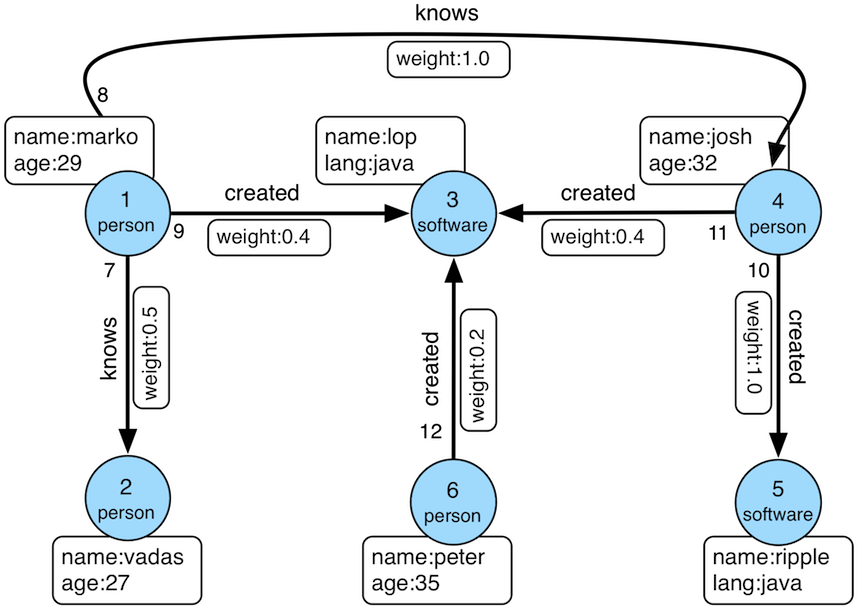
K-out API,根据起始顶点,查找恰好N步可达的邻居,分为基础版和高级版:基础版使用GET方法,根据起始顶点,查找恰好N步可达的邻居 高级版使用POST方法,根据起始顶点,查找恰好N步可达的邻居,与基础版的不同在于:支持只统计邻居数量 支持边属性过滤 支持返回到达邻居的最短路径 K-neighbor API,根据起始顶点,查找N步以内可达的所有邻居,分为基础版和高级版:基础版使用GET方法,根据起始顶点,查找N步以内可达的所有邻居 高级版使用POST方法,根据起始顶点,查找N步以内可达的所有邻居,与基础版的不同在于:支持只统计邻居数量 支持边属性过滤 支持返回到达邻居的最短路径 Same Neighbors, 查询两个顶点的共同邻居 Jaccard Similarity API,计算jaccard相似度,包括两种:一种是使用GET方法,计算两个顶点的邻居的相似度(交并比) 一种是使用POST方法,在全图中查找与起点的jaccard similarity最高的N个点 Shortest Path API,查找两个顶点之间的最短路径 All Shortest Paths,查找两个顶点间的全部最短路径 Weighted Shortest Path,查找起点到目标点的带权最短路径 Single Source Shortest Path,查找一个点到其他各个点的加权最短路径 Multi Node Shortest Path,查找指定顶点集之间两两最短路径 Paths API,查找两个顶点间的全部路径,分为基础版和高级版:基础版使用GET方法,根据起点和终点,查找两个顶点间的全部路径 高级版使用POST方法,根据一组起点和一组终点,查找两个集合间符合条件的全部路径 Customized Paths API,从一批顶点出发,按(一种)模式遍历经过的全部路径 Template Path API,指定起点和终点以及起点和终点间路径信息,查找符合的路径 Crosspoints API,查找两个顶点的交点(共同祖先或者共同子孙) Customized Crosspoints API,从一批顶点出发,按多种模式遍历,最后一步到达的顶点的交点 Rings API,从起始顶点出发,可到达的环路路径 Rays API,从起始顶点出发,可到达边界的路径(即无环路径) Fusiform Similarity API,查找一个顶点的梭形相似点 Vertices API按ID批量查询顶点; 获取顶点的分区; 按分区查询顶点; Edges API 3.2. traverser API详解 使用方法中的例子,都是基于TinkerPop官网给出的图:
数据导入程序如下:
1 public class Loader {
2 public static void main ( String [] args ) {
3 HugeClient client = new HugeClient ( "http://127.0.0.1:8080" , "hugegraph" );
4 SchemaManager schema = client . schema ();
5 schema . propertyKey ( "name" ). asText (). ifNotExist (). create ();
6 schema . propertyKey ( "age" ). asInt (). ifNotExist (). create ();
7 schema . propertyKey ( "city" ). asText (). ifNotExist (). create ();
8 schema . propertyKey ( "weight" ). asDouble (). ifNotExist (). create ();
9 schema . propertyKey ( "lang" ). asText (). ifNotExist (). create ();
10 schema . propertyKey ( "date" ). asText (). ifNotExist (). create ();
11 schema . propertyKey ( "price" ). asInt (). ifNotExist (). create ();
12
13 schema . vertexLabel ( "person" )
14 . properties ( "name" , "age" , "city" )
15 . primaryKeys ( "name" )
16 . nullableKeys ( "age" )
17 . ifNotExist ()
18 . create ();
19
20 schema . vertexLabel ( "software" )
21 . properties ( "name" , "lang" , "price" )
22 . primaryKeys ( "name" )
23 . nullableKeys ( "price" )
24 . ifNotExist ()
25 . create ();
26
27 schema . indexLabel ( "personByCity" )
28 . onV ( "person" )
29 . by ( "city" )
30 . secondary ()
31 . ifNotExist ()
32 . create ();
33
34 schema . indexLabel ( "personByAgeAndCity" )
35 . onV ( "person" )
36 . by ( "age" , "city" )
37 . secondary ()
38 . ifNotExist ()
39 . create ();
40
41 schema . indexLabel ( "softwareByPrice" )
42 . onV ( "software" )
43 . by ( "price" )
44 . range ()
45 . ifNotExist ()
46 . create ();
47
48 schema . edgeLabel ( "knows" )
49 . multiTimes ()
50 . sourceLabel ( "person" )
51 . targetLabel ( "person" )
52 . properties ( "date" , "weight" )
53 . sortKeys ( "date" )
54 . nullableKeys ( "weight" )
55 . ifNotExist ()
56 . create ();
57
58 schema . edgeLabel ( "created" )
59 . sourceLabel ( "person" ). targetLabel ( "software" )
60 . properties ( "date" , "weight" )
61 . nullableKeys ( "weight" )
62 . ifNotExist ()
63 . create ();
64
65 schema . indexLabel ( "createdByDate" )
66 . onE ( "created" )
67 . by ( "date" )
68 . secondary ()
69 . ifNotExist ()
70 . create ();
71
72 schema . indexLabel ( "createdByWeight" )
73 . onE ( "created" )
74 . by ( "weight" )
75 . range ()
76 . ifNotExist ()
77 . create ();
78
79 schema . indexLabel ( "knowsByWeight" )
80 . onE ( "knows" )
81 . by ( "weight" )
82 . range ()
83 . ifNotExist ()
84 . create ();
85
86 GraphManager graph = client . graph ();
87 Vertex marko = graph . addVertex ( T . label , "person" , "name" , "marko" ,
88 "age" , 29 , "city" , "Beijing" );
89 Vertex vadas = graph . addVertex ( T . label , "person" , "name" , "vadas" ,
90 "age" , 27 , "city" , "Hongkong" );
91 Vertex lop = graph . addVertex ( T . label , "software" , "name" , "lop" ,
92 "lang" , "java" , "price" , 328 );
93 Vertex josh = graph . addVertex ( T . label , "person" , "name" , "josh" ,
94 "age" , 32 , "city" , "Beijing" );
95 Vertex ripple = graph . addVertex ( T . label , "software" , "name" , "ripple" ,
96 "lang" , "java" , "price" , 199 );
97 Vertex peter = graph . addVertex ( T . label , "person" , "name" , "peter" ,
98 "age" , 35 , "city" , "Shanghai" );
99
100 marko . addEdge ( "knows" , vadas , "date" , "20160110" , "weight" , 0 . 5 );
101 marko . addEdge ( "knows" , josh , "date" , "20130220" , "weight" , 1 . 0 );
102 marko . addEdge ( "created" , lop , "date" , "20171210" , "weight" , 0 . 4 );
103 josh . addEdge ( "created" , lop , "date" , "20091111" , "weight" , 0 . 4 );
104 josh . addEdge ( "created" , ripple , "date" , "20171210" , "weight" , 1 . 0 );
105 peter . addEdge ( "created" , lop , "date" , "20170324" , "weight" , 0 . 2 );
106 }
107 } 顶点ID为:
1 "2:ripple",
2 "1:vadas",
3 "1:peter",
4 "1:josh",
5 "1:marko",
6 "2:lop" 边ID为:
1 "S1:peter>2>>S2:lop",
2 "S1:josh>2>>S2:lop",
3 "S1:josh>2>>S2:ripple",
4 "S1:marko>1>20130220>S1:josh",
5 "S1:marko>1>20160110>S1:vadas",
6 "S1:marko>2>>S2:lop" 3.2.1 K-out API(GET,基础版) 3.2.1.1 功能介绍 根据起始顶点、方向、边的类型(可选)和深度depth,查找从起始顶点出发恰好depth步可达的顶点
Params source:起始顶点id,必填项 direction:起始顶点向外发散的方向(OUT,IN,BOTH),选填项,默认是BOTH max_depth:步数,必填项 label:边的类型,选填项,默认代表所有edge label nearest:nearest为true时,代表起始顶点到达结果顶点的最短路径长度为depth,不存在更短的路径;nearest为false时,代表起始顶点到结果顶点有一条长度为depth的路径(未必最短且可以有环),选填项,默认为true max_degree:查询过程中,单个顶点遍历的最大邻接边数目,选填项,默认为10000 capacity:遍历过程中最大的访问的顶点数目,选填项,默认为10000000 limit:返回的顶点的最大数目,选填项,默认为10000000 3.2.1.2 使用方法 Method & Url 1 GET http://localhost:8080/graphs/{graph}/traversers/kout?source="1:marko"&max_depth=2 Response Status Response Body 1 {
2 "vertices" :[
3 "2:ripple" ,
4 "1:peter"
5 ]
6 } 3.2.1.3 适用场景 查找恰好N步关系可达的顶点。两个例子:
家族关系中,查找一个人的所有孙子,person A通过连续的两条“儿子”边到达的顶点集合。 社交关系中发现潜在好友,例如:与目标用户相隔两层朋友关系的用户,可以通过连续两条“朋友”边到达的顶点。 3.2.2 K-out API(POST,高级版) 3.2.2.1 功能介绍 根据起始顶点、步骤(包括方向、边类型和过滤属性)和深度depth,查找从起始顶点出发恰好depth步可达的顶点。
与K-out基础版的不同在于:
支持只统计邻居数量 支持边属性过滤 支持返回到达邻居的最短路径 Params source:起始顶点id,必填项 从起始点出发的Step,必填项,结构如下:direction:表示边的方向(OUT,IN,BOTH),默认是BOTH labels:边的类型列表 properties:通过属性的值过滤边 max_degree:查询过程中,单个顶点遍历的最大邻接边数目,默认为 10000 (注: 0.12版之前 step 内仅支持 degree 作为参数名, 0.12开始统一使用 max_degree, 并向下兼容 degree 写法) skip_degree:用于设置查询过程中舍弃超级顶点的最小边数,即当某个顶点的邻接边数目大于 skip_degree 时,完全舍弃该顶点。选填项,如果开启时,需满足 skip_degree >= max_degree 约束,默认为0 (不启用),表示不跳过任何点 (注意: 开启此配置后,遍历时会尝试访问一个顶点的 skip_degree 条边,而不仅仅是 max_degree 条边,这样有额外的遍历开销,对查询性能影响可能有较大影响,请确认理解后再开启) max_depth:步数,必填项 nearest:nearest为true时,代表起始顶点到达结果顶点的最短路径长度为depth,不存在更短的路径;nearest为false时,代表起始顶点到结果顶点有一条长度为depth的路径(未必最短且可以有环),选填项,默认为true count_only:Boolean值,true表示只统计结果的数目,不返回具体结果;false表示返回具体的结果,默认为false with_path:true表示返回起始点到每个邻居的最短路径,false表示不返回起始点到每个邻居的最短路径,选填项,默认为false with_vertex,选填项,默认为false:true表示返回结果包含完整的顶点信息(路径中的全部顶点)with_path为true时,返回所有路径中的顶点的完整信息 with_path为false时,返回所有邻居的完整信息 false时表示只返回顶点id capacity:遍历过程中最大的访问的顶点数目,选填项,默认为10000000 limit:返回的顶点的最大数目,选填项,默认为10000000 3.2.2.2 使用方法 Method & Url 1 POST http://localhost:8080/graphs/{graph}/traversers/kout Request Body 1 {
2 "source" : "1:marko" ,
3 "step" : {
4 "direction" : "BOTH" ,
5 "labels" : [ "knows" , "created" ],
6 "properties" : {
7 "weight" : "P.gt(0.1)"
8 },
9 "max_degree" : 10000 ,
10 "skip_degree" : 100000
11 },
12 "max_depth" : 1 ,
13 "nearest" : true ,
14 "limit" : 10000 ,
15 "with_vertex" : true ,
16 "with_path" : true
17 } Response Status Response Body 1 {
2 "size" : 3 ,
3 "kout" : [
4 "1:josh" ,
5 "1:vadas" ,
6 "2:lop"
7 ],
8 "paths" : [
9 {
10 "objects" : [
11 "1:marko" ,
12 "1:josh"
13 ]
14 },
15 {
16 "objects" : [
17 "1:marko" ,
18 "1:vadas"
19 ]
20 },
21 {
22 "objects" : [
23 "1:marko" ,
24 "2:lop"
25 ]
26 }
27 ],
28 "vertices" : [
29 {
30 "id" : "1:marko" ,
31 "label" : "person" ,
32 "type" : "vertex" ,
33 "properties" : {
34 "name" : "marko" ,
35 "age" : 29 ,
36 "city" : "Beijing"
37 }
38 },
39 {
40 "id" : "1:josh" ,
41 "label" : "person" ,
42 "type" : "vertex" ,
43 "properties" : {
44 "name" : "josh" ,
45 "age" : 32 ,
46 "city" : "Beijing"
47 }
48 },
49 {
50 "id" : "1:vadas" ,
51 "label" : "person" ,
52 "type" : "vertex" ,
53 "properties" : {
54 "name" : "vadas" ,
55 "age" : 27 ,
56 "city" : "Hongkong"
57 }
58 },
59 {
60 "id" : "2:lop" ,
61 "label" : "software" ,
62 "type" : "vertex" ,
63 "properties" : {
64 "name" : "lop" ,
65 "lang" : "java" ,
66 "price" : 328
67 }
68 }
69 ]
70 } 3.2.2.3 适用场景 参见3.2.1.3
3.2.3 K-neighbor(GET,基础版) 3.2.3.1 功能介绍 根据起始顶点、方向、边的类型(可选)和深度depth,查找包括起始顶点在内、depth步之内可达的所有顶点
相当于:起始顶点、K-out(1)、K-out(2)、… 、K-out(max_depth)的并集
Params source: 起始顶点id,必填项 direction:起始顶点向外发散的方向(OUT,IN,BOTH),选填项,默认是BOTH max_depth:步数,必填项 label:边的类型,选填项,默认代表所有edge label max_degree:查询过程中,单个顶点遍历的最大邻接边数目,选填项,默认为10000 limit:返回的顶点的最大数目,也即遍历过程中最大的访问的顶点数目,选填项,默认为10000000 3.2.3.2 使用方法 Method & Url 1 GET http://localhost:8080/graphs/{graph}/traversers/kneighbor?source=“1:marko”&max_depth=2 Response Status Response Body 1 {
2 "vertices" :[
3 "2:ripple" ,
4 "1:marko" ,
5 "1:josh" ,
6 "1:vadas" ,
7 "1:peter" ,
8 "2:lop"
9 ]
10 } 3.2.3.3 适用场景 查找N步以内可达的所有顶点,例如:
家族关系中,查找一个人五服以内所有子孙,person A通过连续的5条“亲子”边到达的顶点集合。 社交关系中发现好友圈子,例如目标用户通过1条、2条、3条“朋友”边可到达的用户可以组成目标用户的朋友圈子 3.2.4 K-neighbor API(POST,高级版) 3.2.4.1 功能介绍 根据起始顶点、步骤(包括方向、边类型和过滤属性)和深度depth,查找从起始顶点出发depth步内可达的所有顶点。
与K-neighbor基础版的不同在于:
支持只统计邻居数量 支持边属性过滤 支持返回到达邻居的最短路径 Params source:起始顶点id,必填项 从起始点出发的Step,必填项,结构如下:direction:表示边的方向(OUT,IN,BOTH),默认是BOTH labels:边的类型列表 properties:通过属性的值过滤边 max_degree:查询过程中,单个顶点遍历的最大邻接边数目,默认为 10000 (注: 0.12版之前 step 内仅支持 degree 作为参数名, 0.12开始统一使用 max_degree, 并向下兼容 degree 写法) skip_degree:用于设置查询过程中舍弃超级顶点的最小边数,即当某个顶点的邻接边数目大于 skip_degree 时,完全舍弃该顶点。选填项,如果开启时,需满足 skip_degree >= max_degree 约束,默认为0 (不启用),表示不跳过任何点 (注意: 开启此配置后,遍历时会尝试访问一个顶点的 skip_degree 条边,而不仅仅是 max_degree 条边,这样有额外的遍历开销,对查询性能影响可能有较大影响,请确认理解后再开启) max_depth:步数,必填项 count_only:Boolean值,true表示只统计结果的数目,不返回具体结果;false表示返回具体的结果,默认为false with_path:true表示返回起始点到每个邻居的最短路径,false表示不返回起始点到每个邻居的最短路径,选填项,默认为false with_vertex,选填项,默认为false:true表示返回结果包含完整的顶点信息(路径中的全部顶点)with_path为true时,返回所有路径中的顶点的完整信息 with_path为false时,返回所有邻居的完整信息 false时表示只返回顶点id limit:返回的顶点的最大数目,选填项,默认为10000000 3.2.4.2 使用方法 Method & Url 1 POST http://localhost:8080/graphs/{graph}/traversers/kneighbor Request Body 1 {
2 "source" : "1:marko" ,
3 "step" : {
4 "direction" : "BOTH" ,
5 "labels" : [ "knows" , "created" ],
6 "properties" : {
7 "weight" : "P.gt(0.1)"
8 },
9 "max_degree" : 10000 ,
10 "skip_degree" : 100000
11 },
12 "max_depth" : 3 ,
13 "limit" : 10000 ,
14 "with_vertex" : true ,
15 "with_path" : true
16 } Response Status Response Body 1 {
2 "size" : 6 ,
3 "kneighbor" : [
4 "2:ripple" ,
5 "1:marko" ,
6 "1:josh" ,
7 "1:vadas" ,
8 "1:peter" ,
9 "2:lop"
10 ],
11 "paths" : [
12 {
13 "objects" : [
14 "1:marko" ,
15 "1:josh" ,
16 "2:ripple"
17 ]
18 },
19 {
20 "objects" : [
21 "1:marko"
22 ]
23 },
24 {
25 "objects" : [
26 "1:marko" ,
27 "1:josh"
28 ]
29 },
30 {
31 "objects" : [
32 "1:marko" ,
33 "1:vadas"
34 ]
35 },
36 {
37 "objects" : [
38 "1:marko" ,
39 "2:lop" ,
40 "1:peter"
41 ]
42 },
43 {
44 "objects" : [
45 "1:marko" ,
46 "2:lop"
47 ]
48 }
49 ],
50 "vertices" : [
51 {
52 "id" : "2:ripple" ,
53 "label" : "software" ,
54 "type" : "vertex" ,
55 "properties" : {
56 "name" : "ripple" ,
57 "lang" : "java" ,
58 "price" : 199
59 }
60 },
61 {
62 "id" : "1:marko" ,
63 "label" : "person" ,
64 "type" : "vertex" ,
65 "properties" : {
66 "name" : "marko" ,
67 "age" : 29 ,
68 "city" : "Beijing"
69 }
70 },
71 {
72 "id" : "1:josh" ,
73 "label" : "person" ,
74 "type" : "vertex" ,
75 "properties" : {
76 "name" : "josh" ,
77 "age" : 32 ,
78 "city" : "Beijing"
79 }
80 },
81 {
82 "id" : "1:vadas" ,
83 "label" : "person" ,
84 "type" : "vertex" ,
85 "properties" : {
86 "name" : "vadas" ,
87 "age" : 27 ,
88 "city" : "Hongkong"
89 }
90 },
91 {
92 "id" : "1:peter" ,
93 "label" : "person" ,
94 "type" : "vertex" ,
95 "properties" : {
96 "name" : "peter" ,
97 "age" : 35 ,
98 "city" : "Shanghai"
99 }
100 },
101 {
102 "id" : "2:lop" ,
103 "label" : "software" ,
104 "type" : "vertex" ,
105 "properties" : {
106 "name" : "lop" ,
107 "lang" : "java" ,
108 "price" : 328
109 }
110 }
111 ]
112 } 3.2.4.3 适用场景 参见3.2.3.3
3.2.5 Same Neighbors 3.2.5.1 功能介绍 查询两个点的共同邻居
Params vertex:一个顶点id,必填项 other:另一个顶点id,必填项 direction:顶点向外发散的方向(OUT,IN,BOTH),选填项,默认是BOTH label:边的类型,选填项,默认代表所有edge label max_degree:查询过程中,单个顶点遍历的最大邻接边数目,选填项,默认为10000 limit:返回的共同邻居的最大数目,选填项,默认为10000000 3.2.5.2 使用方法 Method & Url 1 GET http://localhost:8080/graphs/{graph}/traversers/sameneighbors?vertex=“1:marko”&other="1:josh" Response Status Response Body 1 {
2 "same_neighbors" :[
3 "2:lop"
4 ]
5 } 3.2.5.3 适用场景 查找两个顶点的共同邻居:
3.2.6 Jaccard Similarity(GET) 3.2.6.1 功能介绍 计算两个顶点的jaccard similarity(两个顶点邻居的交集比上两个顶点邻居的并集)
Params vertex:一个顶点id,必填项 other:另一个顶点id,必填项 direction:顶点向外发散的方向(OUT,IN,BOTH),选填项,默认是BOTH label:边的类型,选填项,默认代表所有edge label max_degree:查询过程中,单个顶点遍历的最大邻接边数目,选填项,默认为10000 3.2.6.2 使用方法 Method & Url 1 GET http://localhost:8080/graphs/{graph}/traversers/jaccardsimilarity?vertex="1:marko"&other="1:josh" Response Status Response Body 1 {
2 "jaccard_similarity" : 0.2
3 } 3.2.6.3 适用场景 用于评估两个点的相似性或者紧密度
3.2.7 Jaccard Similarity(POST) 3.2.7.1 功能介绍 计算与指定顶点的jaccard similarity最大的N个点
jaccard similarity的计算方式为:两个顶点邻居的交集比上两个顶点邻居的并集
Params vertex:一个顶点id,必填项 从起始点出发的Step,必填项,结构如下:direction:表示边的方向(OUT,IN,BOTH),默认是BOTH labels:边的类型列表 properties:通过属性的值过滤边 max_degree:查询过程中,单个顶点遍历的最大邻接边数目,默认为 10000 (注: 0.12版之前 step 内仅支持 degree 作为参数名, 0.12开始统一使用 max_degree, 并向下兼容 degree 写法) skip_degree:用于设置查询过程中舍弃超级顶点的最小边数,即当某个顶点的邻接边数目大于 skip_degree 时,完全舍弃该顶点。选填项,如果开启时,需满足 skip_degree >= max_degree 约束,默认为0 (不启用),表示不跳过任何点 (注意: 开启此配置后,遍历时会尝试访问一个顶点的 skip_degree 条边,而不仅仅是 max_degree 条边,这样有额外的遍历开销,对查询性能影响可能有较大影响,请确认理解后再开启) top:返回一个起点的jaccard similarity中最大的top个,选填项,默认为100 capacity:遍历过程中最大的访问的顶点数目,选填项,默认为10000000 3.2.7.2 使用方法 Method & Url 1 POST http://localhost:8080/graphs/{graph}/traversers/jaccardsimilarity Request Body 1 {
2 "vertex" : "1:marko" ,
3 "step" : {
4 "direction" : "BOTH" ,
5 "labels" : [],
6 "max_degree" : 10000 ,
7 "skip_degree" : 100000
8 },
9 "top" : 3
10 } Response Status Response Body 1 {
2 "2:ripple" : 0.3333333333333333 ,
3 "1:peter" : 0.3333333333333333 ,
4 "1:josh" : 0.2
5 } 3.2.7.3 适用场景 用于在图中找出与指定顶点相似性最高的顶点
3.2.8 Shortest Path 3.2.8.1 功能介绍 根据起始顶点、目的顶点、方向、边的类型(可选)和最大深度,查找一条最短路径
Params source:起始顶点id,必填项 target:目的顶点id,必填项 direction:起始顶点向外发散的方向(OUT,IN,BOTH),选填项,默认是BOTH max_depth:最大步数,必填项 label:边的类型,选填项,默认代表所有edge label max_degree:查询过程中,单个顶点遍历的最大邻接边数目,选填项,默认为10000 skip_degree:用于设置查询过程中舍弃超级顶点的最小边数,即当某个顶点的邻接边数目大于 skip_degree 时,完全舍弃该顶点。选填项,如果开启时,需满足 skip_degree >= max_degree 约束,默认为0 (不启用),表示不跳过任何点 (注意: 开启此配置后,遍历时会尝试访问一个顶点的 skip_degree 条边,而不仅仅是 max_degree 条边,这样有额外的遍历开销,对查询性能影响可能有较大影响,请确认理解后再开启) capacity:遍历过程中最大的访问的顶点数目,选填项,默认为10000000 3.2.8.2 使用方法 Method & Url 1 GET http://localhost:8080/graphs/{graph}/traversers/shortestpath?source="1:marko"&target="2:ripple"&max_depth=3 Response Status Response Body 1 {
2 "path" :[
3 "1:marko" ,
4 "1:josh" ,
5 "2:ripple"
6 ]
7 } 3.2.8.3 适用场景 查找两个顶点间的最短路径,例如:
社交关系网中,查找两个用户有关系的最短路径,即最近的朋友关系链 设备关联网络中,查找两个设备最短的关联关系 3.2.9 All Shortest Paths 3.2.9.1 功能介绍 根据起始顶点、目的顶点、方向、边的类型(可选)和最大深度,查找两点间所有的最短路径
Params source:起始顶点id,必填项 target:目的顶点id,必填项 direction:起始顶点向外发散的方向(OUT,IN,BOTH),选填项,默认是BOTH max_depth:最大步数,必填项 label:边的类型,选填项,默认代表所有edge label max_degree:查询过程中,单个顶点遍历的最大邻接边数目,选填项,默认为10000 skip_degree:用于设置查询过程中舍弃超级顶点的最小边数,即当某个顶点的邻接边数目大于 skip_degree 时,完全舍弃该顶点。选填项,如果开启时,需满足 skip_degree >= max_degree 约束,默认为0 (不启用),表示不跳过任何点 (注意: 开启此配置后,遍历时会尝试访问一个顶点的 skip_degree 条边,而不仅仅是 max_degree 条边,这样有额外的遍历开销,对查询性能影响可能有较大影响,请确认理解后再开启) capacity:遍历过程中最大的访问的顶点数目,选填项,默认为10000000 3.2.9.2 使用方法 Method & Url 1 GET http://localhost:8080/graphs/{graph}/traversers/allshortestpaths?source="A"&target="Z"&max_depth=10 Response Status Response Body 1 {
2 "paths" :[
3 {
4 "objects" : [
5 "A" ,
6 "B" ,
7 "C" ,
8 "Z"
9 ]
10 },
11 {
12 "objects" : [
13 "A" ,
14 "M" ,
15 "N" ,
16 "Z"
17 ]
18 }
19 ]
20 } 3.2.9.3 适用场景 查找两个顶点间的所有最短路径,例如:
社交关系网中,查找两个用户有关系的全部最短路径,即最近的朋友关系链 设备关联网络中,查找两个设备全部的最短关联关系 3.2.10 Weighted Shortest Path 3.2.10.1 功能介绍 根据起始顶点、目的顶点、方向、边的类型(可选)和最大深度,查找一条带权最短路径
Params source:起始顶点id,必填项 target:目的顶点id,必填项 direction:起始顶点向外发散的方向(OUT,IN,BOTH),选填项,默认是BOTH label:边的类型,选填项,默认代表所有edge label weight:边的权重属性,必填项,必须是数字类型的属性 max_degree:查询过程中,单个顶点遍历的最大邻接边数目,选填项,默认为10000 skip_degree:用于设置查询过程中舍弃超级顶点的最小边数,即当某个顶点的邻接边数目大于 skip_degree 时,完全舍弃该顶点。选填项,如果开启时,需满足 skip_degree >= max_degree 约束,默认为0 (不启用),表示不跳过任何点 (注意: 开启此配置后,遍历时会尝试访问一个顶点的 skip_degree 条边,而不仅仅是 max_degree 条边,这样有额外的遍历开销,对查询性能影响可能有较大影响,请确认理解后再开启) capacity:遍历过程中最大的访问的顶点数目,选填项,默认为10000000 with_vertex:true表示返回结果包含完整的顶点信息(路径中的全部顶点),false时表示只返回顶点id,选填项,默认为false 3.2.10.2 使用方法 Method & Url 1 GET http://localhost:8080/graphs/{graph}/traversers/weightedshortestpath?source="1:marko"&target="2:ripple"&weight="weight"&with_vertex=true Response Status Response Body 1 {
2 "path" : {
3 "weight" : 2.0 ,
4 "vertices" : [
5 "1:marko" ,
6 "1:josh" ,
7 "2:ripple"
8 ]
9 },
10 "vertices" : [
11 {
12 "id" : "1:marko" ,
13 "label" : "person" ,
14 "type" : "vertex" ,
15 "properties" : {
16 "name" : "marko" ,
17 "age" : 29 ,
18 "city" : "Beijing"
19 }
20 },
21 {
22 "id" : "1:josh" ,
23 "label" : "person" ,
24 "type" : "vertex" ,
25 "properties" : {
26 "name" : "josh" ,
27 "age" : 32 ,
28 "city" : "Beijing"
29 }
30 },
31 {
32 "id" : "2:ripple" ,
33 "label" : "software" ,
34 "type" : "vertex" ,
35 "properties" : {
36 "name" : "ripple" ,
37 "lang" : "java" ,
38 "price" : 199
39 }
40 }
41 ]
42 } 3.2.10.3 适用场景 查找两个顶点间的带权最短路径,例如:
3.2.11 Single Source Shortest Path 3.2.11.1 功能介绍 从一个顶点出发,查找该点到图中其他顶点的最短路径(可选是否带权重)
Params source:起始顶点id,必填项 direction:起始顶点向外发散的方向(OUT,IN,BOTH),选填项,默认是BOTH label:边的类型,选填项,默认代表所有edge label weight:边的权重属性,选填项,必须是数字类型的属性,如果不填或者虽然填了但是边没有该属性,则权重为1.0 max_degree:查询过程中,单个顶点遍历的最大邻接边数目,选填项,默认为10000 skip_degree:用于设置查询过程中舍弃超级顶点的最小边数,即当某个顶点的邻接边数目大于 skip_degree 时,完全舍弃该顶点。选填项,如果开启时,需满足 skip_degree >= max_degree 约束,默认为0 (不启用),表示不跳过任何点 (注意: 开启此配置后,遍历时会尝试访问一个顶点的 skip_degree 条边,而不仅仅是 max_degree 条边,这样有额外的遍历开销,对查询性能影响可能有较大影响,请确认理解后再开启) capacity:遍历过程中最大的访问的顶点数目,选填项,默认为10000000 limit:查询到的目标顶点个数,也是返回的最短路径的条数,选填项,默认为10 with_vertex:true表示返回结果包含完整的顶点信息(路径中的全部顶点),false时表示只返回顶点id,选填项,默认为false 3.2.11.2 使用方法 Method & Url 1 GET http://localhost:8080/graphs/{graph}/traversers/singlesourceshortestpath?source="1:marko"&with_vertex=true Response Status Response Body 1 {
2 "paths" : {
3 "2:ripple" : {
4 "weight" : 2.0 ,
5 "vertices" : [
6 "1:marko" ,
7 "1:josh" ,
8 "2:ripple"
9 ]
10 },
11 "1:josh" : {
12 "weight" : 1.0 ,
13 "vertices" : [
14 "1:marko" ,
15 "1:josh"
16 ]
17 },
18 "1:vadas" : {
19 "weight" : 1.0 ,
20 "vertices" : [
21 "1:marko" ,
22 "1:vadas"
23 ]
24 },
25 "1:peter" : {
26 "weight" : 2.0 ,
27 "vertices" : [
28 "1:marko" ,
29 "2:lop" ,
30 "1:peter"
31 ]
32 },
33 "2:lop" : {
34 "weight" : 1.0 ,
35 "vertices" : [
36 "1:marko" ,
37 "2:lop"
38 ]
39 }
40 },
41 "vertices" : [
42 {
43 "id" : "2:ripple" ,
44 "label" : "software" ,
45 "type" : "vertex" ,
46 "properties" : {
47 "name" : "ripple" ,
48 "lang" : "java" ,
49 "price" : 199
50 }
51 },
52 {
53 "id" : "1:marko" ,
54 "label" : "person" ,
55 "type" : "vertex" ,
56 "properties" : {
57 "name" : "marko" ,
58 "age" : 29 ,
59 "city" : "Beijing"
60 }
61 },
62 {
63 "id" : "1:josh" ,
64 "label" : "person" ,
65 "type" : "vertex" ,
66 "properties" : {
67 "name" : "josh" ,
68 "age" : 32 ,
69 "city" : "Beijing"
70 }
71 },
72 {
73 "id" : "1:vadas" ,
74 "label" : "person" ,
75 "type" : "vertex" ,
76 "properties" : {
77 "name" : "vadas" ,
78 "age" : 27 ,
79 "city" : "Hongkong"
80 }
81 },
82 {
83 "id" : "1:peter" ,
84 "label" : "person" ,
85 "type" : "vertex" ,
86 "properties" : {
87 "name" : "peter" ,
88 "age" : 35 ,
89 "city" : "Shanghai"
90 }
91 },
92 {
93 "id" : "2:lop" ,
94 "label" : "software" ,
95 "type" : "vertex" ,
96 "properties" : {
97 "name" : "lop" ,
98 "lang" : "java" ,
99 "price" : 328
100 }
101 }
102 ]
103 } 3.2.11.3 适用场景 查找从一个点出发到其他顶点的带权最短路径,比如:
查找从北京出发到全国其他所有城市的耗时最短的乘车方案 3.2.12 Multi Node Shortest Path 3.2.12.1 功能介绍 查找指定顶点集两两之间的最短路径
Params vertices:定义起始顶点,必填项,指定方式包括:ids:通过顶点id列表提供起始顶点 label和properties:如果没有指定ids,则使用label和properties的联合条件查询起始顶点label:顶点的类型 properties:通过属性的值查询起始顶点 注意:properties中的属性值可以是列表,表示只要key对应的value在列表中就可以
step:表示从起始顶点到终止顶点走过的路径,必填项,Step的结构如下:direction:表示边的方向(OUT,IN,BOTH),默认是BOTH labels:边的类型列表 properties:通过属性的值过滤边 max_degree:查询过程中,单个顶点遍历的最大邻接边数目,默认为 10000 (注: 0.12版之前 step 内仅支持 degree 作为参数名, 0.12开始统一使用 max_degree, 并向下兼容 degree 写法) skip_degree:用于设置查询过程中舍弃超级顶点的最小边数,即当某个顶点的邻接边数目大于 skip_degree 时,完全舍弃该顶点。选填项,如果开启时,需满足 skip_degree >= max_degree 约束,默认为0 (不启用),表示不跳过任何点 (注意: 开启此配置后,遍历时会尝试访问一个顶点的 skip_degree 条边,而不仅仅是 max_degree 条边,这样有额外的遍历开销,对查询性能影响可能有较大影响,请确认理解后再开启) max_depth:步数,必填项 capacity:遍历过程中最大的访问的顶点数目,选填项,默认为10000000 with_vertex:true表示返回结果包含完整的顶点信息(路径中的全部顶点),false时表示只返回顶点id,选填项,默认为false 3.2.12.2 使用方法 Method & Url 1 POST http://localhost:8080/graphs/{graph}/traversers/multinodeshortestpath Request Body 1 {
2 "vertices" : {
3 "ids" : [ "382:marko" , "382:josh" , "382:vadas" , "382:peter" , "383:lop" , "383:ripple" ]
4 },
5 "step" : {
6 "direction" : "BOTH" ,
7 "properties" : {
8 }
9 },
10 "max_depth" : 10 ,
11 "capacity" : 100000000 ,
12 "with_vertex" : true
13 } Response Status Response Body 1 {
2 "paths" : [
3 {
4 "objects" : [
5 "382:peter" ,
6 "383:lop"
7 ]
8 },
9 {
10 "objects" : [
11 "382:peter" ,
12 "383:lop" ,
13 "382:marko"
14 ]
15 },
16 {
17 "objects" : [
18 "382:peter" ,
19 "383:lop" ,
20 "382:josh"
21 ]
22 },
23 {
24 "objects" : [
25 "382:peter" ,
26 "383:lop" ,
27 "382:marko" ,
28 "382:vadas"
29 ]
30 },
31 {
32 "objects" : [
33 "383:lop" ,
34 "382:marko"
35 ]
36 },
37 {
38 "objects" : [
39 "383:lop" ,
40 "382:josh"
41 ]
42 },
43 {
44 "objects" : [
45 "383:lop" ,
46 "382:marko" ,
47 "382:vadas"
48 ]
49 },
50 {
51 "objects" : [
52 "382:peter" ,
53 "383:lop" ,
54 "382:josh" ,
55 "383:ripple"
56 ]
57 },
58 {
59 "objects" : [
60 "382:marko" ,
61 "382:josh"
62 ]
63 },
64 {
65 "objects" : [
66 "383:lop" ,
67 "382:josh" ,
68 "383:ripple"
69 ]
70 },
71 {
72 "objects" : [
73 "382:marko" ,
74 "382:vadas"
75 ]
76 },
77 {
78 "objects" : [
79 "382:marko" ,
80 "382:josh" ,
81 "383:ripple"
82 ]
83 },
84 {
85 "objects" : [
86 "382:josh" ,
87 "383:ripple"
88 ]
89 },
90 {
91 "objects" : [
92 "382:josh" ,
93 "382:marko" ,
94 "382:vadas"
95 ]
96 },
97 {
98 "objects" : [
99 "382:vadas" ,
100 "382:marko" ,
101 "382:josh" ,
102 "383:ripple"
103 ]
104 }
105 ],
106 "vertices" : [
107 {
108 "id" : "382:peter" ,
109 "label" : "person" ,
110 "type" : "vertex" ,
111 "properties" : {
112 "name" : "peter" ,
113 "age" : 29 ,
114 "city" : "Shanghai"
115 }
116 },
117 {
118 "id" : "383:lop" ,
119 "label" : "software" ,
120 "type" : "vertex" ,
121 "properties" : {
122 "name" : "lop" ,
123 "lang" : "java" ,
124 "price" : 328
125 }
126 },
127 {
128 "id" : "382:marko" ,
129 "label" : "person" ,
130 "type" : "vertex" ,
131 "properties" : {
132 "name" : "marko" ,
133 "age" : 29 ,
134 "city" : "Beijing"
135 }
136 },
137 {
138 "id" : "382:josh" ,
139 "label" : "person" ,
140 "type" : "vertex" ,
141 "properties" : {
142 "name" : "josh" ,
143 "age" : 32 ,
144 "city" : "Beijing"
145 }
146 },
147 {
148 "id" : "382:vadas" ,
149 "label" : "person" ,
150 "type" : "vertex" ,
151 "properties" : {
152 "name" : "vadas" ,
153 "age" : 27 ,
154 "city" : "Hongkong"
155 }
156 },
157 {
158 "id" : "383:ripple" ,
159 "label" : "software" ,
160 "type" : "vertex" ,
161 "properties" : {
162 "name" : "ripple" ,
163 "lang" : "java" ,
164 "price" : 199
165 }
166 }
167 ]
168 } 3.2.12.3 适用场景 查找多个点之间的最短路径,比如:
3.2.13 Paths (GET,基础版) 3.2.13.1 功能介绍 根据起始顶点、目的顶点、方向、边的类型(可选)和最大深度等条件查找所有路径
Params source:起始顶点id,必填项 target:目的顶点id,必填项 direction:起始顶点向外发散的方向(OUT,IN,BOTH),选填项,默认是BOTH label:边的类型,选填项,默认代表所有edge label max_depth:步数,必填项 max_degree:查询过程中,单个顶点遍历的最大邻接边数目,选填项,默认为10000 capacity:遍历过程中最大的访问的顶点数目,选填项,默认为10000000 limit:返回的路径的最大数目,选填项,默认为10 3.2.13.2 使用方法 Method & Url 1 GET http://localhost:8080/graphs/{graph}/traversers/paths?source="1:marko"&target="1:josh"&max_depth=5 Response Status Response Body 1 {
2 "paths" :[
3 {
4 "objects" :[
5 "1:marko" ,
6 "1:josh"
7 ]
8 },
9 {
10 "objects" :[
11 "1:marko" ,
12 "2:lop" ,
13 "1:josh"
14 ]
15 }
16 ]
17 } 3.2.13.3 适用场景 查找两个顶点间的所有路径,例如:
社交网络中,查找两个用户所有可能的关系路径 设备关联网络中,查找两个设备之间所有的关联路径 3.2.14 Paths (POST,高级版) 3.2.14.1 功能介绍 根据起始顶点、目的顶点、步骤(step)和最大深度等条件查找所有路径
Params sources:定义起始顶点,必填项,指定方式包括:ids:通过顶点id列表提供起始顶点 label和properties:如果没有指定ids,则使用label和properties的联合条件查询起始顶点label:顶点的类型 properties:通过属性的值查询起始顶点 注意:properties中的属性值可以是列表,表示只要key对应的value在列表中就可以
targets:定义终止顶点,必填项,指定方式包括:ids:通过顶点id列表提供终止顶点 label和properties:如果没有指定ids,则使用label和properties的联合条件查询终止顶点label:顶点的类型 properties:通过属性的值查询终止顶点 注意:properties中的属性值可以是列表,表示只要key对应的value在列表中就可以
step:表示从起始顶点到终止顶点走过的路径,必填项,Step的结构如下:direction:表示边的方向(OUT,IN,BOTH),默认是BOTH labels:边的类型列表 properties:通过属性的值过滤边 max_degree:查询过程中,单个顶点遍历的最大邻接边数目,默认为 10000 (注: 0.12版之前 step 内仅支持 degree 作为参数名, 0.12开始统一使用 max_degree, 并向下兼容 degree 写法) skip_degree:用于设置查询过程中舍弃超级顶点的最小边数,即当某个顶点的邻接边数目大于 skip_degree 时,完全舍弃该顶点。选填项,如果开启时,需满足 skip_degree >= max_degree 约束,默认为0 (不启用),表示不跳过任何点 (注意: 开启此配置后,遍历时会尝试访问一个顶点的 skip_degree 条边,而不仅仅是 max_degree 条边,这样有额外的遍历开销,对查询性能影响可能有较大影响,请确认理解后再开启) max_depth:步数,必填项 nearest:nearest为true时,代表起始顶点到达结果顶点的最短路径长度为depth,不存在更短的路径;nearest为false时,代表起始顶点到结果顶点有一条长度为depth的路径(未必最短且可以有环),选填项,默认为true capacity:遍历过程中最大的访问的顶点数目,选填项,默认为10000000 limit:返回的路径的最大数目,选填项,默认为10 with_vertex:true表示返回结果包含完整的顶点信息(路径中的全部顶点),false时表示只返回顶点id,选填项,默认为false 3.2.14.2 使用方法 Method & Url 1 POST http://localhost:8080/graphs/{graph}/traversers/paths Request Body 1 {
2 "sources" : {
3 "ids" : [ "1:marko" ]
4 },
5 "targets" : {
6 "ids" : [ "1:peter" ]
7 },
8 "step" : {
9 "direction" : "BOTH" ,
10 "properties" : {
11 "weight" : "P.gt(0.01)"
12 }
13 },
14 "max_depth" : 10 ,
15 "capacity" : 100000000 ,
16 "limit" : 10000000 ,
17 "with_vertex" : false
18 } Response Status Response Body 1 {
2 "paths" : [
3 {
4 "objects" : [
5 "1:marko" ,
6 "1:josh" ,
7 "2:lop" ,
8 "1:peter"
9 ]
10 },
11 {
12 "objects" : [
13 "1:marko" ,
14 "2:lop" ,
15 "1:peter"
16 ]
17 }
18 ]
19 } 3.2.14.3 适用场景 查找两个顶点间的所有路径,例如:
社交网络中,查找两个用户所有可能的关系路径 设备关联网络中,查找两个设备之间所有的关联路径 3.2.15 Customized Paths 3.2.15.1 功能介绍 根据一批起始顶点、边规则(包括方向、边的类型和属性过滤)和最大深度等条件查找符合条件的所有的路径
Params sources:定义起始顶点,必填项,指定方式包括:ids:通过顶点id列表提供起始顶点 label和properties:如果没有指定ids,则使用label和properties的联合条件查询起始顶点label:顶点的类型 properties:通过属性的值查询起始顶点 注意:properties中的属性值可以是列表,表示只要key对应的value在列表中就可以
steps:表示从起始顶点走过的路径规则,是一组Step的列表。必填项。每个Step的结构如下:direction:表示边的方向(OUT,IN,BOTH),默认是BOTH labels:边的类型列表 properties:通过属性的值过滤边 weight_by:根据指定的属性计算边的权重,sort_by不为NONE时有效,与default_weight互斥 default_weight:当边没有属性作为权重计算值时,采取的默认权重,sort_by不为NONE时有效,与weight_by互斥 max_degree:查询过程中,单个顶点遍历的最大邻接边数目,默认为 10000 (注: 0.12版之前 step 内仅支持 degree 作为参数名, 0.12开始统一使用 max_degree, 并向下兼容 degree 写法) sample:当需要对某个step的符合条件的边进行采样时设置,-1表示不采样,默认为采样100 sort_by:根据路径的权重排序,选填项,默认为NONE:NONE表示不排序,默认值 INCR表示按照路径权重的升序排序 DECR表示按照路径权重的降序排序 capacity:遍历过程中最大的访问的顶点数目,选填项,默认为10000000 limit:返回的路径的最大数目,选填项,默认为10 with_vertex:true表示返回结果包含完整的顶点信息(路径中的全部顶点),false时表示只返回顶点id,选填项,默认为false 3.2.15.2 使用方法 Method & Url 1 POST http://localhost:8080/graphs/{graph}/traversers/customizedpaths Request Body 1 {
2 "sources" :{
3 "ids" :[
4
5 ],
6 "label" : "person" ,
7 "properties" :{
8 "name" : "marko"
9 }
10 },
11 "steps" :[
12 {
13 "direction" : "OUT" ,
14 "labels" :[
15 "knows"
16 ],
17 "weight_by" : "weight" ,
18 "max_degree" : -1
19 },
20 {
21 "direction" : "OUT" ,
22 "labels" :[
23 "created"
24 ],
25 "default_weight" : 8 ,
26 "max_degree" : -1 ,
27 "sample" : 1
28 }
29 ],
30 "sort_by" : "INCR" ,
31 "with_vertex" : true ,
32 "capacity" : -1 ,
33 "limit" : -1
34 } Response Status Response Body 1 {
2 "paths" :[
3 {
4 "objects" :[
5 "1:marko" ,
6 "1:josh" ,
7 "2:lop"
8 ],
9 "weights" :[
10 1 ,
11 8
12 ]
13 }
14 ],
15 "vertices" :[
16 {
17 "id" : "1:marko" ,
18 "label" : "person" ,
19 "type" : "vertex" ,
20 "properties" :{
21 "city" :[
22 {
23 "id" : "1:marko>city" ,
24 "value" : "Beijing"
25 }
26 ],
27 "name" :[
28 {
29 "id" : "1:marko>name" ,
30 "value" : "marko"
31 }
32 ],
33 "age" :[
34 {
35 "id" : "1:marko>age" ,
36 "value" : 29
37 }
38 ]
39 }
40 },
41 {
42 "id" : "1:josh" ,
43 "label" : "person" ,
44 "type" : "vertex" ,
45 "properties" :{
46 "city" :[
47 {
48 "id" : "1:josh>city" ,
49 "value" : "Beijing"
50 }
51 ],
52 "name" :[
53 {
54 "id" : "1:josh>name" ,
55 "value" : "josh"
56 }
57 ],
58 "age" :[
59 {
60 "id" : "1:josh>age" ,
61 "value" : 32
62 }
63 ]
64 }
65 },
66 {
67 "id" : "2:lop" ,
68 "label" : "software" ,
69 "type" : "vertex" ,
70 "properties" :{
71 "price" :[
72 {
73 "id" : "2:lop>price" ,
74 "value" : 328
75 }
76 ],
77 "name" :[
78 {
79 "id" : "2:lop>name" ,
80 "value" : "lop"
81 }
82 ],
83 "lang" :[
84 {
85 "id" : "2:lop>lang" ,
86 "value" : "java"
87 }
88 ]
89 }
90 }
91 ]
92 } 3.2.15.3 适用场景 适合查找各种复杂的路径集合,例如:
社交网络中,查找看过张艺谋所导演的电影的用户关注的大V的路径(张艺谋—>电影—->用户—>大V) 风控网络中,查找多个高风险用户的直系亲属的朋友的路径(高风险用户—>直系亲属—>朋友) 3.2.16 Template Paths 3.2.16.1 功能介绍 根据一批起始顶点、边规则(包括方向、边的类型和属性过滤)和最大深度等条件查找符合条件的所有的路径
Params sources:定义起始顶点,必填项,指定方式包括:ids:通过顶点id列表提供起始顶点 label和properties:如果没有指定ids,则使用label和properties的联合条件查询起始顶点label:顶点的类型 properties:通过属性的值查询起始顶点 注意:properties中的属性值可以是列表,表示只要key对应的value在列表中就可以
targets:定义终止顶点,必填项,指定方式包括:ids:通过顶点id列表提供终止顶点 label和properties:如果没有指定ids,则使用label和properties的联合条件查询终止顶点label:顶点的类型 properties:通过属性的值查询终止顶点 注意:properties中的属性值可以是列表,表示只要key对应的value在列表中就可以
steps:表示从起始顶点走过的路径规则,是一组Step的列表。必填项。每个Step的结构如下:direction:表示边的方向(OUT,IN,BOTH),默认是BOTH labels:边的类型列表 properties:通过属性的值过滤边 max_times:当前step可以重复的次数,当为N时,表示从起始顶点可以经过当前step 1-N 次 max_degree:查询过程中,单个顶点遍历的最大邻接边数目,默认为 10000 (注: 0.12版之前 step 内仅支持 degree 作为参数名, 0.12开始统一使用 max_degree, 并向下兼容 degree 写法) skip_degree:用于设置查询过程中舍弃超级顶点的最小边数,即当某个顶点的邻接边数目大于 skip_degree 时,完全舍弃该顶点。选填项,如果开启时,需满足 skip_degree >= max_degree 约束,默认为0 (不启用),表示不跳过任何点 (注意: 开启此配置后,遍历时会尝试访问一个顶点的 skip_degree 条边,而不仅仅是 max_degree 条边,这样有额外的遍历开销,对查询性能影响可能有较大影响,请确认理解后再开启) with_ring:Boolean值,true表示包含环路;false表示不包含环路,默认为false capacity:遍历过程中最大的访问的顶点数目,选填项,默认为10000000 limit:返回的路径的最大数目,选填项,默认为10 with_vertex:true表示返回结果包含完整的顶点信息(路径中的全部顶点),false时表示只返回顶点id,选填项,默认为false 3.2.16.2 使用方法 Method & Url 1 POST http://localhost:8080/graphs/{graph}/traversers/templatepaths Request Body 1 {
2 "sources" : {
3 "ids" : [],
4 "label" : "person" ,
5 "properties" : {
6 "name" : "vadas"
7 }
8 },
9 "targets" : {
10 "ids" : [],
11 "label" : "software" ,
12 "properties" : {
13 "name" : "ripple"
14 }
15 },
16 "steps" : [
17 {
18 "direction" : "IN" ,
19 "labels" : [ "knows" ],
20 "properties" : {
21 },
22 "max_degree" : 10000 ,
23 "skip_degree" : 100000
24 },
25 {
26 "direction" : "OUT" ,
27 "labels" : [ "created" ],
28 "properties" : {
29 },
30 "max_degree" : 10000 ,
31 "skip_degree" : 100000
32 },
33 {
34 "direction" : "IN" ,
35 "labels" : [ "created" ],
36 "properties" : {
37 },
38 "max_degree" : 10000 ,
39 "skip_degree" : 100000
40 },
41 {
42 "direction" : "OUT" ,
43 "labels" : [ "created" ],
44 "properties" : {
45 },
46 "max_degree" : 10000 ,
47 "skip_degree" : 100000
48 }
49 ],
50 "capacity" : 10000 ,
51 "limit" : 10 ,
52 "with_vertex" : true
53 } Response Status Response Body 1 {
2 "paths" : [
3 {
4 "objects" : [
5 "1:vadas" ,
6 "1:marko" ,
7 "2:lop" ,
8 "1:josh" ,
9 "2:ripple"
10 ]
11 }
12 ],
13 "vertices" : [
14 {
15 "id" : "2:ripple" ,
16 "label" : "software" ,
17 "type" : "vertex" ,
18 "properties" : {
19 "name" : "ripple" ,
20 "lang" : "java" ,
21 "price" : 199
22 }
23 },
24 {
25 "id" : "1:marko" ,
26 "label" : "person" ,
27 "type" : "vertex" ,
28 "properties" : {
29 "name" : "marko" ,
30 "age" : 29 ,
31 "city" : "Beijing"
32 }
33 },
34 {
35 "id" : "1:josh" ,
36 "label" : "person" ,
37 "type" : "vertex" ,
38 "properties" : {
39 "name" : "josh" ,
40 "age" : 32 ,
41 "city" : "Beijing"
42 }
43 },
44 {
45 "id" : "1:vadas" ,
46 "label" : "person" ,
47 "type" : "vertex" ,
48 "properties" : {
49 "name" : "vadas" ,
50 "age" : 27 ,
51 "city" : "Hongkong"
52 }
53 },
54 {
55 "id" : "2:lop" ,
56 "label" : "software" ,
57 "type" : "vertex" ,
58 "properties" : {
59 "name" : "lop" ,
60 "lang" : "java" ,
61 "price" : 328
62 }
63 }
64 ]
65 } 3.2.16.3 适用场景 适合查找各种复杂的模板路径,比如personA -(朋友)-> personB -(同学)-> personC,其中"朋友"和"同学"边可以分别是最多3层和4层的情况
3.2.17 Crosspoints 3.2.17.1 功能介绍 根据起始顶点、目的顶点、方向、边的类型(可选)和最大深度等条件查找相交点
Params source:起始顶点id,必填项 target:目的顶点id,必填项 direction:起始顶点到目的顶点的方向, 目的点到起始点是反方向,BOTH时不考虑方向(OUT,IN,BOTH),选填项,默认是BOTH label:边的类型,选填项,默认代表所有edge label max_depth:步数,必填项 max_degree:查询过程中,单个顶点遍历的最大邻接边数目,选填项,默认为10000 capacity:遍历过程中最大的访问的顶点数目,选填项,默认为10000000 limit:返回的交点的最大数目,选填项,默认为10 3.2.17.2 使用方法 Method & Url 1 GET http://localhost:8080/graphs/{graph}/traversers/crosspoints?source="2:lop"&target="2:ripple"&max_depth=5&direction=IN Response Status Response Body 1 {
2 "crosspoints" :[
3 {
4 "crosspoint" : "1:josh" ,
5 "objects" :[
6 "2:lop" ,
7 "1:josh" ,
8 "2:ripple"
9 ]
10 }
11 ]
12 } 3.2.17.3 适用场景 查找两个顶点的交点及其路径,例如:
社交网络中,查找两个用户共同关注的话题或者大V 家族关系中,查找共同的祖先 3.2.18 Customized Crosspoints 3.2.18.1 功能介绍 根据一批起始顶点、多种边规则(包括方向、边的类型和属性过滤)和最大深度等条件查找符合条件的所有的路径终点的交集
Params sources:定义起始顶点,必填项,指定方式包括:
ids:通过顶点id列表提供起始顶点 label和properties:如果没有指定ids,则使用label和properties的联合条件查询起始顶点label:顶点的类型 properties:通过属性的值查询起始顶点 注意:properties中的属性值可以是列表,表示只要key对应的value在列表中就可以
path_patterns:表示从起始顶点走过的路径规则,是一组规则的列表。必填项。每个规则是一个PathPattern
每个PathPattern是一组Step列表,每个Step结构如下:direction:表示边的方向(OUT,IN,BOTH),默认是BOTH labels:边的类型列表 properties:通过属性的值过滤边 max_degree:查询过程中,单个顶点遍历的最大邻接边数目,默认为 10000 (注: 0.12版之前 step 内仅支持 degree 作为参数名, 0.12开始统一使用 max_degree, 并向下兼容 degree 写法) skip_degree:用于设置查询过程中舍弃超级顶点的最小边数,即当某个顶点的邻接边数目大于 skip_degree 时,完全舍弃该顶点。选填项,如果开启时,需满足 skip_degree >= max_degree 约束,默认为0 (不启用),表示不跳过任何点 (注意: 开启此配置后,遍历时会尝试访问一个顶点的 skip_degree 条边,而不仅仅是 max_degree 条边,这样有额外的遍历开销,对查询性能影响可能有较大影响,请确认理解后再开启) capacity:遍历过程中最大的访问的顶点数目,选填项,默认为10000000
limit:返回的路径的最大数目,选填项,默认为10
with_path:true表示返回交点所在的路径,false表示不返回交点所在的路径,选填项,默认为false
with_vertex,选填项,默认为false:
true表示返回结果包含完整的顶点信息(路径中的全部顶点)with_path为true时,返回所有路径中的顶点的完整信息 with_path为false时,返回所有交点的完整信息 false时表示只返回顶点id 3.2.18.2 使用方法 Method & Url 1 POST http://localhost:8080/graphs/{graph}/traversers/customizedcrosspoints Request Body 1 {
2 "sources" :{
3 "ids" :[
4 "2:lop" ,
5 "2:ripple"
6 ]
7 },
8 "path_patterns" :[
9 {
10 "steps" :[
11 {
12 "direction" : "IN" ,
13 "labels" :[
14 "created"
15 ],
16 "max_degree" : -1
17 }
18 ]
19 }
20 ],
21 "with_path" : true ,
22 "with_vertex" : true ,
23 "capacity" : -1 ,
24 "limit" : -1
25 } Response Status Response Body 1 {
2 "crosspoints" :[
3 "1:josh"
4 ],
5 "paths" :[
6 {
7 "objects" :[
8 "2:ripple" ,
9 "1:josh"
10 ]
11 },
12 {
13 "objects" :[
14 "2:lop" ,
15 "1:josh"
16 ]
17 }
18 ],
19 "vertices" :[
20 {
21 "id" : "2:ripple" ,
22 "label" : "software" ,
23 "type" : "vertex" ,
24 "properties" :{
25 "price" :[
26 {
27 "id" : "2:ripple>price" ,
28 "value" : 199
29 }
30 ],
31 "name" :[
32 {
33 "id" : "2:ripple>name" ,
34 "value" : "ripple"
35 }
36 ],
37 "lang" :[
38 {
39 "id" : "2:ripple>lang" ,
40 "value" : "java"
41 }
42 ]
43 }
44 },
45 {
46 "id" : "1:josh" ,
47 "label" : "person" ,
48 "type" : "vertex" ,
49 "properties" :{
50 "city" :[
51 {
52 "id" : "1:josh>city" ,
53 "value" : "Beijing"
54 }
55 ],
56 "name" :[
57 {
58 "id" : "1:josh>name" ,
59 "value" : "josh"
60 }
61 ],
62 "age" :[
63 {
64 "id" : "1:josh>age" ,
65 "value" : 32
66 }
67 ]
68 }
69 },
70 {
71 "id" : "2:lop" ,
72 "label" : "software" ,
73 "type" : "vertex" ,
74 "properties" :{
75 "price" :[
76 {
77 "id" : "2:lop>price" ,
78 "value" : 328
79 }
80 ],
81 "name" :[
82 {
83 "id" : "2:lop>name" ,
84 "value" : "lop"
85 }
86 ],
87 "lang" :[
88 {
89 "id" : "2:lop>lang" ,
90 "value" : "java"
91 }
92 ]
93 }
94 }
95 ]
96 } 3.2.18.3 适用场景 查询一组顶点通过多种路径在终点有交集的情况。例如:
在商品图谱中,多款手机、学习机、游戏机通过不同的低级别的类目路径,最终都属于一级类目的电子设备 3.2.19 Rings 3.2.19.1 功能介绍 根据起始顶点、方向、边的类型(可选)和最大深度等条件查找可达的环路
例如:1 -> 25 -> 775 -> 14690 -> 25, 其中环路为 25 -> 775 -> 14690 -> 25
Params source:起始顶点id,必填项 direction:起始顶点发出的边的方向(OUT,IN,BOTH),选填项,默认是BOTH label:边的类型,选填项,默认代表所有edge label max_depth:步数,必填项 source_in_ring:环路是否包含起点,选填项,默认为true max_degree:查询过程中,单个顶点遍历的最大邻接边数目,选填项,默认为10000 capacity:遍历过程中最大的访问的顶点数目,选填项,默认为10000000 limit:返回的可达环路的最大数目,选填项,默认为10 3.2.19.2 使用方法 Method & Url 1 GET http://localhost:8080/graphs/{graph}/traversers/rings?source="1:marko"&max_depth=2 Response Status Response Body 1 {
2 "rings" :[
3 {
4 "objects" :[
5 "1:marko" ,
6 "1:josh" ,
7 "1:marko"
8 ]
9 },
10 {
11 "objects" :[
12 "1:marko" ,
13 "1:vadas" ,
14 "1:marko"
15 ]
16 },
17 {
18 "objects" :[
19 "1:marko" ,
20 "2:lop" ,
21 "1:marko"
22 ]
23 }
24 ]
25 } 3.2.19.3 适用场景 查询起始顶点可达的环路,例如:
风控项目中,查询一个用户可达的循环担保的人或者设备 设备关联网络中,发现一个设备周围的循环引用的设备 3.2.20 Rays 3.2.20.1 功能介绍 根据起始顶点、方向、边的类型(可选)和最大深度等条件查找发散到边界顶点的路径
例如:1 -> 25 -> 775 -> 14690 -> 2289 -> 18379, 其中 18379 为边界顶点,即没有从 18379 发出的边
Params source:起始顶点id,必填项 direction:起始顶点发出的边的方向(OUT,IN,BOTH),选填项,默认是BOTH label:边的类型,选填项,默认代表所有edge label max_depth:步数,必填项 max_degree:查询过程中,单个顶点遍历的最大邻接边数目,选填项,默认为10000 capacity:遍历过程中最大的访问的顶点数目,选填项,默认为10000000 limit:返回的非环路的最大数目,选填项,默认为10 3.2.20.2 使用方法 Method & Url 1 GET http://localhost:8080/graphs/{graph}/traversers/rays?source="1:marko"&max_depth=2&direction=OUT Response Status Response Body 1 {
2 "rays" :[
3 {
4 "objects" :[
5 "1:marko" ,
6 "1:vadas"
7 ]
8 },
9 {
10 "objects" :[
11 "1:marko" ,
12 "2:lop"
13 ]
14 },
15 {
16 "objects" :[
17 "1:marko" ,
18 "1:josh" ,
19 "2:ripple"
20 ]
21 },
22 {
23 "objects" :[
24 "1:marko" ,
25 "1:josh" ,
26 "2:lop"
27 ]
28 }
29 ]
30 } 3.2.20.3 适用场景 查找起始顶点到某种关系的边界顶点的路径,例如:
家族关系中,查找一个人到所有还没有孩子的子孙的路径 设备关联网络中,找到某个设备到终端设备的路径 3.2.21.1 功能介绍 按照条件查询一批顶点对应的"梭形相似点"。当两个顶点跟很多共同的顶点之间有某种关系的时候,我们认为这两个点为"梭形相似点"。举个例子说明"梭形相似点":“读者A"读了100本书,可以定义读过这100本书中的80本以上的读者,是"读者A"的"梭形相似点”
Params sources:定义起始顶点,必填项,指定方式包括:
ids:通过顶点id列表提供起始顶点 label和properties:如果没有指定ids,则使用label和properties的联合条件查询起始顶点label:顶点的类型 properties:通过属性的值查询起始顶点 注意:properties中的属性值可以是列表,表示只要key对应的value在列表中就可以
label:边的类型,选填项,默认代表所有edge label
direction:起始顶点向外发散的方向(OUT,IN,BOTH),选填项,默认是BOTH
min_neighbors:最少邻居数目,邻居数目少于这个阈值时,认为起点不具备"梭形相似点"。比如想要找一个"读者A"读过的书的"梭形相似点",那么min_neighbors为100时,表示"读者A"至少要读过100本书才可以有"梭形相似点",必填项
alpha:相似度,代表:起点与"梭形相似点"的共同邻居数目占起点的全部邻居数目的比例,必填项
min_similars:“梭形相似点"的最少个数,只有当起点的"梭形相似点"数目大于或等于该值时,才会返回起点及其"梭形相似点”,选填项,默认值为1
top:返回一个起点的"梭形相似点"中相似度最高的top个,必填项,0表示全部
group_property:与min_groups一起使用,当起点跟其所有的"梭形相似点"某个属性的值有至少min_groups个不同值时,才会返回该起点及其"梭形相似点"。比如为"读者A"推荐"异地"书友时,需要设置group_property为读者的"城市"属性,min_group至少为2,选填项,不填代表不需要根据属性过滤
min_groups:与group_property一起使用,只有group_property设置时才有意义
max_degree:查询过程中,单个顶点遍历的最大邻接边数目,选填项,默认为10000
capacity:遍历过程中最大的访问的顶点数目,选填项,默认为10000000
limit:返回的结果数目上限(一个起点及其"梭形相似点"算一个结果),选填项,默认为10
with_intermediary:是否返回起点及其"梭形相似点"共同关联的中间点,默认为false
with_vertex,选填项,默认为false:
true表示返回结果包含完整的顶点信息 false时表示只返回顶点id 3.2.21.2 使用方法 Method & Url 1 POST http://localhost:8080/graphs/hugegraph/traversers/fusiformsimilarity Request Body 1 {
2 "sources" :{
3 "ids" :[],
4 "label" : "person" ,
5 "properties" : {
6 "name" : "p1"
7 }
8 },
9 "label" : "read" ,
10 "direction" : "OUT" ,
11 "min_neighbors" : 8 ,
12 "alpha" : 0.75 ,
13 "min_similars" : 1 ,
14 "top" : 0 ,
15 "group_property" : "city" ,
16 "min_group" : 2 ,
17 "max_degree" : 10000 ,
18 "capacity" : -1 ,
19 "limit" : -1 ,
20 "with_intermediary" : false ,
21 "with_vertex" : true
22 } Response Status Response Body 1 {
2 "similars" : {
3 "3:p1" : [
4 {
5 "id" : "3:p2" ,
6 "score" : 0.8888888888888888 ,
7 "intermediaries" : [
8 ]
9 },
10 {
11 "id" : "3:p3" ,
12 "score" : 0.7777777777777778 ,
13 "intermediaries" : [
14 ]
15 }
16 ]
17 },
18 "vertices" : [
19 {
20 "id" : "3:p1" ,
21 "label" : "person" ,
22 "type" : "vertex" ,
23 "properties" : {
24 "name" : "p1" ,
25 "city" : "Beijing"
26 }
27 },
28 {
29 "id" : "3:p2" ,
30 "label" : "person" ,
31 "type" : "vertex" ,
32 "properties" : {
33 "name" : "p2" ,
34 "city" : "Shanghai"
35 }
36 },
37 {
38 "id" : "3:p3" ,
39 "label" : "person" ,
40 "type" : "vertex" ,
41 "properties" : {
42 "name" : "p3" ,
43 "city" : "Beijing"
44 }
45 }
46 ]
47 } 3.2.21.3 适用场景 查询一组顶点相似度很高的顶点。例如:
跟一个读者有类似书单的读者 跟一个玩家玩类似游戏的玩家 3.2.22 Vertices 3.2.22.1 根据顶点的id列表,批量查询顶点 Params Method & Url 1 GET http://localhost:8080/graphs/hugegraph/traversers/vertices?ids="1:marko"&ids="2:lop" Response Status Response Body 1 {
2 "vertices" :[
3 {
4 "id" : "1:marko" ,
5 "label" : "person" ,
6 "type" : "vertex" ,
7 "properties" :{
8 "city" :[
9 {
10 "id" : "1:marko>city" ,
11 "value" : "Beijing"
12 }
13 ],
14 "name" :[
15 {
16 "id" : "1:marko>name" ,
17 "value" : "marko"
18 }
19 ],
20 "age" :[
21 {
22 "id" : "1:marko>age" ,
23 "value" : 29
24 }
25 ]
26 }
27 },
28 {
29 "id" : "2:lop" ,
30 "label" : "software" ,
31 "type" : "vertex" ,
32 "properties" :{
33 "price" :[
34 {
35 "id" : "2:lop>price" ,
36 "value" : 328
37 }
38 ],
39 "name" :[
40 {
41 "id" : "2:lop>name" ,
42 "value" : "lop"
43 }
44 ],
45 "lang" :[
46 {
47 "id" : "2:lop>lang" ,
48 "value" : "java"
49 }
50 ]
51 }
52 }
53 ]
54 } 3.2.22.2 获取顶点 Shard 信息 通过指定的分片大小split_size,获取顶点分片信息(可以与 3.2.21.3 中的 Scan 配合使用来获取顶点)。
Params Method & Url 1 GET http://localhost:8080/graphs/hugegraph/traversers/vertices/shards?split_size=67108864 Response Status Response Body 1 {
2 "shards" :[
3 {
4 "start" : "0" ,
5 "end" : "2165893" ,
6 "length" : 0
7 },
8 {
9 "start" : "2165893" ,
10 "end" : "4331786" ,
11 "length" : 0
12 },
13 {
14 "start" : "4331786" ,
15 "end" : "6497679" ,
16 "length" : 0
17 },
18 {
19 "start" : "6497679" ,
20 "end" : "8663572" ,
21 "length" : 0
22 },
23 ......
24 ]
25 } 3.2.22.3 根据Shard信息批量获取顶点 通过指定的分片信息批量查询顶点(Shard信息的获取参见 3.2.21.2 Shard)。
Params start:分片起始位置,必填项 end:分片结束位置,必填项 page:分页位置,选填项,默认为null,不分页;当page为“”时表示分页的第一页,从start指示的位置开始 page_limit:分页获取顶点时,一页中顶点数目的上限,选填项,默认为100000 Method & Url 1 GET http://localhost:8080/graphs/hugegraph/traversers/vertices/scan?start=0&end=4294967295 Response Status Response Body 1 {
2 "vertices" :[
3 {
4 "id" : "2:ripple" ,
5 "label" : "software" ,
6 "type" : "vertex" ,
7 "properties" :{
8 "price" :[
9 {
10 "id" : "2:ripple>price" ,
11 "value" : 199
12 }
13 ],
14 "name" :[
15 {
16 "id" : "2:ripple>name" ,
17 "value" : "ripple"
18 }
19 ],
20 "lang" :[
21 {
22 "id" : "2:ripple>lang" ,
23 "value" : "java"
24 }
25 ]
26 }
27 },
28 {
29 "id" : "1:vadas" ,
30 "label" : "person" ,
31 "type" : "vertex" ,
32 "properties" :{
33 "city" :[
34 {
35 "id" : "1:vadas>city" ,
36 "value" : "Hongkong"
37 }
38 ],
39 "name" :[
40 {
41 "id" : "1:vadas>name" ,
42 "value" : "vadas"
43 }
44 ],
45 "age" :[
46 {
47 "id" : "1:vadas>age" ,
48 "value" : 27
49 }
50 ]
51 }
52 },
53 {
54 "id" : "1:peter" ,
55 "label" : "person" ,
56 "type" : "vertex" ,
57 "properties" :{
58 "city" :[
59 {
60 "id" : "1:peter>city" ,
61 "value" : "Shanghai"
62 }
63 ],
64 "name" :[
65 {
66 "id" : "1:peter>name" ,
67 "value" : "peter"
68 }
69 ],
70 "age" :[
71 {
72 "id" : "1:peter>age" ,
73 "value" : 35
74 }
75 ]
76 }
77 },
78 {
79 "id" : "1:josh" ,
80 "label" : "person" ,
81 "type" : "vertex" ,
82 "properties" :{
83 "city" :[
84 {
85 "id" : "1:josh>city" ,
86 "value" : "Beijing"
87 }
88 ],
89 "name" :[
90 {
91 "id" : "1:josh>name" ,
92 "value" : "josh"
93 }
94 ],
95 "age" :[
96 {
97 "id" : "1:josh>age" ,
98 "value" : 32
99 }
100 ]
101 }
102 },
103 {
104 "id" : "1:marko" ,
105 "label" : "person" ,
106 "type" : "vertex" ,
107 "properties" :{
108 "city" :[
109 {
110 "id" : "1:marko>city" ,
111 "value" : "Beijing"
112 }
113 ],
114 "name" :[
115 {
116 "id" : "1:marko>name" ,
117 "value" : "marko"
118 }
119 ],
120 "age" :[
121 {
122 "id" : "1:marko>age" ,
123 "value" : 29
124 }
125 ]
126 }
127 },
128 {
129 "id" : "2:lop" ,
130 "label" : "software" ,
131 "type" : "vertex" ,
132 "properties" :{
133 "price" :[
134 {
135 "id" : "2:lop>price" ,
136 "value" : 328
137 }
138 ],
139 "name" :[
140 {
141 "id" : "2:lop>name" ,
142 "value" : "lop"
143 }
144 ],
145 "lang" :[
146 {
147 "id" : "2:lop>lang" ,
148 "value" : "java"
149 }
150 ]
151 }
152 }
153 ]
154 } 3.2.22.4 适用场景 按id列表查询顶点,可用于批量查询顶点,比如在path查询到多条路径之后,可以进一步查询某条路径的所有顶点属性。 获取分片和按分片查询顶点,可以用来遍历全部顶点 3.2.23 Edges 3.2.23.1 根据边的id列表,批量查询边 Params Method & Url 1 GET http://localhost:8080/graphs/hugegraph/traversers/edges?ids="S1:josh>1>>S2:lop"&ids="S1:josh>1>>S2:ripple" Response Status Response Body 1 {
2 "edges" : [
3 {
4 "id" : "S1:josh>1>>S2:lop" ,
5 "label" : "created" ,
6 "type" : "edge" ,
7 "inVLabel" : "software" ,
8 "outVLabel" : "person" ,
9 "inV" : "2:lop" ,
10 "outV" : "1:josh" ,
11 "properties" : {
12 "date" : "20091111" ,
13 "weight" : 0.4
14 }
15 },
16 {
17 "id" : "S1:josh>1>>S2:ripple" ,
18 "label" : "created" ,
19 "type" : "edge" ,
20 "inVLabel" : "software" ,
21 "outVLabel" : "person" ,
22 "inV" : "2:ripple" ,
23 "outV" : "1:josh" ,
24 "properties" : {
25 "date" : "20171210" ,
26 "weight" : 1
27 }
28 }
29 ]
30 } 3.2.23.2 获取边 Shard 信息 通过指定的分片大小split_size,获取边分片信息(可以与 3.2.22.3 中的 Scan 配合使用来获取边)。
Params Method & Url 1 GET http://localhost:8080/graphs/hugegraph/traversers/edges/shards?split_size=4294967295 Response Status Response Body 1 {
2 "shards" :[
3 {
4 "start" : "0" ,
5 "end" : "1073741823" ,
6 "length" : 0
7 },
8 {
9 "start" : "1073741823" ,
10 "end" : "2147483646" ,
11 "length" : 0
12 },
13 {
14 "start" : "2147483646" ,
15 "end" : "3221225469" ,
16 "length" : 0
17 },
18 {
19 "start" : "3221225469" ,
20 "end" : "4294967292" ,
21 "length" : 0
22 },
23 {
24 "start" : "4294967292" ,
25 "end" : "4294967295" ,
26 "length" : 0
27 }
28 ]
29 } 3.2.23.3 根据 Shard 信息批量获取边 通过指定的分片信息批量查询边(Shard信息的获取参见 3.2.22.2)。
Params start:分片起始位置,必填项 end:分片结束位置,必填项 page:分页位置,选填项,默认为null,不分页;当page为“”时表示分页的第一页,从start指示的位置开始 page_limit:分页获取边时,一页中边数目的上限,选填项,默认为100000 Method & Url 1 GET http://localhost:8080/graphs/hugegraph/traversers/edges/scan?start=0&end=3221225469 Response Status Response Body 1 {
2 "edges" :[
3 {
4 "id" : "S1:peter>2>>S2:lop" ,
5 "label" : "created" ,
6 "type" : "edge" ,
7 "inVLabel" : "software" ,
8 "outVLabel" : "person" ,
9 "inV" : "2:lop" ,
10 "outV" : "1:peter" ,
11 "properties" :{
12 "weight" : 0.2 ,
13 "date" : "20170324"
14 }
15 },
16 {
17 "id" : "S1:josh>2>>S2:lop" ,
18 "label" : "created" ,
19 "type" : "edge" ,
20 "inVLabel" : "software" ,
21 "outVLabel" : "person" ,
22 "inV" : "2:lop" ,
23 "outV" : "1:josh" ,
24 "properties" :{
25 "weight" : 0.4 ,
26 "date" : "20091111"
27 }
28 },
29 {
30 "id" : "S1:josh>2>>S2:ripple" ,
31 "label" : "created" ,
32 "type" : "edge" ,
33 "inVLabel" : "software" ,
34 "outVLabel" : "person" ,
35 "inV" : "2:ripple" ,
36 "outV" : "1:josh" ,
37 "properties" :{
38 "weight" : 1 ,
39 "date" : "20171210"
40 }
41 },
42 {
43 "id" : "S1:marko>1>20130220>S1:josh" ,
44 "label" : "knows" ,
45 "type" : "edge" ,
46 "inVLabel" : "person" ,
47 "outVLabel" : "person" ,
48 "inV" : "1:josh" ,
49 "outV" : "1:marko" ,
50 "properties" :{
51 "weight" : 1 ,
52 "date" : "20130220"
53 }
54 },
55 {
56 "id" : "S1:marko>1>20160110>S1:vadas" ,
57 "label" : "knows" ,
58 "type" : "edge" ,
59 "inVLabel" : "person" ,
60 "outVLabel" : "person" ,
61 "inV" : "1:vadas" ,
62 "outV" : "1:marko" ,
63 "properties" :{
64 "weight" : 0.5 ,
65 "date" : "20160110"
66 }
67 },
68 {
69 "id" : "S1:marko>2>>S2:lop" ,
70 "label" : "created" ,
71 "type" : "edge" ,
72 "inVLabel" : "software" ,
73 "outVLabel" : "person" ,
74 "inV" : "2:lop" ,
75 "outV" : "1:marko" ,
76 "properties" :{
77 "weight" : 0.4 ,
78 "date" : "20171210"
79 }
80 }
81 ]
82 } 3.2.23.4 适用场景 按id列表查询边,可用于批量查询边 获取分片和按分片查询边,可以用来遍历全部边 1.10 - Rank API 4.1 rank API 概述 HugeGraphServer 除了上一节提到的遍历(traverser)方法,还提供了一类专门做推荐的方法,我们称为rank API,
可在图中为一个点推荐与其关系密切的其它点。
4.2 rank API 详解 4.2.1 Personal Rank API Personal Rank 算法典型场景是用于推荐应用中, 根据某个点现有的出边, 推荐具有相近 / 相同关系的其他点,
比如根据某个人的阅读记录 / 习惯, 向它推荐其他可能感兴趣的书, 或潜在的书友, 举例如下:
假设给定 1个 Person 点 是 tom, 它喜欢 a,b,c,d,e 5本书, 我们的想给 tom 推荐一些书友, 以及一些书, 最容易的想法就是看看还有哪些人喜欢过这些书 (共同兴趣) 那么此时, 需要有其它的 Person 点比如 neo, 他喜欢 b,d,f 3本书, 以及 jay, 它喜欢 c,d,e,g 4本书, lee 它喜欢 a,d,e,f 4本书 由于 tom 已经看过的书不需要重复推荐, 所以返回结果里应该期望推荐有共同喜好的其他书友看过, 但 tom 没看过的书, 比如推荐 “f” 和 “g” 书, 且优先级 f > g 此时再计算 tom 的个性化 rank 值, 就会返回排序后 TopN 推荐的 书友 + 书 的结果了 (如果只需要推荐的书, 选择 OTHER_LABEL 即可) 4.2.1.0 数据准备 上面是一个简单的例子, 这里再提供一个公开的 1MB 测试数据集 MovieLens 为例,
用户需下载该数据集,然后使用 HugeGraph-Loader 导入到 HugeGraph 中,简单起见,数据中顶点 user
和 movie 的属性都忽略,仅使用 id 字段即可,边 rating 的具体评分值也忽略。loader 使用的元数据
文件和输入源映射文件内容如下:
1 ////////////////////////////////////////////////////////////
2 // UserID::Gender::Age::Occupation::Zip-code
3 // MovieID::Title::Genres
4 // UserID::MovieID::Rating::Timestamp
5 ////////////////////////////////////////////////////////////
6
7 // Define schema
8 schema . propertyKey ( "id" ). asInt (). ifNotExist (). create ();
9 schema . propertyKey ( "rate" ). asInt (). ifNotExist (). create ();
10
11 schema . vertexLabel ( "user" )
12 . properties ( "id" )
13 . primaryKeys ( "id" )
14 . ifNotExist ()
15 . create ();
16 schema . vertexLabel ( "movie" )
17 . properties ( "id" )
18 . primaryKeys ( "id" )
19 . ifNotExist ()
20 . create ();
21
22 schema . edgeLabel ( "rating" )
23 . sourceLabel ( "user" )
24 . targetLabel ( "movie" )
25 . properties ( "rate" )
26 . ifNotExist ()
27 . create (); 1 {
2 "vertices" : [
3 {
4 "label" : "user" ,
5 "input" : {
6 "type" : "file" ,
7 "path" : "users.dat" ,
8 "format" : "TEXT" ,
9 "delimiter" : "::" ,
10 "header" : [ "UserID" , "Gender" , "Age" , "Occupation" , "Zip-code" ]
11 },
12 "ignored" : [ "Gender" , "Age" , "Occupation" , "Zip-code" ],
13 "mapping" : {
14 "UserID" : "id"
15 }
16 },
17 {
18 "label" : "movie" ,
19 "input" : {
20 "type" : "file" ,
21 "path" : "movies.dat" ,
22 "format" : "TEXT" ,
23 "delimiter" : "::" ,
24 "header" : [ "MovieID" , "Title" , "Genres" ]
25 },
26 "ignored" : [ "Title" , "Genres" ],
27 "mapping" : {
28 "MovieID" : "id"
29 }
30 }
31 ],
32 "edges" : [
33 {
34 "label" : "rating" ,
35 "source" : [ "UserID" ],
36 "target" : [ "MovieID" ],
37 "input" : {
38 "type" : "file" ,
39 "path" : "ratings.dat" ,
40 "format" : "TEXT" ,
41 "delimiter" : "::" ,
42 "header" : [ "UserID" , "MovieID" , "Rating" , "Timestamp" ]
43 },
44 "ignored" : [ "Timestamp" ],
45 "mapping" : {
46 "UserID" : "id" ,
47 "MovieID" : "id" ,
48 "Rating" : "rate"
49 }
50 }
51 ]
52 } 注意将映射文件中input.path的值修改为自己本地的路径。
4.2.1.1 功能介绍 适用于二分图,给出所有源顶点相关的其他顶点及其相关性组成的列表。
二分图:也称二部图,是图论里的一种特殊模型,也是一种特殊的网络流。其最大的特点在于,可以将图里的顶点分为两个集合,两个集合之间的点有边相连,但集合内的点之间没有直接关联。
假设有一个用户和物品的二分图,基于随机游走的 PersonalRank 算法步骤如下:
选定一个起点用户 u,其初始权重为 1.0,从 Vu 开始游走(有 alpha 的概率走到邻居点,1 - alpha 的概率停留); 如果决定向外游走, 那么会选取某一个类型的出边, 例如 rating 来查找共同的打分人:那就从当前节点的邻居节点中按照均匀分布随机选择一个,并且按照均匀分布划分权重值; 给源顶点补偿权重 1 - alpha; 重复步骤2; 达到一定步数或达到精度后收敛,得到推荐列表。 Params 必填项 :
source: 源顶点 id label: 源点出发的某类边 label,须连接两类不同顶点 选填项 :
alpha:每轮迭代时从某个点往外走的概率,与 PageRank 算法中的 alpha 类似,取值区间为 (0, 1], 默认值 0.85 max_degree: 查询过程中,单个顶点遍历的最大邻接边数目,默认为 10000 max_depth: 迭代次数,取值区间为 [2, 50], 默认值 5 with_label:筛选结果中保留哪些结果,可选以下三类, 默认为 BOTH_LABELSAME_LABEL:仅保留与源顶点相同类别的顶点 OTHER_LABEL:仅保留与源顶点不同类别(二分图的另一端)的顶点 BOTH_LABEL:同时保留与源顶点相同和相反类别的顶点 limit: 返回的顶点的最大数目,默认为 100 max_diff: 提前收敛的精度差, 默认为 0.0001 (后续实现 ) sorted:返回的结果是否根据 rank 排序,为 true 时降序排列,反之不排序,默认为 true 4.2.1.2 使用方法 Method & Url 1 POST http://localhost:8080/graphs/hugegraph/traversers/personalrank Request Body 1 {
2 "source" : "1:1" ,
3 "label" : "rating" ,
4 "alpha" : 0.6 ,
5 "max_depth" : 15 ,
6 "with_label" : "OTHER_LABEL" ,
7 "sorted" : true ,
8 "limit" : 10
9 } Response Status Response Body 1 {
2 "2:2858" : 0.0005014026017816927 ,
3 "2:1196" : 0.0004336708357653617 ,
4 "2:1210" : 0.0004128083140214213 ,
5 "2:593" : 0.00038117341069881513 ,
6 "2:480" : 0.00037005373269728036 ,
7 "2:1198" : 0.000366641614652057 ,
8 "2:2396" : 0.0003622362410538888 ,
9 "2:2571" : 0.0003593312457300953 ,
10 "2:589" : 0.00035922123055598566 ,
11 "2:110" : 0.0003466135844390885
12 } 4.2.1.3 适用场景 两类不同顶点连接形成的二分图中,给某个点推荐相关性最高的其他顶点,例如:
阅读推荐: 找出优先给某人推荐的其他书籍 , 也可以同时推荐共同喜好最高的书友 (例: 微信 “你的好友也在看 xx 文章” 功能) 社交推荐: 找出拥有相同关注话题的其他博主 , 也可以推荐可能感兴趣的新闻/消息 (例: Weibo 中的 “热点推荐” 功能) 商品推荐: 通过某人现在的购物习惯, 找出应优先推给它的商品列表 , 也可以给它推荐带货 播主 (例: TaoBao 的 “猜你喜欢” 功能) 4.2.2 Neighbor Rank API 4.2.2.0 数据准备 1 public class Loader {
2 public static void main ( String [] args ) {
3 HugeClient client = new HugeClient ( "http://127.0.0.1:8080" , "hugegraph" );
4 SchemaManager schema = client . schema ();
5
6 schema . propertyKey ( "name" ). asText (). ifNotExist (). create ();
7
8 schema . vertexLabel ( "person" )
9 . properties ( "name" )
10 . useCustomizeStringId ()
11 . ifNotExist ()
12 . create ();
13
14 schema . vertexLabel ( "movie" )
15 . properties ( "name" )
16 . useCustomizeStringId ()
17 . ifNotExist ()
18 . create ();
19
20 schema . edgeLabel ( "follow" )
21 . sourceLabel ( "person" )
22 . targetLabel ( "person" )
23 . ifNotExist ()
24 . create ();
25
26 schema . edgeLabel ( "like" )
27 . sourceLabel ( "person" )
28 . targetLabel ( "movie" )
29 . ifNotExist ()
30 . create ();
31
32 schema . edgeLabel ( "directedBy" )
33 . sourceLabel ( "movie" )
34 . targetLabel ( "person" )
35 . ifNotExist ()
36 . create ();
37
38 GraphManager graph = client . graph ();
39
40 Vertex O = graph . addVertex ( T . label , "person" , T . id , "O" , "name" , "O" );
41
42 Vertex A = graph . addVertex ( T . label , "person" , T . id , "A" , "name" , "A" );
43 Vertex B = graph . addVertex ( T . label , "person" , T . id , "B" , "name" , "B" );
44 Vertex C = graph . addVertex ( T . label , "person" , T . id , "C" , "name" , "C" );
45 Vertex D = graph . addVertex ( T . label , "person" , T . id , "D" , "name" , "D" );
46
47 Vertex E = graph . addVertex ( T . label , "movie" , T . id , "E" , "name" , "E" );
48 Vertex F = graph . addVertex ( T . label , "movie" , T . id , "F" , "name" , "F" );
49 Vertex G = graph . addVertex ( T . label , "movie" , T . id , "G" , "name" , "G" );
50 Vertex H = graph . addVertex ( T . label , "movie" , T . id , "H" , "name" , "H" );
51 Vertex I = graph . addVertex ( T . label , "movie" , T . id , "I" , "name" , "I" );
52 Vertex J = graph . addVertex ( T . label , "movie" , T . id , "J" , "name" , "J" );
53
54 Vertex K = graph . addVertex ( T . label , "person" , T . id , "K" , "name" , "K" );
55 Vertex L = graph . addVertex ( T . label , "person" , T . id , "L" , "name" , "L" );
56 Vertex M = graph . addVertex ( T . label , "person" , T . id , "M" , "name" , "M" );
57
58 O . addEdge ( "follow" , A );
59 O . addEdge ( "follow" , B );
60 O . addEdge ( "follow" , C );
61 D . addEdge ( "follow" , O );
62
63 A . addEdge ( "follow" , B );
64 A . addEdge ( "like" , E );
65 A . addEdge ( "like" , F );
66
67 B . addEdge ( "like" , G );
68 B . addEdge ( "like" , H );
69
70 C . addEdge ( "like" , I );
71 C . addEdge ( "like" , J );
72
73 E . addEdge ( "directedBy" , K );
74 F . addEdge ( "directedBy" , B );
75 F . addEdge ( "directedBy" , L );
76
77 G . addEdge ( "directedBy" , M );
78 }
79 } 4.2.2.1 功能介绍 在一般图结构中,找出每一层与给定起点相关性最高的前 N 个顶点及其相关度,用图的语义理解就是:从起点往外走,
走到各层各个顶点的概率。
Params source: 源顶点 id,必填项 alpha:每轮迭代时从某个点往外走的概率,与 PageRank 算法中的 alpha 类似,必填项,取值区间为 (0, 1] steps: 表示从起始顶点走过的路径规则,是一组 Step 的列表,每个 Step 对应结果中的一层,必填项。每个 Step 的结构如下:direction:表示边的方向(OUT, IN, BOTH),默认是 BOTH labels:边的类型列表,多个边类型取并集 max_degree:查询过程中,单个顶点遍历的最大邻接边数目,默认为 10000 (注: 0.12版之前 step 内仅支持 degree 作为参数名, 0.12开始统一使用 max_degree, 并向下兼容 degree 写法) top:在结果中每一层只保留权重最高的前 N 个结果,默认为 100,最大值为 1000 capacity: 遍历过程中最大的访问的顶点数目,选填项,默认为10000000 4.2.2.2 使用方法 Method & Url 1 POST http://localhost:8080/graphs/hugegraph/traversers/neighborrank Request Body 1 {
2 "source" : "O" ,
3 "steps" :[
4 {
5 "direction" : "OUT" ,
6 "labels" :[
7 "follow"
8 ],
9 "max_degree" : -1 ,
10 "top" : 100
11 },
12 {
13 "direction" : "OUT" ,
14 "labels" :[
15 "follow" ,
16 "like"
17 ],
18 "max_degree" : -1 ,
19 "top" : 100
20 },
21 {
22 "direction" : "OUT" ,
23 "labels" :[
24 "directedBy"
25 ],
26 "max_degree" : -1 ,
27 "top" : 100
28 }
29 ],
30 "alpha" : 0.9 ,
31 "capacity" : -1
32 } Response Status Response Body 1 {
2 "ranks" : [
3 {
4 "O" : 1
5 },
6 {
7 "B" : 0.4305 ,
8 "A" : 0.3 ,
9 "C" : 0.3
10 },
11 {
12 "G" : 0.17550000000000002 ,
13 "H" : 0.17550000000000002 ,
14 "I" : 0.135 ,
15 "J" : 0.135 ,
16 "E" : 0.09000000000000001 ,
17 "F" : 0.09000000000000001
18 },
19 {
20 "M" : 0.15795 ,
21 "K" : 0.08100000000000002 ,
22 "L" : 0.04050000000000001
23 }
24 ]
25 } 4.2.2.3 适用场景 为给定的起点在不同的层中找到最应该推荐的顶点。
比如:在观众、朋友、电影、导演的四层图结构中,根据某个观众的朋友们喜欢的电影,为这个观众推荐电影;或者根据这些电影是谁拍的,为其推荐导演。 1.11 - Variable API 5.1 Variables Variables可以用来存储有关整个图的数据,数据按照键值对的方式存取
5.1.1 创建或者更新某个键值对 Method & Url 1 PUT http : // localhost : 8080 / graphs / hugegraph / variables / name Request Body Response Status Response Body 5.1.2 列出全部键值对 Method & Url 1 GET http : // localhost : 8080 / graphs / hugegraph / variables Response Status Response Body 5.1.3 列出某个键值对 Method & Url 1 GET http : // localhost : 8080 / graphs / hugegraph / variables / name Response Status Response Body 5.1.4 删除某个键值对 Method & Url 1 DELETE http : // localhost : 8080 / graphs / hugegraph / variables / name Response Status 1.12 - Graphs API 6.1 Graphs 6.1.1 列出数据库中全部的图 Method & Url 1 GET http://localhost:8080/graphs Response Status Response Body 1 {
2 "graphs" : [
3 "hugegraph" ,
4 "hugegraph1"
5 ]
6 } 6.1.2 查看某个图的信息 Method & Url 1 GET http://localhost:8080/graphs/hugegraph Response Status Response Body 1 {
2 "name" : "hugegraph" ,
3 "backend" : "cassandra"
4 } 6.1.3 清空某个图的全部数据,包括schema、vertex、edge和index等,该操作需要管理员权限 Params 由于清空图是一个比较危险的操作,为避免用户误调用,我们给API添加了用于确认的参数:
confirm_message: 默认为I'm sure to delete all data Method & Url 1 DELETE http://localhost:8080/graphs/hugegraph/clear?confirm_message=I%27m+sure+to+delete+all+data Response Status 6.1.4 克隆一个图,该操作需要管理员权限 Params clone_graph_name: 已有图的名称;从已有的图来克隆,用户可选择传递配置文件,传递时将替换已有图中的配置; Method & Url 1 POST http://localhost:8080/graphs/hugegraph_clone?clone_graph_name=hugegraph Request Body 【可选】 1 gremlin.graph=com.baidu.hugegraph.auth.HugeFactoryAuthProxy
2 backend=rocksdb
3 serializer=binary
4 store=hugegraph_clone
5 rocksdb.data_path=./hg2
6 rocksdb.wal_path=./hg2 Response Status Response Body 1 {
2 "name" : "hugegraph_clone" ,
3 "backend" : "rocksdb"
4 } 6.1.5 创建一个图,该操作需要管理员权限 Method & Url 1 POST http://localhost:8080/graphs/hugegraph2 Request Body 1 gremlin.graph=com.baidu.hugegraph.auth.HugeFactoryAuthProxy
2 backend=rocksdb
3 serializer=binary
4 store=hugegraph2
5 rocksdb.data_path=./hg2
6 rocksdb.wal_path=./hg2 Response Status Response Body 1 {
2 "name" : "hugegraph2" ,
3 "backend" : "rocksdb"
4 } 6.1.6 删除某个图及其全部数据 Params 由于删除图是一个比较危险的操作,为避免用户误调用,我们给API添加了用于确认的参数:
confirm_message: 默认为I'm sure to drop the graph Method & Url 1 DELETE http://localhost:8080/graphs/hugegraph_clone?confirm_message=I%27m%20sure%20to%20drop%20the%20graph Response Status 6.2 Conf 6.2.1 查看某个图的配置,该操作需要管理员权限 Method & Url 1 GET http://localhost:8080/graphs/hugegraph/conf Response Status Response Body 1 # gremlin entrence to create graph
2 gremlin.graph = com.baidu.hugegraph.HugeFactory
3
4 # cache config
5 #schema.cache_capacity=1048576
6 #graph.cache_capacity=10485760
7 #graph.cache_expire=600
8
9 # schema illegal name template
10 #schema.illegal_name_regex=\s+|~.*
11
12 #vertex.default_label=vertex
13
14 backend = cassandra
15 serializer = cassandra
16
17 store = hugegraph
18 ... 6.3 Mode 合法的图模式包括:NONE,RESTORING,MERGING,LOADING
None 模式(默认),元数据和图数据的写入属于正常状态。特别的:元数据(schema)创建时不允许指定 ID 图数据(vertex)在 id strategy 为 Automatic 时,不允许指定 ID LOADING:批量导入数据时自动启用,特别的: Restore 时存在两种不同的模式: Restoring 和 Merging
Restoring 模式,恢复到一个新图中,特别的:元数据(schema)创建时允许指定 ID 图数据(vertex)在 id strategy 为 Automatic 时,允许指定 ID Merging 模式,合并到一个已存在元数据和图数据的图中,特别的:元数据(schema)创建时不允许指定 ID 图数据(vertex)在 id strategy 为 Automatic 时,允许指定 ID 正常情况下,图模式为 None,当需要 Restore 图时,需要根据需要临时修改图模式为 Restoring 模式或者 Merging 模式,并在完成 Restore 时,恢复图模式为 None。
6.3.1 查看某个图的模式. Method & Url 1 GET http://localhost:8080/graphs/hugegraph/mode Response Status Response Body 合法的图模式包括:NONE,RESTORING,MERGING
6.3.2 设置某个图的模式. 该操作需要管理员权限 Method & Url 1 PUT http://localhost:8080/graphs/hugegraph/mode Request Body 合法的图模式包括:NONE,RESTORING,MERGING
Response Status Response Body 1 {
2 "mode" : "RESTORING"
3 } 6.3.3 查看某个图的读模式. Params Method & Url 1 GET http://localhost:8080/graphs/hugegraph/graph_read_mode Response Status Response Body 1 {
2 "graph_read_mode" : "ALL"
3 } 6.3.4 设置某个图的读模式. 该操作需要管理员权限 Params Method & Url 1 PUT http://localhost:8080/graphs/hugegraph/graph_read_mode Request Body 合法的图模式包括:ALL,OLTP_ONLY,OLAP_ONLY
Response Status Response Body 1 {
2 "graph_read_mode" : "OLTP_ONLY"
3 } 6.4 Snapshot 6.4.1 创建快照 Params Method & Url 1 PUT http://localhost:8080/graphs/hugegraph/snapshot_create Response Status Response Body 1 {
2 "hugegraph" : "snapshot_created"
3 } 6.4.2 快照恢复 Params Method & Url 1 PUT http://localhost:8080/graphs/hugegraph/snapshot_resume Response Status Response Body 1 {
2 "hugegraph" : "snapshot_resumed"
3 } 6.5 Compact 6.5.1 手动压缩图,该操作需要管理员权限 Params Method & Url 1 PUT http://localhost:8080/graphs/hugegraph/compact Response Status Response Body 1 {
2 "nodes" : 1 ,
3 "cluster_id" : "local" ,
4 "servers" : {
5 "local" : "OK"
6 }
7 } 1.13 - Task API 7.1 Task 7.1.1 列出某个图中全部的异步任务 Params status: 异步任务的状态 limit:返回异步任务数目上限 Method & Url 1 GET http://localhost:8080/graphs/hugegraph/tasks?status=success Response Status Response Body 1 {
2 "tasks" : [{
3 "task_name" : "hugegraph.traversal().V()" ,
4 "task_progress" : 0 ,
5 "task_create" : 1532943976585 ,
6 "task_status" : "success" ,
7 "task_update" : 1532943976736 ,
8 "task_result" : "0" ,
9 "task_retries" : 0 ,
10 "id" : 2 ,
11 "task_type" : "gremlin" ,
12 "task_callable" : "com.baidu.hugegraph.api.job.GremlinAPI$GremlinJob" ,
13 "task_input" : "{\"gremlin\":\"hugegraph.traversal().V()\",\"bindings\":{},\"language\":\"gremlin-groovy\",\"aliases\":{\"hugegraph\":\"graph\"}}"
14 }]
15 } 7.1.2 查看某个异步任务的信息 Method & Url 1 GET http://localhost:8080/graphs/hugegraph/tasks/2 Response Status Response Body 1 {
2 "task_name" : "hugegraph.traversal().V()" ,
3 "task_progress" : 0 ,
4 "task_create" : 1532943976585 ,
5 "task_status" : "success" ,
6 "task_update" : 1532943976736 ,
7 "task_result" : "0" ,
8 "task_retries" : 0 ,
9 "id" : 2 ,
10 "task_type" : "gremlin" ,
11 "task_callable" : "com.baidu.hugegraph.api.job.GremlinAPI$GremlinJob" ,
12 "task_input" : "{\"gremlin\":\"hugegraph.traversal().V()\",\"bindings\":{},\"language\":\"gremlin-groovy\",\"aliases\":{\"hugegraph\":\"graph\"}}"
13 } 7.1.3 删除某个异步任务信息,不删除异步任务本身 Method & Url 1 DELETE http://localhost:8080/graphs/hugegraph/tasks/2 Response Status 7.1.4 取消某个异步任务,该异步任务必须具有处理中断的能力 假设已经通过Gremlin API 创建了一个异步任务如下:
1 "for (int i = 0; i < 10; i++) {" +
2 "hugegraph.addVertex(T.label, 'man');" +
3 "hugegraph.tx().commit();" +
4 "try {" +
5 "sleep(1000);" +
6 "} catch (InterruptedException e) {" +
7 "break;" +
8 "}" +
9 "}" Method & Url 1 PUT http://localhost:8080/graphs/hugegraph/tasks/2?action=cancel 请保证在10秒内发送该请求,如果超过10秒发送,任务可能已经执行完成,无法取消。
Response Status Response Body 1 {
2 "cancelled" : true
3 } 此时查询 label 为 man 的顶点数目,一定是小于 10 的。
1.14 - Gremlin API 8.1 Gremlin 8.1.1 向HugeGraphServer发送gremlin语句(GET),同步执行 Params gremlin: 要发送给HugeGraphServer执行的gremlin语句 bindings: 用来绑定参数,key是字符串,value是绑定的值(只能是字符串或者数字),功能类似于MySQL的 Prepared Statement,用于加速语句执行 language: 发送语句的语言类型,默认为gremlin-groovy aliases: 为存在于图空间的已有变量添加别名 查询顶点
Method & Url 1 GET http://127.0.0.1:8080/gremlin?gremlin=hugegraph.traversal().V('1:marko') Response Status Response Body 1 {
2 "requestId" : "c6ef47a8-b634-4b07-9d38-6b3b69a3a556" ,
3 "status" : {
4 "message" : "" ,
5 "code" : 200 ,
6 "attributes" : {}
7 },
8 "result" : {
9 "data" : [{
10 "id" : "1:marko" ,
11 "label" : "person" ,
12 "type" : "vertex" ,
13 "properties" : {
14 "city" : [{
15 "id" : "1:marko>city" ,
16 "value" : "Beijing"
17 }],
18 "name" : [{
19 "id" : "1:marko>name" ,
20 "value" : "marko"
21 }],
22 "age" : [{
23 "id" : "1:marko>age" ,
24 "value" : 29
25 }]
26 }
27 }],
28 "meta" : {}
29 }
30 } 8.1.2 向HugeGraphServer发送gremlin语句(POST),同步执行 Method & Url 1 POST http://localhost:8080/gremlin 查询顶点
Request Body 1 {
2 "gremlin" : "hugegraph.traversal().V('1:marko')" ,
3 "bindings" : {},
4 "language" : "gremlin-groovy" ,
5 "aliases" : {}
6 } Response Status Response Body 1 {
2 "requestId" : "c6ef47a8-b634-4b07-9d38-6b3b69a3a556" ,
3 "status" : {
4 "message" : "" ,
5 "code" : 200 ,
6 "attributes" : {}
7 },
8 "result" : {
9 "data" : [{
10 "id" : "1:marko" ,
11 "label" : "person" ,
12 "type" : "vertex" ,
13 "properties" : {
14 "city" : [{
15 "id" : "1:marko>city" ,
16 "value" : "Beijing"
17 }],
18 "name" : [{
19 "id" : "1:marko>name" ,
20 "value" : "marko"
21 }],
22 "age" : [{
23 "id" : "1:marko>age" ,
24 "value" : 29
25 }]
26 }
27 }],
28 "meta" : {}
29 }
30 } 注意:
这里是直接使用图对象(hugegraph),先获取其遍历器(traversal()),再获取顶点。
不能直接写成graph.traversal().V()或g.V(),可以通过"aliases": {"graph": "hugegraph", "g": "__g_hugegraph"}
为图和遍历器添加别名后使用别名操作。其中,hugegraph是原生存在的变量,__g_hugegraph是HugeGraphServer额外添加的变量,
每个图都会存在一个对应的这样格式(_g ${graph})的遍历器对象。
响应体的结构与其他 Vertex 或 Edge 的 RESTful API的结构有区别,用户可能需要自行解析。
查询边
Request Body 1 {
2 "gremlin" : "g.E('S1:marko>2>>S2:lop')" ,
3 "bindings" : {},
4 "language" : "gremlin-groovy" ,
5 "aliases" : {
6 "graph" : "hugegraph" ,
7 "g" : "__g_hugegraph"
8 }
9 } Response Status Response Body 1 {
2 "requestId" : "3f117cd4-eedc-4e08-a106-ee01d7bb8249" ,
3 "status" : {
4 "message" : "" ,
5 "code" : 200 ,
6 "attributes" : {}
7 },
8 "result" : {
9 "data" : [{
10 "id" : "S1:marko>2>>S2:lop" ,
11 "label" : "created" ,
12 "type" : "edge" ,
13 "inVLabel" : "software" ,
14 "outVLabel" : "person" ,
15 "inV" : "2:lop" ,
16 "outV" : "1:marko" ,
17 "properties" : {
18 "weight" : 0.4 ,
19 "date" : "20171210"
20 }
21 }],
22 "meta" : {}
23 }
24 } 8.1.3 向HugeGraphServer发送gremlin语句(POST),异步执行 Method & Url 1 POST http://localhost:8080/graphs/hugegraph/jobs/gremlin 查询顶点
Request Body 1 {
2 "gremlin" : "g.V('1:marko')" ,
3 "bindings" : {},
4 "language" : "gremlin-groovy" ,
5 "aliases" : {}
6 } 注意:
异步执行Gremlin语句暂不支持aliases,可以使用 graph 代表要操作的图,也可以直接使用图的名字, 例如 hugegraph;
另外g代表 traversal,等价于 graph.traversal() 或者 hugegraph.traversal()
Response Status Response Body 注:
可以通过GET http://localhost:8080/graphs/hugegraph/tasks/1(其中"1"是task_id)来查询异步任务的执行状态,更多异步任务RESTful API
查询边
Request Body 1 {
2 "gremlin" : "g.E('S1:marko>2>>S2:lop')" ,
3 "bindings" : {},
4 "language" : "gremlin-groovy" ,
5 "aliases" : {}
6 } Response Status Response Body 注:
可以通过GET http://localhost:8080/graphs/hugegraph/tasks/2(其中"2"是task_id)来查询异步任务的执行状态,更多异步任务RESTful API
1.15 - Authentication API 9.1 用户认证与权限控制 开启权限及相关配置请先参考 权限配置 文档
用户认证与权限控制概述: HugeGraph支持多用户认证、以及细粒度的权限访问控制,采用基于“用户-用户组-操作-资源”的4层设计,灵活控制用户角色与权限。
资源描述了图数据库中的数据,比如符合某一类条件的顶点,每一个资源包括type、label、properties三个要素,共有18种type、
任意label、任意properties的组合形成的资源,一个资源的内部条件是且关系,多个资源之间的条件是或关系。用户可以属于一个或多个用户组,
每个用户组可以拥有对任意个资源的操作权限,操作类型包括:读、写、删除、执行等种类。 HugeGraph支持动态创建用户、用户组、资源,
支持动态分配或取消权限。初始化数据库时超级管理员用户被创建,后续可通过超级管理员创建各类角色用户,新创建的用户如果被分配足够权限后,可以由其创建或管理更多的用户。
举例说明: user(name=boss) -belong-> group(name=all) -access(read)-> target(graph=graph1, resource={label: person,
city: Beijing})
接口说明: 用户认证与权限控制接口包括5类:UserAPI、GroupAPI、TargetAPI、BelongAPI、AccessAPI。
9.2 用户(User)API 用户接口包括:创建用户,删除用户,修改用户,和查询用户相关信息接口。
9.2.1 创建用户 Params user_name: 用户名称 user_password: 用户密码 user_phone: 用户手机号 user_email: 用户邮箱 其中 user_name 和 user_password 为必填。
Request Body 1 {
2 "user_name" : "boss" ,
3 "user_password" : "******" ,
4 "user_phone" : "182****9088" ,
5 "user_email" : "123@xx.com"
6 } Method & Url 1 POST http://localhost:8080/graphs/hugegraph/auth/users Response Status Response Body 返回报文中,密码为加密后的密文
1 {
2 "user_password" : "******" ,
3 "user_email" : "123@xx.com" ,
4 "user_update" : "2020-11-17 14:31:07.833" ,
5 "user_name" : "boss" ,
6 "user_creator" : "admin" ,
7 "user_phone" : "182****9088" ,
8 "id" : "-63:boss" ,
9 "user_create" : "2020-11-17 14:31:07.833"
10 } 9.2.2 删除用户 Params Method & Url 1 DELETE http://localhost:8080/graphs/hugegraph/auth/users/-63:test Response Status Response Body 9.2.3 修改用户 Params Method & Url 1 PUT http://localhost:8080/graphs/hugegraph/auth/users/-63:test Request Body 修改user_name、user_password和user_phone
1 {
2 "user_name" : "test" ,
3 "user_password" : "******" ,
4 "user_phone" : "183****9266"
5 } Response Status Response Body 返回结果是包含修改过的内容在内的整个用户组对象
1 {
2 "user_password" : "******" ,
3 "user_update" : "2020-11-12 10:29:30.455" ,
4 "user_name" : "test" ,
5 "user_creator" : "admin" ,
6 "user_phone" : "183****9266" ,
7 "id" : "-63:test" ,
8 "user_create" : "2020-11-12 10:27:13.601"
9 } 9.2.4 查询用户列表 Params Method & Url 1 GET http://localhost:8080/graphs/hugegraph/auth/users Response Status Response Body 1 {
2 "users" : [
3 {
4 "user_password" : "******" ,
5 "user_update" : "2020-11-11 11:41:12.254" ,
6 "user_name" : "admin" ,
7 "user_creator" : "system" ,
8 "id" : "-63:admin" ,
9 "user_create" : "2020-11-11 11:41:12.254"
10 }
11 ]
12 } 9.2.5 查询某个用户 Params Method & Url 1 GET http://localhost:8080/graphs/hugegraph/auth/users/-63:admin Response Status Response Body 1 {
2 "users" : [
3 {
4 "user_password" : "******" ,
5 "user_update" : "2020-11-11 11:41:12.254" ,
6 "user_name" : "admin" ,
7 "user_creator" : "system" ,
8 "id" : "-63:admin" ,
9 "user_create" : "2020-11-11 11:41:12.254"
10 }
11 ]
12 } 9.2.6 查询某个用户的角色 Method & Url 1 GET http://localhost:8080/graphs/hugegraph/auth/users/-63:boss/role Response Status Response Body 1 {
2 "roles" : {
3 "hugegraph" : {
4 "READ" : [
5 {
6 "type" : "ALL" ,
7 "label" : "*" ,
8 "properties" : null
9 }
10 ]
11 }
12 }
13 } 9.3 用户组(Group)API 用户组会赋予相应的资源权限,用户会被分配不同的用户组,即可拥有不同的资源权限。
9.3.1 创建用户组 Params group_name: 用户组名称 group_description: 用户组描述 Request Body 1 {
2 "group_name" : "all" ,
3 "group_description" : "group can do anything"
4 } Method & Url 1 POST http://localhost:8080/graphs/hugegraph/auth/groups Response Status Response Body 1 {
2 "group_creator" : "admin" ,
3 "group_name" : "all" ,
4 "group_create" : "2020-11-11 15:46:08.791" ,
5 "group_update" : "2020-11-11 15:46:08.791" ,
6 "id" : "-69:all" ,
7 "group_description" : "group can do anything"
8 } 9.3.2 删除用户组 Params Method & Url 1 DELETE http://localhost:8080/graphs/hugegraph/auth/groups/-69:grant Response Status Response Body 9.3.3 修改用户组 Params Method & Url 1 PUT http://localhost:8080/graphs/hugegraph/auth/groups/-69:grant Request Body 修改group_description
1 {
2 "group_name" : "grant" ,
3 "group_description" : "grant"
4 } Response Status Response Body 返回结果是包含修改过的内容在内的整个用户组对象
1 {
2 "group_creator" : "admin" ,
3 "group_name" : "grant" ,
4 "group_create" : "2020-11-12 09:50:58.458" ,
5 "group_update" : "2020-11-12 09:57:58.155" ,
6 "id" : "-69:grant" ,
7 "group_description" : "grant"
8 } 9.3.4 查询用户组列表 Params Method & Url 1 GET http://localhost:8080/graphs/hugegraph/auth/groups Response Status Response Body 1 {
2 "groups" : [
3 {
4 "group_creator" : "admin" ,
5 "group_name" : "all" ,
6 "group_create" : "2020-11-11 15:46:08.791" ,
7 "group_update" : "2020-11-11 15:46:08.791" ,
8 "id" : "-69:all" ,
9 "group_description" : "group can do anything"
10 }
11 ]
12 } 9.3.5 查询某个用户组 Params Method & Url 1 GET http://localhost:8080/graphs/hugegraph/auth/groups/-69:all Response Status Response Body 1 {
2 "group_creator" : "admin" ,
3 "group_name" : "all" ,
4 "group_create" : "2020-11-11 15:46:08.791" ,
5 "group_update" : "2020-11-11 15:46:08.791" ,
6 "id" : "-69:all" ,
7 "group_description" : "group can do anything"
8 } 9.4 资源(Target)API 资源描述了图数据库中的数据,比如符合某一类条件的顶点,每一个资源包括type、label、properties三个要素,共有18种type、
任意label、任意properties的组合形成的资源,一个资源的内部条件是且关系,多个资源之间的条件是或关系。
9.4.1 创建资源 Params target_name: 资源名称 target_graph: 资源图 target_url: 资源地址 target_resources: 资源定义(列表) target_resources可以包括多个target_resource,以列表的形式存储。
type:可选值 VERTEX, EDGE等, 可填ALL,则表示可以是顶点或边; label:可选值,⼀个顶点或边类型的名称,可填*,则表示任意类型; properties:map类型,可包含多个属性的键值对,必须匹配所有属性值,属性值⽀持填条件范围(age:
P.gte(18)),properties如果为null表示任意属性均可,如果属性名和属性值均为‘*ʼ也表示任意属性均可。 如精细资源:“target_resources”: [{“type”:“VERTEX”,“label”:“person”,“properties”:{“city”:“Beijing”,“age”:“P.gte(20)”}}]**
Request Body 1 {
2 "target_name" : "all" ,
3 "target_graph" : "hugegraph" ,
4 "target_url" : "127.0.0.1:8080" ,
5 "target_resources" : [
6 {
7 "type" : "ALL"
8 }
9 ]
10 } Method & Url 1 POST http://localhost:8080/graphs/hugegraph/auth/targets Response Status Response Body 1 {
2 "target_creator" : "admin" ,
3 "target_name" : "all" ,
4 "target_url" : "127.0.0.1:8080" ,
5 "target_graph" : "hugegraph" ,
6 "target_create" : "2020-11-11 15:32:01.192" ,
7 "target_resources" : [
8 {
9 "type" : "ALL" ,
10 "label" : "*" ,
11 "properties" : null
12 }
13 ],
14 "id" : "-77:all" ,
15 "target_update" : "2020-11-11 15:32:01.192"
16 } 9.4.2 删除资源 Params Method & Url 1 DELETE http://localhost:8080/graphs/hugegraph/auth/targets/-77:gremlin Response Status Response Body 9.4.3 修改资源 Params Method & Url 1 PUT http://localhost:8080/graphs/hugegraph/auth/targets/-77:gremlin Request Body 修改资源定义中的type
1 {
2 "target_name" : "gremlin" ,
3 "target_graph" : "hugegraph" ,
4 "target_url" : "127.0.0.1:8080" ,
5 "target_resources" : [
6 {
7 "type" : "NONE"
8 }
9 ]
10 } Response Status Response Body 返回结果是包含修改过的内容在内的整个用户组对象
1 {
2 "target_creator" : "admin" ,
3 "target_name" : "gremlin" ,
4 "target_url" : "127.0.0.1:8080" ,
5 "target_graph" : "hugegraph" ,
6 "target_create" : "2020-11-12 09:34:13.848" ,
7 "target_resources" : [
8 {
9 "type" : "NONE" ,
10 "label" : "*" ,
11 "properties" : null
12 }
13 ],
14 "id" : "-77:gremlin" ,
15 "target_update" : "2020-11-12 09:37:12.780"
16 } 9.4.4 查询资源列表 Params Method & Url 1 GET http://localhost:8080/graphs/hugegraph/auth/targets Response Status Response Body 1 {
2 "targets" : [
3 {
4 "target_creator" : "admin" ,
5 "target_name" : "all" ,
6 "target_url" : "127.0.0.1:8080" ,
7 "target_graph" : "hugegraph" ,
8 "target_create" : "2020-11-11 15:32:01.192" ,
9 "target_resources" : [
10 {
11 "type" : "ALL" ,
12 "label" : "*" ,
13 "properties" : null
14 }
15 ],
16 "id" : "-77:all" ,
17 "target_update" : "2020-11-11 15:32:01.192"
18 },
19 {
20 "target_creator" : "admin" ,
21 "target_name" : "grant" ,
22 "target_url" : "127.0.0.1:8080" ,
23 "target_graph" : "hugegraph" ,
24 "target_create" : "2020-11-11 15:43:24.841" ,
25 "target_resources" : [
26 {
27 "type" : "GRANT" ,
28 "label" : "*" ,
29 "properties" : null
30 }
31 ],
32 "id" : "-77:grant" ,
33 "target_update" : "2020-11-11 15:43:24.841"
34 }
35 ]
36 } 9.4.5 查询某个资源 Params Method & Url 1 GET http://localhost:8080/graphs/hugegraph/auth/targets/-77:grant Response Status Response Body 1 {
2 "target_creator" : "admin" ,
3 "target_name" : "grant" ,
4 "target_url" : "127.0.0.1:8080" ,
5 "target_graph" : "hugegraph" ,
6 "target_create" : "2020-11-11 15:43:24.841" ,
7 "target_resources" : [
8 {
9 "type" : "GRANT" ,
10 "label" : "*" ,
11 "properties" : null
12 }
13 ],
14 "id" : "-77:grant" ,
15 "target_update" : "2020-11-11 15:43:24.841"
16 } 9.5 关联角色(Belong)API 关联用户和用户组的关系,一个用户可以关联一个或者多个用户组。用户组拥有相关资源的权限,不同用户组的资源权限可以理解为不同的角色。即给用户关联角色。
9.5.1 创建用户的关联角色 Params user: 用户 Id group: 用户组 Id belong_description: 描述 Request Body 1 {
2 "user" : "-63:boss" ,
3 "group" : "-69:all"
4 } Method & Url 1 POST http://localhost:8080/graphs/hugegraph/auth/belongs Response Status Response Body 1 {
2 "belong_create" : "2020-11-11 16:19:35.422" ,
3 "belong_creator" : "admin" ,
4 "belong_update" : "2020-11-11 16:19:35.422" ,
5 "id" : "S-63:boss>-82>>S-69:all" ,
6 "user" : "-63:boss" ,
7 "group" : "-69:all"
8 } 9.5.2 删除关联角色 Params Method & Url 1 DELETE http://localhost:8080/graphs/hugegraph/auth/belongs/S-63:boss>-82>>S-69:grant Response Status Response Body 9.5.3 修改关联角色 关联角色只能修改描述,不能修改 user 和 group 属性,如果需要修改关联角色,需要删除原来关联关系,新增关联角色。
Params Method & Url 1 PUT http://localhost:8080/graphs/hugegraph/auth/belongs/S-63:boss>-82>>S-69:grant Request Body 修改belong_description
1 {
2 "belong_description" : "update test"
3 } Response Status Response Body 返回结果是包含修改过的内容在内的整个用户组对象
1 {
2 "belong_description" : "update test" ,
3 "belong_create" : "2020-11-12 10:40:21.720" ,
4 "belong_creator" : "admin" ,
5 "belong_update" : "2020-11-12 10:42:47.265" ,
6 "id" : "S-63:boss>-82>>S-69:grant" ,
7 "user" : "-63:boss" ,
8 "group" : "-69:grant"
9 } 9.5.4 查询关联角色列表 Params Method & Url 1 GET http://localhost:8080/graphs/hugegraph/auth/belongs Response Status Response Body 1 {
2 "belongs" : [
3 {
4 "belong_create" : "2020-11-11 16:19:35.422" ,
5 "belong_creator" : "admin" ,
6 "belong_update" : "2020-11-11 16:19:35.422" ,
7 "id" : "S-63:boss>-82>>S-69:all" ,
8 "user" : "-63:boss" ,
9 "group" : "-69:all"
10 }
11 ]
12 } 9.5.5 查看某个关联角色 Params Method & Url 1 GET http://localhost:8080/graphs/hugegraph/auth/belongs/S-63:boss>-82>>S-69:all Response Status Response Body 1 {
2 "belong_create" : "2020-11-11 16:19:35.422" ,
3 "belong_creator" : "admin" ,
4 "belong_update" : "2020-11-11 16:19:35.422" ,
5 "id" : "S-63:boss>-82>>S-69:all" ,
6 "user" : "-63:boss" ,
7 "group" : "-69:all"
8 } 9.6 赋权(Access)API 给用户组赋予资源的权限,主要包含:读操作(READ)、写操作(WRITE)、删除操作(DELETE)、执行操作(EXECUTE)等。
9.6.1 创建赋权(用户组赋予资源的权限) Params group: 用户组 Id target: 资源 Id access_permission: 权限许可 access_description: 赋权描述 access_permission:
READ:读操作,所有的查询,包括查询Schema、查顶点/边,查询顶点和边的数量VERTEX_AGGR/EDGE_AGGR,也包括读图的状态STATUS、变量VAR、任务TASK等; WRITE:写操作,所有的创建、更新操作,包括给Schema增加property key,给顶点增加或更新属性等; DELETE:删除操作,包括删除元数据、删除顶点/边; EXECUTE:执⾏操作,包括执⾏Gremlin语句、执⾏Task、执⾏metadata函数; Request Body 1 {
2 "group" : "-69:all" ,
3 "target" : "-77:all" ,
4 "access_permission" : "READ"
5 } Method & Url 1 POST http://localhost:8080/graphs/hugegraph/auth/accesses Response Status Response Body 1 {
2 "access_permission" : "READ" ,
3 "access_create" : "2020-11-11 15:54:54.008" ,
4 "id" : "S-69:all>-88>11>S-77:all" ,
5 "access_update" : "2020-11-11 15:54:54.008" ,
6 "access_creator" : "admin" ,
7 "group" : "-69:all" ,
8 "target" : "-77:all"
9 } 9.6.2 删除赋权 Params Method & Url 1 DELETE http://localhost:8080/graphs/hugegraph/auth/accesses/S-69:all>-88>12>S-77:all Response Status Response Body 9.6.3 修改赋权 赋权只能修改描述,不能修改用户组、资源和权限许可,如果需要修改赋权的关系,可以删除原来的赋权关系,新增赋权。
Params Method & Url 1 PUT http://localhost:8080/graphs/hugegraph/auth/accesses/S-69:all>-88>12>S-77:all Request Body 修改access_description
1 {
2 "access_description" : "test"
3 } Response Status Response Body 返回结果是包含修改过的内容在内的整个用户组对象
1 {
2 "access_description" : "test" ,
3 "access_permission" : "WRITE" ,
4 "access_create" : "2020-11-12 10:12:03.074" ,
5 "id" : "S-69:all>-88>12>S-77:all" ,
6 "access_update" : "2020-11-12 10:16:18.637" ,
7 "access_creator" : "admin" ,
8 "group" : "-69:all" ,
9 "target" : "-77:all"
10 } 9.6.4 查询赋权列表 Params Method & Url 1 GET http://localhost:8080/graphs/hugegraph/auth/accesses Response Status Response Body 1 {
2 "accesses" : [
3 {
4 "access_permission" : "READ" ,
5 "access_create" : "2020-11-11 15:54:54.008" ,
6 "id" : "S-69:all>-88>11>S-77:all" ,
7 "access_update" : "2020-11-11 15:54:54.008" ,
8 "access_creator" : "admin" ,
9 "group" : "-69:all" ,
10 "target" : "-77:all"
11 }
12 ]
13 } 9.6.5 查询某个赋权 Params Method & Url 1 GET http://localhost:8080/graphs/hugegraph/auth/accesses/S-69:all>-88>11>S-77:all Response Status Response Body 1 {
2 "access_permission" : "READ" ,
3 "access_create" : "2020-11-11 15:54:54.008" ,
4 "id" : "S-69:all>-88>11>S-77:all" ,
5 "access_update" : "2020-11-11 15:54:54.008" ,
6 "access_creator" : "admin" ,
7 "group" : "-69:all" ,
8 "target" : "-77:all"
9 } 1.16 - Other API 10.1 Other 10.1.1 查看HugeGraph的版本信息 Method & Url 1 GET http://localhost:8080/versions Response Status Response Body 1 {
2 "versions" : {
3 "version" : "v1" ,
4 "core" : "0.4.5.1" ,
5 "gremlin" : "3.2.5" ,
6 "api" : "0.13.2.0"
7 }
8 } 2 - HugeGraph Java Client 本文的代码都是java语言写的,但其风格与gremlin(groovy)是非常类似的。用户只需要把代码中的变量声明替换成def或直接去掉,
就能将java代码转变为groovy;另外就是每一行语句最后可以不加分号,groovy认为一行就是一条语句。
用户在HugeGraph-Studio中编写的gremlin(groovy)可以参考本文的java代码,下面会举出几个例子。
1 HugeGraph-Client HugeGraph-Client 是操作 graph 的总入口,用户必须先创建出 HugeGraph-Client 对象,与 HugeGraph-Server 建立连接(伪连接)后,才能获取到 schema、graph 以及 gremlin 的操作入口对象。
目前 HugeGraph-Client 只允许连接服务端已存在的图,无法自定义图进行创建。其创建方法如下:
1 // HugeGraphServer地址:"http://localhost:8080"
2 // 图的名称:"hugegraph"
3 HugeClient hugeClient = HugeClient . builder ( "http://localhost:8080" , "hugegraph" )
4 . configTimeout ( 20 ) // 默认 20s 超时
5 . configUser ( "**" , "**" ) // 默认未开启用户权限
6 . build (); 上述创建 HugeClient 的过程如果失败会抛出异常,用户需要try-catch。如果成功则继续获取 schema、graph 以及 gremlin 的 manager。
在HugeGraph - Hubble / Studio中通过gremlin来操作时,不需要使用HugeClient,可以忽略。
2 元数据 2.1 SchemaManager SchemaManager 用于管理 HugeGraph 中的四种元数据,分别是PropertyKey(属性类型)、VertexLabel(顶点类型)、EdgeLabel(边类型)和 IndexLabel(索引标签)。在定义元数据信息之前必须先创建 SchemaManager 对象。
用户可使用如下方法获得SchemaManager对象:
1 SchemaManager schema = hugeClient . schema () 在HugeGraph-Studio中通过gremlin创建schema对象:
下面分别对三种元数据的定义过程进行介绍。
2.2 PropertyKey 2.2.1 接口及参数介绍 PropertyKey 用来规范顶点和边的属性的约束,暂不支持定义属性的属性。
PropertyKey 允许定义的约束信息包括:name、datatype、cardinality、userdata,下面逐一介绍。
name: 属性的名字,用来区分不同的 PropertyKey,不允许有同名的属性; datatype:属性值类型,必须从下表中选择符合具体业务场景的一项显式设置; cardinality:属性值是单值还是多值,多值的情况下又分为允许有重复值和不允许有重复值,该项默认为 single,如有必要可从下表中选择一项设置; userdata:用户可以自己添加一些约束或额外信息,然后自行检查传入的属性是否满足约束,或者必要的时候提取出额外信息 2.2.2 创建 PropertyKey 1 schema . propertyKey ( "name" ). asText (). valueSet (). ifNotExist (). create () 在HugeGraph-Studio中通过gremlin创建上述PropertyKey对象的语法完全一致,如果用户没有定义出schema变量,应该这样写:
1 graph . schema (). propertyKey ( "name" ). asText (). valueSet (). ifNotExist (). create () 以下的示例中,gremlin与java的语法完全一致,不再赘述。
ifNotExist():为 create 添加判断机制,若当前 PropertyKey 已经存在则不再创建,否则创建该属性。若不添加判断,在 properkey 已存在的情况下会抛出异常信息,下同,不再赘述。 2.2.3 删除 PropertyKey 1 schema . propertyKey ( "name" ). remove () 2.2.4 查询 PropertyKey 1 // 获取PropertyKey对象
2 schema . getPropertyKey ( "name" )
3
4 // 获取PropertyKey属性
5 schema . getPropertyKey ( "name" ). cardinality ()
6 schema . getPropertyKey ( "name" ). dataType ()
7 schema . getPropertyKey ( "name" ). name ()
8 schema . getPropertyKey ( "name" ). userdata () 2.3 VertexLabel 2.3.1 接口及参数介绍 VertexLabel 用来定义顶点类型,描述顶点的约束信息:
VertexLabel 允许定义的约束信息包括:name、idStrategy、properties、primaryKeys和 nullableKeys,下面逐一介绍。
name: 属性的名字,用来区分不同的 VertexLabel,不允许有同名的属性; idStrategy: 每一个 VertexLabel 都可以选择自己的 Id 策略,目前有三种策略供选择,即 Automatic(自动生成)、Customize(用户传入)和 PrimaryKey(主属性键)。其中 Automatic 使用 Snowflake 算法生成 Id,Customize 需要用户自行传入字符串或数字类型的 Id,PrimaryKey 则允许用户从 VertexLabel 的属性中选择若干主属性作为区分的依据,HugeGraph 内部会根据主属性的值拼接生成 Id。idStrategy 默认使用 Automatic的,但如果用户没有显式设置 idStrategy 又调用了 primaryKeys(…) 方法设置了主属性,则 idStrategy 将自动使用 PrimaryKey; properties: 定义顶点的属性,传入的参数是 PropertyKey 的 name primaryKeys: 当用户选择了 PrimaryKey 的 Id 策略时,需要从 VertexLabel 的属性中选择若干主属性作为区分的依据; 需要注意的是,Id 策略的选择与 primaryKeys 的设置有一些相互约束,不能随意调用,约束关系见下表:
nullableKeys: 对于通过 properties(…) 方法设置过的属性,默认全都是不可为空的,也就是在创建顶点时该属性必须赋值,这样可能对用户数据提出了太过严格的完整性要求。为避免这样的强约束,用户可以通过
本方法设置若干属性为可空的,这样添加顶点时该属性可以不赋值。 注意:primaryKeys 和 nullableKeys 不能有交集,因为一个属性不能既作为主属性,又是可空的。
enableLabelIndex:用户可以指定是否需要为label创建索引。不创建则无法全局搜索指定label的顶点和边,创建则可以全局搜索,做类似于g.V().hasLabel('person'), g.E().has('label', 'person')这样的查询,
但是插入数据时性能上会更加慢,并且需要占用更多的存储空间。此项默认为 true。 userdata:用户可以自己添加一些约束或额外信息,然后自行检查传入的属性是否满足约束,或者必要的时候提取出额外信息 2.3.2 创建 VertexLabel 1 // 使用 Automatic 的 Id 策略
2 schema . vertexLabel ( "person" ). properties ( "name" , "age" ). ifNotExist (). create ();
3 schema . vertexLabel ( "person" ). useAutomaticId (). properties ( "name" , "age" ). ifNotExist (). create ();
4
5 // 使用 Customize_String 的 Id 策略
6 schema . vertexLabel ( "person" ). useCustomizeStringId (). properties ( "name" , "age" ). ifNotExist (). create ();
7 // 使用 Customize_Number 的 Id 策略
8 schema . vertexLabel ( "person" ). useCustomizeNumberId (). properties ( "name" , "age" ). ifNotExist (). create ();
9
10 // 使用 PrimaryKey 的 Id 策略
11 schema . vertexLabel ( "person" ). properties ( "name" , "age" ). primaryKeys ( "name" ). ifNotExist (). create ();
12 schema . vertexLabel ( "person" ). usePrimaryKeyId (). properties ( "name" , "age" ). primaryKeys ( "name" ). ifNotExist (). create (); 2.3.3 追加 VertexLabel VertexLabel 是可以追加约束的,不过仅限 properties 和 nullableKeys,而且追加的属性也必须添加到 nullableKeys 集合中。
1 schema . vertexLabel ( "person" ). properties ( "price" ). nullableKeys ( "price" ). append (); 2.3.4 删除 VertexLabel 1 schema . vertexLabel ( "person" ). remove (); 2.3.5 查询 VertexLabel 1 // 获取VertexLabel对象
2 schema . getVertexLabel ( "name" )
3
4 // 获取property key属性
5 schema . getVertexLabel ( "person" ). idStrategy ()
6 schema . getVertexLabel ( "person" ). primaryKeys ()
7 schema . getVertexLabel ( "person" ). name ()
8 schema . getVertexLabel ( "person" ). properties ()
9 schema . getVertexLabel ( "person" ). nullableKeys ()
10 schema . getVertexLabel ( "person" ). userdata () 2.4 EdgeLabel 2.4.1 接口及参数介绍 EdgeLabel 用来定义边类型,描述边的约束信息。
EdgeLabel 允许定义的约束信息包括:name、sourceLabel、targetLabel、frequency、properties、sortKeys 和 nullableKeys,下面逐一介绍。
name: 属性的名字,用来区分不同的 EdgeLabel,不允许有同名的属性; frequency: 字面意思是频率,表示在两个具体的顶点间某个关系出现的次数,可以是单次(single)或多次(frequency),默认为single; sortKeys: 当 EdgeLabel 的 frequency 为 multiple 时,需要某些属性来区分这多次的关系,故引入了 sortKeys(排序键); nullableKeys: 与顶点中的 nullableKeys 概念一致,不再赘述 注意:sortKeys 和 nullableKeys也不能有交集。
2.4.2 创建 EdgeLabel 1 schema . edgeLabel ( "knows" ). link ( "person" , "person" ). properties ( "date" ). ifNotExist (). create ();
2 schema . edgeLabel ( "created" ). multiTimes (). link ( "person" , "software" ). properties ( "date" ). sortKeys ( "date" ). ifNotExist (). create (); 2.4.3 追加 EdgeLabel 1 schema . edgeLabel ( "knows" ). properties ( "price" ). nullableKeys ( "price" ). append (); 2.4.4 删除 EdgeLabel 1 schema . edgeLabel ( "knows" ). remove (); 2.4.5 查询 EdgeLabel 1 // 获取EdgeLabel对象
2 schema . getEdgeLabel ( "knows" )
3
4 // 获取property key属性
5 schema . getEdgeLabel ( "knows" ). frequency ()
6 schema . getEdgeLabel ( "knows" ). sourceLabel ()
7 schema . getEdgeLabel ( "knows" ). targetLabel ()
8 schema . getEdgeLabel ( "knows" ). sortKeys ()
9 schema . getEdgeLabel ( "knows" ). name ()
10 schema . getEdgeLabel ( "knows" ). properties ()
11 schema . getEdgeLabel ( "knows" ). nullableKeys ()
12 schema . getEdgeLabel ( "knows" ). userdata () 2.5 IndexLabel 2.5.1 接口及参数介绍 IndexLabel 用来定义索引类型,描述索引的约束信息,主要是为了方便查询。
IndexLabel 允许定义的约束信息包括:name、baseType、baseValue、indexFields、indexType,下面逐一介绍。
name: 属性的名字,用来区分不同的 IndexLabel,不允许有同名的属性; baseType: 表示要为 VertexLabel 还是 EdgeLabel 建立索引, 与下面的 baseValue 配合使用;
baseValue: 指定要建立索引的 VertexLabel 或 EdgeLabel 的名称;
indexFields: 要在哪些属性上建立索引,可以是为多列建立联合索引; indexType: 建立的索引类型,目前支持五种,即 Secondary、Range、Search、Shard 和 Unique。Secondary 支持精确匹配的二级索引,允许建立联合索引,联合索引支持索引前缀搜索单个属性,支持相等查询,比如:person顶点的city属性的二级索引,可以用g.V().has("city", "北京") 查询"city属性值是北京"的全部顶点 联合索引,支持前缀查询和相等查询,比如:person顶点的city和street属性的联合索引,可以用g.V().has ("city", "北京").has('street', '中关村街道') 查询"city属性值是北京且street属性值是中关村"的全部顶点,或者g.V() .has("city", "北京")查询"city属性值是北京"的全部顶点 secondary index的查询都是基于"是"或者"相等"的查询条件,不支持"部分匹配"
Range 支持数值类型的范围查询必须是单个数字或者日期属性,比如:person顶点的age属性的范围索引,可以用g.V().has("age", P.gt(18)) 查询"age属性值大于18"的顶点。除了P.gt()以外,还支持P.gte(), P.lte(), P.lt(),
P.eq(), P.between(), P.inside()和P.outside()等 Search 支持全文检索的索引必须是单个文本属性,比如:person顶点的address属性的全文索引,可以用g.V().has("address", Text .contains('大厦')查询"address属性中包含大厦"的全部顶点 search index的查询是基于"是"或者"包含"的查询条件
Shard 支持前缀匹配 + 数字范围查询的索引N个属性的分片索引,支持前缀相等情况下的范围查询,比如:person顶点的city和age属性的分片索引,可以用g.V().has ("city", "北京").has("age", P.between(18, 30)) 查询"city属性是北京且年龄大于等于18小于30"的全部顶点 shard index N个属性全是文本属性时,等价于secondary index shard index只有单个数字或者日期属性时,等价于range index shard index可以有任意数字或者日期属性,但是查询时最多只能提供一个范围查找条件,且该范围查找条件的属性的前缀属性都是相等查询条件
Unique 支持属性值唯一性约束,即可以限定属性的值不重复,允许联合索引,但不支持查询单个或者多个属性的唯一性索引,不可用来查询,只可对属性的值进行限定,当出现重复值时将报错 2.5.2 创建 IndexLabel 1 schema . indexLabel ( "personByAge" ). onV ( "person" ). by ( "age" ). range (). ifNotExist (). create ();
2 schema . indexLabel ( "createdByDate" ). onE ( "created" ). by ( "date" ). secondary (). ifNotExist (). create ();
3 schema . indexLabel ( "personByLived" ). onE ( "person" ). by ( "lived" ). search (). ifNotExist (). create ();
4 schema . indexLabel ( "personByCityAndAge" ). onV ( "person" ). by ( "city" , "age" ). shard (). ifNotExist (). create ();
5 schema . indexLabel ( "personById" ). onV ( "person" ). by ( "id" ). unique (). ifNotExist (). create (); 2.5.3 删除 IndexLabel 1 schema . indexLabel ( "personByAge" ). remove () 2.5.4 查询 IndexLabel 1 // 获取IndexLabel对象
2 schema . getIndexLabel ( "personByAge" )
3
4 // 获取property key属性
5 schema . getIndexLabel ( "personByAge" ). baseType ()
6 schema . getIndexLabel ( "personByAge" ). baseValue ()
7 schema . getIndexLabel ( "personByAge" ). indexFields ()
8 schema . getIndexLabel ( "personByAge" ). indexType ()
9 schema . getIndexLabel ( "personByAge" ). name () 3 图数据 3.1 Vertex 顶点是构成图的最基本元素,一个图中可以有非常多的顶点。下面给出一个添加顶点的例子:
1 Vertex marko = graph . addVertex ( T . label , "person" , "name" , "marko" , "age" , 29 );
2 Vertex lop = graph . addVertex ( T . label , "software" , "name" , "lop" , "lang" , "java" , "price" , 328 ); 添加顶点的关键是顶点属性,添加顶点函数的参数个数必须为偶数,且满足key1 -> val1, key2 -> val2 ···的顺序排列,键值对之间的顺序是自由的。 参数中必须包含一对特殊的键值对,就是T.label -> "val",用来定义该顶点的类别,以便于程序从缓存或后端获取到该VertexLabel的schema定义,然后做后续的约束检查。例子中的label定义为person。 如果顶点类型的 Id 策略为 AUTOMATIC,则不允许用户传入 id 键值对。 如果顶点类型的 Id 策略为 CUSTOMIZE_STRING,则用户需要自己传入 String 类型 id 的值,键值对形如:"T.id", "123456"。 如果顶点类型的 Id 策略为 CUSTOMIZE_NUMBER,则用户需要自己传入 Number 类型 id 的值,键值对形如:"T.id", 123456。 如果顶点类型的 Id 策略为 PRIMARY_KEY,参数还必须全部包含该primaryKeys对应属性的名和值,如果不设置会抛出异常。比如之前person的primaryKeys是name,例子中就设置了name的值为marko。 对于非 nullableKeys 的属性,必须要赋值。 剩下的参数就是顶点其他属性的设置,但并非必须。 调用addVertex方法后,顶点会立刻被插入到后端存储系统中。 3.2 Edge 有了点,还需要边才能构成完整的图。下面给出一个添加边的例子:
1 Edge knows1 = marko . addEdge ( "knows" , vadas , "city" , "Beijing" ); 由(源)顶点来调用添加边的函数,函数第一个参数为边的label,第二个参数是目标顶点,这两个参数的位置和顺序是固定的。后续的参数就是key1 -> val1, key2 -> val2 ···的顺序排列,设置边的属性,键值对顺序自由。 源顶点和目标顶点必须符合 EdgeLabel 中 source-label 和 target-label 的定义,不能随意添加。 对于非 nullableKeys 的属性,必须要赋值。 注意:当frequency为multiple时必须要设置sortKeys对应属性类型的值。
4 简单示例 简单示例见HugeGraph-Client
3 - Gremlin-Console Gremlin-Console是由Tinkerpop自己开发的一个交互式客户端,用户可以使用该客户端对Graph做各种操作,主要有两种使用模式:
单机离线调用模式; Client/Server请求模式; 1 单机离线调用模式 由于lib目录下已经包含了HugeCore的jar包,且HugeGraph已经作为插件注册到Console中,用户可以直接写groovy脚本调用HugeGraph-Core的代码,然后交由Gremlin-Console内的解析引擎执行,就能在不启动Server的情况下操作图。
这种模式便于用户快速上手体验,但是不适合大量数据插入和查询的场景。下面给一个示例:
在script目录下有一个示例脚本:example.groovy
1 import com.baidu.hugegraph.HugeFactory
2 import com.baidu.hugegraph.dist.RegisterUtil
3 import org.apache.tinkerpop.gremlin.structure.T
4
5 RegisterUtil . registerCassandra ();
6 RegisterUtil . registerScyllaDB ();
7
8 conf = "conf/hugegraph.properties"
9 graph = HugeFactory . open ( conf );
10 schema = graph . schema ();
11
12 schema . propertyKey ( "name" ). asText (). ifNotExist (). create ();
13 schema . propertyKey ( "age" ). asInt (). ifNotExist (). create ();
14 schema . propertyKey ( "city" ). asText (). ifNotExist (). create ();
15 schema . propertyKey ( "weight" ). asDouble (). ifNotExist (). create ();
16 schema . propertyKey ( "lang" ). asText (). ifNotExist (). create ();
17 schema . propertyKey ( "date" ). asText (). ifNotExist (). create ();
18 schema . propertyKey ( "price" ). asInt (). ifNotExist (). create ();
19
20 schema . vertexLabel ( "person" ). properties ( "name" , "age" , "city" ). primaryKeys ( "name" ). ifNotExist (). create ();
21 schema . vertexLabel ( "software" ). properties ( "name" , "lang" , "price" ). primaryKeys ( "name" ). ifNotExist (). create ();
22 schema . indexLabel ( "personByName" ). onV ( "person" ). by ( "name" ). secondary (). ifNotExist (). create ();
23 schema . indexLabel ( "personByCity" ). onV ( "person" ). by ( "city" ). secondary (). ifNotExist (). create ();
24 schema . indexLabel ( "personByAgeAndCity" ). onV ( "person" ). by ( "age" , "city" ). secondary (). ifNotExist (). create ();
25 schema . indexLabel ( "softwareByPrice" ). onV ( "software" ). by ( "price" ). range (). ifNotExist (). create ();
26 schema . edgeLabel ( "knows" ). sourceLabel ( "person" ). targetLabel ( "person" ). properties ( "date" , "weight" ). ifNotExist (). create ();
27 schema . edgeLabel ( "created" ). sourceLabel ( "person" ). targetLabel ( "software" ). properties ( "date" , "weight" ). ifNotExist (). create ();
28 schema . indexLabel ( "createdByDate" ). onE ( "created" ). by ( "date" ). secondary (). ifNotExist (). create ();
29 schema . indexLabel ( "createdByWeight" ). onE ( "created" ). by ( "weight" ). range (). ifNotExist (). create ();
30 schema . indexLabel ( "knowsByWeight" ). onE ( "knows" ). by ( "weight" ). range (). ifNotExist (). create ();
31
32 marko = graph . addVertex ( T . label , "person" , "name" , "marko" , "age" , 29 , "city" , "Beijing" );
33 vadas = graph . addVertex ( T . label , "person" , "name" , "vadas" , "age" , 27 , "city" , "Hongkong" );
34 lop = graph . addVertex ( T . label , "software" , "name" , "lop" , "lang" , "java" , "price" , 328 );
35 josh = graph . addVertex ( T . label , "person" , "name" , "josh" , "age" , 32 , "city" , "Beijing" );
36 ripple = graph . addVertex ( T . label , "software" , "name" , "ripple" , "lang" , "java" , "price" , 199 );
37 peter = graph . addVertex ( T . label , "person" , "name" , "peter" , "age" , 35 , "city" , "Shanghai" );
38
39 marko . addEdge ( "knows" , vadas , "date" , "20160110" , "weight" , 0.5 );
40 marko . addEdge ( "knows" , josh , "date" , "20130220" , "weight" , 1.0 );
41 marko . addEdge ( "created" , lop , "date" , "20171210" , "weight" , 0.4 );
42 josh . addEdge ( "created" , lop , "date" , "20091111" , "weight" , 0.4 );
43 josh . addEdge ( "created" , ripple , "date" , "20171210" , "weight" , 1.0 );
44 peter . addEdge ( "created" , lop , "date" , "20170324" , "weight" , 0.2 );
45
46 graph . tx (). commit ();
47
48 g = graph . traversal ();
49
50 System . out . println ( ">>>> query all vertices: size=" + g . V (). toList (). size ());
51 System . out . println ( ">>>> query all edges: size=" + g . E (). toList (). size ()); 其实这一段groovy脚本几乎就是Java代码,不同之处仅在于变量的定义可以不写类型声明,以及每一行末尾的分号可以去掉。
g.V() 是获取所有的顶点,g.E() 是获取所有的边,toList() 是把结果存到一个 List 中,参考TinkerPop Terminal Steps 。
下面进入gremlin-console,并传入该脚本令其执行:
1 bin/gremlin-console.sh scripts/example.groovy
2 objc[ 5038] : Class JavaLaunchHelper is implemented in both /Library/Java/JavaVirtualMachines/jdk1.8.0_121.jdk/Contents/Home/bin/java ( 0x10137a4c0) and /Library/Java/JavaVirtualMachines/jdk1.8.0_121.jdk/Contents/Home/jre/lib/libinstrument.dylib ( 0x102bbb4e0) . One of the two will be used. Which one is undefined.
3
4 \, ,,/
5 ( o o)
6 -----oOOo-( 3) -oOOo-----
7 plugin activated: com.baidu.hugegraph
8 plugin activated: tinkerpop.server
9 plugin activated: tinkerpop.utilities
10 plugin activated: tinkerpop.tinkergraph
11 2018-01-15 14:36:19 7516 [ main] [ WARN ] com.baidu.hugegraph.config.HugeConfig [] - The config option 'rocksdb.data_path' is redundant, please ensure it has been registered
12 2018-01-15 14:36:19 7523 [ main] [ WARN ] com.baidu.hugegraph.config.HugeConfig [] - The config option 'rocksdb.wal_path' is redundant, please ensure it has been registered
13 2018-01-15 14:36:19 7604 [ main] [ INFO ] com.baidu.hugegraph.HugeGraph [] - Opening backend store 'cassandra' for graph 'hugegraph'
14 >>>> query all vertices: size = 6
15 >>>> query all edges: size = 6 可以看到,插入了6个顶点、6条边,并查询出来了。进入console之后,还可继续输入groovy语句对图做操作:
1 gremlin > g . V ()
2 ==> v [ 2 : ripple ]
3 ==> v [ 1 : vadas ]
4 ==> v [ 1 : peter ]
5 ==> v [ 1 : josh ]
6 ==> v [ 1 : marko ]
7 ==> v [ 2 : lop ]
8 gremlin > g . E ()
9 ==> e [ S1: josh > 2 >> S2: ripple ][ 1 : josh - created -> 2 : ripple ]
10 ==> e [ S1: marko > 1 > 20160110 > S1: vadas ][ 1 : marko - knows -> 1 : vadas ]
11 ==> e [ S1: peter > 2 >> S2: lop ][ 1 : peter - created -> 2 : lop ]
12 ==> e [ S1: josh > 2 >> S2: lop ][ 1 : josh - created -> 2 : lop ]
13 ==> e [ S1: marko > 1 > 20130220 > S1: josh ][ 1 : marko - knows -> 1 : josh ]
14 ==> e [ S1: marko > 2 >> S2: lop ][ 1 : marko - created -> 2 : lop ] 更多的Gremlin语句请参考Tinkerpop官网
2 Client/Server请求模式 因为Gremlin-Console只能通过WebSocket连接HugeGraph-Server,默认HugeGraph-Server是对外提供HTTP连接的,所以先修改gremlin-server的配置。
注意:将连接方式修改为WebSocket后,HugeGraph-Client、HugeGraph-Loader、HugeGraph-Studio等配套工具都不能使用了。
1 # vim conf/gremlin-server.yaml
2 host : 127.0.0.1
3 port : 8182
4 scriptEvaluationTimeout : 30000
5 # If you want to start gremlin-server for gremlin-console(web-socket),
6 # please change `HttpChannelizer` to `WebSocketChannelizer` or comment this line.
7 channelizer : org.apache.tinkerpop.gremlin.server.channel.HttpChannelizer
8 graphs : {
9 hugegraph : conf/hugegraph.properties,
10 hugegraph1 : conf/hugegraph1.properties
11 }
12 plugins :
13 - com.baidu.hugegraph
14 scriptEngines : {
15 gremlin-groovy : {
16 imports : [ java.lang.Math],
17 staticImports : [ java.lang.Math.PI],
18 scripts : [ scripts/empty-sample.groovy]
19 }
20 }
21 serializers :
22 - { className : org.apache.tinkerpop.gremlin.driver.ser.GryoLiteMessageSerializerV1d0,
23 config : {
24 serializeResultToString : false ,
25 ioRegistries : [ com.baidu.hugegraph.io.HugeGraphIoRegistry]
26 }
27 }
28 - { className : org.apache.tinkerpop.gremlin.driver.ser.GryoMessageSerializerV1d0,
29 config : {
30 serializeResultToString : true ,
31 ioRegistries : [ com.baidu.hugegraph.io.HugeGraphIoRegistry]
32 }
33 }
34 - { className : org.apache.tinkerpop.gremlin.driver.ser.GraphSONMessageSerializerGremlinV1d0,
35 config : {
36 serializeResultToString : false ,
37 ioRegistries : [ com.baidu.hugegraph.io.HugeGraphIoRegistry]
38 }
39 }
40 - { className : org.apache.tinkerpop.gremlin.driver.ser.GraphSONMessageSerializerGremlinV2d0,
41 config : {
42 serializeResultToString : false ,
43 ioRegistries : [ com.baidu.hugegraph.io.HugeGraphIoRegistry]
44 }
45 }
46 - { className : org.apache.tinkerpop.gremlin.driver.ser.GraphSONMessageSerializerV1d0,
47 config : {
48 serializeResultToString : false ,
49 ioRegistries : [ com.baidu.hugegraph.io.HugeGraphIoRegistry]
50 }
51 }
52 metrics : {
53 consoleReporter : {enabled : false, interval : 180000 },
54 csvReporter : {enabled : true, interval : 180000, fileName : /tmp/gremlin-server-metrics.csv},
55 jmxReporter : {enabled : false },
56 slf4jReporter : {enabled : false, interval : 180000 },
57 gangliaReporter : {enabled : false, interval : 180000, addressingMode : MULTICAST},
58 graphiteReporter : {enabled : false, interval : 180000 }
59 }
60 maxInitialLineLength : 4096
61 maxHeaderSize : 8192
62 maxChunkSize : 8192
63 maxContentLength : 65536
64 maxAccumulationBufferComponents : 1024
65 resultIterationBatchSize : 64
66 writeBufferLowWaterMark : 32768
67 writeBufferHighWaterMark : 65536
68 ssl : {
69 enabled : false
70 } 将channelizer: org.apache.tinkerpop.gremlin.server.channel.HttpChannelizer修改成channelizer: org.apache.tinkerpop.gremlin.server.channel.WebSocketChannelizer或直接注释,然后按照步骤启动Server。
然后进入gremlin-console
1 bin/gremlin-console.sh
2 objc[ 5761] : Class JavaLaunchHelper is implemented in both /Library/Java/JavaVirtualMachines/jdk1.8.0_121.jdk/Contents/Home/bin/java ( 0x10ec584c0) and /Library/Java/JavaVirtualMachines/jdk1.8.0_121.jdk/Contents/Home/jre/lib/libinstrument.dylib ( 0x10ecdc4e0) . One of the two will be used. Which one is undefined.
3
4 \, ,,/
5 ( o o)
6 -----oOOo-( 3) -oOOo-----
7 plugin activated: com.baidu.hugegraph
8 plugin activated: tinkerpop.server
9 plugin activated: tinkerpop.utilities
10 plugin activated: tinkerpop.tinkergraph 连接server,需在配置文件中指定连接参数,在conf目录下有一个默认的remote.yaml
1 # cat conf/remote.yaml
2 hosts : [ localhost]
3 port : 8182
4 serializer : {
5 className : org.apache.tinkerpop.gremlin.driver.ser.GryoMessageSerializerV1d0,
6 config : {
7 serializeResultToString : true ,
8 ioRegistries : [ com.baidu.hugegraph.io.HugeGraphIoRegistry]
9 }
10 } 1 gremlin > : remote connect tinkerpop . server conf /remote.yaml
2 2018-01-15 15:30:31 11528 [main] [INFO ] org.apache.tinkerpop.gremlin.driver.Connection [] - Created new connection for ws://localhost:8182/ gremlin
3 2018 - 01 - 15 15 : 30 : 31 11538 [ main ] [ INFO ] org . apache . tinkerpop . gremlin . driver . Connection [] - Created new connection for ws: //localhost:8182/gremlin
4 2018 - 01 - 15 15 : 30 : 31 11538 [ main ] [ INFO ] org . apache . tinkerpop . gremlin . driver . ConnectionPool [] - Opening connection pool on Host { address = localhost /127.0.0.1:8182, hostUri=ws://localhost:8182/ gremlin } with core size of 2
5 ==> Configured localhost / 127.0 . 0.1 : 8182 连接成功之后,在console的上下文中能使用的变量只有hugegraph和hugegraph1两个图对象(在gremlin-server.yaml中配置),如果想拥有更多的变量,可以在scripts/empty-sample.groovy中添加,如:
1 import org.apache.tinkerpop.gremlin.server.util.LifeCycleHook
2
3 // an init script that returns a Map allows explicit setting of global bindings.
4 def globals = [:]
5
6 // defines a sample LifeCycleHook that prints some output to the Gremlin Server console.
7 // note that the name of the key in the "global" map is unimportant.
8 globals << [ hook: [
9 onStartUp : { ctx ->
10 ctx . logger . info ( "Executed once at startup of Gremlin Server." )
11 },
12 onShutDown: { ctx ->
13 ctx . logger . info ( "Executed once at shutdown of Gremlin Server." )
14 }
15 ] as LifeCycleHook ]
16
17 // define schema manger for hugegraph
18 schema = hugegraph . schema ()
19 // define the default TraversalSource to bind queries to - this one will be named "g".
20 g = hugegraph . traversal () 这样在console中便可以直接使用schema和g这两个对象,做元数据的管理和图的查询了。
不定义了也没关系,因为所有的对象都可以通过graph获得,例如:
1 gremlin > :> hugegraph . traversal (). V ()
2 ==> v [ 2 : ripple ]
3 ==> v [ 1 : vadas ]
4 ==> v [ 1 : peter ]
5 ==> v [ 1 : josh ]
6 ==> v [ 1 : marko ]
7 ==> v [ 2 : lop ] 在Client/Server模式下,所有跟Server有关的操作都要加上:> ,如果不加,表示在console本地操作。
还可以把多条语句放在一个字符串变量中,然后一次性发给server:
1 gremlin > script = """
2 graph = hugegraph;
3 marko = graph.addVertex(T.label, "person", "name", "marko", "age", 29, "city", "Beijing");
4 vadas = graph.addVertex(T.label, "person", "name", "vadas", "age", 27, "city", "Hongkong");
5 lop = graph.addVertex(T.label, "software", "name", "lop", "lang", "java", "price", 328);
6 josh = graph.addVertex(T.label, "person", "name", "josh", "age", 32, "city", "Beijing");
7 ripple = graph.addVertex(T.label, "software", "name", "ripple", "lang", "java", "price", 199);
8 peter = graph.addVertex(T.label, "person", "name", "peter", "age", 35, "city", "Shanghai");
9
10 marko.addEdge("knows", vadas, "date", "20160110", "weight", 0.5);
11 marko.addEdge("knows", josh, "date", "20130220", "weight", 1.0);
12 marko.addEdge("created", lop, "date", "20171210", "weight", 0.4);
13 josh.addEdge("created", lop, "date", "20091111", "weight", 0.4);
14 josh.addEdge("created", ripple, "date", "20171210", "weight", 1.0);
15 peter.addEdge("created", lop, "date", "20170324", "weight", 0.2);
16
17 graph.tx().commit();
18
19 g = graph.traversal();
20 g.V().toList().size();
21 """
22
23 gremlin > :> @script
24 ==> 6 更多关于gremlin-console的使用,请参考Tinkerpop官网