1 - HugeGraph-Server Quick Start
1 HugeGraph-Server 概述
HugeGraph-Server 是 HugeGraph 项目的核心部分,包含 Core、Backend、API 等子模块。
Core 模块是 Tinkerpop 接口的实现,Backend 模块用于管理数据存储,目前支持的后端包括:Memory、Cassandra、ScyllaDB 以及 RocksDB,API 模块提供 HTTP Server,将 Client 的 HTTP 请求转化为对 Core 的调用。
文档中会大量出现 HugeGraph-Server 及 HugeGraphServer 这两种写法,其他组件也类似。这两种写法含义上并无大的差异,可以这么区分:HugeGraph-Server 表示服务端相关组件代码,HugeGraphServer 表示服务进程。
2 依赖
2.1 安装 Java 11 (JDK 11)
请优先考虑在 Java 11 的环境上启动 HugeGraph-Server,目前同时保留对 Java 8 的兼容
在往下阅读之前务必执行 java -version 命令查看 jdk 版本
3 部署
有四种方式可以部署 HugeGraph-Server 组件:
- 方式 1:使用 Docker 容器 (便于测试)
- 方式 2:下载 tar 包
- 方式 3:源码编译
- 方式 4:使用 tools 工具部署 (Outdated)
3.1 使用 Docker 容器 (便于测试)
可参考 Docker 部署方式。
我们可以使用 docker run -itd --name=server -p 8080:8080 hugegraph/hugegraph 去快速启动一个内置了 RocksDB 的 Hugegraph server.
可选项:
- 可以使用
docker exec -it server bash 进入容器完成一些操作 - 可以使用
docker run -itd --name=server -p 8080:8080 -e PRELOAD="true" hugegraph/hugegraph 在启动的时候预加载一个内置的样例图。可以通过 RESTful API 进行验证。具体步骤可以参考 5.1.1 - 可以使用
-e PASSWORD=123456 设置是否开启鉴权模式以及 admin 的密码,具体步骤可以参考 Config Authentication
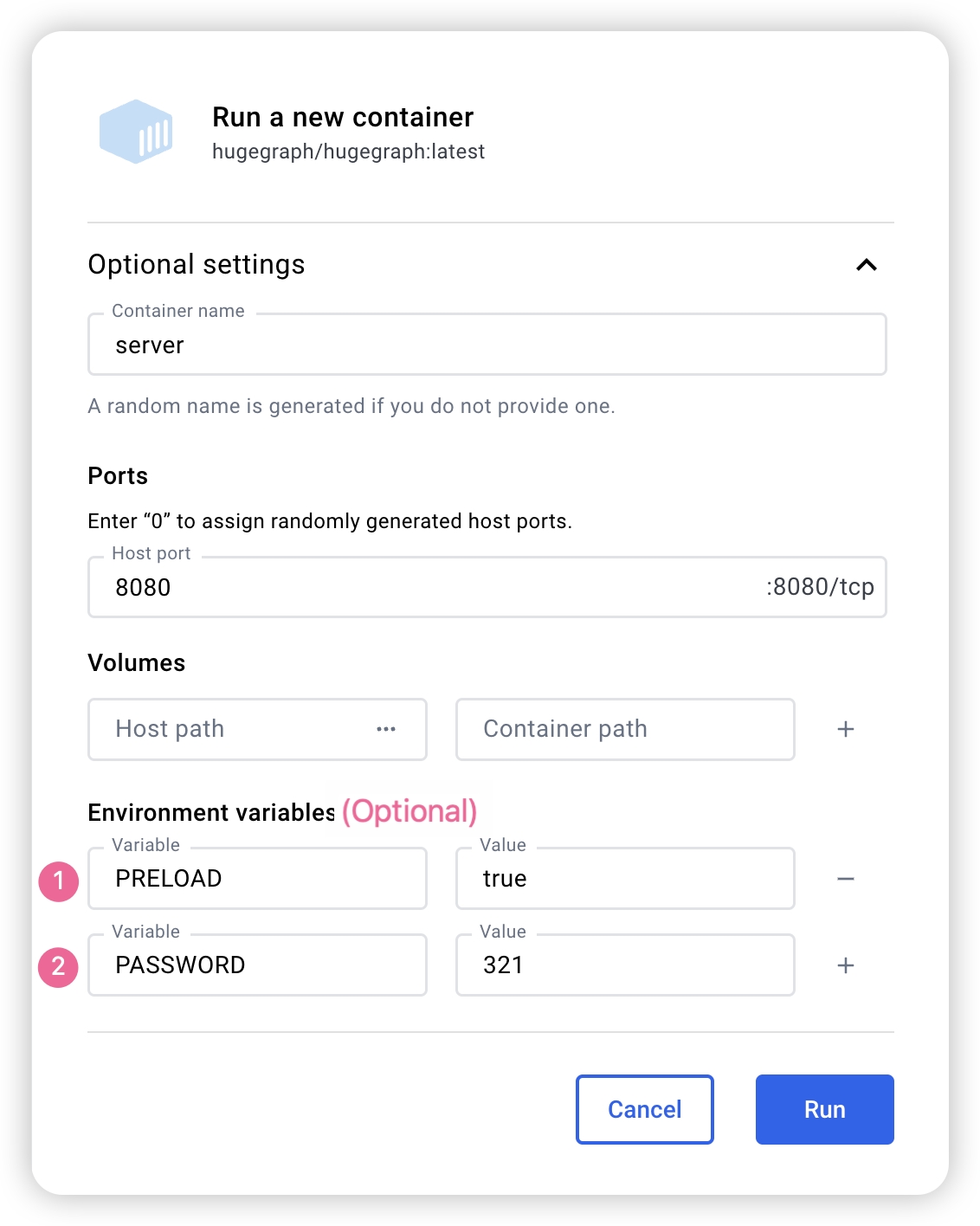
如果使用 docker desktop,则可以按照如下的方式设置可选项:
另外,如果我们希望能够在一个文件中管理除了 server 之外的其他 Hugegraph 相关的实例,我们也可以使用 docker-compose完成部署,使用命令 docker-compose up -d,(当然只配置 server 也是可以的)以下是一个样例的 docker-compose.yml:
 1version: '3'
 2services:
 3  server:
 4    image: hugegraph/hugegraph
 5    container_name: server
 6    # environment:
 7    #  - PRELOAD=true 为可选参数,为 True 时可以在启动的时候预加载一个内置的样例图
 8    #  - PASSWORD=123456 为可选参数,设置的时候可以开启鉴权模式,并设置密码
 9    ports:
10      - 8080:8080
注意:
hugegraph 的 docker 镜像是一个便捷版本,用于快速启动 hugegraph,并不是官方发布物料包方式。你可以从 ASF Release Distribution Policy 中得到更多细节。
推荐使用 release tag(如 1.2.0) 以获取稳定版。使用 latest tag 可以使用开发中的最新功能。
3.2 下载 tar 包
1# use the latest version, here is 1.2.0 for example
2wget https://downloads.apache.org/incubator/hugegraph/{version}/apache-hugegraph-incubating-{version}.tar.gz
3tar zxf *hugegraph*.tar.gz
3.3 源码编译
源码编译前请确保安装了 wget 命令
下载 HugeGraph 源代码
1git clone https://github.com/apache/hugegraph.git
编译打包生成 tar 包
1cd hugegraph
2mvn package -DskipTests
执行日志如下:
 1......
 2[INFO] Reactor Summary for hugegraph 1.2.0:
 3[INFO]
 4[INFO] hugegraph .......................................... SUCCESS [  2.405 s]
 5[INFO] hugegraph-core ..................................... SUCCESS [ 13.405 s]
 6[INFO] hugegraph-api ...................................... SUCCESS [ 25.943 s]
 7[INFO] hugegraph-cassandra ................................ SUCCESS [ 54.270 s]
 8[INFO] hugegraph-scylladb ................................. SUCCESS [  1.032 s]
 9[INFO] hugegraph-rocksdb .................................. SUCCESS [ 34.752 s]
10[INFO] hugegraph-mysql .................................... SUCCESS [  1.778 s]
11[INFO] hugegraph-palo ..................................... SUCCESS [  1.070 s]
12[INFO] hugegraph-hbase .................................... SUCCESS [ 32.124 s]
13[INFO] hugegraph-postgresql ............................... SUCCESS [  1.823 s]
14[INFO] hugegraph-dist ..................................... SUCCESS [ 17.426 s]
15[INFO] hugegraph-example .................................. SUCCESS [  1.941 s]
16[INFO] hugegraph-test ..................................... SUCCESS [01:01 min]
17[INFO] ------------------------------------------------------------------------
18[INFO] BUILD SUCCESS
19[INFO] ------------------------------------------------------------------------
20......
执行成功后,在 hugegraph 目录下生成 *hugegraph-*.tar.gz 文件,就是编译生成的 tar 包。
HugeGraph-Tools 提供了一键部署的命令行工具,用户可以使用该工具快速地一键下载、解压、配置并启动 HugeGraph-Server 和 HugeGraph-Hubble,最新的 HugeGraph-Toolchain 中已经包含所有的这些工具,直接下载它解压就有工具包集合了
1# download toolchain package, it includes loader + tool + hubble, please check the latest version (here is 1.2.0)
2wget https://downloads.apache.org/incubator/hugegraph/1.2.0/apache-hugegraph-toolchain-incubating-1.2.0.tar.gz
3tar zxf *hugegraph-*.tar.gz
4# enter the tool's package
5cd *hugegraph*/*tool*
注:${version} 为版本号,最新版本号可参考 Download 页面,或直接从 Download 页面点击链接下载
HugeGraph-Tools 的总入口脚本是 bin/hugegraph,用户可以使用 help 子命令查看其用法,这里只介绍一键部署的命令。
1bin/hugegraph deploy -v {hugegraph-version} -p {install-path} [-u {download-path-prefix}]
{hugegraph-version} 表示要部署的 HugeGraphServer 及 HugeGraphStudio 的版本,用户可查看 conf/version-mapping.yaml 文件获取版本信息,{install-path} 指定 HugeGraphServer 及 HugeGraphStudio 的安装目录,{download-path-prefix} 可选,指定 HugeGraphServer 及 HugeGraphStudio tar 包的下载地址,不提供时使用默认下载地址,比如要启动 0.6 版本的 HugeGraph-Server 及 HugeGraphStudio 将上述命令写为 bin/hugegraph deploy -v 0.6 -p services 即可。
4 配置
如果需要快速启动 HugeGraph 仅用于测试,那么只需要进行少数几个配置项的修改即可(见下一节)。
详细的配置介绍请参考配置文档及配置项介绍。
5 启动
5.1 使用启动脚本启动
启动分为"首次启动"和"非首次启动",这么区分是因为在第一次启动前需要初始化后端数据库,然后启动服务。
而在人为停掉服务后,或者其他原因需要再次启动服务时,因为后端数据库是持久化存在的,直接启动服务即可。
HugeGraphServer 启动时会连接后端存储并尝试检查后端存储版本号,如果未初始化后端或者后端已初始化但版本不匹配时(旧版本数据),HugeGraphServer 会启动失败,并给出错误信息。
如果需要外部访问 HugeGraphServer,请修改 rest-server.properties 的 restserver.url 配置项(默认为 http://127.0.0.1:8080),修改成机器名或 IP 地址。
由于各种后端所需的配置(hugegraph.properties)及启动步骤略有不同,下面逐一对各后端的配置及启动做介绍。
如果想要使用 HugeGraph 鉴权模式,在后面正式启动 Server 之前应按照 Server 鉴权配置 进行配置。
5.1.1 RocksDB
点击展开/折叠 RocksDB 配置及启动方法
RocksDB 是一个嵌入式的数据库,不需要手动安装部署,要求 GCC 版本 >= 4.3.0(GLIBCXX_3.4.10),如不满足,需要提前升级 GCC
修改 hugegraph.properties
1backend=rocksdb
2serializer=binary
3rocksdb.data_path=.
4rocksdb.wal_path=.
初始化数据库(第一次启动时或在 conf/graphs/ 下手动添加了新配置时需要进行初始化)
1cd *hugegraph-${version}
2bin/init-store.sh
启动 server
1bin/start-hugegraph.sh
2Starting HugeGraphServer...
3Connecting to HugeGraphServer (http://127.0.0.1:8080/graphs)....OK
提示的 url 与 rest-server.properties 中配置的 restserver.url 一致
5.1.2 HBase
点击展开/折叠 HBase 配置及启动方法
用户需自行安装 HBase,要求版本 2.0 以上,下载地址
修改 hugegraph.properties
 1backend=hbase
 2serializer=hbase
 3
 4# hbase backend config
 5hbase.hosts=localhost
 6hbase.port=2181
 7# Note: recommend to modify the HBase partition number by the actual/env data amount & RS amount before init store
 8# it may influence the loading speed a lot
 9#hbase.enable_partition=true
10#hbase.vertex_partitions=10
11#hbase.edge_partitions=30
初始化数据库(第一次启动时或在 conf/graphs/ 下手动添加了新配置时需要进行初始化)
1cd *hugegraph-${version}
2bin/init-store.sh
启动 server
1bin/start-hugegraph.sh
2Starting HugeGraphServer...
3Connecting to HugeGraphServer (http://127.0.0.1:8080/graphs)....OK
更多其它后端配置可参考配置项介绍
5.1.3 MySQL
点击展开/折叠 MySQL 配置及启动方法
由于 MySQL 是在 GPL 协议下,与 Apache 协议不兼容,用户需自行安装 MySQL,下载地址
下载 MySQL 的驱动包,比如 mysql-connector-java-8.0.30.jar,并放入 HugeGraph-Server 的 lib 目录下。
修改 hugegraph.properties,配置数据库 URL,用户名和密码,store 是数据库名,如果没有会被自动创建。
 1backend=mysql
 2serializer=mysql
 3
 4store=hugegraph
 5
 6# mysql backend config
 7jdbc.driver=com.mysql.cj.jdbc.Driver
 8jdbc.url=jdbc:mysql://127.0.0.1:3306
 9jdbc.username=
10jdbc.password=
11jdbc.reconnect_max_times=3
12jdbc.reconnect_interval=3
13jdbc.ssl_mode=false
初始化数据库(第一次启动时或在 conf/graphs/ 下手动添加了新配置时需要进行初始化)
1cd *hugegraph-${version}
2bin/init-store.sh
启动 server
1bin/start-hugegraph.sh
2Starting HugeGraphServer...
3Connecting to HugeGraphServer (http://127.0.0.1:8080/graphs)....OK
5.1.4 Cassandra
点击展开/折叠 Cassandra 配置及启动方法
用户需自行安装 Cassandra,要求版本 3.0 以上,下载地址
修改 hugegraph.properties
 1backend=cassandra
 2serializer=cassandra
 3
 4# cassandra backend config
 5cassandra.host=localhost
 6cassandra.port=9042
 7cassandra.username=
 8cassandra.password=
 9#cassandra.connect_timeout=5
10#cassandra.read_timeout=20
11
12#cassandra.keyspace.strategy=SimpleStrategy
13#cassandra.keyspace.replication=3
初始化数据库(第一次启动时或在 conf/graphs/ 下手动添加了新配置时需要进行初始化)
 1cd *hugegraph-${version}
 2bin/init-store.sh
 3Initing HugeGraph Store...
 42017-12-01 11:26:51 1424  [main] [INFO ] org.apache.hugegraph.HugeGraph [] - Opening backend store: 'cassandra'
 52017-12-01 11:26:52 2389  [main] [INFO ] org.apache.hugegraph.backend.store.cassandra.CassandraStore [] - Failed to connect keyspace: hugegraph, try init keyspace later
 62017-12-01 11:26:52 2472  [main] [INFO ] org.apache.hugegraph.backend.store.cassandra.CassandraStore [] - Failed to connect keyspace: hugegraph, try init keyspace later
 72017-12-01 11:26:52 2557  [main] [INFO ] org.apache.hugegraph.backend.store.cassandra.CassandraStore [] - Failed to connect keyspace: hugegraph, try init keyspace later
 82017-12-01 11:26:53 2797  [main] [INFO ] org.apache.hugegraph.backend.store.cassandra.CassandraStore [] - Store initialized: huge_graph
 92017-12-01 11:26:53 2945  [main] [INFO ] org.apache.hugegraph.backend.store.cassandra.CassandraStore [] - Store initialized: huge_schema
102017-12-01 11:26:53 3044  [main] [INFO ] org.apache.hugegraph.backend.store.cassandra.CassandraStore [] - Store initialized: huge_index
112017-12-01 11:26:53 3046  [pool-3-thread-1] [INFO ] org.apache.hugegraph.backend.Transaction [] - Clear cache on event 'store.init'
122017-12-01 11:26:59 9720  [main] [INFO ] org.apache.hugegraph.HugeGraph [] - Opening backend store: 'cassandra'
132017-12-01 11:27:00 9805  [main] [INFO ] org.apache.hugegraph.backend.store.cassandra.CassandraStore [] - Failed to connect keyspace: hugegraph1, try init keyspace later
142017-12-01 11:27:00 9886  [main] [INFO ] org.apache.hugegraph.backend.store.cassandra.CassandraStore [] - Failed to connect keyspace: hugegraph1, try init keyspace later
152017-12-01 11:27:00 9955  [main] [INFO ] org.apache.hugegraph.backend.store.cassandra.CassandraStore [] - Failed to connect keyspace: hugegraph1, try init keyspace later
162017-12-01 11:27:00 10175 [main] [INFO ] org.apache.hugegraph.backend.store.cassandra.CassandraStore [] - Store initialized: huge_graph
172017-12-01 11:27:00 10321 [main] [INFO ] org.apache.hugegraph.backend.store.cassandra.CassandraStore [] - Store initialized: huge_schema
182017-12-01 11:27:00 10413 [main] [INFO ] org.apache.hugegraph.backend.store.cassandra.CassandraStore [] - Store initialized: huge_index
192017-12-01 11:27:00 10413 [pool-3-thread-1] [INFO ] org.apache.hugegraph.backend.Transaction [] - Clear cache on event 'store.init'
启动 server
1bin/start-hugegraph.sh
2Starting HugeGraphServer...
3Connecting to HugeGraphServer (http://127.0.0.1:8080/graphs)....OK
5.1.5 Memory
点击展开/折叠 Memory 配置及启动方法
修改 hugegraph.properties
1backend=memory
2serializer=text
Memory 后端的数据是保存在内存中无法持久化的,不需要初始化后端,这也是唯一一个不需要初始化的后端。
启动 server
1bin/start-hugegraph.sh
2Starting HugeGraphServer...
3Connecting to HugeGraphServer (http://127.0.0.1:8080/graphs)....OK
提示的 url 与 rest-server.properties 中配置的 restserver.url 一致
5.1.6 ScyllaDB
点击展开/折叠 ScyllaDB 配置及启动方法
用户需自行安装 ScyllaDB,推荐版本 2.1 以上,下载地址
修改 hugegraph.properties
 1backend=scylladb
 2serializer=scylladb
 3
 4# cassandra backend config
 5cassandra.host=localhost
 6cassandra.port=9042
 7cassandra.username=
 8cassandra.password=
 9#cassandra.connect_timeout=5
10#cassandra.read_timeout=20
11
12#cassandra.keyspace.strategy=SimpleStrategy
13#cassandra.keyspace.replication=3
由于 scylladb 数据库本身就是基于 cassandra 的"优化版",如果用户未安装 scylladb,也可以直接使用 cassandra 作为后端存储,只需要把 backend 和 serializer 修改为 scylladb,host 和 post 指向 cassandra 集群的 seeds 和 port 即可,但是并不建议这样做,这样发挥不出 scylladb 本身的优势了。
初始化数据库(第一次启动时或在 conf/graphs/ 下手动添加了新配置时需要进行初始化)
1cd *hugegraph-${version}
2bin/init-store.sh
启动 server
1bin/start-hugegraph.sh
2Starting HugeGraphServer...
3Connecting to HugeGraphServer (http://127.0.0.1:8080/graphs)....OK
5.1.7 启动 server 的时候创建示例图
在脚本启动时候携带 -p true参数,表示 preload, 即创建示例图图
1bin/start-hugegraph.sh -p true
2Starting HugeGraphServer in daemon mode...
3Connecting to HugeGraphServer (http://127.0.0.1:8080/graphs)......OK
并且使用 RESTful API 请求 HugeGraphServer 得到如下结果:
1> curl "http://localhost:8080/graphs/hugegraph/graph/vertices" | gunzip
2
3{"vertices":[{"id":"2:lop","label":"software","type":"vertex","properties":{"name":"lop","lang":"java","price":328}},{"id":"1:josh","label":"person","type":"vertex","properties":{"name":"josh","age":32,"city":"Beijing"}},{"id":"1:marko","label":"person","type":"vertex","properties":{"name":"marko","age":29,"city":"Beijing"}},{"id":"1:peter","label":"person","type":"vertex","properties":{"name":"peter","age":35,"city":"Shanghai"}},{"id":"1:vadas","label":"person","type":"vertex","properties":{"name":"vadas","age":27,"city":"Hongkong"}},{"id":"2:ripple","label":"software","type":"vertex","properties":{"name":"ripple","lang":"java","price":199}}]}
代表创建示例图成功。
5.2 使用 Docker
在 3.3 使用 Docker 容器中,我们已经介绍了如何使用 docker 部署 hugegraph-server, 我们还可以使用其他的后端存储或者设置参数在 sever 启动的时候加载样例图
5.2.1 使用 Cassandra 作为后端
点击展开/折叠 Cassandra 配置及启动方法
在使用 Docker 的时候,我们可以使用 Cassandra 作为后端存储。我们更加推荐直接使用 docker-compose 来对于 server 以及 Cassandra 进行统一管理
样例的 docker-compose.yml 可以在 github 中获取,使用 docker-compose up -d 启动。(如果使用 cassandra 4.0 版本作为后端存储,则需要大约两个分钟初始化,请耐心等待)
 1version: "3"
 2
 3services:
 4  server:
 5    image: hugegraph/hugegraph
 6    container_name: cas-server
 7    ports:
 8      - 8080:8080
 9    environment:
10      hugegraph.backend: cassandra
11      hugegraph.serializer: cassandra
12      hugegraph.cassandra.host: cas-cassandra
13      hugegraph.cassandra.port: 9042
14    networks:
15      - ca-network
16    depends_on:
17      - cassandra
18    healthcheck:
19      test: ["CMD", "bin/gremlin-console.sh", "--" ,"-e", "scripts/remote-connect.groovy"]
20      interval: 10s
21      timeout: 30s
22      retries: 3
23
24  cassandra:
25    image: cassandra:4
26    container_name: cas-cassandra
27    ports:
28      - 7000:7000
29      - 9042:9042
30    security_opt:
31      - seccomp:unconfined
32    networks:
33      - ca-network
34    healthcheck:
35      test: ["CMD", "cqlsh", "--execute", "describe keyspaces;"]
36      interval: 10s
37      timeout: 30s
38      retries: 5
39
40networks:
41  ca-network:
42
43volumes:
44  hugegraph-data:
在这个 yaml 中,需要在环境变量中以 hugegraph.<parameter_name>的形式进行参数传递,配置 Cassandra 相关的参数。
具体来说,在 hugegraph.properties 配置文件中,提供了 backend=xxx, cassandra.host=xxx 等配置项,为了配置这些配置项,在传递环境变量的过程之中,我们需要在这些配置项前加上 hugegrpah.,即 hugegraph.backend 和 hugegraph.cassandra.host。
其他配置可以参照 4 配置
5.2.2 启动 server 的时候创建示例图
在 docker 启动的时候设置环境变量 PRELOAD=true, 从而实现启动脚本的时候加载数据。
使用docker run
使用 docker run -itd --name=server -p 8080:8080 -e PRELOAD=true hugegraph/hugegraph:latest
使用docker-compose
创建docker-compose.yml,具体文件如下,在环境变量中设置 PRELOAD=true。其中,example.groovy 是一个预定义的脚本,用于预加载样例数据。如果有需要,可以通过挂载新的 example.groovy 脚本改变预加载的数据。
 1version: '3'
 2  services:
 3    server:
 4      image: hugegraph/hugegraph:latest
 5      container_name: server
 6      environment:
 7        - PRELOAD=true
 8      volumes:
 9        - /path/to/yourscript:/hugegraph/scripts/example.groovy
10      ports:
11        - 8080:8080
使用命令 docker-compose up -d 启动容器
使用 RESTful API 请求 HugeGraphServer 得到如下结果:
1> curl "http://localhost:8080/graphs/hugegraph/graph/vertices" | gunzip
2
3{"vertices":[{"id":"2:lop","label":"software","type":"vertex","properties":{"name":"lop","lang":"java","price":328}},{"id":"1:josh","label":"person","type":"vertex","properties":{"name":"josh","age":32,"city":"Beijing"}},{"id":"1:marko","label":"person","type":"vertex","properties":{"name":"marko","age":29,"city":"Beijing"}},{"id":"1:peter","label":"person","type":"vertex","properties":{"name":"peter","age":35,"city":"Shanghai"}},{"id":"1:vadas","label":"person","type":"vertex","properties":{"name":"vadas","age":27,"city":"Hongkong"}},{"id":"2:ripple","label":"software","type":"vertex","properties":{"name":"ripple","lang":"java","price":199}}]}
代表创建示例图成功。
6 访问 Server
6.1 服务启动状态校验
jps 查看服务进程
1jps
26475 HugeGraphServer
curl 请求 RESTful API
1echo `curl -o /dev/null -s -w %{http_code} "http://localhost:8080/graphs/hugegraph/graph/vertices"`
返回结果 200,代表 server 启动正常
6.2 请求 Server
HugeGraphServer 的 RESTful API 包括多种类型的资源,典型的包括 graph、schema、gremlin、traverser 和 task
graph 包含 vertices、edgesschema 包含 vertexlabels、propertykeys、edgelabels、indexlabelsgremlin 包含各种 Gremlin 语句,如 g.v(),可以同步或者异步执行traverser 包含各种高级查询,包括最短路径、交叉点、N 步可达邻居等task 包含异步任务的查询和删除
6.2.1 获取 hugegraph 的顶点及相关属性
1curl http://localhost:8080/graphs/hugegraph/graph/vertices
说明
由于图的点和边很多,对于 list 型的请求,比如获取所有顶点,获取所有边等,Server 会将数据压缩再返回,所以使用 curl 时得到一堆乱码,可以重定向至 gunzip 进行解压。推荐使用 Chrome 浏览器 + Restlet 插件发送 HTTP 请求进行测试。
1curl "http://localhost:8080/graphs/hugegraph/graph/vertices" | gunzip
当前 HugeGraphServer 的默认配置只能是本机访问,可以修改配置,使其能在其他机器访问。
1vim conf/rest-server.properties
2
3restserver.url=http://0.0.0.0:8080
响应体如下:
 1{
 2    "vertices": [
 3        {
 4            "id": "2lop",
 5            "label": "software",
 6            "type": "vertex",
 7            "properties": {
 8                "price": [
 9                    {
10                        "id": "price",
11                        "value": 328
12                    }
13                ],
14                "name": [
15                    {
16                        "id": "name",
17                        "value": "lop"
18                    }
19                ],
20                "lang": [
21                    {
22                        "id": "lang",
23                        "value": "java"
24                    }
25                ]
26            }
27        },
28        {
29            "id": "1josh",
30            "label": "person",
31            "type": "vertex",
32            "properties": {
33                "name": [
34                    {
35                        "id": "name",
36                        "value": "josh"
37                    }
38                ],
39                "age": [
40                    {
41                        "id": "age",
42                        "value": 32
43                    }
44                ]
45            }
46        },
47        ...
48    ]
49}
详细的 API 请参考 RESTful-API 文档。
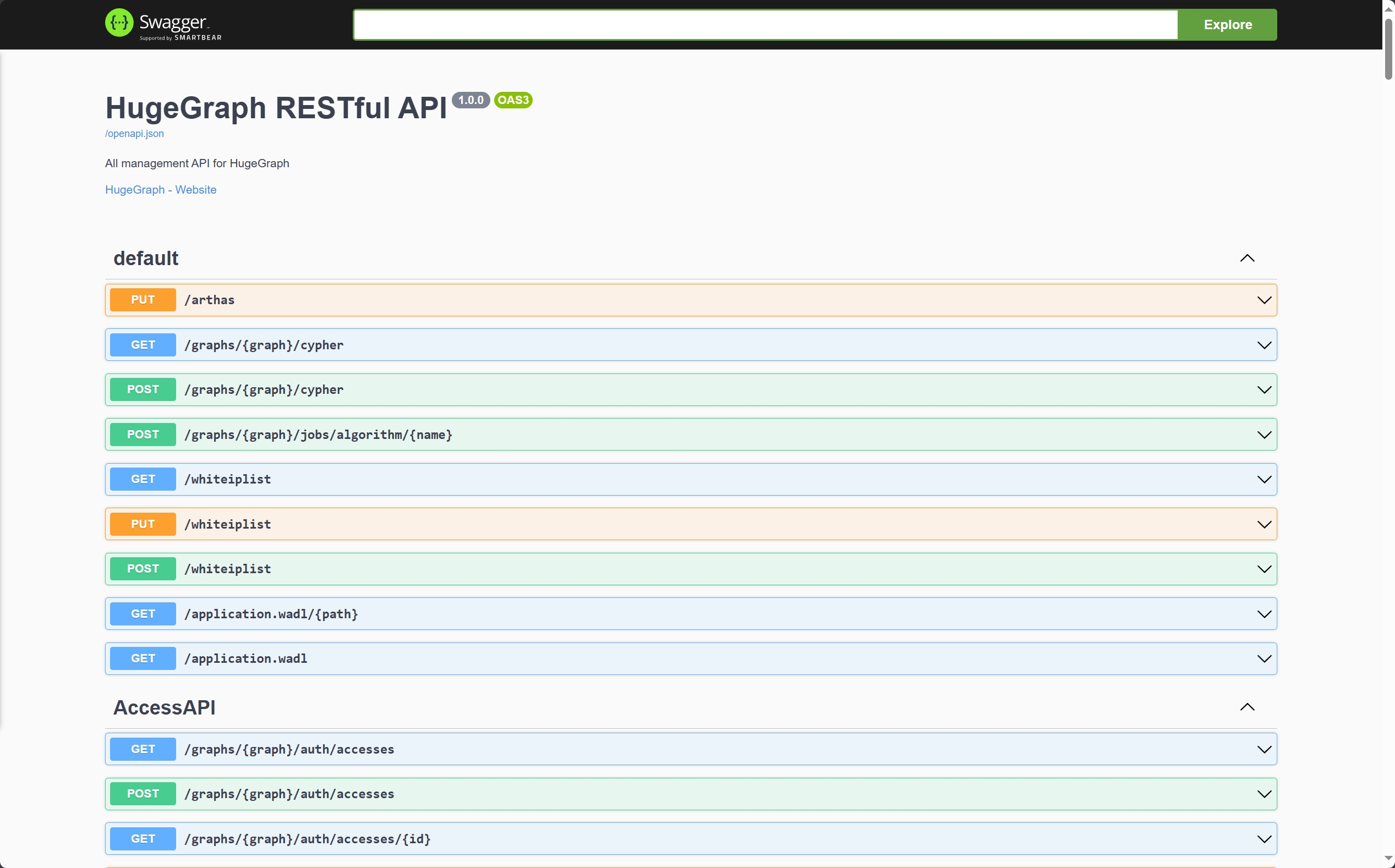
另外也可以通过访问 localhost:8080/swagger-ui/index.html 查看 API。
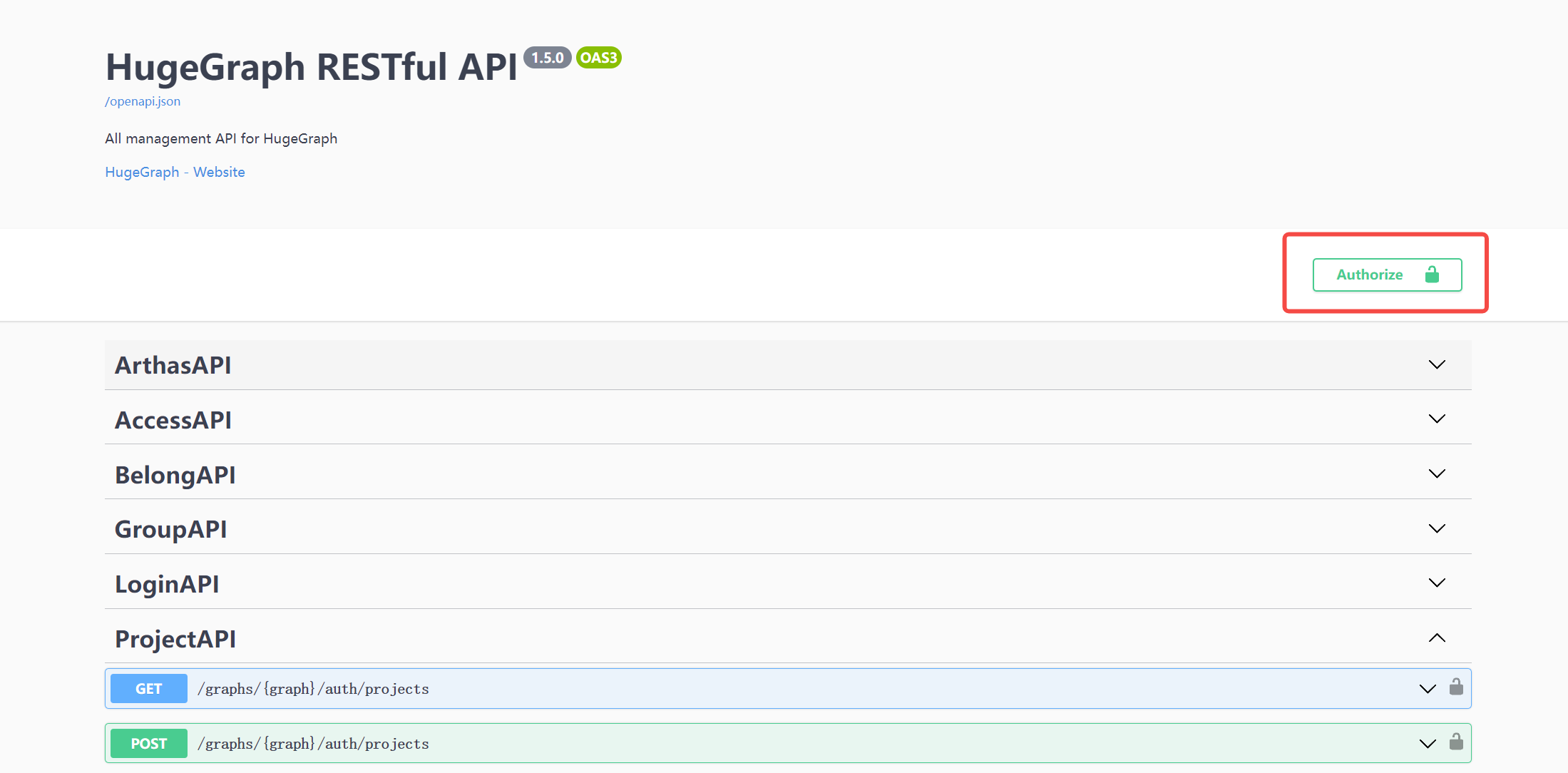
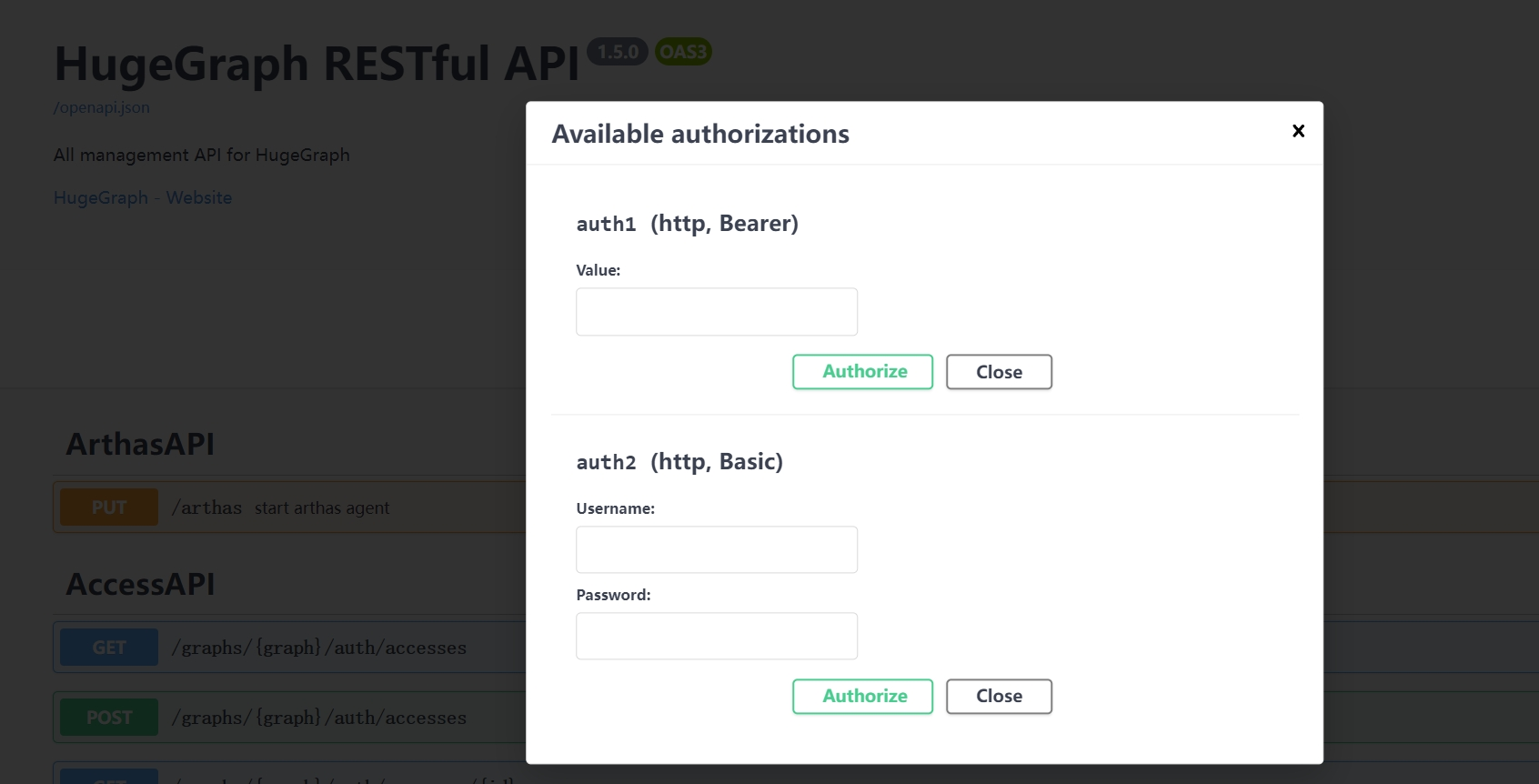
在使用 Swagger UI 调试 HugeGraph 提供的 API 时,如果 HugeGraph Server 开启了鉴权模式,可以在 Swagger 页面输入鉴权信息。
当前 HugeGraph 支持基于 Basic 和 Bearer 两种形式设置鉴权信息。
7 停止 Server
1$cd *hugegraph-${version}
2$bin/stop-hugegraph.sh
8 使用 IntelliJ IDEA 调试 Server
请参考在 IDEA 中配置 Server 开发环境