HugeGraph-Server provides interfaces for clients to operate on graphs based on the HTTP protocol through the HugeGraph-API. These interfaces primarily include the ability to add, delete, modify, and query metadata and graph data, perform traversal algorithms, handle variables, and perform other graph-related operations.
Expect the doc below, you can also use swagger-ui to visit the RESTful API by localhost:8080/swagger-ui/index.html. Here is an example
1 - Schema API
1.1 Schema
HugeGraph provides a single interface to get all Schema information of a graph, including: PropertyKey, VertexLabel, EdgeLabel and IndexLabel.
Method & Url
1GET http://localhost:8080/graphs/{graph_name}/schema
23e.g: GET http://localhost:8080/graphs/hugegraph/schema
data_type: The data type of the property type, including: bool, byte, int, long, float, double, text, blob, date, uuid. The default data type is text (Represent a string type)
cardinality: The cardinality of the property type, including: single, list, set. The default cardinality is single.
Request Body Field Description:
id: The ID value of the property type.
properties: The properties of the property type. For properties, this field is empty.
user_data: Setting the common information of the property type, such as setting the value range of the age property from 0 to 100. Currently, no validation is performed on this field, and it is only a reserved entry for future expansion.
Where age is the name of the PropertyKey to be deleted.
Response Status
1202
Response Body
1{2"task_id":03}
3 - VertexLabel API
1.3 VertexLabel
Assuming that the PropertyKeys listed in 1.1.3 have already been created.
Params Description:
id: The ID value of the vertex type.
name: The name of the vertex type, required.
id_strategy: The ID strategy for the vertex type, including primary key ID, auto-generated, custom string, custom number, custom UUID. The default strategy is primary key ID.
properties: The property types associated with the vertex type.
primary_keys: The primary key properties. This field must have a value when the ID strategy is PRIMARY_KEY, and must be empty for other ID strategies.
enable_label_index: Whether to enable label indexing. It is disabled by default.
index_names: The indexes created for the vertex type. See details in section 3.4.
nullable_keys: Nullable properties.
user_data: Setting the common information of the vertex type, similar to the property type.
Starting from version v0.11.2, hugegraph-server supports Time-to-Live (TTL) functionality for vertices. The TTL for vertices is set through VertexLabel. For example, if you want the vertices of type “person” to have a lifespan of one day, you need to set the TTL field to 86400000 (in milliseconds) when creating the “person” VertexLabel.
Additionally, if the vertex has a property called “createdTime” and you want to use it as the starting point for calculating the vertex’s lifespan, you can set the ttl_start_time field in the VertexLabel. For example, if the “person” VertexLabel has a property called “createdTime” of type Date, and you want the vertices of type “person” to live for one day starting from the creation time, the Request Body for creating the “person” VertexLabel would be as follows:
You can use GET http://localhost:8080/graphs/hugegraph/tasks/1 (where “1” is the task_id) to query the execution status of the asynchronous task. For more information, refer to the Asynchronous Task RESTful API.
4 - EdgeLabel API
1.4 EdgeLabel
Assuming PropertyKeys from version 1.2.3 and VertexLabels from version 1.3.3 have already been created.
Params Explanation
name: Name of the vertex type, required.
source_label: Name of the source vertex type, required.
target_label: Name of the target vertex type, required.
frequency: Whether there can be multiple edges between two points, can have values SINGLE or MULTIPLE, optional (default value: SINGLE).
properties: Property types associated with the edge type, optional.
sort_keys: Specifies a list of differentiating key properties when multiple associations are allowed.
Starting from version 0.11.2 of hugegraph-server, the TTL (Time to Live) feature for edges is supported. The TTL for edges is set through EdgeLabel. For example, if you want the “knows” type of edge to have a lifespan of one day, you need to set the TTL field to 86400000 when creating the “knows” EdgeLabel, where the unit is milliseconds.
Additionally, when the edge has a property called “createdTime” and you want to use the “createdTime” property as the starting point for calculating the edge’s lifespan, you can set the ttl_start_time field in the EdgeLabel. For example, if the knows EdgeLabel has a property called “createdTime” which is of type Date, and you want the “knows” type of edge to live for one day from the time of creation, the Request Body for creating the knows EdgeLabel would be as follows:
You can query the execution status of an asynchronous task by using GET http://localhost:8080/graphs/hugegraph/tasks/1 (where “1” is the task_id). For more information, refer to the Asynchronous Task RESTful API.
5 - IndexLabel API
1.5 IndexLabel
Assuming PropertyKeys from version 1.1.3, VertexLabels from version 1.2.3, and EdgeLabels from version 1.3.3 have already been created.
You can query the execution status of an asynchronous task by using GET http://localhost:8080/graphs/hugegraph/tasks/1 (where “1” is the task_id). For more information, refer to the Asynchronous Task RESTful API.
You can get the asynchronous job status by GET http://localhost:8080/graphs/hugegraph/tasks/${task_id} (the task_id here should be 1). See More AsyncJob RESTfull API
You can get the asynchronous job status by GET http://localhost:8080/graphs/hugegraph/tasks/${task_id} (the task_id here should be 2). See More AsyncJob RESTfull API
You can get the asynchronous job status by GET http://localhost:8080/graphs/hugegraph/tasks/${task_id} (the task_id here should be 3). See More AsyncJob RESTfull API
7 - Vertex API
2.1 Vertex
In vertex types, the Id strategy determines the type of the vertex Id, with the corresponding relationships as follows:
Id_Strategy
id type
AUTOMATIC
number
PRIMARY_KEY
string
CUSTOMIZE_STRING
string
CUSTOMIZE_NUMBER
number
CUSTOMIZE_UUID
uuid
For the GET/PUT/DELETE API of a vertex, the id part in the URL should be passed as the id value with type information. This type information is indicated by whether the JSON string is enclosed in quotes, meaning:
When the id type is number, the id in the URL is without quotes, for example: xxx/vertices/123456.
When the id type is string, the id in the URL is enclosed in quotes, for example: xxx/vertices/"123456".
The next example requires first creating the graph schema from the following groovy script
Note: There are three categories for property values: single, set, and list. If it is single, it means adding or updating the property value. If it is set or list, it means appending the property value.
The lang property does not specify an update strategy and is directly overwritten by the new value, regardless of whether the new value is null.
The price property specifies the BIGGER update strategy. The old property value is 328, and the new property value is 299, so the old property value of 328 is retained.
The age property specifies the OVERRIDE update strategy, but the new property value does not include age, which is equivalent to age being null. Therefore, the original property value of 32 is still retained.
The city property also specifies the OVERRIDE update strategy, and the new property value is not null, so it overrides the old value.
The weight property specifies the SUM update strategy. The old property value is 0.1, and the new property value is 0.2. The final value is 0.3.
The hobby property (cardinality is Set) specifies the UNION update strategy, so the new value is taken as the union with the old value.
The usage of other update strategies can be inferred in a similar manner and will not be further elaborated.
properties: Property key-value pairs (precondition: indexes are created for property queries)
limit: Maximum number of results
page: Page number
All of the above parameters are optional. If the page parameter is provided, the limit parameter must also be provided, and no other parameters are allowed. label, properties, and limit can be combined in any way.
Property key-value pairs consist of the property name and value in JSON format. Multiple property key-value pairs are allowed as query conditions. The property value supports exact matching, range matching, and fuzzy matching. For exact matching, use the format properties={"age":29}, for range matching, use the format properties={"age":"P.gt(29)"}, and for fuzzy matching, use the format properties={"city": "P.textcontains("ChengDu China")}. The following expressions are supported for range matching:
Expression
Explanation
P.eq(number)
Vertices with property value equal to number
P.neq(number)
Vertices with property value not equal to number
P.lt(number)
Vertices with property value less than number
P.lte(number)
Vertices with property value less than or equal to number
P.gt(number)
Vertices with property value greater than number
P.gte(number)
Vertices with property value greater than or equal to number
P.between(number1,number2)
Vertices with property value greater than or equal to number1 and less than number2
P.inside(number1,number2)
Vertices with property value greater than number1 and less than number2
P.outside(number1,number2)
Vertices with property value less than number1 and greater than number2
P.within(value1,value2,value3,…)
Vertices with property value equal to any of the given values
The returned body contains information about the page number of the next page, "page": "CIYxOnBldGVyAAAAAAAAAAM". When querying the next page, assign this value to the page parameter.
Paginate and retrieve all vertices, including the next page (passing the page value returned from the previous page), limited to 3 items.
At this point, "page": null indicates that there are no more pages available. (Note: When using Cassandra as the backend for performance reasons, if the returned page happens to be the last page, the page value may not be empty. When requesting the next page using that page value, it will return empty data and page = null. The same applies to other similar situations.)
The modification of the vertex ID format also affects the ID of the edge, as well as the formats of the source vertex and target vertex IDs.
The EdgeId is formed by concatenating src-vertex-id + direction + label + sort-values + tgt-vertex-id, but the vertex ID types are not distinguished by quotation marks here. Instead, they are distinguished by prefixes:
When the ID type is number, the vertex ID in the EdgeId has a prefix L, like “L123456>1»L987654”.
When the ID type is string, the vertex ID in the EdgeId has a prefix S, like “S1:peter>1»S2:lop”.
The following example requires creating a graph schema based on the following groovy script:
check_vertex: Whether to check the existence of vertices (true | false). When set to true, an error will be thrown if the source or target vertices of the edge to be inserted do not exist. Default is true.
NOTE: There are three categories of property values: single, set, and list. If it is single, it means adding or updating the property value. If it is set or list, it means appending the property value.
update_strategies: For each property, you can set its update strategy individually, including:
SUM: Only supports number type
BIGGER/SMALLER: Only supports date/number type
UNION/INTERSECTION: Only supports set type
APPEND/ELIMINATE: Only supports collection type
OVERRIDE
check_vertex: Whether to check the existence of vertices (true | false). When set to true, an error will be thrown if the source or target vertices of the edge to be inserted do not exist. Default is true.
create_if_not_exist: Currently only supports setting to true
direction: Edge direction (OUT | IN | BOTH), default is BOTH
label: Edge label
properties: Key-value pairs of properties (requires pre-built indexes for property queries)
keep_start_p: Default is false. When set to true, the range matching input expression will not be automatically escaped. For example, properties={"age":"P.gt(0.8)"} will be interpreted as an exact match, i.e., the age property is equal to “P.gt(0.8)”
offset: Offset, default is 0
limit: Number of queries, default is 100
page: Page number
Key-value pairs of properties consist of the property name and value in JSON format. Multiple key-value pairs are allowed as query conditions. Property values support exact matching and range matching. For exact matching, it is in the form properties={"weight":0.8}. For range matching, it is in the form properties={"age":"P.gt(0.8)"}. The expressions supported by range matching are as follows:
Expression
Description
P.eq(number)
Edges with property value equal to number
P.neq(number)
Edges with property value not equal to number
P.lt(number)
Edges with property value less than number
P.lte(number)
Edges with property value less than or equal to number
P.gt(number)
Edges with property value greater than number
P.gte(number)
Edges with property value greater than or equal to number
P.between(number1,number2)
Edges with property value greater than or equal to number1 and less than number2
P.inside(number1,number2)
Edges with property value greater than number1 and less than number2
P.outside(number1,number2)
Edges with property value less than number1 and greater than number2
P.within(value1,value2,value3,…)
Edges with property value equal to any of the given values
P.textcontains(value)
Edges with property value containing the given value (string type)
P.contains(value)
Edges with property value containing the given value (collection type)
Edges connected to the vertex person:marko(vertex_id=“1:marko”) with label knows and date property equal to “20160111”
The returned body contains the page number information for the next page, "page": "EoYxOm1hcmtvgggCAIQyOmxvcAAAAAAAAAAC". When querying the next page, assign this value to the page parameter.
Paginate and retrieve all edges, get the next page (include the page value returned from the previous page), limit to 2 entries
When "page": null is returned, it indicates that there are no more pages available.
NOTE: When the backend is Cassandra, for performance considerations, if the returned page happens to be the last page, the page value may not be empty. When requesting the next page data using that page value, it will return empty data and page = null. Similar situations apply for other cases.
HugeGraphServer provides a RESTful API interface for the HugeGraph graph database. In addition to the basic CRUD operations for vertices and edges, it also offers several traversal methods, which we refer to as the traverser API. These traversal methods implement various complex graph algorithms, making it convenient for users to analyze and explore the graph.
The Traverser API supported by HugeGraph includes:
K-out API: It finds neighbors that are exactly N steps away from a given starting vertex. There are two versions:
The basic version uses the GET method to find neighbors that are exactly N steps away from a given starting vertex.
The advanced version uses the POST method to find neighbors that are exactly N steps away from a given starting vertex. The advanced version differs from the basic version in the following ways:
Supports counting the number of neighbors only
Supports filtering by edge and vertex properties
Supports returning the shortest path to reach the neighbor
K-neighbor API: It finds all neighbors that are within N steps of a given starting vertex. There are two versions:
The basic version uses the GET method to find all neighbors that are within N steps of a given starting vertex.
The advanced version uses the POST method to find all neighbors that are within N steps of a given starting vertex. The advanced version differs from the basic version in the following ways:
Supports counting the number of neighbors only
Supports filtering by edge and vertex properties
Supports returning the shortest path to reach the neighbor
Same Neighbors: It queries the common neighbors of two vertices.
Jaccard Similarity API: It calculates the Jaccard similarity, which includes two types:
One type uses the GET method to calculate the similarity (intersection over union) of neighbors between two vertices.
The other type uses the POST method to find the top N vertices with the highest Jaccard similarity to a given starting vertex in the entire graph.
Shortest Path API: It finds the shortest path between two vertices.
All Shortest Paths: It finds all shortest paths between two vertices.
Weighted Shortest Path: It finds the shortest weighted path from a starting vertex to a target vertex.
Single Source Shortest Path: It finds the weighted shortest path from a single source vertex to all other vertices.
Multi Node Shortest Path: It finds the shortest path between every pair of specified vertices.
Paths API: It finds all paths between two vertices. There are two versions:
The basic version uses the GET method to find all paths between a given starting vertex and an ending vertex.
The advanced version uses the POST method to find all paths that meet certain conditions between a set of starting vertices and a set of ending vertices.
3.2 Detailed Explanation of Traverser API
In the following, we provide a detailed explanation of the Traverser API:
Customized Paths API: It traverses all paths that pass through a batch of vertices according to a specific pattern.
Template Path API: It specifies a starting point, an ending point, and the path information between them to find matching paths.
Crosspoints API: It finds the intersection (common ancestors or common descendants) between two vertices.
Customized Crosspoints API: It traverses multiple patterns starting from a batch of vertices and finds the intersections with the vertices reached in the final step.
Rings API: It finds the cyclic paths that can be reached from a starting vertex.
Rays API: It finds the paths from a starting vertex that reach the boundaries (i.e., paths without cycles).
Fusiform Similarity API: It finds the fusiform similar vertices to a given vertex.
Vertices API:
Batch querying vertices by ID.
Getting the partitions of vertices.
Querying vertices by partition.
Edges API:
Batch querying edges by ID.
Getting the partitions of edges.
Querying edges by partition.
3.2 Detailed Explanation of Traverser API
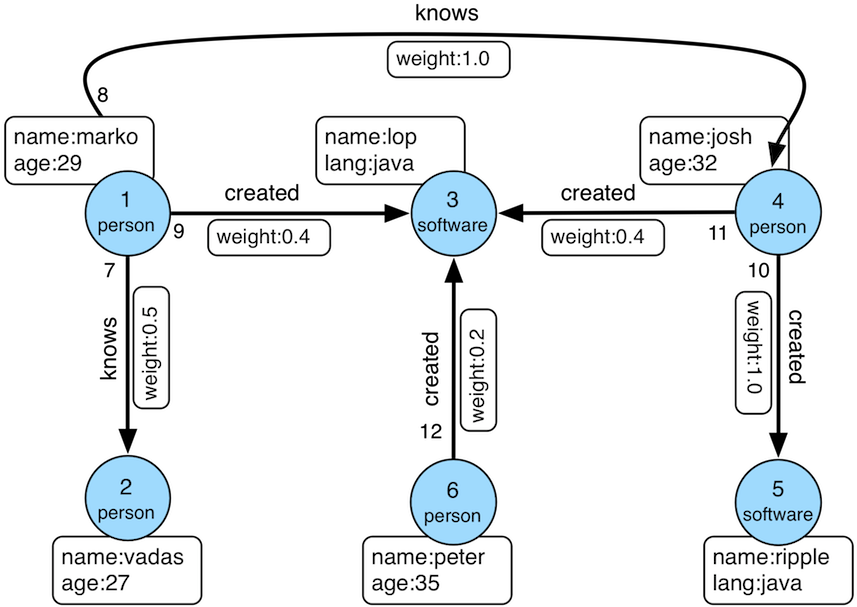
The usage examples provided in this section are based on the graph presented on the TinkerPop official website:
The K-out API allows you to find vertices that are exactly “depth” steps away from a given starting vertex, considering the specified direction, edge type (optional), and depth.
Params
source: ID of the starting vertex (required)
direction: Direction of traversal from the starting vertex (OUT, IN, BOTH). Optional, default is BOTH.
max_depth: Number of steps (required)
label: Edge type (optional), represents all edge labels by default
nearest: When nearest is set to true, it means the shortest path length from the starting vertex to the result vertices is equal to the depth, and there is no shorter path. When nearest is set to false, it means there is at least one path of length depth from the starting vertex to the result vertices (not necessarily the shortest and may contain cycles). Optional, default is true.
max_degree: Maximum number of adjacent edges to traverse per vertex during the query. Optional, default is 10000.
capacity: Maximum number of vertices to be visited during the traversal. Optional, default is 10000000.
limit: Maximum number of vertices to be returned. Optional, default is 10000000.
Finding vertices that are exactly N steps away in a relationship. Two examples:
In a family relationship, finding all grandchildren of a person. The set of vertices that can be reached by person A through two consecutive “son” edges.
Discovering potential friends in a social network. For example, finding users who are two degrees of friendship away from the target user, reachable through two consecutive “friend” edges.
3.2.2 K-out API (POST, Advanced Version)
3.2.2.1 Functionality Overview
The K-out API allows you to find vertices that are exactly “depth” steps away from a given starting vertex, considering the specified steps (including direction, edge type, and attribute filtering).
The advanced version differs from the basic version of K-out API in the following aspects:
Supports counting the number of neighbors only
Supports edge attribute filtering
Supports returning the shortest path to the neighbor
Params
source: The ID of the starting vertex, required.
steps: Steps from the starting point, required, with the following structure:
direction: Represents the direction of the edges (OUT, IN, BOTH), default is BOTH.
edge_steps: The step set of edges, supporting label and properties filtering for the edge. If edge_steps is empty, the edge is not filtered.
label: Edge types.
properties: Filter edges based on property values.
vertex_steps: The step set of vertices, supporting label and properties filtering for the vertex. If vertex_steps is empty, the vertex is not filtered.
label: Vertex types.
properties: Filter vertices based on property values.
max_degree: Maximum number of adjacent edges to traverse for a single vertex, default is 10000 (Note: Prior to version 0.12, the parameter name was “degree” instead of “max_degree”. Starting from version 0.12, “max_degree” is used uniformly, while still supporting the “degree” syntax for backward compatibility).
skip_degree: Sets the minimum number of edges to skip super vertices during the query process. If the number of adjacent edges for a vertex is greater than skip_degree, the vertex is completely skipped. Optional. If enabled, it should satisfy the constraint skip_degree >= max_degree. Default is 0 (not enabled), indicating no skipping of any vertices (Note: Enabling this configuration means that during traversal, an attempt will be made to access skip_degree edges of a vertex, not just max_degree edges. This incurs additional traversal overhead and may have a significant impact on query performance. Please enable it only after understanding the implications).
max_depth: Number of steps, required.
nearest: When nearest is true, it means the shortest path length from the starting vertex to the result vertex is equal to depth, and there is no shorter path. When nearest is false, it means there is a path of length depth from the starting vertex to the result vertex (not necessarily the shortest and can contain cycles). Optional, default is true.
count_only: Boolean value, true indicates only counting the number of results without returning specific results, false indicates returning specific results. Default is false.
with_path: When true, it returns the shortest path from the starting vertex to each neighbor. When false, it does not return the shortest path. Optional, default is false.
with_edge: Optional parameter, default is false:
When true, the result will include complete edge information (all edges in the path):
When with_path is true, it returns complete information of all edges in all paths.
When with_path is false, no information is returned.
When false, it only returns edge IDs.
with_vertex: Optional parameter, default is false:
When true, the result will include complete vertex information (all vertices in the path):
When with_path is true, it returns complete information of all vertices in all paths.
When with_path is false, it returns complete information of all neighbors.
When false, it only returns vertex IDs.
capacity: Maximum number of vertices to visit during traversal. Optional, default is 10000000.
limit: Maximum number of vertices to return. Optional, default is 10000000.
traverse_mode: Traversal mode. There are two options: “breadth_first_search” and “depth_first_search”, default is “breadth_first_search”.
Find all vertices that are reachable within depth steps, including the starting vertex, based on the starting vertex, direction, edge type (optional), and depth.
Equivalent to the union of: starting vertex, K-out(1), K-out(2), …, K-out(max_depth).
Params
source: ID of the starting vertex, required.
direction: Direction in which the starting vertex’s edges extend (OUT, IN, BOTH). Optional, default is BOTH.
max_depth: Number of steps, required.
label: Edge type, optional, default represents all edge labels.
max_degree: Maximum number of adjacent edges to traverse for a single vertex during the query process. Optional, default is 10000.
limit: Maximum number of vertices to return, also represents the maximum number of vertices to visit during traversal. Optional, default is 10000000.
Find all vertices reachable within N steps, for example:
In a family relationship, find all descendants within five generations of a person. This can be achieved by traversing five consecutive “parent-child” edges from person A.
In a social network, discover friend circles. For example, users who can be reached by 1, 2, or 3 “friend” edges from the target user can form the target user’s friend circle.
3.2.4 K-neighbor API (POST, Advanced Version)
3.2.4.1 Function Introduction
Find all vertices that are reachable within depth steps from the starting vertex, based on the starting vertex, steps (including direction, edge type, and filter properties), and depth.
The difference from the Basic Version of K-neighbor API is that:
It supports counting the number of neighbors only.
It supports filtering edges based on their properties.
It supports returning the shortest path to reach the neighbors.
Params
source: Starting vertex ID, required.
steps: Steps from the starting point, required, with the following structure:
direction: Represents the direction of the edges (OUT, IN, BOTH), default is BOTH.
edge_steps: The step set of edges, supporting label and properties filtering for the edge. If edge_steps is empty, the edge is not filtered.
label: Edge types.
properties: Filter edges based on property values.
vertex_steps: The step set of vertices, supporting label and properties filtering for the vertex. If vertex_steps is empty, the vertex is not filtered.
label: Vertex types.
properties: Filter vertices based on property values.
max_degree: Maximum number of adjacent edges to traverse for each vertex during the query process. Default is 10000. (Note: Before version 0.12, the parameter name within the step only supported “degree.” Starting from version 0.12, it is unified as “max_degree” and is backward compatible with the “degree” notation.)
skip_degree: Used to set the minimum number of edges to discard super vertices during the query process. When the number of adjacent edges for a vertex exceeds skip_degree, the vertex is completely discarded. This is an optional parameter. If enabled, it should satisfy the constraint skip_degree >= max_degree. Default is 0 (not enabled), which means no vertices are skipped. (Note: When this configuration is enabled, the traversal will attempt to access skip_degree edges for each vertex, not just max_degree edges. This incurs additional traversal overhead and may significantly impact query performance. Please make sure to understand this before enabling.)
max_depth: Number of steps, required.
count_only: Boolean value. If true, only the count of results is returned without the actual results. If false, the specific results are returned. Default is false.
with_path: If true, the shortest path from the starting point to each neighbor is returned. If false, the shortest path from the starting point to each neighbor is not returned. This is an optional parameter. Default is false.
with_edge: Optional parameter, default is false:
When true, the result will include complete edge information (all edges in the path):
When with_path is true, it returns complete information of all edges in all paths.
When with_path is false, no information is returned.
When false, it only returns edge IDs.
with_vertex: Optional parameter, default is false:
When true, the result will include complete vertex information (all vertices in the path):
When with_path is true, it returns complete information of all vertices in all paths.
When with_path is false, it returns complete information of all neighbors.
When false, it only returns vertex IDs.
limit: Maximum number of vertices to be returned. Also, the maximum number of vertices visited during the traversal process. This is an optional parameter. Default is 10000000.
In a social network, find the common followers or users both users are following.
3.2.6 Jaccard Similarity (GET)
3.2.6.1 Function Introduction
Compute the Jaccard similarity between two vertices (the intersection of the neighbors of the two vertices divided by the union of the neighbors of the two vertices).
Params
vertex: ID of one vertex, required.
other: ID of another vertex, required.
direction: Direction in which the vertex expands outward (OUT, IN, BOTH). Optional, default is BOTH.
label: Edge type. Optional, default represents all edge labels.
max_degree: Maximum number of adjacent edges to traverse for each vertex during the query process. Optional, default is 10000.
Used to evaluate the similarity or closeness between two vertices.
3.2.7 Jaccard Similarity (POST)
3.2.7.1 Function Introduction
Compute the N vertices with the highest Jaccard similarity to a specified vertex.
The Jaccard similarity is calculated as the intersection of the neighbors of the two vertices divided by the union of the neighbors of the two vertices.
Params
vertex: ID of a vertex, required.
Steps from the starting point, required. The structure is as follows:
direction: Direction of the edges (OUT, IN, BOTH). Optional, default is BOTH.
labels: List of edge types.
properties: Filter edges based on property values.
max_degree: Maximum number of adjacent edges to traverse for each vertex during the query process. Default is 10000. (Note: Prior to version 0.12, the parameter name inside “step” was “degree”. Starting from version 0.12, it is unified as “max_degree” and still compatible with “degree” notation.)
skip_degree: Used to set the minimum number of edges to skip super vertices during the query process. If the number of adjacent edges for a vertex is greater than skip_degree, the vertex is completely skipped. Optional, default is 0 (not enabled), which means no skipping. (Note: When this configuration is enabled, the traversal will attempt to access skip_degree edges of a vertex, not just max_degree edges. This incurs additional traversal overhead and may have a significant impact on query performance. Please enable it after understanding and confirming.)
top: Return the top N vertices with the highest Jaccard similarity for a starting vertex. Optional, default is 100.
capacity: Maximum number of vertices to be visited during the traversal process. Optional, default is 10000000.
Used to find the vertices in the graph that have the highest similarity to a specified vertex.
3.2.8 Shortest Path
3.2.8.1 Function Introduction
Find the shortest path between a starting vertex and a target vertex based on the direction, edge type (optional), and maximum depth.
Params
source: ID of the starting vertex, required.
target: ID of the target vertex, required.
direction: Direction in which the starting vertex expands (OUT, IN, BOTH). Optional, default is BOTH.
max_depth: Maximum number of steps, required.
label: Edge type, optional. Default represents all edge labels.
max_degree: Maximum number of adjacent edges to traverse for each vertex during the query process. Optional, default is 10000.
skip_degree: Used to set the minimum number of edges to skip super vertices during the query process. If the number of adjacent edges for a vertex is greater than skip_degree, the vertex is completely skipped. Optional, default is 0 (not enabled), which means no skipping. (Note: When this configuration is enabled, the traversal will attempt to access skip_degree edges of a vertex, not just max_degree edges. This incurs additional traversal overhead and may have a significant impact on query performance. Please enable it after understanding and confirming.)
capacity: Maximum number of vertices to be visited during the traversal process. Optional, default is 10000000.
Used to find the shortest path between two vertices, for example:
In a social network, finding the shortest path between two users, representing the closest friend relationship chain.
In a device association network, finding the shortest association relationship between two devices.
3.2.9 All Shortest Paths
3.2.9.1 Function Introduction
Find all shortest paths between a starting vertex and a target vertex based on the direction, edge type (optional), and maximum depth.
Params
source: ID of the starting vertex, required.
target: ID of the target vertex, required.
direction: Direction in which the starting vertex expands (OUT, IN, BOTH). Optional, default is BOTH.
max_depth: Maximum number of steps, required.
label: Edge type, optional. Default represents all edge labels.
max_degree: Maximum number of adjacent edges to traverse for each vertex during the query process. Optional, default is 10000.
skip_degree: Used to set the minimum number of edges to skip super vertices during the query process. If the number of adjacent edges for a vertex is greater than skip_degree, the vertex is completely skipped. Optional, default is 0 (not enabled), which means no skipping. (Note: When this configuration is enabled, the traversal will attempt to access skip_degree edges of a vertex, not just max_degree edges. This incurs additional traversal overhead and may have a significant impact on query performance. Please enable it after understanding and confirming.)
capacity: Maximum number of vertices to be visited during the traversal process. Optional, default is 10000000.
Used to find all shortest paths between two vertices, for example:
In a social network, finding all shortest paths between two users, representing all the closest friend relationship chains.
In a device association network, finding all shortest association relationships between two devices.
3.2.10 Weighted Shortest Path
3.2.10.1 Function Introduction
Find a weighted shortest path between a starting vertex and a target vertex based on the direction, edge type (optional), maximum depth, and edge weight property.
Params
source: ID of the starting vertex, required.
target: ID of the target vertex, required.
direction: Direction in which the starting vertex expands (OUT, IN, BOTH). Optional, default is BOTH.
label: Edge type, optional. Default represents all edge labels.
weight: Edge weight property, required. It must be a numeric property.
max_degree: Maximum number of adjacent edges to traverse for each vertex during the query process. Optional, default is 10000.
skip_degree: Used to set the minimum number of edges to skip super vertices during the query process. If the number of adjacent edges for a vertex is greater than skip_degree, the vertex is completely skipped. Optional, default is 0 (not enabled), which means no skipping. (Note: When this configuration is enabled, the traversal will attempt to access skip_degree edges of a vertex, not just max_degree edges. This incurs additional traversal overhead and may have a significant impact on query performance. Please enable it after understanding and confirming.)
capacity: Maximum number of vertices to be visited during the traversal process. Optional, default is 10000000.
with_vertex: true to include complete vertex information (all vertices in the path) in the result, false to only return vertex IDs. Optional, default is false.
Used to find the weighted shortest path between two vertices, for example:
In a transportation network, finding the transportation method that requires the least cost from city A to city B.
3.2.11 Single Source Shortest Path
3.2.11.1 Function Introduction
Starting from a vertex, find the shortest paths from that vertex to other vertices in the graph (optional with weight).
Params
source: ID of the starting vertex, required.
direction: Direction in which the starting vertex expands (OUT, IN, BOTH). Optional, default is BOTH.
label: Edge type, optional. Default represents all edge labels.
weight: Edge weight property, optional. It must be a numeric property. If not provided or the edges don’t have this property, the weight is considered as 1.0.
max_degree: Maximum number of adjacent edges to traverse for each vertex during the query process. Optional, default is 10000.
skip_degree: Used to set the minimum number of edges to skip super vertices during the query process. If the number of adjacent edges for a vertex is greater than skip_degree, the vertex is completely skipped. Optional, default is 0 (not enabled), which means no skipping. (Note: When this configuration is enabled, the traversal will attempt to access skip_degree edges of a vertex, not just max_degree edges. This incurs additional traversal overhead and may have a significant impact on query performance. Please enable it after understanding and confirming.)
capacity: Maximum number of vertices to be visited during the traversal process. Optional, default is 10000000.
limit: Number of target vertices to be queried and the number of shortest paths to be returned. Optional, default is 10.
with_vertex: true to include complete vertex information (all vertices in the path) in the result, false to only return vertex IDs. Optional, default is false.
Used to find the weighted shortest path from one vertex to other vertices, for example:
Finding the shortest travel time by bus from Beijing to all other cities in the country.
3.2.12 Multi Node Shortest Path
3.2.12.1 Function Introduction
Finds the shortest paths between pairs of specified vertices.
Params
vertices: Defines the starting vertices, required. It can be specified in the following ways:
ids: Provide a list of vertex IDs as starting vertices.
label and properties: If no IDs are specified, use the combined conditions of label and properties to query the starting vertices.
label: Vertex type.
properties: Query the starting vertices based on property values.
Note: Property values in properties can be a list, indicating that the value of the key can be any value in the list.
step: Represents the path from the starting vertices to the destination vertices, required. The structure of the step is as follows:
direction: Represents the direction of the edges (OUT, IN, BOTH). Default is BOTH.
labels: List of edge types.
properties: Filters the edges based on property values.
max_degree: Maximum number of adjacent edges to traverse for each vertex during the query process. Default is 10000. (Note: Before version 0.12, the step only supported “degree” as the parameter name. Starting from version 0.12, “max_degree” is used uniformly, and “degree” is still supported for backward compatibility.)
skip_degree: Used to set the minimum number of edges to skip super vertices during the query process. If the number of adjacent edges for a vertex is greater than skip_degree, the vertex is completely skipped. Optional, default is 0 (not enabled), which means no skipping. (Note: When this configuration is enabled, the traversal will attempt to access skip_degree edges of a vertex, not just max_degree edges. This incurs additional traversal overhead and may have a significant impact on query performance. Please enable it after understanding and confirming.)
max_depth: Number of steps, required.
capacity: Maximum number of vertices to be visited during the traversal process. Optional, default is 10000000.
with_vertex: true to include complete vertex information (all vertices in the path) in the result, false to only return vertex IDs. Optional, default is false.
Used to find all paths between two vertices, for example:
In a social network, finding all possible relationship paths between two users.
In a device association network, finding all associated paths between two devices.
3.2.14 Paths (POST, Advanced Version)
3.2.14.1 Function Introduction
Finds all paths based on conditions such as the starting vertex, destination vertex, steps (step), and maximum depth.
Params
sources: Defines the starting vertices, required. The specification methods include:
ids: Provide the starting vertices through a list of vertex IDs.
label and properties: If no IDs are specified, use the label and properties as combined conditions to query the starting vertices.
label: Vertex type.
properties: Query the starting vertices based on the values of their properties.
Note: The property values in properties can be a list, indicating that any value corresponding to the key is acceptable.
targets: Defines the destination vertices, required. The specification methods include:
ids: Provide the destination vertices through a list of vertex IDs.
label and properties: If no IDs are specified, use the label and properties as combined conditions to query the destination vertices.
label: Vertex type.
properties: Query the destination vertices based on the values of their properties.
Note: The property values in properties can be a list, indicating that any value corresponding to the key is acceptable.
step: Represents the path from the starting vertex to the destination vertex, required. The structure of Step is as follows:
direction: Represents the direction of edges (OUT, IN, BOTH). The default is BOTH.
labels: List of edge types.
properties: Filters edges based on property values.
max_degree: Maximum number of adjacent edges to traverse for each vertex during the query process. Default is 10000. (Note: Prior to version 0.12, step only supported degree as a parameter name. Starting from version 0.12, max_degree is used uniformly and degree writing is backward compatible.)
skip_degree: Used to set the minimum number of edges to be discarded for super vertices during the query process. When the number of adjacent edges for a vertex is greater than skip_degree, the vertex is completely discarded. Optional, if enabled, it must satisfy the constraint skip_degree >= max_degree. Default is 0 (not enabled), which means no points are skipped. (Note: When this configuration is enabled, the traversal will attempt to visit skip_degree edges of a vertex, not just max_degree edges. This incurs additional traversal overhead and may have a significant impact on query performance. Please make sure to understand before enabling it.)
max_depth: Number of steps, required.
nearest: When nearest is true, it means the shortest path length from the starting vertex to the result vertex is depth, and there is no shorter path. When nearest is false, it means there is a path of length depth from the starting vertex to the result vertex (not necessarily the shortest path and can have cycles). Optional, default is true.
capacity: Maximum number of vertices to be visited during the traversal process. Optional, default is 10000000.
limit: Maximum number of paths to be returned. Optional, default is 10.
with_vertex: When true, the results include complete vertex information (all vertices in the path). When false, only the vertex IDs are returned. Optional, default is false.
Used to find all paths between two vertices, for example:
In a social network, finding all possible relationship paths between two users.
In a device association network, finding all associated paths between two devices.
3.2.15 Customized Paths
3.2.15.1 Function Introduction
Finds all paths that meet the specified conditions based on a batch of starting vertices, edge rules (including direction, edge types, and property filters), and maximum depth.
Params
sources: Defines the starting vertices, required. The specification methods include:
ids: Provide the starting vertices through a list of vertex IDs.
label and properties: If no IDs are specified, use the label and properties as combined conditions to query the starting vertices.
label: Vertex type.
properties: Query the starting vertices based on the values of their properties.
Note: The property values in properties can be a list, indicating that any value corresponding to the key is acceptable.
steps: Represents the path rules traversed from the starting vertices and is a list of Steps. Required. The structure of each Step is as follows:
direction: Represents the direction of edges (OUT, IN, BOTH). The default is BOTH.
labels: List of edge types.
properties: Filters edges based on property values.
weight_by: Calculates the weight of edges based on the specified property. It is effective when sort_by is not NONE and is mutually exclusive with default_weight.
default_weight: The default weight to be used when there is no property to calculate the weight of edges. It is effective when sort_by is not NONE and is mutually exclusive with weight_by.
max_degree: Maximum number of adjacent edges to traverse for each vertex during the query process. Default is 10000. (Note: Prior to version 0.12, step only supported degree as a parameter name. Starting from version 0.12, max_degree is used uniformly and degree writing is backward compatible.)
sample: Used when sampling is needed for the edges that meet the conditions of a specific step. -1 means no sampling, and the default is to sample 100 edges.
sort_by: Sorts the paths based on their weights. Optional, default is NONE:
NONE: No sorting, default value.
INCR: Sorts in ascending order based on path weights.
DECR: Sorts in descending order based on path weights.
capacity: Maximum number of vertices to be visited during the traversal process. Optional, default is 10000000.
limit: Maximum number of paths to be returned. Optional, default is 10.
with_vertex: When true, the results include complete vertex information (all vertices in the path). When false, only the vertex IDs are returned. Optional, default is false.
Suitable for finding various complex sets of paths, for example:
In a social network, finding the paths from users who have watched movies directed by Zhang Yimou to the influencers they follow (Zhang Yimou —> Movie —> User —> Influencer).
In a risk control network, finding the paths from multiple high-risk users to the friends of their direct relatives (High-risk user —> Direct relative —> Friend).
3.2.16 Template Paths
3.2.16.1 Function Introduction
Finds all paths that meet the specified conditions based on a batch of starting vertices, edge rules (including direction, edge types, and property filters), and maximum depth.
Params
sources: Defines the starting vertices, required. The specification methods include:
ids: Provide the starting vertices through a list of vertex IDs.
label and properties: If no IDs are specified, use the label and properties as combined conditions to query the starting vertices.
label: Vertex type.
properties: Query the starting vertices based on the values of their properties.
Note: The property values in properties can be a list, indicating that any value corresponding to the key is acceptable.
targets: Defines the ending vertices, required. The specification methods include:
ids: Provide the ending vertices through a list of vertex IDs.
label and properties: If no IDs are specified, use the label and properties as combined conditions to query the ending vertices.
label: Vertex type.
properties: Query the ending vertices based on the values of their properties.
Note: The property values in properties can be a list, indicating that any value corresponding to the key is acceptable.
steps: Represents the path rules traversed from the starting vertices and is a list of Steps. Required. The structure of each Step is as follows:
direction: Represents the direction of edges (OUT, IN, BOTH). The default is BOTH.
labels: List of edge types.
properties: Filters edges based on property values.
max_times: The number of times the current step can be repeated. When set to N, it means the starting vertices can pass through the current step 1-N times.
max_degree: Maximum number of adjacent edges to traverse for each vertex during the query process. Default is 10000. (Note: Prior to version 0.12, step only supported degree as a parameter name. Starting from version 0.12, max_degree is used uniformly and degree writing is backward compatible.)
skip_degree: Used to set the minimum number of edges to discard super vertices during the query process. When the number of adjacent edges of a vertex is greater than skip_degree, the vertex is completely discarded. Optional. If enabled, it must satisfy the skip_degree >= max_degree constraint. Default is 0 (not enabled), which means no points are skipped. (Note: After enabling this configuration, traversing will attempt to access a vertex’s skip_degree edges, not just max_degree edges. This incurs additional traversal overhead and may have a significant impact on query performance. Please ensure understanding before enabling.)
with_ring: Boolean value, true to include cycles; false to exclude cycles. Default is false.
capacity: Maximum number of vertices to be visited during the traversal process. Optional, default is 10000000.
limit: Maximum number of paths to be returned. Optional, default is 10.
with_vertex: When true, the results include complete vertex information (all vertices in the path). When false, only the vertex IDs are returned. Optional, default is
Suitable for finding various complex template paths, such as personA -(Friend)-> personB -(Classmate)-> personC, where the “Friend” and “Classmate” edges can have a maximum depth of 3 and 4 layers, respectively.
3.2.17 Crosspoints
3.2.17.1 Function Introduction
Finds the intersection points based on the specified conditions, including starting vertices, destination vertices, direction, edge types (optional), and maximum depth.
Params
source: ID of the starting vertex, required.
target: ID of the destination vertex, required.
direction: The direction from the starting vertex to the destination vertex. The reverse direction is used from the destination vertex to the starting vertex. When set to BOTH, the direction is not considered (OUT, IN, BOTH). Optional, default is BOTH.
label: Edge type, optional. Default represents all edge labels.
max_depth: Number of steps, required.
max_degree: Maximum number of adjacent edges to traverse for each vertex during the query process. Optional, default is 10000.
capacity: Maximum number of vertices to be visited during the traversal process. Optional, default is 10000000.
limit: Maximum number of intersection points to be returned. Optional, default is 10.
Used to find the intersection points and their paths between two vertices, such as:
In a social network, finding the topics or influencers that two users have in common.
In a family relationship, finding common ancestors.
3.2.18 Customized Crosspoints
3.2.18.1 Function Introduction
Finds the intersection of destination vertices that satisfy the specified conditions, including starting vertices, multiple edge rules (including direction, edge type, and property filters), and maximum depth.
Params
sources: Defines the starting vertices, required. The specified options include:
ids: Provides a list of vertex IDs as starting vertices.
label and properties: If no IDs are specified, uses the combined conditions of label and properties to query the starting vertices.
label: Type of the vertex.
properties: Queries the starting vertices based on property values.
Note: Property values in properties can be a list, indicating that the value of the key can be any item in the list.
path_patterns: Represents the path rules to be followed from the starting vertices. It is a list of rules. Required. Each rule is a PathPattern.
Each PathPattern consists of a list of steps, where each step has the following structure:
direction: Indicates the direction of the edge (OUT, IN, BOTH). Default is BOTH.
labels: List of edge types.
properties: Filters the edges based on property values.
max_degree: Maximum number of adjacent edges to traverse for each vertex during the query process. Default is 10000.
skip_degree: Sets the minimum number of edges to discard super vertices during the query process. If the number of adjacent edges for a vertex is greater than skip_degree, the vertex is completely discarded. Optional. If enabled, it must satisfy the constraint skip_degree >= max_degree. Default is 0 (not enabled), which means no vertices are skipped. Note: When this configuration is enabled, the traversal process will attempt to visit skip_degree edges of a vertex, not just max_degree edges. This incurs additional traversal overhead and may significantly impact query performance. Please make sure you understand it before enabling.
capacity: Maximum number of vertices to be visited during the traversal process. Optional. Default is 10000000.
limit: Maximum number of paths to be returned. Optional. Default is 10.
with_path: When set to true, returns the paths where the intersection points are located. When set to false, does not return the paths. Optional. Default is false.
with_vertex: Optional. Default is false.
When set to true, the result includes complete vertex information (all vertices in the paths):
When with_path is true, it returns complete information of all vertices in the paths.
When with_path is false, it returns complete information of all intersection points.
When set to false, only the vertex IDs are returned.
Used to query a group of vertices that have intersections at the destination through multiple paths. For example:
In a product knowledge graph, multiple models of smartphones, learning devices, and gaming devices belong to the top-level category of electronic devices through different lower-level category paths.
3.2.19 Rings
3.2.19.1 Function Introduction
Finds reachable cycles based on the specified conditions, including starting vertices, direction, edge types (optional), and maximum depth.
For example: 1 -> 25 -> 775 -> 14690 -> 25, where the cycle is 25 -> 775 -> 14690 -> 25.
Params
source: Starting vertex ID, required.
direction: Direction of edges emitted from the starting vertex (OUT, IN, BOTH). Optional. Default is BOTH.
label: Edge type. Optional. Default represents all edge labels.
max_depth: Number of steps. Required.
source_in_ring: Whether the starting point is included in the cycle. Optional. Default is true.
max_degree: Maximum number of adjacent edges to traverse for each vertex during the query process. Optional. Default is 10000.
capacity: Maximum number of vertices to be visited during the traversal process. Optional. Default is 10000000.
limit: Maximum number of reachable cycles to be returned. Optional. Default is 10.
Used to query cycles reachable from the starting vertex, for example:
In a risk control project, querying individuals or devices involved in a circular guarantee that a user is connected to.
In a device network, discovering devices that have circular references around a specific device.
3.2.20 Rays
3.2.20.1 Function Introduction
Finds paths that diverge from the starting vertex and reach boundary vertices based on the specified conditions, including starting vertices, direction, edge types (optional), and maximum depth.
For example: 1 -> 25 -> 775 -> 14690 -> 2289 -> 18379, where 18379 is the boundary vertex, meaning there are no edges emitted from 18379.
Params
source: Starting vertex ID, required.
direction: Direction of edges emitted from the starting vertex (OUT, IN, BOTH). Optional. Default is BOTH.
label: Edge type. Optional. Default represents all edge labels.
max_depth: Number of steps. Required.
max_degree: Maximum number of adjacent edges to traverse for each vertex during the query process. Optional. Default is 10000.
capacity: Maximum number of vertices to be visited during the traversal process. Optional. Default is 10000000.
limit: Maximum number of non-cycle paths to be returned. Optional. Default is 10.
Used to find paths from the starting vertex to boundary vertices based on a specific relationship, for example:
In a family relationship, finding paths from a person to all descendants who do not have children.
In a device network, discovering paths from a specific device to terminal devices.
3.2.21 Fusiform Similarity
3.2.21.1 Function Introduction
Queries a batch of “fusiform similar vertices” based on specified conditions. When two vertices share a certain relationship with many common vertices, they are considered “fusiform similar vertices.” For example, if “Reader A” has read 100 books, readers who have read 80 or more of these 100 books can be defined as “fusiform similar vertices” of “Reader A.”
ids: Provide a list of vertex IDs as starting vertices.
label and properties: If ids are not specified, use the combined conditions of label and properties to query the starting vertices.
label: Vertex type.
properties: Query the starting vertices based on the values of their properties.
Note: Property values in properties can be a list, indicating that the value of the key can be any value in the list.
label: Edge type. Optional. Default represents all edge labels.
direction: Direction in which the starting vertex diverges (OUT, IN, BOTH). Optional. Default is BOTH.
min_neighbors: Minimum number of neighbors. If the number of neighbors is less than this threshold, the starting vertex is not considered a “fusiform similar vertex.” For example, if you want to find “fusiform similar vertices” of books read by “Reader A,” and min_neighbors is set to 100, it means that “Reader A” must have read at least 100 books to have “fusiform similar vertices.” Required.
alpha: Similarity, representing the proportion of common neighbors between the starting vertex and “fusiform similar vertices” to all neighbors of the starting vertex. Required.
min_similars: Minimum number of “fusiform similar vertices.” Only when the number of “fusiform similar vertices” of the starting vertex is greater than or equal to this value, the starting vertex and its “fusiform similar vertices” will be returned. Optional. Default is 1.
top: Returns the top highest similarity “fusiform similar vertices” of a starting vertex. Required. 0 means all.
group_property: Used together with min_groups. Returns the starting vertex and its “fusiform similar vertices” only if there are at least min_groups different values for a certain attribute of the starting vertex and its “fusiform similar vertices.” For example, when recommending “out-of-town” book buddies for “Reader A,” set group_property to the “city” attribute of readers and min_group to at least 2. Optional. If not specified, no filtering based on attributes is needed.
min_groups: Used together with group_property. Only meaningful when group_property is set.
max_degree: Maximum number of adjacent edges to traverse for each vertex during the query process. Optional. Default is 10000.
capacity: Maximum number of vertices to be visited during the traversal process. Optional. Default is 10000000.
limit: Maximum number of results to be returned (one starting vertex and its “fusiform similar vertices” count as one result). Optional. Default is 10.
with_intermediary: Whether to return the starting vertex and the intermediate vertices that are commonly related to the “fusiform
similar vertices.” Default is false.
with_vertex: Optional. Default is false.
true: Returns complete vertex information in the results.
3.2.22.3 Batch Retrieve Vertices Based on Shard Information
Retrieve vertices in batches based on the specified shard information (refer to 3.2.21.2 Shard for obtaining shard information).
Params
start: Shard start position, required.
end: Shard end position, required.
page: Page position for pagination, optional. Default is null, no pagination. When page is “”, it represents the first page of pagination starting from the position indicated by start.
page_limit: The upper limit of the number of vertices per page when retrieving vertices with pagination, optional. Default is 100000.
Querying vertices by ID list, which can be used for batch vertex queries. For example, after querying multiple paths in a path search, you can further query all vertex properties of a specific path.
Retrieving shards and querying vertices by shard, which can be used to traverse all vertices.
Retrieve shard information for edges by specifying the shard size (split_size). This can be used in conjunction with the Scan operation described in section 3.2.22.3 to retrieve edges.
3.2.23.3 Batch Retrieve Edges Based on Shard Information
Batch retrieve edges by specifying shard information (refer to section 3.2.22.2 for shard retrieval).
Params
start: Shard starting position, required field.
end: Shard ending position, required field.
page: Page position for pagination, optional field. Default is null, which means no pagination. When page is empty, it indicates the first page of pagination starting from the position indicated by start.
page_limit: Upper limit of the number of edges per page for paginated retrieval, optional field. Default is 100000.
Querying edges based on ID list, suitable for batch retrieval of edges.
Retrieving shard information and querying edges based on shards, useful for traversing all edges.
10 - Rank API
4.1 Rank API overview
Not only the Graph iteration (traverser) method, HugeGraph-Server also provide Rank API for recommendation purpose.
You can use it to recommend some vertexes much closer to a vertex.
4.2 Details of Rank API
4.2.1 Personal Rank API
A typical scenario for Personal Rank algorithm is in recommendation application. According to the out edges of a vertex,
recommend some other vertices that having the same or similar edges.
Here is a use case:
According to someone’s reading habit or reading history, we can recommend some books he may be interested or some book pal.
For Example:
Suppose we have a vertex, Person type, and named tom.He like 5 books a,b,c,d,e. If we want to recommend some book pal and books for tom, an easier idea is let’s check whoever also liked these books (common hobby based).
Now, we need someone else, like neo, he like three books b,d,f. And Jay, he like 4 books c,d,e,g, and Lee, he also like 4 books a,d,e,f.
For we don’t need to recommend books tom already read, the recommend-list should only contain the books Tom’s book pal already read but tom haven’t read yet. Such as book “f” and “g”, and with priority f > g.
Now, we recompute Tom’s personal rank value, we will get a sorted TopN book pal or book recommend-list. (Choose OTHER_LABEL,for Only Book purpose)
4.2.1.0 Data Preparation
The case above is simple. Here we also provide a public test dataset MovieLens for use case.
You should download the dataset. The load it into HugeGraph with HugeGraph-Loader. To make it simple, we ignore all properties data of user and move. only field id is enough. we also ignore the value of edge rating.
The metadata for input file and mapping file as follows:
suitable for bipartite graph, will return all vertex or a list of its correlation which related to all source vertex.
Bipartite Graph is a special model in Graph Theory, as well as a special flow in network. The strongest feature is, it split all vertex in graph into two sets. The vertex in the set is not connected. However,the vertex in two sets may connect with each other.
Suppose we have one bipartite graph based on user and things.
A random walk based PersonalRank algorithm should be likes this:
Choose a user u as start vertex, let’s set the initial weight to be 1.0 . Go from Vu with probability alpha to a neighbor vertex, and (1-alpha) to stay.
If we decide to go outside, we would like to choose an edge, such as rating, to find a common judge.
Then choose the neighbors of current vertex randomly with uniform distribution, and reset the weights with uniform distribution.
Compensate the source vertex’s weight with (1 - alpha)
Repeat step 2;
Convergence after reaching a certain number of steps or precision, then we got a recommend-list.
Params
Required:
source: the id of source vertex
label: edge label go from the source vertex, should connect two different type of vertex
Optional:
alpha: the probability of going out for one vertex in each iteration,similar to the alpha of PageRank,required, value range is (0, 1], default 0.85.
max_degree: in query process, the max iteration number of adjacency edge for a vertex, default 10000
In a bipartite graph build by two different type of vertex, recommend other most related vertex to one vertex. for example:
Reading recommendation: find out the books should be recommended to someone first, It is also possible to recommend book pal with the highest common preferences at the same time (just like: WeChat “your friend also read xx " function)
Social recommendation: find out other Poster who interested in same topics, or other News/Messages you may be interested with (Such as : “Hot News” function in Weibo)
Commodity recommendation: according to someone’s shopping habit,find out a commodity list should recommend first, some online salesman may also be good (Such as : “You May Like” function in TaoBao)
In a general graph structure,find the first N vertices of each layer with the highest correlation with a given starting point and their relevance.
In graph words: to go out from the starting point, get the probability of going to each vertex of each layer.
Params
source: id of source vertex,required
alpha:the probability of going out for one vertex in each iteration,similar to the alpha of PageRank,required, value range is (0, 1]
steps: a path rule for source vertex visited,it’s a list of Step,each Step map to a layout in result,required.The structure of each Step as follows:
direction:the direction of edge(OUT, IN, BOTH), BOTH for default.
labels:a list of edge types, will union all edge types
max_degree:in query process, the max iteration number of adjacency edge for a vertex, default 10000
(Note: before v0.12 step only support degree as parameter name, from v0.12, use max_degree, compatible with degree)
top: retains only the top N results with the highest weight in each layer of the results, default 100, max 1000
capacity: the maximum number of vertexes visited during the traversal, optional, default 10000000
Find the vertices in different layers for a given start point that should be most recommended
For example, in the four-layered structure of the audience, friends, movies, and directors, according to the movies that a certain audience’s friends like, recommend movies for that audience, or recommend directors for those movies based on who made them.
11 - Variable API
5.1 Variables
Variables can be used to store data about the entire graph. The data is accessed and stored in the form of key-value pairs.
clone_graph_name: name of an existed graph.
To clone from an existing graph, the user can choose to transfer the configuration file,
which will replace the configuration in the existing graph
Not support creating vertex with id for AUTOMATIC id strategy
LOADING mode used to load data via hugegraph-loader.
When adding vertices / edges, it is not checked whether the required attributes are passed in
Restore has two different modes: Restoring and Merging
Restoring mode is used to restore schema and graph data to a new graph.
Support create schema with specified id
Support create vertex with id for AUTOMATIC id strategy
Merging mode is used to merge schema and graph data to an existing graph.
Not allowed to create schema with specified id
Support create vertex with id for AUTOMATIC id strategy
Under normal circumstances, the graph mode is None. When you need to restore the graph,
you need to temporarily modify the graph mode to Restoring or Merging as needed.
When you complete the restore, change the graph mode to None.
cancel it in 10s. if more than 10s, the task may already be finished, then can’t be cancelled.
Response Status
1202
Response Body
1{2"cancelled":true3}
At this point, the number of vertices whose label is man must be less than 10.
14 - Gremlin API
8.1 Gremlin
8.1.1 Sending a gremlin statement (GET) to HugeGraphServer for synchronous execution
Params
gremlin: The gremlin statement to be sent to HugeGraphServer for execution
bindings: Used to bind parameters. Key is a string, and the value is the bound value (can only be a string or number). This functionality is similar to MySQL’s Prepared Statement and is used to speed up statement execution.
language: The language type of the sent statement. Default is gremlin-groovy.
aliases: Adds aliases for existing variables in the graph space.
Here we directly use the graph object (hugegraph), first retrieve its traversal iterator (traversal()), and then retrieve the vertices. Instead of writing graph.traversal().V() or g.V(), you can use aliases to operate on the graph and traversal iterator. In this case, hugegraph is a native variable, and __g_hugegraph is an additional variable added by HugeGraphServer. Each graph will have a corresponding traversal iterator object in this format (__g_${graph}).
The structure of the response body is different from the RESTful API structure of other vertices or edges. Users may need to parse it manually.
Asynchronous execution of Gremlin statements does not currently support aliases. You can use graph to represent the graph you want to operate on, or directly use the name of the graph, such as hugegraph. Additionally, g represents the traversal, which is equivalent to graph.traversal() or hugegraph.traversal().
Response Status
1201
Response Body
1{2"task_id":13}
Note:
You can query the execution status of an asynchronous task by using GET http://localhost:8080/graphs/hugegraph/tasks/1 (where “1” is the task_id). For more information, refer to the Asynchronous Task RESTful API.
You can query the execution status of an asynchronous task by using GET http://localhost:8080/graphs/hugegraph/tasks/2 (where “2” is the task_id). For more information, refer to the Asynchronous Task RESTful API.
15 - Cypher API
9.1 Cypher
9.1.1 Sending a cypher statement (GET) to HugeGraphServer for synchronous execution
Method & Url
1GET/graphs/{graph}/cypher?cypher={cypher}
Params
graph: Graph name
cypher: Cypher statement
Example
1GEThttp://localhost:8080/graphs/hugecypher1/cypher?cypher=match(n:person) return n.name as name order by n.name limit 1
To enable authentication and related configurations, please refer to the Authentication Configuration documentation.
Overview of User Authentication and Access Control:
HugeGraph supports multi-user authentication and fine-grained access control. It adopts a 4-tier design based on “User-User Group-Operation-Resource” to flexibly control user roles and permissions. Resources describe data in the graph database, such as vertices that meet certain conditions. Each resource consists of three elements: type, label, and properties. There are a total of 18 types and combinations of any label and properties to form resources. The internal condition of a resource is an “AND” relationship, while the condition between multiple resources is an “OR” relationship. Users can belong to one or more user groups, and each user group can have permissions for any number of resources. The types of operations include read, write, delete, execute, etc. HugeGraph supports dynamically creating users, user groups, and resources, and supports dynamically assigning or revoking permissions. During the initialization of the database, a super administrator user is created, and subsequently, various role users can be created by the super administrator. If a newly created user is assigned sufficient permissions, they can create or manage more users.
Example:
user(name=boss) -belong-> group(name=all) -access(read)-> target(graph=graph1, resource={label: person, city: Beijing}) Description: User ‘boss’ has read permission for people in the ‘graph1’ graph from Beijing.
Interface Description:
The user authentication and access control interface includes 5 categories: UserAPI, GroupAPI, TargetAPI, BelongAPI, AccessAPI.
10.2 User (User) API
The user interface includes APIs for creating users, deleting users, modifying users, and querying user-related information.
Groups grant corresponding resource permissions, and users are assigned to different groups, thereby having different resource permissions.
The group interface includes APIs for creating groups, deleting groups, modifying groups, and querying group-related information.
10.3.1 Create Group
Params
group_name: Group name
group_description: Group description
Request Body
1{2"group_name":"all",3"group_description":"group can do anything"4}
1{2"group_creator":"admin",3"group_name":"all",4"group_create":"2020-11-11 15:46:08.791",5"group_update":"2020-11-11 15:46:08.791",6"id":"-69:all",7"group_description":"group can do anything"8}
1{2"group_creator":"admin",3"group_name":"all",4"group_create":"2020-11-11 15:46:08.791",5"group_update":"2020-11-11 15:46:08.791",6"id":"-69:all",7"group_description":"group can do anything"8}
10.4 Resource (Target) API
Resources describe data in the graph database, such as vertices that meet certain criteria. Each resource includes three elements: type, label, and properties. There are 18 types in total, and the combination of any label and any properties forms a resource. The internal conditions of a resource are based on the AND relationship, while the conditions between multiple resources are based on the OR relationship. The resource API includes creating, deleting, modifying, and querying resources.
10.4.1 Create Resource
Params
target_name: Name of the resource
target_graph: Graph of the resource
target_url: URL of the resource
target_resources: Resource definitions (list)
target_resources can include multiple target_resource, stored in the form of a list. Each target_resource contains:
type: Optional value: VERTEX, EDGE, etc. Can be filled with ALL, indicating it can be a vertex or edge.
label: Optional value: name of a vertex or edge type. Can be filled with *, indicating any type.
properties: Map type, can contain multiple key-value pairs of properties. Must match all property values. Property values can support conditional ranges (e.g., age: P.gte(18)). If properties are null, it means any property is allowed. If both the property name and value are ‘*’, it also means any property is allowed.
For example, a specific resource: “target_resources”: [{“type”:“VERTEX”,“label”:“person”,“properties”:{“city”:“Beijing”,“age”:“P.gte(20)”}}] The resource definition means: a vertex of type ‘person’ with the city property set to ‘Beijing’ and the age property greater than or equal to 20.
The association between users and user groups allows a user to be associated with one or more user groups. User groups have permissions for related resources, and the permissions for different user groups can be understood as different roles. In other words, users are associated with roles. The API for associating roles includes creating, deleting, modifying, and querying the association of roles for users.
An association of roles can only be modified for its description. The user and group properties cannot be modified. If you need to modify an association of roles, you need to delete the existing association and create a new one.
Grant permissions to user groups for resources, including operations such as READ, WRITE, DELETE, EXECUTE, etc.
The authorization API includes: creating, deleting, modifying, and querying permissions.
10.6.1 Create Authorization (Granting permissions to user groups for resources)
Params
group: Group ID
target: Resource ID
access_permission: Permission grant
access_description: Authorization description
Access permissions:
READ: Read operations, including all queries such as querying the schema, retrieving vertices/edges, aggregating vertex and edge counts (VERTEX_AGGR/EDGE_AGGR), and reading the graph’s status (STATUS), variables (VAR), tasks (TASK), etc.
WRITE: Write operations, including creating and updating operations, such as adding property keys to the schema or adding/updating properties of vertices.
DELETE: Delete operations, including deleting metadata, vertices, or edges.
EXECUTE: Execute operations, including executing Gremlin queries, executing tasks, and executing metadata functions.
Authorization can only be modified for its description. User group, resource, and permission cannot be modified. If you need to modify the relationship of the authorization, you can delete the original authorization relationship and create a new one.
HugeGraph provides a metrics interface for obtaining monitoring information, such as statistics on
each Gremlin execution time, cache size, etc. The metrics interface includes the following
categories: basic metrics, statistical metrics, system metrics, and backend storage metrics.
1. Basic Metrics
1.1 Get All Basic Metrics
Params
type: If the passed value is json, it is returned in json format, otherwise it is returned in
Promethaus format.
 1# HELP hugegraph_info
 2# TYPE hugegraph_info untyped
 3hugegraph_info{version="0.69",
 4} 1.0
 5# HELP org_apache_hugegraph_backend_cache_Cache_edge_hugegraph_capacity
 6# TYPE org_apache_hugegraph_backend_cache_Cache_edge_hugegraph_capacity gauge
 7org_apache_hugegraph_backend_cache_Cache_edge_hugegraph_capacity 1000000
 8# HELP org_apache_hugegraph_backend_cache_Cache_edge_hugegraph_expire
 9# TYPE org_apache_hugegraph_backend_cache_Cache_edge_hugegraph_expire gauge
10org_apache_hugegraph_backend_cache_Cache_edge_hugegraph_expire 600000
11# HELP org_apache_hugegraph_backend_cache_Cache_edge_hugegraph_hits
12# TYPE org_apache_hugegraph_backend_cache_Cache_edge_hugegraph_hits gauge
13org_apache_hugegraph_backend_cache_Cache_edge_hugegraph_hits 0
14# HELP org_apache_hugegraph_backend_cache_Cache_edge_hugegraph_miss
15# TYPE org_apache_hugegraph_backend_cache_Cache_edge_hugegraph_miss gauge
16org_apache_hugegraph_backend_cache_Cache_edge_hugegraph_miss 0
17# HELP org_apache_hugegraph_backend_cache_Cache_edge_hugegraph_size
18# TYPE org_apache_hugegraph_backend_cache_Cache_edge_hugegraph_size gauge
19org_apache_hugegraph_backend_cache_Cache_edge_hugegraph_size 0
20# HELP org_apache_hugegraph_backend_cache_Cache_instances
21# TYPE org_apache_hugegraph_backend_cache_Cache_instances gauge
22org_apache_hugegraph_backend_cache_Cache_instances 7
23# HELP org_apache_hugegraph_backend_cache_Cache_schema_id_hugegraph_capacity
24# TYPE org_apache_hugegraph_backend_cache_Cache_schema_id_hugegraph_capacity gauge
25org_apache_hugegraph_backend_cache_Cache_schema_id_hugegraph_capacity 10000
26# HELP org_apache_hugegraph_backend_cache_Cache_schema_id_hugegraph_expire
27# TYPE org_apache_hugegraph_backend_cache_Cache_schema_id_hugegraph_expire gauge
28org_apache_hugegraph_backend_cache_Cache_schema_id_hugegraph_expire 0
29# HELP org_apache_hugegraph_backend_cache_Cache_schema_id_hugegraph_hits
30# TYPE org_apache_hugegraph_backend_cache_Cache_schema_id_hugegraph_hits gauge
31org_apache_hugegraph_backend_cache_Cache_schema_id_hugegraph_hits 0
32# HELP org_apache_hugegraph_backend_cache_Cache_schema_id_hugegraph_miss
33# TYPE org_apache_hugegraph_backend_cache_Cache_schema_id_hugegraph_miss gauge
34org_apache_hugegraph_backend_cache_Cache_schema_id_hugegraph_miss 0
35# HELP org_apache_hugegraph_backend_cache_Cache_schema_id_hugegraph_size
36# TYPE org_apache_hugegraph_backend_cache_Cache_schema_id_hugegraph_size gauge
37org_apache_hugegraph_backend_cache_Cache_schema_id_hugegraph_size 17
38# HELP org_apache_hugegraph_backend_cache_Cache_schema_name_hugegraph_capacity
39# TYPE org_apache_hugegraph_backend_cache_Cache_schema_name_hugegraph_capacity gauge
40org_apache_hugegraph_backend_cache_Cache_schema_name_hugegraph_capacity 10000
41# HELP org_apache_hugegraph_backend_cache_Cache_schema_name_hugegraph_expire
42# TYPE org_apache_hugegraph_backend_cache_Cache_schema_name_hugegraph_expire gauge
43org_apache_hugegraph_backend_cache_Cache_schema_name_hugegraph_expire 0
44# HELP org_apache_hugegraph_backend_cache_Cache_schema_name_hugegraph_hits
45# TYPE org_apache_hugegraph_backend_cache_Cache_schema_name_hugegraph_hits gauge
46org_apache_hugegraph_backend_cache_Cache_schema_name_hugegraph_hits 0
47# HELP org_apache_hugegraph_backend_cache_Cache_schema_name_hugegraph_miss
48# TYPE org_apache_hugegraph_backend_cache_Cache_schema_name_hugegraph_miss gauge
49org_apache_hugegraph_backend_cache_Cache_schema_name_hugegraph_miss 0
50# HELP org_apache_hugegraph_backend_cache_Cache_schema_name_hugegraph_size
51# TYPE org_apache_hugegraph_backend_cache_Cache_schema_name_hugegraph_size gauge
52org_apache_hugegraph_backend_cache_Cache_schema_name_hugegraph_size 17
53...