文档 1.5 版本已不再积极维护,你当前浏览的是一份归档快照。
最新文档请参阅 最新版本。
Traverser API
3.1 traverser API概述
HugeGraphServer为HugeGraph图数据库提供了RESTful API接口。除了顶点和边的CRUD基本操作以外,还提供了一些遍历(traverser)方法,我们称为traverser API。这些遍历方法实现了一些复杂的图算法,方便用户对图进行分析和挖掘。
HugeGraph支持的Traverser API包括:
- K-out API,根据起始顶点,查找恰好N步可达的邻居,分为基础版和高级版:
- 基础版使用GET方法,根据起始顶点,查找恰好N步可达的邻居
- 高级版使用POST方法,根据起始顶点,查找恰好N步可达的邻居,与基础版的不同在于:
- 支持只统计邻居数量
- 支持顶点和边属性过滤
- 支持返回到达邻居的最短路径
- K-neighbor API,根据起始顶点,查找N步以内可达的所有邻居,分为基础版和高级版:
- 基础版使用GET方法,根据起始顶点,查找N步以内可达的所有邻居
- 高级版使用POST方法,根据起始顶点,查找N步以内可达的所有邻居,与基础版的不同在于:
- 支持只统计邻居数量
- 支持顶点和边属性过滤
- 支持返回到达邻居的最短路径
- Same Neighbors, 查询两个顶点的共同邻居
- Jaccard Similarity API,计算jaccard相似度,包括两种:
- 一种是使用GET方法,计算两个顶点的邻居的相似度(交并比)
- 一种是使用POST方法,在全图中查找与起点的jaccard similarity最高的N个点
- Shortest Path API,查找两个顶点之间的最短路径
- All Shortest Paths,查找两个顶点间的全部最短路径
- Weighted Shortest Path,查找起点到目标点的带权最短路径
- Single Source Shortest Path,查找一个点到其他各个点的加权最短路径
- Multi Node Shortest Path,查找指定顶点集之间两两最短路径
- Paths API,查找两个顶点间的全部路径,分为基础版和高级版:
- 基础版使用GET方法,根据起点和终点,查找两个顶点间的全部路径
- 高级版使用POST方法,根据一组起点和一组终点,查找两个集合间符合条件的全部路径
- Customized Paths API,从一批顶点出发,按(一种)模式遍历经过的全部路径
- Template Path API,指定起点和终点以及起点和终点间路径信息,查找符合的路径
- Crosspoints API,查找两个顶点的交点(共同祖先或者共同子孙)
- Customized Crosspoints API,从一批顶点出发,按多种模式遍历,最后一步到达的顶点的交点
- Rings API,从起始顶点出发,可到达的环路路径
- Rays API,从起始顶点出发,可到达边界的路径(即无环路径)
- Fusiform Similarity API,查找一个顶点的梭形相似点
- Vertices API
- 按ID批量查询顶点;
- 获取顶点的分区;
- 按分区查询顶点;
- Edges API
3.2. traverser API详解
使用方法中的例子,都是基于TinkerPop官网给出的图:
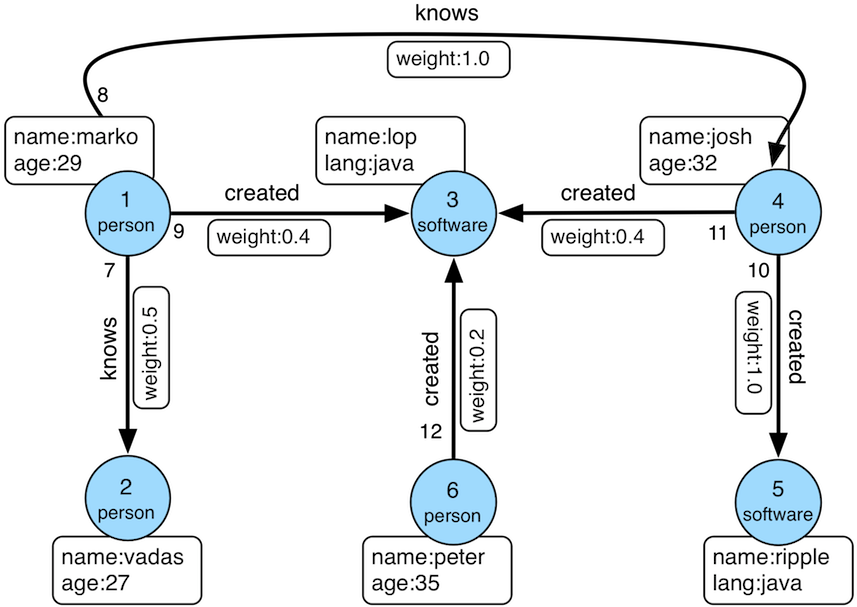
数据导入程序如下:
  1public class Loader {
  2    public static void main(String[] args) {
  3        HugeClient client = new HugeClient("http://127.0.0.1:8080", "hugegraph");
  4        SchemaManager schema = client.schema();
  5        schema.propertyKey("name").asText().ifNotExist().create();
  6        schema.propertyKey("age").asInt().ifNotExist().create();
  7        schema.propertyKey("city").asText().ifNotExist().create();
  8        schema.propertyKey("weight").asDouble().ifNotExist().create();
  9        schema.propertyKey("lang").asText().ifNotExist().create();
 10        schema.propertyKey("date").asText().ifNotExist().create();
 11        schema.propertyKey("price").asInt().ifNotExist().create();
 12
 13        schema.vertexLabel("person")
 14              .properties("name", "age", "city")
 15              .primaryKeys("name")
 16              .nullableKeys("age")
 17              .ifNotExist()
 18              .create();
 19
 20        schema.vertexLabel("software")
 21              .properties("name", "lang", "price")
 22              .primaryKeys("name")
 23              .nullableKeys("price")
 24              .ifNotExist()
 25              .create();
 26
 27        schema.indexLabel("personByCity")
 28              .onV("person")
 29              .by("city")
 30              .secondary()
 31              .ifNotExist()
 32              .create();
 33
 34        schema.indexLabel("personByAgeAndCity")
 35              .onV("person")
 36              .by("age", "city")
 37              .secondary()
 38              .ifNotExist()
 39              .create();
 40
 41        schema.indexLabel("softwareByPrice")
 42              .onV("software")
 43              .by("price")
 44              .range()
 45              .ifNotExist()
 46              .create();
 47
 48        schema.edgeLabel("knows")
 49              .multiTimes()
 50              .sourceLabel("person")
 51              .targetLabel("person")
 52              .properties("date", "weight")
 53              .sortKeys("date")
 54              .nullableKeys("weight")
 55              .ifNotExist()
 56              .create();
 57
 58        schema.edgeLabel("created")
 59              .sourceLabel("person").targetLabel("software")
 60              .properties("date", "weight")
 61              .nullableKeys("weight")
 62              .ifNotExist()
 63              .create();
 64
 65        schema.indexLabel("createdByDate")
 66              .onE("created")
 67              .by("date")
 68              .secondary()
 69              .ifNotExist()
 70              .create();
 71
 72        schema.indexLabel("createdByWeight")
 73              .onE("created")
 74              .by("weight")
 75              .range()
 76              .ifNotExist()
 77              .create();
 78
 79        schema.indexLabel("knowsByWeight")
 80              .onE("knows")
 81              .by("weight")
 82              .range()
 83              .ifNotExist()
 84              .create();
 85
 86        GraphManager graph = client.graph();
 87        Vertex marko = graph.addVertex(T.label, "person", "name", "marko",
 88                                       "age", 29, "city", "Beijing");
 89        Vertex vadas = graph.addVertex(T.label, "person", "name", "vadas",
 90                                       "age", 27, "city", "Hongkong");
 91        Vertex lop = graph.addVertex(T.label, "software", "name", "lop",
 92                                     "lang", "java", "price", 328);
 93        Vertex josh = graph.addVertex(T.label, "person", "name", "josh",
 94                                      "age", 32, "city", "Beijing");
 95        Vertex ripple = graph.addVertex(T.label, "software", "name", "ripple",
 96                                        "lang", "java", "price", 199);
 97        Vertex peter = graph.addVertex(T.label, "person", "name", "peter",
 98                                       "age", 35, "city", "Shanghai");
 99
100        marko.addEdge("knows", vadas, "date", "20160110", "weight", 0.5);
101        marko.addEdge("knows", josh, "date", "20130220", "weight", 1.0);
102        marko.addEdge("created", lop, "date", "20171210", "weight", 0.4);
103        josh.addEdge("created", lop, "date", "20091111", "weight", 0.4);
104        josh.addEdge("created", ripple, "date", "20171210", "weight", 1.0);
105        peter.addEdge("created", lop, "date", "20170324", "weight", 0.2);
106    }
107}
顶点ID为:
1"2:ripple",
2"1:vadas",
3"1:peter",
4"1:josh",
5"1:marko",
6"2:lop"
边ID为:
1"S1:peter>2>>S2:lop",
2"S1:josh>2>>S2:lop",
3"S1:josh>2>>S2:ripple",
4"S1:marko>1>20130220>S1:josh",
5"S1:marko>1>20160110>S1:vadas",
6"S1:marko>2>>S2:lop"
3.2.1 K-out API(GET,基础版)
3.2.1.1 功能介绍
根据起始顶点、方向、边的类型(可选)和深度depth,查找从起始顶点出发恰好depth步可达的顶点
Params
- source:起始顶点id,必填项
- direction:起始顶点向外发散的方向(OUT,IN,BOTH),选填项,默认是BOTH
- max_depth:步数,必填项
- label:边的类型,选填项,默认代表所有edge label
- nearest:nearest为true时,代表起始顶点到达结果顶点的最短路径长度为depth,不存在更短的路径;nearest为false时,代表起始顶点到结果顶点有一条长度为depth的路径(未必最短且可以有环),选填项,默认为true
- max_degree:查询过程中,单个顶点遍历的最大邻接边数目,选填项,默认为10000
- capacity:遍历过程中最大的访问的顶点数目,选填项,默认为10000000
- limit:返回的顶点的最大数目,选填项,默认为10000000
3.2.1.2 使用方法
Method & Url
1GET http://localhost:8080/graphs/{graph}/traversers/kout?source="1:marko"&max_depth=2
Response Status
Response Body
1{
2    "vertices":[
3        "2:ripple",
4        "1:peter"
5    ]
6}
3.2.1.3 适用场景
查找恰好N步关系可达的顶点。两个例子:
- 家族关系中,查找一个人的所有孙子,person A通过连续的两条“儿子”边到达的顶点集合。
- 社交关系中发现潜在好友,例如:与目标用户相隔两层朋友关系的用户,可以通过连续两条“朋友”边到达的顶点。
3.2.2 K-out API(POST,高级版)
3.2.2.1 功能介绍
根据起始顶点、步骤(包括方向、边类型和过滤属性)和深度depth,查找从起始顶点出发恰好depth步可达的顶点。
与K-out基础版的不同在于:
- 支持只统计邻居数量
- 支持边属性过滤
- 支持返回到达邻居的最短路径
Params
- source:起始顶点id,必填项
- steps: 从起始点出发的Steps,必填项,结构如下:
- direction:表示边的方向(OUT,IN,BOTH),默认是BOTH
- edge_steps:边Step集合,支持对单边的类型和属性过滤,如果为空,则不过滤
- vertex_steps:顶点Step集合,支持对单点的类型和属性过滤,如果为空,则不过滤
- label:顶点类型
- properties:顶点属性
- max_degree:查询过程中,单个顶点遍历的最大邻接边数目,默认为 10000 (注: 0.12版之前 step 内仅支持 degree 作为参数名, 0.12开始统一使用 max_degree, 并向下兼容 degree 写法)
- skip_degree:用于设置查询过程中舍弃超级顶点的最小边数,即当某个顶点的邻接边数目大于 skip_degree 时,完全舍弃该顶点。选填项,如果开启时,需满足
skip_degree >= max_degree 约束,默认为0 (不启用),表示不跳过任何点 (注意: 开启此配置后,遍历时会尝试访问一个顶点的 skip_degree 条边,而不仅仅是 max_degree 条边,这样有额外的遍历开销,对查询性能影响可能有较大影响,请确认理解后再开启)
- max_depth:步数,必填项
- nearest:nearest为true时,代表起始顶点到达结果顶点的最短路径长度为depth,不存在更短的路径;nearest为false时,代表起始顶点到结果顶点有一条长度为depth的路径(未必最短且可以有环),选填项,默认为true
- count_only:Boolean值,true表示只统计结果的数目,不返回具体结果;false表示返回具体的结果,默认为false
- with_path:true表示返回起始点到每个邻居的最短路径,false表示不返回起始点到每个邻居的最短路径,选填项,默认为false
- with_edge,选填项,默认为false:
- 如果设置为true,则结果将包含所有边的完整信息,即路径中的所有边
- 当with_path为true时,将返回所有路径中的边的完整信息
- 当with_path为false时,不返回任何信息
- 如果设置为false,则仅返回边的id
- with_vertex,选填项,默认为false:
- 如果设置为true,则结果将包含所有顶点的完整信息,即路径中的所有顶点
- 当with_path为true时,将返回所有路径中的顶点的完整信息
- 当with_path为false时,返回所有邻居顶点的完整信息
- 如果设置为false,则仅返回顶点的id
- capacity:遍历过程中最大的访问的顶点数目,选填项,默认为10000000
- limit:返回的顶点的最大数目,选填项,默认为10000000
- traverse_mode: 遍历方式,可选择“breadth_first_search”或“depth_first_search”作为参数,默认为“breadth_first_search”
3.2.2.2 使用方法
Method & Url
1POST http://localhost:8080/graphs/{graph}/traversers/kout
Request Body
 1{
 2    "source": "1:marko",
 3    "steps": {
 4        "direction": "BOTH",
 5        "edge_steps": [
 6            {
 7                "label": "knows",
 8                "properties": {
 9                    "weight": "P.gt(0.1)"
10                }
11            },
12            {
13                "label": "created",
14                "properties": {
15                    "weight": "P.gt(0.1)"
16                }
17            }
18        ],
19        "vertex_steps": [
20            {
21                "label": "person",
22                "properties": {
23                    "age": "P.lt(32)"
24                }
25            },
26            {
27                "label": "software",
28                "properties": {}
29            }
30        ],
31        "max_degree": 10000,
32        "skip_degree": 100000
33    },
34    "max_depth": 1,
35    "nearest": true,
36    "limit": 10000,
37    "with_vertex": true,
38    "with_path": true,
39    "with_edge": true
40}
Response Status
Response Body
 1{
 2    "size": 2,
 3	"kout": [
 4        "1:vadas",
 5        "2:lop"
 6    ],
 7    "paths": [
 8        {
 9            "objects": [
10                "1:marko",
11                "2:lop"
12            ]
13        },
14        {
15            "objects": [
16                "1:marko",
17                "1:vadas"
18            ]
19        }
20    ],
21    "vertices": [
22        {
23            "id": "1:marko",
24            "label": "person",
25            "type": "vertex",
26            "properties": {
27                "name": "marko",
28                "age": 29,
29                "city": "Beijing"
30            }
31        },
32        {
33            "id": "1:vadas",
34            "label": "person",
35            "type": "vertex",
36            "properties": {
37                "name": "vadas",
38                "age": 27,
39                "city": "Hongkong"
40            }
41        },
42        {
43            "id": "2:lop",
44            "label": "software",
45            "type": "vertex",
46            "properties": {
47                "name": "lop",
48                "lang": "java",
49                "price": 328
50            }
51        }
52    ],
53    "edges": [
54        {
55            "id": "S1:marko>1>20160110>S1:vadas",
56            "label": "knows",
57            "type": "edge",
58            "outV": "1:marko",
59            "outVLabel": "person",
60            "inV": "1:vadas",
61            "inVLabel": "person",
62            "properties": {
63                "weight": 0.5,
64                "date": "20160110"
65            }
66        },
67        {
68            "id": "S1:marko>2>>S2:lop",
69            "label": "created",
70            "type": "edge",
71            "outV": "1:marko",
72            "outVLabel": "person",
73            "inV": "2:lop",
74            "inVLabel": "software",
75            "properties": {
76                "weight": 0.4,
77                "date": "20171210"
78            }
79        }
80    ]
81}
3.2.2.3 适用场景
参见3.2.1.3
3.2.3 K-neighbor(GET,基础版)
3.2.3.1 功能介绍
根据起始顶点、方向、边的类型(可选)和深度depth,查找包括起始顶点在内、depth步之内可达的所有顶点
相当于:起始顶点、K-out(1)、K-out(2)、… 、K-out(max_depth)的并集
Params
- source: 起始顶点id,必填项
- direction:起始顶点向外发散的方向(OUT,IN,BOTH),选填项,默认是BOTH
- max_depth:步数,必填项
- label:边的类型,选填项,默认代表所有edge label
- max_degree:查询过程中,单个顶点遍历的最大邻接边数目,选填项,默认为10000
- limit:返回的顶点的最大数目,也即遍历过程中最大的访问的顶点数目,选填项,默认为10000000
3.2.3.2 使用方法
Method & Url
1GET http://localhost:8080/graphs/{graph}/traversers/kneighbor?source=“1:marko”&max_depth=2
Response Status
Response Body
 1{
 2    "vertices":[
 3        "2:ripple",
 4        "1:marko",
 5        "1:josh",
 6        "1:vadas",
 7        "1:peter",
 8        "2:lop"
 9    ]
10}
3.2.3.3 适用场景
查找N步以内可达的所有顶点,例如:
- 家族关系中,查找一个人五服以内所有子孙,person A通过连续的5条“亲子”边到达的顶点集合。
- 社交关系中发现好友圈子,例如目标用户通过1条、2条、3条“朋友”边可到达的用户可以组成目标用户的朋友圈子
3.2.4 K-neighbor API(POST,高级版)
3.2.4.1 功能介绍
根据起始顶点、步骤(包括方向、边类型和过滤属性)和深度depth,查找从起始顶点出发depth步内可达的所有顶点。
与K-neighbor基础版的不同在于:
- 支持只统计邻居数量
- 支持边属性过滤
- 支持返回到达邻居的最短路径
Params
- source:起始顶点id,必填项
- steps: 从起始点出发的Steps,必填项,结构如下:
- direction:表示边的方向(OUT,IN,BOTH),默认是BOTH
- 从起始点出发的Steps,必填项,结构如下:
- direction:表示边的方向(OUT,IN,BOTH),默认是BOTH
- edge_steps:边Step集合,支持对单边的类型和属性过滤,如果为空,则不过滤
- vertex_steps:顶点Step集合,支持对单点的类型和属性过滤,如果为空,则不过滤
- label:顶点类型
- properties:顶点属性
- max_degree:查询过程中,单个顶点遍历的最大邻接边数目,默认为 10000 (注: 0.12版之前 step 内仅支持 degree 作为参数名, 0.12开始统一使用 max_degree, 并向下兼容 degree 写法)
- skip_degree:用于设置查询过程中舍弃超级顶点的最小边数,即当某个顶点的邻接边数目大于 skip_degree 时,完全舍弃该顶点。选填项,如果开启时,需满足
skip_degree >= max_degree 约束,默认为0 (不启用),表示不跳过任何点 (注意: 开启此配置后,遍历时会尝试访问一个顶点的 skip_degree 条边,而不仅仅是 max_degree 条边,这样有额外的遍历开销,对查询性能影响可能有较大影响,请确认理解后再开启)
- max_depth:步数,必填项
- count_only:Boolean值,true表示只统计结果的数目,不返回具体结果;false表示返回具体的结果,默认为false
- with_path:true表示返回起始点到每个邻居的最短路径,false表示不返回起始点到每个邻居的最短路径,选填项,默认为false
- with_edge,选填项,默认为false:
- 如果设置为true,则结果将包含所有边的完整信息,即路径中的所有边
- 当with_path为true时,将返回所有路径中的边的完整信息
- 当with_path为false时,不返回任何信息
- 如果设置为false,则仅返回边的id
- with_vertex,选填项,默认为false:
- 如果设置为true,则结果将包含所有顶点的完整信息,即路径中的所有顶点
- 当with_path为true时,将返回所有路径中的顶点的完整信息
- 当with_path为false时,返回所有邻居顶点的完整信息
- 如果设置为false,则仅返回顶点的id
- limit:返回的顶点的最大数目,选填项,默认为10000000
3.2.4.2 使用方法
Method & Url
1POST http://localhost:8080/graphs/{graph}/traversers/kneighbor
Request Body
 1{
 2  	"source": "1:marko",
 3  	"steps": {
 4  	  	"direction": "BOTH",
 5  	  	"edge_steps": [
 6  	  	    {
 7  	  	        "label": "knows",
 8  	  	        "properties": {}
 9  	  	    },
10  	  	    {
11  	  	        "label": "created",
12  	  	        "properties": {}
13  	  	    }
14  	  	],
15  	  	"vertex_steps": [
16  	  	    {
17  	  	        "label": "person",
18  	  	        "properties": {
19  	  	            "age": "P.gt(28)"
20  	  	        }
21  	  	    },
22  	  	    {
23  	  	        "label": "software",
24  	  	        "properties": {}
25  	  	    }
26  	  	],
27  	  	"max_degree": 10000,
28  	  	"skip_degree": 100000
29  	},
30  	"max_depth": 3,
31  	"limit": 10000,
32  	"with_vertex": true,
33  	"with_path": true,
34  	"with_edge": true
35}
Response Status
Response Body
  1{
  2    "size": 4,
  3	"kneighbor": [
  4        "1:josh",
  5        "2:lop",
  6        "1:peter",
  7        "2:ripple"
  8    ],
  9    "paths": [
 10        {
 11            "objects": [
 12                "1:marko",
 13                "2:lop"
 14            ]
 15        },
 16        {
 17            "objects": [
 18                "1:marko",
 19                "2:lop",
 20                "1:peter"
 21            ]
 22        },
 23        {
 24            "objects": [
 25                "1:marko",
 26                "1:josh"
 27            ]
 28        },
 29        {
 30            "objects": [
 31                "1:marko",
 32                "1:josh",
 33                "2:ripple"
 34            ]
 35        }
 36    ],
 37    "vertices": [
 38        {
 39            "id": "2:ripple",
 40            "label": "software",
 41            "type": "vertex",
 42            "properties": {
 43                "name": "ripple",
 44                "lang": "java",
 45                "price": 199
 46            }
 47        },
 48        {
 49            "id": "1:marko",
 50            "label": "person",
 51            "type": "vertex",
 52            "properties": {
 53                "name": "marko",
 54                "age": 29,
 55                "city": "Beijing"
 56            }
 57        },
 58        {
 59            "id": "1:josh",
 60            "label": "person",
 61            "type": "vertex",
 62            "properties": {
 63                "name": "josh",
 64                "age": 32,
 65                "city": "Beijing"
 66            }
 67        },
 68        {
 69            "id": "1:peter",
 70            "label": "person",
 71            "type": "vertex",
 72            "properties": {
 73                "name": "peter",
 74                "age": 35,
 75                "city": "Shanghai"
 76            }
 77        },
 78        {
 79            "id": "2:lop",
 80            "label": "software",
 81            "type": "vertex",
 82            "properties": {
 83                "name": "lop",
 84                "lang": "java",
 85                "price": 328
 86            }
 87        }
 88    ],
 89    "edges": [
 90        {
 91            "id": "S1:josh>2>>S2:ripple",
 92            "label": "created",
 93            "type": "edge",
 94            "outV": "1:josh",
 95            "outVLabel": "person",
 96            "inV": "2:ripple",
 97            "inVLabel": "software",
 98            "properties": {
 99                "weight": 1.0,
100                "date": "20171210"
101            }
102        },
103        {
104            "id": "S1:marko>2>>S2:lop",
105            "label": "created",
106            "type": "edge",
107            "outV": "1:marko",
108            "outVLabel": "person",
109            "inV": "2:lop",
110            "inVLabel": "software",
111            "properties": {
112                "weight": 0.4,
113                "date": "20171210"
114            }
115        },
116        {
117            "id": "S1:marko>1>20130220>S1:josh",
118            "label": "knows",
119            "type": "edge",
120            "outV": "1:marko",
121            "outVLabel": "person",
122            "inV": "1:josh",
123            "inVLabel": "person",
124            "properties": {
125                "weight": 1.0,
126                "date": "20130220"
127            }
128        },
129        {
130            "id": "S1:peter>2>>S2:lop",
131            "label": "created",
132            "type": "edge",
133            "outV": "1:peter",
134            "outVLabel": "person",
135            "inV": "2:lop",
136            "inVLabel": "software",
137            "properties": {
138                "weight": 0.2,
139                "date": "20170324"
140            }
141        }
142    ]
143}
3.2.4.3 适用场景
参见3.2.3.3
3.2.5 Same Neighbors
3.2.5.1 功能介绍
查询两个点的共同邻居
Params
- vertex:一个顶点id,必填项
- other:另一个顶点id,必填项
- direction:顶点向外发散的方向(OUT,IN,BOTH),选填项,默认是BOTH
- label:边的类型,选填项,默认代表所有edge label
- max_degree:查询过程中,单个顶点遍历的最大邻接边数目,选填项,默认为10000
- limit:返回的共同邻居的最大数目,选填项,默认为10000000
3.2.5.2 使用方法
Method & Url
1GET http://localhost:8080/graphs/{graph}/traversers/sameneighbors?vertex=“1:marko”&other="1:josh"
Response Status
Response Body
1{
2    "same_neighbors":[
3        "2:lop"
4    ]
5}
3.2.5.3 适用场景
查找两个顶点的共同邻居:
3.2.6 Jaccard Similarity(GET)
3.2.6.1 功能介绍
计算两个顶点的jaccard similarity(两个顶点邻居的交集比上两个顶点邻居的并集)
Params
- vertex:一个顶点id,必填项
- other:另一个顶点id,必填项
- direction:顶点向外发散的方向(OUT,IN,BOTH),选填项,默认是BOTH
- label:边的类型,选填项,默认代表所有edge label
- max_degree:查询过程中,单个顶点遍历的最大邻接边数目,选填项,默认为10000
3.2.6.2 使用方法
Method & Url
1GET http://localhost:8080/graphs/{graph}/traversers/jaccardsimilarity?vertex="1:marko"&other="1:josh"
Response Status
Response Body
1{
2    "jaccard_similarity": 0.2
3}
3.2.6.3 适用场景
用于评估两个点的相似性或者紧密度
3.2.7 Jaccard Similarity(POST)
3.2.7.1 功能介绍
计算与指定顶点的jaccard similarity最大的N个点
jaccard similarity的计算方式为:两个顶点邻居的交集比上两个顶点邻居的并集
Params
- vertex:一个顶点id,必填项
- 从起始点出发的Step,必填项,结构如下:
- direction:表示边的方向(OUT,IN,BOTH),默认是BOTH
- labels:边的类型列表
- properties:通过属性的值过滤边
- max_degree:查询过程中,单个顶点遍历的最大邻接边数目,默认为 10000 (注: 0.12版之前 step 内仅支持 degree 作为参数名, 0.12开始统一使用 max_degree, 并向下兼容 degree 写法)
- skip_degree:用于设置查询过程中舍弃超级顶点的最小边数,即当某个顶点的邻接边数目大于 skip_degree 时,完全舍弃该顶点。选填项,如果开启时,需满足
skip_degree >= max_degree 约束,默认为0 (不启用),表示不跳过任何点 (注意: 开启此配置后,遍历时会尝试访问一个顶点的 skip_degree 条边,而不仅仅是 max_degree 条边,这样有额外的遍历开销,对查询性能影响可能有较大影响,请确认理解后再开启)
- top:返回一个起点的jaccard similarity中最大的top个,选填项,默认为100
- capacity:遍历过程中最大的访问的顶点数目,选填项,默认为10000000
3.2.7.2 使用方法
Method & Url
1POST http://localhost:8080/graphs/{graph}/traversers/jaccardsimilarity
Request Body
 1{
 2  "vertex": "1:marko",
 3  "step": {
 4    "direction": "BOTH",
 5    "labels": [],
 6    "max_degree": 10000,
 7    "skip_degree": 100000
 8  },
 9  "top": 3
10}
Response Status
Response Body
1{
2    "2:ripple": 0.3333333333333333,
3    "1:peter": 0.3333333333333333,
4    "1:josh": 0.2
5}
3.2.7.3 适用场景
用于在图中找出与指定顶点相似性最高的顶点
3.2.8 Shortest Path
3.2.8.1 功能介绍
根据起始顶点、目的顶点、方向、边的类型(可选)和最大深度,查找一条最短路径
Params
- source:起始顶点id,必填项
- target:目的顶点id,必填项
- direction:起始顶点向外发散的方向(OUT,IN,BOTH),选填项,默认是BOTH
- max_depth:最大步数,必填项
- label:边的类型,选填项,默认代表所有edge label
- max_degree:查询过程中,单个顶点遍历的最大邻接边数目,选填项,默认为10000
- skip_degree:用于设置查询过程中舍弃超级顶点的最小边数,即当某个顶点的邻接边数目大于 skip_degree 时,完全舍弃该顶点。选填项,如果开启时,需满足
skip_degree >= max_degree 约束,默认为0 (不启用),表示不跳过任何点 (注意: 开启此配置后,遍历时会尝试访问一个顶点的 skip_degree 条边,而不仅仅是 max_degree 条边,这样有额外的遍历开销,对查询性能影响可能有较大影响,请确认理解后再开启) - capacity:遍历过程中最大的访问的顶点数目,选填项,默认为10000000
3.2.8.2 使用方法
Method & Url
1GET http://localhost:8080/graphs/{graph}/traversers/shortestpath?source="1:marko"&target="2:ripple"&max_depth=3
Response Status
Response Body
1{
2    "path":[
3        "1:marko",
4        "1:josh",
5        "2:ripple"
6    ]
7}
3.2.8.3 适用场景
查找两个顶点间的最短路径,例如:
- 社交关系网中,查找两个用户有关系的最短路径,即最近的朋友关系链
- 设备关联网络中,查找两个设备最短的关联关系
3.2.9 All Shortest Paths
3.2.9.1 功能介绍
根据起始顶点、目的顶点、方向、边的类型(可选)和最大深度,查找两点间所有的最短路径
Params
- source:起始顶点id,必填项
- target:目的顶点id,必填项
- direction:起始顶点向外发散的方向(OUT,IN,BOTH),选填项,默认是BOTH
- max_depth:最大步数,必填项
- label:边的类型,选填项,默认代表所有edge label
- max_degree:查询过程中,单个顶点遍历的最大邻接边数目,选填项,默认为10000
- skip_degree:用于设置查询过程中舍弃超级顶点的最小边数,即当某个顶点的邻接边数目大于 skip_degree 时,完全舍弃该顶点。选填项,如果开启时,需满足
skip_degree >= max_degree 约束,默认为0 (不启用),表示不跳过任何点 (注意: 开启此配置后,遍历时会尝试访问一个顶点的 skip_degree 条边,而不仅仅是 max_degree 条边,这样有额外的遍历开销,对查询性能影响可能有较大影响,请确认理解后再开启) - capacity:遍历过程中最大的访问的顶点数目,选填项,默认为10000000
3.2.9.2 使用方法
Method & Url
1GET http://localhost:8080/graphs/{graph}/traversers/allshortestpaths?source="A"&target="Z"&max_depth=10
Response Status
Response Body
 1{
 2    "paths":[
 3        {
 4            "objects": [
 5                "A",
 6                "B",
 7                "C",
 8                "Z"
 9            ]
10        },
11        {
12            "objects": [
13                "A",
14                "M",
15                "N",
16                "Z"
17            ]
18        }
19    ]
20}
3.2.9.3 适用场景
查找两个顶点间的所有最短路径,例如:
- 社交关系网中,查找两个用户有关系的全部最短路径,即最近的朋友关系链
- 设备关联网络中,查找两个设备全部的最短关联关系
3.2.10 Weighted Shortest Path
3.2.10.1 功能介绍
根据起始顶点、目的顶点、方向、边的类型(可选)和最大深度,查找一条带权最短路径
Params
- source:起始顶点id,必填项
- target:目的顶点id,必填项
- direction:起始顶点向外发散的方向(OUT,IN,BOTH),选填项,默认是BOTH
- label:边的类型,选填项,默认代表所有edge label
- weight:边的权重属性,必填项,必须是数字类型的属性
- max_degree:查询过程中,单个顶点遍历的最大邻接边数目,选填项,默认为10000
- skip_degree:用于设置查询过程中舍弃超级顶点的最小边数,即当某个顶点的邻接边数目大于 skip_degree 时,完全舍弃该顶点。选填项,如果开启时,需满足
skip_degree >= max_degree 约束,默认为0 (不启用),表示不跳过任何点 (注意: 开启此配置后,遍历时会尝试访问一个顶点的 skip_degree 条边,而不仅仅是 max_degree 条边,这样有额外的遍历开销,对查询性能影响可能有较大影响,请确认理解后再开启) - capacity:遍历过程中最大的访问的顶点数目,选填项,默认为10000000
- with_vertex:true表示返回结果包含完整的顶点信息(路径中的全部顶点),false时表示只返回顶点id,选填项,默认为false
3.2.10.2 使用方法
Method & Url
1GET http://localhost:8080/graphs/{graph}/traversers/weightedshortestpath?source="1:marko"&target="2:ripple"&weight="weight"&with_vertex=true
Response Status
Response Body
 1{
 2    "path": {
 3        "weight": 2.0,
 4        "vertices": [
 5            "1:marko",
 6            "1:josh",
 7            "2:ripple"
 8        ]
 9    },
10    "vertices": [
11        {
12            "id": "1:marko",
13            "label": "person",
14            "type": "vertex",
15            "properties": {
16                "name": "marko",
17                "age": 29,
18                "city": "Beijing"
19            }
20        },
21        {
22            "id": "1:josh",
23            "label": "person",
24            "type": "vertex",
25            "properties": {
26                "name": "josh",
27                "age": 32,
28                "city": "Beijing"
29            }
30        },
31        {
32            "id": "2:ripple",
33            "label": "software",
34            "type": "vertex",
35            "properties": {
36                "name": "ripple",
37                "lang": "java",
38                "price": 199
39            }
40        }
41    ]
42}
3.2.10.3 适用场景
查找两个顶点间的带权最短路径,例如:
3.2.11 Single Source Shortest Path
3.2.11.1 功能介绍
从一个顶点出发,查找该点到图中其他顶点的最短路径(可选是否带权重)
Params
- source:起始顶点id,必填项
- direction:起始顶点向外发散的方向(OUT,IN,BOTH),选填项,默认是BOTH
- label:边的类型,选填项,默认代表所有edge label
- weight:边的权重属性,选填项,必须是数字类型的属性,如果不填或者虽然填了但是边没有该属性,则权重为1.0
- max_degree:查询过程中,单个顶点遍历的最大邻接边数目,选填项,默认为10000
- skip_degree:用于设置查询过程中舍弃超级顶点的最小边数,即当某个顶点的邻接边数目大于 skip_degree 时,完全舍弃该顶点。选填项,如果开启时,需满足
skip_degree >= max_degree 约束,默认为0 (不启用),表示不跳过任何点 (注意: 开启此配置后,遍历时会尝试访问一个顶点的 skip_degree 条边,而不仅仅是 max_degree 条边,这样有额外的遍历开销,对查询性能影响可能有较大影响,请确认理解后再开启) - capacity:遍历过程中最大的访问的顶点数目,选填项,默认为10000000
- limit:查询到的目标顶点个数,也是返回的最短路径的条数,选填项,默认为10
- with_vertex:true表示返回结果包含完整的顶点信息(路径中的全部顶点),false时表示只返回顶点id,选填项,默认为false
3.2.11.2 使用方法
Method & Url
1GET http://localhost:8080/graphs/{graph}/traversers/singlesourceshortestpath?source="1:marko"&with_vertex=true
Response Status
Response Body
  1{
  2    "paths": {
  3        "2:ripple": {
  4            "weight": 2.0,
  5            "vertices": [
  6                "1:marko",
  7                "1:josh",
  8                "2:ripple"
  9            ]
 10        },
 11        "1:josh": {
 12            "weight": 1.0,
 13            "vertices": [
 14                "1:marko",
 15                "1:josh"
 16            ]
 17        },
 18        "1:vadas": {
 19            "weight": 1.0,
 20            "vertices": [
 21                "1:marko",
 22                "1:vadas"
 23            ]
 24        },
 25        "1:peter": {
 26            "weight": 2.0,
 27            "vertices": [
 28                "1:marko",
 29                "2:lop",
 30                "1:peter"
 31            ]
 32        },
 33        "2:lop": {
 34            "weight": 1.0,
 35            "vertices": [
 36                "1:marko",
 37                "2:lop"
 38            ]
 39        }
 40    },
 41    "vertices": [
 42        {
 43            "id": "2:ripple",
 44            "label": "software",
 45            "type": "vertex",
 46            "properties": {
 47                "name": "ripple",
 48                "lang": "java",
 49                "price": 199
 50            }
 51        },
 52        {
 53            "id": "1:marko",
 54            "label": "person",
 55            "type": "vertex",
 56            "properties": {
 57                "name": "marko",
 58                "age": 29,
 59                "city": "Beijing"
 60            }
 61        },
 62        {
 63            "id": "1:josh",
 64            "label": "person",
 65            "type": "vertex",
 66            "properties": {
 67                "name": "josh",
 68                "age": 32,
 69                "city": "Beijing"
 70            }
 71        },
 72        {
 73            "id": "1:vadas",
 74            "label": "person",
 75            "type": "vertex",
 76            "properties": {
 77                "name": "vadas",
 78                "age": 27,
 79                "city": "Hongkong"
 80            }
 81        },
 82        {
 83            "id": "1:peter",
 84            "label": "person",
 85            "type": "vertex",
 86            "properties": {
 87                "name": "peter",
 88                "age": 35,
 89                "city": "Shanghai"
 90            }
 91        },
 92        {
 93            "id": "2:lop",
 94            "label": "software",
 95            "type": "vertex",
 96            "properties": {
 97                "name": "lop",
 98                "lang": "java",
 99                "price": 328
100            }
101        }
102    ]
103}
3.2.11.3 适用场景
查找从一个点出发到其他顶点的带权最短路径,比如:
- 查找从北京出发到全国其他所有城市的耗时最短的乘车方案
3.2.12 Multi Node Shortest Path
3.2.12.1 功能介绍
查找指定顶点集两两之间的最短路径
Params
- vertices:定义起始顶点,必填项,指定方式包括:
- ids:通过顶点id列表提供起始顶点
- label和properties:如果没有指定ids,则使用label和properties的联合条件查询起始顶点
- label:顶点的类型
- properties:通过属性的值查询起始顶点
注意:properties中的属性值可以是列表,表示只要key对应的value在列表中就可以
- step:表示从起始顶点到终止顶点走过的路径,必填项,Step的结构如下:
- direction:表示边的方向(OUT,IN,BOTH),默认是BOTH
- labels:边的类型列表
- properties:通过属性的值过滤边
- max_degree:查询过程中,单个顶点遍历的最大邻接边数目,默认为 10000 (注: 0.12版之前 step 内仅支持 degree 作为参数名, 0.12开始统一使用 max_degree, 并向下兼容 degree 写法)
- skip_degree:用于设置查询过程中舍弃超级顶点的最小边数,即当某个顶点的邻接边数目大于 skip_degree 时,完全舍弃该顶点。选填项,如果开启时,需满足
skip_degree >= max_degree 约束,默认为0 (不启用),表示不跳过任何点 (注意: 开启此配置后,遍历时会尝试访问一个顶点的 skip_degree 条边,而不仅仅是 max_degree 条边,这样有额外的遍历开销,对查询性能影响可能有较大影响,请确认理解后再开启)
- max_depth:步数,必填项
- capacity:遍历过程中最大的访问的顶点数目,选填项,默认为10000000
- with_vertex:true表示返回结果包含完整的顶点信息(路径中的全部顶点),false时表示只返回顶点id,选填项,默认为false
3.2.12.2 使用方法
Method & Url
1POST http://localhost:8080/graphs/{graph}/traversers/multinodeshortestpath
Request Body
 1{
 2    "vertices": {
 3        "ids": ["382:marko", "382:josh", "382:vadas", "382:peter", "383:lop", "383:ripple"]
 4    },
 5    "step": {
 6        "direction": "BOTH",
 7        "properties": {
 8        }
 9    },
10    "max_depth": 10,
11    "capacity": 100000000,
12    "with_vertex": true
13}
Response Status
Response Body
  1{
  2    "paths": [
  3        {
  4            "objects": [
  5                "382:peter",
  6                "383:lop"
  7            ]
  8        },
  9        {
 10            "objects": [
 11                "382:peter",
 12                "383:lop",
 13                "382:marko"
 14            ]
 15        },
 16        {
 17            "objects": [
 18                "382:peter",
 19                "383:lop",
 20                "382:josh"
 21            ]
 22        },
 23        {
 24            "objects": [
 25                "382:peter",
 26                "383:lop",
 27                "382:marko",
 28                "382:vadas"
 29            ]
 30        },
 31        {
 32            "objects": [
 33                "383:lop",
 34                "382:marko"
 35            ]
 36        },
 37        {
 38            "objects": [
 39                "383:lop",
 40                "382:josh"
 41            ]
 42        },
 43        {
 44            "objects": [
 45                "383:lop",
 46                "382:marko",
 47                "382:vadas"
 48            ]
 49        },
 50        {
 51            "objects": [
 52                "382:peter",
 53                "383:lop",
 54                "382:josh",
 55                "383:ripple"
 56            ]
 57        },
 58        {
 59            "objects": [
 60                "382:marko",
 61                "382:josh"
 62            ]
 63        },
 64        {
 65            "objects": [
 66                "383:lop",
 67                "382:josh",
 68                "383:ripple"
 69            ]
 70        },
 71        {
 72            "objects": [
 73                "382:marko",
 74                "382:vadas"
 75            ]
 76        },
 77        {
 78            "objects": [
 79                "382:marko",
 80                "382:josh",
 81                "383:ripple"
 82            ]
 83        },
 84        {
 85            "objects": [
 86                "382:josh",
 87                "383:ripple"
 88            ]
 89        },
 90        {
 91            "objects": [
 92                "382:josh",
 93                "382:marko",
 94                "382:vadas"
 95            ]
 96        },
 97        {
 98            "objects": [
 99                "382:vadas",
100                "382:marko",
101                "382:josh",
102                "383:ripple"
103            ]
104        }
105    ],
106    "vertices": [
107        {
108            "id": "382:peter",
109            "label": "person",
110            "type": "vertex",
111            "properties": {
112                "name": "peter",
113                "age": 29,
114                "city": "Shanghai"
115            }
116        },
117        {
118            "id": "383:lop",
119            "label": "software",
120            "type": "vertex",
121            "properties": {
122                "name": "lop",
123                "lang": "java",
124                "price": 328
125            }
126        },
127        {
128            "id": "382:marko",
129            "label": "person",
130            "type": "vertex",
131            "properties": {
132                "name": "marko",
133                "age": 29,
134                "city": "Beijing"
135            }
136        },
137        {
138            "id": "382:josh",
139            "label": "person",
140            "type": "vertex",
141            "properties": {
142                "name": "josh",
143                "age": 32,
144                "city": "Beijing"
145            }
146        },
147        {
148            "id": "382:vadas",
149            "label": "person",
150            "type": "vertex",
151            "properties": {
152                "name": "vadas",
153                "age": 27,
154                "city": "Hongkong"
155            }
156        },
157        {
158            "id": "383:ripple",
159            "label": "software",
160            "type": "vertex",
161            "properties": {
162                "name": "ripple",
163                "lang": "java",
164                "price": 199
165            }
166        }
167    ]
168}
3.2.12.3 适用场景
查找多个点之间的最短路径,比如:
3.2.13 Paths (GET,基础版)
3.2.13.1 功能介绍
根据起始顶点、目的顶点、方向、边的类型(可选)和最大深度等条件查找所有路径
Params
- source:起始顶点id,必填项
- target:目的顶点id,必填项
- direction:起始顶点向外发散的方向(OUT,IN,BOTH),选填项,默认是BOTH
- label:边的类型,选填项,默认代表所有edge label
- max_depth:步数,必填项
- max_degree:查询过程中,单个顶点遍历的最大邻接边数目,选填项,默认为10000
- capacity:遍历过程中最大的访问的顶点数目,选填项,默认为10000000
- limit:返回的路径的最大数目,选填项,默认为10
3.2.13.2 使用方法
Method & Url
1GET http://localhost:8080/graphs/{graph}/traversers/paths?source="1:marko"&target="1:josh"&max_depth=5
Response Status
Response Body
 1{
 2    "paths":[
 3        {
 4            "objects":[
 5                "1:marko",
 6                "1:josh"
 7            ]
 8        },
 9        {
10            "objects":[
11                "1:marko",
12                "2:lop",
13                "1:josh"
14            ]
15        }
16    ]
17}
3.2.13.3 适用场景
查找两个顶点间的所有路径,例如:
- 社交网络中,查找两个用户所有可能的关系路径
- 设备关联网络中,查找两个设备之间所有的关联路径
3.2.14 Paths (POST,高级版)
3.2.14.1 功能介绍
根据起始顶点、目的顶点、步骤(step)和最大深度等条件查找所有路径
Params
- sources:定义起始顶点,必填项,指定方式包括:
- ids:通过顶点id列表提供起始顶点
- label和properties:如果没有指定ids,则使用label和properties的联合条件查询起始顶点
- label:顶点的类型
- properties:通过属性的值查询起始顶点
注意:properties中的属性值可以是列表,表示只要key对应的value在列表中就可以
- targets:定义终止顶点,必填项,指定方式包括:
- ids:通过顶点id列表提供终止顶点
- label和properties:如果没有指定ids,则使用label和properties的联合条件查询终止顶点
- label:顶点的类型
- properties:通过属性的值查询终止顶点
注意:properties中的属性值可以是列表,表示只要key对应的value在列表中就可以
- step:表示从起始顶点到终止顶点走过的路径,必填项,Step的结构如下:
- direction:表示边的方向(OUT,IN,BOTH),默认是BOTH
- labels:边的类型列表
- properties:通过属性的值过滤边
- max_degree:查询过程中,单个顶点遍历的最大邻接边数目,默认为 10000 (注: 0.12版之前 step 内仅支持 degree 作为参数名, 0.12开始统一使用 max_degree, 并向下兼容 degree 写法)
- skip_degree:用于设置查询过程中舍弃超级顶点的最小边数,即当某个顶点的邻接边数目大于 skip_degree 时,完全舍弃该顶点。选填项,如果开启时,需满足
skip_degree >= max_degree 约束,默认为0 (不启用),表示不跳过任何点 (注意: 开启此配置后,遍历时会尝试访问一个顶点的 skip_degree 条边,而不仅仅是 max_degree 条边,这样有额外的遍历开销,对查询性能影响可能有较大影响,请确认理解后再开启)
- max_depth:步数,必填项
- nearest:nearest为true时,代表起始顶点到达结果顶点的最短路径长度为depth,不存在更短的路径;nearest为false时,代表起始顶点到结果顶点有一条长度为depth的路径(未必最短且可以有环),选填项,默认为true
- capacity:遍历过程中最大的访问的顶点数目,选填项,默认为10000000
- limit:返回的路径的最大数目,选填项,默认为10
- with_vertex:true表示返回结果包含完整的顶点信息(路径中的全部顶点),false时表示只返回顶点id,选填项,默认为false
3.2.14.2 使用方法
Method & Url
1POST http://localhost:8080/graphs/{graph}/traversers/paths
Request Body
 1{
 2"sources": {
 3  "ids": ["1:marko"]
 4},
 5"targets": {
 6  "ids": ["1:peter"]
 7},
 8"step": {
 9"direction": "BOTH",
10  "properties": {
11    "weight": "P.gt(0.01)"
12  }
13},
14"max_depth": 10,
15"capacity": 100000000,
16"limit": 10000000,
17"with_vertex": false
18}
Response Status
Response Body
 1{
 2    "paths": [
 3        {
 4            "objects": [
 5                "1:marko",
 6                "1:josh",
 7                "2:lop",
 8                "1:peter"
 9            ]
10        },
11        {
12            "objects": [
13                "1:marko",
14                "2:lop",
15                "1:peter"
16            ]
17        }
18    ]
19}
3.2.14.3 适用场景
查找两个顶点间的所有路径,例如:
- 社交网络中,查找两个用户所有可能的关系路径
- 设备关联网络中,查找两个设备之间所有的关联路径
3.2.15 Customized Paths
3.2.15.1 功能介绍
根据一批起始顶点、边规则(包括方向、边的类型和属性过滤)和最大深度等条件查找符合条件的所有的路径
Params
- sources:定义起始顶点,必填项,指定方式包括:
- ids:通过顶点id列表提供起始顶点
- label和properties:如果没有指定ids,则使用label和properties的联合条件查询起始顶点
- label:顶点的类型
- properties:通过属性的值查询起始顶点
注意:properties中的属性值可以是列表,表示只要key对应的value在列表中就可以
- steps:表示从起始顶点走过的路径规则,是一组Step的列表。必填项。每个Step的结构如下:
- direction:表示边的方向(OUT,IN,BOTH),默认是BOTH
- labels:边的类型列表
- properties:通过属性的值过滤边
- weight_by:根据指定的属性计算边的权重,sort_by不为NONE时有效,与default_weight互斥
- default_weight:当边没有属性作为权重计算值时,采取的默认权重,sort_by不为NONE时有效,与weight_by互斥
- max_degree:查询过程中,单个顶点遍历的最大邻接边数目,默认为 10000 (注: 0.12版之前 step 内仅支持 degree 作为参数名, 0.12开始统一使用 max_degree, 并向下兼容 degree 写法)
- sample:当需要对某个step的符合条件的边进行采样时设置,-1表示不采样,默认为采样100
- sort_by:根据路径的权重排序,选填项,默认为NONE:
- NONE表示不排序,默认值
- INCR表示按照路径权重的升序排序
- DECR表示按照路径权重的降序排序
- capacity:遍历过程中最大的访问的顶点数目,选填项,默认为10000000
- limit:返回的路径的最大数目,选填项,默认为10
- with_vertex:true表示返回结果包含完整的顶点信息(路径中的全部顶点),false时表示只返回顶点id,选填项,默认为false
3.2.15.2 使用方法
Method & Url
1POST http://localhost:8080/graphs/{graph}/traversers/customizedpaths
Request Body
 1{
 2    "sources":{
 3        "ids":[
 4
 5        ],
 6        "label":"person",
 7        "properties":{
 8            "name":"marko"
 9        }
10    },
11    "steps":[
12        {
13            "direction":"OUT",
14            "labels":[
15                "knows"
16            ],
17            "weight_by":"weight",
18            "max_degree":-1
19        },
20        {
21            "direction":"OUT",
22            "labels":[
23                "created"
24            ],
25            "default_weight":8,
26            "max_degree":-1,
27            "sample":1
28        }
29    ],
30    "sort_by":"INCR",
31    "with_vertex":true,
32    "capacity":-1,
33    "limit":-1
34}
Response Status
Response Body
 1{
 2    "paths":[
 3        {
 4            "objects":[
 5                "1:marko",
 6                "1:josh",
 7                "2:lop"
 8            ],
 9            "weights":[
10                1,
11                8
12            ]
13        }
14    ],
15    "vertices":[
16        {
17            "id":"1:marko",
18            "label":"person",
19            "type":"vertex",
20            "properties":{
21                "city":[
22                    {
23                        "id":"1:marko>city",
24                        "value":"Beijing"
25                    }
26                ],
27                "name":[
28                    {
29                        "id":"1:marko>name",
30                        "value":"marko"
31                    }
32                ],
33                "age":[
34                    {
35                        "id":"1:marko>age",
36                        "value":29
37                    }
38                ]
39            }
40        },
41        {
42            "id":"1:josh",
43            "label":"person",
44            "type":"vertex",
45            "properties":{
46                "city":[
47                    {
48                        "id":"1:josh>city",
49                        "value":"Beijing"
50                    }
51                ],
52                "name":[
53                    {
54                        "id":"1:josh>name",
55                        "value":"josh"
56                    }
57                ],
58                "age":[
59                    {
60                        "id":"1:josh>age",
61                        "value":32
62                    }
63                ]
64            }
65        },
66        {
67            "id":"2:lop",
68            "label":"software",
69            "type":"vertex",
70            "properties":{
71                "price":[
72                    {
73                        "id":"2:lop>price",
74                        "value":328
75                    }
76                ],
77                "name":[
78                    {
79                        "id":"2:lop>name",
80                        "value":"lop"
81                    }
82                ],
83                "lang":[
84                    {
85                        "id":"2:lop>lang",
86                        "value":"java"
87                    }
88                ]
89            }
90        }
91    ]
92}
3.2.15.3 适用场景
适合查找各种复杂的路径集合,例如:
- 社交网络中,查找看过张艺谋所导演的电影的用户关注的大V的路径(张艺谋—>电影—->用户—>大V)
- 风控网络中,查找多个高风险用户的直系亲属的朋友的路径(高风险用户—>直系亲属—>朋友)
3.2.16 Template Paths
3.2.16.1 功能介绍
根据一批起始顶点、边规则(包括方向、边的类型和属性过滤)和最大深度等条件查找符合条件的所有的路径
Params
- sources:定义起始顶点,必填项,指定方式包括:
- ids:通过顶点id列表提供起始顶点
- label和properties:如果没有指定ids,则使用label和properties的联合条件查询起始顶点
- label:顶点的类型
- properties:通过属性的值查询起始顶点
注意:properties中的属性值可以是列表,表示只要key对应的value在列表中就可以
- targets:定义终止顶点,必填项,指定方式包括:
- ids:通过顶点id列表提供终止顶点
- label和properties:如果没有指定ids,则使用label和properties的联合条件查询终止顶点
- label:顶点的类型
- properties:通过属性的值查询终止顶点
注意:properties中的属性值可以是列表,表示只要key对应的value在列表中就可以
- steps:表示从起始顶点走过的路径规则,是一组Step的列表。必填项。每个Step的结构如下:
- direction:表示边的方向(OUT,IN,BOTH),默认是BOTH
- labels:边的类型列表
- properties:通过属性的值过滤边
- max_times:当前step可以重复的次数,当为N时,表示从起始顶点可以经过当前step 1-N 次
- max_degree:查询过程中,单个顶点遍历的最大邻接边数目,默认为 10000 (注: 0.12版之前 step 内仅支持 degree 作为参数名, 0.12开始统一使用 max_degree, 并向下兼容 degree 写法)
- skip_degree:用于设置查询过程中舍弃超级顶点的最小边数,即当某个顶点的邻接边数目大于 skip_degree 时,完全舍弃该顶点。选填项,如果开启时,需满足
skip_degree >= max_degree 约束,默认为0 (不启用),表示不跳过任何点 (注意: 开启此配置后,遍历时会尝试访问一个顶点的 skip_degree 条边,而不仅仅是 max_degree 条边,这样有额外的遍历开销,对查询性能影响可能有较大影响,请确认理解后再开启)
- with_ring:Boolean值,true表示包含环路;false表示不包含环路,默认为false
- capacity:遍历过程中最大的访问的顶点数目,选填项,默认为10000000
- limit:返回的路径的最大数目,选填项,默认为10
- with_vertex:true表示返回结果包含完整的顶点信息(路径中的全部顶点),false时表示只返回顶点id,选填项,默认为false
3.2.16.2 使用方法
Method & Url
1POST http://localhost:8080/graphs/{graph}/traversers/templatepaths
Request Body
 1{
 2  "sources": {
 3    "ids": [],
 4    "label": "person",
 5    "properties": {
 6      "name": "vadas"
 7    }
 8  },
 9  "targets": {
10    "ids": [],
11    "label": "software",
12    "properties": {
13      "name": "ripple"
14    }
15  },
16  "steps": [
17    {
18      "direction": "IN",
19      "labels": ["knows"],
20      "properties": {
21      },
22      "max_degree": 10000,
23      "skip_degree": 100000
24    },
25    {
26      "direction": "OUT",
27      "labels": ["created"],
28      "properties": {
29      },
30      "max_degree": 10000,
31      "skip_degree": 100000
32    },
33    {
34      "direction": "IN",
35      "labels": ["created"],
36      "properties": {
37      },
38      "max_degree": 10000,
39      "skip_degree": 100000
40    },
41    {
42      "direction": "OUT",
43      "labels": ["created"],
44      "properties": {
45      },
46      "max_degree": 10000,
47      "skip_degree": 100000
48    }
49  ],
50  "capacity": 10000,
51  "limit": 10,
52  "with_vertex": true
53}
Response Status
Response Body
 1{
 2    "paths": [
 3        {
 4            "objects": [
 5                "1:vadas",
 6                "1:marko",
 7                "2:lop",
 8                "1:josh",
 9                "2:ripple"
10            ]
11        }
12    ],
13    "vertices": [
14        {
15            "id": "2:ripple",
16            "label": "software",
17            "type": "vertex",
18            "properties": {
19                "name": "ripple",
20                "lang": "java",
21                "price": 199
22            }
23        },
24        {
25            "id": "1:marko",
26            "label": "person",
27            "type": "vertex",
28            "properties": {
29                "name": "marko",
30                "age": 29,
31                "city": "Beijing"
32            }
33        },
34        {
35            "id": "1:josh",
36            "label": "person",
37            "type": "vertex",
38            "properties": {
39                "name": "josh",
40                "age": 32,
41                "city": "Beijing"
42            }
43        },
44        {
45            "id": "1:vadas",
46            "label": "person",
47            "type": "vertex",
48            "properties": {
49                "name": "vadas",
50                "age": 27,
51                "city": "Hongkong"
52            }
53        },
54        {
55            "id": "2:lop",
56            "label": "software",
57            "type": "vertex",
58            "properties": {
59                "name": "lop",
60                "lang": "java",
61                "price": 328
62            }
63        }
64    ]
65}
3.2.16.3 适用场景
适合查找各种复杂的模板路径,比如personA -(朋友)-> personB -(同学)-> personC,其中"朋友"和"同学"边可以分别是最多3层和4层的情况
3.2.17 Crosspoints
3.2.17.1 功能介绍
根据起始顶点、目的顶点、方向、边的类型(可选)和最大深度等条件查找相交点
Params
- source:起始顶点id,必填项
- target:目的顶点id,必填项
- direction:起始顶点到目的顶点的方向, 目的点到起始点是反方向,BOTH时不考虑方向(OUT,IN,BOTH),选填项,默认是BOTH
- label:边的类型,选填项,默认代表所有edge label
- max_depth:步数,必填项
- max_degree:查询过程中,单个顶点遍历的最大邻接边数目,选填项,默认为10000
- capacity:遍历过程中最大的访问的顶点数目,选填项,默认为10000000
- limit:返回的交点的最大数目,选填项,默认为10
3.2.17.2 使用方法
Method & Url
1GET http://localhost:8080/graphs/{graph}/traversers/crosspoints?source="2:lop"&target="2:ripple"&max_depth=5&direction=IN
Response Status
Response Body
 1{
 2    "crosspoints":[
 3        {
 4            "crosspoint":"1:josh",
 5            "objects":[
 6                "2:lop",
 7                "1:josh",
 8                "2:ripple"
 9            ]
10        }
11    ]
12}
3.2.17.3 适用场景
查找两个顶点的交点及其路径,例如:
- 社交网络中,查找两个用户共同关注的话题或者大V
- 家族关系中,查找共同的祖先
3.2.18 Customized Crosspoints
3.2.18.1 功能介绍
根据一批起始顶点、多种边规则(包括方向、边的类型和属性过滤)和最大深度等条件查找符合条件的所有的路径终点的交集
Params
sources:定义起始顶点,必填项,指定方式包括:
- ids:通过顶点id列表提供起始顶点
- label和properties:如果没有指定ids,则使用label和properties的联合条件查询起始顶点
- label:顶点的类型
- properties:通过属性的值查询起始顶点
注意:properties中的属性值可以是列表,表示只要key对应的value在列表中就可以
path_patterns:表示从起始顶点走过的路径规则,是一组规则的列表。必填项。每个规则是一个PathPattern
- 每个PathPattern是一组Step列表,每个Step结构如下:
- direction:表示边的方向(OUT,IN,BOTH),默认是BOTH
- labels:边的类型列表
- properties:通过属性的值过滤边
- max_degree:查询过程中,单个顶点遍历的最大邻接边数目,默认为 10000 (注: 0.12版之前 step 内仅支持 degree 作为参数名, 0.12开始统一使用 max_degree, 并向下兼容 degree 写法)
- skip_degree:用于设置查询过程中舍弃超级顶点的最小边数,即当某个顶点的邻接边数目大于 skip_degree 时,完全舍弃该顶点。选填项,如果开启时,需满足
skip_degree >= max_degree 约束,默认为0 (不启用),表示不跳过任何点 (注意: 开启此配置后,遍历时会尝试访问一个顶点的 skip_degree 条边,而不仅仅是 max_degree 条边,这样有额外的遍历开销,对查询性能影响可能有较大影响,请确认理解后再开启)
capacity:遍历过程中最大的访问的顶点数目,选填项,默认为10000000
limit:返回的路径的最大数目,选填项,默认为10
with_path:true表示返回交点所在的路径,false表示不返回交点所在的路径,选填项,默认为false
with_vertex,选填项,默认为false:
- true表示返回结果包含完整的顶点信息(路径中的全部顶点)
- with_path为true时,返回所有路径中的顶点的完整信息
- with_path为false时,返回所有交点的完整信息
- false时表示只返回顶点id
3.2.18.2 使用方法
Method & Url
1POST http://localhost:8080/graphs/{graph}/traversers/customizedcrosspoints
Request Body
 1{
 2    "sources":{
 3        "ids":[
 4            "2:lop",
 5            "2:ripple"
 6        ]
 7    },
 8    "path_patterns":[
 9        {
10            "steps":[
11                {
12                    "direction":"IN",
13                    "labels":[
14                        "created"
15                    ],
16                    "max_degree":-1
17                }
18            ]
19        }
20    ],
21    "with_path":true,
22    "with_vertex":true,
23    "capacity":-1,
24    "limit":-1
25}
Response Status
Response Body
 1{
 2    "crosspoints":[
 3        "1:josh"
 4    ],
 5    "paths":[
 6        {
 7            "objects":[
 8                "2:ripple",
 9                "1:josh"
10            ]
11        },
12        {
13            "objects":[
14                "2:lop",
15                "1:josh"
16            ]
17        }
18    ],
19    "vertices":[
20        {
21            "id":"2:ripple",
22            "label":"software",
23            "type":"vertex",
24            "properties":{
25                "price":[
26                    {
27                        "id":"2:ripple>price",
28                        "value":199
29                    }
30                ],
31                "name":[
32                    {
33                        "id":"2:ripple>name",
34                        "value":"ripple"
35                    }
36                ],
37                "lang":[
38                    {
39                        "id":"2:ripple>lang",
40                        "value":"java"
41                    }
42                ]
43            }
44        },
45        {
46            "id":"1:josh",
47            "label":"person",
48            "type":"vertex",
49            "properties":{
50                "city":[
51                    {
52                        "id":"1:josh>city",
53                        "value":"Beijing"
54                    }
55                ],
56                "name":[
57                    {
58                        "id":"1:josh>name",
59                        "value":"josh"
60                    }
61                ],
62                "age":[
63                    {
64                        "id":"1:josh>age",
65                        "value":32
66                    }
67                ]
68            }
69        },
70        {
71            "id":"2:lop",
72            "label":"software",
73            "type":"vertex",
74            "properties":{
75                "price":[
76                    {
77                        "id":"2:lop>price",
78                        "value":328
79                    }
80                ],
81                "name":[
82                    {
83                        "id":"2:lop>name",
84                        "value":"lop"
85                    }
86                ],
87                "lang":[
88                    {
89                        "id":"2:lop>lang",
90                        "value":"java"
91                    }
92                ]
93            }
94        }
95    ]
96}
3.2.18.3 适用场景
查询一组顶点通过多种路径在终点有交集的情况。例如:
- 在商品图谱中,多款手机、学习机、游戏机通过不同的低级别的类目路径,最终都属于一级类目的电子设备
3.2.19 Rings
3.2.19.1 功能介绍
根据起始顶点、方向、边的类型(可选)和最大深度等条件查找可达的环路
例如:1 -> 25 -> 775 -> 14690 -> 25, 其中环路为 25 -> 775 -> 14690 -> 25
Params
- source:起始顶点id,必填项
- direction:起始顶点发出的边的方向(OUT,IN,BOTH),选填项,默认是BOTH
- label:边的类型,选填项,默认代表所有edge label
- max_depth:步数,必填项
- source_in_ring:环路是否包含起点,选填项,默认为true
- max_degree:查询过程中,单个顶点遍历的最大邻接边数目,选填项,默认为10000
- capacity:遍历过程中最大的访问的顶点数目,选填项,默认为10000000
- limit:返回的可达环路的最大数目,选填项,默认为10
3.2.19.2 使用方法
Method & Url
1GET http://localhost:8080/graphs/{graph}/traversers/rings?source="1:marko"&max_depth=2
Response Status
Response Body
 1{
 2    "rings":[
 3        {
 4            "objects":[
 5                "1:marko",
 6                "1:josh",
 7                "1:marko"
 8            ]
 9        },
10        {
11            "objects":[
12                "1:marko",
13                "1:vadas",
14                "1:marko"
15            ]
16        },
17        {
18            "objects":[
19                "1:marko",
20                "2:lop",
21                "1:marko"
22            ]
23        }
24    ]
25}
3.2.19.3 适用场景
查询起始顶点可达的环路,例如:
- 风控项目中,查询一个用户可达的循环担保的人或者设备
- 设备关联网络中,发现一个设备周围的循环引用的设备
3.2.20 Rays
3.2.20.1 功能介绍
根据起始顶点、方向、边的类型(可选)和最大深度等条件查找发散到边界顶点的路径
例如:1 -> 25 -> 775 -> 14690 -> 2289 -> 18379, 其中 18379 为边界顶点,即没有从 18379 发出的边
Params
- source:起始顶点id,必填项
- direction:起始顶点发出的边的方向(OUT,IN,BOTH),选填项,默认是BOTH
- label:边的类型,选填项,默认代表所有edge label
- max_depth:步数,必填项
- max_degree:查询过程中,单个顶点遍历的最大邻接边数目,选填项,默认为10000
- capacity:遍历过程中最大的访问的顶点数目,选填项,默认为10000000
- limit:返回的非环路的最大数目,选填项,默认为10
3.2.20.2 使用方法
Method & Url
1GET http://localhost:8080/graphs/{graph}/traversers/rays?source="1:marko"&max_depth=2&direction=OUT
Response Status
Response Body
 1{
 2    "rays":[
 3        {
 4            "objects":[
 5                "1:marko",
 6                "1:vadas"
 7            ]
 8        },
 9        {
10            "objects":[
11                "1:marko",
12                "2:lop"
13            ]
14        },
15        {
16            "objects":[
17                "1:marko",
18                "1:josh",
19                "2:ripple"
20            ]
21        },
22        {
23            "objects":[
24                "1:marko",
25                "1:josh",
26                "2:lop"
27            ]
28        }
29    ]
30}
3.2.20.3 适用场景
查找起始顶点到某种关系的边界顶点的路径,例如:
- 家族关系中,查找一个人到所有还没有孩子的子孙的路径
- 设备关联网络中,找到某个设备到终端设备的路径
3.2.21.1 功能介绍
按照条件查询一批顶点对应的"梭形相似点"。当两个顶点跟很多共同的顶点之间有某种关系的时候,我们认为这两个点为"梭形相似点"。举个例子说明"梭形相似点":“读者A"读了100本书,可以定义读过这100本书中的80本以上的读者,是"读者A"的"梭形相似点”
Params
sources:定义起始顶点,必填项,指定方式包括:
- ids:通过顶点id列表提供起始顶点
- label和properties:如果没有指定ids,则使用label和properties的联合条件查询起始顶点
- label:顶点的类型
- properties:通过属性的值查询起始顶点
注意:properties中的属性值可以是列表,表示只要key对应的value在列表中就可以
label:边的类型,选填项,默认代表所有edge label
direction:起始顶点向外发散的方向(OUT,IN,BOTH),选填项,默认是BOTH
min_neighbors:最少邻居数目,邻居数目少于这个阈值时,认为起点不具备"梭形相似点"。比如想要找一个"读者A"读过的书的"梭形相似点",那么min_neighbors为100时,表示"读者A"至少要读过100本书才可以有"梭形相似点",必填项
alpha:相似度,代表:起点与"梭形相似点"的共同邻居数目占起点的全部邻居数目的比例,必填项
min_similars:“梭形相似点"的最少个数,只有当起点的"梭形相似点"数目大于或等于该值时,才会返回起点及其"梭形相似点”,选填项,默认值为1
top:返回一个起点的"梭形相似点"中相似度最高的top个,必填项,0表示全部
group_property:与min_groups一起使用,当起点跟其所有的"梭形相似点"某个属性的值有至少min_groups个不同值时,才会返回该起点及其"梭形相似点"。比如为"读者A"推荐"异地"书友时,需要设置group_property为读者的"城市"属性,min_group至少为2,选填项,不填代表不需要根据属性过滤
min_groups:与group_property一起使用,只有group_property设置时才有意义
max_degree:查询过程中,单个顶点遍历的最大邻接边数目,选填项,默认为10000
capacity:遍历过程中最大的访问的顶点数目,选填项,默认为10000000
limit:返回的结果数目上限(一个起点及其"梭形相似点"算一个结果),选填项,默认为10
with_intermediary:是否返回起点及其"梭形相似点"共同关联的中间点,默认为false
with_vertex,选填项,默认为false:
- true表示返回结果包含完整的顶点信息
- false时表示只返回顶点id
3.2.21.2 使用方法
Method & Url
1POST http://localhost:8080/graphs/hugegraph/traversers/fusiformsimilarity
Request Body
 1{
 2    "sources":{
 3        "ids":[],
 4        "label": "person",
 5        "properties": {
 6            "name":"p1"
 7        }
 8    },
 9    "label":"read",
10    "direction":"OUT",
11    "min_neighbors":8,
12    "alpha":0.75,
13    "min_similars":1,
14    "top":0,
15    "group_property":"city",
16    "min_group":2,
17    "max_degree": 10000,
18    "capacity": -1,
19    "limit": -1,
20    "with_intermediary": false,
21    "with_vertex":true
22}
Response Status
Response Body
 1{
 2    "similars": {
 3        "3:p1": [
 4            {
 5                "id": "3:p2",
 6                "score": 0.8888888888888888,
 7                "intermediaries": [
 8                ]
 9            },
10            {
11                "id": "3:p3",
12                "score": 0.7777777777777778,
13                "intermediaries": [
14                ]
15            }
16        ]
17    },
18    "vertices": [
19        {
20            "id": "3:p1",
21            "label": "person",
22            "type": "vertex",
23            "properties": {
24                "name": "p1",
25                "city": "Beijing"
26            }
27        },
28        {
29            "id": "3:p2",
30            "label": "person",
31            "type": "vertex",
32            "properties": {
33                "name": "p2",
34                "city": "Shanghai"
35            }
36        },
37        {
38            "id": "3:p3",
39            "label": "person",
40            "type": "vertex",
41            "properties": {
42                "name": "p3",
43                "city": "Beijing"
44            }
45        }
46    ]
47}
3.2.21.3 适用场景
查询一组顶点相似度很高的顶点。例如:
- 跟一个读者有类似书单的读者
- 跟一个玩家玩类似游戏的玩家
3.2.22 Vertices
3.2.22.1 根据顶点的id列表,批量查询顶点
Params
Method & Url
1GET http://localhost:8080/graphs/hugegraph/traversers/vertices?ids="1:marko"&ids="2:lop"
Response Status
Response Body
 1{
 2    "vertices":[
 3        {
 4            "id":"1:marko",
 5            "label":"person",
 6            "type":"vertex",
 7            "properties":{
 8                "city":[
 9                    {
10                        "id":"1:marko>city",
11                        "value":"Beijing"
12                    }
13                ],
14                "name":[
15                    {
16                        "id":"1:marko>name",
17                        "value":"marko"
18                    }
19                ],
20                "age":[
21                    {
22                        "id":"1:marko>age",
23                        "value":29
24                    }
25                ]
26            }
27        },
28        {
29            "id":"2:lop",
30            "label":"software",
31            "type":"vertex",
32            "properties":{
33                "price":[
34                    {
35                        "id":"2:lop>price",
36                        "value":328
37                    }
38                ],
39                "name":[
40                    {
41                        "id":"2:lop>name",
42                        "value":"lop"
43                    }
44                ],
45                "lang":[
46                    {
47                        "id":"2:lop>lang",
48                        "value":"java"
49                    }
50                ]
51            }
52        }
53    ]
54}
3.2.22.2 获取顶点 Shard 信息
通过指定的分片大小split_size,获取顶点分片信息(可以与 3.2.21.3 中的 Scan 配合使用来获取顶点)。
Params
Method & Url
1GET http://localhost:8080/graphs/hugegraph/traversers/vertices/shards?split_size=67108864
Response Status
Response Body
 1{
 2    "shards":[
 3        {
 4            "start": "0",
 5            "end": "2165893",
 6            "length": 0
 7        },
 8        {
 9            "start": "2165893",
10            "end": "4331786",
11            "length": 0
12        },
13        {
14            "start": "4331786",
15            "end": "6497679",
16            "length": 0
17        },
18        {
19            "start": "6497679",
20            "end": "8663572",
21            "length": 0
22        },
23        ......
24    ]
25}
3.2.22.3 根据Shard信息批量获取顶点
通过指定的分片信息批量查询顶点(Shard信息的获取参见 3.2.21.2 Shard)。
Params
- start:分片起始位置,必填项
- end:分片结束位置,必填项
- page:分页位置,选填项,默认为null,不分页;当page为“”时表示分页的第一页,从start指示的位置开始
- page_limit:分页获取顶点时,一页中顶点数目的上限,选填项,默认为100000
Method & Url
1GET http://localhost:8080/graphs/hugegraph/traversers/vertices/scan?start=0&end=4294967295
Response Status
Response Body
  1{
  2    "vertices":[
  3        {
  4            "id":"2:ripple",
  5            "label":"software",
  6            "type":"vertex",
  7            "properties":{
  8                "price":[
  9                    {
 10                        "id":"2:ripple>price",
 11                        "value":199
 12                    }
 13                ],
 14                "name":[
 15                    {
 16                        "id":"2:ripple>name",
 17                        "value":"ripple"
 18                    }
 19                ],
 20                "lang":[
 21                    {
 22                        "id":"2:ripple>lang",
 23                        "value":"java"
 24                    }
 25                ]
 26            }
 27        },
 28        {
 29            "id":"1:vadas",
 30            "label":"person",
 31            "type":"vertex",
 32            "properties":{
 33                "city":[
 34                    {
 35                        "id":"1:vadas>city",
 36                        "value":"Hongkong"
 37                    }
 38                ],
 39                "name":[
 40                    {
 41                        "id":"1:vadas>name",
 42                        "value":"vadas"
 43                    }
 44                ],
 45                "age":[
 46                    {
 47                        "id":"1:vadas>age",
 48                        "value":27
 49                    }
 50                ]
 51            }
 52        },
 53        {
 54            "id":"1:peter",
 55            "label":"person",
 56            "type":"vertex",
 57            "properties":{
 58                "city":[
 59                    {
 60                        "id":"1:peter>city",
 61                        "value":"Shanghai"
 62                    }
 63                ],
 64                "name":[
 65                    {
 66                        "id":"1:peter>name",
 67                        "value":"peter"
 68                    }
 69                ],
 70                "age":[
 71                    {
 72                        "id":"1:peter>age",
 73                        "value":35
 74                    }
 75                ]
 76            }
 77        },
 78        {
 79            "id":"1:josh",
 80            "label":"person",
 81            "type":"vertex",
 82            "properties":{
 83                "city":[
 84                    {
 85                        "id":"1:josh>city",
 86                        "value":"Beijing"
 87                    }
 88                ],
 89                "name":[
 90                    {
 91                        "id":"1:josh>name",
 92                        "value":"josh"
 93                    }
 94                ],
 95                "age":[
 96                    {
 97                        "id":"1:josh>age",
 98                        "value":32
 99                    }
100                ]
101            }
102        },
103        {
104            "id":"1:marko",
105            "label":"person",
106            "type":"vertex",
107            "properties":{
108                "city":[
109                    {
110                        "id":"1:marko>city",
111                        "value":"Beijing"
112                    }
113                ],
114                "name":[
115                    {
116                        "id":"1:marko>name",
117                        "value":"marko"
118                    }
119                ],
120                "age":[
121                    {
122                        "id":"1:marko>age",
123                        "value":29
124                    }
125                ]
126            }
127        },
128        {
129            "id":"2:lop",
130            "label":"software",
131            "type":"vertex",
132            "properties":{
133                "price":[
134                    {
135                        "id":"2:lop>price",
136                        "value":328
137                    }
138                ],
139                "name":[
140                    {
141                        "id":"2:lop>name",
142                        "value":"lop"
143                    }
144                ],
145                "lang":[
146                    {
147                        "id":"2:lop>lang",
148                        "value":"java"
149                    }
150                ]
151            }
152        }
153    ]
154}
3.2.22.4 适用场景
- 按id列表查询顶点,可用于批量查询顶点,比如在path查询到多条路径之后,可以进一步查询某条路径的所有顶点属性。
- 获取分片和按分片查询顶点,可以用来遍历全部顶点
3.2.23 Edges
3.2.23.1 根据边的id列表,批量查询边
Params
Method & Url
1GET http://localhost:8080/graphs/hugegraph/traversers/edges?ids="S1:josh>1>>S2:lop"&ids="S1:josh>1>>S2:ripple"
Response Status
Response Body
 1{
 2    "edges": [
 3        {
 4            "id": "S1:josh>1>>S2:lop",
 5            "label": "created",
 6            "type": "edge",
 7            "inVLabel": "software",
 8            "outVLabel": "person",
 9            "inV": "2:lop",
10            "outV": "1:josh",
11            "properties": {
12                "date": "20091111",
13                "weight": 0.4
14            }
15        },
16        {
17            "id": "S1:josh>1>>S2:ripple",
18            "label": "created",
19            "type": "edge",
20            "inVLabel": "software",
21            "outVLabel": "person",
22            "inV": "2:ripple",
23            "outV": "1:josh",
24            "properties": {
25                "date": "20171210",
26                "weight": 1
27            }
28        }
29    ]
30}
3.2.23.2 获取边 Shard 信息
通过指定的分片大小split_size,获取边分片信息(可以与 3.2.22.3 中的 Scan 配合使用来获取边)。
Params
Method & Url
1GET http://localhost:8080/graphs/hugegraph/traversers/edges/shards?split_size=4294967295
Response Status
Response Body
 1{
 2    "shards":[
 3        {
 4            "start": "0",
 5            "end": "1073741823",
 6            "length": 0
 7        },
 8        {
 9            "start": "1073741823",
10            "end": "2147483646",
11            "length": 0
12        },
13        {
14            "start": "2147483646",
15            "end": "3221225469",
16            "length": 0
17        },
18        {
19            "start": "3221225469",
20            "end": "4294967292",
21            "length": 0
22        },
23        {
24            "start": "4294967292",
25            "end": "4294967295",
26            "length": 0
27        }
28    ]
29}
3.2.23.3 根据 Shard 信息批量获取边
通过指定的分片信息批量查询边(Shard信息的获取参见 3.2.22.2)。
Params
- start:分片起始位置,必填项
- end:分片结束位置,必填项
- page:分页位置,选填项,默认为null,不分页;当page为“”时表示分页的第一页,从start指示的位置开始
- page_limit:分页获取边时,一页中边数目的上限,选填项,默认为100000
Method & Url
1GET http://localhost:8080/graphs/hugegraph/traversers/edges/scan?start=0&end=3221225469
Response Status
Response Body
 1{
 2    "edges":[
 3        {
 4            "id":"S1:peter>2>>S2:lop",
 5            "label":"created",
 6            "type":"edge",
 7            "inVLabel":"software",
 8            "outVLabel":"person",
 9            "inV":"2:lop",
10            "outV":"1:peter",
11            "properties":{
12                "weight":0.2,
13                "date":"20170324"
14            }
15        },
16        {
17            "id":"S1:josh>2>>S2:lop",
18            "label":"created",
19            "type":"edge",
20            "inVLabel":"software",
21            "outVLabel":"person",
22            "inV":"2:lop",
23            "outV":"1:josh",
24            "properties":{
25                "weight":0.4,
26                "date":"20091111"
27            }
28        },
29        {
30            "id":"S1:josh>2>>S2:ripple",
31            "label":"created",
32            "type":"edge",
33            "inVLabel":"software",
34            "outVLabel":"person",
35            "inV":"2:ripple",
36            "outV":"1:josh",
37            "properties":{
38                "weight":1,
39                "date":"20171210"
40            }
41        },
42        {
43            "id":"S1:marko>1>20130220>S1:josh",
44            "label":"knows",
45            "type":"edge",
46            "inVLabel":"person",
47            "outVLabel":"person",
48            "inV":"1:josh",
49            "outV":"1:marko",
50            "properties":{
51                "weight":1,
52                "date":"20130220"
53            }
54        },
55        {
56            "id":"S1:marko>1>20160110>S1:vadas",
57            "label":"knows",
58            "type":"edge",
59            "inVLabel":"person",
60            "outVLabel":"person",
61            "inV":"1:vadas",
62            "outV":"1:marko",
63            "properties":{
64                "weight":0.5,
65                "date":"20160110"
66            }
67        },
68        {
69            "id":"S1:marko>2>>S2:lop",
70            "label":"created",
71            "type":"edge",
72            "inVLabel":"software",
73            "outVLabel":"person",
74            "inV":"2:lop",
75            "outV":"1:marko",
76            "properties":{
77                "weight":0.4,
78                "date":"20171210"
79            }
80        }
81    ]
82}
3.2.23.4 适用场景
- 按id列表查询边,可用于批量查询边
- 获取分片和按分片查询边,可以用来遍历全部边