Version 1.5 of the documentation is no longer actively maintained. The site that you are currently viewing is an archived snapshot. For up-to-date documentation, see the latest version.
HugeGraph-LLM
Please refer to the AI repository README for the most up-to-date documentation, and the official website regularly is updated and synchronized.
Bridge the gap between Graph Databases and Large Language Models
AI summarizes the project documentation: Ask DeepWiki
🎯 Overview
HugeGraph-LLM is a comprehensive toolkit that combines the power of graph databases with large language models. It enables seamless integration between HugeGraph and LLMs for building intelligent applications.
Key Features
- 🏗️ Knowledge Graph Construction - Build KGs automatically using LLMs + HugeGraph
- 🗣️ Natural Language Querying - Operate graph databases using natural language (Gremlin/Cypher)
- 🔍 Graph-Enhanced RAG - Leverage knowledge graphs to improve answer accuracy (GraphRAG & Graph Agent)
For detailed source code doc, visit our DeepWiki page. (Recommended)
📋 Prerequisites
- Python: 3.10+ (not tested on 3.12)
- HugeGraph Server: 1.3+ (recommended: 1.5+)
- UV Package Manager: 0.7+
🚀 Quick Start
Choose your preferred deployment method:
Option 1: Docker Compose (Recommended)
The fastest way to get started with both HugeGraph Server and RAG Service:
Option 2: Individual Docker Containers
For more control over individual components:
Available Images
hugegraph/rag- Development image with source code accesshugegraph/rag-bin- Production-optimized binary (compiled with Nuitka)
Option 3: Build from Source
For development and customization:
Additional Setup (Optional)
Check our Quick Start Guide for detailed usage examples and query logic explanations.
💡 Usage Examples
Knowledge Graph Construction
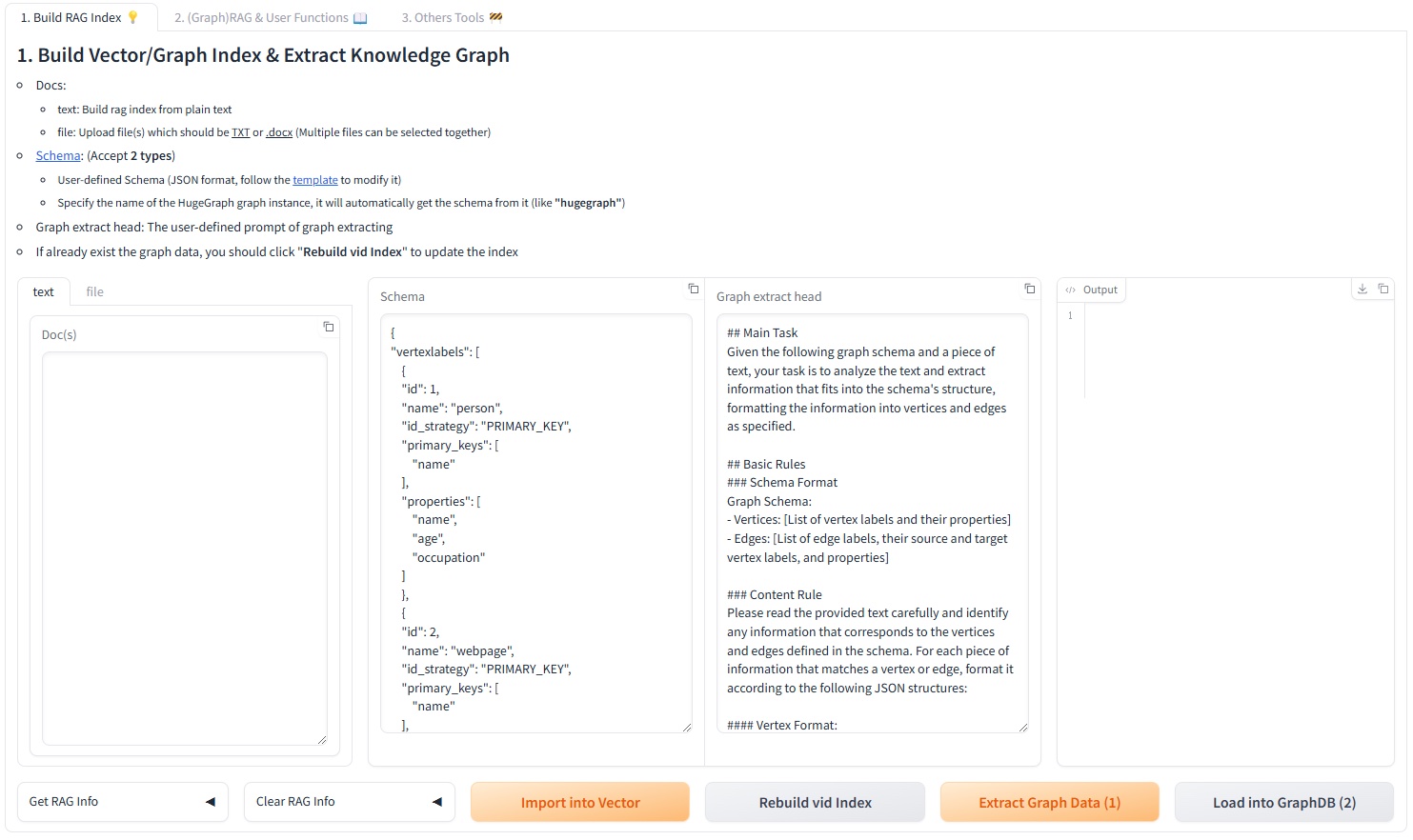
Interactive Web Interface
Use the Gradio interface for visual knowledge graph building:
Input Options:
- Text: Direct text input for RAG index creation
- Files: Upload TXT or DOCX files (multiple selection supported)
Schema Configuration:
- Custom Schema: JSON format following our template
- HugeGraph Schema: Use existing graph instance schema (e.g., “hugegraph”)
Programmatic Construction
Build knowledge graphs with code using the KgBuilder class:
Pipeline Workflow:
graph LR
    A[Import Schema] --> B[Chunk Split]
    B --> C[Extract Info]
    C --> D[Commit to HugeGraph]
    D --> E[Execute Pipeline]

    style A fill:#fff2cc
    style B fill:#d5e8d4
    style C fill:#dae8fc
    style D fill:#f8cecc
style E fill:#e1d5e7Graph-Enhanced RAG
Leverage HugeGraph for retrieval-augmented generation:
RAG Pipeline Flow:
graph TD
    A[User Query] --> B[Extract Keywords]
    B --> C[Match Graph Nodes]
    C --> D[Retrieve Graph Context]
    D --> E[Rerank Results]
    E --> F[Generate Answer]

    style A fill:#e3f2fd
    style B fill:#f3e5f5
    style C fill:#e8f5e8
    style D fill:#fff3e0
    style E fill:#fce4ec
style F fill:#e0f2f1🔧 Configuration
After running the demo, configuration files are automatically generated:
- Environment:
hugegraph-llm/.env - Prompts:
hugegraph-llm/src/hugegraph_llm/resources/demo/config_prompt.yaml
Configuration changes are automatically saved when using the web interface. For manual changes, simply refresh the page to load updates.
LLM Provider Support: This project uses LiteLLM for multi-provider LLM support.
📚 Additional Resources
- Graph Visualization: Use HugeGraph Hubble for data analysis and schema management
- API Documentation: Explore our REST API endpoints for integration
- Community: Join our discussions and contribute to the project
License: Apache License 2.0 | Community: Apache HugeGraph