文档 1.7 版本已不再积极维护,你当前浏览的是一份归档快照。 最新文档请参阅 最新版本。
如何参与 HugeGraph 社区
TODO: translate this article to Chinese
Thanks for taking the time to contribute! As an open source project, HugeGraph is looking forward to be contributed from everyone, and we are also grateful to all the contributors.
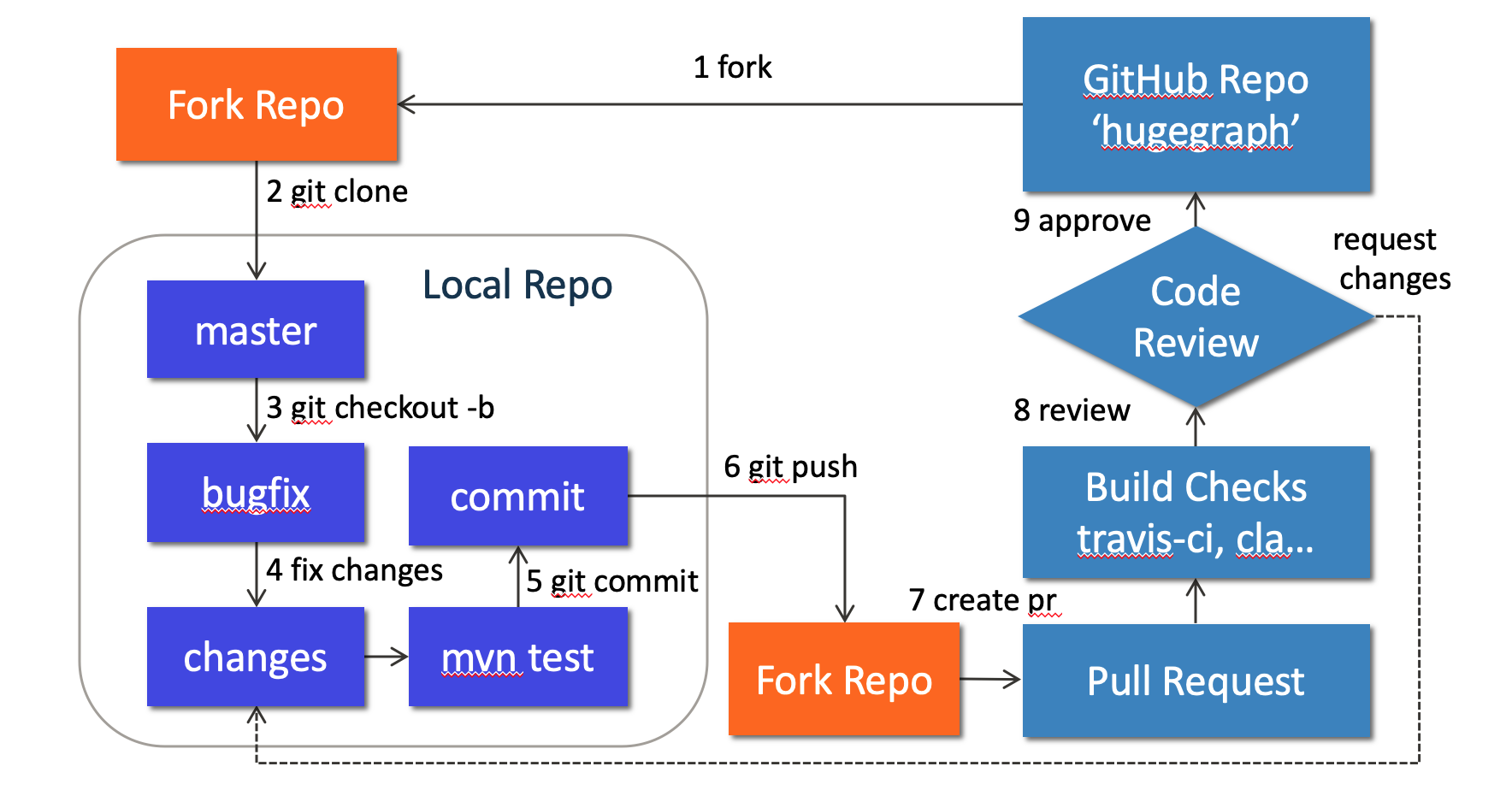
The following is a contribution guide for HugeGraph:
{width=“884” height=“462”}
1. Preparation
建议: 使用 GitHub desktop 可以大幅简化和改善你提交 PR/Commit 的过程, 特别适合新人
We can contribute by reporting issues, submitting code patches or any other feedback.
Before submitting the code, we need to do some preparation:
Sign up or login to GitHub: https://github.com
Fork HugeGraph repo from GitHub: https://github.com/apache/incubator-hugegraph/fork
Clone code from fork repo to local: https://github.com/${GITHUB_USER_NAME}/hugegraph
Configure local HugeGraph repo
2. Create an Issue on GitHub
If you encounter bugs or have any questions, please go to GitHub Issues to report them and feel free to create an issue.
3. Make changes of code locally
3.1 Create a new branch
Please don’t use master branch for development. We should create a new branch instead:
3.2 Change the code
Assume that we need to modify some files like “HugeGraph.java” and “HugeFactory.java”:
Note: In order to be consistent with the code style easily, if you use IDEA as your IDE, you can directly import our code style configuration file.
3.2.1 添加第三方依赖
如果我们要在 HugeGraph 项目中添加新的第三方依赖, 我们需要做下面的几件事情:
- 找到第三方依赖的仓库,将依赖的
license文件放到 ./hugegraph-dist/release-docs/licenses/ 路径下。 - 在./hugegraph-dist/release-docs/LICENSE 中声明该依赖的
LICENSE信息。 - 找到仓库里的 NOTICE 文件,将其追加到 ./hugegraph-dist/release-docs/NOTICE 文件后面(如果没有NOTICE文件则跳过这一步)。
- 本地执行./hugegraph-dist/scripts/dependency/regenerate_known_dependencies.sh 脚本来更新依赖列表known-dependencies.txt (或者手动更新)。
例如:在项目中引入了第三方新依赖 -> ant-1.9.1.jar
- 项目源码位于:https://github.com/apache/ant/tree/rel/1.9.1
- LICENSE 文件:https://github.com/apache/ant/blob/rel/1.9.1/LICENSE
- NOTICE 文件:https://github.com/apache/ant/blob/rel/1.9.1/NOTICE
ant-1.9.1.jar 的 license 信息需要在 LICENSE 文件中指定,notice 信息需要在 NOTICE 文件中指定。 ant-1.9.1.jar 对应的详细 LICENSE 文件需要复制到我们的 licenses/ 目录下。最后更新 known-dependencies.txt 文件。
3.3 Commit changes to git repo
After the code has been completed, we submit them to the local git repo:
Please edit the commit message after running git commit, we can explain what and how to fix a bug or implement a feature, the following is an example:
Please remember to fill in the issue id, which was generated by GitHub after issue creation.
3.4 Push commit to GitHub fork repo
Push the local commit to GitHub fork repo:
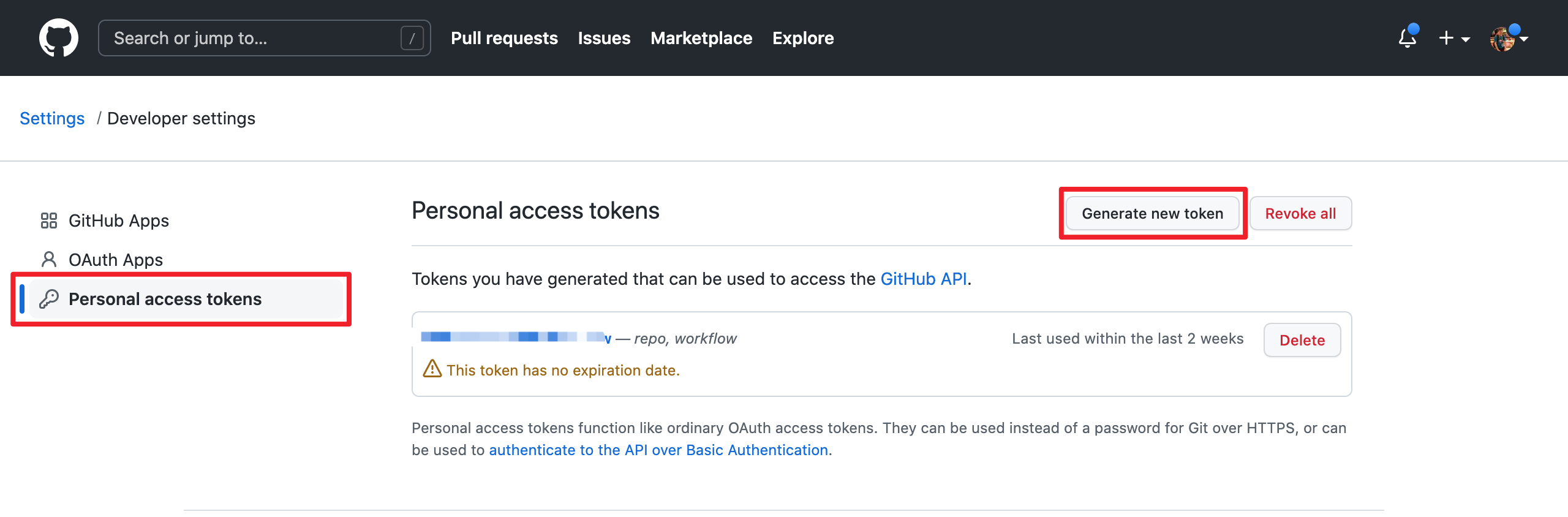
Note that since GitHub requires submitting code through username + token (instead of using username + password directly), you need to create a GitHub token from https://github.com/settings/tokens:
{width=“1280” height=“422”}
4. Create a Pull Request
Go to the web page of GitHub fork repo, there would be a chance to create a Pull Request after pushing to a new branch, just click button “Compare & pull request” to do it. Then edit the description for proposed changes, which can just be copied from the commit message.
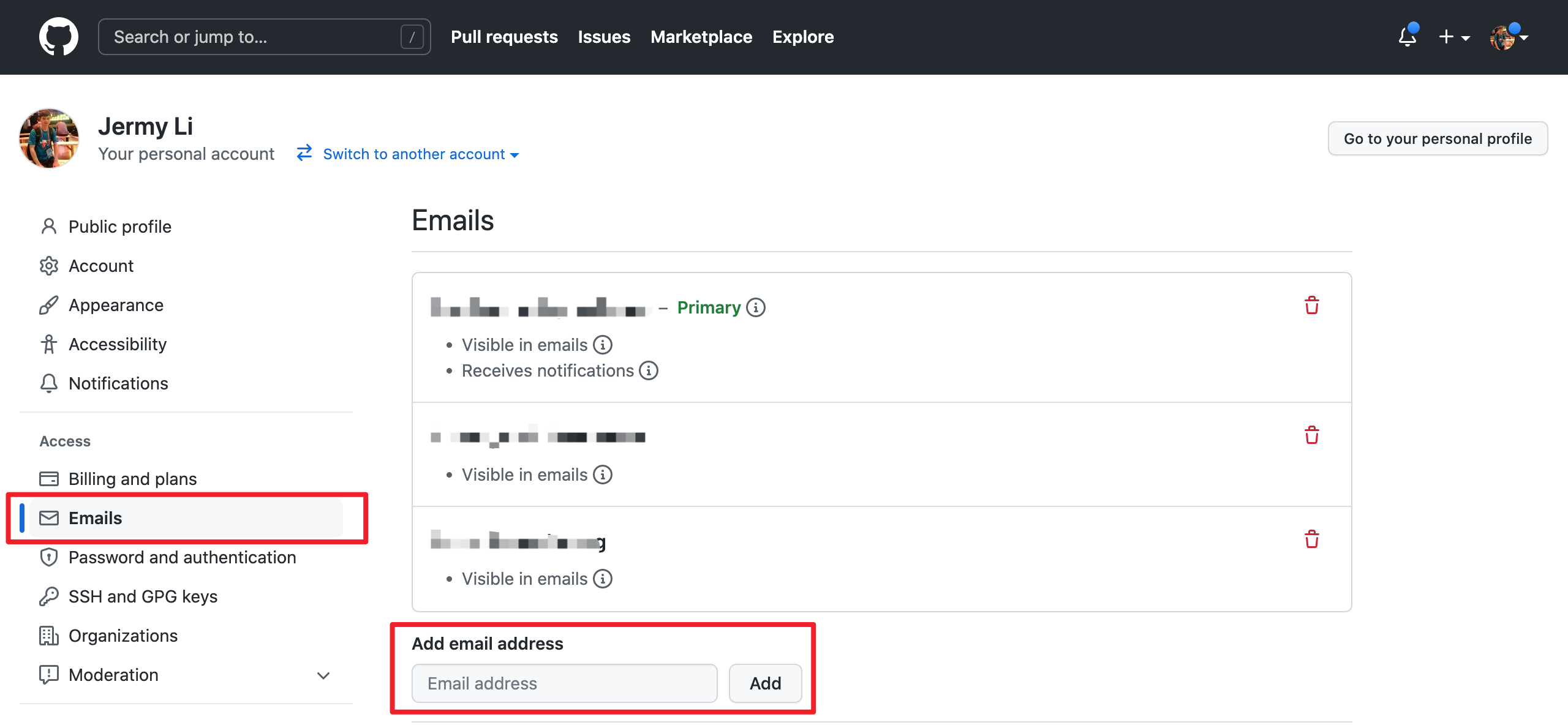
Note: please make sure the email address you used to submit the code is bound to the GitHub account. For how to bind the email address, please refer to https://github.com/settings/emails:
{width=“1280” height=“592”}
5. Code review
Maintainers will start the code review after all the automatic checks are passed:
- Check: Contributor License Agreement is signed
- Check: Travis CI builds is passed (automatically Test and Deploy)
The commit will be accepted and merged if there is no problem after review.
Please click on “Details” to find the problem if any check does not pass.
If there are checks not passed or changes requested, then continue to modify the code and push again.
6. More changes after review
If we have not passed the review, don’t be discouraged. Usually a commit needs to be reviewed several times before being accepted! Please follow the review comments and make further changes.
After the further changes, we submit them to the local repo:
If there are conflicts that prevent the code from being merged, we need to rebase on master branch:
And push it to GitHub fork repo again:
GitHub will automatically update the Pull Request after we push it, just wait for code review.