Skip to content

Version 1.7 of the documentation is no longer actively maintained. The site that you are currently viewing is an archived snapshot. For up-to-date documentation, see the latest version.

HugeGraph-LLM

Please refer to the AI repository README for the most up-to-date documentation, and the official website regularly is updated and synchronized.

Bridge the gap between Graph Databases and Large Language Models

AI summarizes the project documentation: Ask DeepWiki

🎯 Overview

HugeGraph-LLM is a comprehensive toolkit that combines the power of graph databases with large language models. It enables seamless integration between HugeGraph and LLMs for building intelligent applications.

Key Features

  • 🏗️ Knowledge Graph Construction - Build KGs automatically using LLMs + HugeGraph
  • 🗣️ Natural Language Querying - Operate graph databases using natural language (Gremlin/Cypher)
  • 🔍 Graph-Enhanced RAG - Leverage knowledge graphs to improve answer accuracy (GraphRAG & Graph Agent)

For detailed source code doc, visit our DeepWiki page. (Recommended)

📋 Prerequisites

Important
  • Python: 3.10+ (not tested on 3.12)
  • HugeGraph Server: 1.3+ (recommended: 1.5+)
  • UV Package Manager: 0.7+

🚀 Quick Start

Choose your preferred deployment method:

The fastest way to get started with both HugeGraph Server and RAG Service:

# 1. Set up environment
cp docker/env.template docker/.env
# Edit docker/.env and set PROJECT_PATH to your actual project path

# 2. Deploy services
cd docker
docker-compose -f docker-compose-network.yml up -d

# 3. Verify deployment
docker-compose -f docker-compose-network.yml ps

# 4. Access services
# HugeGraph Server: http://localhost:8080
# RAG Service: http://localhost:8001

Option 2: Individual Docker Containers

For more control over individual components:

Available Images

  • hugegraph/rag - Development image with source code access
  • hugegraph/rag-bin - Production-optimized binary (compiled with Nuitka)
# 1. Create network
docker network create -d bridge hugegraph-net

# 2. Start HugeGraph Server
docker run -itd --name=server -p 8080:8080 --network hugegraph-net hugegraph/hugegraph

# 3. Start RAG Service
docker pull hugegraph/rag:latest
docker run -itd --name rag \
  -v /path/to/your/hugegraph-llm/.env:/home/work/hugegraph-llm/.env \
  -p 8001:8001 --network hugegraph-net hugegraph/rag

# 4. Monitor logs
docker logs -f rag

Option 3: Build from Source

For development and customization:

# 1. Start HugeGraph Server
docker run -itd --name=server -p 8080:8080 hugegraph/hugegraph

# 2. Install UV package manager
curl -LsSf https://astral.sh/uv/install.sh | sh

# 3. Clone and setup project
git clone https://github.com/apache/incubator-hugegraph-ai.git
cd incubator-hugegraph-ai/hugegraph-llm

# 4. Create virtual environment and install dependencies
uv venv && source .venv/bin/activate
uv pip install -e .

# 5. Launch RAG demo
python -m hugegraph_llm.demo.rag_demo.app
# Access at: http://127.0.0.1:8001

# 6. (Optional) Custom host/port
python -m hugegraph_llm.demo.rag_demo.app --host 127.0.0.1 --port 18001

Additional Setup (Optional)

# Download NLTK stopwords for better text processing
python ./hugegraph_llm/operators/common_op/nltk_helper.py

# Update configuration files
python -m hugegraph_llm.config.generate --update
Tip

Check our Quick Start Guide for detailed usage examples and query logic explanations.

💡 Usage Examples

Knowledge Graph Construction

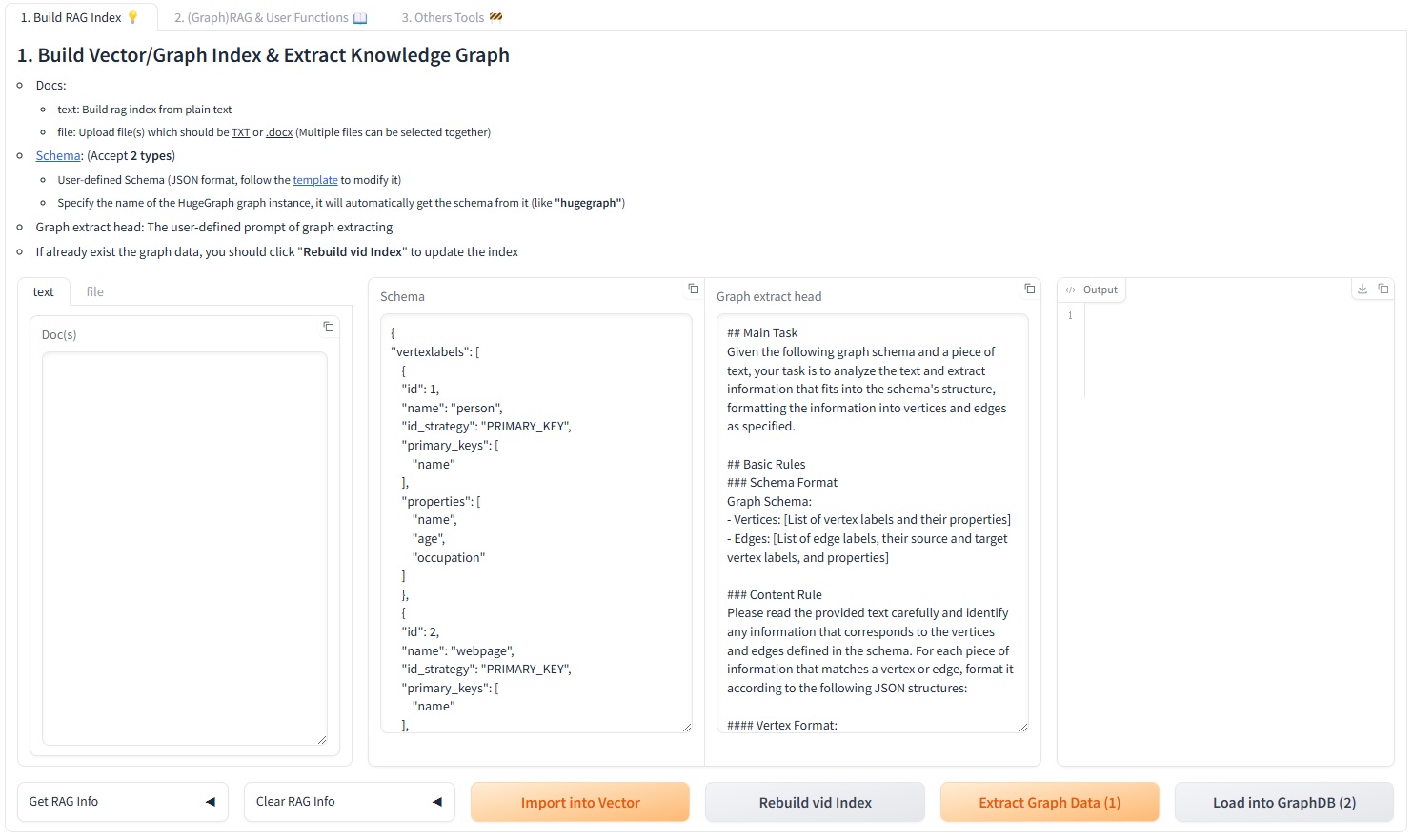
Interactive Web Interface

Use the Gradio interface for visual knowledge graph building:

Input Options:

  • Text: Direct text input for RAG index creation
  • Files: Upload TXT or DOCX files (multiple selection supported)

Schema Configuration:

  • Custom Schema: JSON format following our template
  • HugeGraph Schema: Use existing graph instance schema (e.g., “hugegraph”)
Knowledge Graph Builder

Programmatic Construction

Build knowledge graphs with code using the KgBuilder class:

from hugegraph_llm.models.llms.init_llm import LLMs
from hugegraph_llm.operators.kg_construction_task import KgBuilder

# Initialize and chain operations
TEXT = "Your input text here..."
builder = KgBuilder(LLMs().get_chat_llm())

(
    builder
    .import_schema(from_hugegraph="talent_graph").print_result()
    .chunk_split(TEXT).print_result()
    .extract_info(extract_type="property_graph").print_result()
    .commit_to_hugegraph()
    .run()
)

Pipeline Workflow:

Graph-Enhanced RAG

Leverage HugeGraph for retrieval-augmented generation:

from hugegraph_llm.operators.graph_rag_task import RAGPipeline

# Initialize RAG pipeline
graph_rag = RAGPipeline()

# Execute RAG workflow
(
    graph_rag
    .extract_keywords(text="Tell me about Al Pacino.")
    .keywords_to_vid()
    .query_graphdb(max_deep=2, max_graph_items=30)
    .merge_dedup_rerank()
    .synthesize_answer(vector_only_answer=False, graph_only_answer=True)
    .run(verbose=True)
)

RAG Pipeline Flow:

🔧 Configuration

After running the demo, configuration files are automatically generated:

  • Environment: hugegraph-llm/.env
  • Prompts: hugegraph-llm/src/hugegraph_llm/resources/demo/config_prompt.yaml
Note

Configuration changes are automatically saved when using the web interface. For manual changes, simply refresh the page to load updates.

LLM Provider Support: This project uses LiteLLM for multi-provider LLM support.

📚 Additional Resources

  • Graph Visualization: Use HugeGraph Hubble for data analysis and schema management
  • API Documentation: Explore our REST API endpoints for integration
  • Community: Join our discussions and contribute to the project

License: Apache License 2.0 | Community: Apache HugeGraph